
Metadata Cleaner: Photo/Video
EXIF viewer, editor & remover: read, fix or erase photo metadata (GPS, date).


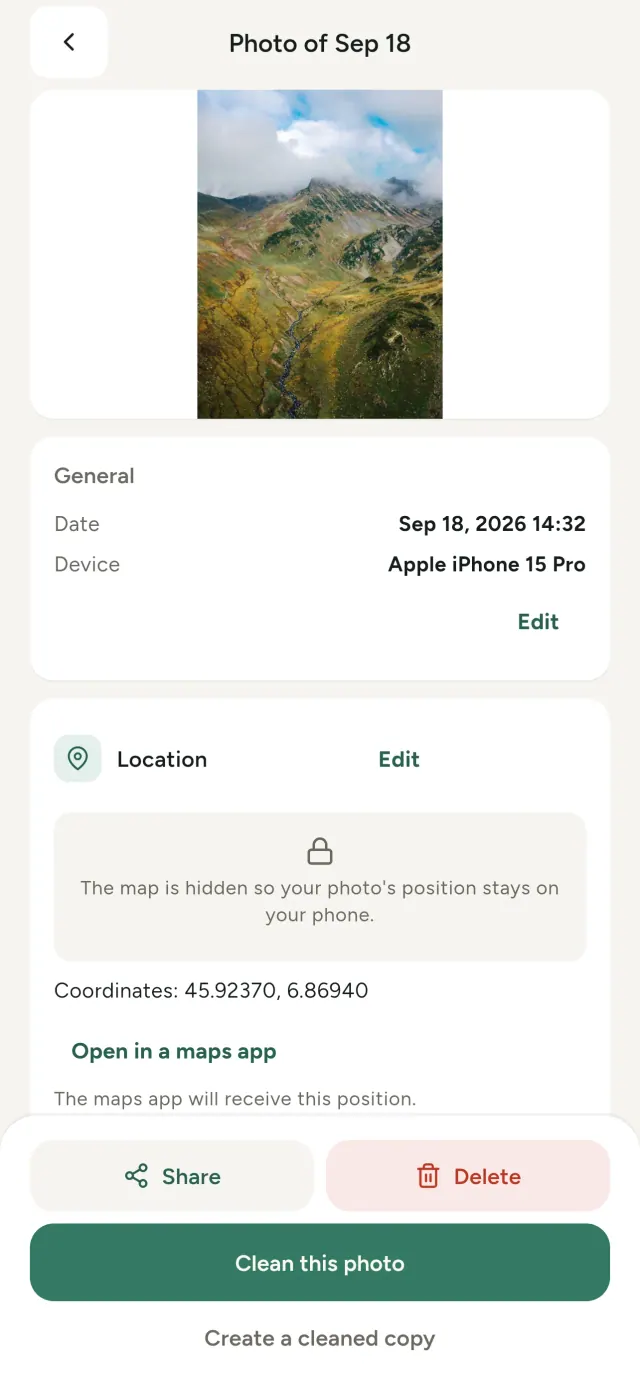
Every photo you take carries hidden information: where it was taken, when, with which phone, sometimes even a tiny preview of the original picture. Share it and all of that goes with it.
Metadata Cleaner does three things, on your phone: it shows what your photos and videos contain, lets you fix it, and removes it.
What Metadata Cleaner does
Read
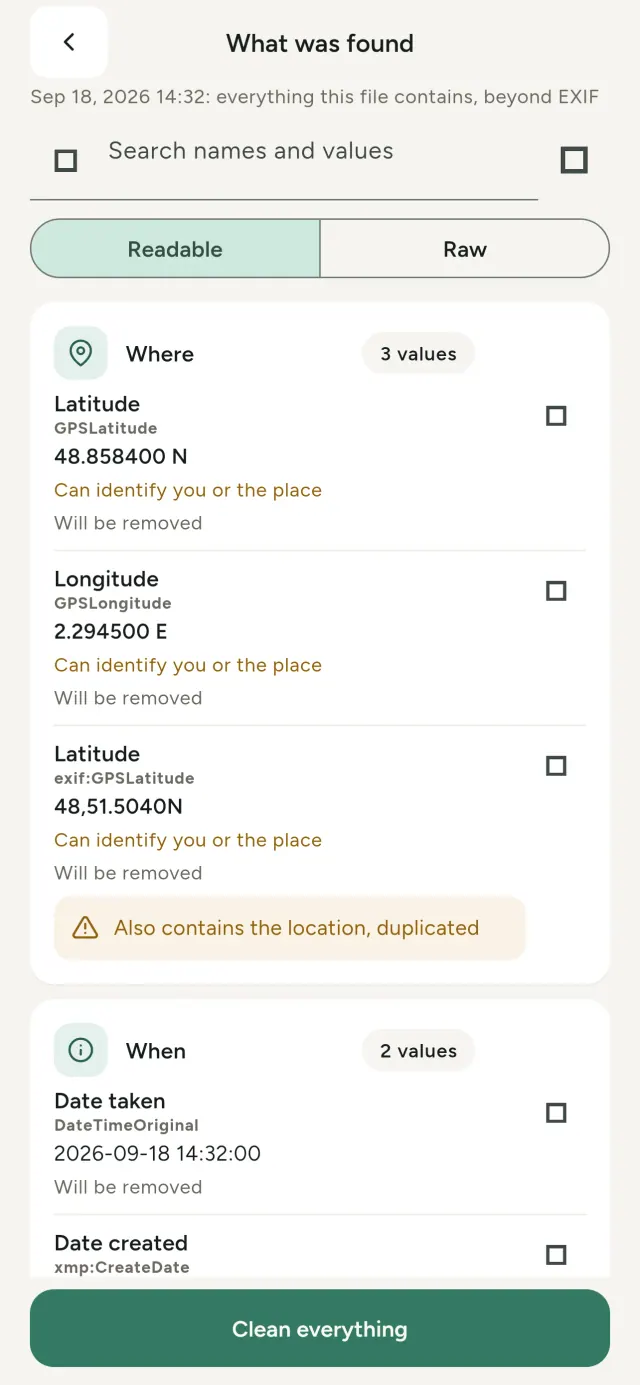
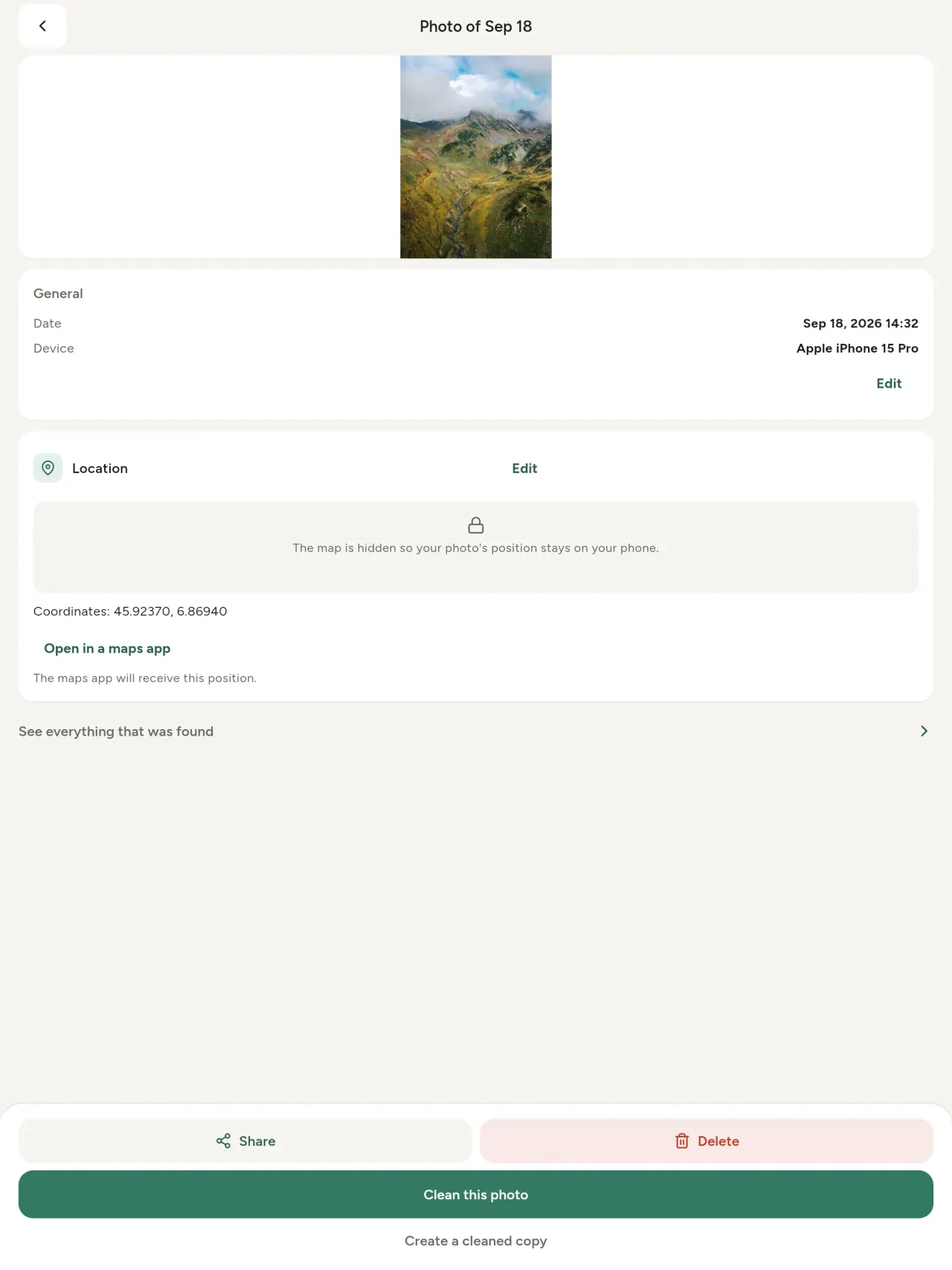
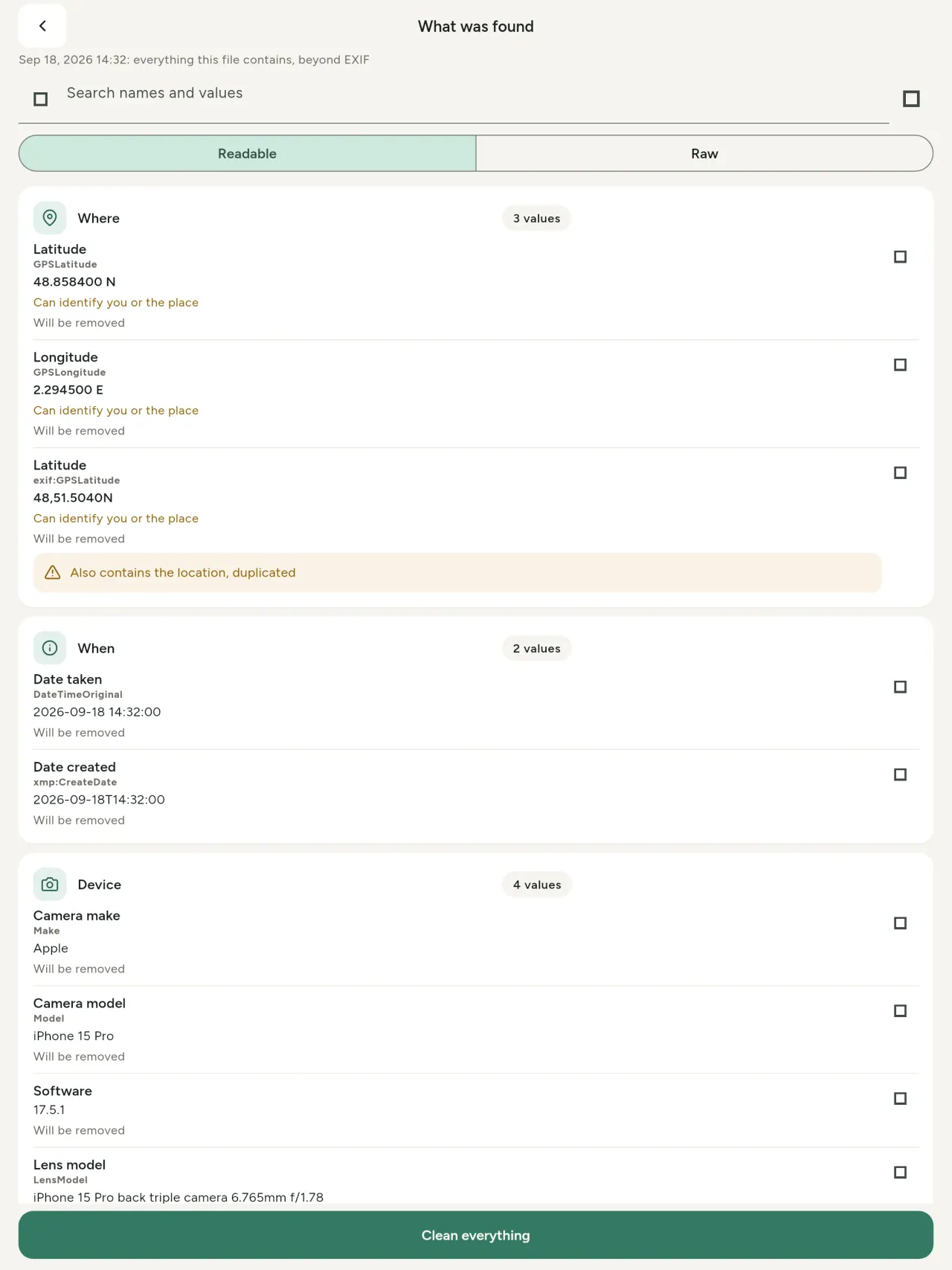
A real metadata viewer: every value found in a photo or video (EXIF, IPTC, XMP, video codecs, duration and resolution), grouped, searchable and copyable, with what will be removed marked. AI provenance (C2PA, generation parameters) is detected too.
Edit
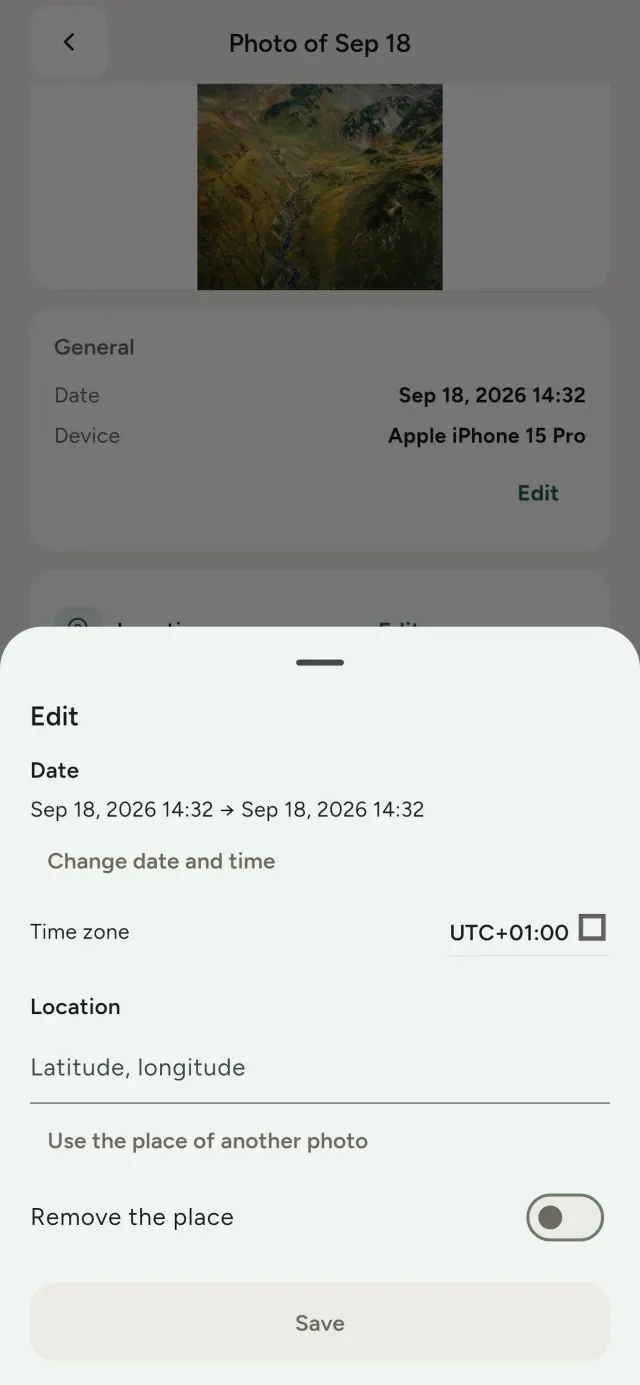
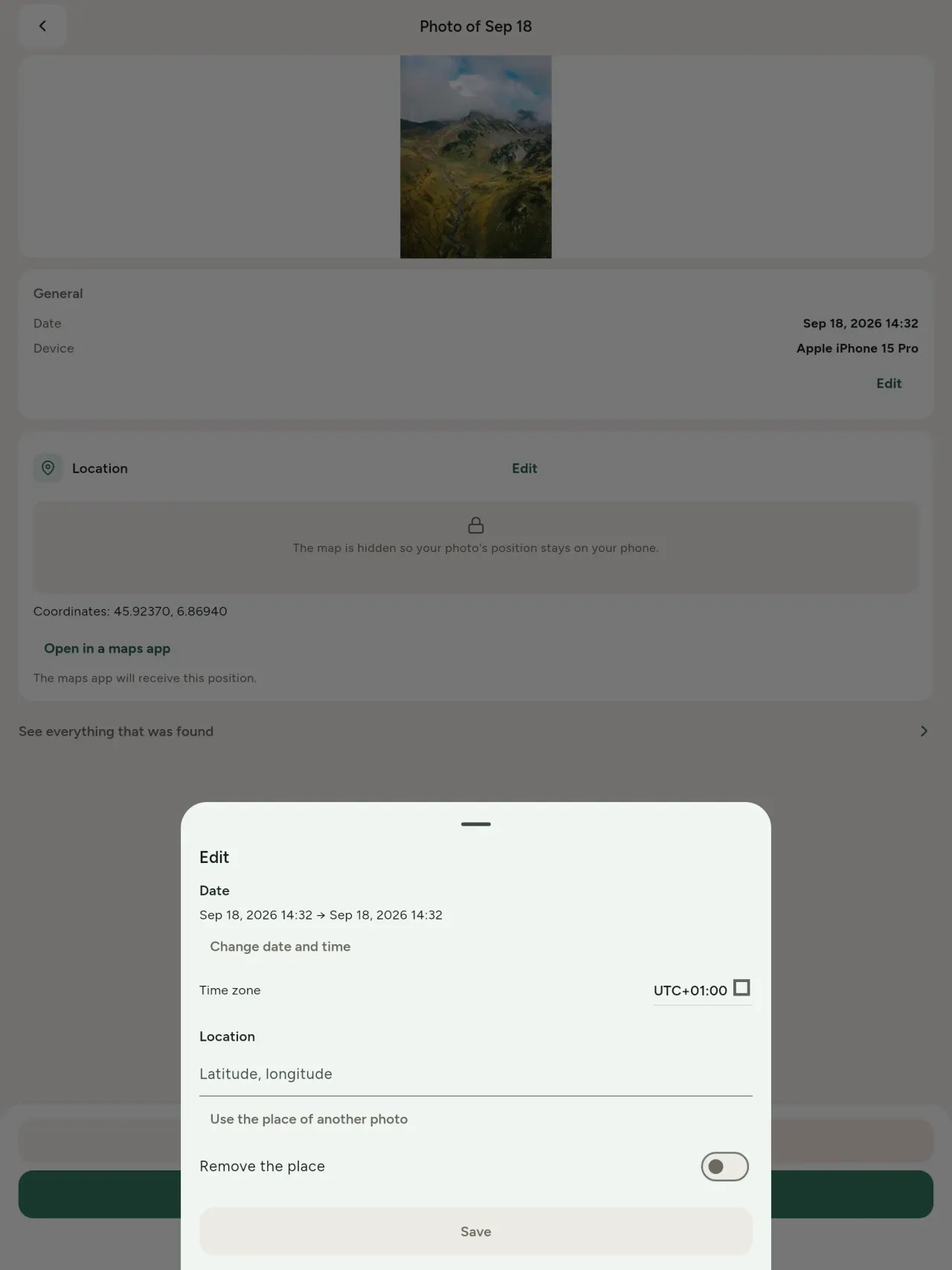
Change or replace the date and the place of a photo, even a photo that has no metadata at all. Copy the place of another photo, or pick it on a map (asked first, every time). Compare before and after.
Remove
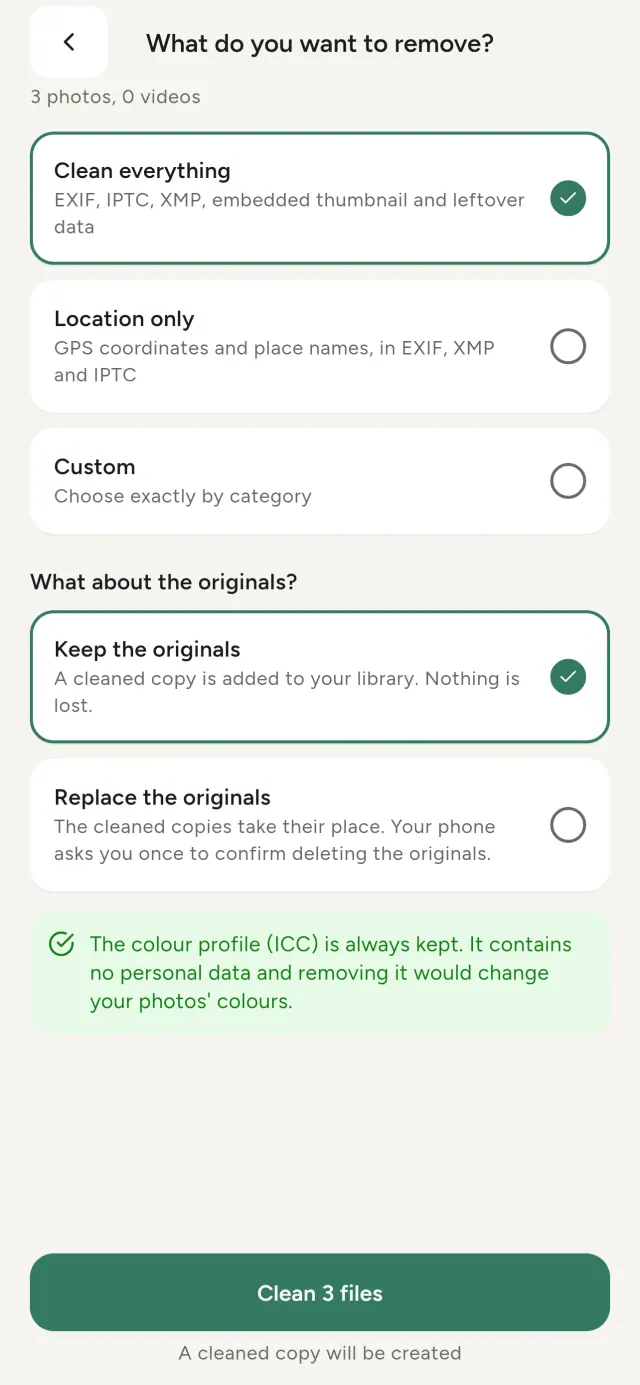
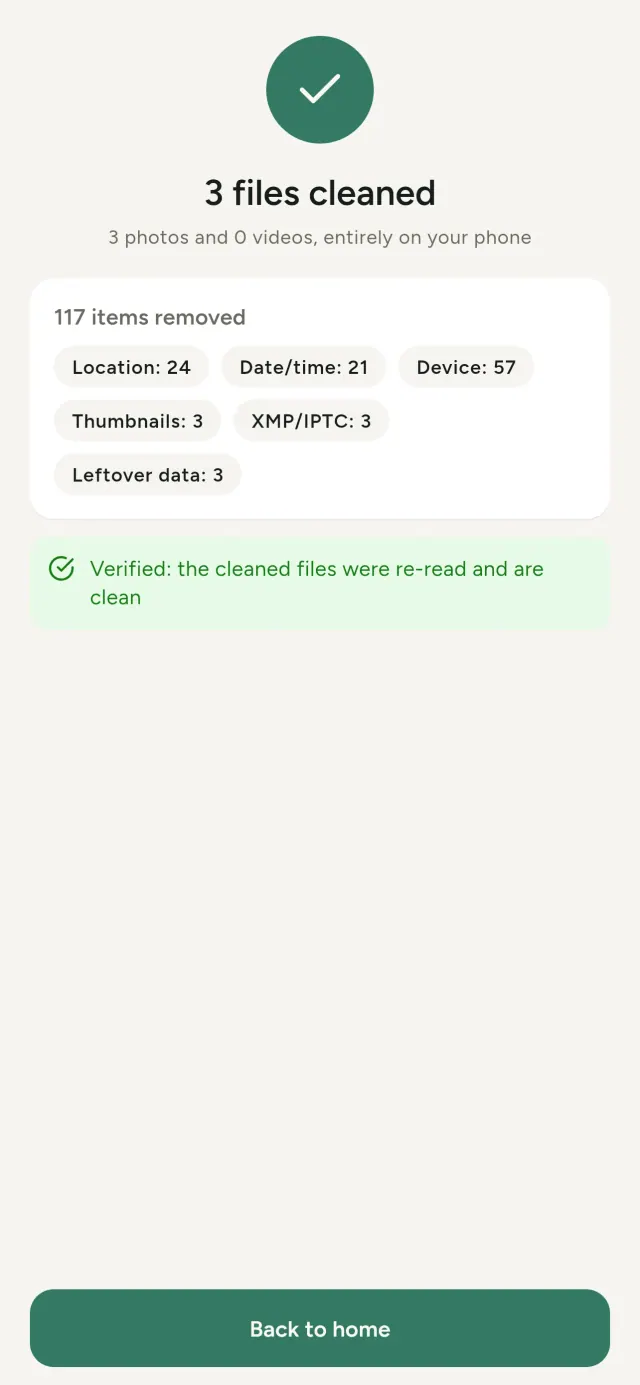
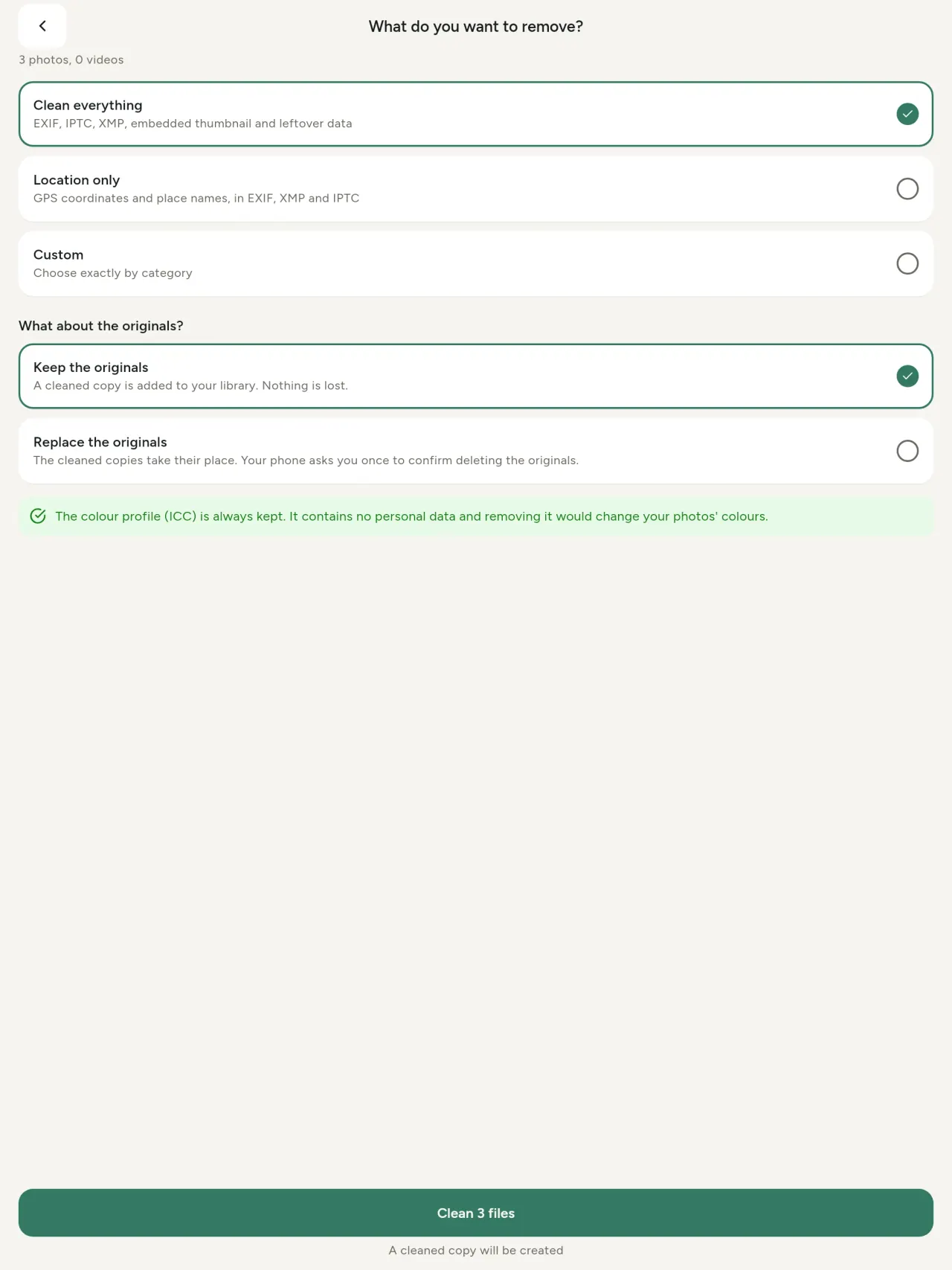
Everything, only the location, or the categories you pick: EXIF, IPTC and XMP data, embedded thumbnails, camera maker notes, AI provenance and the leftover bytes some editing tools keep behind a cropped picture. Clean a whole selection at once, then keep the originals or replace them.
Safe to share at a glance
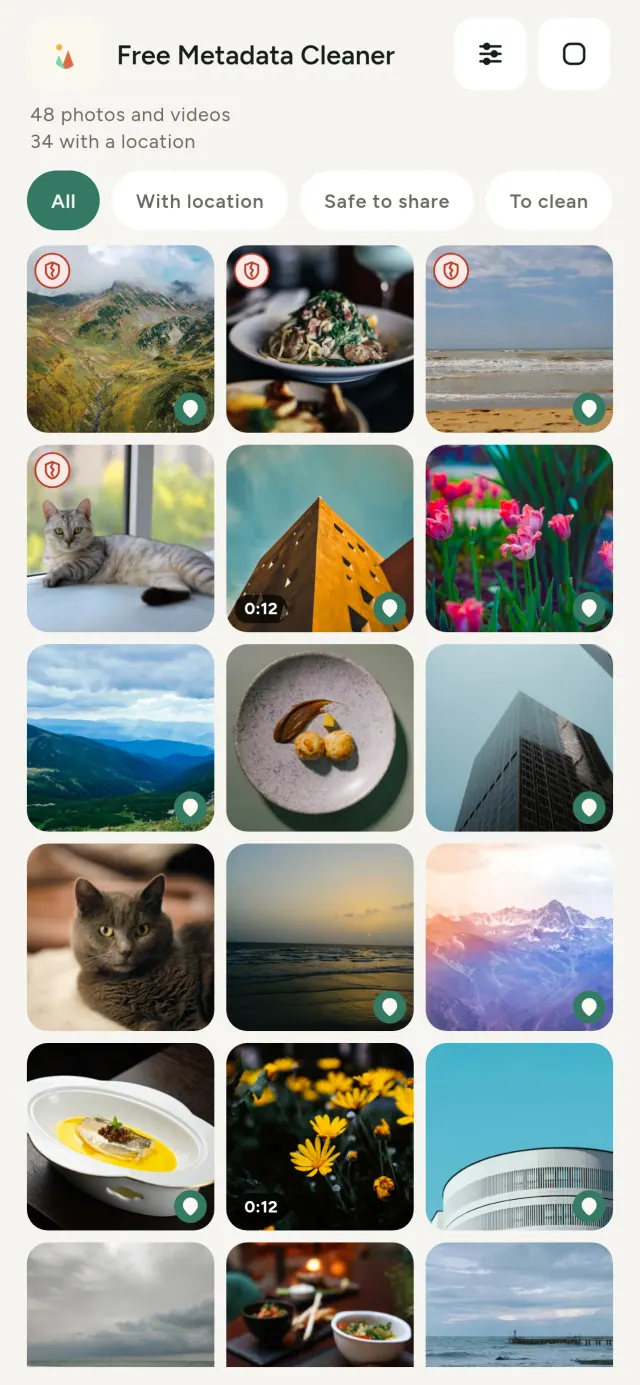
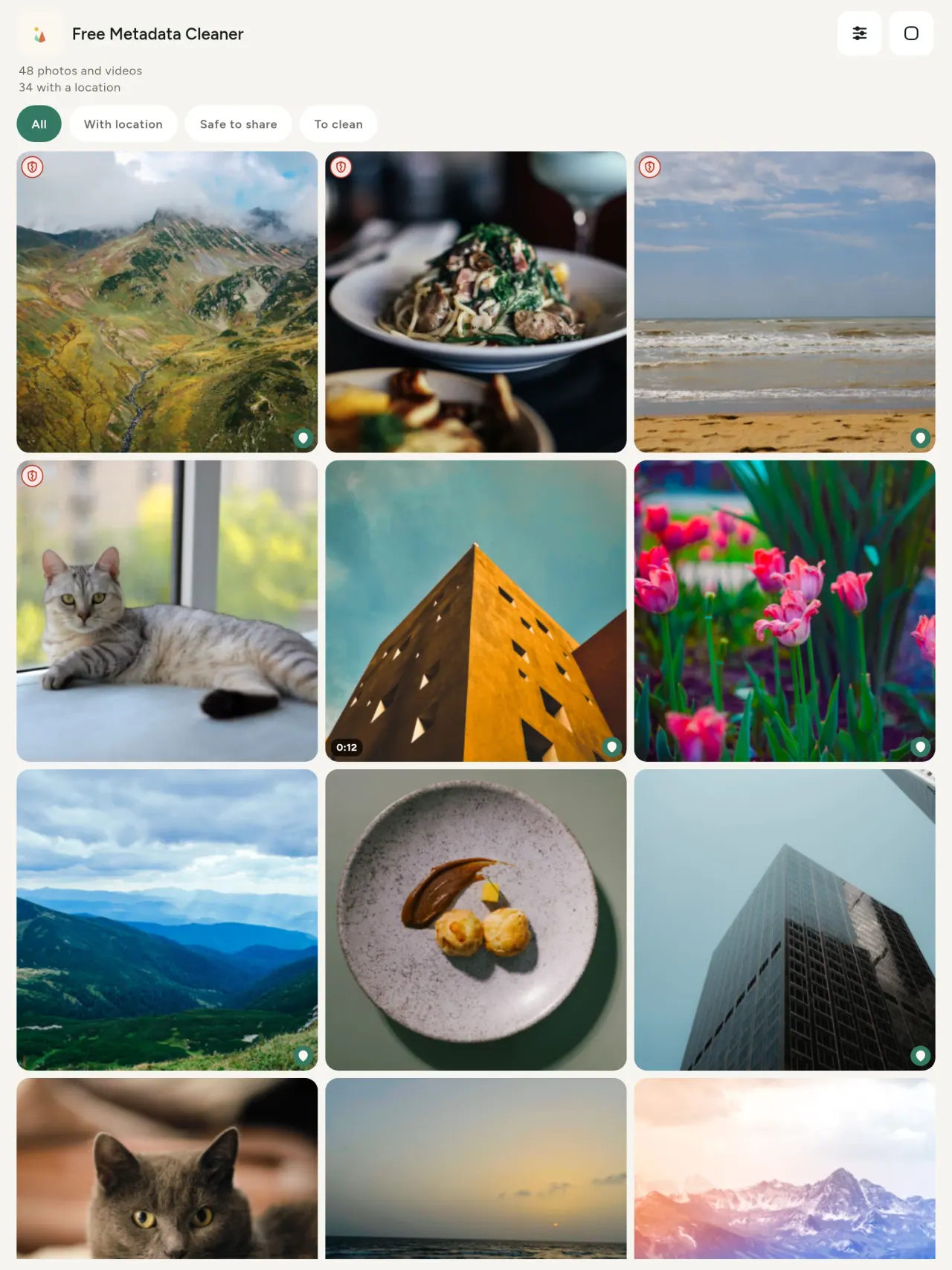
A green shield marks files with no metadata left; a red cracked shield marks the ones that still have some.
No quality loss
Pictures are never re-encoded: the image itself is untouched.
Private by design
Your photos are read, edited and cleaned on your device. No account, no ads, no analytics. The one optional exception is the map: when you ask to see a photo's location, or to pick a place, the app asks you first, every time, then loads the map from OpenStreetMap (the photo itself is never sent).
Free, no ads
If the app helps you, you can leave an optional tip.
Who it is for
- Anyone who wants to know what a photo reveals (GPS location, date, camera) before posting, selling or sending it.
- People who sell on classified ad sites and do not want to show where they live.
- Parents and anyone who wants to keep a sensitive place (home, school, workplace) out of the photos they share.
- Journalists, activists and people at risk, who need to share an image without leaving a trace.
- People tired of data leaks who want to take back control of the personal information their own photos carry.
Why choose Metadata Cleaner
- Three things in one app: read what a photo or video reveals, edit it (date taken, location), and remove the metadata in a few taps.
- Everything runs on the phone. Your photos are not sent anywhere.
- Photos (JPEG, HEIC, PNG, WebP, GIF) and videos (MP4, MOV, 3GP).
What it does not do yet
- Only the formats listed above are supported. More formats are planned.
Pixeon principle. Pixeon apps are local first: no account, no tracking, and your data stays on your phone. If an app ever connects to the network, it is only when you choose to turn on a feature you need, and the privacy policy is updated before it ships.
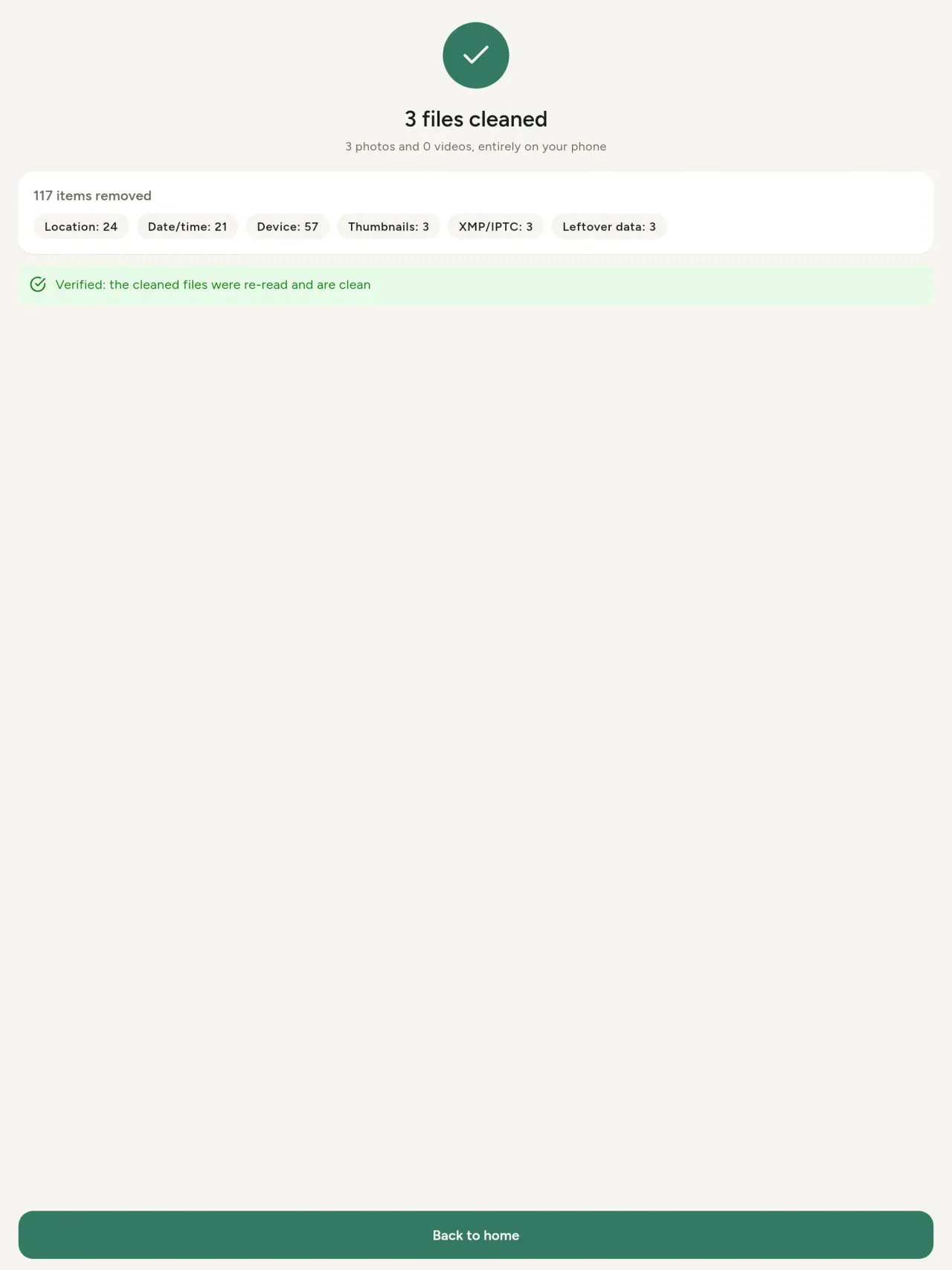
See Metadata Cleaner in action.
Get Metadata Cleaner.
Free on iPhone and Android.
Version 1.1
- App Store Upcoming
- Google Play Upcoming
What's new
- Read: see exactly what a photo or video reveals (location, date, camera, AI provenance labels such as C2PA and generation parameters, video duration, codecs, resolution and frame rate).
- Edit: change the date a photo was taken and its location (JPEG, HEIC, AVIF), even on a photo with no metadata, reuse the location of another photo, or pick it on an OpenStreetMap map after your confirmation.
- Remove: clean metadata in a few taps, with a before and after view on the result screen.
- DNG photos are supported.
- Translations aligned across 91 languages.
Privacy policy
Last updated: 2026-11-03 · applies to version 1.1 and later
Policy versions: 1.1 and later (this text) · version 1.0 (still the policy of the app version 1.0). The version number of your app is shown at the bottom of its Settings screen.
Free Metadata Cleaner shows and removes the metadata hidden in your photos and videos (location, date and time, camera and lens details, thumbnails…). The short version: everything happens on your device, and we collect nothing.
What the app accesses
Your photo and video library, only after you grant permission (and, where your system requires it, the permission to read the location stored in your photos, so that it can be shown to you). The files you choose are read and cleaned on your device; the cleaned copy is saved to your library. If you choose to replace the originals, the system asks you to confirm before deleting them.
To show which photos are already clean, the app reads the metadata of the photos displayed on screen, on your device. This result is kept in memory only and is never stored.
What we collect
Nothing. No account, no analytics or usage tracking, no advertising or advertising identifiers, no crash or diagnostics reporting beyond what the app stores provide, and no third-party SDK that sends data anywhere. There is no Free Metadata Cleaner server. Cleaning a photo or video never uses the network, at all: turn on airplane mode and clean one to check for yourself. The only network request the app itself can ever make is described under “Location” below, and it only ever happens if you ask for it. The one other connection is the optional tip purchase, handled by the store (see “Optional support”).
Temporary files and history
The app keeps no history and no database. Temporary files created while cleaning are deleted after each item and purged when the app starts.
Deleted originals
Originals that are deleted remain in your system's trash (such as “Recently Deleted” or the trash) for about 30 days, with their metadata. The app cannot empty it: do it yourself if you need the originals gone at once.
iCloud and cloud photos
If a photo is stored in iCloud and not on your device, the operating system may download it before the app can process it. That transfer is made by the system, under the provider's own terms, not by the app.
Location
When a photo contains a location, the app shows the coordinates as text, which stays on your device. Three actions can send location information off your device, only when you choose them, each time: “Open in…” hands the coordinates to the maps application you select, under its own privacy policy; “Show the map” asks you to confirm first (“Showing the map sends this photo's position to a map service. Nothing else is sent.”), then loads a small map from OpenStreetMap for that one position; and, when you edit a photo's place, “Choose on the map” asks you to confirm first, then opens a full-screen map from OpenStreetMap. This map does not use your phone's location. As you move and zoom it, the app requests the map tiles of the area you are browsing, so OpenStreetMap receives the position of the area shown on screen, which starts on the photo's current place if it has one, and otherwise on a world view. The photo itself is never sent, and nothing is sent before you confirm. The place you choose on the map (or copy from another photo) is written into the photo's file only when you save, on your device. In every case OpenStreetMap receives, as with any web request, technical details like your IP address; it does not receive your name, an account, or anything else about you or your other photos. See OpenStreetMap's own privacy policy. Outside of these explicit actions, the app never sends a photo's location, or anything else, anywhere.
Optional support
The app is free. If you wish, you can leave a tip. On iPhone and in the Google Play version for Android, tips are in-app purchases processed by Apple or Google under their own terms and privacy policy; the app adds the Google Play billing permission for this, makes no network call itself, and receives no payment or personal details. Versions installed outside Google Play may instead open an external donation page in your browser, operated by a third party under its own privacy policy; nothing from the app is sent to it. A tip unlocks nothing.
Contact form on this website
If you write to us through this site, we use your message and the email address you optionally give only to reply. Bot protection is provided by Cloudflare and email delivery by Resend.
Language choice on this website
When you choose a language, or when this site opens a page in your browser's language, it stores
one small functional cookie (pxl, a language code, one year) so that your choice is
remembered. If this site suggests a page in your browser's language and you close that suggestion,
your browser also keeps a local note (pxl-banner-off, in local storage, 30 days) so the
suggestion does not come back. Neither identifies anyone, neither is used for tracking or advertising,
and neither is shared. You can delete them in your browser at any time.
Website statistics
This website uses Cloudflare Web Analytics to count visits (pages viewed, country, browser type, loading speed). It sets no cookie, does not use local storage, does not fingerprint your device, does not follow you across sites and does not build a profile of you. Search engines (for example Google Search Console) give us aggregated search statistics, without any data about individual visitors. Our own web server also counts the pages it serves: for each page it keeps the page address, the site or social network that sent you (only its name, or the campaign tag written in the link), the country, the type of device and whether the request came from a robot. It keeps no IP address, no identifier and no cookie, and these counts are anonymous. We use no advertising or other analytics service. None of this concerns the app itself, which collects nothing.
Children
The app is a general-purpose tool and is not directed at children.
Changes
An updated policy will be published at this URL with a new date above.
Contact
Questions about privacy: metadata-cleaner-contact@pixeon.net
Version 1.0
- App Store Published
- Google Play Published
What's new
- Cleans JPEG, HEIC, PNG, WebP, GIF, MP4, MOV and 3GP files, with no video re-encoding.
- "Safe to share" and "To clean" filters.
- New green design.
- Help screen with a FAQ.
- Settings: share, rate, feedback, unsupported formats.
- Optional tips.
Privacy policy, version 1.0
Applies to version 1.0 of the app (the first release). Later versions: current policy.
Free Metadata Cleaner shows and removes the metadata hidden in your photos and videos (location, date and time, camera and lens details, thumbnails…). The short version: everything happens on your device, and we collect nothing.
What the app accesses
Your photo and video library, only after you grant permission (and, where your system requires it, the permission to read the location stored in your photos, so that it can be shown to you). The files you choose are read and cleaned on your device; the cleaned copy is saved to your library. If you choose to replace the originals, the system asks you to confirm before deleting them.
To show which photos are already clean, the app reads the metadata of the photos displayed on screen, on your device. This result is kept in memory only and is never stored.
What we collect
Nothing. No account, no analytics or usage tracking, no advertising or advertising identifiers, no crash or diagnostics reporting beyond what the app stores provide, and no third-party SDK that sends data anywhere. There is no Free Metadata Cleaner server. Cleaning a photo or video never uses the network, at all: turn on airplane mode and clean one to check for yourself. The only network request the app itself can ever make is described under “Location” below, and it only ever happens if you ask for it. The one other connection is the optional tip purchase, handled by the store (see “Optional support”).
Temporary files and history
The app keeps no history and no database. Temporary files created while cleaning are deleted after each item and purged when the app starts.
Deleted originals
Originals that are deleted remain in your system's trash (such as “Recently Deleted” or the trash) for about 30 days, with their metadata. The app cannot empty it: do it yourself if you need the originals gone at once.
iCloud and cloud photos
If a photo is stored in iCloud and not on your device, the operating system may download it before the app can process it. That transfer is made by the system, under the provider's own terms, not by the app.
Location
When a photo contains a location, the app shows the coordinates as text, which stays on your device. Two actions send that one photo's position off your device, only when you choose them, each time: “Open in…” hands the coordinates to the maps application you select, under its own privacy policy; “Show the map” asks you to confirm first (“Showing the map sends this photo's position to a map service. Nothing else is sent.”), then loads a small map from OpenStreetMap for that one position. OpenStreetMap receives the coordinates and, as with any web request, technical details like your IP address; it does not receive your name, an account, or anything else about you or your other photos. See OpenStreetMap's own privacy policy. Outside of these two explicit actions, the app never sends a photo's location, or anything else, anywhere.
Optional support
The app is free. If you wish, you can leave a tip. On iPhone and in the Google Play version for Android, tips are in-app purchases processed by Apple or Google under their own terms and privacy policy; the app adds the Google Play billing permission for this, makes no network call itself, and receives no payment or personal details. Versions installed outside Google Play may instead open an external donation page in your browser, operated by a third party under its own privacy policy; nothing from the app is sent to it. A tip unlocks nothing.
Contact form on this website
If you write to us through this site, we use your message and the email address you optionally give only to reply. Bot protection is provided by Cloudflare and email delivery by Resend.
Language choice on this website
When you choose a language, or when this site opens a page in your browser's language, it stores
one small functional cookie (pxl, a language code, one year) so that your choice is
remembered. If this site suggests a page in your browser's language and you close that suggestion,
your browser also keeps a local note (pxl-banner-off, in local storage, 30 days) so the
suggestion does not come back. Neither identifies anyone, neither is used for tracking or advertising,
and neither is shared. You can delete them in your browser at any time.
Website statistics
This website uses Cloudflare Web Analytics to count visits (pages viewed, country, browser type, loading speed). It sets no cookie, does not use local storage, does not fingerprint your device, does not follow you across sites and does not build a profile of you. Search engines (for example Google Search Console) give us aggregated search statistics, without any data about individual visitors. Our own web server also counts the pages it serves: for each page it keeps the page address, the site or social network that sent you (only its name, or the campaign tag written in the link), the country, the type of device and whether the request came from a robot. It keeps no IP address, no identifier and no cookie, and these counts are anonymous. We use no advertising or other analytics service. None of this concerns the app itself, which collects nothing.
Children
The app is a general-purpose tool and is not directed at children.
Changes
An updated policy will be published at this URL with a new date above.
Contact
Questions about privacy: metadata-cleaner-contact@pixeon.net
Support
Last updated: 2026-10-08
Free Metadata Cleaner is a small independent app. Answers to the most common questions are below.
We do our best to reply within a few days. To help us, tell us your device model, its system version and what you were doing. Please do not send private photos.
What data does the app store or send?
None. It keeps no history, has no account and no server. Details in the privacy policy.
How do I clean a photo?
- Open the app and allow access to your library when asked.
- Select the photos or videos to clean.
- Choose what to remove, and whether the originals are replaced or a cleaned copy is created.
- Confirm. A summary shows what was removed and any file that could not be processed.
Where do the cleaned copies go?
To your photo library. The library date of the original is kept, so a cleaned photo does not jump to the top of your gallery.
I chose “replace originals” but the originals still exist.
Deleted originals stay in the system trash (such as “Recently Deleted” or the trash) for about 30 days, with their metadata. Empty the trash to remove them immediately. If you decline the system's deletion prompt, the originals are kept and the cleaned copies are still added.
Which files are supported?
Photos in JPEG, HEIC, AVIF, PNG, WebP and GIF, and videos in MP4, MOV and 3GP (more formats are being added). A file the app cannot clean is left untouched and listed in the summary with the reason, without stopping the rest of the batch.
Why does the app need access to my photos?
To list the photos you can choose from and to save the cleaned copies. Where your system requires it, the app also asks for the permission to read the location stored in photos: without it the system hides the location, so the app could not show you what a photo reveals. Nothing is uploaded.
How can I check that nothing leaves my phone?
Turn on airplane mode and clean a photo: it works the same. The only exception is the map: if you tap “Show the map” on a photo's location and confirm, that one position is sent to OpenStreetMap to display a map, and nothing else. See “Location” above.
Which languages are available?
The app is available in English, French, German, Spanish, Italian, Portuguese and Arabic. This website is available in more languages, and more app languages are coming.
Support the project
Metadata Cleaner stays free and ad-free. If it is useful to you, you can support its development (optional):
Buy Me a CoffeeExpense tracker and family budget planner. Free phone sync, no account.
Also from PixeonVaultMarkEncrypted document vault. Watermark documents, remove metadata before sharing.
Also from PixeonLittle RelayBreastfeeding, sleep and starting solids tracker. No account, works offline.
Also from PixeonMenuloopPlan the week's meals, build your grocery list and keep recipes with photos.
Also from PixeonIndie OfficeOffline quotes, invoices and ledger for solo businesses. No account, no ads.