
Metadata Cleaner: Foto/Video
EXIF viewer: fotoğraf metadata, fotoğraf konumu. Oku, düzelt, sil.


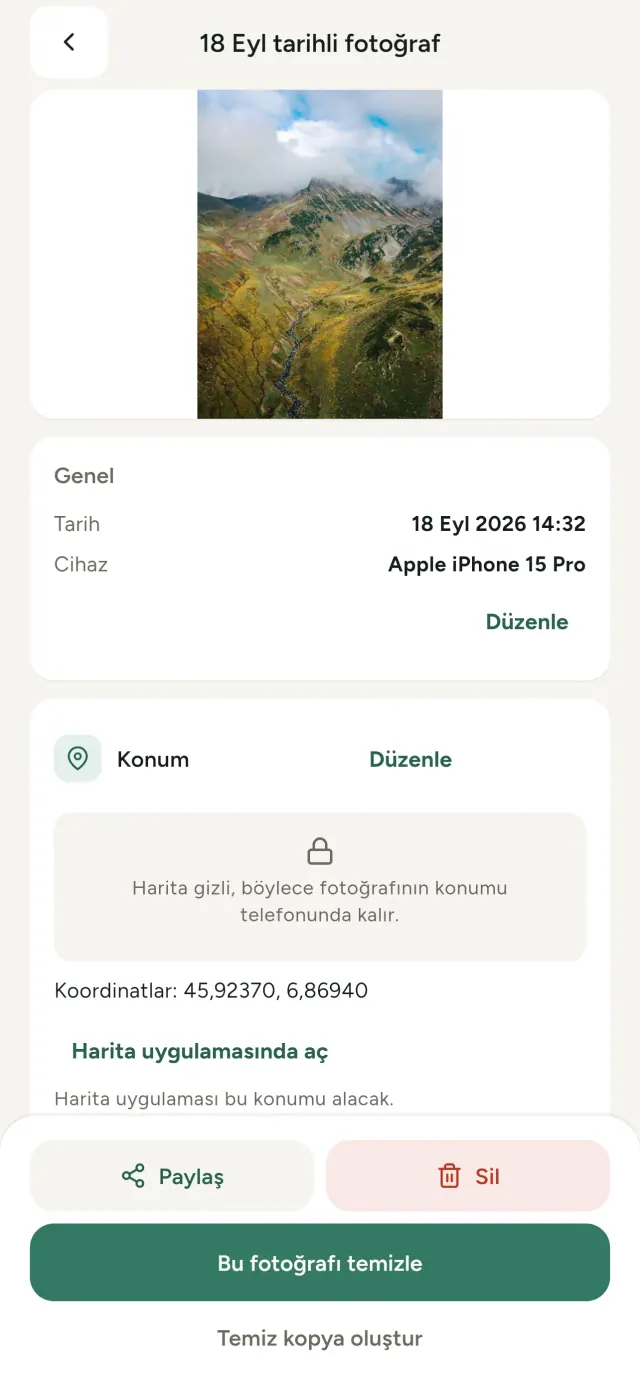
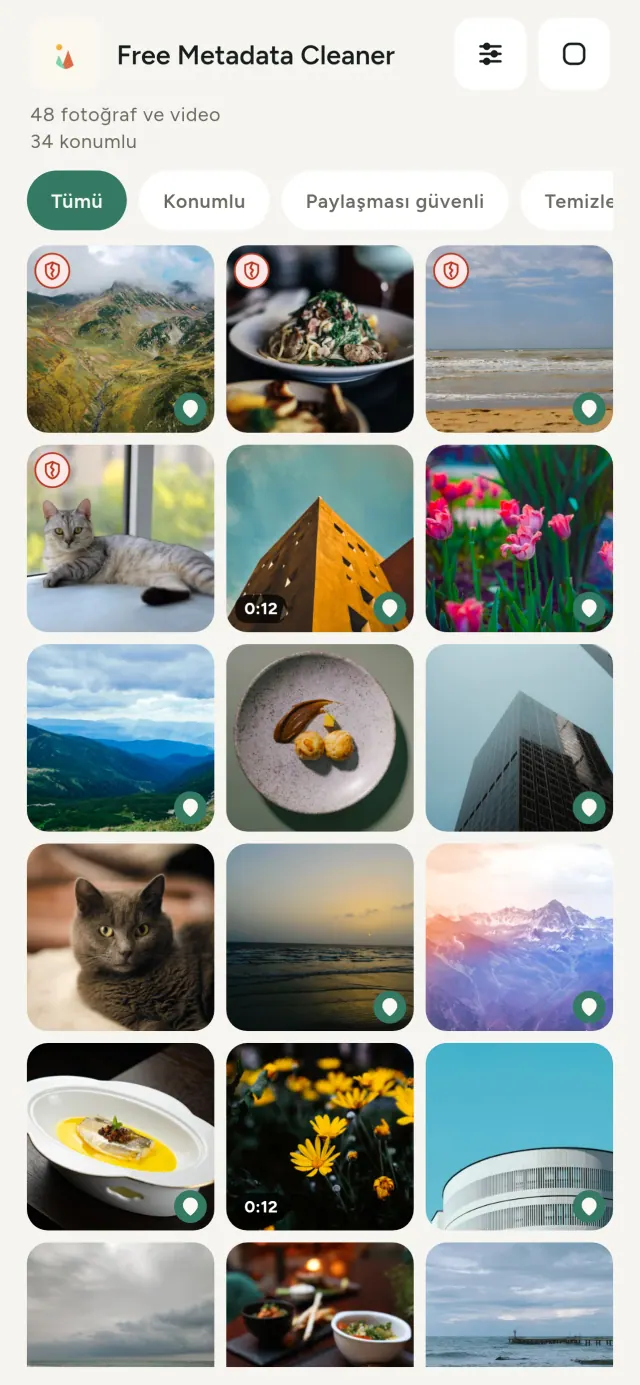
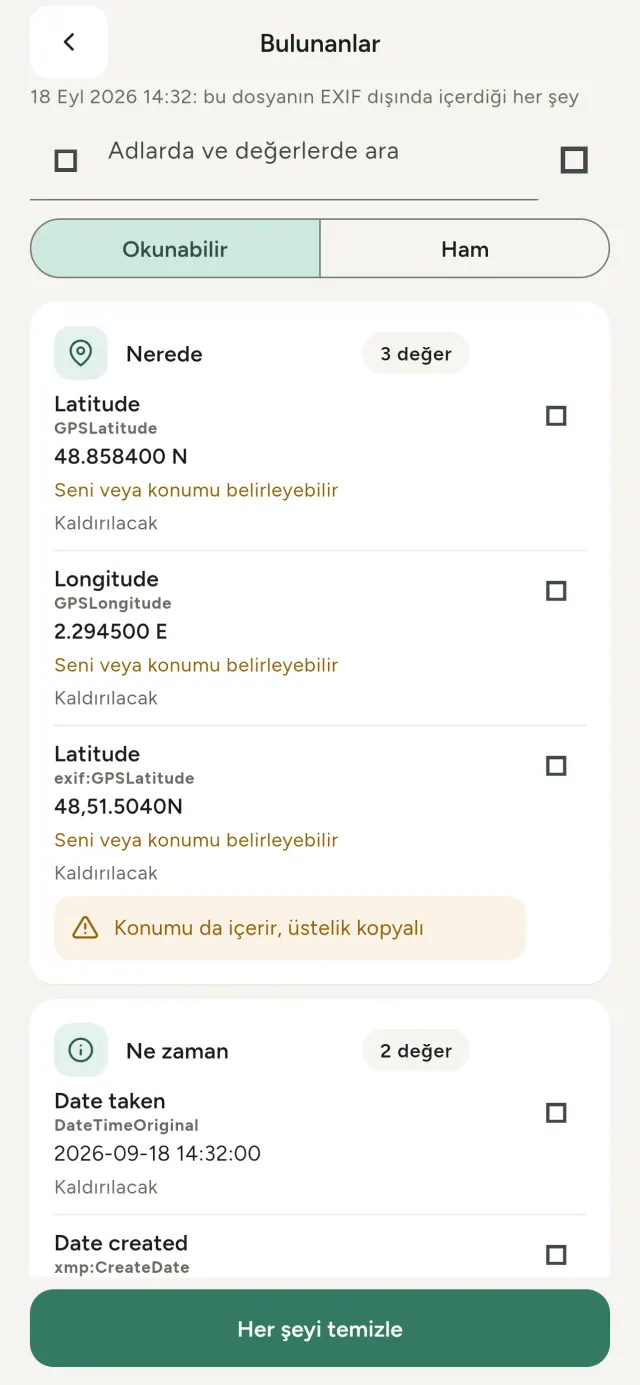
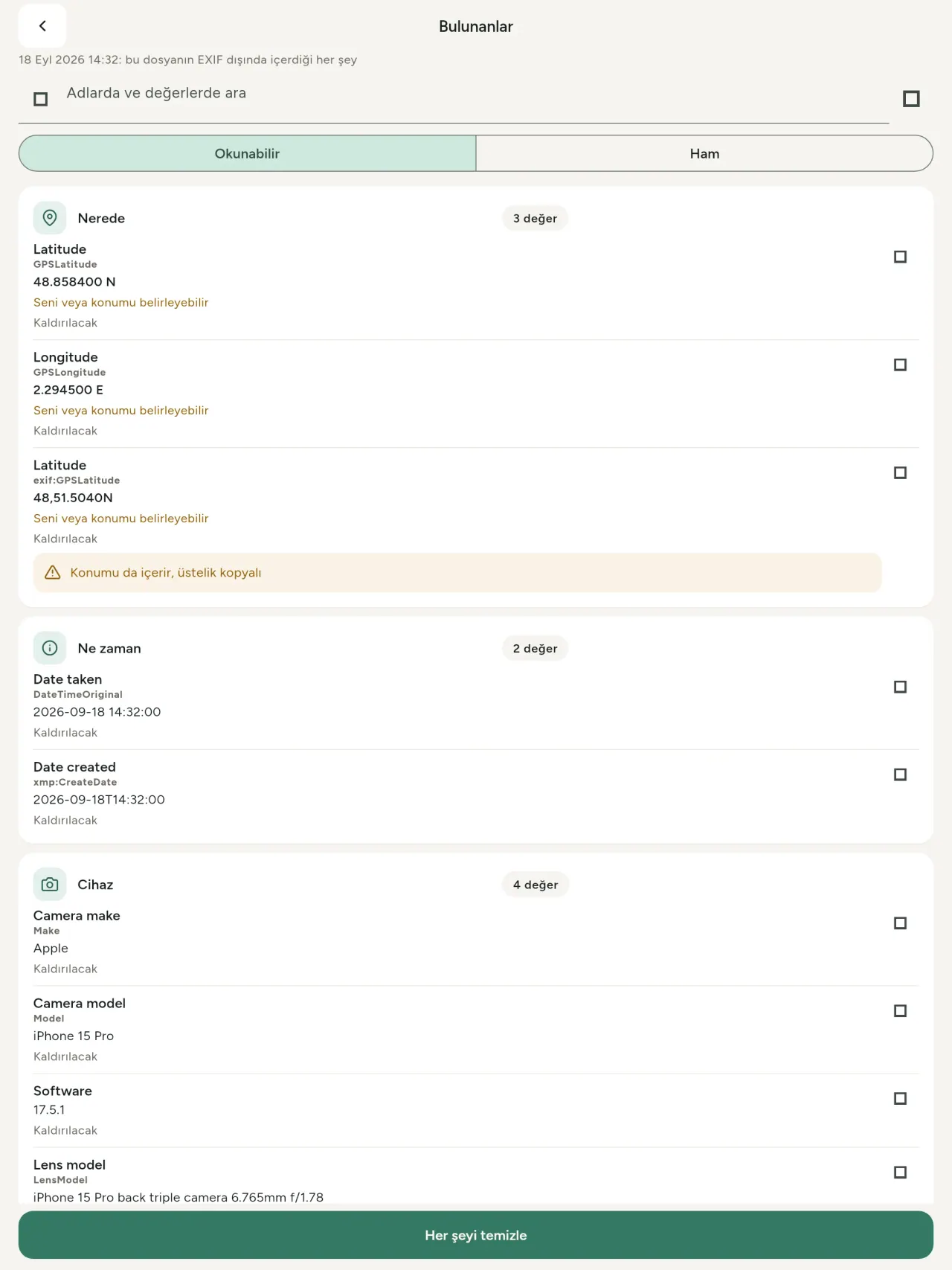
Her fotoğraf gizli bilgiler taşır: nerede ve ne zaman çekildiği, hangi telefonun kullanıldığı, hatta bazen orijinal görüntünün küçük resmi. Paylaştığında tümü birlikte gider.
Metadata Cleaner, fotoğraf metadata ve video içeriğini gösterir, bunları düzeltmene ve ardından doğrudan telefonunda silmene izin verir.
Metadata Cleaner ne yapar
Oku
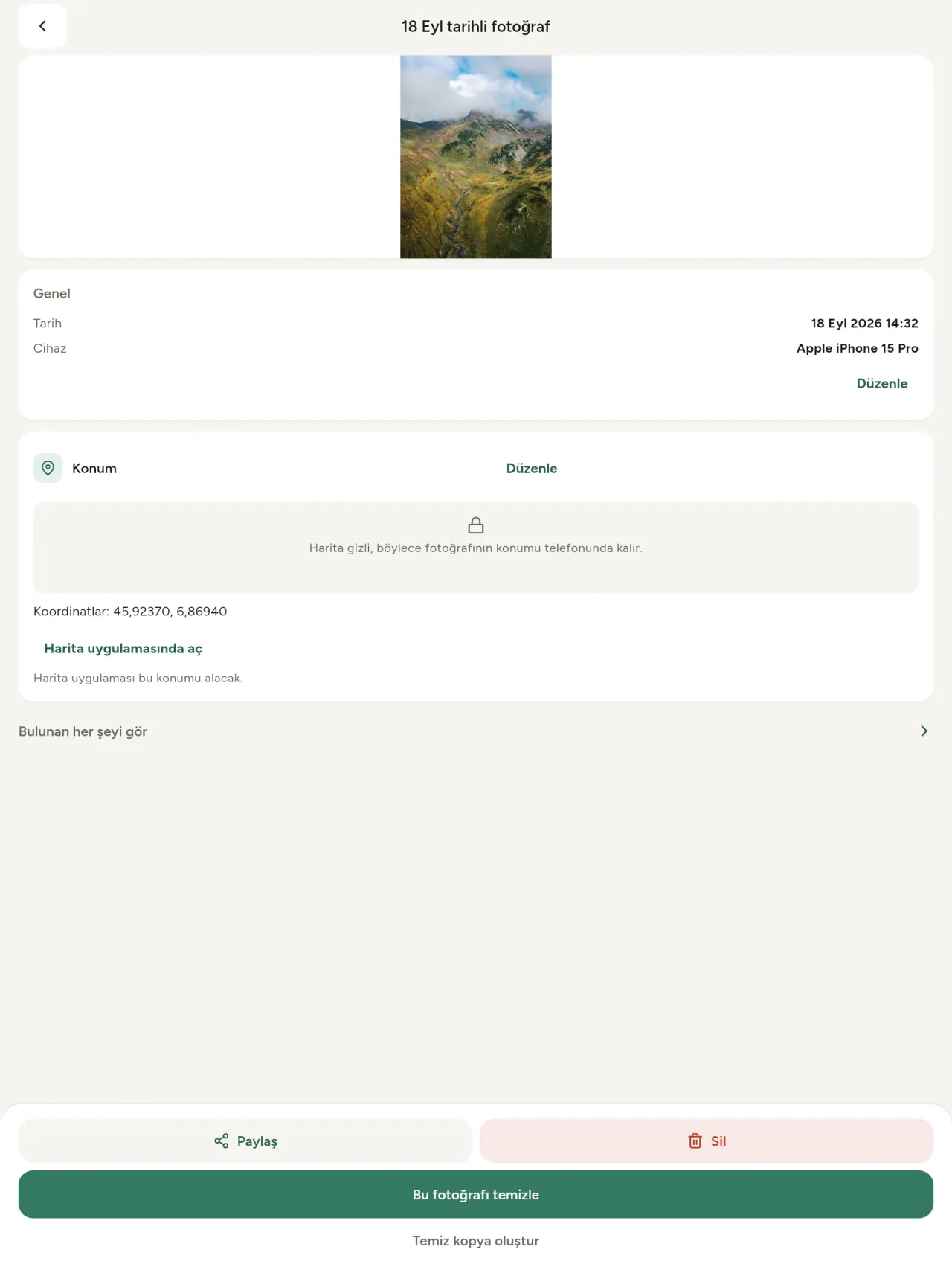
Gerçek bir exif viewer; fotoğraf veya videoda bulunan EXIF, IPTC, XMP, video kodekleri, süre ve çözünürlük dahil her değeri okur. Bilgiler gruplanır, aranır ve kopyalanır. C2PA dahil yapay zekâ kaynağı da algılanır.
Düzenle
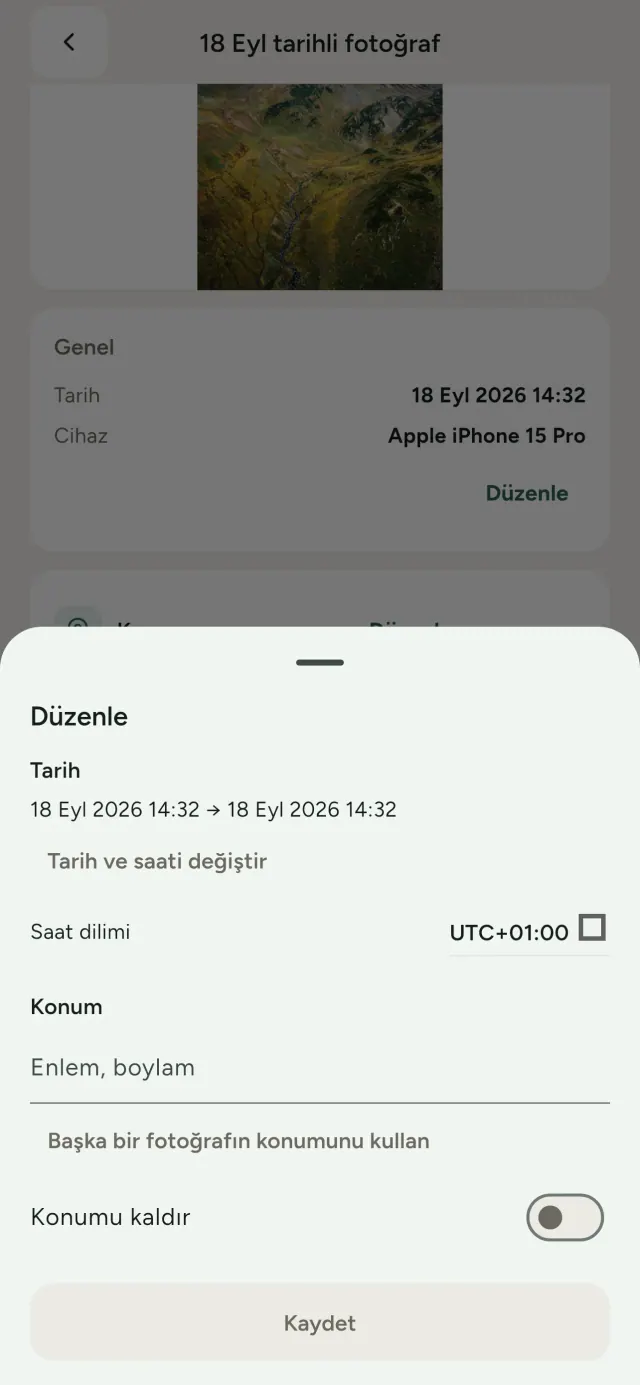
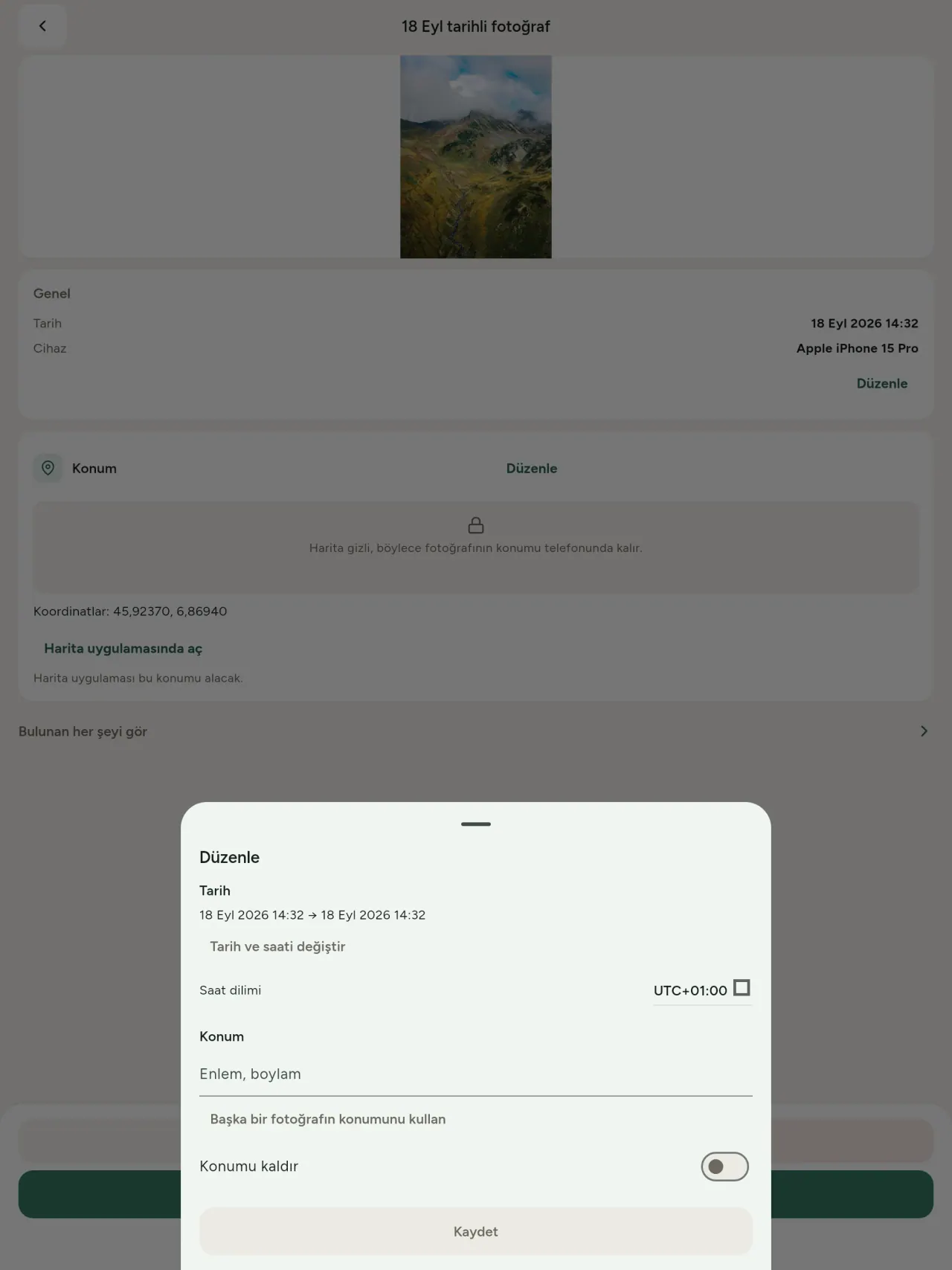
Metadata olmasa bile fotoğrafın tarihini ve fotoğraf konumu bilgisini değiştir veya yenile; fotoğraf konumu bilgisi korunur. Başka bir fotoğraftaki yeri kopyala ya da haritada seç; uygulama her seferinde önce izin ister. Öncesi ve sonrasını karşılaştır.
Sil
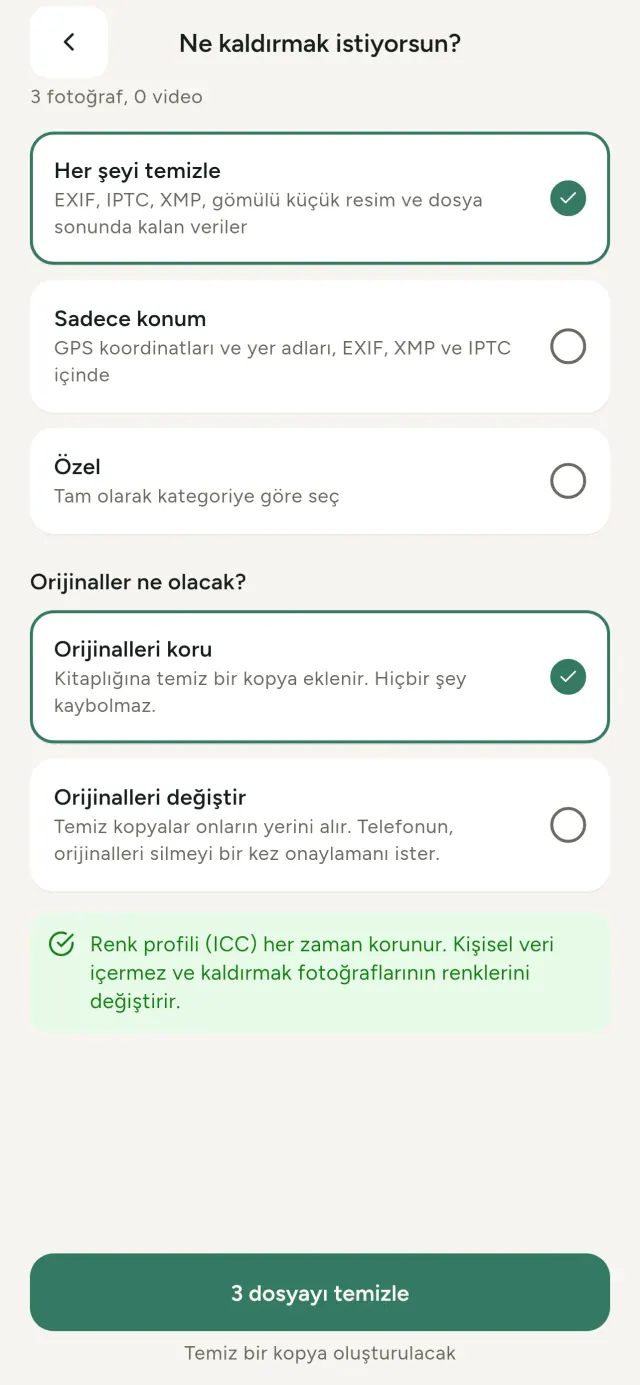
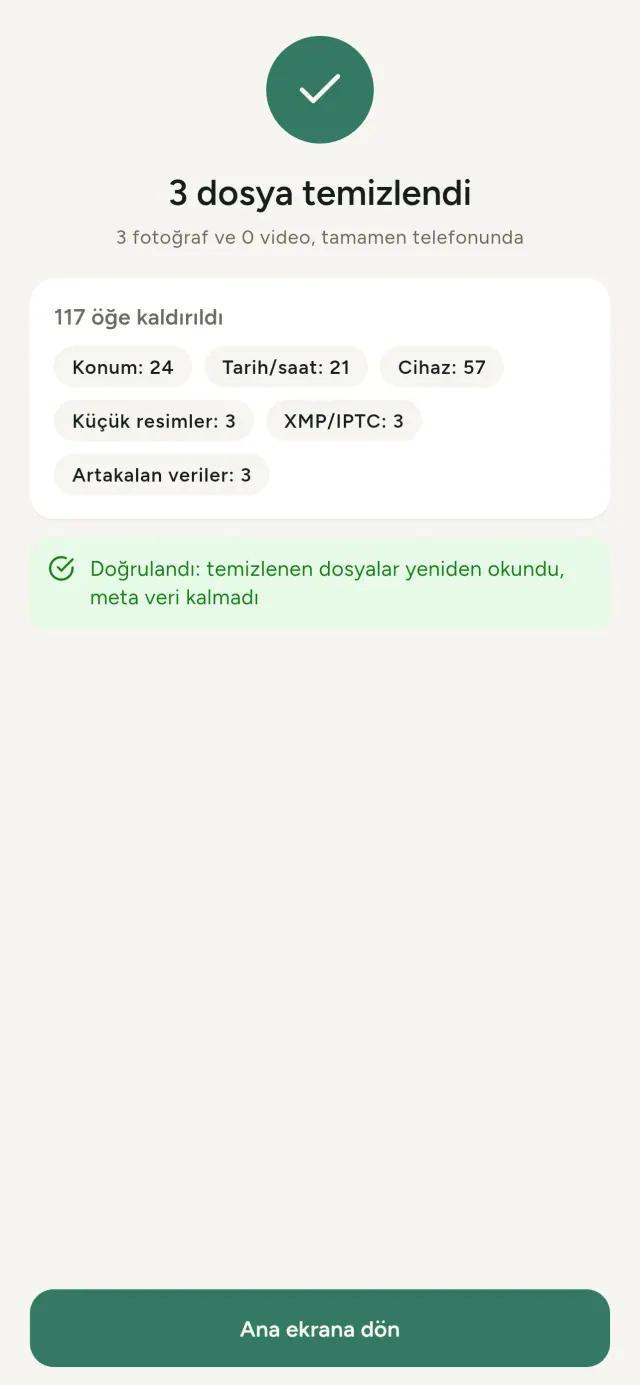
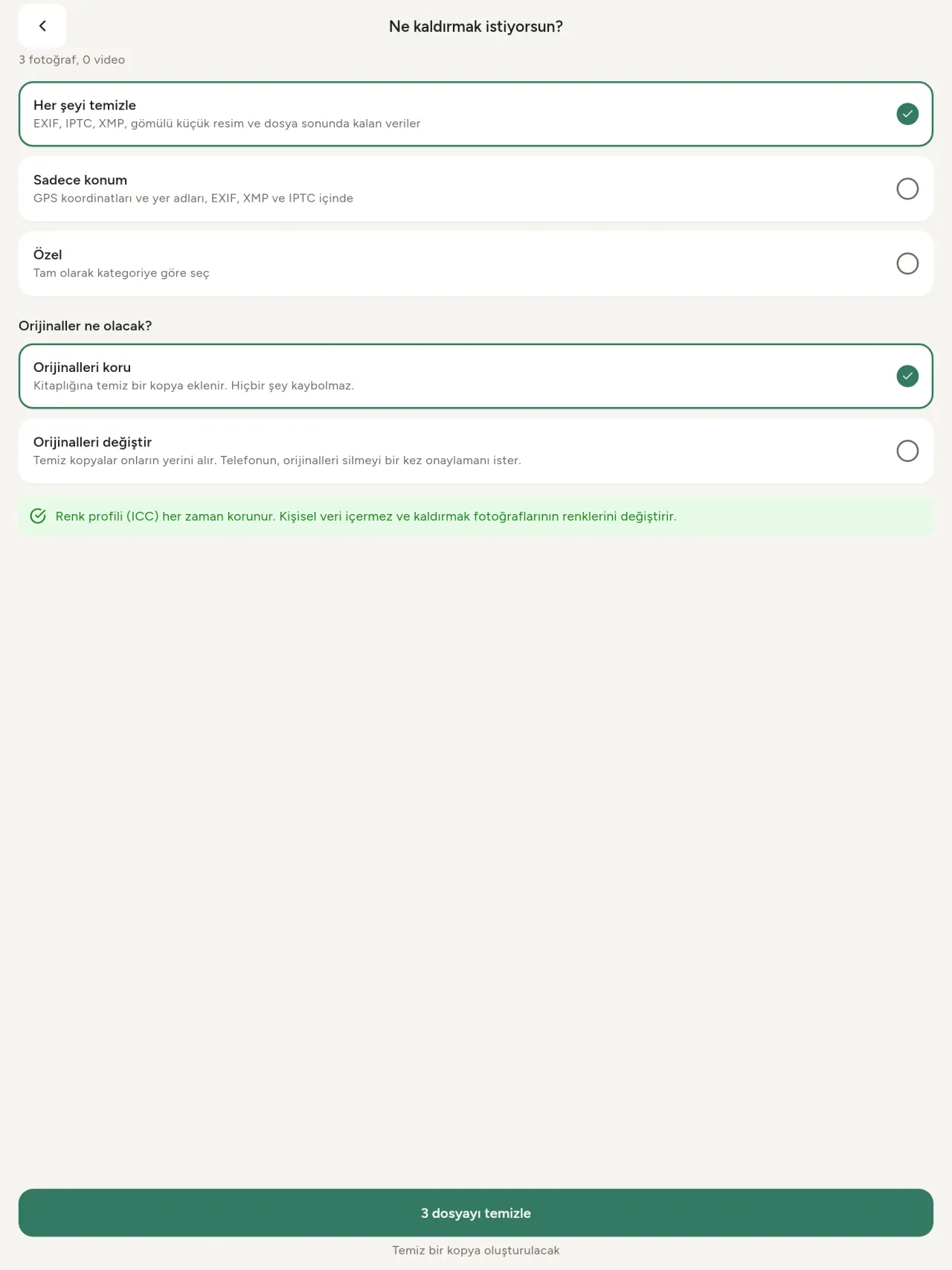
Her şeyi, yalnızca konumu veya seçtiğin kategorileri kaldır: EXIF, IPTC, XMP, gömülü küçük resimler, kamera üreticisi notları ve kırpma sonrası kalan baytlar. Bir seçimi tek seferde temizle, orijinalleri sakla veya değiştir.
Bir bakışta güvenli paylaşım
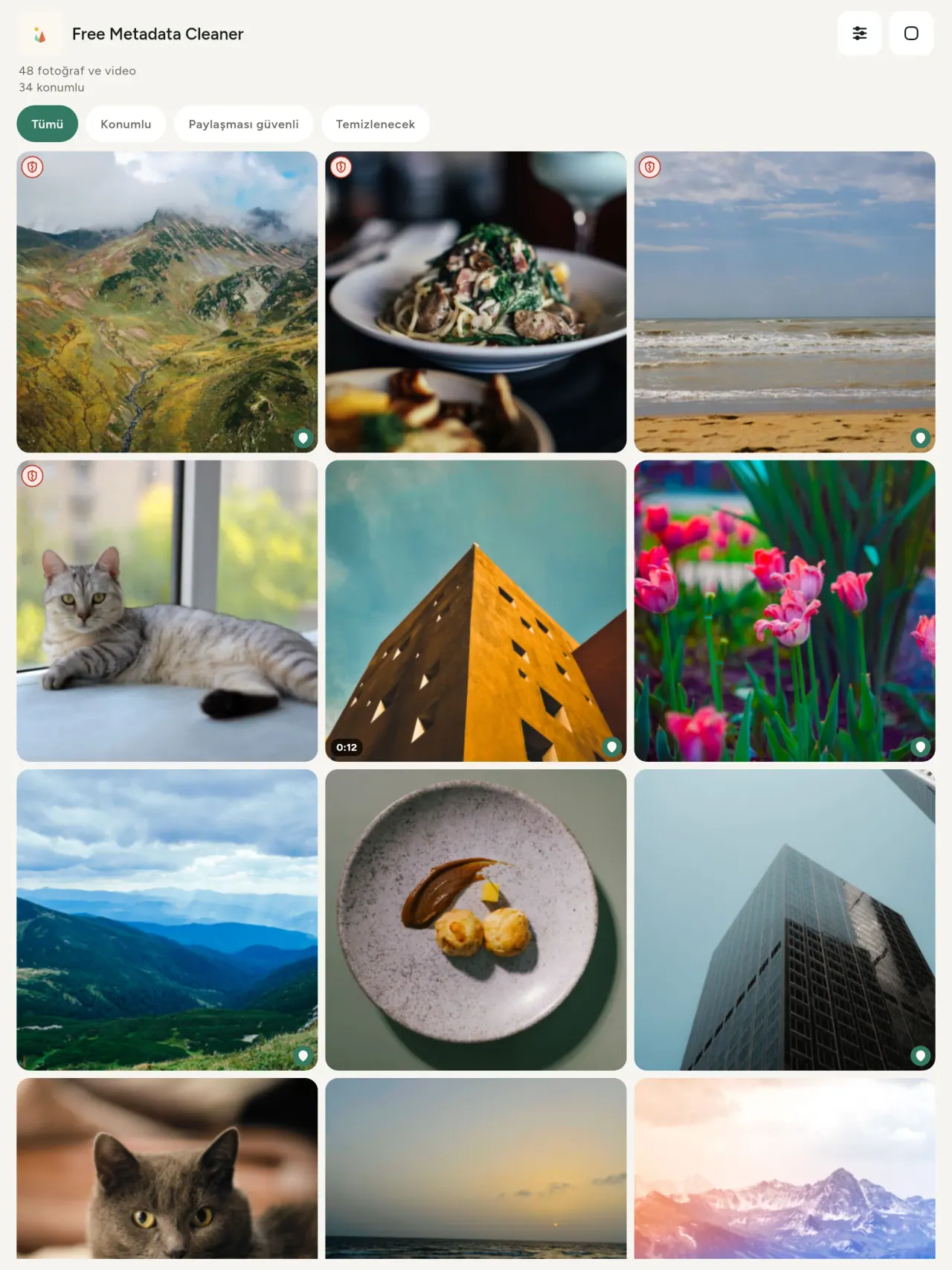
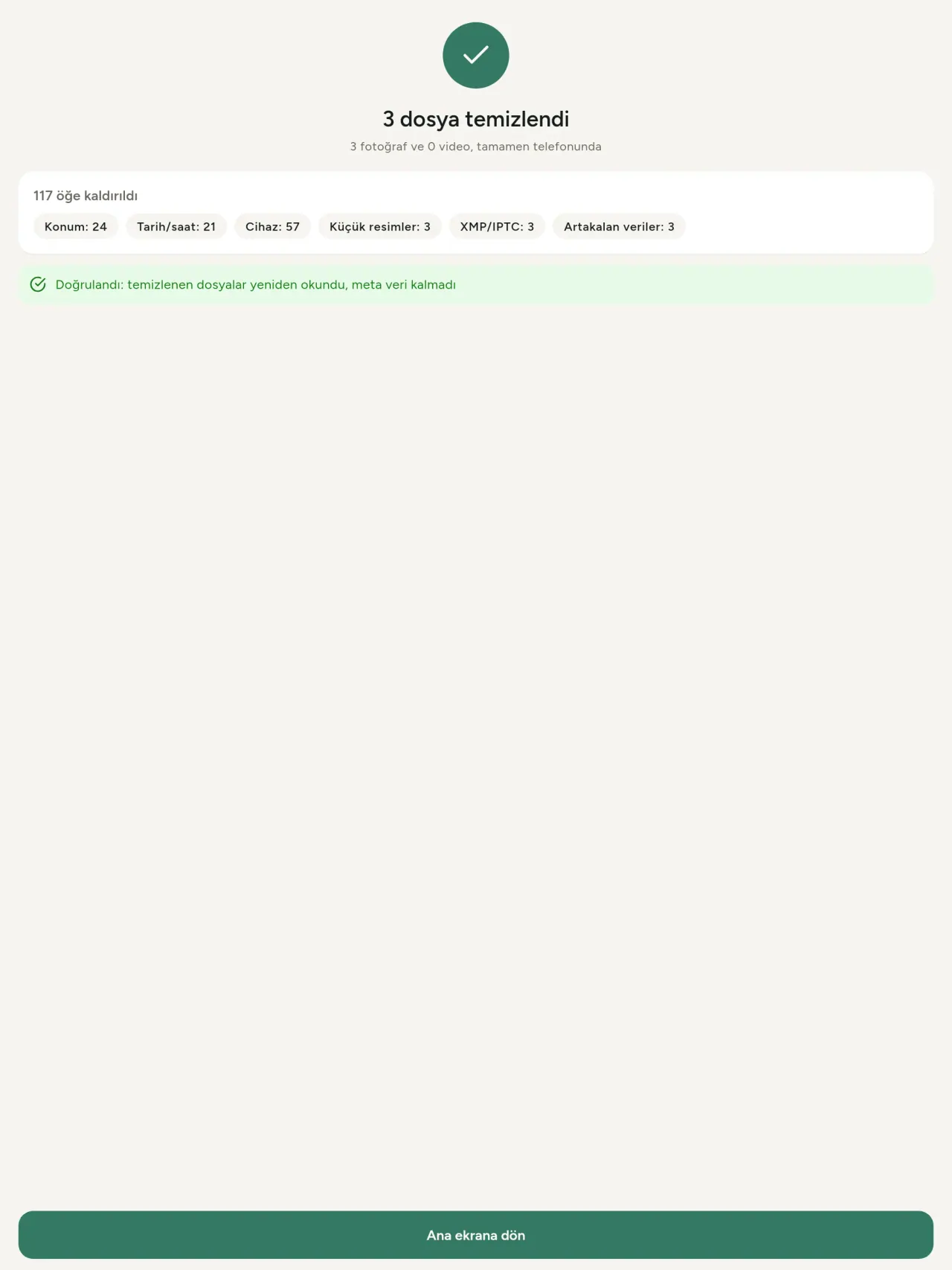
Yeşil kalkan metadata kalmadığını, çatlak kırmızı kalkan ise hâlâ veri olduğunu gösterir.
Kalite kaybı yok
Görüntüler yeniden kodlanmaz; görüntünün kendisi olduğu gibi kalır.
Gizlilik öncelikli
Dosyaların cihazında okunur, düzenlenir ve temizlenir. Hesap, reklam veya analiz yok. İsteğe bağlı harita, onayından sonra OpenStreetMap üzerinden yüklenir; fotoğraf asla gönderilmez.
Ücretsiz ve reklamsız
Uygulama işine yararsa isteğe bağlı bahşiş bırakabilirsin.
Kimler için
- Bir fotoğrafı paylaşmadan, satmadan ya da göndermeden önce neyi ele verdiğini (GPS konumu, tarih, kamera) bilmek isteyen herkes.
- İkinci el ilan sitelerinde satış yapan ve nerede yaşadığını göstermek istemeyenler.
- Paylaştıkları fotoğraflarda hassas yerlerin (ev, okul, iş yeri) görünmesini istemeyen ebeveynler ve diğer herkes.
- İz bırakmadan görsel paylaşması gereken gazeteciler, aktivistler ve risk altındaki kişiler.
- Veri sızıntılarından bıkmış ve kendi fotoğraflarındaki kişisel bilgilerin kontrolünü geri almak isteyenler.
Metadata Cleaner neden seçilmeli
- Tek bir uygulamada üç şey: Bir fotoğrafın veya videonun ne gösterdiğini oku, düzenle (çekildiği tarih, konum) ve birkaç dokunuşla metaverileri kaldır.
- Her şey telefonda çalışır. Fotoğraflarınız hiçbir yere gönderilmez.
- Fotoğraflar (JPEG, HEIC, PNG, WebP, GIF) ve videolar (MP4, MOV, 3GP).
Uygulamanın henüz yapmadıkları
- Yalnızca yukarıda listelenen biçimler desteklenir. Daha fazla biçim planlanıyor.
Pixeon ilkesi. Pixeon uygulamaları önce yereldir: hesap yok, takip yok ve verileriniz telefonunuzda kalır. Bir uygulama ağa bağlanıyorsa bu yalnızca ihtiyaç duyduğunuz bir özelliği kendiniz açtığınızda olur ve gizlilik politikası o özellik yayınlanmadan önce güncellenir.
Metadata Cleaner uygulamasını hareket halinde görün.
Metadata Cleaner'i edinin.
iPhone ve Android'de ücretsiz.
SHA-256: A4:38:C9:B4:A9:3F:97:7B:E8:98:AD:B7:3B:30:5F:63:01:22:E0:D9:F8:CF:5D:2B:D7:4E:38:CB:9A:CF:5A:A2
Sürüm 1.1
- App Store Yakında
- Google Play Yakında
Yenilikler
Bu metin İngilizcedir.
- Read: see exactly what a photo or video reveals (location, date, camera, AI provenance labels such as C2PA and generation parameters, video duration, codecs, resolution and frame rate).
- Edit: change the date a photo was taken and its location (JPEG, HEIC, AVIF), even on a photo with no metadata, reuse the location of another photo, or pick it on an OpenStreetMap map after your confirmation.
- Remove: clean metadata in a few taps, with a before and after view on the result screen.
- DNG photos are supported.
- Translations aligned across 91 languages.
Privacy policy
Aşağıdaki metin İngilizcedir. İngilizce versiyon geçerlidir.
Last updated: 2026-11-18 · applies to version 1.1 and later
Policy versions: 1.1 and later (this text) · version 1.0 (still the policy of the app version 1.0). The version number of your app is shown at the bottom of its Settings screen.
Free Metadata Cleaner shows and removes the metadata hidden in your photos and videos (location, date and time, camera and lens details, thumbnails…). The short version: everything happens on your device, and we collect nothing.
What the app accesses
Your photo and video library, only after you grant permission (and, where your system requires it, the permission to read the location stored in your photos, so that it can be shown to you). The files you choose are read and cleaned on your device; the cleaned copy is saved to your library. If you choose to replace the originals, the system asks you to confirm before deleting them.
To show which photos are already clean, the app reads the metadata of the photos displayed on screen, on your device. This result is kept in memory only and is never stored.
What we collect
Nothing. No account, no analytics or usage tracking, no advertising or advertising identifiers, no crash or diagnostics reporting beyond what the app stores provide, and no third-party SDK that sends data anywhere. There is no Free Metadata Cleaner server. Cleaning a photo or video never uses the network, at all: turn on airplane mode and clean one to check for yourself. The only network request the app itself can ever make is described under “Location” below, and it only ever happens if you ask for it. The one other connection is the optional tip purchase, handled by the store (see “Optional support”).
Temporary files and history
The app keeps no history and no database. Temporary files created while cleaning are deleted after each item and purged when the app starts.
Deleted originals
Originals that are deleted remain in your system's trash (such as “Recently Deleted” or the trash) for about 30 days, with their metadata. The app cannot empty it: do it yourself if you need the originals gone at once.
iCloud and cloud photos
If a photo is stored in iCloud and not on your device, the operating system may download it before the app can process it. That transfer is made by the system, under the provider's own terms, not by the app.
Location
When a photo contains a location, the app shows the coordinates as text, which stays on your device. Three actions can send location information off your device, only when you choose them, each time: “Open in…” hands the coordinates to the maps application you select, under its own privacy policy; “Show the map” asks you to confirm first (“Showing the map sends this photo's position to a map service. Nothing else is sent.”), then loads a small map from OpenStreetMap for that one position; and, when you edit a photo's place, “Choose on the map” asks you to confirm first, then opens a full-screen map from OpenStreetMap. This map does not use your phone's location. As you move and zoom it, the app requests the map tiles of the area you are browsing, so OpenStreetMap receives the position of the area shown on screen, which starts on the photo's current place if it has one, and otherwise on a world view. The photo itself is never sent, and nothing is sent before you confirm. The place you choose on the map (or copy from another photo) is written into the photo's file only when you save, on your device. In every case OpenStreetMap receives, as with any web request, technical details like your IP address; it does not receive your name, an account, or anything else about you or your other photos. See OpenStreetMap's own privacy policy. Outside of these explicit actions, the app never sends a photo's location, or anything else, anywhere.
Optional support
The app is free. If you wish, you can leave a tip. On iPhone and in the Google Play version for Android, tips are in-app purchases processed by Apple or Google under their own terms and privacy policy; the app adds the Google Play billing permission for this, makes no network call itself, and receives no payment or personal details. Versions installed outside Google Play may instead open an external donation page in your browser, operated by a third party under its own privacy policy; nothing from the app is sent to it. A tip unlocks nothing.
Contact form on this website
If you write to us through this site, we use your message and the email address you optionally give only to reply. Bot protection is provided by Cloudflare and email delivery by Resend.
Language choice on this website
When you choose a language, or when this site opens a page in your browser's language, it stores
one small functional cookie (pxl, a language code, one year) so that your choice is
remembered. If this site suggests a page in your browser's language and you close that suggestion,
your browser also keeps a local note (pxl-banner-off, in local storage, 30 days) so the
suggestion does not come back. Neither identifies anyone, neither is used for tracking or advertising,
and neither is shared. You can delete them in your browser at any time.
Website statistics
This website uses Cloudflare Web Analytics to count visits (pages viewed, country, browser type, loading speed). It sets no cookie, does not use local storage, does not fingerprint your device, does not follow you across sites and does not build a profile of you. Search engines (for example Google Search Console) give us aggregated search statistics, without any data about individual visitors. Our own web server also counts the pages and APK downloads it serves: for each request it keeps the address, the site or social network that sent you (only its name, or the campaign tag written in the link), the country, the type of device and whether the request came from a robot. It keeps no IP address, no identifier and no cookie, and these counts are anonymous. We use no advertising or other analytics service. None of this concerns the app itself, which collects nothing.
Children
The app is a general-purpose tool and is not directed at children.
Changes
An updated policy will be published at this URL with a new date above.
Contact
Questions about privacy: metadata-cleaner-contact@pixeon.net
Sürüm 1.0
- App Store Yayınlandı
- Google Play Yayınlandı
Yenilikler
Bu metin İngilizcedir.
- Cleans JPEG, HEIC, PNG, WebP, GIF, MP4, MOV and 3GP files, with no video re-encoding.
- "Safe to share" and "To clean" filters.
- New green design.
- Help screen with a FAQ.
- Settings: share, rate, feedback, unsupported formats.
- Optional tips.
Privacy policy, version 1.0
Aşağıdaki metin İngilizcedir. İngilizce versiyon geçerlidir.
Applies to version 1.0 of the app (the first release). Later versions: current policy.
Free Metadata Cleaner shows and removes the metadata hidden in your photos and videos (location, date and time, camera and lens details, thumbnails…). The short version: everything happens on your device, and we collect nothing.
What the app accesses
Your photo and video library, only after you grant permission (and, where your system requires it, the permission to read the location stored in your photos, so that it can be shown to you). The files you choose are read and cleaned on your device; the cleaned copy is saved to your library. If you choose to replace the originals, the system asks you to confirm before deleting them.
To show which photos are already clean, the app reads the metadata of the photos displayed on screen, on your device. This result is kept in memory only and is never stored.
What we collect
Nothing. No account, no analytics or usage tracking, no advertising or advertising identifiers, no crash or diagnostics reporting beyond what the app stores provide, and no third-party SDK that sends data anywhere. There is no Free Metadata Cleaner server. Cleaning a photo or video never uses the network, at all: turn on airplane mode and clean one to check for yourself. The only network request the app itself can ever make is described under “Location” below, and it only ever happens if you ask for it. The one other connection is the optional tip purchase, handled by the store (see “Optional support”).
Temporary files and history
The app keeps no history and no database. Temporary files created while cleaning are deleted after each item and purged when the app starts.
Deleted originals
Originals that are deleted remain in your system's trash (such as “Recently Deleted” or the trash) for about 30 days, with their metadata. The app cannot empty it: do it yourself if you need the originals gone at once.
iCloud and cloud photos
If a photo is stored in iCloud and not on your device, the operating system may download it before the app can process it. That transfer is made by the system, under the provider's own terms, not by the app.
Location
When a photo contains a location, the app shows the coordinates as text, which stays on your device. Two actions send that one photo's position off your device, only when you choose them, each time: “Open in…” hands the coordinates to the maps application you select, under its own privacy policy; “Show the map” asks you to confirm first (“Showing the map sends this photo's position to a map service. Nothing else is sent.”), then loads a small map from OpenStreetMap for that one position. OpenStreetMap receives the coordinates and, as with any web request, technical details like your IP address; it does not receive your name, an account, or anything else about you or your other photos. See OpenStreetMap's own privacy policy. Outside of these two explicit actions, the app never sends a photo's location, or anything else, anywhere.
Optional support
The app is free. If you wish, you can leave a tip. On iPhone and in the Google Play version for Android, tips are in-app purchases processed by Apple or Google under their own terms and privacy policy; the app adds the Google Play billing permission for this, makes no network call itself, and receives no payment or personal details. Versions installed outside Google Play may instead open an external donation page in your browser, operated by a third party under its own privacy policy; nothing from the app is sent to it. A tip unlocks nothing.
Contact form on this website
If you write to us through this site, we use your message and the email address you optionally give only to reply. Bot protection is provided by Cloudflare and email delivery by Resend.
Language choice on this website
When you choose a language, or when this site opens a page in your browser's language, it stores
one small functional cookie (pxl, a language code, one year) so that your choice is
remembered. If this site suggests a page in your browser's language and you close that suggestion,
your browser also keeps a local note (pxl-banner-off, in local storage, 30 days) so the
suggestion does not come back. Neither identifies anyone, neither is used for tracking or advertising,
and neither is shared. You can delete them in your browser at any time.
Website statistics
This website uses Cloudflare Web Analytics to count visits (pages viewed, country, browser type, loading speed). It sets no cookie, does not use local storage, does not fingerprint your device, does not follow you across sites and does not build a profile of you. Search engines (for example Google Search Console) give us aggregated search statistics, without any data about individual visitors. Our own web server also counts the pages and APK downloads it serves: for each request it keeps the address, the site or social network that sent you (only its name, or the campaign tag written in the link), the country, the type of device and whether the request came from a robot. It keeps no IP address, no identifier and no cookie, and these counts are anonymous. We use no advertising or other analytics service. None of this concerns the app itself, which collects nothing.
Children
The app is a general-purpose tool and is not directed at children.
Changes
An updated policy will be published at this URL with a new date above.
Contact
Questions about privacy: metadata-cleaner-contact@pixeon.net
Credits
Android is a trademark of Google LLC. The Android robot is reproduced or modified from work created and shared by Google and used according to terms described in the Creative Commons 3.0 Attribution License. This site is not affiliated with or endorsed by Google.
Destek
Son güncelleme: 2026-10-08
Free Metadata Cleaner küçük ve bağımsız bir uygulamadır. En sık sorulan soruların yanıtları aşağıdadır.
Birkaçı gün içinde yanıt vermek için elimizden geleni yapıyoruz. Bize yardımcı olmak için lütfen cihaz modelinizi, sistem sürümünüzü ve ne yaptığınızı belirtin. Lütfen özel fotoğraf göndermeyin.
Uygulama hangi verileri saklar veya gönderir?
Hiçbirini. Geçmiş tutmaz, hesabı yok ve sunucusu yok. Ayrıntılar için gizlilik politikasına bakın.
Bir fotoğrafı nasıl temizlerim?
- Uygulamayı açıp istenirse kütüphanenize erişime izin verin.
- Temizlemek istediğiniz fotoğraf veya videoları seçin.
- Neleri kaldıracağınızı seçin, orijinallerin üzerine yazılmasını mı yoksa temiz kopya oluşturulmasını mı istediğinizi belirtin.
- Onaylayın. Bir özet, nelerin kaldırıldığını ve işlenemeyen dosyaları gösterir.
Temizlenen kopyalar nereye gidiyor?
Fotoğraf kütüphanenize eklenir. Orijinalin kütüphane tarihi korunur, yani temizlenmiş fotoğraf galerinizin en üstüne çıkmaz.
“Orijinalleri değiştir” seçtim ama orijinaller hala duruyor.
Silinen orijinaller, sistemin çöp kutusunda (“Son Silinenler” veya çöp kutusu gibi) yaklaşık 30 gün boyunca metadata ile birlikte kalır. Hemen kaldırmak için çöp kutusunu boşaltın. Sistemin silme uyarısını reddederseniz, orijinaller tutulur ve temizlenmiş kopyalar yine eklenir.
Hangi dosya türleri destekleniyor?
JPEG, HEIC, AVIF, PNG, WebP ve GIF fotoğraflar; MP4, MOV ve 3GP videolar (daha fazla format ekleniyor). Uygulamanın temizleyemediği dosya dokunulmadan bırakılır ve özetten nedeni ile birlikte listelenir, kalan dosyalar ise işleme devam eder.
Uygulama neden fotoğraflarıma erişim istiyor?
Seçebileceğiniz fotoğrafları listelemek ve temizlenen kopyaları kaydetmek için. Sisteminiz gerekiyorsa, uygulama ayrıca fotoğraflarda kaydedilen konumu okumak için izin ister. İzin vermezseniz sistem konumu gizler ve uygulama size bir fotoğrafın neleri açığa çıkardığını gösteremez. Hiçbir şey yüklenmez.
Telefonumdan hiçbir şeyin çıkmadığını nasıl kontrol edebilirim?
Uçak modunu açıp bir fotoğraf temizleyin, aynı şekilde çalışır. Tek istisna haritadır: bir fotoğrafın konumunda “Haritayı göster” seçeneğine dokunup onaylarsanız, sadece o konum OpenStreetMap'e gönderilir ve başka hiçbir şey aktarılmaz. “Konum” başlığına bakınız.
Hangi diller mevcut?
Uygulama; İngilizce, Fransızca, Almanca, İspanyolca, İtalyanca, Portekizce ve Arapça dillerinde kullanılabilir. Bu web sitesi daha fazla dilde mevcut, uygulamaya da yeni diller eklenecek.
Projeye destek ol
Metadata Cleaner ücretsiz ve reklamsız kalır. Size faydalıysa geliştirilmesine destek olabilirsiniz (isteğe bağlı):
Buy Me a CoffeeBütçe ve gider takibi; gelir gider takibi için sade, çevrimdışı bir uygulama.
Pixeon'dan başkaVaultMarkYerel belge kasası: belge tara, filigran ekle ve meta veriyi silerek paylaş.
Pixeon'dan başkaLittle RelayBreastfeeding, sleep and starting solids tracker. No account, works offline.
Pixeon'dan başkaMenuloopYemek planı, tarif defteri, alışveriş listesi. Fotoğraf desteğiyle kolay.
Pixeon'dan başkaIndie OfficeQuote maker and self-employed invoices. Offline, no account, no ads.