
Metadata Cleaner: Foto/Vidiyo
Onye na-ele, edezi ma na-ehichapụ EXIF: gụọ, dozie ma ọ bụ wepụ metadata foto.


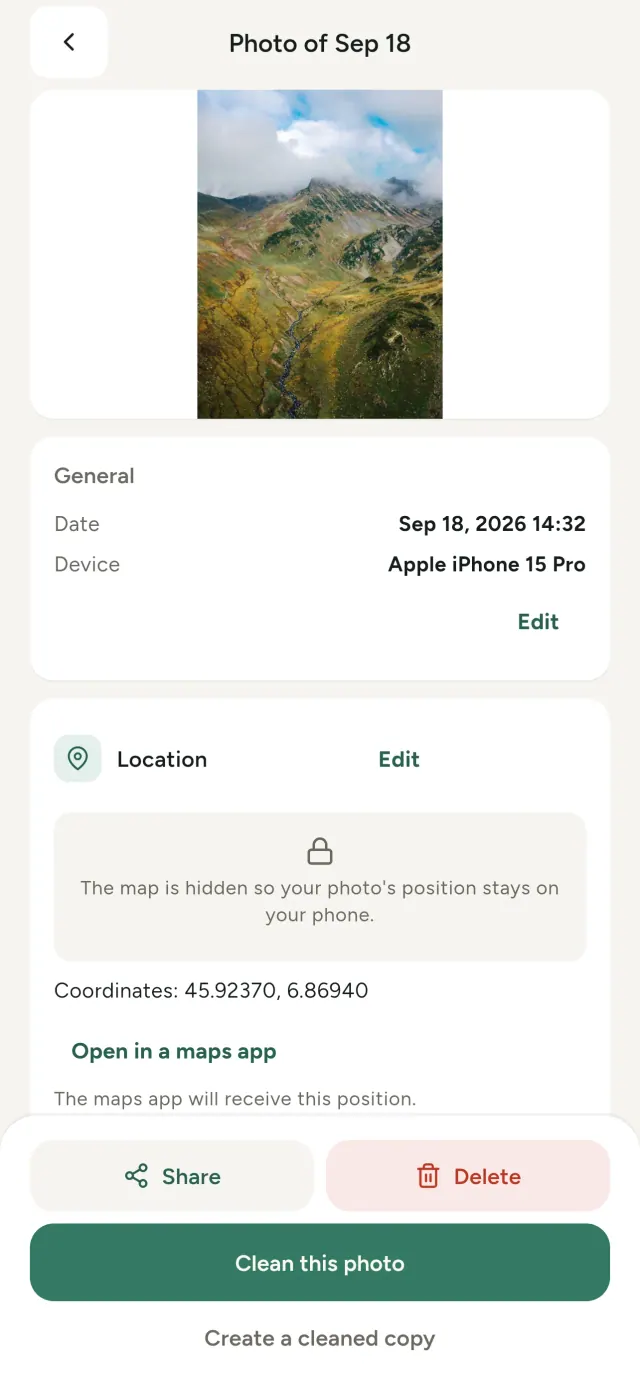
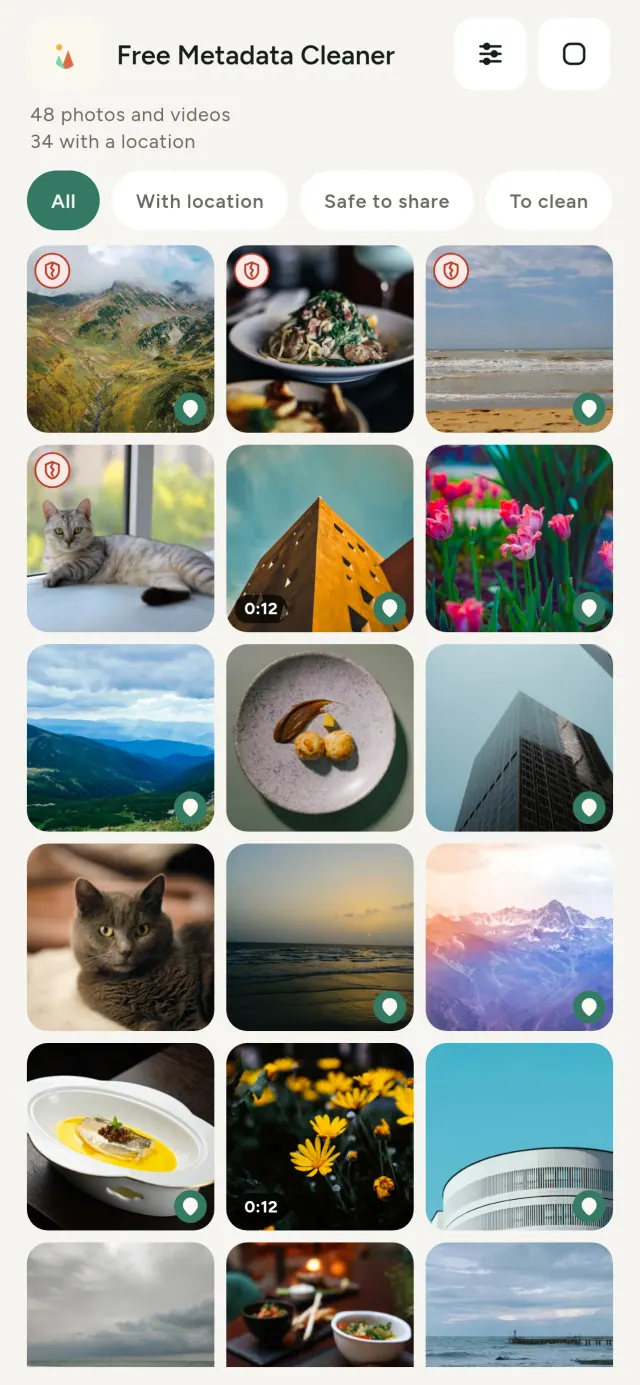
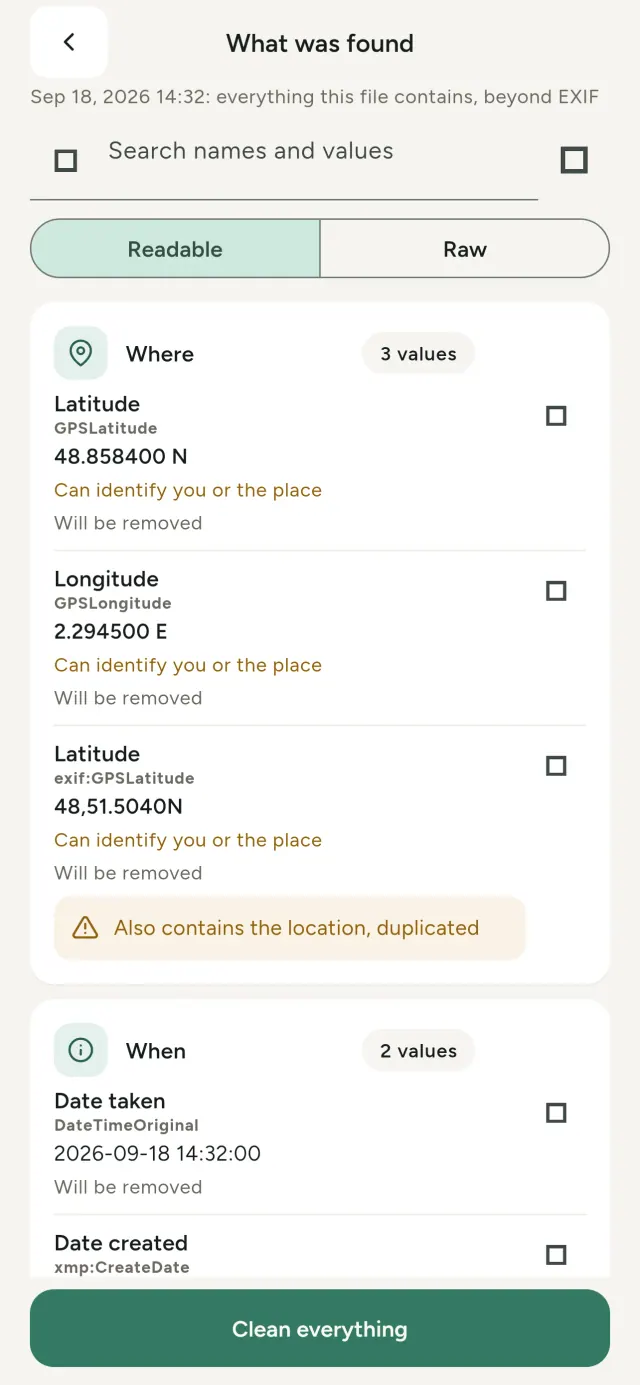
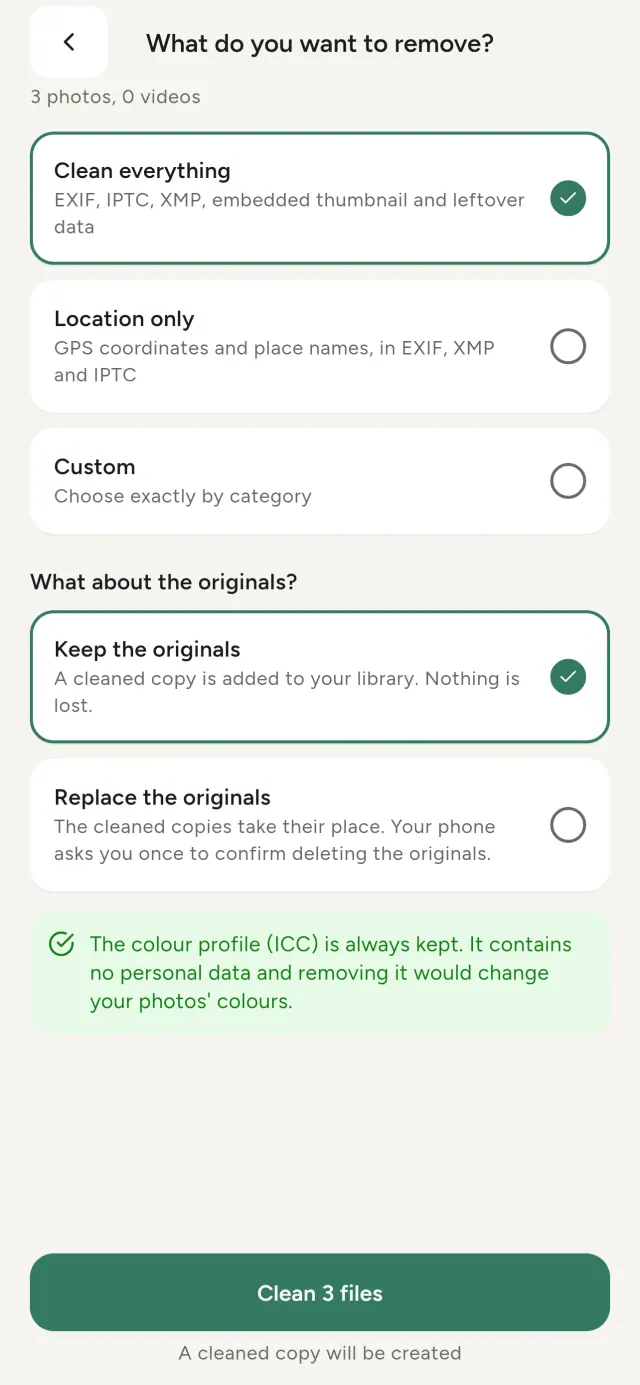
Foto ọ bụla nwere ozi zoro ezo: ebe e sere ya, mgbe e sere ya, ekwentị e ji see ya, na mgbe ụfọdụ obere nlele nke foto mbụ. Mgbe ị kesara ya, ihe ndị a niile na-eso ya.
Metadata Cleaner na-eme ihe atọ n'ekwentị gị: ọ na-egosi ihe foto na vidiyo gị nwere, ọ na-ahapụ gị ka ị dozie ya, ma ọ na-ewepụ ya.
Ihe Metadata Cleaner na-eme
Gụọ
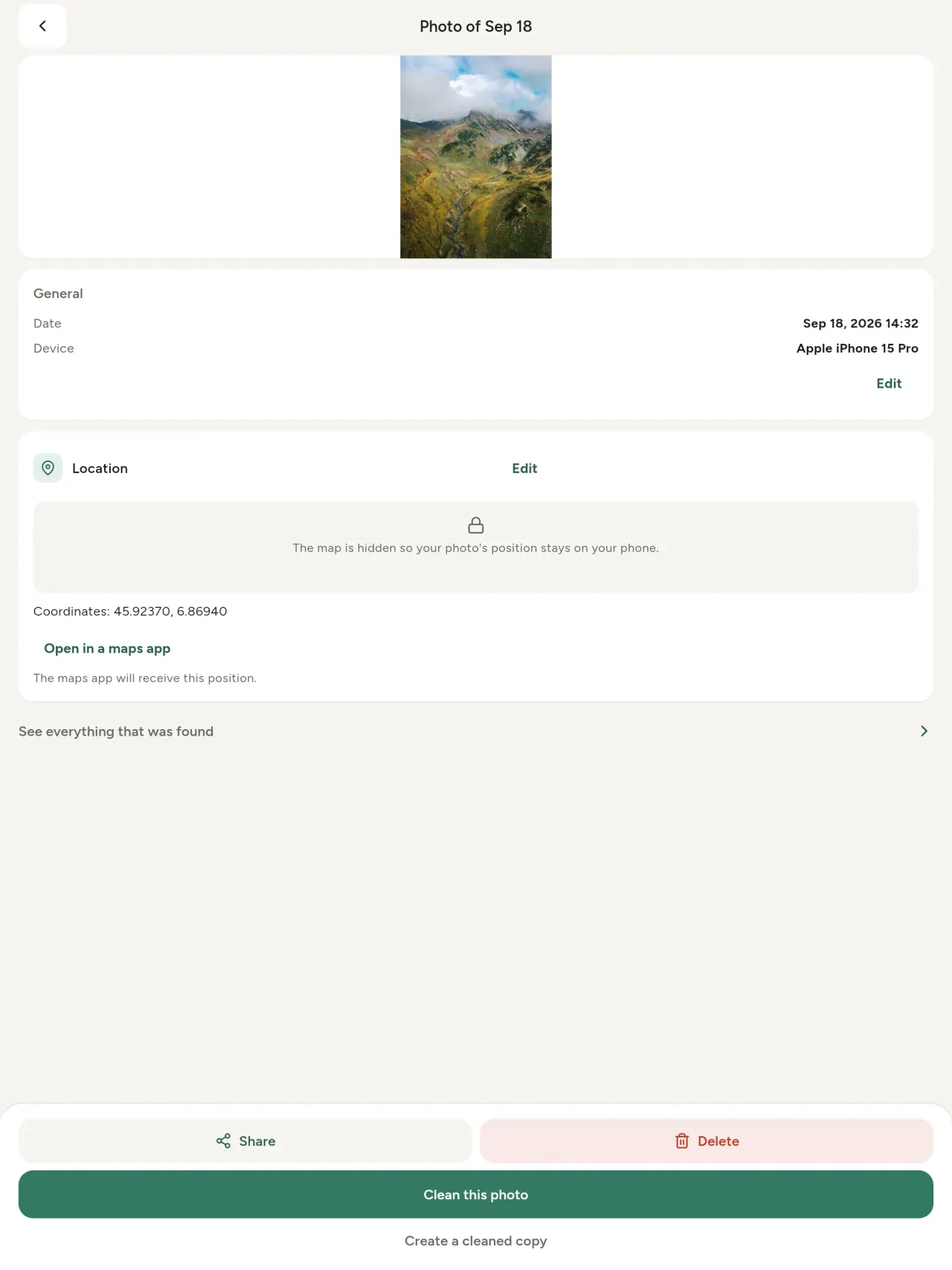
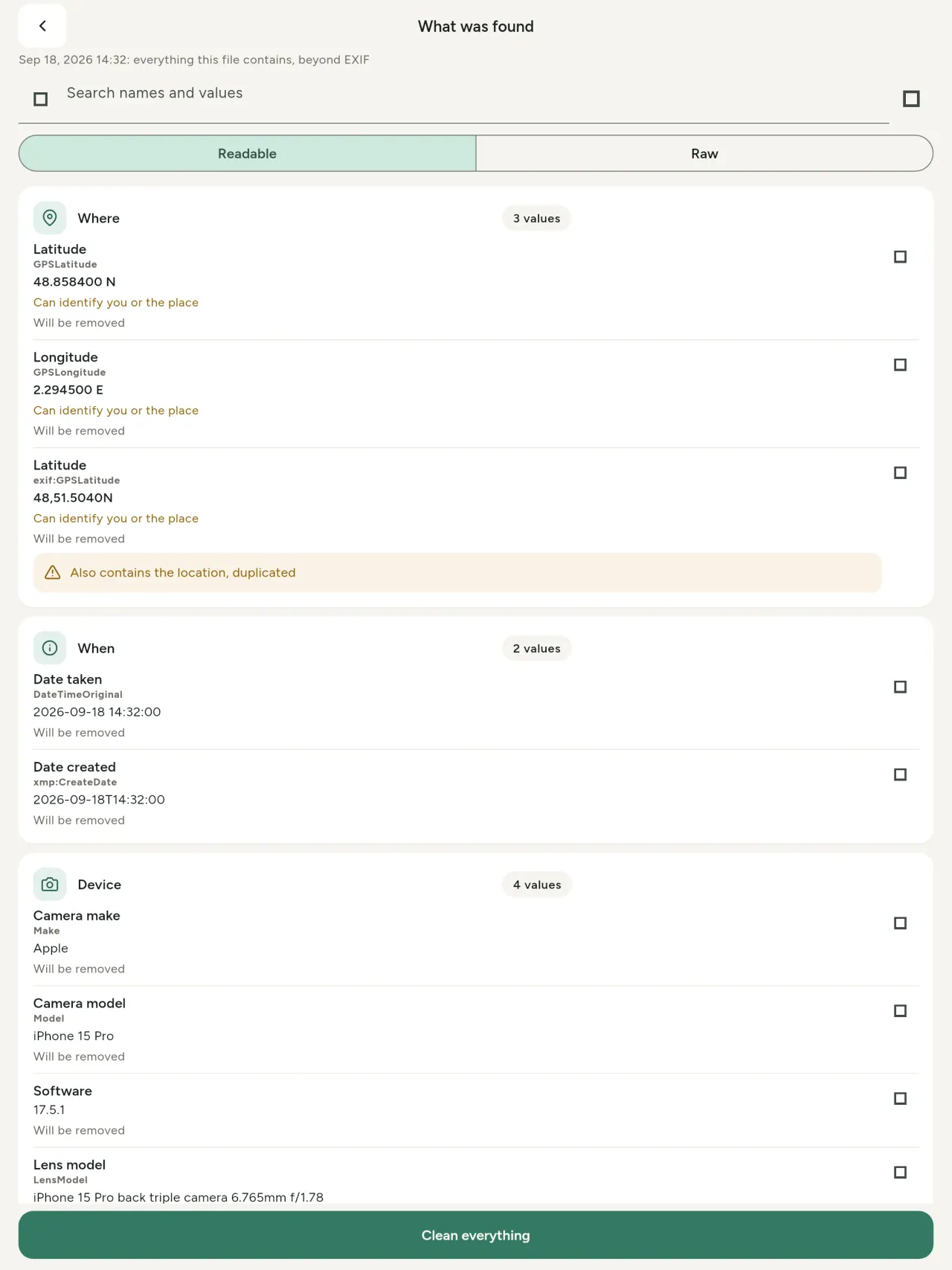
Onye na-ele metadata n'ezie: uru ọ bụla dị na foto ma ọ bụ vidiyo (EXIF, IPTC, XMP, codecs vidiyo, ogologo na mkpebi), haziri n'ìgwè, a pụrụ ịchọ ma detuo. A na-akara ihe a ga-ewepụ. A na-achọpụtakwa mmalite AI (C2PA na parameters mmepụta).
Dezie
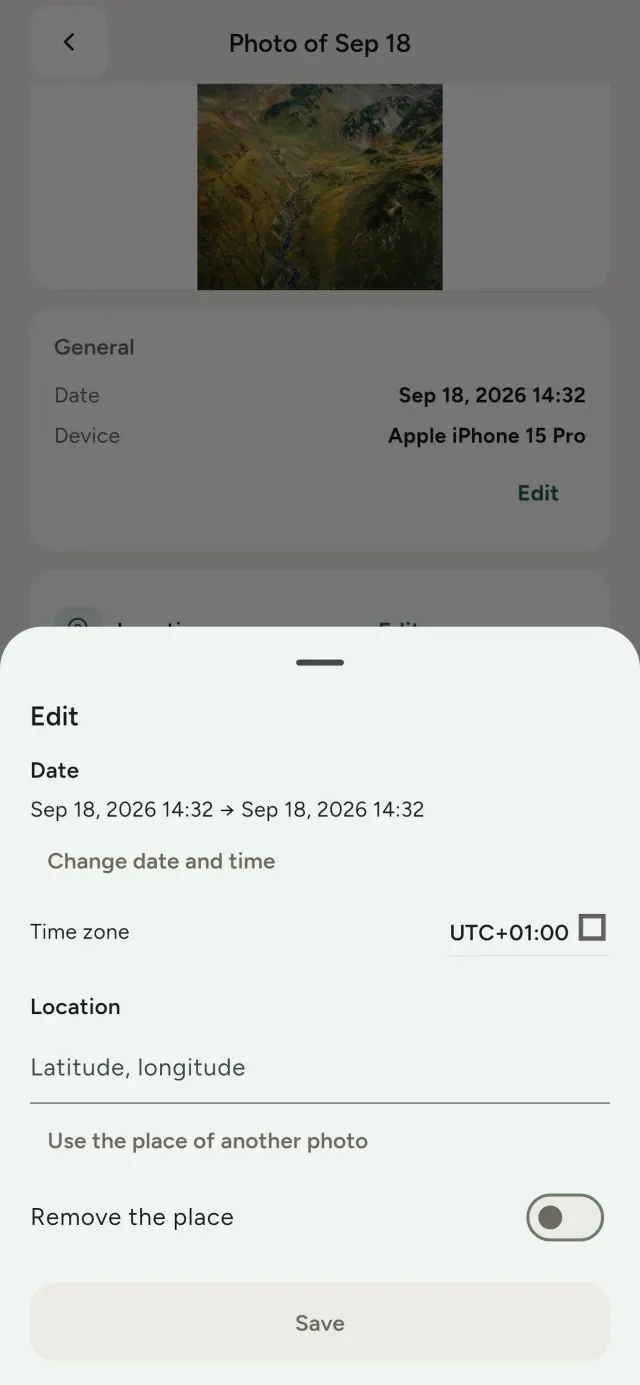
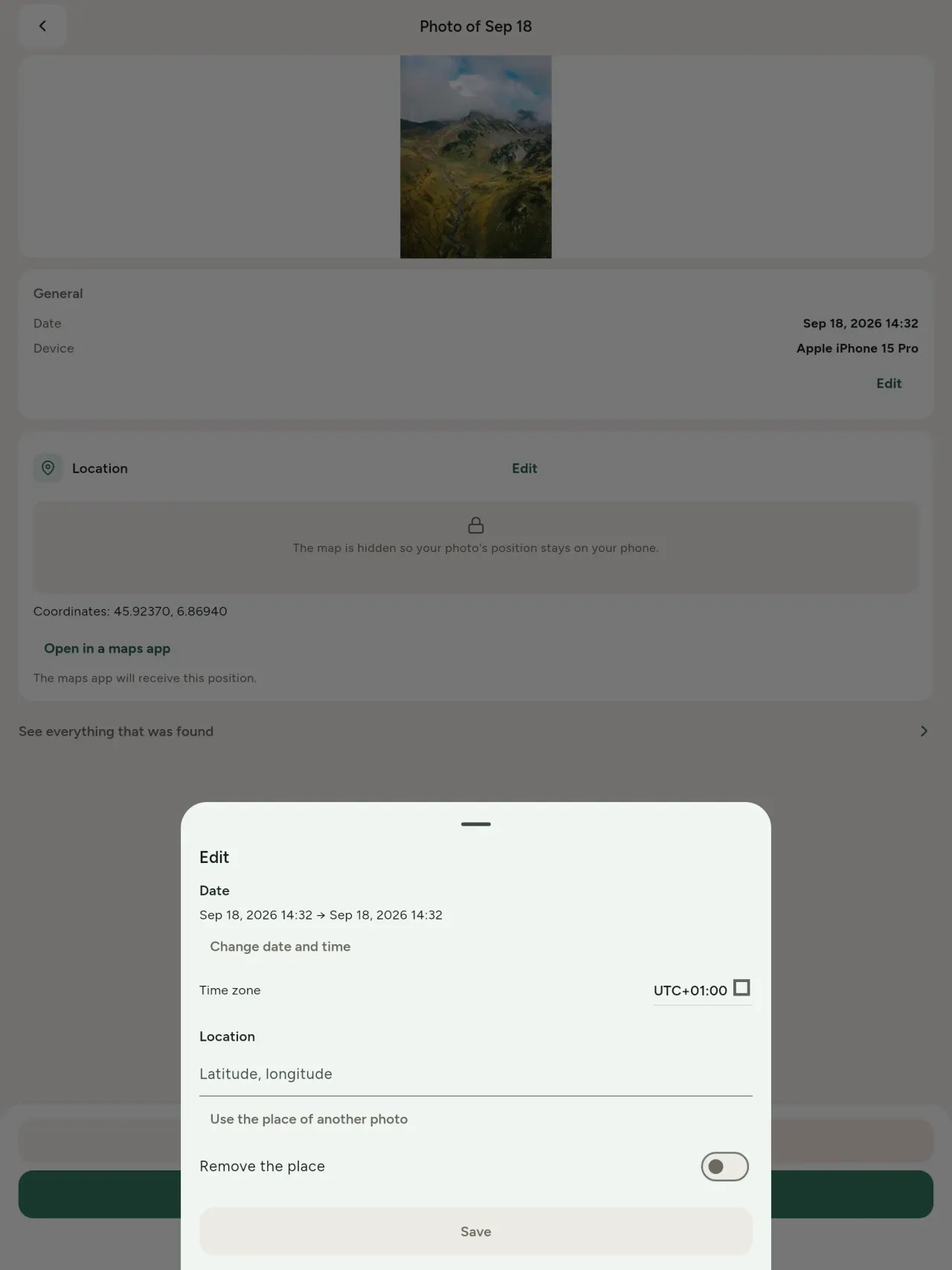
Gbanwee ụbọchị na ebe foto, ọbụna ma ọ bụrụ na metadata adịghị. Detuo ebe si na foto ọzọ, ma ọ bụ họrọ ya na maapụ (a na-ajụ ụzọ mbụ, oge ọ bụla). Tulee tupu na mgbe.
Wepụ
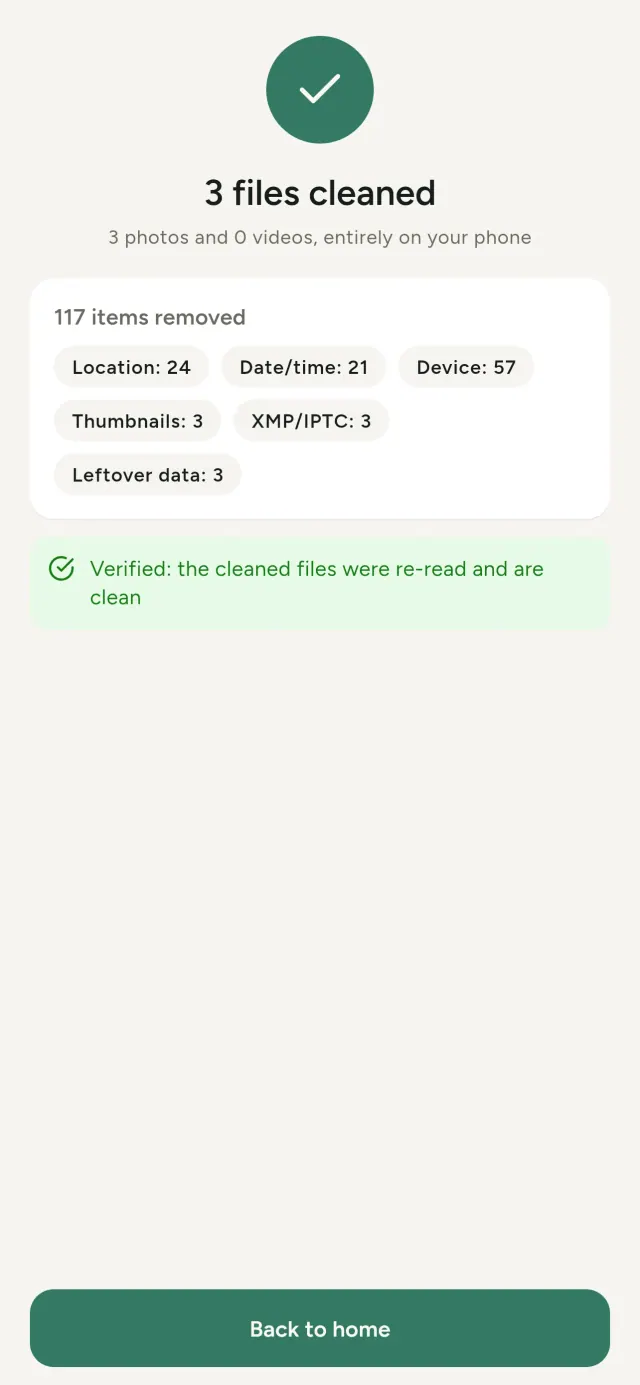
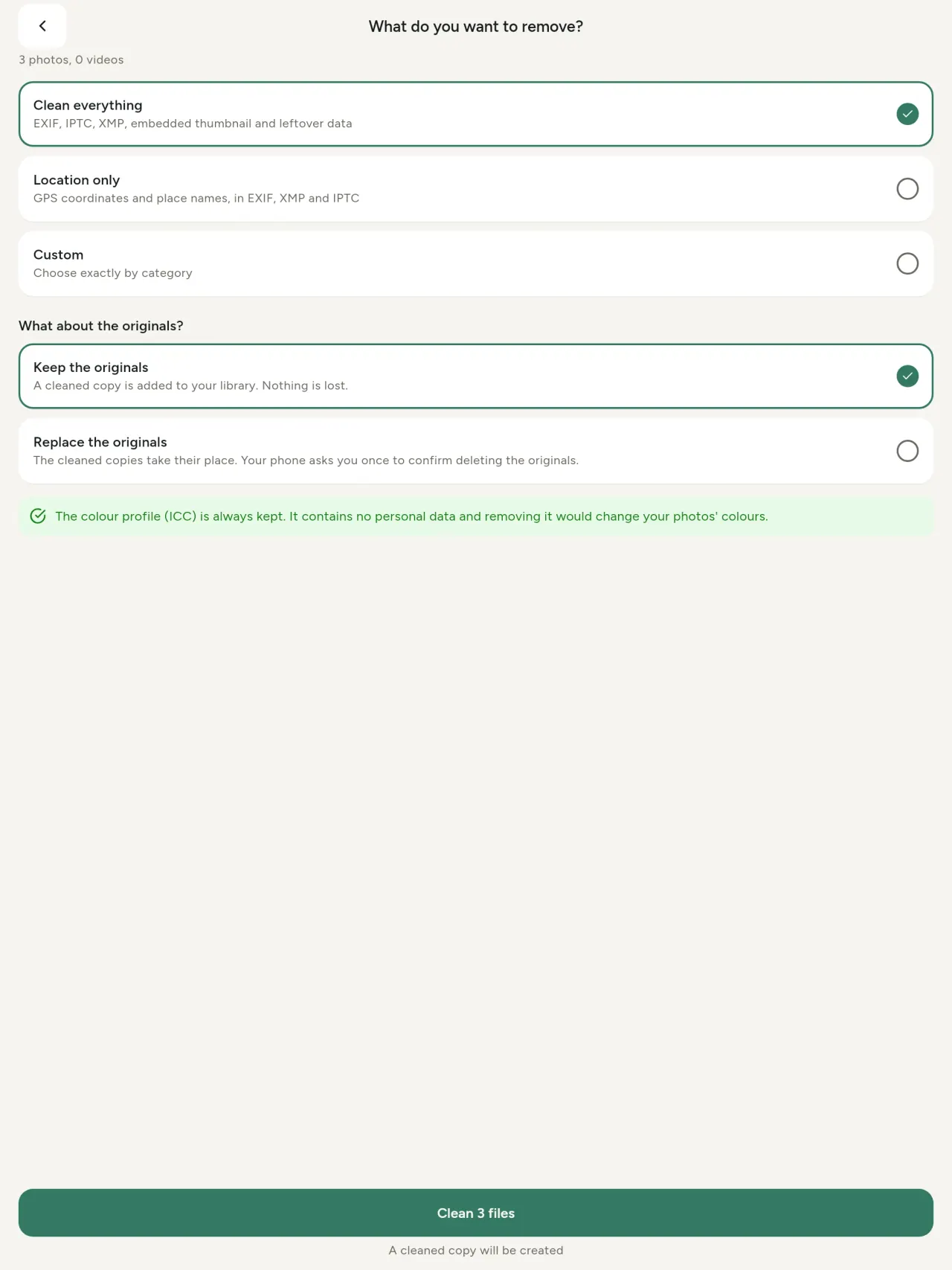
Ihe niile, ebe naanị, ma ọ bụ ngalaba ị họọrọ: data EXIF, IPTC na XMP, thumbnails, ndetu igwefoto, mmalite AI na bytes fọdụrụ. Hichaa nhọrọ dum n'otu oge, debe nke mbụ ma ọ bụ dochie ha.
Ọ dị nchebe ikesa ozugbo
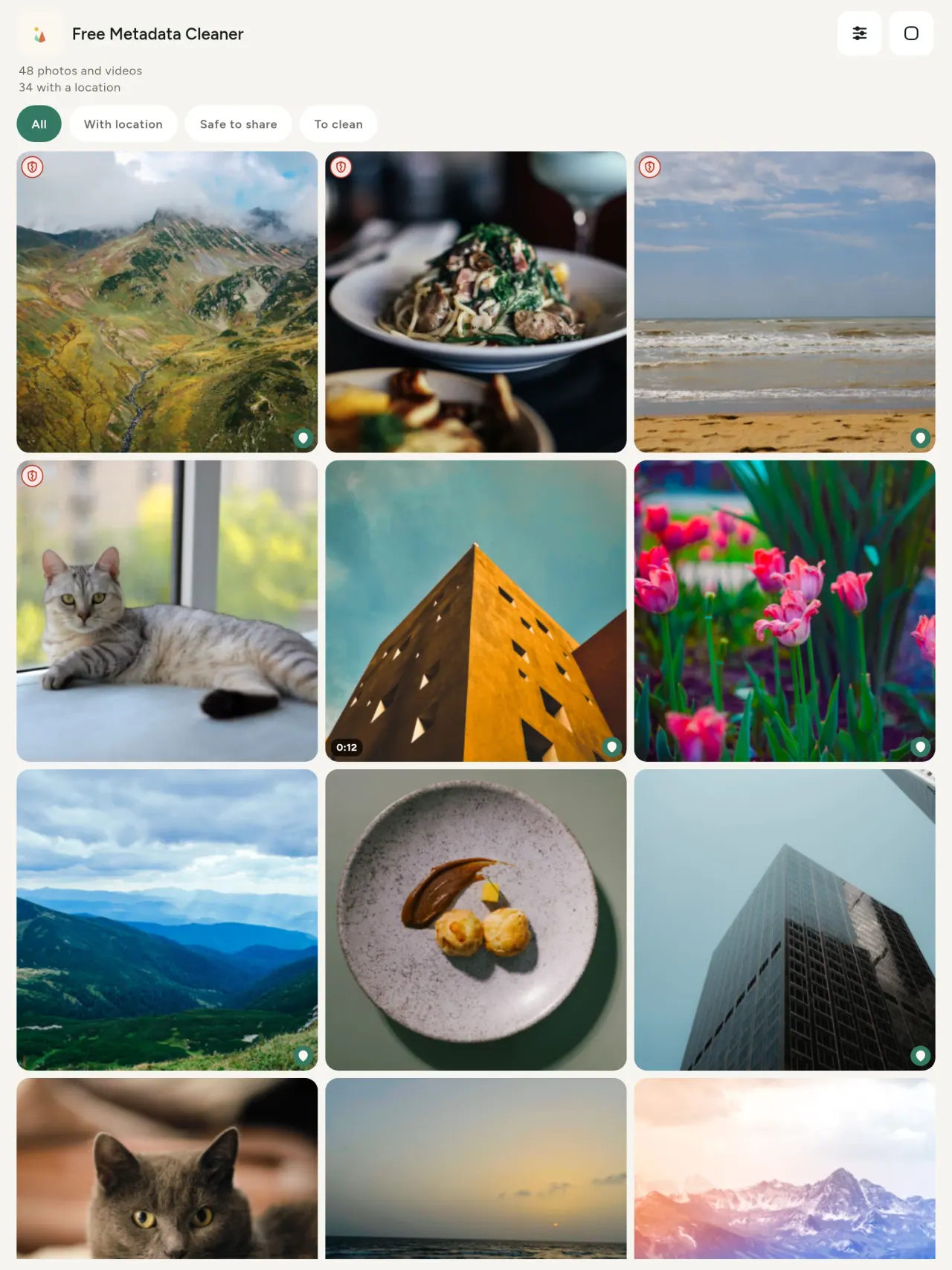
Ọta akwụkwọ ndụ na-egosi faịlụ na-enweghị metadata; ọta uhie gbawara agbawa na-egosi ndị fọdụrụ ihe.
Enweghị ọnwụ mma
A naghị encode foto ọzọ.
Nzuzo bụ ụkpụrụ ya
A na-agụ, edezi ma hichaa foto gị na ngwaọrụ gị. Enweghị akaụntụ, mgbasa ozi ma ọ bụ analytics. Maapụ bụ naanị ihe nhọrọ: mgbe ị kwadoro, ọ na-abịa site na OpenStreetMap; a naghị eziga foto ahụ.
Ọ bụ n'efu, enweghị mgbasa ozi
Ọ bụrụ na ngwa ahụ nyere gị aka, ị nwere ike inye onyinye.
Ònye ọ bụ maka
- Ndị chọrọ ịma ihe foto na-egosi (ebe GPS, ụbọchị, igwefoto) tupu bipụta, ree ma ọ bụ zipu ya.
- Ndị na-ere ihe n'ọrụ ahịa ntanetị na-achọghị igosi ebe ha nọ.
- Ndị nne na nna na onye ọ bụla chọrọ ichebe ebe aruara (ụlọ, ụlọ akwụkwọ, ebe ọrụ) apụ na foto ha na-ekekọrịta.
- Ndị nta akụkọ, ndị nnabata na ndị nọ n'ihe ize ndụ, chọrọ ikekọrịta foto na-enweghị hapụ ihe na-egosi ha.
- Ndị nwere iwe na-esi n'eweputa data chọrọ ijikwa ihe ha dere foto.
Gịnị mere họrọ Metadata Cleaner
- Ihe ime atọ n'otu ngwa: gụọ ihe foto ma ọ bụ vidio na-egosi, dezie ya (ụbọchị e were, ebe), wepụ metadata ahụ na ntakịrị.
- Ihe niile na-arụ na ekwentị. Foto gị anaghị apụ n'ebe ọzọ.
- Foto (JPEG, HEIC, PNG, WebP, GIF) na vidio (MP4, MOV, 3GP).
Ihe ngwa ahụ ka na-enweghị
- Naanị ụdị a nwere ike jiri ya. Ịdị ọhụrụ a na-emegharị.
Akụkụ Pixeon. Ngwa Pixeon na-eme ihe niile n'eme ụlọ mbụ: enweghi akaụntụ, enweghị inyocha, data gị na-anọgide na ekwentị gị. Ọ bụrụ na ngwa kpọọ netwọk, ọ bụ naanị ma ị họrọ ịgbanye atụmatụ ịchọrọ, a ga-emelite iwu nzuzo tupu ewepụta ya.
Hụ Metadata Cleaner n'ọrụ.
Nweta Metadata Cleaner.
N'efu na iPhone na Android.
Ụdị 1.1
- App Store Na-abịa
- Google Play Na-abịa
Ihe ọhụrụ
Okwu a bụ na Bekee.
- Read: see exactly what a photo or video reveals (location, date, camera, AI provenance labels such as C2PA and generation parameters, video duration, codecs, resolution and frame rate).
- Edit: change the date a photo was taken and its location (JPEG, HEIC, AVIF), even on a photo with no metadata, reuse the location of another photo, or pick it on an OpenStreetMap map after your confirmation.
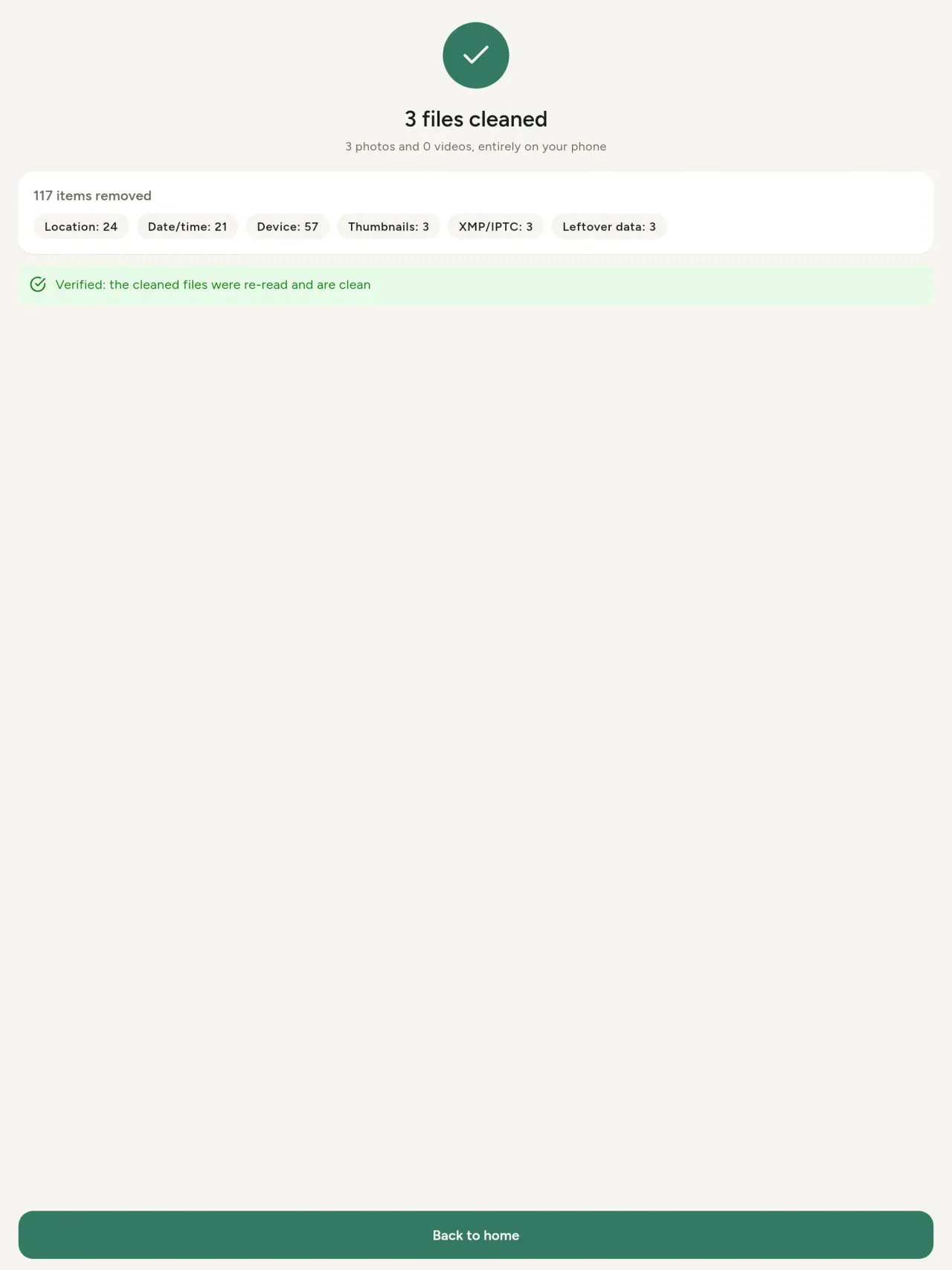
- Remove: clean metadata in a few taps, with a before and after view on the result screen.
- DNG photos are supported.
- Translations aligned across 91 languages.
Privacy policy
Okwu dị n'okpuru bụ Bekee. Nsụgharị Bekee kwesiri ntụkwasị obi.
Last updated: 2026-11-03 · applies to version 1.1 and later
Policy versions: 1.1 and later (this text) · version 1.0 (still the policy of the app version 1.0). The version number of your app is shown at the bottom of its Settings screen.
Free Metadata Cleaner shows and removes the metadata hidden in your photos and videos (location, date and time, camera and lens details, thumbnails…). The short version: everything happens on your device, and we collect nothing.
What the app accesses
Your photo and video library, only after you grant permission (and, where your system requires it, the permission to read the location stored in your photos, so that it can be shown to you). The files you choose are read and cleaned on your device; the cleaned copy is saved to your library. If you choose to replace the originals, the system asks you to confirm before deleting them.
To show which photos are already clean, the app reads the metadata of the photos displayed on screen, on your device. This result is kept in memory only and is never stored.
What we collect
Nothing. No account, no analytics or usage tracking, no advertising or advertising identifiers, no crash or diagnostics reporting beyond what the app stores provide, and no third-party SDK that sends data anywhere. There is no Free Metadata Cleaner server. Cleaning a photo or video never uses the network, at all: turn on airplane mode and clean one to check for yourself. The only network request the app itself can ever make is described under “Location” below, and it only ever happens if you ask for it. The one other connection is the optional tip purchase, handled by the store (see “Optional support”).
Temporary files and history
The app keeps no history and no database. Temporary files created while cleaning are deleted after each item and purged when the app starts.
Deleted originals
Originals that are deleted remain in your system's trash (such as “Recently Deleted” or the trash) for about 30 days, with their metadata. The app cannot empty it: do it yourself if you need the originals gone at once.
iCloud and cloud photos
If a photo is stored in iCloud and not on your device, the operating system may download it before the app can process it. That transfer is made by the system, under the provider's own terms, not by the app.
Location
When a photo contains a location, the app shows the coordinates as text, which stays on your device. Three actions can send location information off your device, only when you choose them, each time: “Open in…” hands the coordinates to the maps application you select, under its own privacy policy; “Show the map” asks you to confirm first (“Showing the map sends this photo's position to a map service. Nothing else is sent.”), then loads a small map from OpenStreetMap for that one position; and, when you edit a photo's place, “Choose on the map” asks you to confirm first, then opens a full-screen map from OpenStreetMap. This map does not use your phone's location. As you move and zoom it, the app requests the map tiles of the area you are browsing, so OpenStreetMap receives the position of the area shown on screen, which starts on the photo's current place if it has one, and otherwise on a world view. The photo itself is never sent, and nothing is sent before you confirm. The place you choose on the map (or copy from another photo) is written into the photo's file only when you save, on your device. In every case OpenStreetMap receives, as with any web request, technical details like your IP address; it does not receive your name, an account, or anything else about you or your other photos. See OpenStreetMap's own privacy policy. Outside of these explicit actions, the app never sends a photo's location, or anything else, anywhere.
Optional support
The app is free. If you wish, you can leave a tip. On iPhone and in the Google Play version for Android, tips are in-app purchases processed by Apple or Google under their own terms and privacy policy; the app adds the Google Play billing permission for this, makes no network call itself, and receives no payment or personal details. Versions installed outside Google Play may instead open an external donation page in your browser, operated by a third party under its own privacy policy; nothing from the app is sent to it. A tip unlocks nothing.
Contact form on this website
If you write to us through this site, we use your message and the email address you optionally give only to reply. Bot protection is provided by Cloudflare and email delivery by Resend.
Language choice on this website
When you choose a language, or when this site opens a page in your browser's language, it stores
one small functional cookie (pxl, a language code, one year) so that your choice is
remembered. If this site suggests a page in your browser's language and you close that suggestion,
your browser also keeps a local note (pxl-banner-off, in local storage, 30 days) so the
suggestion does not come back. Neither identifies anyone, neither is used for tracking or advertising,
and neither is shared. You can delete them in your browser at any time.
Website statistics
This website uses Cloudflare Web Analytics to count visits (pages viewed, country, browser type, loading speed). It sets no cookie, does not use local storage, does not fingerprint your device, does not follow you across sites and does not build a profile of you. Search engines (for example Google Search Console) give us aggregated search statistics, without any data about individual visitors. Our own web server also counts the pages it serves: for each page it keeps the page address, the site or social network that sent you (only its name, or the campaign tag written in the link), the country, the type of device and whether the request came from a robot. It keeps no IP address, no identifier and no cookie, and these counts are anonymous. We use no advertising or other analytics service. None of this concerns the app itself, which collects nothing.
Children
The app is a general-purpose tool and is not directed at children.
Changes
An updated policy will be published at this URL with a new date above.
Contact
Questions about privacy: metadata-cleaner-contact@pixeon.net
Ụdị 1.0
- App Store Ebipụtara
- Google Play Ebipụtara
Ihe ọhụrụ
Okwu a bụ na Bekee.
- Cleans JPEG, HEIC, PNG, WebP, GIF, MP4, MOV and 3GP files, with no video re-encoding.
- "Safe to share" and "To clean" filters.
- New green design.
- Help screen with a FAQ.
- Settings: share, rate, feedback, unsupported formats.
- Optional tips.
Privacy policy, version 1.0
Okwu dị n'okpuru bụ Bekee. Nsụgharị Bekee kwesiri ntụkwasị obi.
Applies to version 1.0 of the app (the first release). Later versions: current policy.
Free Metadata Cleaner shows and removes the metadata hidden in your photos and videos (location, date and time, camera and lens details, thumbnails…). The short version: everything happens on your device, and we collect nothing.
What the app accesses
Your photo and video library, only after you grant permission (and, where your system requires it, the permission to read the location stored in your photos, so that it can be shown to you). The files you choose are read and cleaned on your device; the cleaned copy is saved to your library. If you choose to replace the originals, the system asks you to confirm before deleting them.
To show which photos are already clean, the app reads the metadata of the photos displayed on screen, on your device. This result is kept in memory only and is never stored.
What we collect
Nothing. No account, no analytics or usage tracking, no advertising or advertising identifiers, no crash or diagnostics reporting beyond what the app stores provide, and no third-party SDK that sends data anywhere. There is no Free Metadata Cleaner server. Cleaning a photo or video never uses the network, at all: turn on airplane mode and clean one to check for yourself. The only network request the app itself can ever make is described under “Location” below, and it only ever happens if you ask for it. The one other connection is the optional tip purchase, handled by the store (see “Optional support”).
Temporary files and history
The app keeps no history and no database. Temporary files created while cleaning are deleted after each item and purged when the app starts.
Deleted originals
Originals that are deleted remain in your system's trash (such as “Recently Deleted” or the trash) for about 30 days, with their metadata. The app cannot empty it: do it yourself if you need the originals gone at once.
iCloud and cloud photos
If a photo is stored in iCloud and not on your device, the operating system may download it before the app can process it. That transfer is made by the system, under the provider's own terms, not by the app.
Location
When a photo contains a location, the app shows the coordinates as text, which stays on your device. Two actions send that one photo's position off your device, only when you choose them, each time: “Open in…” hands the coordinates to the maps application you select, under its own privacy policy; “Show the map” asks you to confirm first (“Showing the map sends this photo's position to a map service. Nothing else is sent.”), then loads a small map from OpenStreetMap for that one position. OpenStreetMap receives the coordinates and, as with any web request, technical details like your IP address; it does not receive your name, an account, or anything else about you or your other photos. See OpenStreetMap's own privacy policy. Outside of these two explicit actions, the app never sends a photo's location, or anything else, anywhere.
Optional support
The app is free. If you wish, you can leave a tip. On iPhone and in the Google Play version for Android, tips are in-app purchases processed by Apple or Google under their own terms and privacy policy; the app adds the Google Play billing permission for this, makes no network call itself, and receives no payment or personal details. Versions installed outside Google Play may instead open an external donation page in your browser, operated by a third party under its own privacy policy; nothing from the app is sent to it. A tip unlocks nothing.
Contact form on this website
If you write to us through this site, we use your message and the email address you optionally give only to reply. Bot protection is provided by Cloudflare and email delivery by Resend.
Language choice on this website
When you choose a language, or when this site opens a page in your browser's language, it stores
one small functional cookie (pxl, a language code, one year) so that your choice is
remembered. If this site suggests a page in your browser's language and you close that suggestion,
your browser also keeps a local note (pxl-banner-off, in local storage, 30 days) so the
suggestion does not come back. Neither identifies anyone, neither is used for tracking or advertising,
and neither is shared. You can delete them in your browser at any time.
Website statistics
This website uses Cloudflare Web Analytics to count visits (pages viewed, country, browser type, loading speed). It sets no cookie, does not use local storage, does not fingerprint your device, does not follow you across sites and does not build a profile of you. Search engines (for example Google Search Console) give us aggregated search statistics, without any data about individual visitors. Our own web server also counts the pages it serves: for each page it keeps the page address, the site or social network that sent you (only its name, or the campaign tag written in the link), the country, the type of device and whether the request came from a robot. It keeps no IP address, no identifier and no cookie, and these counts are anonymous. We use no advertising or other analytics service. None of this concerns the app itself, which collects nothing.
Children
The app is a general-purpose tool and is not directed at children.
Changes
An updated policy will be published at this URL with a new date above.
Contact
Questions about privacy: metadata-cleaner-contact@pixeon.net
Nkwado
Emelitere ikpeazụ: 2026-10-08
Free Metadata Cleaner bụ ngwa ntanetị nta. Azịza ajụjụ a na-ajụkarị dị n'okpuru.
Anyị na-agbalịsi ike ịza ajụjụ n'ime otu ụbọchị ole na ole. Iji nyere anyị aka, gwa anyị ụdị ngwaọrụ gị, ụdị usoro ya na ihe ị na-eme. Biko ejila zipụ foto nzuzo.
Kedu data ngwa a na-edebe ma ọ bụ zipu?
Ọ dịghị. Ọ naghị echeta akụkọ ihe mere eme, enweghi akaụntụ na sava. Nkọwa nọ na ụkpụrụ nzuzo.
Olee otú m ga-esi sachaa foto?
- Meghee ngwa ahụ ma kweta ịnweta ika faịlụ gị mgbe e jụọ gị.
- Họrọ foto ma ọ bụ vidiyo ịchọrọ ịsachapụ.
- Họrọ ihe ịchọrọ iwepụ, ma họrọ ma a ga dochie foto mbụ ma ọ bụ mee otu e sachara.
- Kpọsaa. Nsonaazụ ga-egosi ihe e wepụrụ na faịlụ ọ bụla a maghị emepụta.
Ebee ka e debere faịlụ a sachara?
N'ime ika foto gị. A na-edobe ụbọchị faịlụ mbụ, ya mere, foto a sachara agaghị apụta n'elu ile anya foto gị.
Ahọrọ m "dochie foto mbụ" ma foto mbụ ka dị ndụ.
Foto mbụ a gogburu ka na-anọgide na sistemụ mkpọ (dịka "E nyere nkịtị" ma ọ bụ mkpọ akwụkwọ mkpofu) maka ihe dị ka ụbọchị iri atọ, na metadata ha. Kpochapụ mkpọ iji wepu ya ozugbo. Ọ bụrụ na jụ nkwenye ihichapụ sistemụ, a ga-edobe foto mbụ, a ga-etinye faịlụ sachara ka na-adị.
Kedu ụdị faịlụ a na-akwado?
Foto na JPEG, HEIC, AVIF, PNG, WebP na GIF, na vidiyo na MP4, MOV na 3GP (a na-etinye ụdị ndị ọzọ). A naghị emetụta faịlụ ngwa ahụ enweghị ike ịsacha, a ga-egosi nsonaazụ na mpụta ya, na-eme ka ndị ọzọ gaa n'ihu.
Gịnị mere ngwa ji chọọ ịnweta foto m?
Iji gosi foto ịchọrọ ịhọrọ na iji chekwaa faịlụ sachara. Oge ụfọdụ sistemụ gị chọọ ya, ngwa a na-ajụkwa ikike ịgụ ebe a dere na foto: na-enweghị ya, sistemụ na-egbochi ebe, ngwa ahụ agaghị egosi ihe foto nwere ike igosi. Enweghị ihe a zipụ.
Kedu ka m ga-esi hụ na ọ dịghị ihe na-apụ na ekwentị m?
Gbanyụọ ọnọdụ ụgbọ elu ma sachaa foto: ọ na-arụ otu ihe ahụ. Ihe naanị iche bụ ma ọ bụrụ na pịa "Gosi map" na ebe foto ma kwadoro, otu ọnọdụ ahụ ezipu OpenStreetMap iji gosipụta map, ihe ọzọ adịghị. Lee "Ebe" n'elu.
Kedu asụsụ dị?
Ngwa na-akwado Bekee, French, German, Spanish, Italian, Portuguese na Arabic. Webụsaịtị a dị na asụsụ ọzọ, a ga-etinye asụsụ ndị ọzọ ngwa ngwa.
Kwado oru ngo a
Metadata Cleaner na-anọgide n'efu na enweghị mgbasa ozi. Ọ bụrụ na ọ bara uru, ịnwere ike kwado mmepe ya (nhọrọ):
Buy Me a CoffeeExpense tracker and family budget planner. Free phone sync, no account.
Nwoke ọzọ sitere PixeonVaultMarkEncrypted document vault. Watermark documents, remove metadata before sharing.
Nwoke ọzọ sitere PixeonLittle RelayBreastfeeding, sleep and starting solids tracker. No account, works offline.
Nwoke ọzọ sitere PixeonMenuloopPlan the week's meals, build your grocery list and keep recipes with photos.