
Metadata Cleaner: foto/wideo
EXIF viewer: metadane zdjęć, lokalizacja zdjęć. Czytaj, poprawiaj, usuwaj.


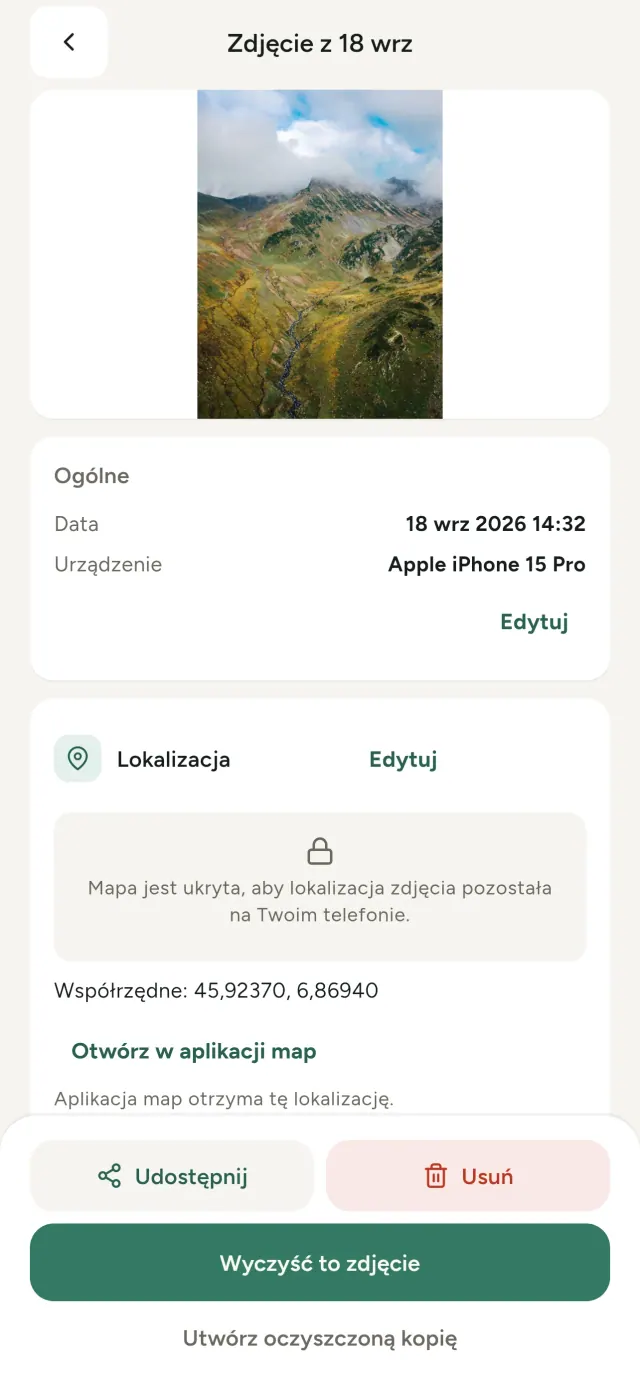
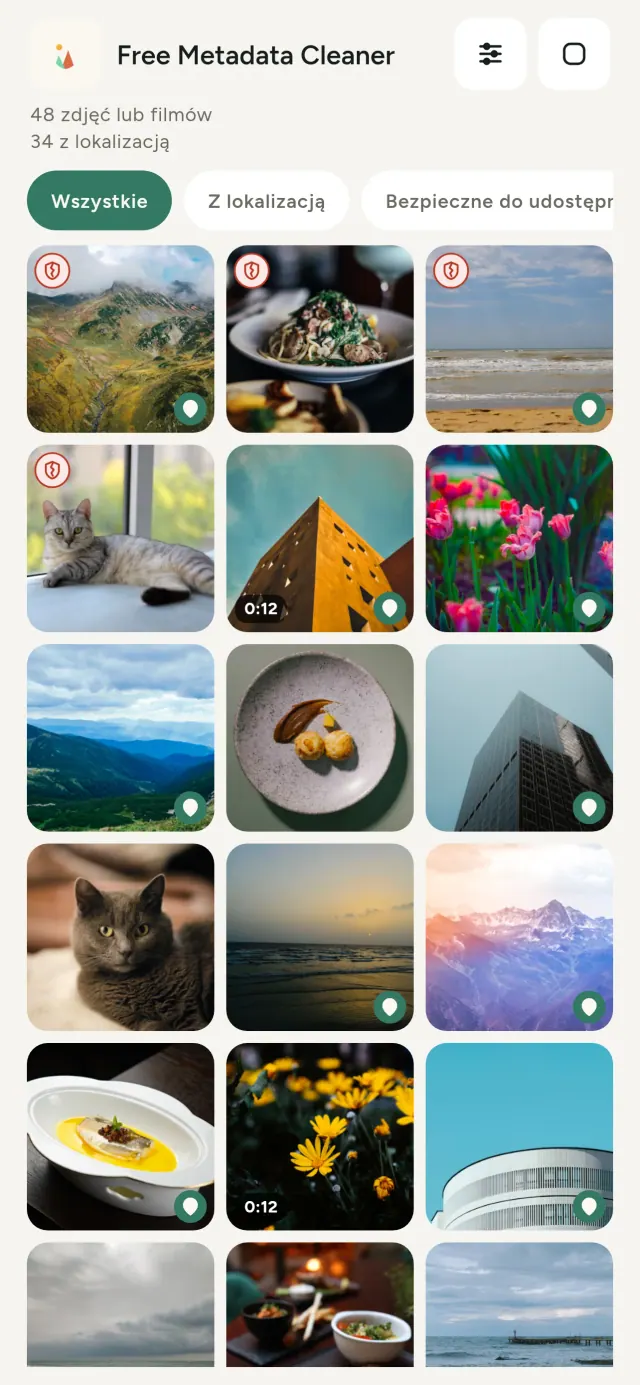
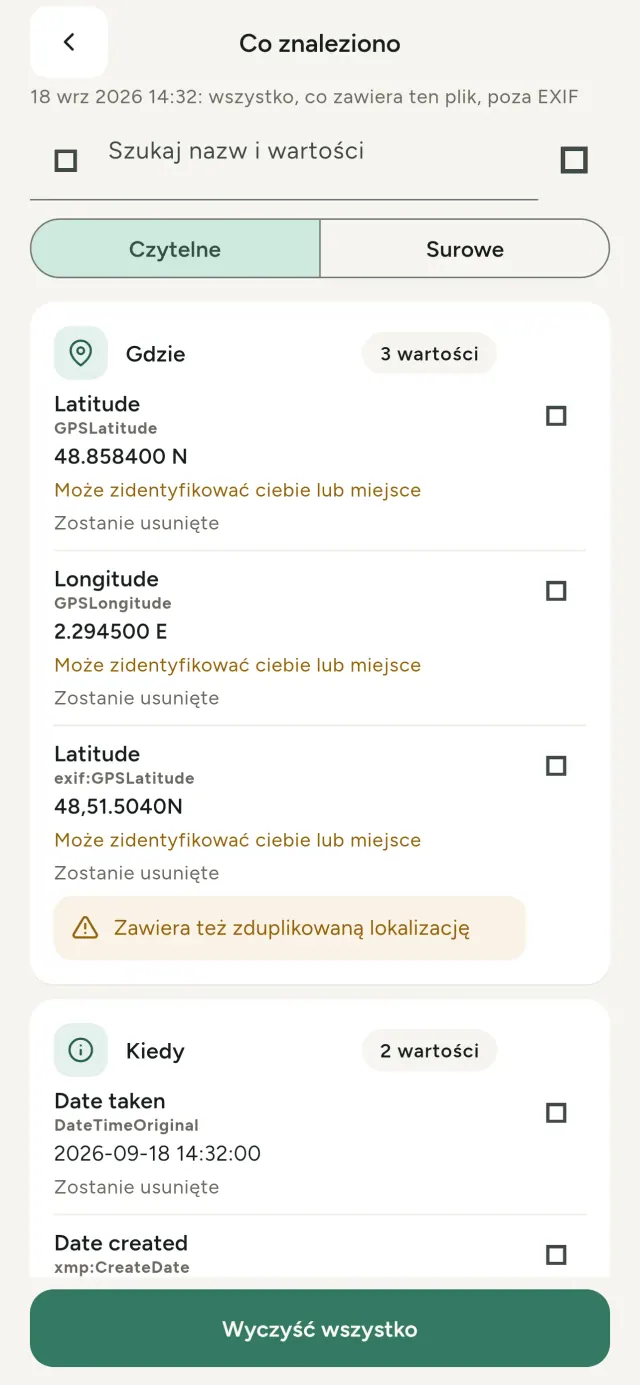
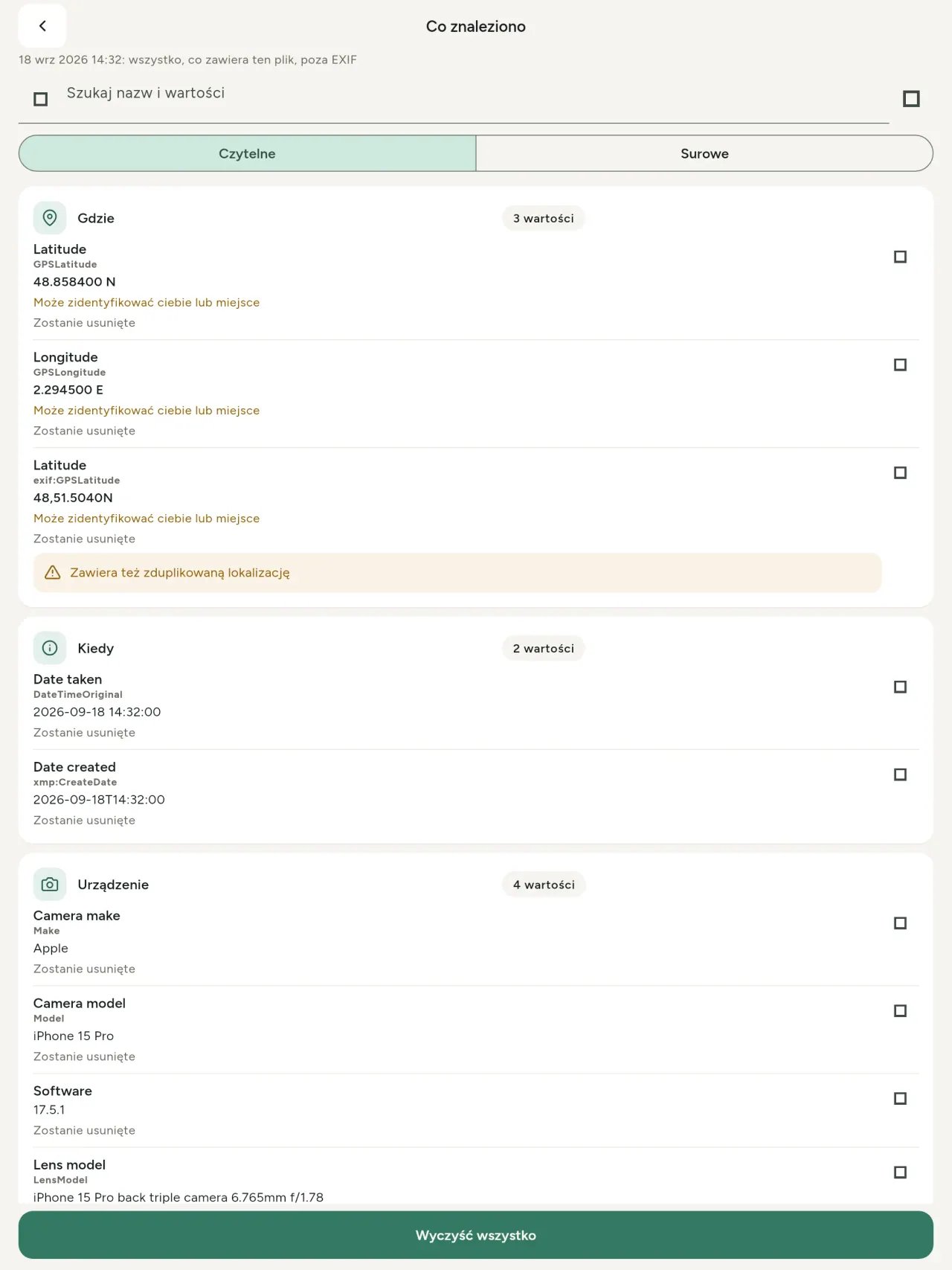
Każde zdjęcie zawiera ukryte informacje: gdzie i kiedy powstało, jakim telefonem zostało zrobione, a czasem nawet miniaturę oryginału. Po udostępnieniu wszystkie te dane idą razem z nim.
Metadata Cleaner pokazuje metadane zdjęć i filmów, pozwala je poprawić, a następnie usunąć, bezpośrednio na telefonie.
Co robi Metadata Cleaner
Czytaj
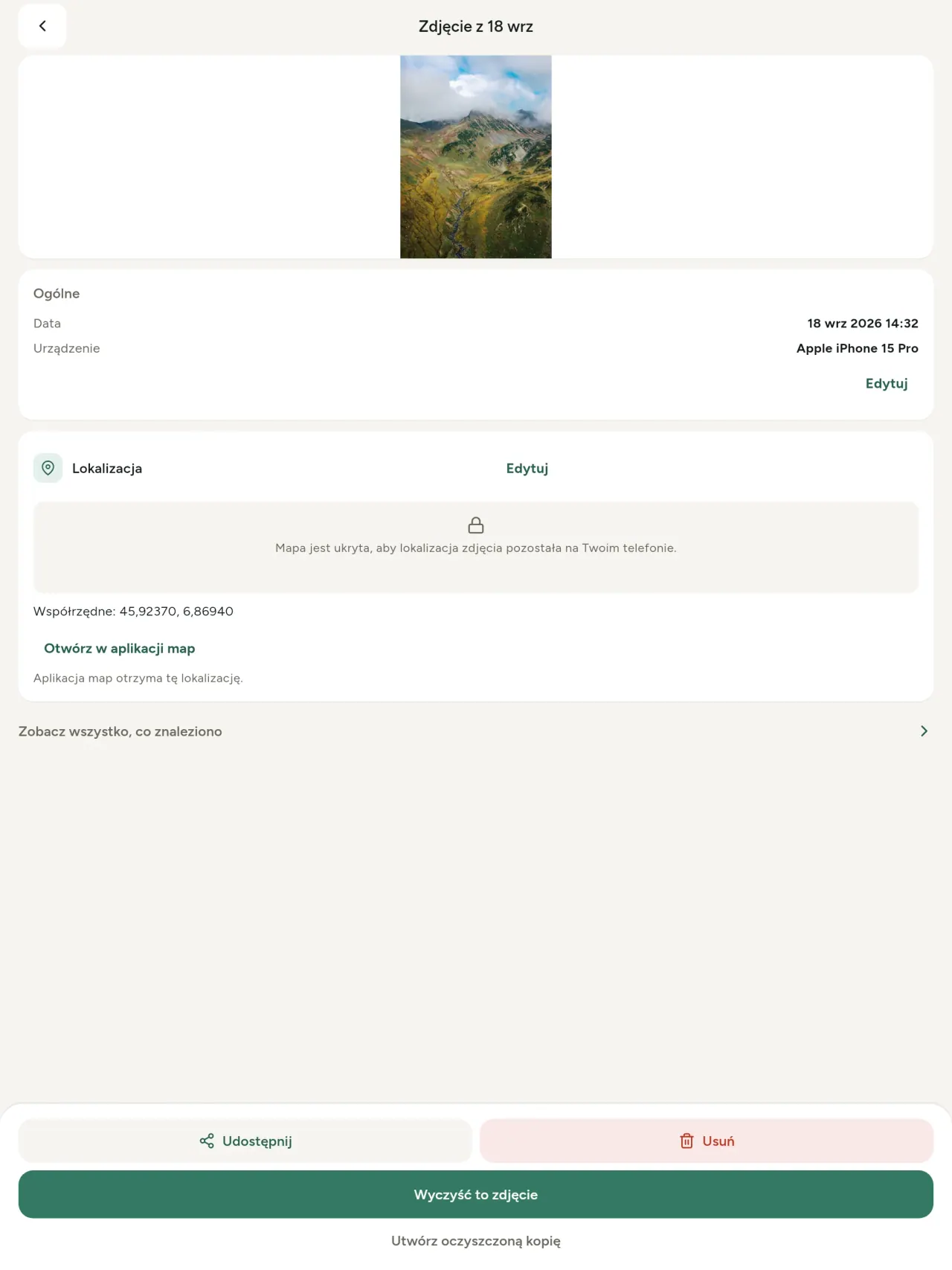
To prawdziwy exif viewer metadane zdjęć: odczytuje każdą wartość znalezioną w zdjęciu lub filmie, w tym EXIF, IPTC, XMP, kodeki, czas trwania i rozdzielczość. Dane są pogrupowane, przeszukiwalne i możliwe do skopiowania. Wykrywana jest także proweniencja AI, w tym C2PA.
Edytuj
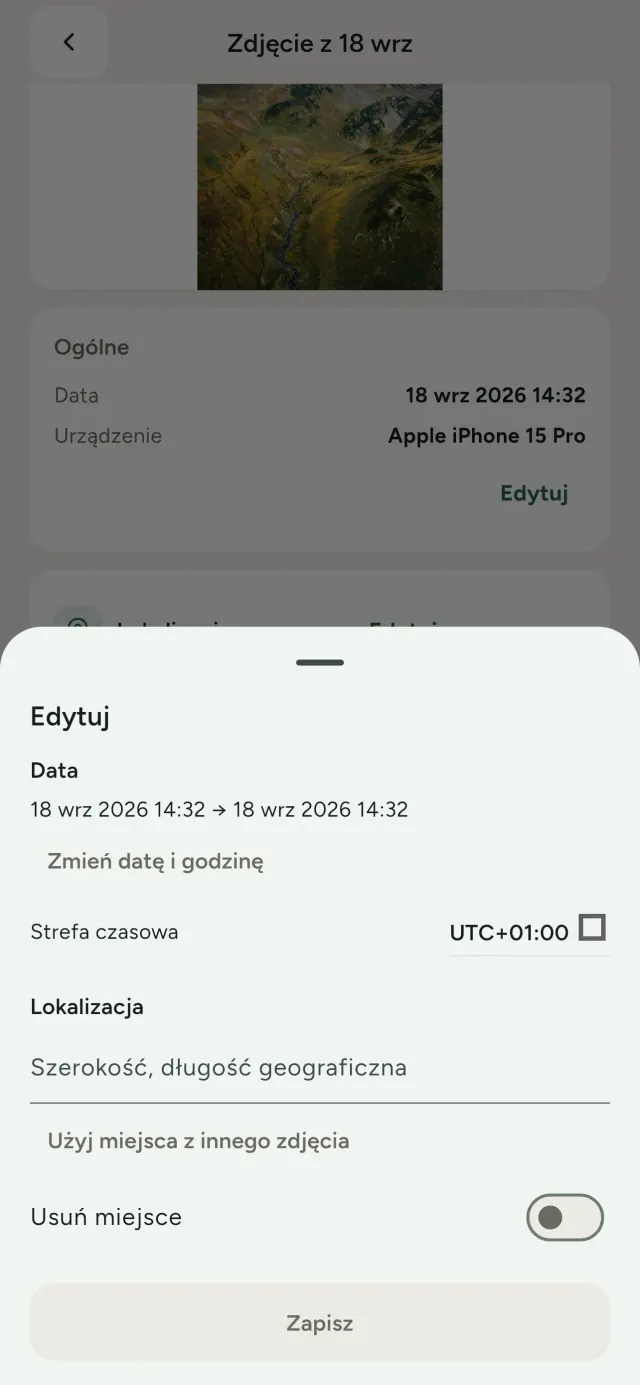
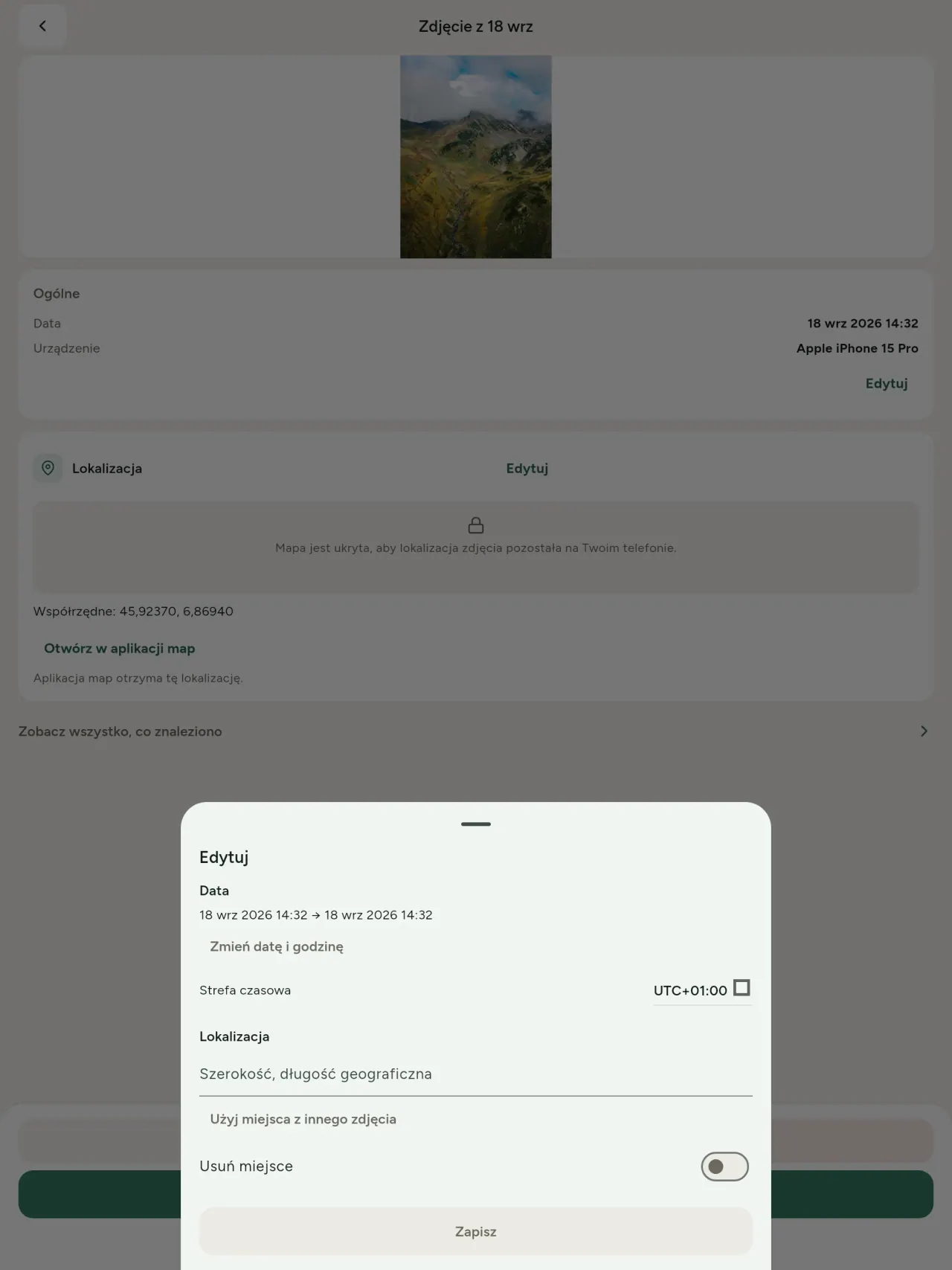
Ten edytor naprawia datę, lokalizację zdjęć i inne dane. Zmień lub zastąp datę i lokalizację zdjęcia, nawet jeśli nie ma ono metadanych. Skopiuj miejsce z innego zdjęcia albo wybierz je na mapie, zawsze po wcześniejszym potwierdzeniu. Porównaj stan przed i po.
Usuń
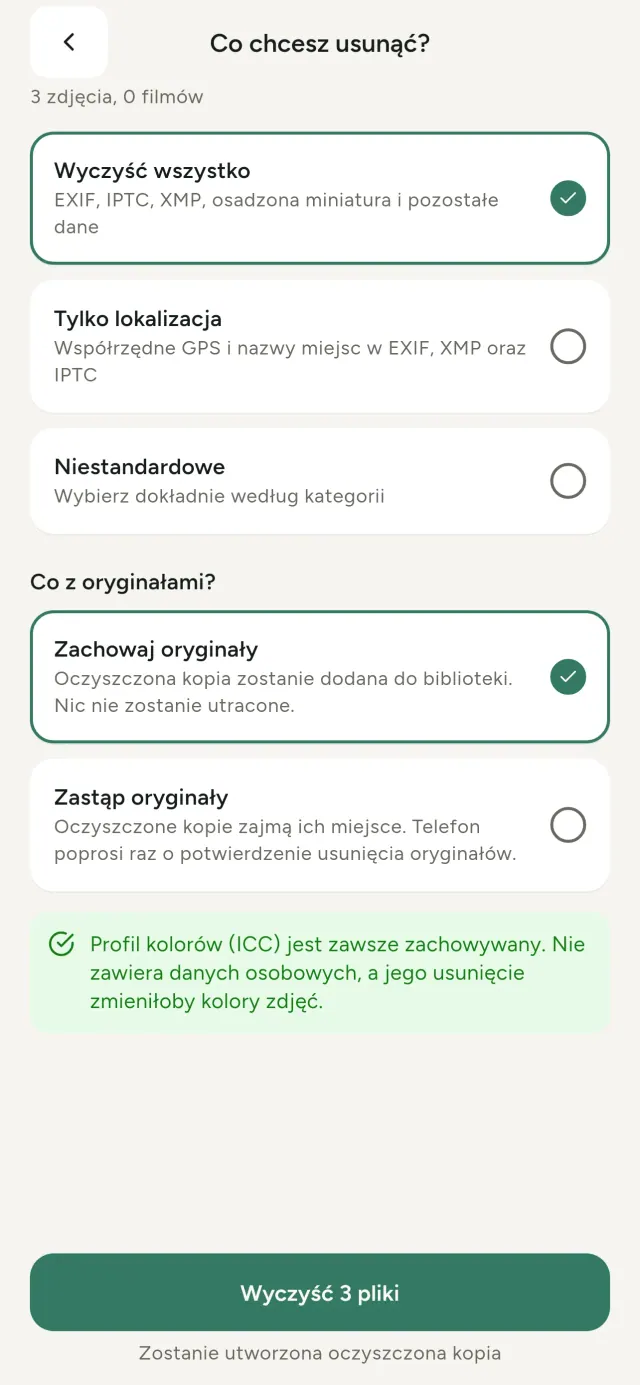
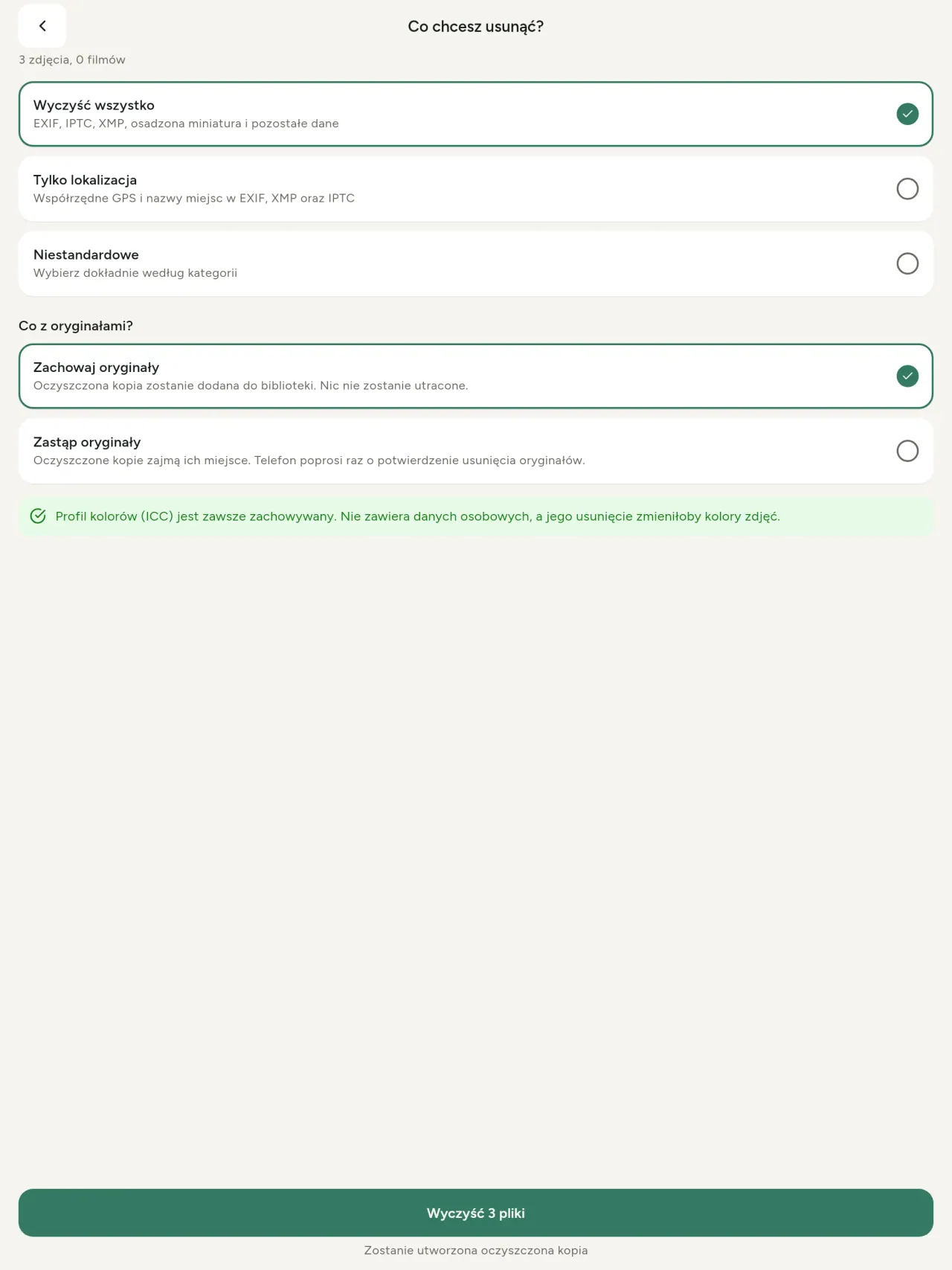
Usuń wszystko, tylko lokalizacja albo wybrane kategorie: EXIF, IPTC, XMP, miniatury, notatki producenta i pozostałe bajty po kadrowaniu. Wyczyść wiele plików naraz, zachowując oryginały lub zastępując je.
Bezpieczne udostępnianie
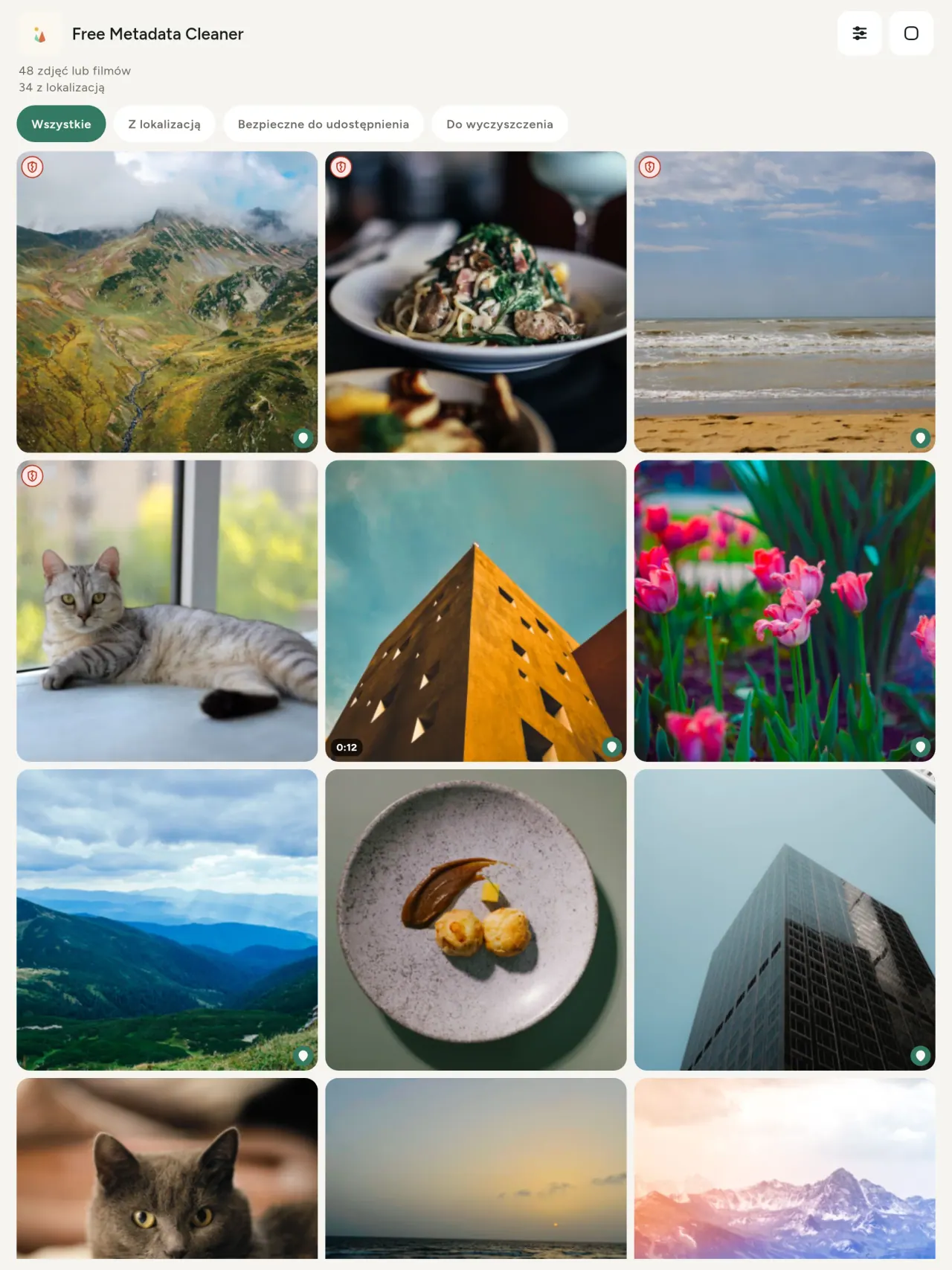
Zielona tarcza oznacza plik bez metadanych, a pęknięta czerwona tarcza wskazuje, że coś jeszcze pozostało.
Bez utraty jakości
Obrazy nie są ponownie kodowane, więc ich zawartość pozostaje nietknięta.
Prywatność przede wszystkim
Zdjęcia są odczytywane i czyszczone na urządzeniu. Bez konta, reklam i analityki. Opcjonalna mapa jest pobierana z OpenStreetMap dopiero po potwierdzeniu; zdjęcie nigdy nie jest wysyłane.
Bezpłatnie i bez reklam
Jeśli aplikacja Ci pomaga, możesz zostawić opcjonalny napiwek.
Dla kogo
- Każdy, kto chce wiedzieć, co zdradza zdjęcie (lokalizacja GPS, data, aparat), zanim je opublikuje, sprzeda lub wyśle.
- Osoby sprzedające na portalach ogłoszeniowych, które nie chcą pokazywać, gdzie mieszkają.
- Rodzice i każdy, kto chce, aby miejsca wrażliwe (dom, szkoła, miejsce pracy) nie pojawiały się na udostępnianych zdjęciach.
- Dziennikarze, aktywiści i osoby zagrożone, które muszą udostępnić obraz bez pozostawiania śladu.
- Osoby zmęczone wyciekami danych, które chcą odzyskać kontrolę nad informacjami osobistymi zawartymi we własnych zdjęciach.
Dlaczego warto wybrać Metadata Cleaner
- Trzy rzeczy w jednej aplikacji: odczytaj, co ujawnia zdjęcie lub wideo, edytuj je (data wykonania, lokalizacja) i usuń metadane w kilku stuknięciach.
- Wszystko działa w telefonie. Twoje zdjęcia nigdzie nie są wysyłane.
- Zdjęcia (JPEG, HEIC, PNG, WebP, GIF) i filmy (MP4, MOV, 3GP).
Czego aplikacja jeszcze nie robi
- Obsługiwane są tylko formaty wymienione powyżej. Kolejne formaty są planowane.
Zasada Pixeon. Aplikacje Pixeon działają przede wszystkim lokalnie: bez konta, bez śledzenia, a Twoje dane zostają w telefonie. Jeśli aplikacja kiedyś połączy się z siecią, stanie się to tylko wtedy, gdy sam włączysz potrzebną funkcję, a politykę prywatności aktualizujemy, zanim ta funkcja trafi do użytkowników.
Zobacz Metadata Cleaner w akcji.
Pobierz Metadata Cleaner.
Bezpłatnie na iPhone i Android.
SHA-256: A4:38:C9:B4:A9:3F:97:7B:E8:98:AD:B7:3B:30:5F:63:01:22:E0:D9:F8:CF:5D:2B:D7:4E:38:CB:9A:CF:5A:A2
Wersja 1.1
- App Store Wkrótce
- Google Play Wkrótce
Co nowego
Ten tekst jest po angielsku.
- Read: see exactly what a photo or video reveals (location, date, camera, AI provenance labels such as C2PA and generation parameters, video duration, codecs, resolution and frame rate).
- Edit: change the date a photo was taken and its location (JPEG, HEIC, AVIF), even on a photo with no metadata, reuse the location of another photo, or pick it on an OpenStreetMap map after your confirmation.
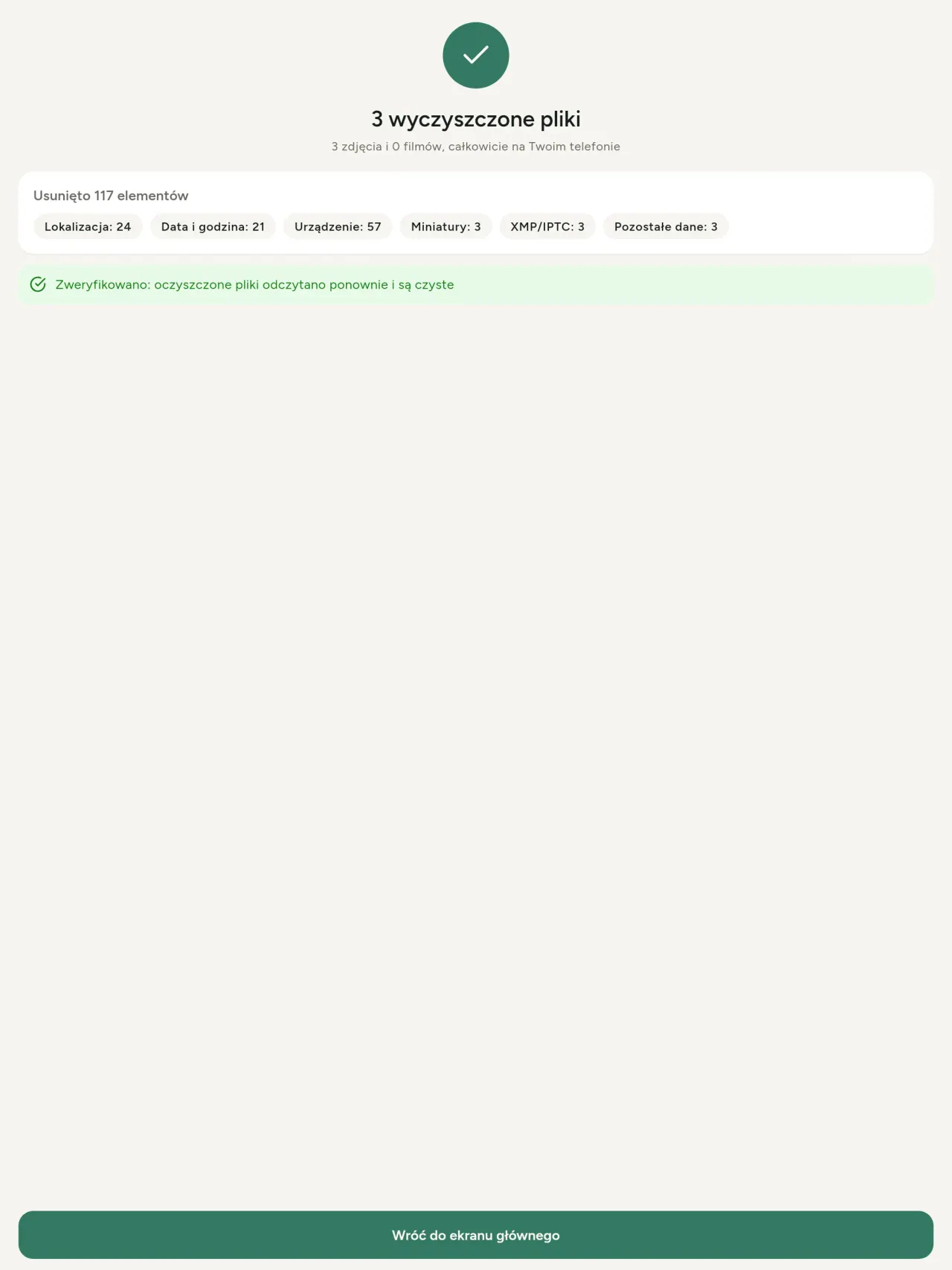
- Remove: clean metadata in a few taps, with a before and after view on the result screen.
- DNG photos are supported.
- Translations aligned across 91 languages.
Privacy policy
Tekst poniżej jest po angielsku. Wersja angielska jest nadrzędna.
Last updated: 2026-11-18 · applies to version 1.1 and later
Policy versions: 1.1 and later (this text) · version 1.0 (still the policy of the app version 1.0). The version number of your app is shown at the bottom of its Settings screen.
Free Metadata Cleaner shows and removes the metadata hidden in your photos and videos (location, date and time, camera and lens details, thumbnails…). The short version: everything happens on your device, and we collect nothing.
What the app accesses
Your photo and video library, only after you grant permission (and, where your system requires it, the permission to read the location stored in your photos, so that it can be shown to you). The files you choose are read and cleaned on your device; the cleaned copy is saved to your library. If you choose to replace the originals, the system asks you to confirm before deleting them.
To show which photos are already clean, the app reads the metadata of the photos displayed on screen, on your device. This result is kept in memory only and is never stored.
What we collect
Nothing. No account, no analytics or usage tracking, no advertising or advertising identifiers, no crash or diagnostics reporting beyond what the app stores provide, and no third-party SDK that sends data anywhere. There is no Free Metadata Cleaner server. Cleaning a photo or video never uses the network, at all: turn on airplane mode and clean one to check for yourself. The only network request the app itself can ever make is described under “Location” below, and it only ever happens if you ask for it. The one other connection is the optional tip purchase, handled by the store (see “Optional support”).
Temporary files and history
The app keeps no history and no database. Temporary files created while cleaning are deleted after each item and purged when the app starts.
Deleted originals
Originals that are deleted remain in your system's trash (such as “Recently Deleted” or the trash) for about 30 days, with their metadata. The app cannot empty it: do it yourself if you need the originals gone at once.
iCloud and cloud photos
If a photo is stored in iCloud and not on your device, the operating system may download it before the app can process it. That transfer is made by the system, under the provider's own terms, not by the app.
Location
When a photo contains a location, the app shows the coordinates as text, which stays on your device. Three actions can send location information off your device, only when you choose them, each time: “Open in…” hands the coordinates to the maps application you select, under its own privacy policy; “Show the map” asks you to confirm first (“Showing the map sends this photo's position to a map service. Nothing else is sent.”), then loads a small map from OpenStreetMap for that one position; and, when you edit a photo's place, “Choose on the map” asks you to confirm first, then opens a full-screen map from OpenStreetMap. This map does not use your phone's location. As you move and zoom it, the app requests the map tiles of the area you are browsing, so OpenStreetMap receives the position of the area shown on screen, which starts on the photo's current place if it has one, and otherwise on a world view. The photo itself is never sent, and nothing is sent before you confirm. The place you choose on the map (or copy from another photo) is written into the photo's file only when you save, on your device. In every case OpenStreetMap receives, as with any web request, technical details like your IP address; it does not receive your name, an account, or anything else about you or your other photos. See OpenStreetMap's own privacy policy. Outside of these explicit actions, the app never sends a photo's location, or anything else, anywhere.
Optional support
The app is free. If you wish, you can leave a tip. On iPhone and in the Google Play version for Android, tips are in-app purchases processed by Apple or Google under their own terms and privacy policy; the app adds the Google Play billing permission for this, makes no network call itself, and receives no payment or personal details. Versions installed outside Google Play may instead open an external donation page in your browser, operated by a third party under its own privacy policy; nothing from the app is sent to it. A tip unlocks nothing.
Contact form on this website
If you write to us through this site, we use your message and the email address you optionally give only to reply. Bot protection is provided by Cloudflare and email delivery by Resend.
Language choice on this website
When you choose a language, or when this site opens a page in your browser's language, it stores
one small functional cookie (pxl, a language code, one year) so that your choice is
remembered. If this site suggests a page in your browser's language and you close that suggestion,
your browser also keeps a local note (pxl-banner-off, in local storage, 30 days) so the
suggestion does not come back. Neither identifies anyone, neither is used for tracking or advertising,
and neither is shared. You can delete them in your browser at any time.
Website statistics
This website uses Cloudflare Web Analytics to count visits (pages viewed, country, browser type, loading speed). It sets no cookie, does not use local storage, does not fingerprint your device, does not follow you across sites and does not build a profile of you. Search engines (for example Google Search Console) give us aggregated search statistics, without any data about individual visitors. Our own web server also counts the pages and APK downloads it serves: for each request it keeps the address, the site or social network that sent you (only its name, or the campaign tag written in the link), the country, the type of device and whether the request came from a robot. It keeps no IP address, no identifier and no cookie, and these counts are anonymous. We use no advertising or other analytics service. None of this concerns the app itself, which collects nothing.
Children
The app is a general-purpose tool and is not directed at children.
Changes
An updated policy will be published at this URL with a new date above.
Contact
Questions about privacy: metadata-cleaner-contact@pixeon.net
Wersja 1.0
- App Store Opublikowano
- Google Play Opublikowano
Co nowego
Ten tekst jest po angielsku.
- Cleans JPEG, HEIC, PNG, WebP, GIF, MP4, MOV and 3GP files, with no video re-encoding.
- "Safe to share" and "To clean" filters.
- New green design.
- Help screen with a FAQ.
- Settings: share, rate, feedback, unsupported formats.
- Optional tips.
Privacy policy, version 1.0
Tekst poniżej jest po angielsku. Wersja angielska jest nadrzędna.
Applies to version 1.0 of the app (the first release). Later versions: current policy.
Free Metadata Cleaner shows and removes the metadata hidden in your photos and videos (location, date and time, camera and lens details, thumbnails…). The short version: everything happens on your device, and we collect nothing.
What the app accesses
Your photo and video library, only after you grant permission (and, where your system requires it, the permission to read the location stored in your photos, so that it can be shown to you). The files you choose are read and cleaned on your device; the cleaned copy is saved to your library. If you choose to replace the originals, the system asks you to confirm before deleting them.
To show which photos are already clean, the app reads the metadata of the photos displayed on screen, on your device. This result is kept in memory only and is never stored.
What we collect
Nothing. No account, no analytics or usage tracking, no advertising or advertising identifiers, no crash or diagnostics reporting beyond what the app stores provide, and no third-party SDK that sends data anywhere. There is no Free Metadata Cleaner server. Cleaning a photo or video never uses the network, at all: turn on airplane mode and clean one to check for yourself. The only network request the app itself can ever make is described under “Location” below, and it only ever happens if you ask for it. The one other connection is the optional tip purchase, handled by the store (see “Optional support”).
Temporary files and history
The app keeps no history and no database. Temporary files created while cleaning are deleted after each item and purged when the app starts.
Deleted originals
Originals that are deleted remain in your system's trash (such as “Recently Deleted” or the trash) for about 30 days, with their metadata. The app cannot empty it: do it yourself if you need the originals gone at once.
iCloud and cloud photos
If a photo is stored in iCloud and not on your device, the operating system may download it before the app can process it. That transfer is made by the system, under the provider's own terms, not by the app.
Location
When a photo contains a location, the app shows the coordinates as text, which stays on your device. Two actions send that one photo's position off your device, only when you choose them, each time: “Open in…” hands the coordinates to the maps application you select, under its own privacy policy; “Show the map” asks you to confirm first (“Showing the map sends this photo's position to a map service. Nothing else is sent.”), then loads a small map from OpenStreetMap for that one position. OpenStreetMap receives the coordinates and, as with any web request, technical details like your IP address; it does not receive your name, an account, or anything else about you or your other photos. See OpenStreetMap's own privacy policy. Outside of these two explicit actions, the app never sends a photo's location, or anything else, anywhere.
Optional support
The app is free. If you wish, you can leave a tip. On iPhone and in the Google Play version for Android, tips are in-app purchases processed by Apple or Google under their own terms and privacy policy; the app adds the Google Play billing permission for this, makes no network call itself, and receives no payment or personal details. Versions installed outside Google Play may instead open an external donation page in your browser, operated by a third party under its own privacy policy; nothing from the app is sent to it. A tip unlocks nothing.
Contact form on this website
If you write to us through this site, we use your message and the email address you optionally give only to reply. Bot protection is provided by Cloudflare and email delivery by Resend.
Language choice on this website
When you choose a language, or when this site opens a page in your browser's language, it stores
one small functional cookie (pxl, a language code, one year) so that your choice is
remembered. If this site suggests a page in your browser's language and you close that suggestion,
your browser also keeps a local note (pxl-banner-off, in local storage, 30 days) so the
suggestion does not come back. Neither identifies anyone, neither is used for tracking or advertising,
and neither is shared. You can delete them in your browser at any time.
Website statistics
This website uses Cloudflare Web Analytics to count visits (pages viewed, country, browser type, loading speed). It sets no cookie, does not use local storage, does not fingerprint your device, does not follow you across sites and does not build a profile of you. Search engines (for example Google Search Console) give us aggregated search statistics, without any data about individual visitors. Our own web server also counts the pages and APK downloads it serves: for each request it keeps the address, the site or social network that sent you (only its name, or the campaign tag written in the link), the country, the type of device and whether the request came from a robot. It keeps no IP address, no identifier and no cookie, and these counts are anonymous. We use no advertising or other analytics service. None of this concerns the app itself, which collects nothing.
Children
The app is a general-purpose tool and is not directed at children.
Changes
An updated policy will be published at this URL with a new date above.
Contact
Questions about privacy: metadata-cleaner-contact@pixeon.net
Credits
Android is a trademark of Google LLC. The Android robot is reproduced or modified from work created and shared by Google and used according to terms described in the Creative Commons 3.0 Attribution License. This site is not affiliated with or endorsed by Google.
Wsparcie
Ostatnia aktualizacja: 2026-10-08
Free Metadata Cleaner to mała niezależna aplikacja. Najczęstsze pytania i odpowiedzi znajdziesz poniżej.
Odpowiadamy zazwyczaj w ciągu kilku dni. Żeby nam pomóc, podaj model urządzenia, wersję systemu i napisz, co robiłeś. Nie wysyłaj prywatnych zdjęć.
Jakie dane aplikacja przechowuje lub wysyła?
Żadne. Aplikacja nie zapisuje historii, nie wymaga konta ani nie ma serwera. Szczegóły znajdziesz w polityce prywatności.
Jak wyczyścić zdjęcie?
- Otwórz aplikację i zezwól na dostęp do biblioteki gdy pojawi się prośba.
- Wybierz zdjęcia lub filmy do wyczyszczenia.
- Wybierz co usunąć oraz czy oryginały mają zostać zastąpione lub utworzona ma być czysta kopia.
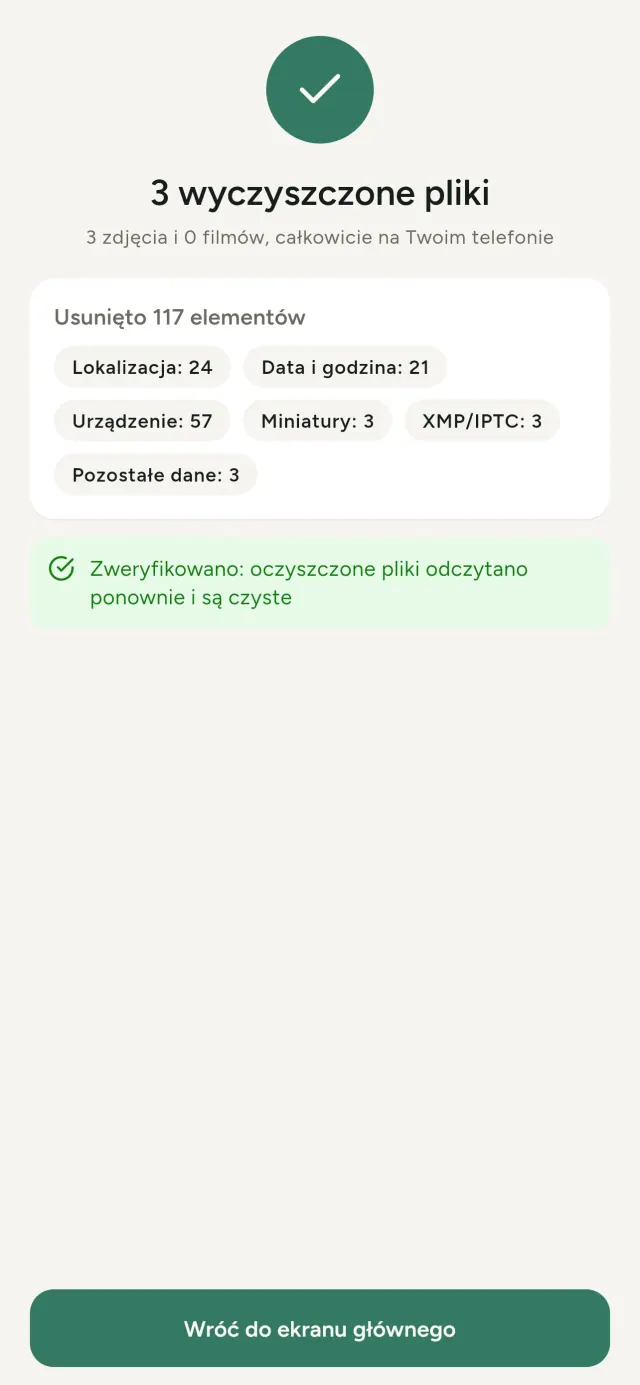
- Potwierdź. Podsumowanie pokaże co zostało usunięte oraz pliki, których nie udało się przetworzyć.
Gdzie trafiają wyczyszczone kopie?
Do Twojej biblioteki zdjęć. Data biblioteki oryginału jest zachowana, więc oczyszczone zdjęcie nie pojawia się na szczycie galerii.
Wybrałem „zastąp oryginały”, ale oryginały nadal istnieją.
Usunięte oryginały trafiają do kosza systemowego (np. „Ostatnio usunięte” lub kosz) na około 30 dni, wraz z metadanymi. Opróżnij kosz, żeby usunąć je od razu. Jeśli odmówisz potwierdzenia systemowej prośby o usunięcie, oryginały pozostają, a czyste kopie nadal zostaną dodane.
Jakie pliki są obsługiwane?
Zdjęcia w formatach JPEG, HEIC, AVIF, PNG, WebP i GIF oraz filmy w MP4, MOV i 3GP (dodawane są kolejne formaty). Plik, którego aplikacja nie może wyczyścić, pozostaje nietknięty i pojawi się w podsumowaniu z powodem, bez przerywania pozostałego procesu.
Dlaczego aplikacja potrzebuje dostępu do moich zdjęć?
Aby wyświetlić zdjęcia do wyboru i zapisać czyste kopie. Gdzie system tego wymaga, aplikacja poprosi też o zgodę na odczyt lokalizacji zapisanej w zdjęciach, bo bez tego system ukrywa lokalizację i aplikacja nie może pokazać, co dane zdjęcie ujawnia. Nic nie jest przesyłane.
Jak mogę sprawdzić, że nic nie opuszcza mojego telefonu?
Włącz tryb samolotowy i wyczyść zdjęcie: aplikacja działa tak samo. Wyjątkiem jest mapa – jeśli klikniesz „Pokaż mapę” na lokalizacji zdjęcia i potwierdzisz, to tylko ta jedna pozycja zostanie wysłana do OpenStreetMap by wyświetlić mapę, i nic więcej. Zobacz „Lokalizacja” wyżej.
Jakie języki są dostępne?
Aplikacja dostępna jest po angielsku, francusku, niemiecku, hiszpańsku, włosku, portugalsku i arabsku. Strona dostępna jest w większej liczbie języków, kolejne wersje aplikacji wkrótce.
Wesprzyj projekt
Metadata Cleaner pozostaje bezpłatna i bez reklam. Jeśli jest dla Ciebie przydatna, możesz wesprzeć jej rozwój (opcjonalnie):
Buy Me a CoffeeBudżet i kontrola wydatków dla domu. Planuj miesiąc i miej finanse pod ręką.
Również od PixeonVaultMarkSzyfrowany sejf na dokumenty: skaner, znak wodny i metadane PDF.
Również od PixeonLittle RelayBreastfeeding, sleep and starting solids tracker. No account, works offline.
Również od PixeonMenuloopPlanowanie posiłków, przepisy ze zdjęciami i lista zakupów w jednym miejscu.
Również od PixeonIndie OfficeQuote maker and self-employed invoices. Offline, no account, no ads.