
Metadata Cleaner: Photo/Video
Funda, hlela okanye cima i-metadata yesithombe (GPS, umhla).


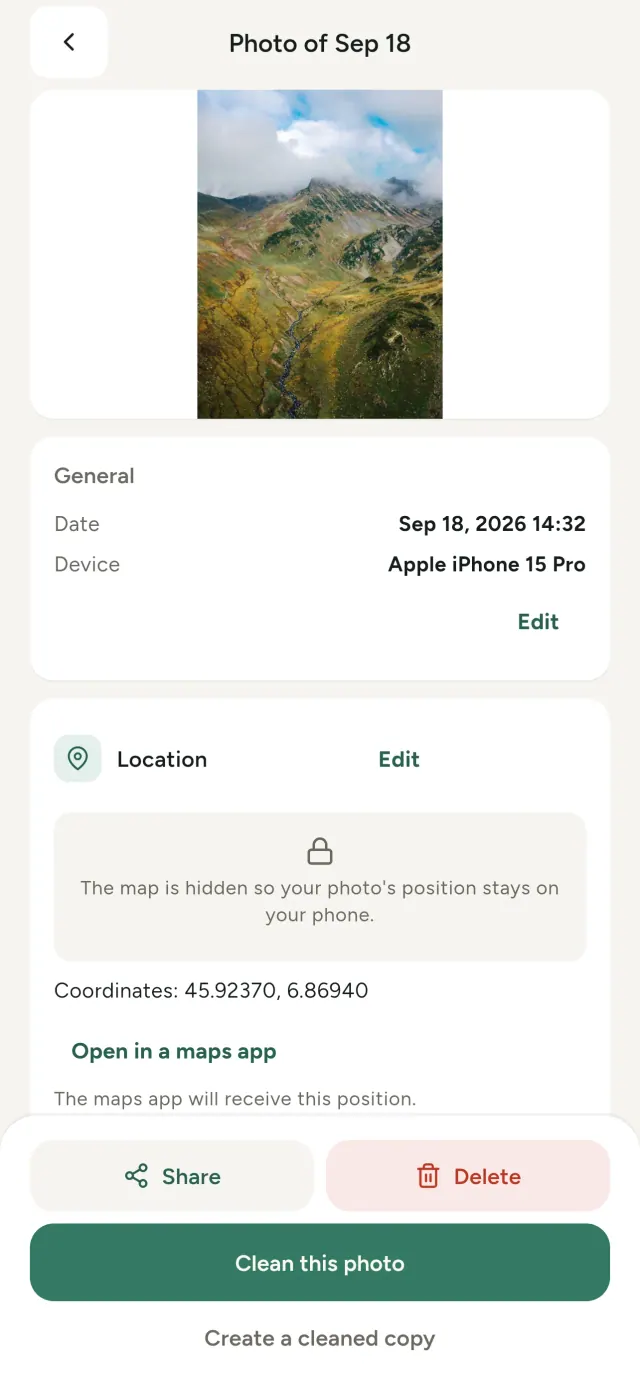
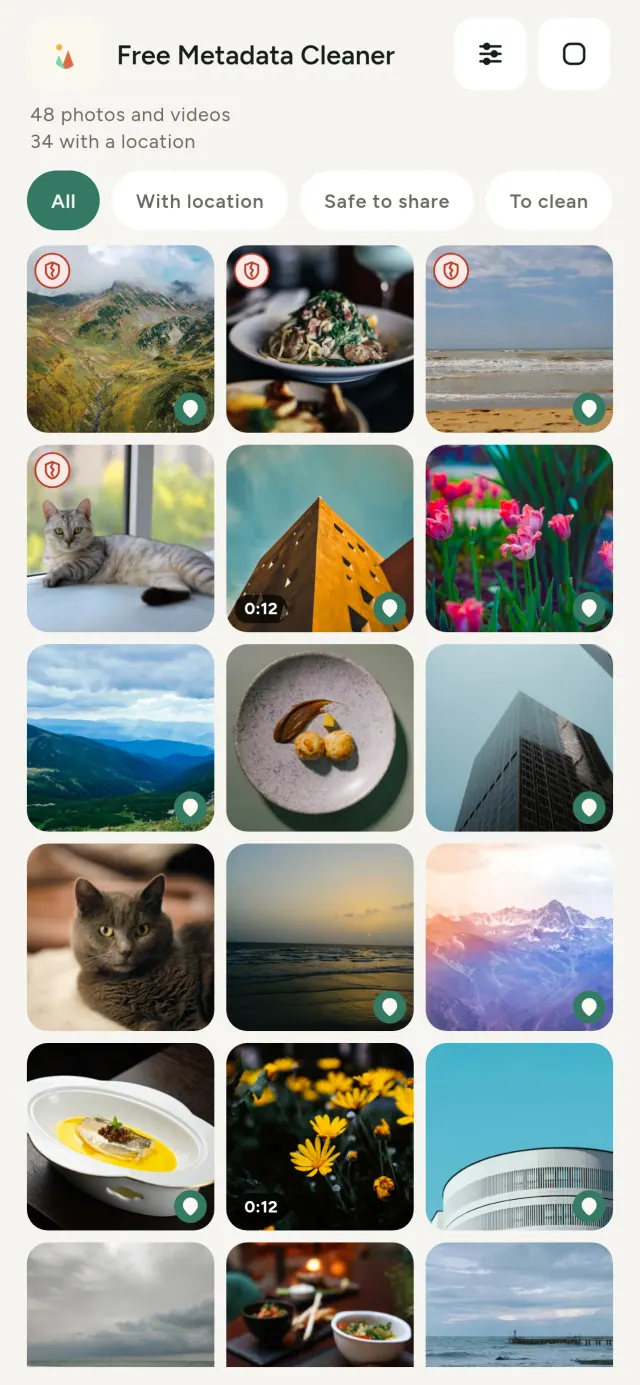
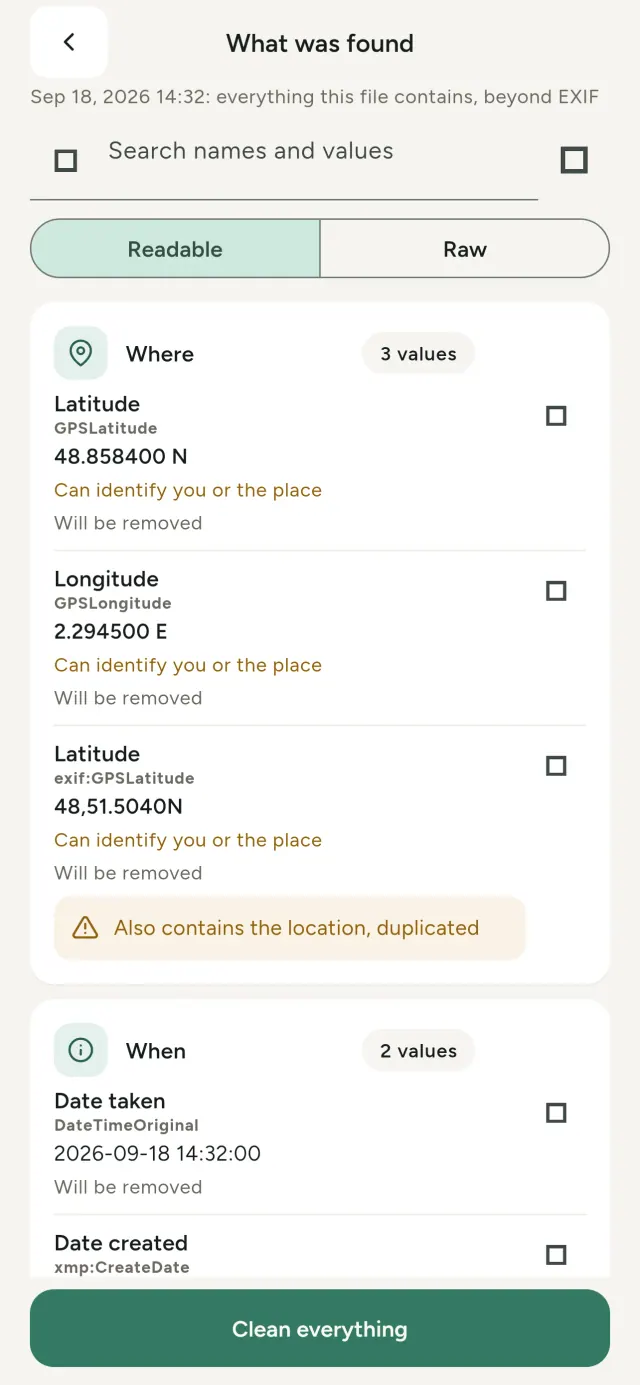
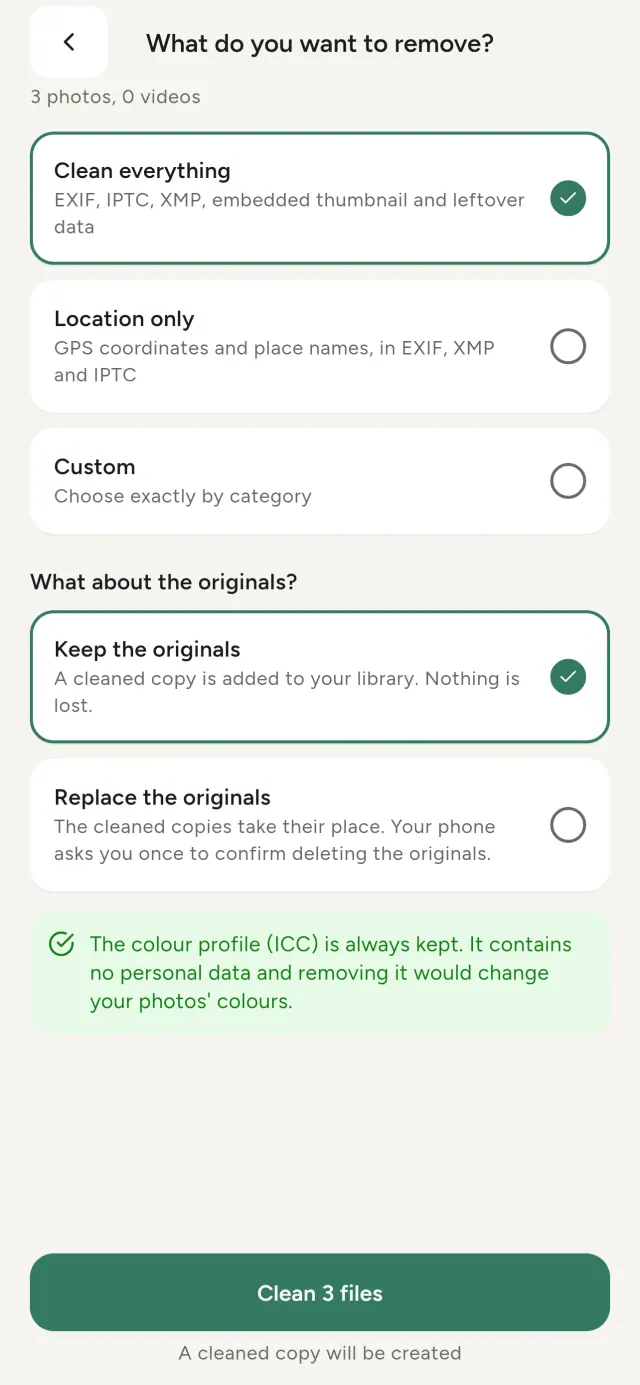
Onke amafoto owathathayo aphatha ulwazi olufihlakeleyo: apho athathwe khona, nini, ngesiphi isixhobo, maxa wambi nomfanekiso omncinci womfanekiso wokuqala. Xa uwabelana ngawo, olo lwazi lonke luyahamba.
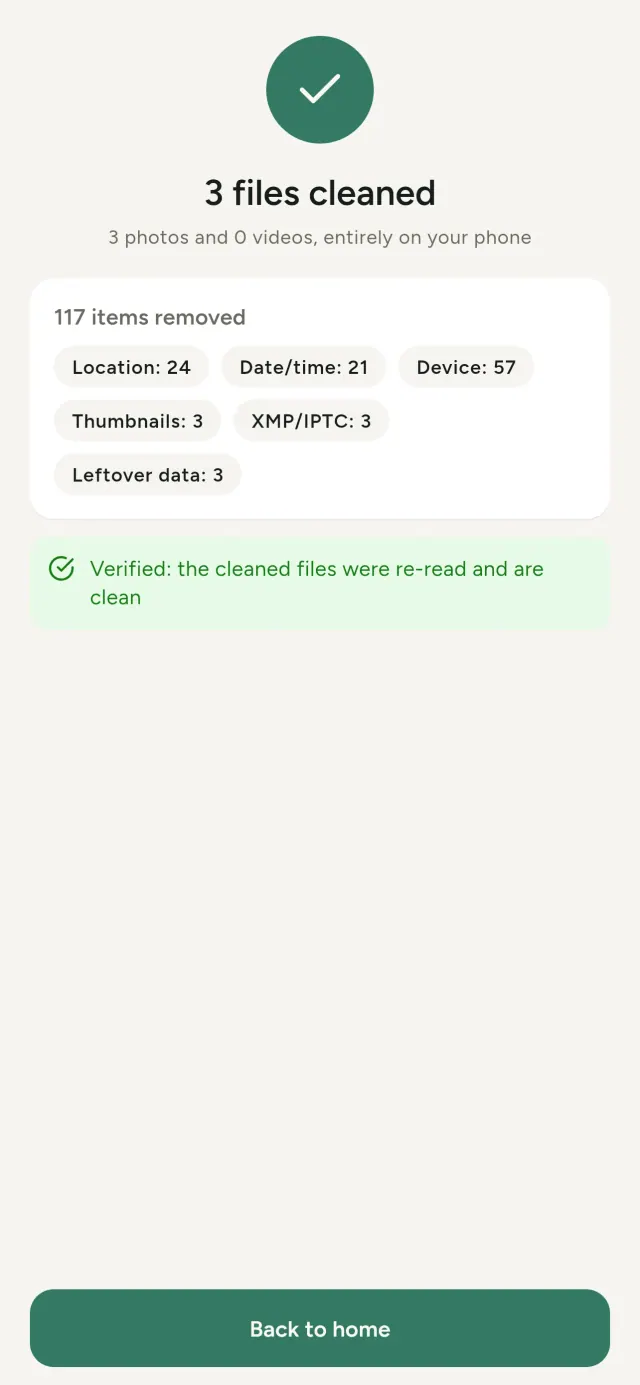
Metadata Cleaner wenza izinto ezithathu kwifowuni yakho: ubonisa ukuba zini iifoto kunye neevidiyo, ikuvumela ukuba uzilungise, aze acime i-metadata.
Okwenza Metadata Cleaner
Funda
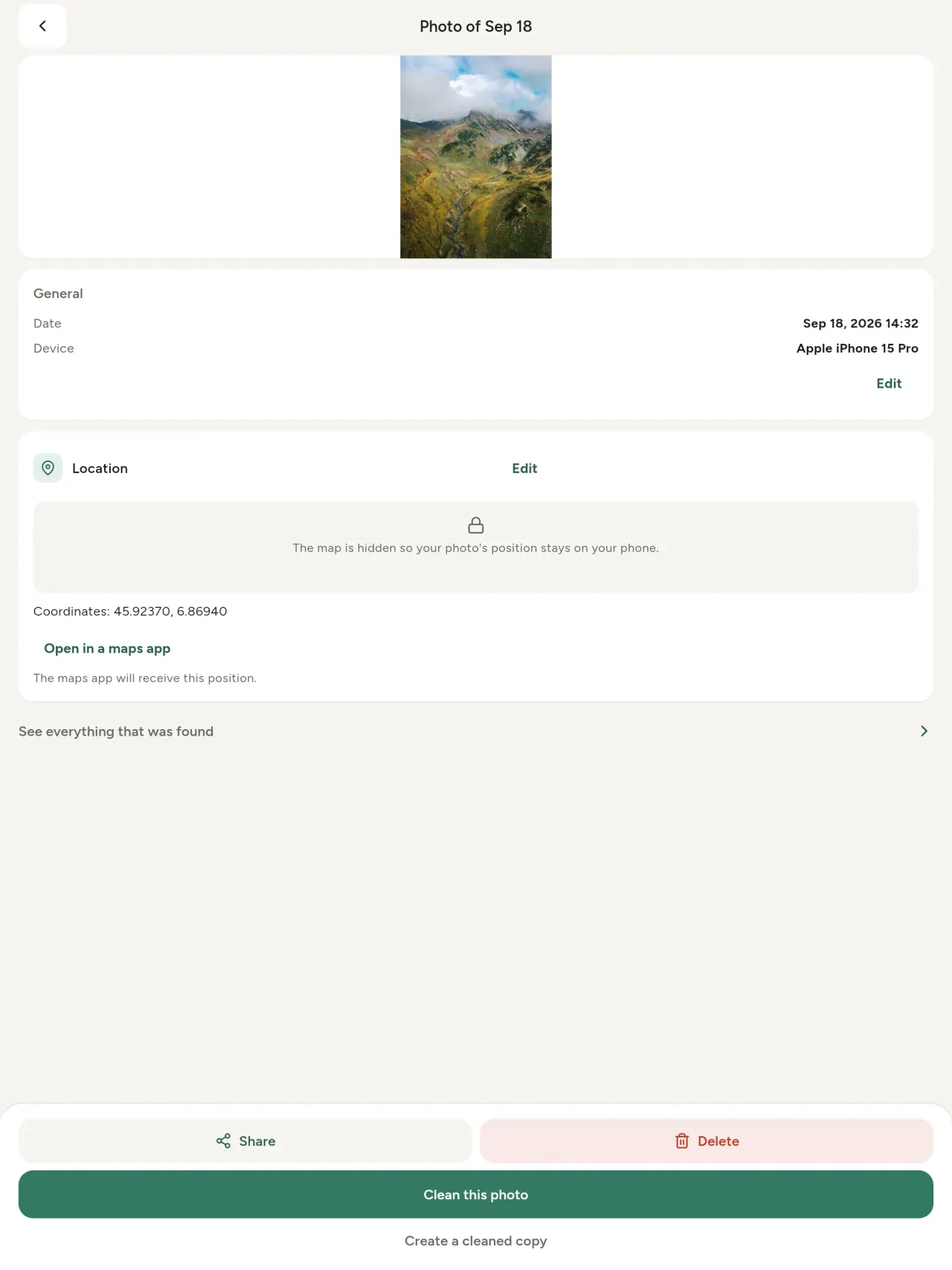
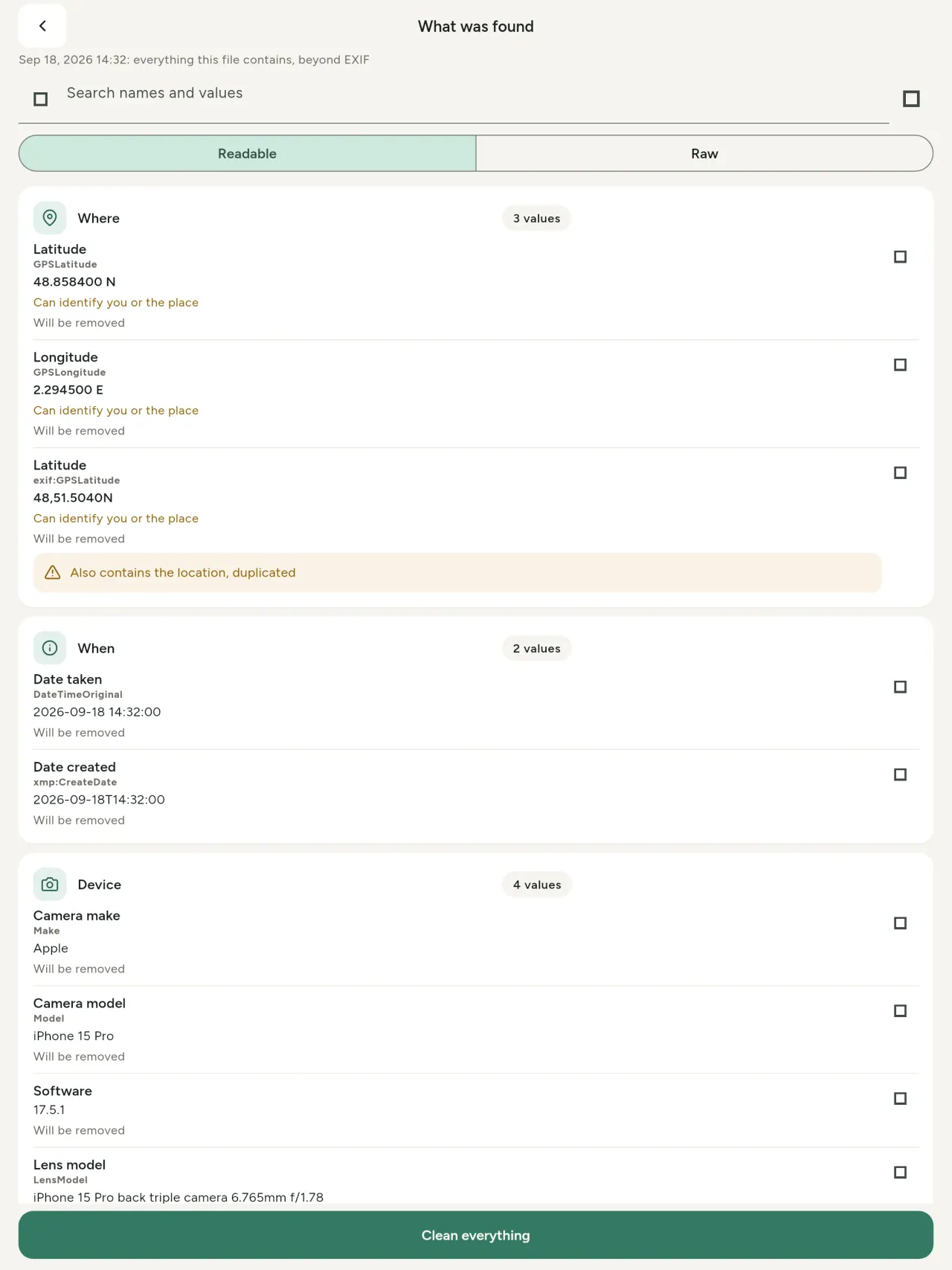
Umbonisi wokwenene we-metadata: ixabiso ngalinye elifunyenwe kumfanekiso okanye ividiyo (EXIF, IPTC, XMP, iikhowudi zevidiyo, ixesha nobungakanani), lihlelwe, linokukhangelwa kwaye likopishwe, oko kuya kucinywa kuphawuliwe. Uvelwano lwe-AI (C2PA, iiparamitha zokuzalwa) nalo luyafunyanwa.
Hlela
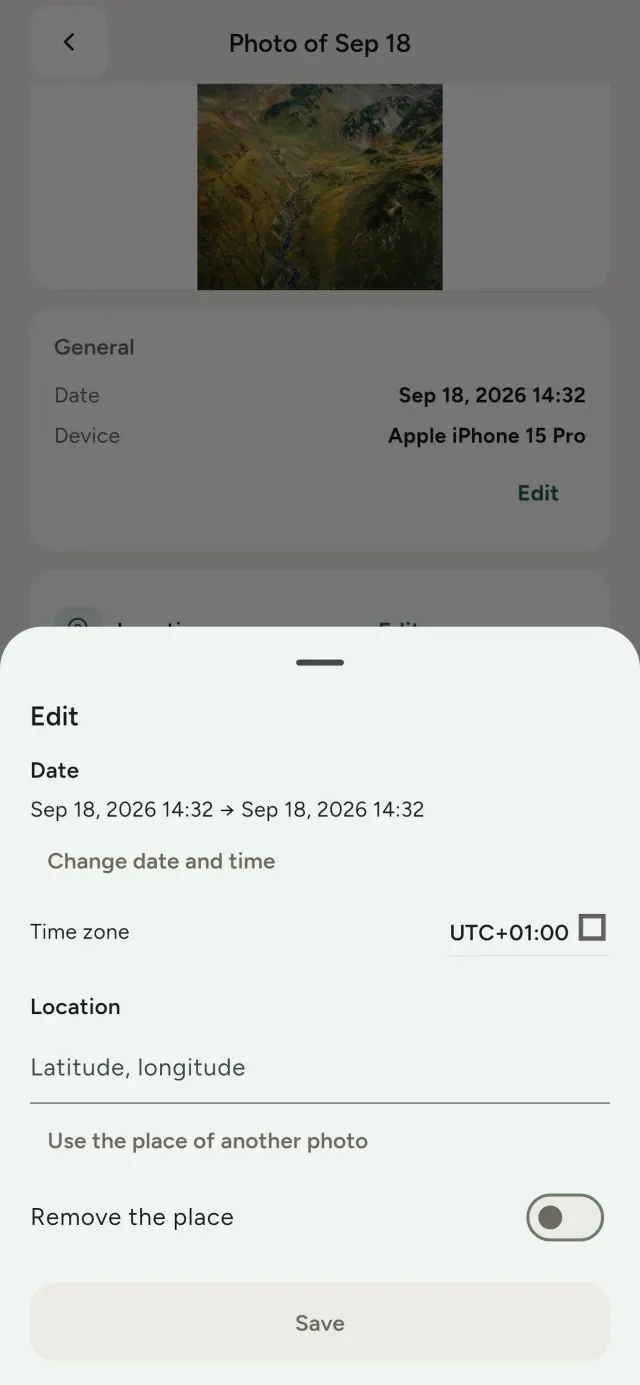
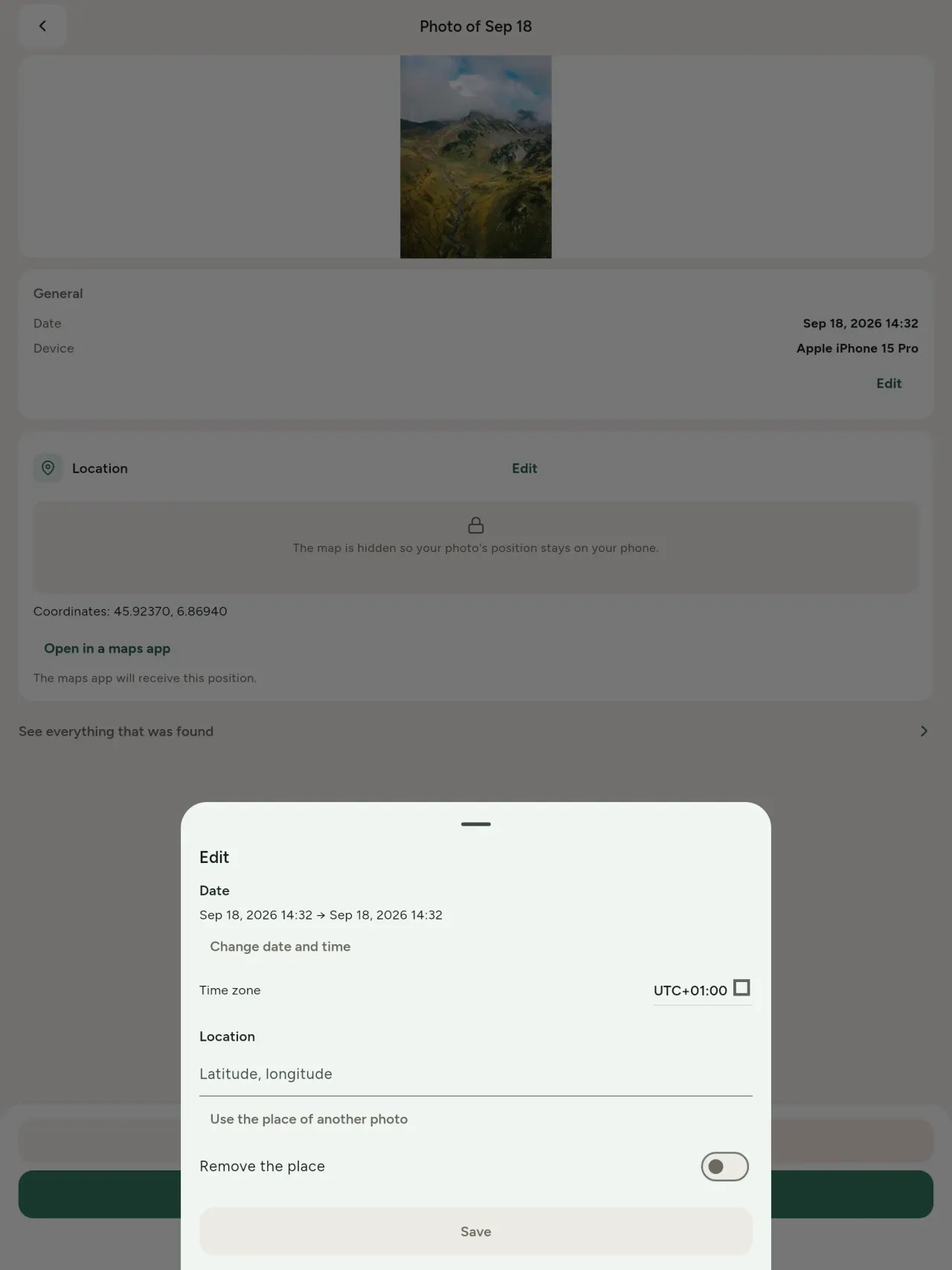
Tshintsha umhla nendawo yomfanekiso, noba ngumfanekiso ongenayo kwaphela i-metadata. Kopisha indawo kwenye ifoto, okanye uyikhethe kwimephu (kubuza kuqala, rhoqo). Thelekisa ngaphambi nangemva.
Cima
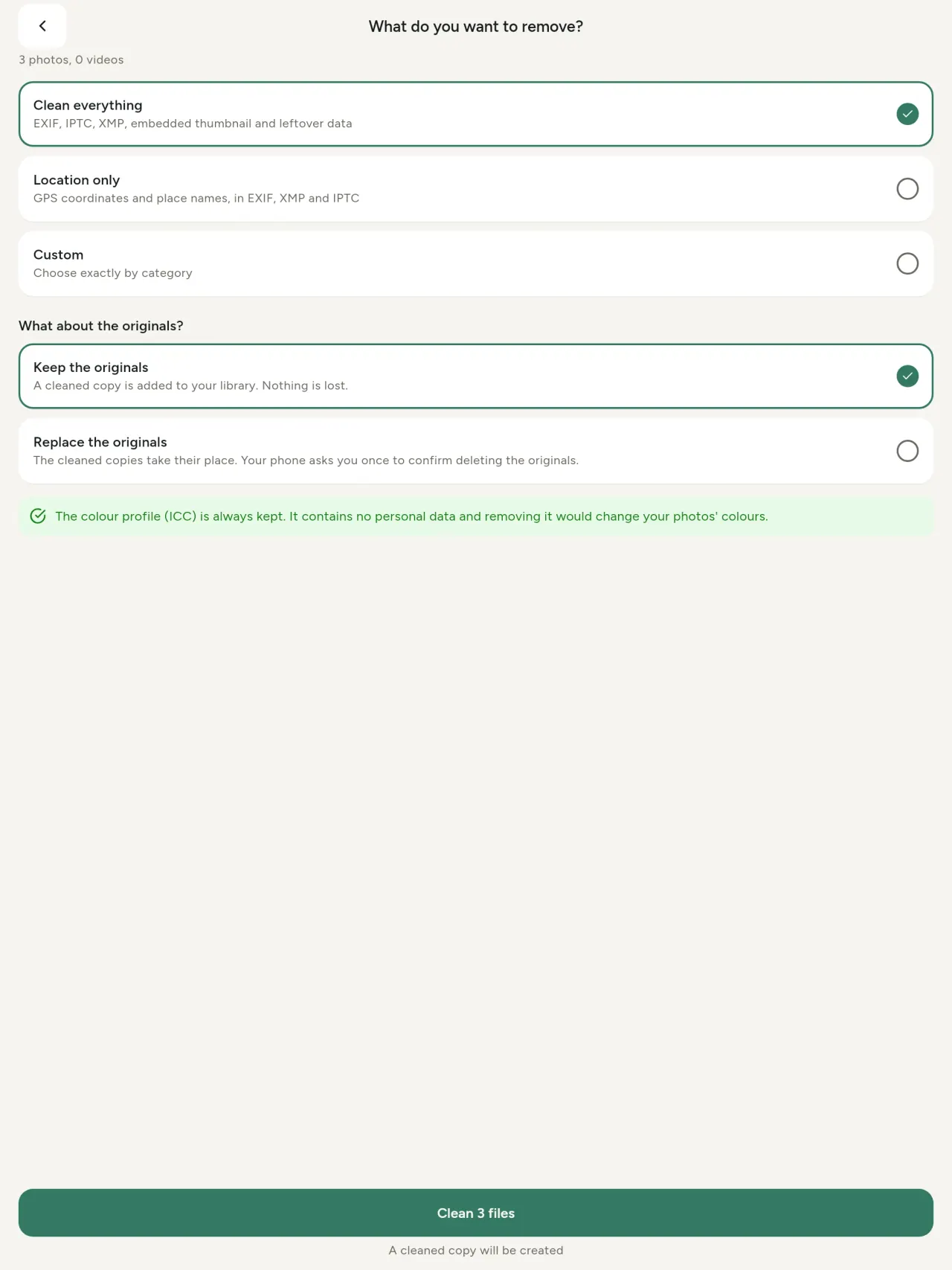
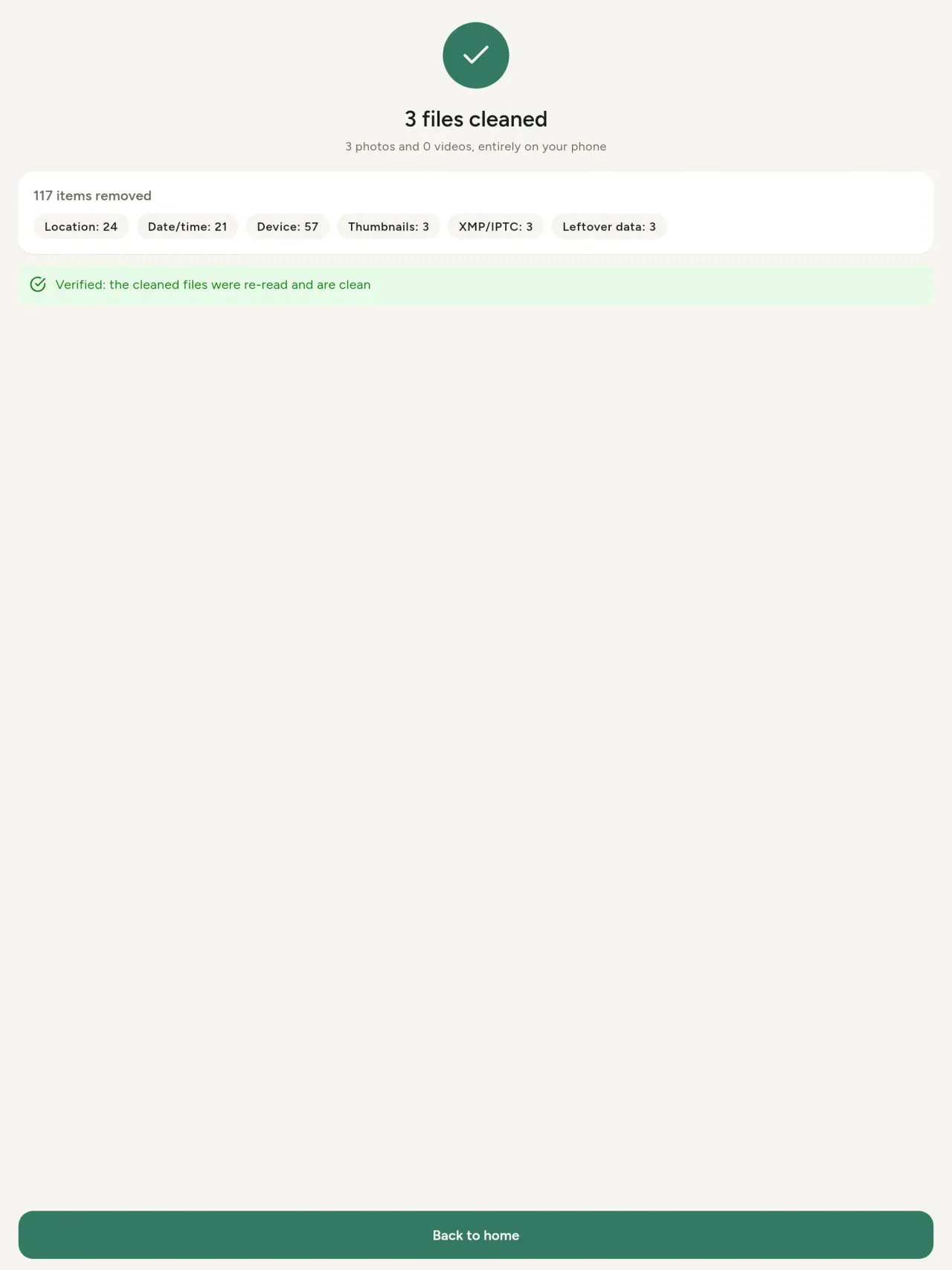
Konke, indawo kuphela, okanye iindidi ozikhethayo: i-EXIF, IPTC ne-XMP, imifanekiso emincinci efakelweyo, amanqaku omvelisi wekhamera, uvelwano lwe-AI kunye neebhayithi ezishiywa zizixhobo zokuhlela emva kokusikwa komfanekiso. Coca iqoqo lamafoto ngexesha elinye, uze ugcine ezokuqala okanye uzibuyisele.
Kukhuselekile xa ujonga nje
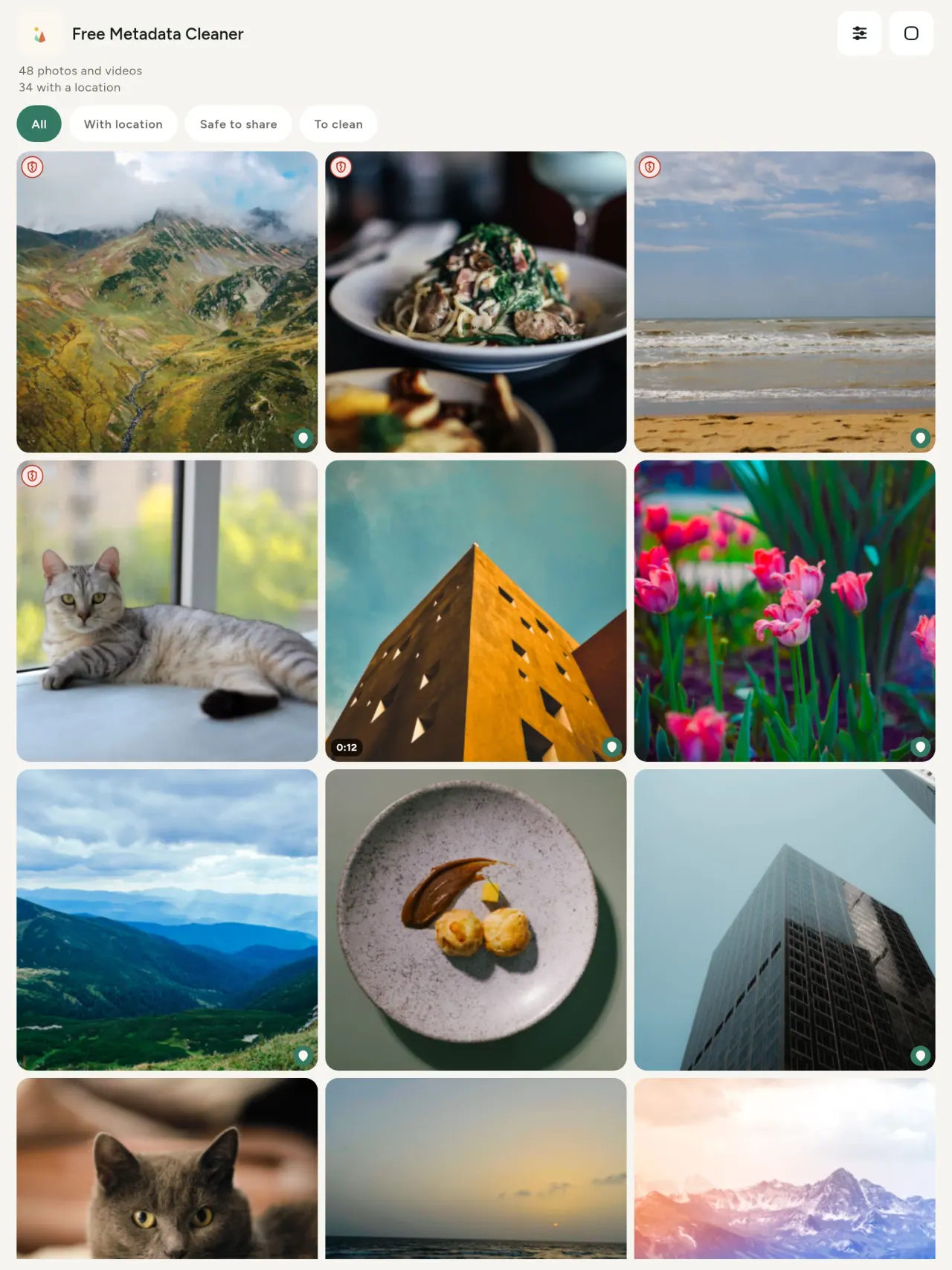
Ishield eliluhlaza libonisa iifayile ezingasenayo i-metadata; ishield ebomvu eqhekekileyo ibonisa ezo zisashiyekileyo.
Akukho kulahleka komgangatho
Imifanekiso ayiphindi ikhowudwe: umfanekiso ngokwawo awuchukunyiswa.
Yilungiselelwe ubumfihlo
Amafoto akho afundwa, ahlelwa aze acoceke kwisixhobo sakho. Akukho akhawunti, akukho ntengiso, akukho kuhlalutya. Ukuphuma okukodwa kukhetho lwemephu: xa ucelisa ukubona indawo yomfanekiso, okanye ukhethe indawo, usetyenziso lubuza kuqala, ngalo lonke ixesha, luyaze lufake imephu evela e-OpenStreetMap (umfanekiso ngokwawo awuthunyelwa).
Simahla, akukho ntengiso
Ukuba usetyenziso lukunceda, ungashiya ingxowa-mali yokuzithandela.
Yeyobani
- Nabani na ofuna ukwazi oko kufihlwa yifoto (geo, umhla, ikhamera) ngaphambi kokuposa, ukuthengisa okanye ukuthumela.
- Abantu abathengisa kwiindawo zokuthengisa ezikwiintengiso ezisecaleni abangafuni ukutyhila indawo abahlala kuyo.
- Abazali nabani ofuna ukugcina indawo ebuthathaka (ekhaya, esikolweni, emsebenzini) ingabonakali kwiifoto abazabelanayo.
- Iintatheli, abasebenzi bokhuseleko nabantu abasemngciphekweni, abafuna ukwabelana ngomfanekiso ngaphandle kokushiya umkhondo.
- Abantu abadinwe kukuvuza kwedatha abafuna ukuthatha ulawulo kwakhona kwiinkcukacha zobuqu ezithweleyo ziifoto zabo.
Kutheni ukhethe Metadata Cleaner
- Izinto ezintathu kwisicelo esinye: funda oko kufihlwa yifoto/ividiyo, hlela (umhla owuthathayo, indawo), kwaye ususe i-metadata ngokukhawuleza.
- Yonke into iqhuba kwiselfowuni. Iifoto zakho azithunyelwanga ndawo.
- Iifoto (JPEG, HEIC, PNG, WebP, GIF) kunye nevidiyo (MP4, MOV, 3GP).
Usetyenziso alukwenzi oku okwamanje
- Kuxhaswa kuphela iifomathi ezikhankanyiweyo apha ngasentla. Iifomathi ezingakumbi zicwangcisiwe.
Umgaqo wePixeon. Ii-apps zePixeon ziqala ngokubaluleka kobumfihlo: akukho akhawunti, akukho kulandelela, kwaye idatha yakho ihlala kwiselfowuni yakho. Ukuba lusetyenziso lufuna ukudibanisa nenethiwekhi, loo nto yenzeka kuphela xa ukhetha ukuvulela umsebenzi owufunayo, kwaye umgaqo-nkqubo wabucala uhlaziywa ngaphambi kokuba ukhutshwe.
Bona Metadata Cleaner isebenza.
Fumana Metadata Cleaner.
Simahla kwi-iPhone naku-Android.
Inguqulelo 1.1
- App Store Izayo
- Google Play Izayo
Oktsha
Lo mbhalo useNgesi.
- Read: see exactly what a photo or video reveals (location, date, camera, AI provenance labels such as C2PA and generation parameters, video duration, codecs, resolution and frame rate).
- Edit: change the date a photo was taken and its location (JPEG, HEIC, AVIF), even on a photo with no metadata, reuse the location of another photo, or pick it on an OpenStreetMap map after your confirmation.
- Remove: clean metadata in a few taps, with a before and after view on the result screen.
- DNG photos are supported.
- Translations aligned across 91 languages.
Privacy policy
Umbhalo ongezantsi useNgesi. Guqulelo lwesiNgesi olusetyenziswa.
Last updated: 2026-11-03 · applies to version 1.1 and later
Policy versions: 1.1 and later (this text) · version 1.0 (still the policy of the app version 1.0). The version number of your app is shown at the bottom of its Settings screen.
Free Metadata Cleaner shows and removes the metadata hidden in your photos and videos (location, date and time, camera and lens details, thumbnails…). The short version: everything happens on your device, and we collect nothing.
What the app accesses
Your photo and video library, only after you grant permission (and, where your system requires it, the permission to read the location stored in your photos, so that it can be shown to you). The files you choose are read and cleaned on your device; the cleaned copy is saved to your library. If you choose to replace the originals, the system asks you to confirm before deleting them.
To show which photos are already clean, the app reads the metadata of the photos displayed on screen, on your device. This result is kept in memory only and is never stored.
What we collect
Nothing. No account, no analytics or usage tracking, no advertising or advertising identifiers, no crash or diagnostics reporting beyond what the app stores provide, and no third-party SDK that sends data anywhere. There is no Free Metadata Cleaner server. Cleaning a photo or video never uses the network, at all: turn on airplane mode and clean one to check for yourself. The only network request the app itself can ever make is described under “Location” below, and it only ever happens if you ask for it. The one other connection is the optional tip purchase, handled by the store (see “Optional support”).
Temporary files and history
The app keeps no history and no database. Temporary files created while cleaning are deleted after each item and purged when the app starts.
Deleted originals
Originals that are deleted remain in your system's trash (such as “Recently Deleted” or the trash) for about 30 days, with their metadata. The app cannot empty it: do it yourself if you need the originals gone at once.
iCloud and cloud photos
If a photo is stored in iCloud and not on your device, the operating system may download it before the app can process it. That transfer is made by the system, under the provider's own terms, not by the app.
Location
When a photo contains a location, the app shows the coordinates as text, which stays on your device. Three actions can send location information off your device, only when you choose them, each time: “Open in…” hands the coordinates to the maps application you select, under its own privacy policy; “Show the map” asks you to confirm first (“Showing the map sends this photo's position to a map service. Nothing else is sent.”), then loads a small map from OpenStreetMap for that one position; and, when you edit a photo's place, “Choose on the map” asks you to confirm first, then opens a full-screen map from OpenStreetMap. This map does not use your phone's location. As you move and zoom it, the app requests the map tiles of the area you are browsing, so OpenStreetMap receives the position of the area shown on screen, which starts on the photo's current place if it has one, and otherwise on a world view. The photo itself is never sent, and nothing is sent before you confirm. The place you choose on the map (or copy from another photo) is written into the photo's file only when you save, on your device. In every case OpenStreetMap receives, as with any web request, technical details like your IP address; it does not receive your name, an account, or anything else about you or your other photos. See OpenStreetMap's own privacy policy. Outside of these explicit actions, the app never sends a photo's location, or anything else, anywhere.
Optional support
The app is free. If you wish, you can leave a tip. On iPhone and in the Google Play version for Android, tips are in-app purchases processed by Apple or Google under their own terms and privacy policy; the app adds the Google Play billing permission for this, makes no network call itself, and receives no payment or personal details. Versions installed outside Google Play may instead open an external donation page in your browser, operated by a third party under its own privacy policy; nothing from the app is sent to it. A tip unlocks nothing.
Contact form on this website
If you write to us through this site, we use your message and the email address you optionally give only to reply. Bot protection is provided by Cloudflare and email delivery by Resend.
Language choice on this website
When you choose a language, or when this site opens a page in your browser's language, it stores
one small functional cookie (pxl, a language code, one year) so that your choice is
remembered. If this site suggests a page in your browser's language and you close that suggestion,
your browser also keeps a local note (pxl-banner-off, in local storage, 30 days) so the
suggestion does not come back. Neither identifies anyone, neither is used for tracking or advertising,
and neither is shared. You can delete them in your browser at any time.
Website statistics
This website uses Cloudflare Web Analytics to count visits (pages viewed, country, browser type, loading speed). It sets no cookie, does not use local storage, does not fingerprint your device, does not follow you across sites and does not build a profile of you. Search engines (for example Google Search Console) give us aggregated search statistics, without any data about individual visitors. Our own web server also counts the pages it serves: for each page it keeps the page address, the site or social network that sent you (only its name, or the campaign tag written in the link), the country, the type of device and whether the request came from a robot. It keeps no IP address, no identifier and no cookie, and these counts are anonymous. We use no advertising or other analytics service. None of this concerns the app itself, which collects nothing.
Children
The app is a general-purpose tool and is not directed at children.
Changes
An updated policy will be published at this URL with a new date above.
Contact
Questions about privacy: metadata-cleaner-contact@pixeon.net
Inguqulelo 1.0
- App Store Ishicilelwe
- Google Play Ishicilelwe
Oktsha
Lo mbhalo useNgesi.
- Cleans JPEG, HEIC, PNG, WebP, GIF, MP4, MOV and 3GP files, with no video re-encoding.
- "Safe to share" and "To clean" filters.
- New green design.
- Help screen with a FAQ.
- Settings: share, rate, feedback, unsupported formats.
- Optional tips.
Privacy policy, version 1.0
Umbhalo ongezantsi useNgesi. Guqulelo lwesiNgesi olusetyenziswa.
Applies to version 1.0 of the app (the first release). Later versions: current policy.
Free Metadata Cleaner shows and removes the metadata hidden in your photos and videos (location, date and time, camera and lens details, thumbnails…). The short version: everything happens on your device, and we collect nothing.
What the app accesses
Your photo and video library, only after you grant permission (and, where your system requires it, the permission to read the location stored in your photos, so that it can be shown to you). The files you choose are read and cleaned on your device; the cleaned copy is saved to your library. If you choose to replace the originals, the system asks you to confirm before deleting them.
To show which photos are already clean, the app reads the metadata of the photos displayed on screen, on your device. This result is kept in memory only and is never stored.
What we collect
Nothing. No account, no analytics or usage tracking, no advertising or advertising identifiers, no crash or diagnostics reporting beyond what the app stores provide, and no third-party SDK that sends data anywhere. There is no Free Metadata Cleaner server. Cleaning a photo or video never uses the network, at all: turn on airplane mode and clean one to check for yourself. The only network request the app itself can ever make is described under “Location” below, and it only ever happens if you ask for it. The one other connection is the optional tip purchase, handled by the store (see “Optional support”).
Temporary files and history
The app keeps no history and no database. Temporary files created while cleaning are deleted after each item and purged when the app starts.
Deleted originals
Originals that are deleted remain in your system's trash (such as “Recently Deleted” or the trash) for about 30 days, with their metadata. The app cannot empty it: do it yourself if you need the originals gone at once.
iCloud and cloud photos
If a photo is stored in iCloud and not on your device, the operating system may download it before the app can process it. That transfer is made by the system, under the provider's own terms, not by the app.
Location
When a photo contains a location, the app shows the coordinates as text, which stays on your device. Two actions send that one photo's position off your device, only when you choose them, each time: “Open in…” hands the coordinates to the maps application you select, under its own privacy policy; “Show the map” asks you to confirm first (“Showing the map sends this photo's position to a map service. Nothing else is sent.”), then loads a small map from OpenStreetMap for that one position. OpenStreetMap receives the coordinates and, as with any web request, technical details like your IP address; it does not receive your name, an account, or anything else about you or your other photos. See OpenStreetMap's own privacy policy. Outside of these two explicit actions, the app never sends a photo's location, or anything else, anywhere.
Optional support
The app is free. If you wish, you can leave a tip. On iPhone and in the Google Play version for Android, tips are in-app purchases processed by Apple or Google under their own terms and privacy policy; the app adds the Google Play billing permission for this, makes no network call itself, and receives no payment or personal details. Versions installed outside Google Play may instead open an external donation page in your browser, operated by a third party under its own privacy policy; nothing from the app is sent to it. A tip unlocks nothing.
Contact form on this website
If you write to us through this site, we use your message and the email address you optionally give only to reply. Bot protection is provided by Cloudflare and email delivery by Resend.
Language choice on this website
When you choose a language, or when this site opens a page in your browser's language, it stores
one small functional cookie (pxl, a language code, one year) so that your choice is
remembered. If this site suggests a page in your browser's language and you close that suggestion,
your browser also keeps a local note (pxl-banner-off, in local storage, 30 days) so the
suggestion does not come back. Neither identifies anyone, neither is used for tracking or advertising,
and neither is shared. You can delete them in your browser at any time.
Website statistics
This website uses Cloudflare Web Analytics to count visits (pages viewed, country, browser type, loading speed). It sets no cookie, does not use local storage, does not fingerprint your device, does not follow you across sites and does not build a profile of you. Search engines (for example Google Search Console) give us aggregated search statistics, without any data about individual visitors. Our own web server also counts the pages it serves: for each page it keeps the page address, the site or social network that sent you (only its name, or the campaign tag written in the link), the country, the type of device and whether the request came from a robot. It keeps no IP address, no identifier and no cookie, and these counts are anonymous. We use no advertising or other analytics service. None of this concerns the app itself, which collects nothing.
Children
The app is a general-purpose tool and is not directed at children.
Changes
An updated policy will be published at this URL with a new date above.
Contact
Questions about privacy: metadata-cleaner-contact@pixeon.net
Inkxaso
Igqitywe ukuhlaziywa: 2026-10-08
Free Metadata Cleaner lusetyenziso oluzimeleyo oluncinci. Iimpendulo zemibuzo exhaphakileyo zikwi aşağı.
Sizama ukuphendula kwiintsuku ezimbalwa. Ukunceda, sixelele imodeli yesixhobo sakho, uguqulelo lwenkqubo kunye nento obuyenza. Nceda ungathumeli iifoto zabucala.
Yeyiphi idatha egcinwa lusetyenziso okanye ethunyelwayo?
Akukho nanye. Ayigcini mbali, akukho akhawunti kwaye akukho server. Iinkcukacha zikwipolisi yabucala privacy policy.
Ndicoce njani ifoto?
- Vula usetyenziso uye uvumele ukufikelela kwilayibrari xa ucela.
- Khetha iifoto okanye iividiyo oza kuzicoceka.
- Khetha into oza kuyisusa, nokuba itshintsha ezantlandlolo okanye kudalwe ikopi ecocelekileyo.
- Qinisekisa. Isishwankathelo sibonisa into esusiweyo kunye neefayile ezingakwazanga ukucutshungulwa.
Iikopi ezicocekileyo ziphi?
Kwilayibrari yakho yezithombe. Umhla welayibrari yendalo uyagcinwa, ngoko ifoto ecocelekileyo ayinyuki encotsheni yegalari yakho.
Ndikhethe "tshintsha ezantlandlolo" kodwa ezantlandlolo zisekhona.
Ezihlaziyiweyo zihlala kugutyulweni kwenkqubo (njenge "Ezisusiweyo Kutsha nje" okanye ugutyulo) kangangemihla engama-30, kunye ne metadata yazo. Khupha ugutyulo ukuze uzisuse ngokukhawuleza. Ukuba uyala imvume yokucima yenkqubo, ezantlandlolo ziya kugcinwa kwaye iikopi ezicocekileyo zisagcinwa.
Zeziphi iifayile ezixhaswayo?
Iifoto kwiJPEG, HEIC, AVIF, PNG, WebP kunye neGIF, kunye nevidiyo kwiMP4, MOV kunye ne3GP (kwakhona kuyakongezwa ezinye iifomati). Ifayile usetyenziso olungakwazi ukucoca ayichukunyiswanga kwaye iboniswa kwisishwankathelo nesizathu, ngaphandle kokuphazamisa ezinye.
Kutheni usetyenziso lufuna ukufikelela kwiifoto zam?
Ukuluhlu lweefoto onokukhetha kuzo nokugcina iikopi ezicocekileyo. Kwimeko apho inkqubo yakho iyayifuna, usetyenziso luyabuza imvume yokufunda indawo egcinwe kwiifoto: ngaphandle kwale mvume, inkqubo ifihla indawo, ngoko usetyenziso alukwazi ukubonisa into efumanekayo kwifoto. Akukho nto ilayishwayo.
Ndingaqinisekisa njani ukuba akukho nto iphumelela kwiselfowuni yam?
Vula imo yomoya usecoce ifoto: isebenza kwangokuhlala. Olunye ukhetho kuphela imephu: xa ucofa "Bonisa imephu" kwindawo yefoto uze uqinisekise, loo ndawo ithunyelwa ku-OpenStreetMap ukuze kuboniswe imephu, akukho enye into. Jonga "Indawo" ngasentla.
Zeziphi iilwimi ezikhoyo?
Usetyenziso lufumaneka ngesiNgesi, isiFrentshi, isiJamani, isiSpanish, isiTaliyane, isiPhuthukezi nesiArabhu. Le webhusayithi ikhona ngeelwimi ezininzi, kwaye kuyakongeza nezinye iilwimi zosetyenziso.
Xhasa iprojekthi
Metadata Cleaner isala simahla kwaye ayinalo intengiso. Ukuba iyanceda, ungayixhasa kuphuhliso lwayo (ngokhetho):
Buy Me a CoffeeExpense tracker and family budget planner. Free phone sync, no account.
Iyeza nakwiPixeonVaultMarkEncrypted document vault. Watermark documents, remove metadata before sharing.
Iyeza nakwiPixeonLittle RelayBreastfeeding, sleep and starting solids tracker. No account, works offline.
Iyeza nakwiPixeonMenuloopPlan the week's meals, build your grocery list and keep recipes with photos.