
Metadata Cleaner: Foto/Video
metadati delle foto, exif: EXIF viewer per leggere, correggere e rimuovere


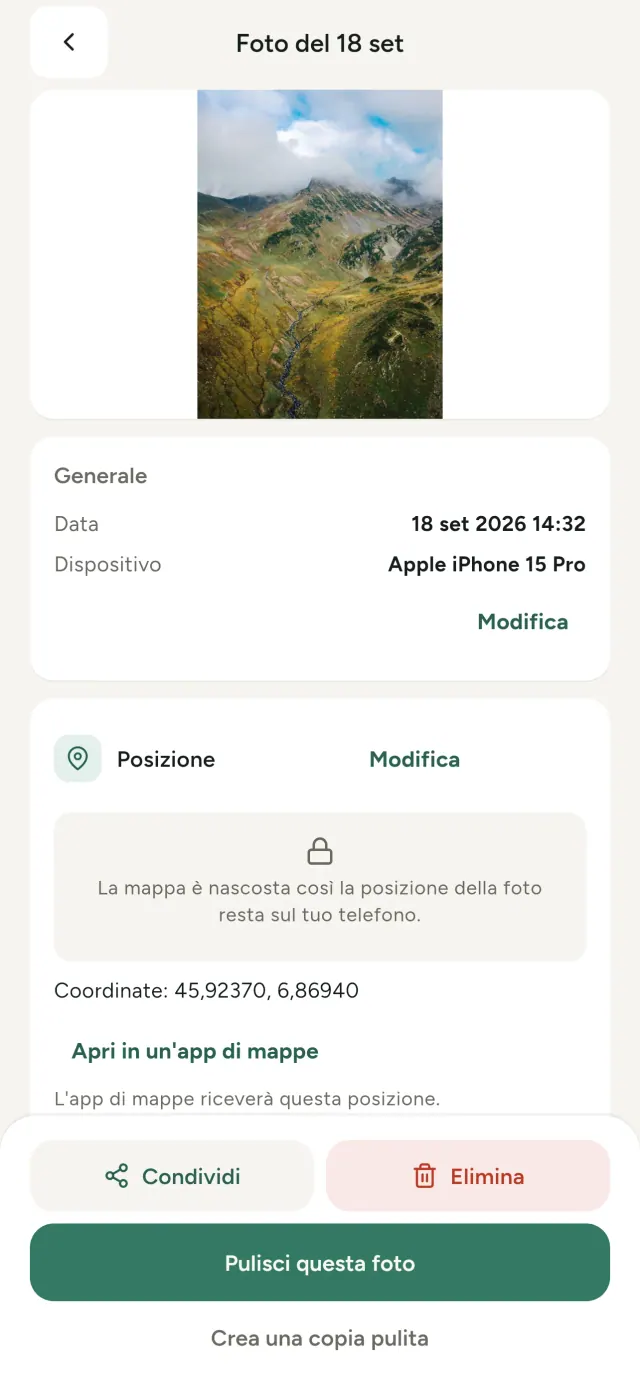
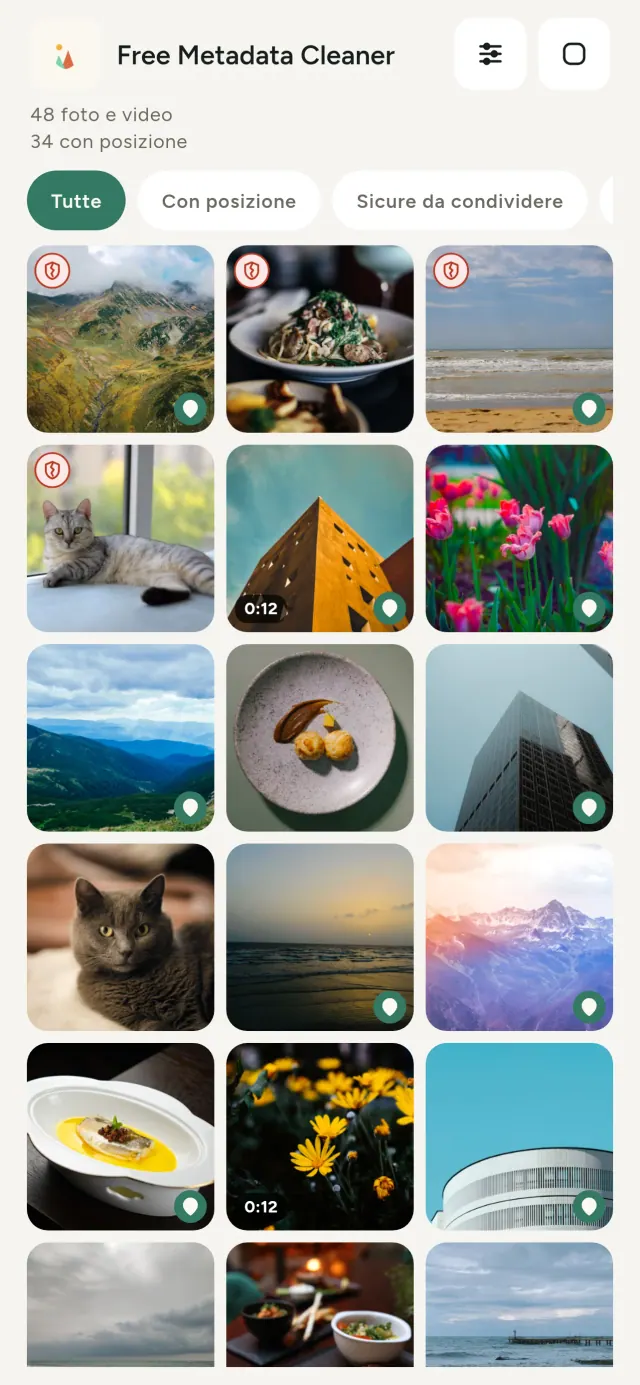
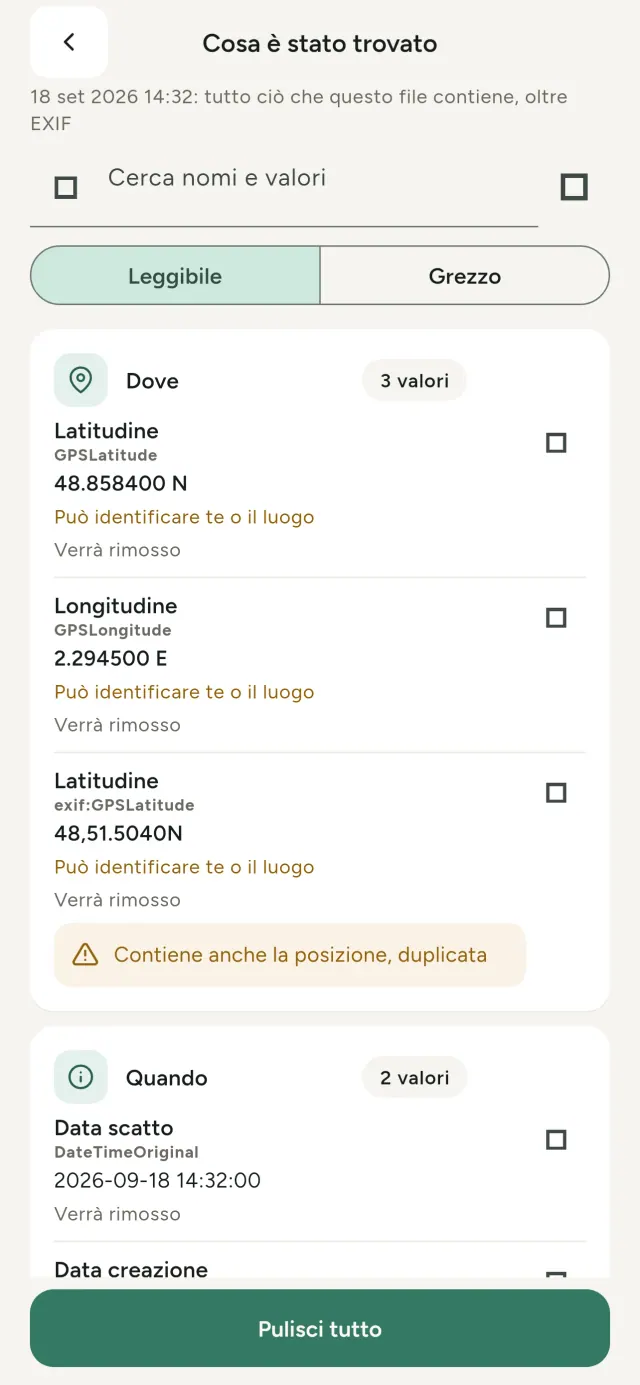
Ogni foto che scatti contiene informazioni nascoste: dove e quando è stata scattata, con quale telefono e talvolta una miniatura dell'originale. Quando la condividi, parte tutto insieme. Metadata Cleaner legge e protegge i metadati delle foto direttamente sul telefono. Le metadati delle foto includono exif, gps, viewer e privacy: qui trovi anche posizione delle foto e un exif viewer.
Cosa fa Metadata Cleaner
Leggi
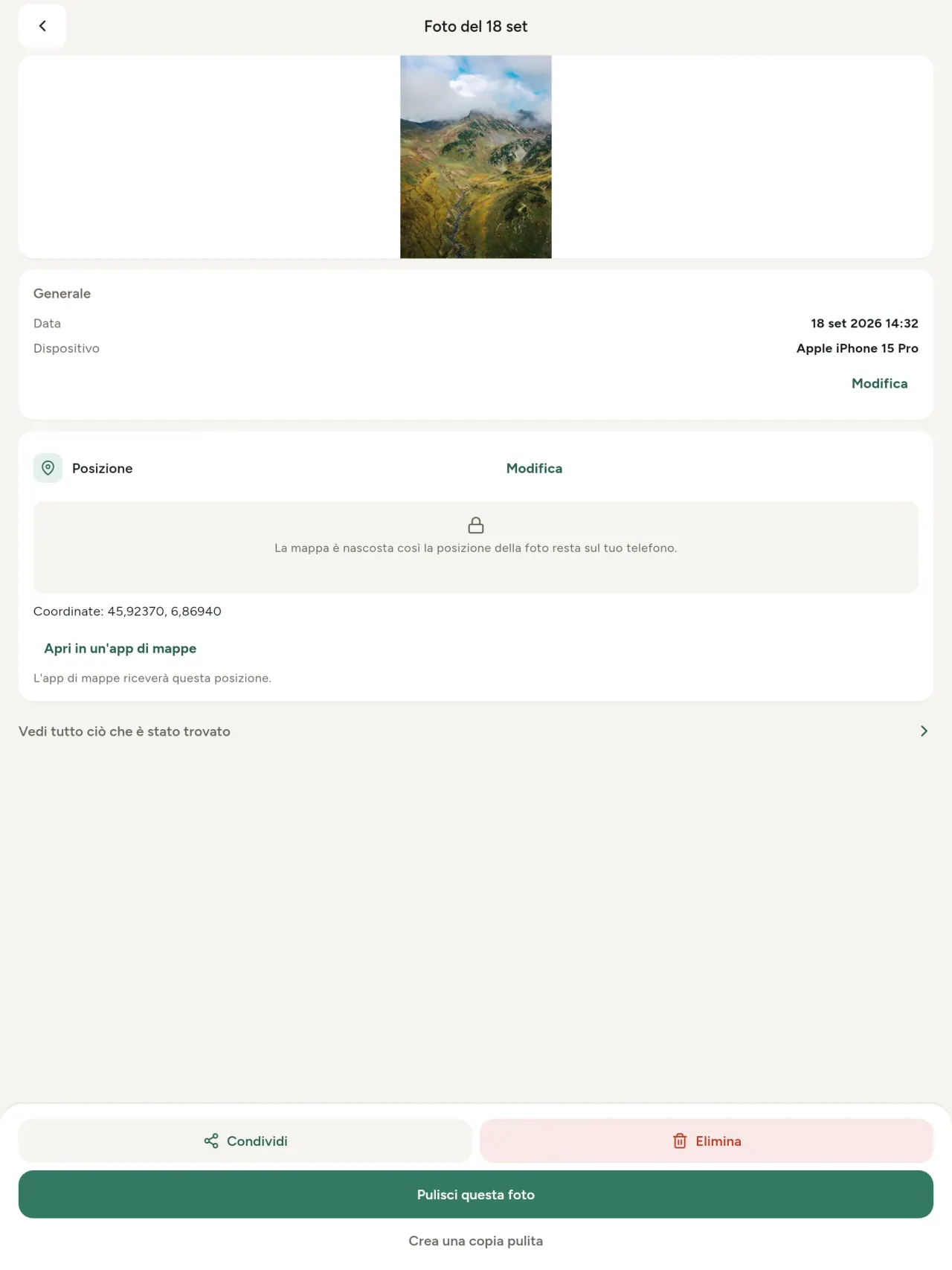
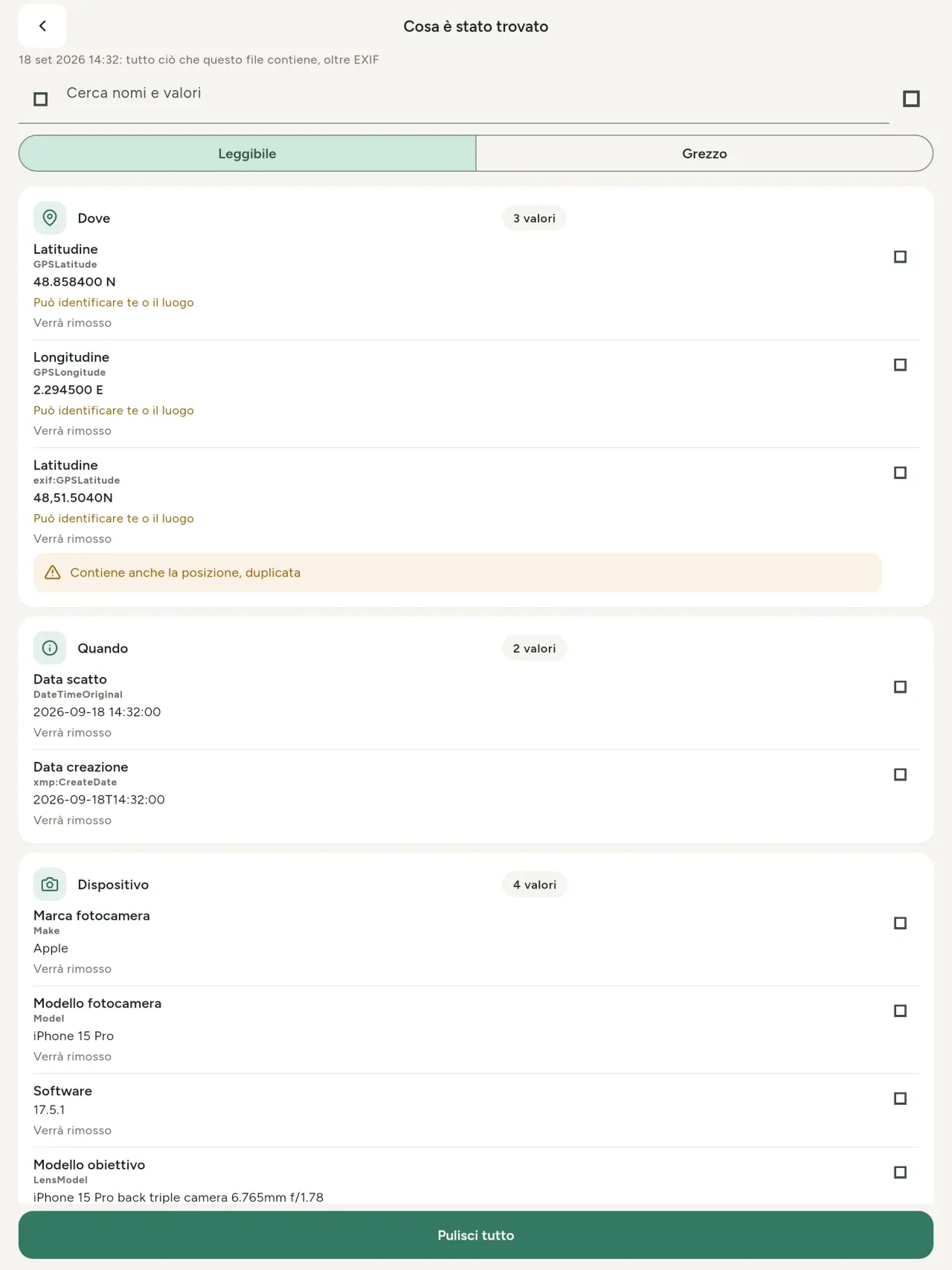
Un vero exif viewer mostra ogni valore trovato in una foto o in un video: EXIF, IPTC, XMP, codec, durata e risoluzione. I dati sono raggruppati, cercabili e copiabili, con ciò che verrà rimosso chiaramente indicato. Rileva anche la provenienza IA, inclusi C2PA e i parametri di generazione.
Modifica
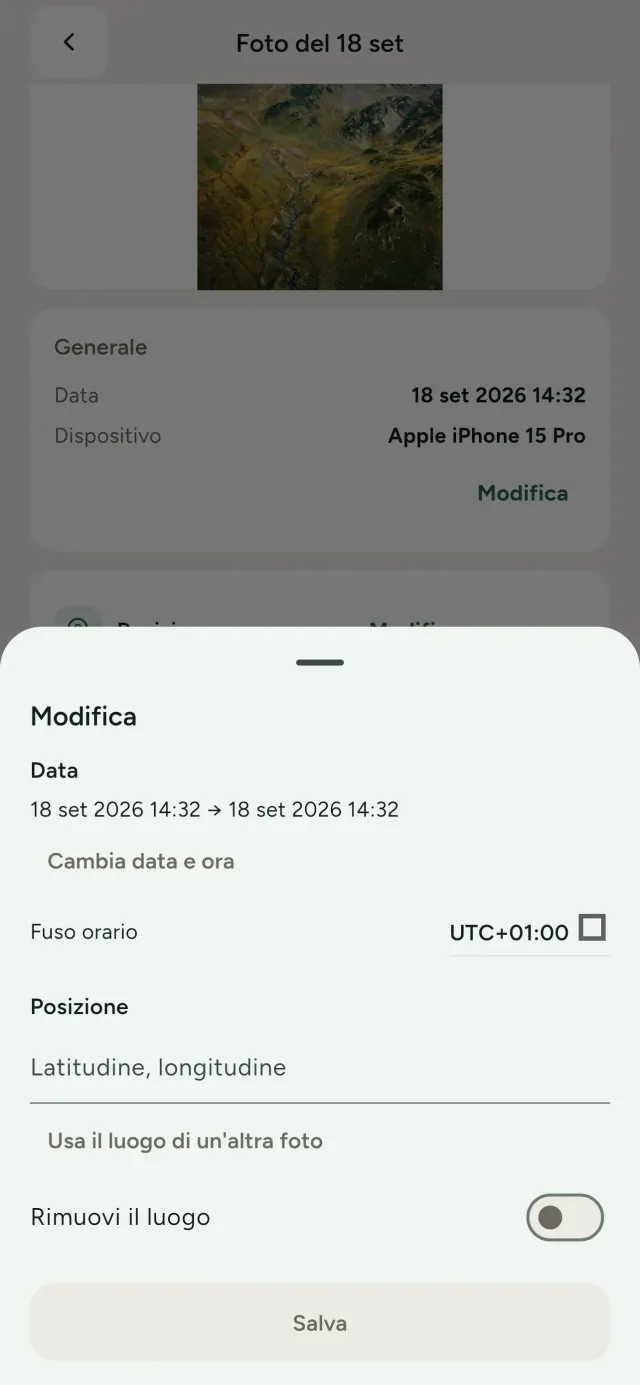
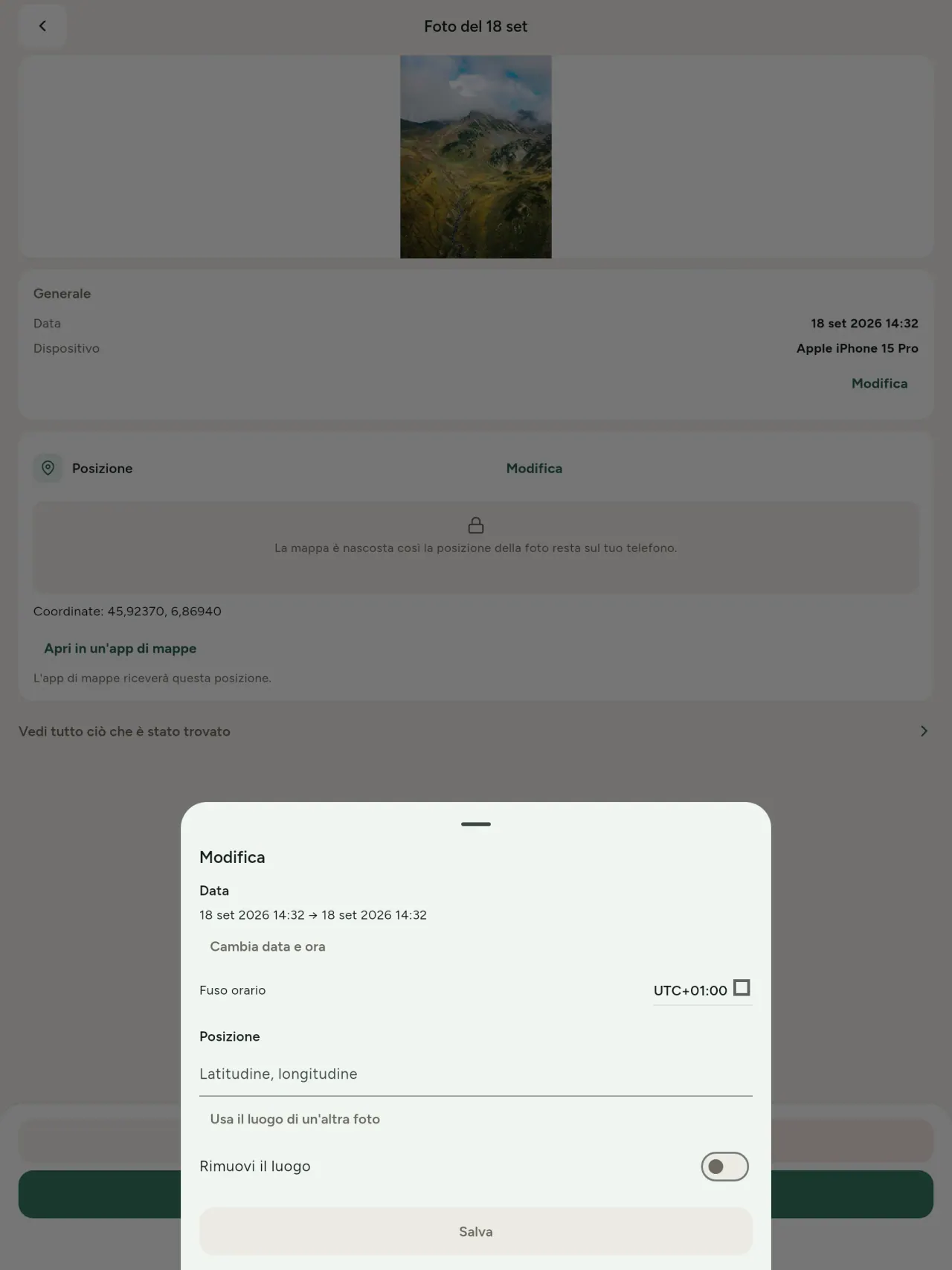
Cambia o sostituisci data e luogo, anche quando non esistono metadati. Copia la posizione delle foto da un'altra immagine oppure sceglila sulla mappa, dopo una richiesta di conferma. Confronta prima e dopo.
Rimuovi
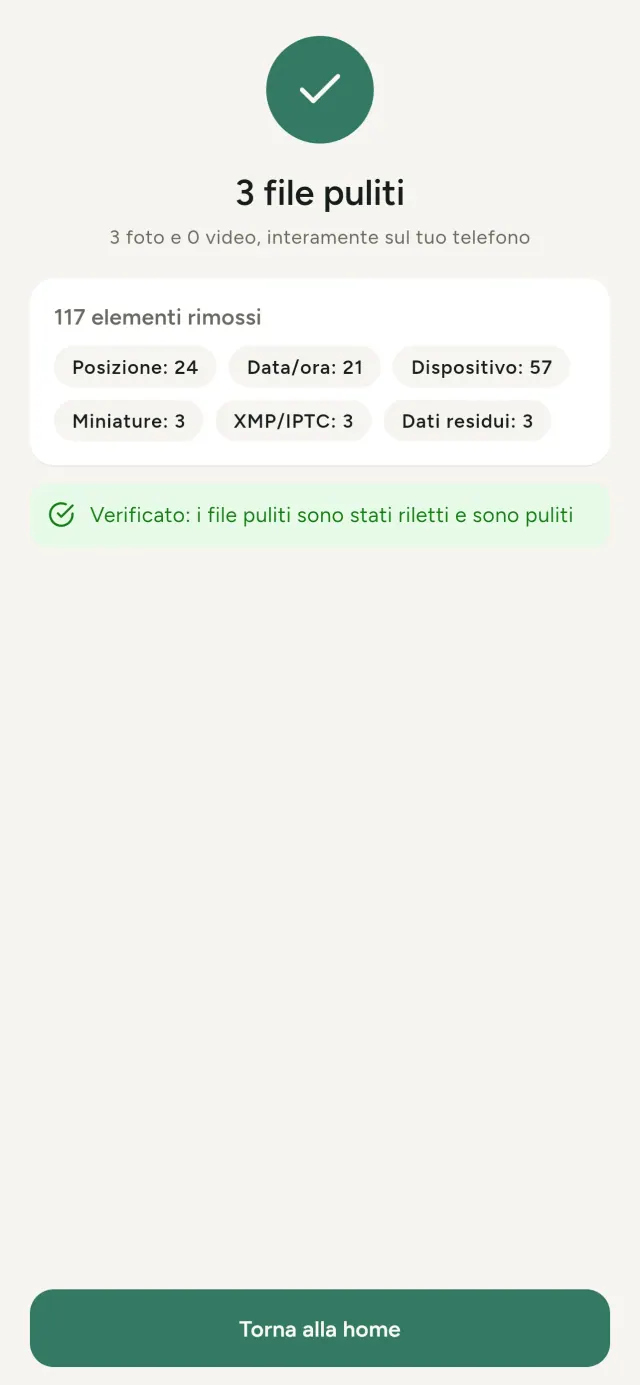
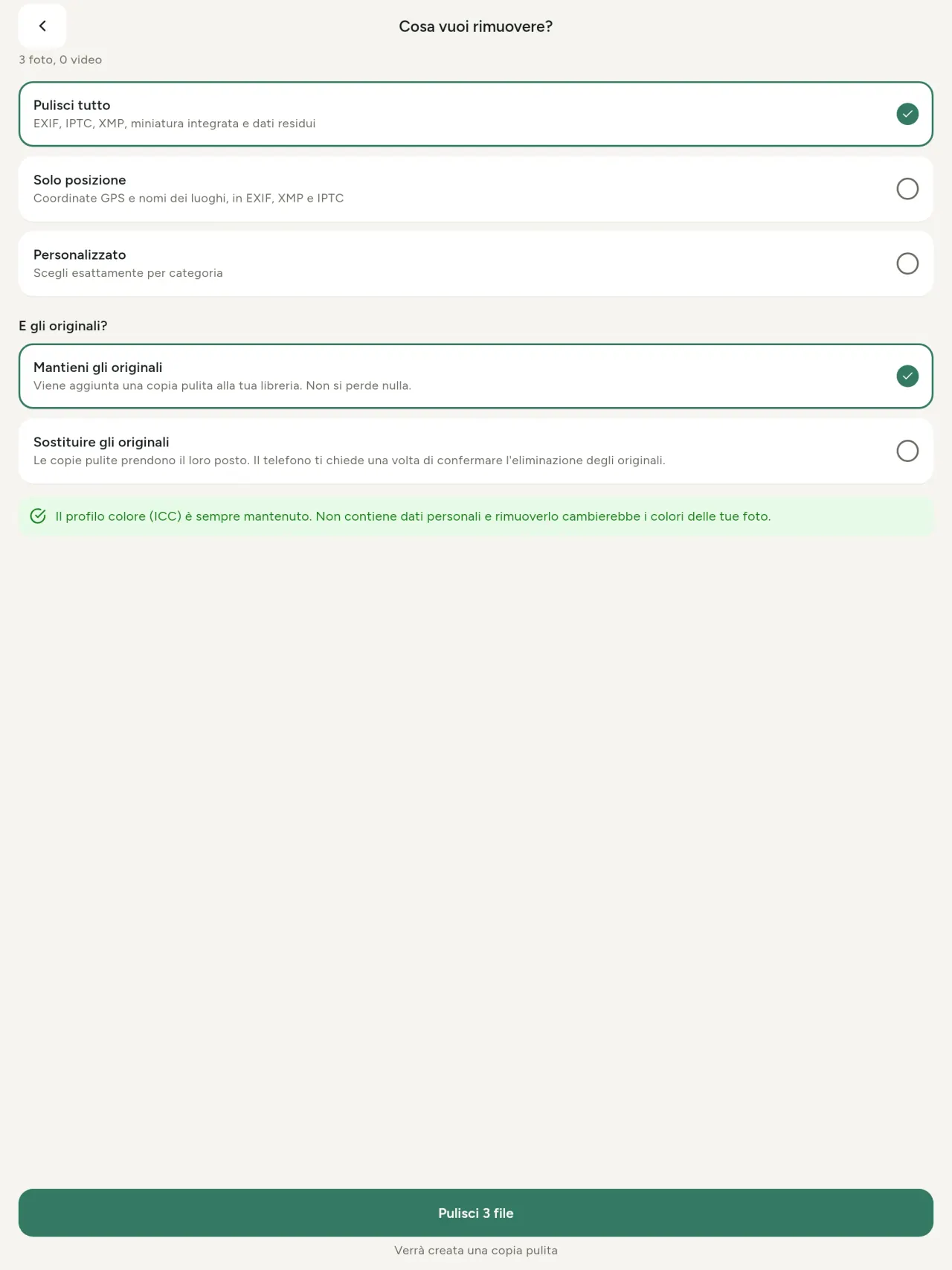
Cancella tutto, solo la posizione o le categorie che scegli: dati EXIF, IPTC e XMP, miniature incorporate, note del produttore, provenienza IA e byte residui lasciati da un'immagine ritagliata. Pulisci un'intera selezione e conserva o sostituisci gli originali.
Sicuro a colpo d'occhio
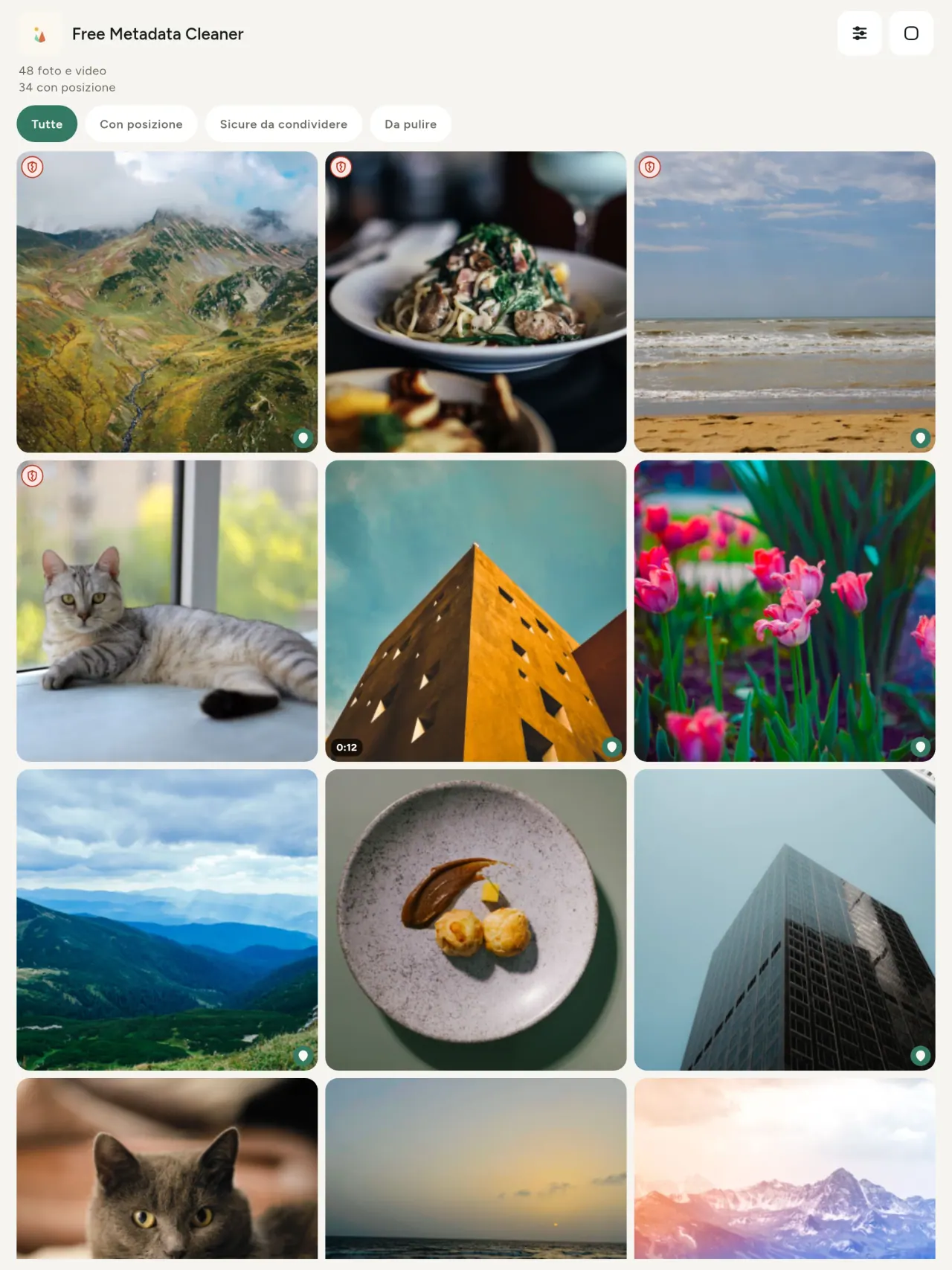
Uno scudo verde indica i file senza metadati; uno scudo rosso crepato indica quelli che ne contengono ancora.
Nessuna perdita di qualità
Le immagini non vengono mai ricodificate: la foto resta intatta.
Privacy prima di tutto
Foto e video vengono letti, modificati e puliti sul dispositivo. Nessun account, nessuna pubblicità e nessuna analisi. La mappa opzionale viene caricata da OpenStreetMap solo dopo la tua conferma e la foto non viene mai inviata.
Gratis, senza pubblicità
Se l'app ti è utile, puoi lasciare una mancia facoltativa.
A chi è rivolto
- Chiunque voglia sapere cosa rivela una foto (posizione GPS, data, fotocamera) prima di pubblicarla, venderla o inviarla.
- Persone che vendono su siti di annunci e non vogliono mostrare dove abitano.
- Genitori e chiunque voglia evitare che nelle foto condivise compaia un luogo sensibile (casa, scuola, luogo di lavoro).
- Giornalisti, attivisti e persone a rischio che devono condividere un'immagine senza lasciare tracce.
- Persone stanche delle fughe di dati che vogliono riprendere il controllo delle informazioni personali contenute nelle proprie foto.
Perché scegliere Metadata Cleaner
- Tre cose in un'unica app: leggi cosa rivela una foto o un video, modificala (data di scatto, posizione) e rimuovi i metadati in pochi tocchi.
- Tutto funziona sul telefono. Le tue foto non vengono inviate da nessuna parte.
- Foto (JPEG, HEIC, PNG, WebP, GIF) e video (MP4, MOV, 3GP).
Cosa non fa ancora
- Sono supportati solo i formati elencati sopra. Sono previsti altri formati.
Il principio di Pixeon. Le app Pixeon sono prima di tutto locali: nessun account, nessun tracciamento e i tuoi dati restano sul telefono. Se un'app si connette alla rete, lo fa solo quando scegli di attivare una funzione che ti serve, e l'informativa sulla privacy viene aggiornata prima del rilascio.
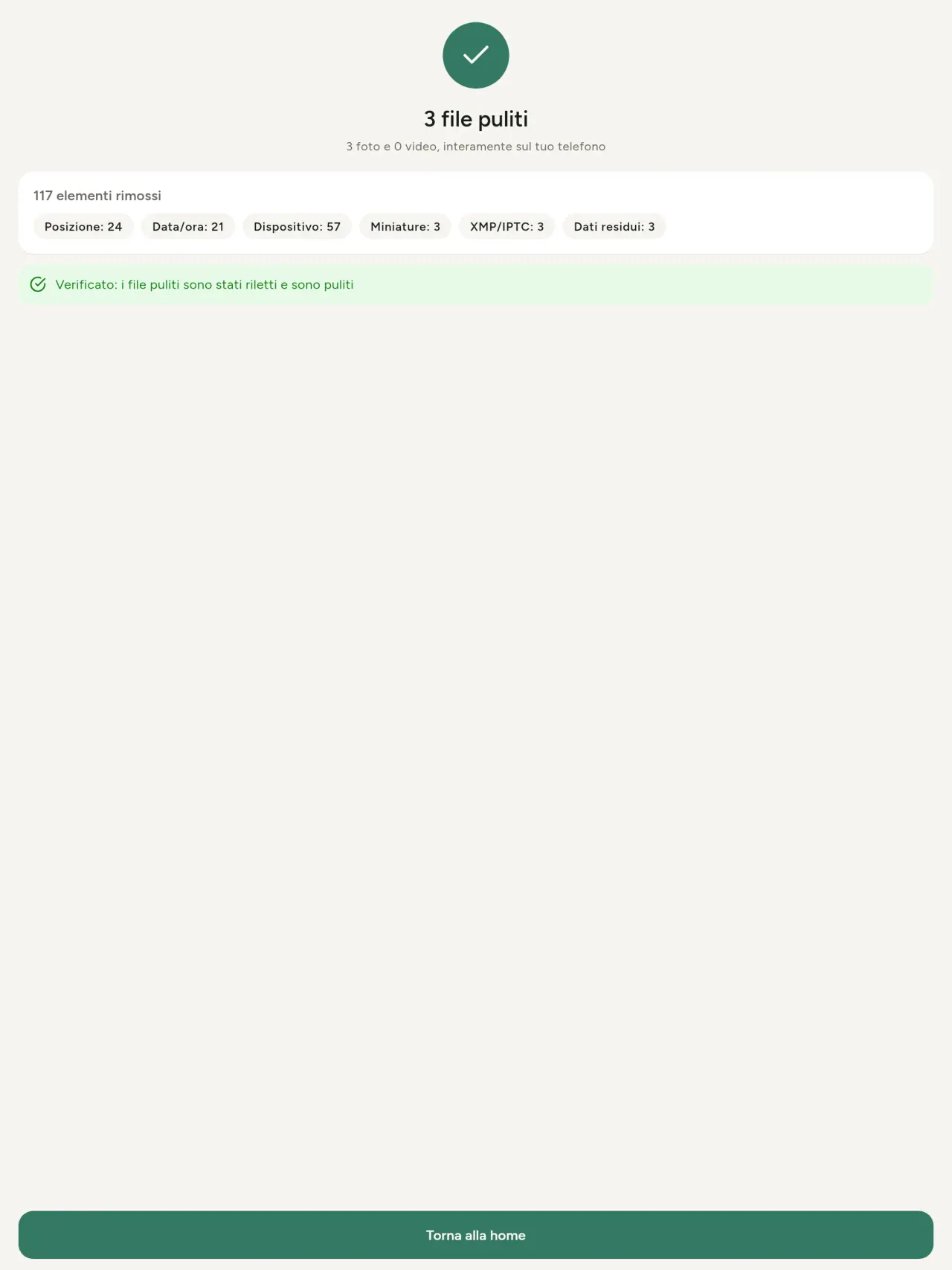
Metadata Cleaner in azione.
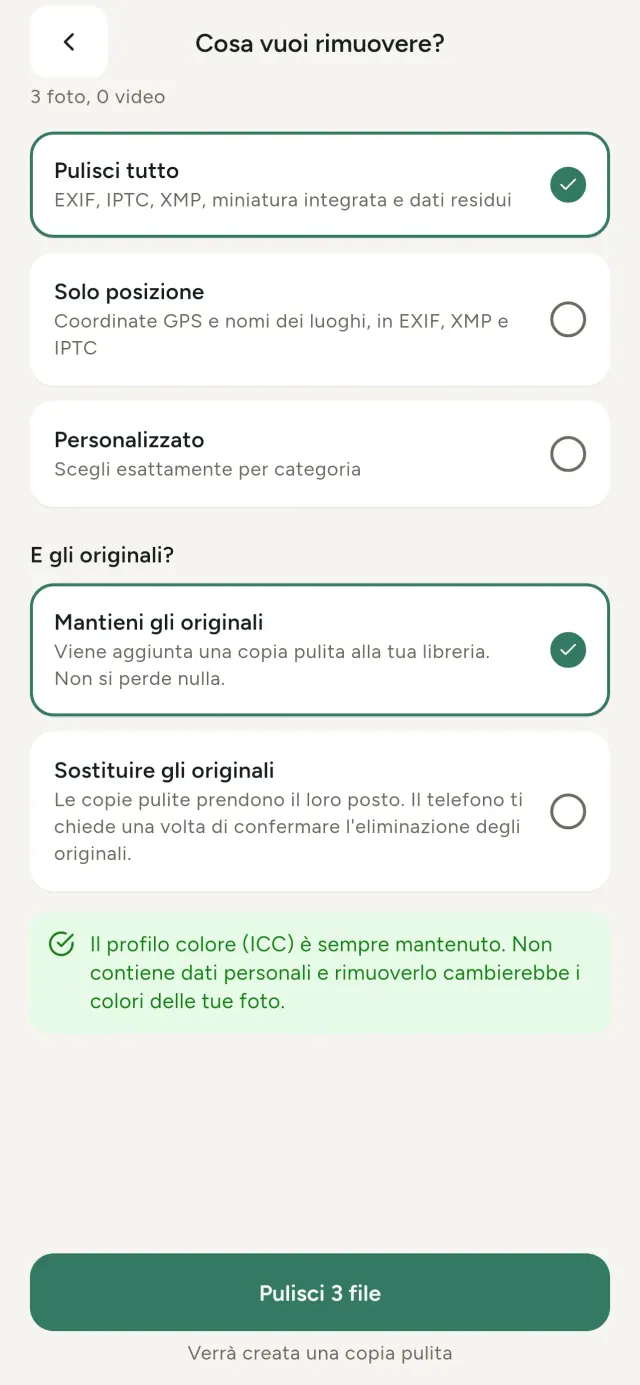
Scarica Metadata Cleaner.
Gratis su iPhone e Android.
SHA-256: A4:38:C9:B4:A9:3F:97:7B:E8:98:AD:B7:3B:30:5F:63:01:22:E0:D9:F8:CF:5D:2B:D7:4E:38:CB:9A:CF:5A:A2
Versione 1.1
- App Store In arrivo
- Google Play In arrivo
Novità
Questo testo è in inglese.
- Read: see exactly what a photo or video reveals (location, date, camera, AI provenance labels such as C2PA and generation parameters, video duration, codecs, resolution and frame rate).
- Edit: change the date a photo was taken and its location (JPEG, HEIC, AVIF), even on a photo with no metadata, reuse the location of another photo, or pick it on an OpenStreetMap map after your confirmation.
- Remove: clean metadata in a few taps, with a before and after view on the result screen.
- DNG photos are supported.
- Translations aligned across 91 languages.
Privacy policy
L'informativa sulla privacy e i testi di assistenza qui sotto sono in inglese. Fa fede la versione inglese.
Last updated: 2026-11-18 · applies to version 1.1 and later
Policy versions: 1.1 and later (this text) · version 1.0 (still the policy of the app version 1.0). The version number of your app is shown at the bottom of its Settings screen.
Free Metadata Cleaner shows and removes the metadata hidden in your photos and videos (location, date and time, camera and lens details, thumbnails…). The short version: everything happens on your device, and we collect nothing.
What the app accesses
Your photo and video library, only after you grant permission (and, where your system requires it, the permission to read the location stored in your photos, so that it can be shown to you). The files you choose are read and cleaned on your device; the cleaned copy is saved to your library. If you choose to replace the originals, the system asks you to confirm before deleting them.
To show which photos are already clean, the app reads the metadata of the photos displayed on screen, on your device. This result is kept in memory only and is never stored.
What we collect
Nothing. No account, no analytics or usage tracking, no advertising or advertising identifiers, no crash or diagnostics reporting beyond what the app stores provide, and no third-party SDK that sends data anywhere. There is no Free Metadata Cleaner server. Cleaning a photo or video never uses the network, at all: turn on airplane mode and clean one to check for yourself. The only network request the app itself can ever make is described under “Location” below, and it only ever happens if you ask for it. The one other connection is the optional tip purchase, handled by the store (see “Optional support”).
Temporary files and history
The app keeps no history and no database. Temporary files created while cleaning are deleted after each item and purged when the app starts.
Deleted originals
Originals that are deleted remain in your system's trash (such as “Recently Deleted” or the trash) for about 30 days, with their metadata. The app cannot empty it: do it yourself if you need the originals gone at once.
iCloud and cloud photos
If a photo is stored in iCloud and not on your device, the operating system may download it before the app can process it. That transfer is made by the system, under the provider's own terms, not by the app.
Location
When a photo contains a location, the app shows the coordinates as text, which stays on your device. Three actions can send location information off your device, only when you choose them, each time: “Open in…” hands the coordinates to the maps application you select, under its own privacy policy; “Show the map” asks you to confirm first (“Showing the map sends this photo's position to a map service. Nothing else is sent.”), then loads a small map from OpenStreetMap for that one position; and, when you edit a photo's place, “Choose on the map” asks you to confirm first, then opens a full-screen map from OpenStreetMap. This map does not use your phone's location. As you move and zoom it, the app requests the map tiles of the area you are browsing, so OpenStreetMap receives the position of the area shown on screen, which starts on the photo's current place if it has one, and otherwise on a world view. The photo itself is never sent, and nothing is sent before you confirm. The place you choose on the map (or copy from another photo) is written into the photo's file only when you save, on your device. In every case OpenStreetMap receives, as with any web request, technical details like your IP address; it does not receive your name, an account, or anything else about you or your other photos. See OpenStreetMap's own privacy policy. Outside of these explicit actions, the app never sends a photo's location, or anything else, anywhere.
Optional support
The app is free. If you wish, you can leave a tip. On iPhone and in the Google Play version for Android, tips are in-app purchases processed by Apple or Google under their own terms and privacy policy; the app adds the Google Play billing permission for this, makes no network call itself, and receives no payment or personal details. Versions installed outside Google Play may instead open an external donation page in your browser, operated by a third party under its own privacy policy; nothing from the app is sent to it. A tip unlocks nothing.
Contact form on this website
If you write to us through this site, we use your message and the email address you optionally give only to reply. Bot protection is provided by Cloudflare and email delivery by Resend.
Language choice on this website
When you choose a language, or when this site opens a page in your browser's language, it stores
one small functional cookie (pxl, a language code, one year) so that your choice is
remembered. If this site suggests a page in your browser's language and you close that suggestion,
your browser also keeps a local note (pxl-banner-off, in local storage, 30 days) so the
suggestion does not come back. Neither identifies anyone, neither is used for tracking or advertising,
and neither is shared. You can delete them in your browser at any time.
Website statistics
This website uses Cloudflare Web Analytics to count visits (pages viewed, country, browser type, loading speed). It sets no cookie, does not use local storage, does not fingerprint your device, does not follow you across sites and does not build a profile of you. Search engines (for example Google Search Console) give us aggregated search statistics, without any data about individual visitors. Our own web server also counts the pages and APK downloads it serves: for each request it keeps the address, the site or social network that sent you (only its name, or the campaign tag written in the link), the country, the type of device and whether the request came from a robot. It keeps no IP address, no identifier and no cookie, and these counts are anonymous. We use no advertising or other analytics service. None of this concerns the app itself, which collects nothing.
Children
The app is a general-purpose tool and is not directed at children.
Changes
An updated policy will be published at this URL with a new date above.
Contact
Questions about privacy: metadata-cleaner-contact@pixeon.net
Versione 1.0
- App Store Pubblicata
- Google Play Pubblicata
Novità
Questo testo è in inglese.
- Cleans JPEG, HEIC, PNG, WebP, GIF, MP4, MOV and 3GP files, with no video re-encoding.
- "Safe to share" and "To clean" filters.
- New green design.
- Help screen with a FAQ.
- Settings: share, rate, feedback, unsupported formats.
- Optional tips.
Privacy policy, version 1.0
L'informativa sulla privacy e i testi di assistenza qui sotto sono in inglese. Fa fede la versione inglese.
Applies to version 1.0 of the app (the first release). Later versions: current policy.
Free Metadata Cleaner shows and removes the metadata hidden in your photos and videos (location, date and time, camera and lens details, thumbnails…). The short version: everything happens on your device, and we collect nothing.
What the app accesses
Your photo and video library, only after you grant permission (and, where your system requires it, the permission to read the location stored in your photos, so that it can be shown to you). The files you choose are read and cleaned on your device; the cleaned copy is saved to your library. If you choose to replace the originals, the system asks you to confirm before deleting them.
To show which photos are already clean, the app reads the metadata of the photos displayed on screen, on your device. This result is kept in memory only and is never stored.
What we collect
Nothing. No account, no analytics or usage tracking, no advertising or advertising identifiers, no crash or diagnostics reporting beyond what the app stores provide, and no third-party SDK that sends data anywhere. There is no Free Metadata Cleaner server. Cleaning a photo or video never uses the network, at all: turn on airplane mode and clean one to check for yourself. The only network request the app itself can ever make is described under “Location” below, and it only ever happens if you ask for it. The one other connection is the optional tip purchase, handled by the store (see “Optional support”).
Temporary files and history
The app keeps no history and no database. Temporary files created while cleaning are deleted after each item and purged when the app starts.
Deleted originals
Originals that are deleted remain in your system's trash (such as “Recently Deleted” or the trash) for about 30 days, with their metadata. The app cannot empty it: do it yourself if you need the originals gone at once.
iCloud and cloud photos
If a photo is stored in iCloud and not on your device, the operating system may download it before the app can process it. That transfer is made by the system, under the provider's own terms, not by the app.
Location
When a photo contains a location, the app shows the coordinates as text, which stays on your device. Two actions send that one photo's position off your device, only when you choose them, each time: “Open in…” hands the coordinates to the maps application you select, under its own privacy policy; “Show the map” asks you to confirm first (“Showing the map sends this photo's position to a map service. Nothing else is sent.”), then loads a small map from OpenStreetMap for that one position. OpenStreetMap receives the coordinates and, as with any web request, technical details like your IP address; it does not receive your name, an account, or anything else about you or your other photos. See OpenStreetMap's own privacy policy. Outside of these two explicit actions, the app never sends a photo's location, or anything else, anywhere.
Optional support
The app is free. If you wish, you can leave a tip. On iPhone and in the Google Play version for Android, tips are in-app purchases processed by Apple or Google under their own terms and privacy policy; the app adds the Google Play billing permission for this, makes no network call itself, and receives no payment or personal details. Versions installed outside Google Play may instead open an external donation page in your browser, operated by a third party under its own privacy policy; nothing from the app is sent to it. A tip unlocks nothing.
Contact form on this website
If you write to us through this site, we use your message and the email address you optionally give only to reply. Bot protection is provided by Cloudflare and email delivery by Resend.
Language choice on this website
When you choose a language, or when this site opens a page in your browser's language, it stores
one small functional cookie (pxl, a language code, one year) so that your choice is
remembered. If this site suggests a page in your browser's language and you close that suggestion,
your browser also keeps a local note (pxl-banner-off, in local storage, 30 days) so the
suggestion does not come back. Neither identifies anyone, neither is used for tracking or advertising,
and neither is shared. You can delete them in your browser at any time.
Website statistics
This website uses Cloudflare Web Analytics to count visits (pages viewed, country, browser type, loading speed). It sets no cookie, does not use local storage, does not fingerprint your device, does not follow you across sites and does not build a profile of you. Search engines (for example Google Search Console) give us aggregated search statistics, without any data about individual visitors. Our own web server also counts the pages and APK downloads it serves: for each request it keeps the address, the site or social network that sent you (only its name, or the campaign tag written in the link), the country, the type of device and whether the request came from a robot. It keeps no IP address, no identifier and no cookie, and these counts are anonymous. We use no advertising or other analytics service. None of this concerns the app itself, which collects nothing.
Children
The app is a general-purpose tool and is not directed at children.
Changes
An updated policy will be published at this URL with a new date above.
Contact
Questions about privacy: metadata-cleaner-contact@pixeon.net
Credits
Android is a trademark of Google LLC. The Android robot is reproduced or modified from work created and shared by Google and used according to terms described in the Creative Commons 3.0 Attribution License. This site is not affiliated with or endorsed by Google.
Assistenza
Ultimo aggiornamento: 2026-10-08
Free Metadata Cleaner è una piccola app indipendente. Di seguito trovi le risposte alle domande più frequenti.
Facciamo del nostro meglio per rispondere entro pochi giorni. Per aiutarci, indicaci il modello del dispositivo, la versione del sistema e cosa stavi facendo. Non inviare foto private.
Quali dati archivia o invia l'app?
Nessuno. Non conserva alcuna cronologia, non ha account né server. Dettagli nell'informativa sulla privacy.
Come posso pulire una foto?
- Apri l'app e, quando richiesto, consenti l'accesso alla tua raccolta.
- Seleziona le foto o i video da pulire.
- Scegli cosa rimuovere e se sostituire gli originali o creare una copia pulita.
- Conferma. Un riepilogo mostra cosa è stato rimosso e indica i file che non è stato possibile elaborare.
Dove vengono salvate le copie pulite?
Nella tua raccolta di foto. La data della raccolta dell'originale viene mantenuta, quindi una foto pulita non passa in cima alla galleria.
Ho scelto “sostituisci gli originali”, ma gli originali esistono ancora.
Gli originali eliminati restano nel cestino del sistema, ad esempio in “Eliminati di recente” o nel cestino, per circa 30 giorni, insieme ai relativi metadati. Svuota il cestino per rimuoverli immediatamente. Se rifiuti la richiesta di eliminazione del sistema, gli originali vengono conservati e le copie pulite vengono comunque aggiunte.
Quali file sono supportati?
Foto in JPEG, HEIC, AVIF, PNG, WebP e GIF, e video in MP4, MOV e 3GP, con altri formati in arrivo. Un file che l'app non può pulire viene lasciato intatto e inserito nel riepilogo con il motivo, senza interrompere il resto dell'elaborazione.
Perché l'app ha bisogno di accedere alle mie foto?
Per elencare le foto tra cui puoi scegliere e salvare le copie pulite. Quando il sistema lo richiede, l'app chiede anche l'autorizzazione a leggere la posizione memorizzata nelle foto: senza questa autorizzazione il sistema nasconde la posizione, quindi l'app non potrebbe mostrarti cosa rivela una foto. Nulla viene caricato.
Come posso verificare che nulla lasci il mio telefono?
Attiva la modalità aereo e pulisci una foto: funzionerà allo stesso modo. L'unica eccezione è la mappa: se tocchi “Mostra la mappa” sulla posizione di una foto e confermi, quella posizione viene inviata a OpenStreetMap per visualizzare una mappa, e nient'altro. Vedi “Posizione” qui sopra.
Quali lingue sono disponibili?
L'app è disponibile in inglese, francese, tedesco, spagnolo, italiano, portoghese e arabo. Questo sito è disponibile in più lingue e ne arriveranno altre per l'app.
Sostieni il progetto
Metadata Cleaner resta gratuita e senza pubblicità. Se ti è utile, puoi sostenerne lo sviluppo (facoltativo):
Buy Me a CoffeeBudget familiare e controllo spese solo sul tuo dispositivo. Senza account.
Anche da PixeonVaultMarkCassaforte documenti cifrata. Filigrana documento e rimozione dei metadati.
Anche da PixeonLittle RelayDiario neonato con svezzamento, allattamento e sonno, senza account
Anche da PixeonMenuloopPianificatore pasti con lista della spesa e ricette con foto, anche offline.
Anche da PixeonIndie OfficeQuote maker and self-employed invoices. Offline, no account, no ads.