
Metadata Cleaner: Foto/Video
Vizualizator, editor și ștergere metadate foto: locație, dată.


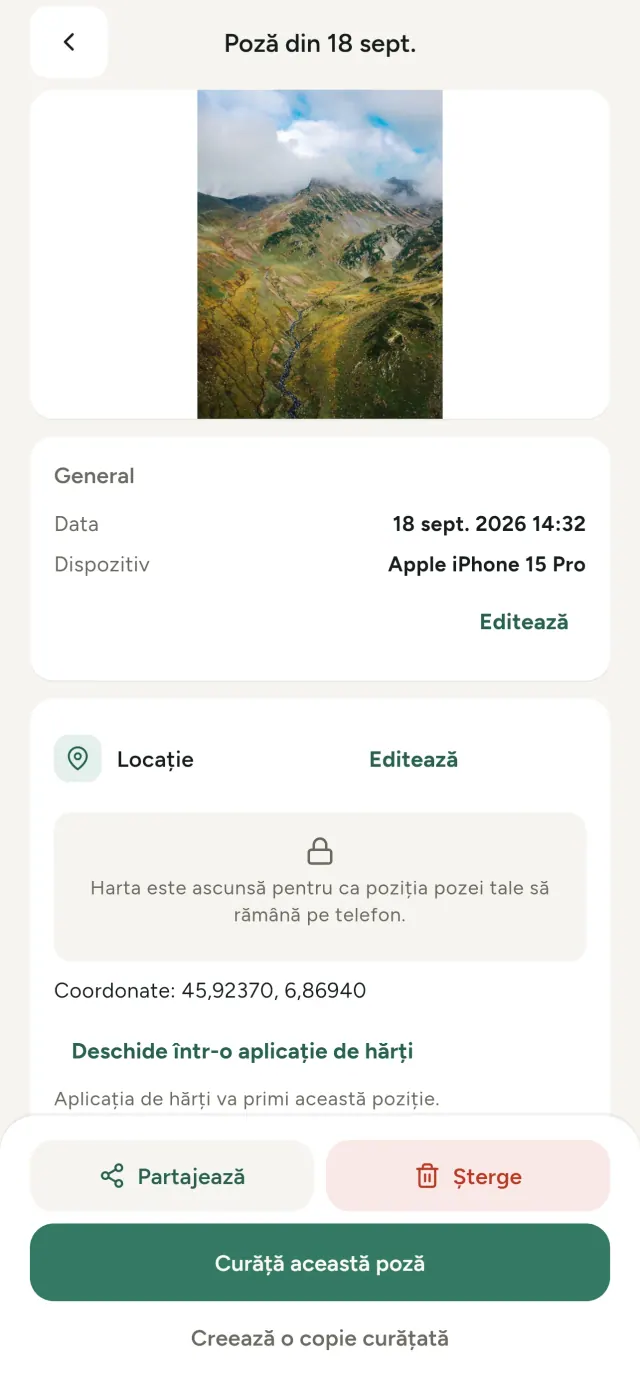
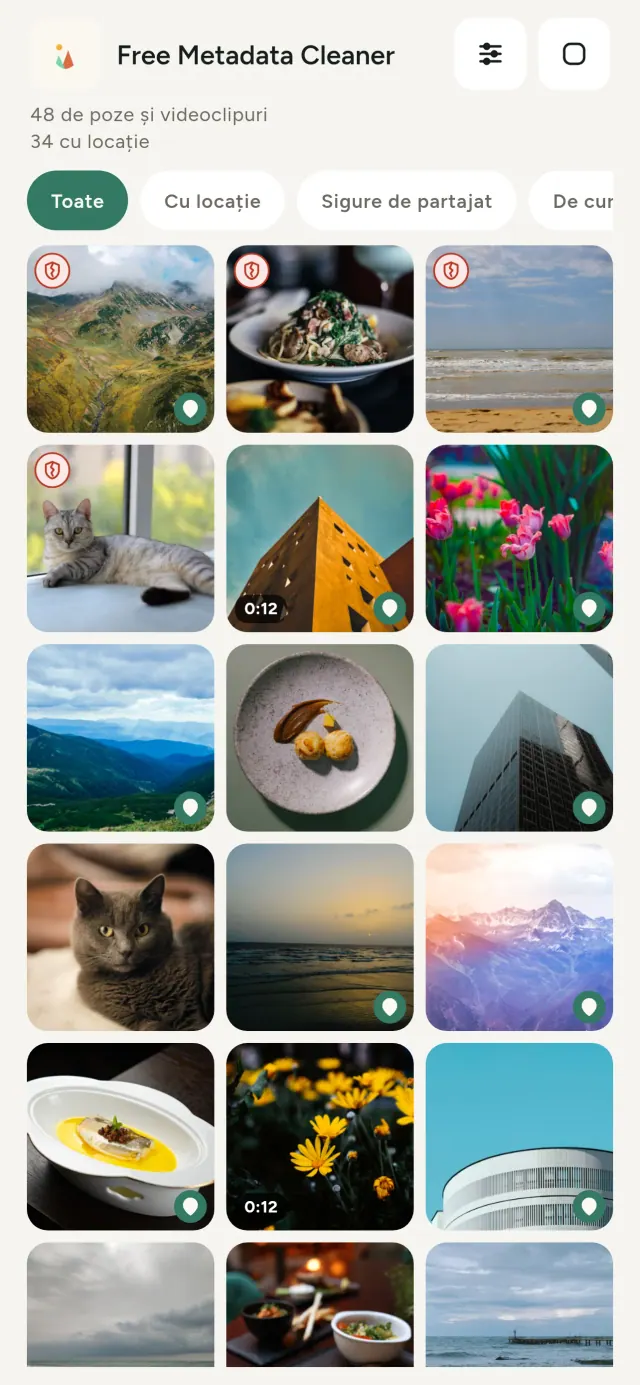
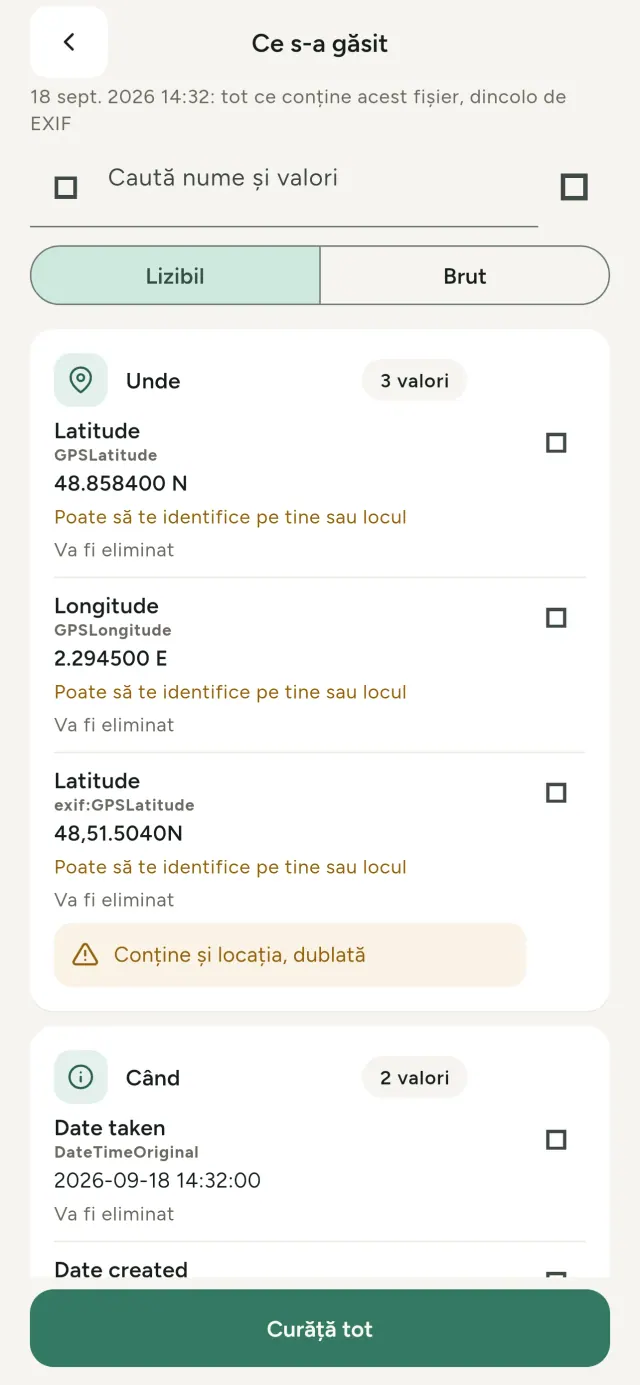
Fiecare poză pe care o faci poartă informații ascunse: unde și când a fost făcută, cu ce telefon, uneori chiar și o miniatură a imaginii originale. Când o partajezi, toate pleacă odată cu ea.
Metadata Cleaner face trei lucruri, pe telefonul tău: îți arată ce conțin pozele și videoclipurile, te lasă să corectezi ce e greșit și șterge metadatele.
Ce face Metadata Cleaner
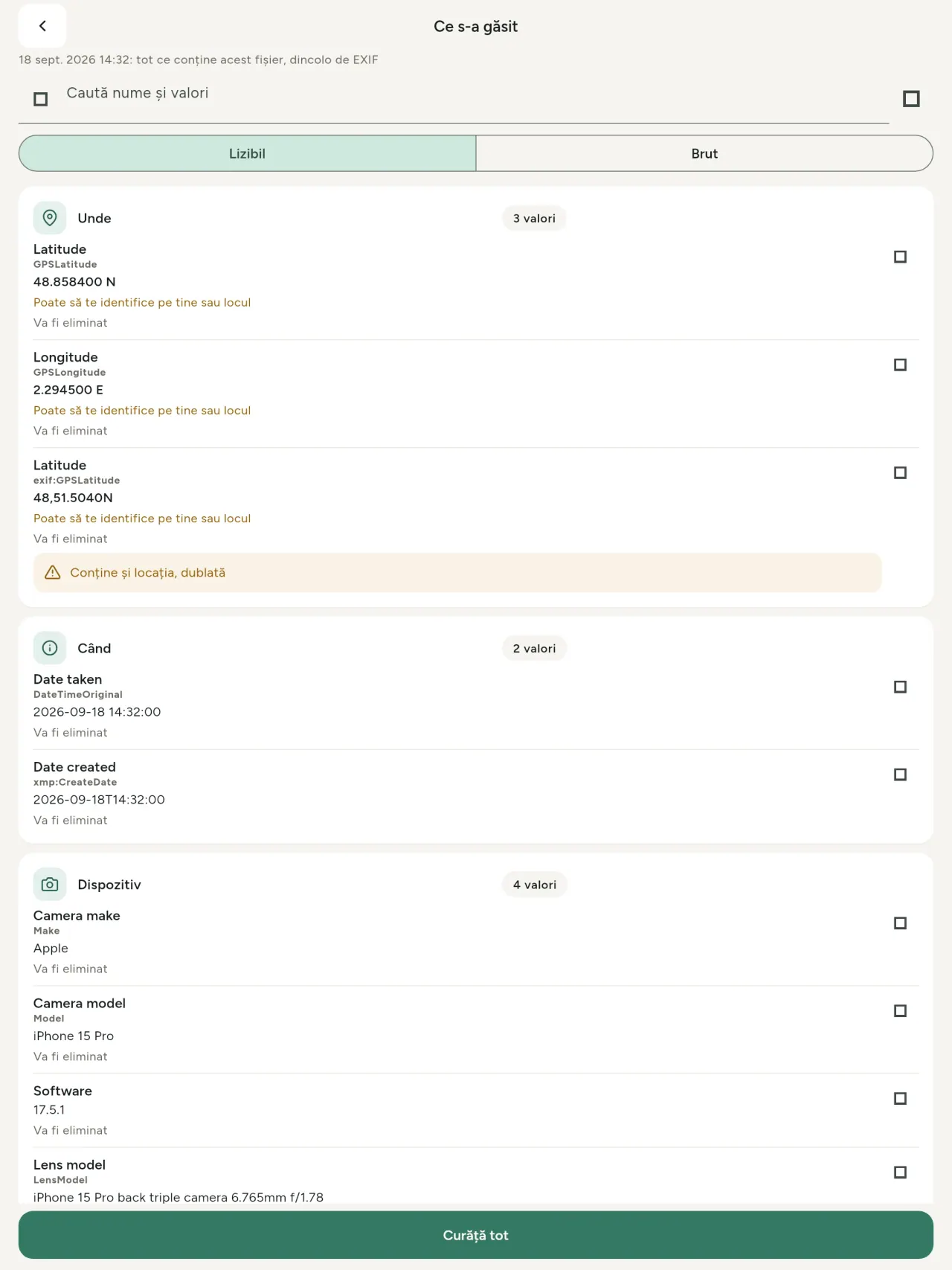
Citește
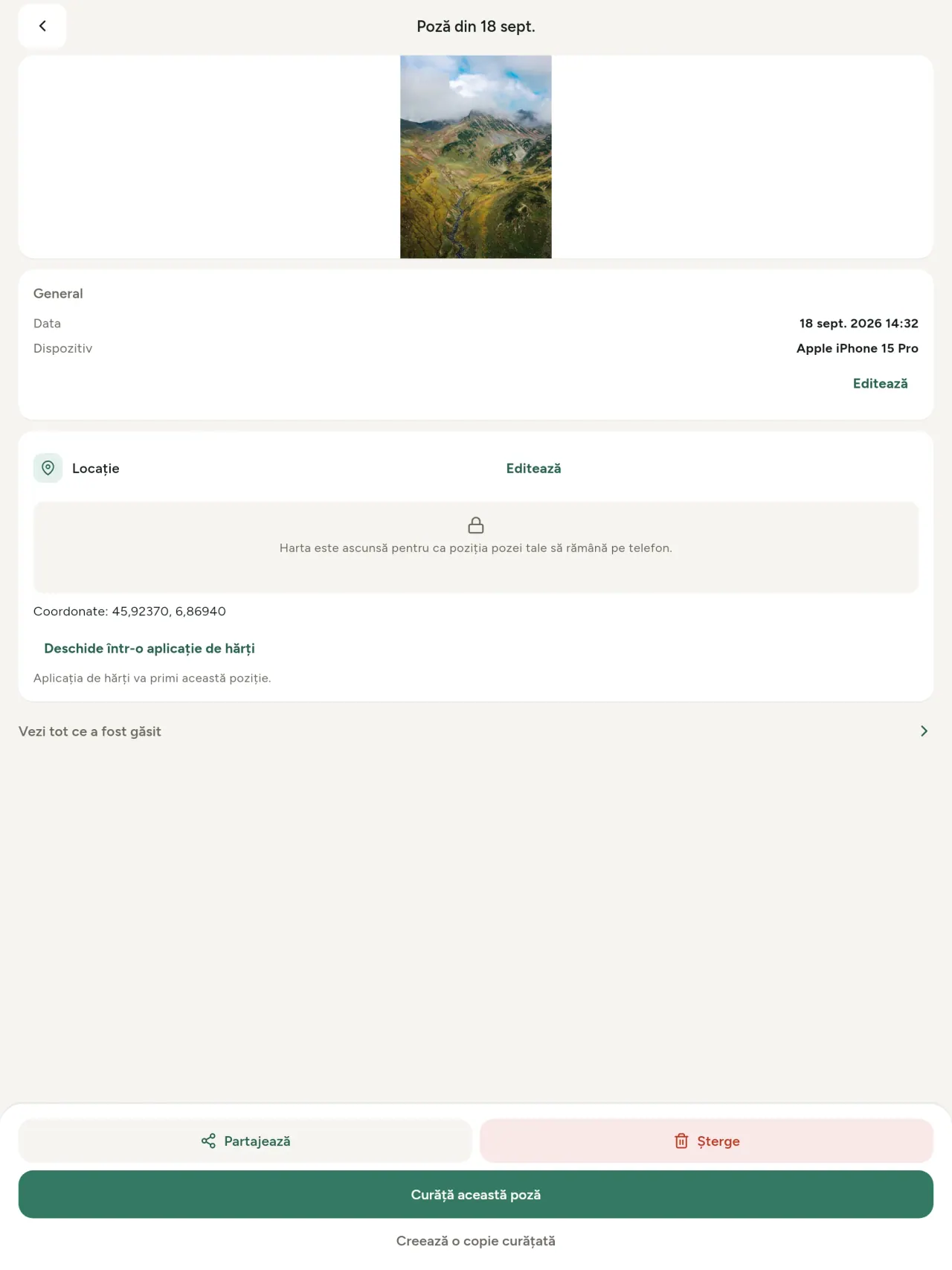
Un vizualizator de metadate adevărat: toate valorile găsite într-o poză sau într-un videoclip (EXIF, IPTC, XMP, codecuri video, durată și rezoluție), grupate, căutabile și copiabile, cu ce va fi șters marcat. Detectează și proveniența IA (C2PA, parametri de generare).
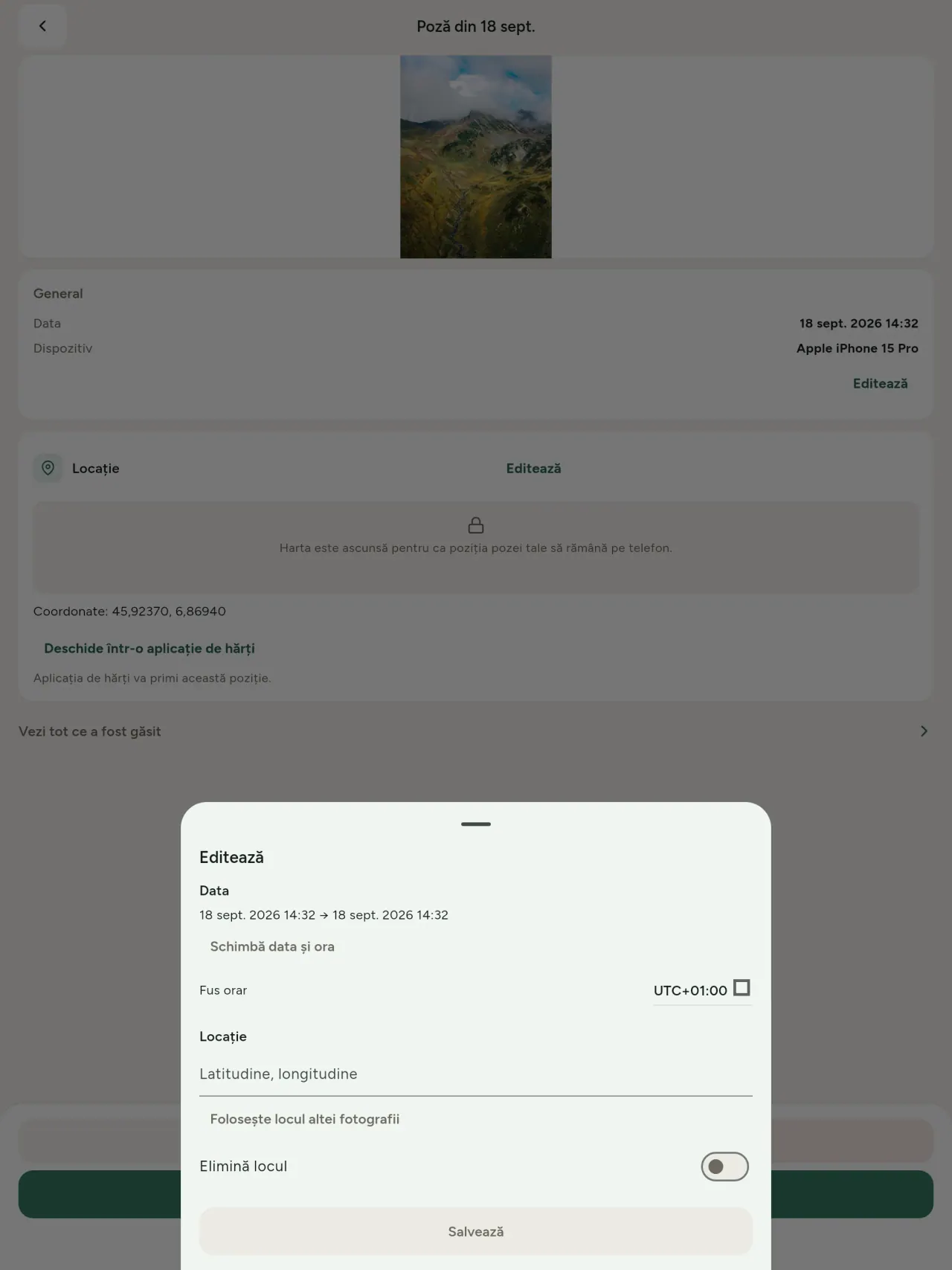
Editează
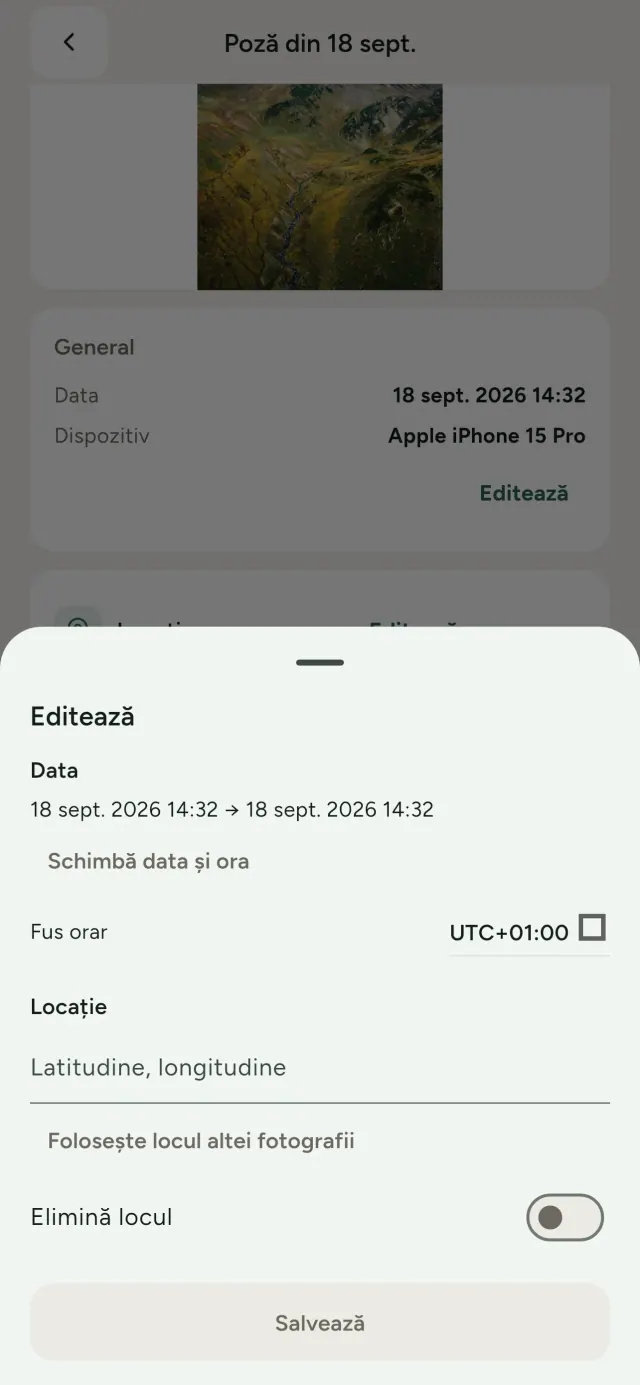
Schimbă sau înlocuiește data și locul unei poze, chiar și dacă nu are metadate deloc. Preia locul din altă poză sau alege-l pe hartă (aplicația întreabă înainte, de fiecare dată). Compară înainte și după.
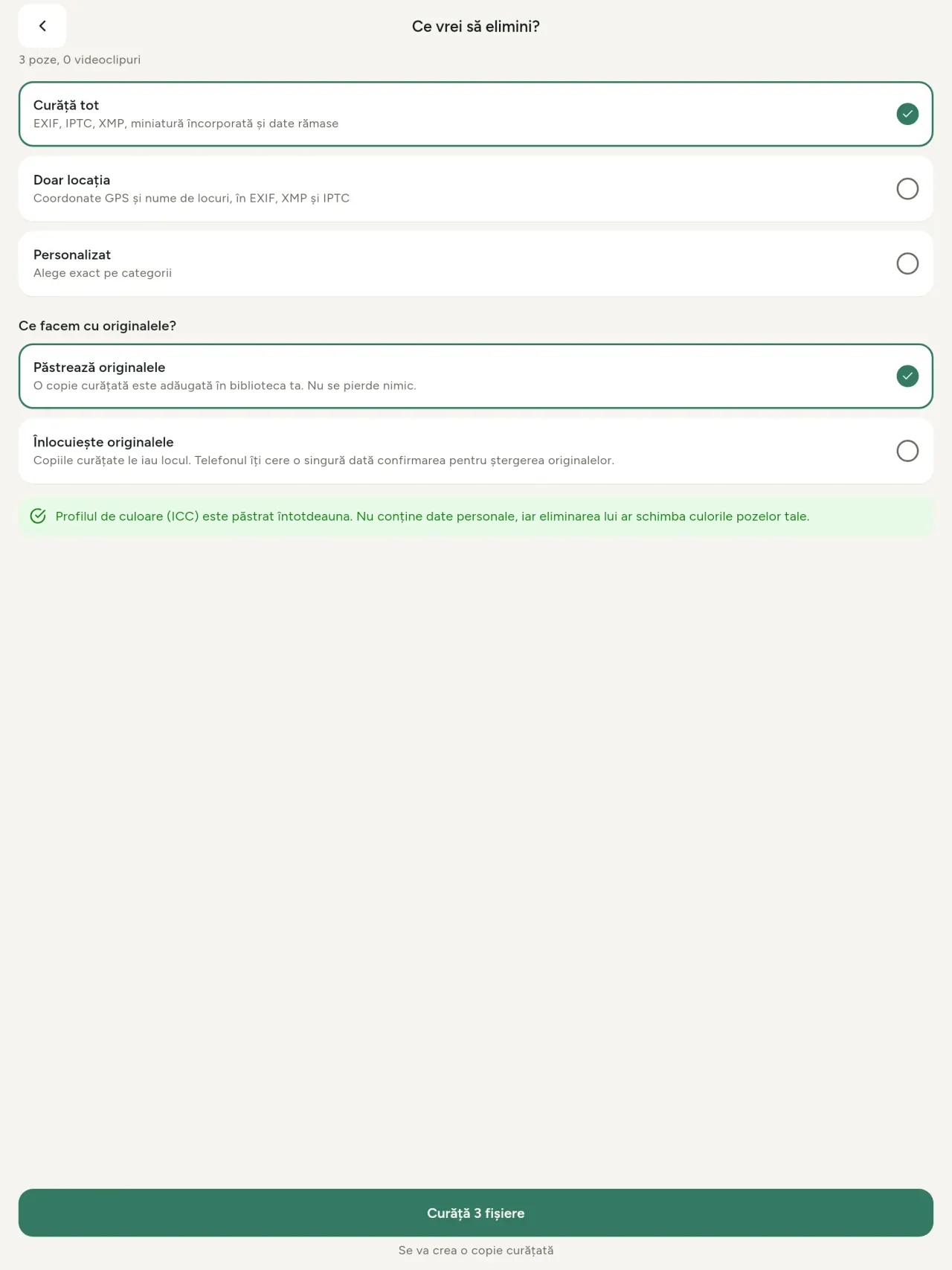
Șterge
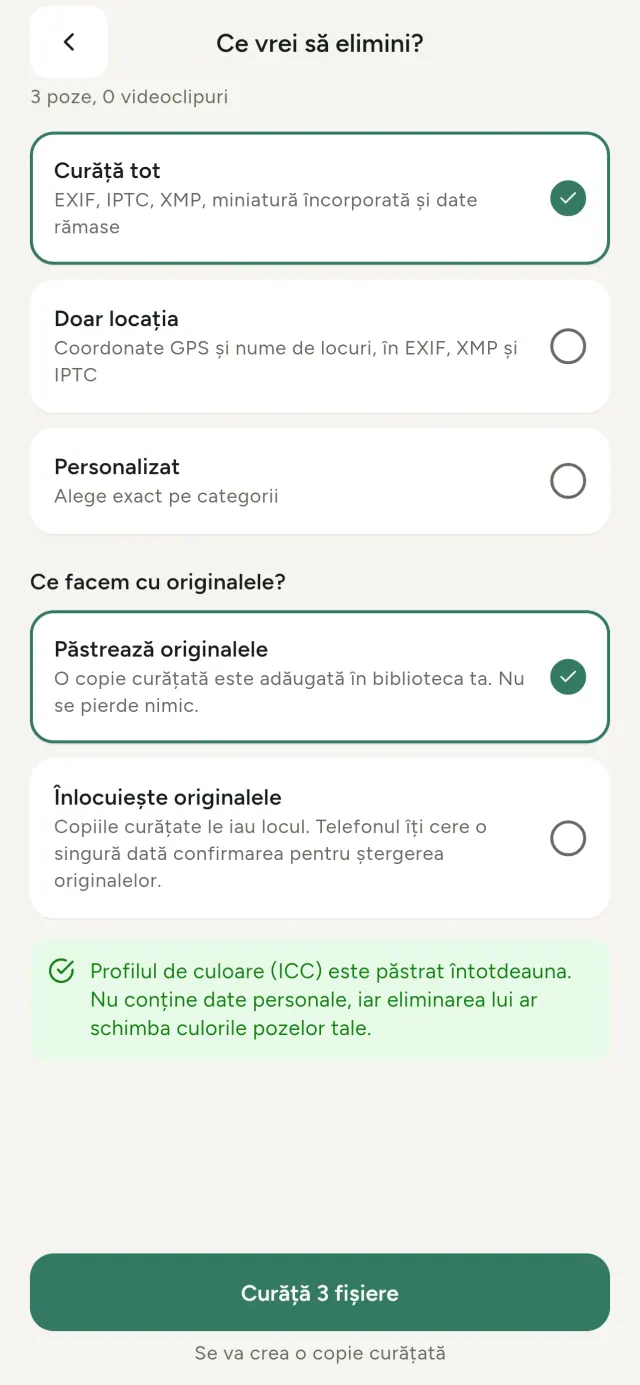
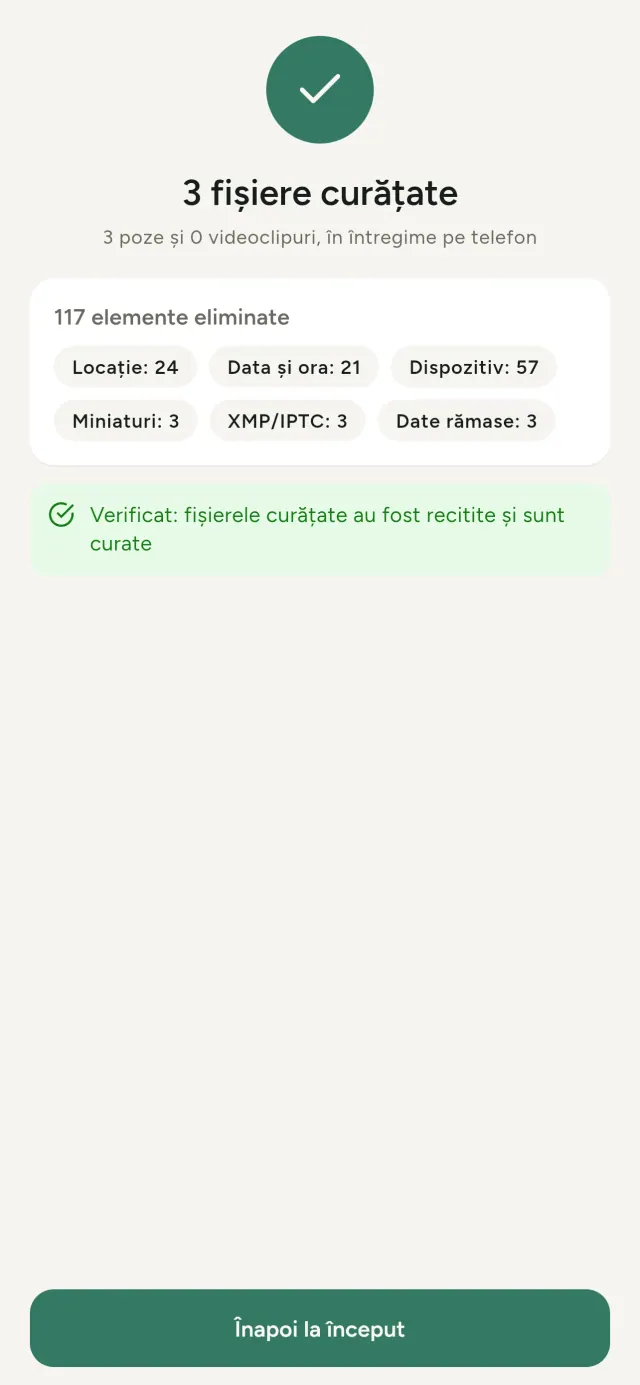
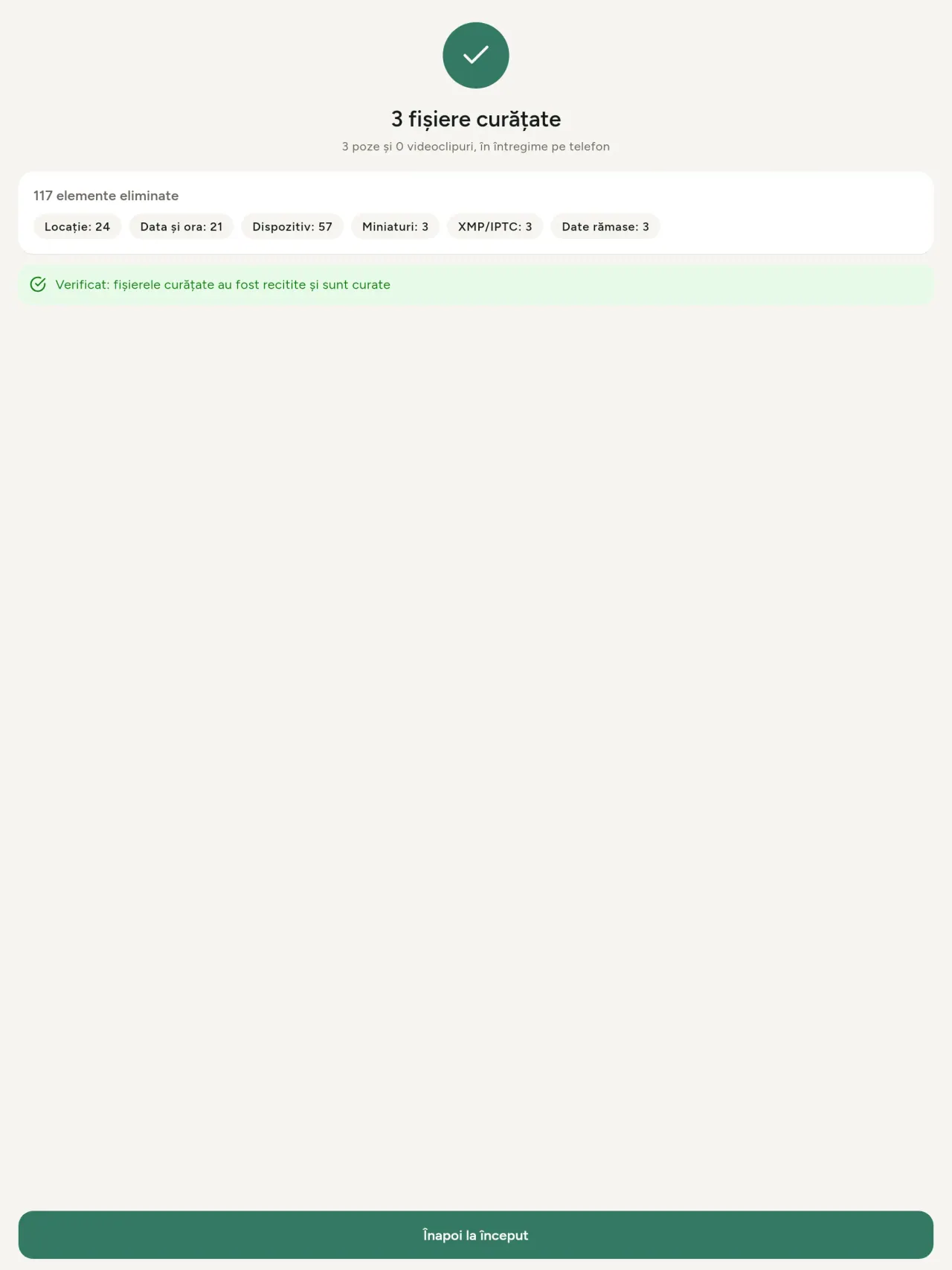
Tot, doar locația sau categoriile alese: date EXIF, IPTC și XMP, miniaturi încorporate, notele producătorului camerei, proveniența IA și octeții rămași pe care unele editoare îi lasă după decuparea unei poze. Curăță o selecție întreagă de fișiere, apoi păstrează originalele sau le înlocuiește.
Sigur de partajat dintr-o privire
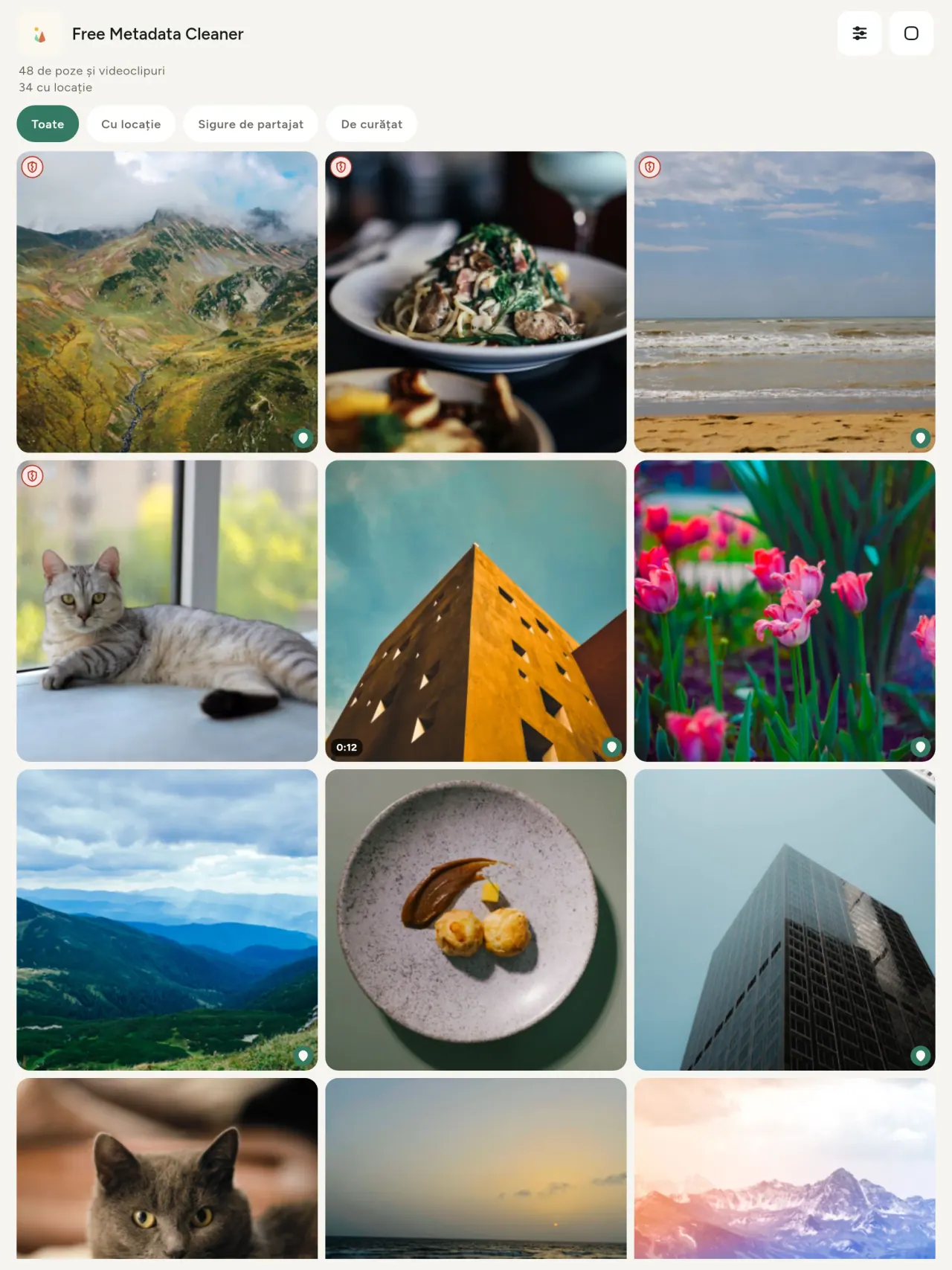
Un scut verde marchează fișierele fără metadate, un scut roșu crăpat pe cele care mai au.
Fără pierdere de calitate
Pozele nu sunt niciodată recodificate: imaginea în sine rămâne neatinsă.
Confidențialitate prin design
Pozele sunt citite, editate și curățate pe dispozitivul tău. Fără cont, fără reclame, fără analiză. Singura excepție opțională este harta: când ceri să vezi locul unei poze sau să alegi o locație, aplicația întreabă mai întâi, de fiecare dată, apoi încarcă harta de la OpenStreetMap (poza în sine nu este trimisă).
Gratuită, fără reclame
Dacă aplicația te ajută, poți lăsa un bacșiș opțional.
Pentru cine este
- Oricine vrea să știe ce dezvăluie o fotografie, locația GPS, data, camera, înainte de a o publica, vinde sau trimite.
- Persoane care vând pe site-uri de anunțuri și nu vor să arate unde locuiesc.
- Părinți și oricine vrea să țină un loc sensibil, casa, școala sau locul de muncă, în afara fotografiilor pe care le distribuie.
- Jurnaliști, activiști și persoane expuse riscului, care trebuie să distribuie o imagine fără a lăsa urme.
- Persoane sătule de scurgerile de date, care vor să recâștige controlul asupra informațiilor personale pe care le conțin propriile lor fotografii.
De ce să alegi Metadata Cleaner
- Trei lucruri într-o singură aplicație: citește ce dezvăluie o fotografie sau un videoclip, editează-le (data realizării, locația) și elimină metadatele în câteva atingeri.
- Totul rulează pe telefon. Fotografiile tale nu sunt trimise nicăieri.
- Fotografii (JPEG, HEIC, PNG, WebP, GIF) și videoclipuri (MP4, MOV, 3GP).
Ce nu face încă aplicația
- Sunt acceptate doar formatele enumerate mai sus. Vor urma mai multe formate.
Principiul Pixeon. Aplicațiile Pixeon pun datele locale pe primul loc: fără cont, fără urmărire, iar datele tale rămân pe telefon. Dacă o aplicație se conectează vreodată la rețea, o face doar când alegi să activezi o funcție de care ai nevoie, iar politica de confidențialitate este actualizată înainte de lansare.
Vezi Metadata Cleaner în acțiune.
Descarcă Metadata Cleaner.
Gratuit pe iPhone și Android.
SHA-256: A4:38:C9:B4:A9:3F:97:7B:E8:98:AD:B7:3B:30:5F:63:01:22:E0:D9:F8:CF:5D:2B:D7:4E:38:CB:9A:CF:5A:A2
Versiunea 1.1
- App Store În curând
- Google Play În curând
Noutăți
Acest text este în engleză.
- Read: see exactly what a photo or video reveals (location, date, camera, AI provenance labels such as C2PA and generation parameters, video duration, codecs, resolution and frame rate).
- Edit: change the date a photo was taken and its location (JPEG, HEIC, AVIF), even on a photo with no metadata, reuse the location of another photo, or pick it on an OpenStreetMap map after your confirmation.
- Remove: clean metadata in a few taps, with a before and after view on the result screen.
- DNG photos are supported.
- Translations aligned across 91 languages.
Privacy policy
Textul de mai jos este în engleză. Versiunea în engleză prevalează.
Last updated: 2026-11-18 · applies to version 1.1 and later
Policy versions: 1.1 and later (this text) · version 1.0 (still the policy of the app version 1.0). The version number of your app is shown at the bottom of its Settings screen.
Free Metadata Cleaner shows and removes the metadata hidden in your photos and videos (location, date and time, camera and lens details, thumbnails…). The short version: everything happens on your device, and we collect nothing.
What the app accesses
Your photo and video library, only after you grant permission (and, where your system requires it, the permission to read the location stored in your photos, so that it can be shown to you). The files you choose are read and cleaned on your device; the cleaned copy is saved to your library. If you choose to replace the originals, the system asks you to confirm before deleting them.
To show which photos are already clean, the app reads the metadata of the photos displayed on screen, on your device. This result is kept in memory only and is never stored.
What we collect
Nothing. No account, no analytics or usage tracking, no advertising or advertising identifiers, no crash or diagnostics reporting beyond what the app stores provide, and no third-party SDK that sends data anywhere. There is no Free Metadata Cleaner server. Cleaning a photo or video never uses the network, at all: turn on airplane mode and clean one to check for yourself. The only network request the app itself can ever make is described under “Location” below, and it only ever happens if you ask for it. The one other connection is the optional tip purchase, handled by the store (see “Optional support”).
Temporary files and history
The app keeps no history and no database. Temporary files created while cleaning are deleted after each item and purged when the app starts.
Deleted originals
Originals that are deleted remain in your system's trash (such as “Recently Deleted” or the trash) for about 30 days, with their metadata. The app cannot empty it: do it yourself if you need the originals gone at once.
iCloud and cloud photos
If a photo is stored in iCloud and not on your device, the operating system may download it before the app can process it. That transfer is made by the system, under the provider's own terms, not by the app.
Location
When a photo contains a location, the app shows the coordinates as text, which stays on your device. Three actions can send location information off your device, only when you choose them, each time: “Open in…” hands the coordinates to the maps application you select, under its own privacy policy; “Show the map” asks you to confirm first (“Showing the map sends this photo's position to a map service. Nothing else is sent.”), then loads a small map from OpenStreetMap for that one position; and, when you edit a photo's place, “Choose on the map” asks you to confirm first, then opens a full-screen map from OpenStreetMap. This map does not use your phone's location. As you move and zoom it, the app requests the map tiles of the area you are browsing, so OpenStreetMap receives the position of the area shown on screen, which starts on the photo's current place if it has one, and otherwise on a world view. The photo itself is never sent, and nothing is sent before you confirm. The place you choose on the map (or copy from another photo) is written into the photo's file only when you save, on your device. In every case OpenStreetMap receives, as with any web request, technical details like your IP address; it does not receive your name, an account, or anything else about you or your other photos. See OpenStreetMap's own privacy policy. Outside of these explicit actions, the app never sends a photo's location, or anything else, anywhere.
Optional support
The app is free. If you wish, you can leave a tip. On iPhone and in the Google Play version for Android, tips are in-app purchases processed by Apple or Google under their own terms and privacy policy; the app adds the Google Play billing permission for this, makes no network call itself, and receives no payment or personal details. Versions installed outside Google Play may instead open an external donation page in your browser, operated by a third party under its own privacy policy; nothing from the app is sent to it. A tip unlocks nothing.
Contact form on this website
If you write to us through this site, we use your message and the email address you optionally give only to reply. Bot protection is provided by Cloudflare and email delivery by Resend.
Language choice on this website
When you choose a language, or when this site opens a page in your browser's language, it stores
one small functional cookie (pxl, a language code, one year) so that your choice is
remembered. If this site suggests a page in your browser's language and you close that suggestion,
your browser also keeps a local note (pxl-banner-off, in local storage, 30 days) so the
suggestion does not come back. Neither identifies anyone, neither is used for tracking or advertising,
and neither is shared. You can delete them in your browser at any time.
Website statistics
This website uses Cloudflare Web Analytics to count visits (pages viewed, country, browser type, loading speed). It sets no cookie, does not use local storage, does not fingerprint your device, does not follow you across sites and does not build a profile of you. Search engines (for example Google Search Console) give us aggregated search statistics, without any data about individual visitors. Our own web server also counts the pages and APK downloads it serves: for each request it keeps the address, the site or social network that sent you (only its name, or the campaign tag written in the link), the country, the type of device and whether the request came from a robot. It keeps no IP address, no identifier and no cookie, and these counts are anonymous. We use no advertising or other analytics service. None of this concerns the app itself, which collects nothing.
Children
The app is a general-purpose tool and is not directed at children.
Changes
An updated policy will be published at this URL with a new date above.
Contact
Questions about privacy: metadata-cleaner-contact@pixeon.net
Versiunea 1.0
- App Store Publicat
- Google Play Publicat
Noutăți
Acest text este în engleză.
- Cleans JPEG, HEIC, PNG, WebP, GIF, MP4, MOV and 3GP files, with no video re-encoding.
- "Safe to share" and "To clean" filters.
- New green design.
- Help screen with a FAQ.
- Settings: share, rate, feedback, unsupported formats.
- Optional tips.
Privacy policy, version 1.0
Textul de mai jos este în engleză. Versiunea în engleză prevalează.
Applies to version 1.0 of the app (the first release). Later versions: current policy.
Free Metadata Cleaner shows and removes the metadata hidden in your photos and videos (location, date and time, camera and lens details, thumbnails…). The short version: everything happens on your device, and we collect nothing.
What the app accesses
Your photo and video library, only after you grant permission (and, where your system requires it, the permission to read the location stored in your photos, so that it can be shown to you). The files you choose are read and cleaned on your device; the cleaned copy is saved to your library. If you choose to replace the originals, the system asks you to confirm before deleting them.
To show which photos are already clean, the app reads the metadata of the photos displayed on screen, on your device. This result is kept in memory only and is never stored.
What we collect
Nothing. No account, no analytics or usage tracking, no advertising or advertising identifiers, no crash or diagnostics reporting beyond what the app stores provide, and no third-party SDK that sends data anywhere. There is no Free Metadata Cleaner server. Cleaning a photo or video never uses the network, at all: turn on airplane mode and clean one to check for yourself. The only network request the app itself can ever make is described under “Location” below, and it only ever happens if you ask for it. The one other connection is the optional tip purchase, handled by the store (see “Optional support”).
Temporary files and history
The app keeps no history and no database. Temporary files created while cleaning are deleted after each item and purged when the app starts.
Deleted originals
Originals that are deleted remain in your system's trash (such as “Recently Deleted” or the trash) for about 30 days, with their metadata. The app cannot empty it: do it yourself if you need the originals gone at once.
iCloud and cloud photos
If a photo is stored in iCloud and not on your device, the operating system may download it before the app can process it. That transfer is made by the system, under the provider's own terms, not by the app.
Location
When a photo contains a location, the app shows the coordinates as text, which stays on your device. Two actions send that one photo's position off your device, only when you choose them, each time: “Open in…” hands the coordinates to the maps application you select, under its own privacy policy; “Show the map” asks you to confirm first (“Showing the map sends this photo's position to a map service. Nothing else is sent.”), then loads a small map from OpenStreetMap for that one position. OpenStreetMap receives the coordinates and, as with any web request, technical details like your IP address; it does not receive your name, an account, or anything else about you or your other photos. See OpenStreetMap's own privacy policy. Outside of these two explicit actions, the app never sends a photo's location, or anything else, anywhere.
Optional support
The app is free. If you wish, you can leave a tip. On iPhone and in the Google Play version for Android, tips are in-app purchases processed by Apple or Google under their own terms and privacy policy; the app adds the Google Play billing permission for this, makes no network call itself, and receives no payment or personal details. Versions installed outside Google Play may instead open an external donation page in your browser, operated by a third party under its own privacy policy; nothing from the app is sent to it. A tip unlocks nothing.
Contact form on this website
If you write to us through this site, we use your message and the email address you optionally give only to reply. Bot protection is provided by Cloudflare and email delivery by Resend.
Language choice on this website
When you choose a language, or when this site opens a page in your browser's language, it stores
one small functional cookie (pxl, a language code, one year) so that your choice is
remembered. If this site suggests a page in your browser's language and you close that suggestion,
your browser also keeps a local note (pxl-banner-off, in local storage, 30 days) so the
suggestion does not come back. Neither identifies anyone, neither is used for tracking or advertising,
and neither is shared. You can delete them in your browser at any time.
Website statistics
This website uses Cloudflare Web Analytics to count visits (pages viewed, country, browser type, loading speed). It sets no cookie, does not use local storage, does not fingerprint your device, does not follow you across sites and does not build a profile of you. Search engines (for example Google Search Console) give us aggregated search statistics, without any data about individual visitors. Our own web server also counts the pages and APK downloads it serves: for each request it keeps the address, the site or social network that sent you (only its name, or the campaign tag written in the link), the country, the type of device and whether the request came from a robot. It keeps no IP address, no identifier and no cookie, and these counts are anonymous. We use no advertising or other analytics service. None of this concerns the app itself, which collects nothing.
Children
The app is a general-purpose tool and is not directed at children.
Changes
An updated policy will be published at this URL with a new date above.
Contact
Questions about privacy: metadata-cleaner-contact@pixeon.net
Credits
Android is a trademark of Google LLC. The Android robot is reproduced or modified from work created and shared by Google and used according to terms described in the Creative Commons 3.0 Attribution License. This site is not affiliated with or endorsed by Google.
Asistență
Actualizat ultima dată: 2026-10-08
Free Metadata Cleaner este o aplicație mică și independentă. Mai jos găsiți răspunsuri la cele mai frecvente întrebări.
Facem tot posibilul să răspundem în câteva zile. Pentru a ne ajuta, spuneți-ne modelul dispozitivului, versiunea sistemului și ce făceați. Vă rugăm să nu trimiteți fotografii private.
Ce date stochează sau trimite aplicația?
Niciuna. Nu păstrează istoricul, nu are cont și nu are server. Detalii în politica de confidențialitate.
Cum curăț o fotografie?
- Deschideți aplicația și permiteți accesul la biblioteca dumneavoastră atunci când vi se solicită.
- Selectați fotografiile sau videoclipurile de curățat.
- Alegeți ce să eliminați și dacă originalele sunt înlocuite sau se creează o copie curățată.
- Confirmați. Un rezumat arată ce a fost eliminat și orice fișier care nu a putut fi procesat.
Unde ajung copiile curățate?
În biblioteca foto. Data din bibliotecă a originalului este păstrată, astfel încât o fotografie curățată nu ajunge în partea de sus a galeriei.
Am ales “înlocuiește originalele”, dar originalele încă există.
Originalele șterse rămân în coșul de gunoi al sistemului (de exemplu, “Șterse recent” sau coșul de gunoi) timp de aproximativ 30 de zile, împreună cu metadatele lor. Goliți coșul pentru a le elimina imediat. Dacă refuzați solicitarea de ștergere a sistemului, originalele sunt păstrate, iar copiile curățate sunt totuși adăugate.
Ce fișiere sunt acceptate?
Fotografii în JPEG, HEIC, AVIF, PNG, WebP și GIF, precum și videoclipuri în MP4, MOV și 3GP (se adaugă și alte formate). Un fișier pe care aplicația nu îl poate curăța rămâne neschimbat și este listat în rezumat împreună cu motivul, fără a opri restul lotului.
De ce are aplicația nevoie de acces la fotografiile mele?
Pentru a lista fotografiile din care puteți alege și pentru a salva copiile curățate. Acolo unde sistemul dumneavoastră impune acest lucru, aplicația solicită și permisiunea de a citi locația stocată în fotografii: fără ea, sistemul ascunde locația, iar aplicația nu v-ar putea arăta ce dezvăluie o fotografie. Nimic nu este încărcat.
Cum pot verifica dacă nimic nu părăsește telefonul meu?
Activați modul avion și curățați o fotografie: funcționează la fel. Singura excepție este harta: dacă apăsați “Afișați harta” pentru locația unei fotografii și confirmați, acea poziție este trimisă către OpenStreetMap pentru afișarea unei hărți și nimic altceva. Consultați secțiunea “Locație” de mai sus.
Ce limbi sunt disponibile?
Aplicația este disponibilă în engleză, franceză, germană, spaniolă, italiană, portugheză și arabă. Acest site este disponibil în mai multe limbi, iar în curând vor fi disponibile și alte limbi în aplicație.
Susține proiectul
Metadata Cleaner rămâne gratuită și fără reclame. Dacă vă este utilă, puteți sprijini dezvoltarea ei (opțional):
Buy Me a CoffeeTracker cheltuieli și buget familie, direct pe telefon, fără cont.
Tot de la PixeonVaultMarkSeif local pentru documente: scanner, filigran și ștergere metadate PDF.
Tot de la PixeonLittle RelayBreastfeeding, sleep and starting solids tracker. No account, works offline.
Tot de la PixeonMenuloopPlanifică mesele și listele de cumpărături cu MenuLoop, offline, fără cont!
Tot de la PixeonIndie OfficeQuote maker and self-employed invoices. Offline, no account, no ads.