
Metadata Cleaner: Foto/Video
EXIF-viser, rediger og fjern bildemetadata (GPS, dato).


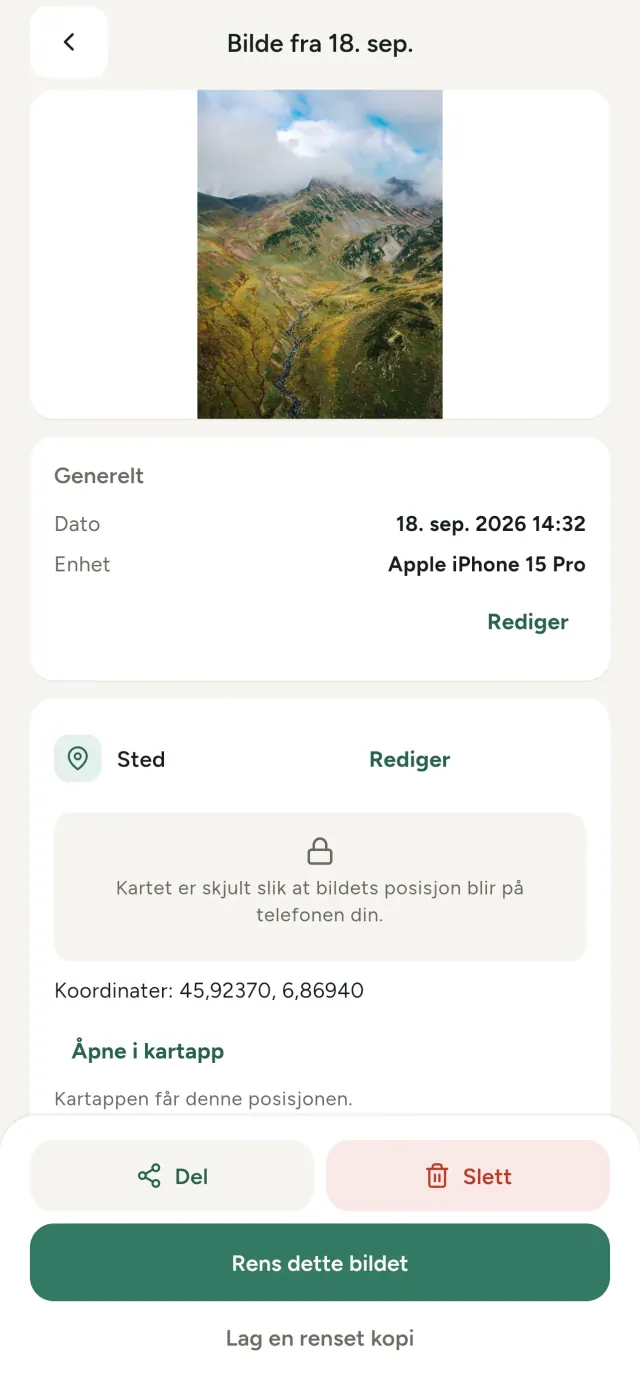
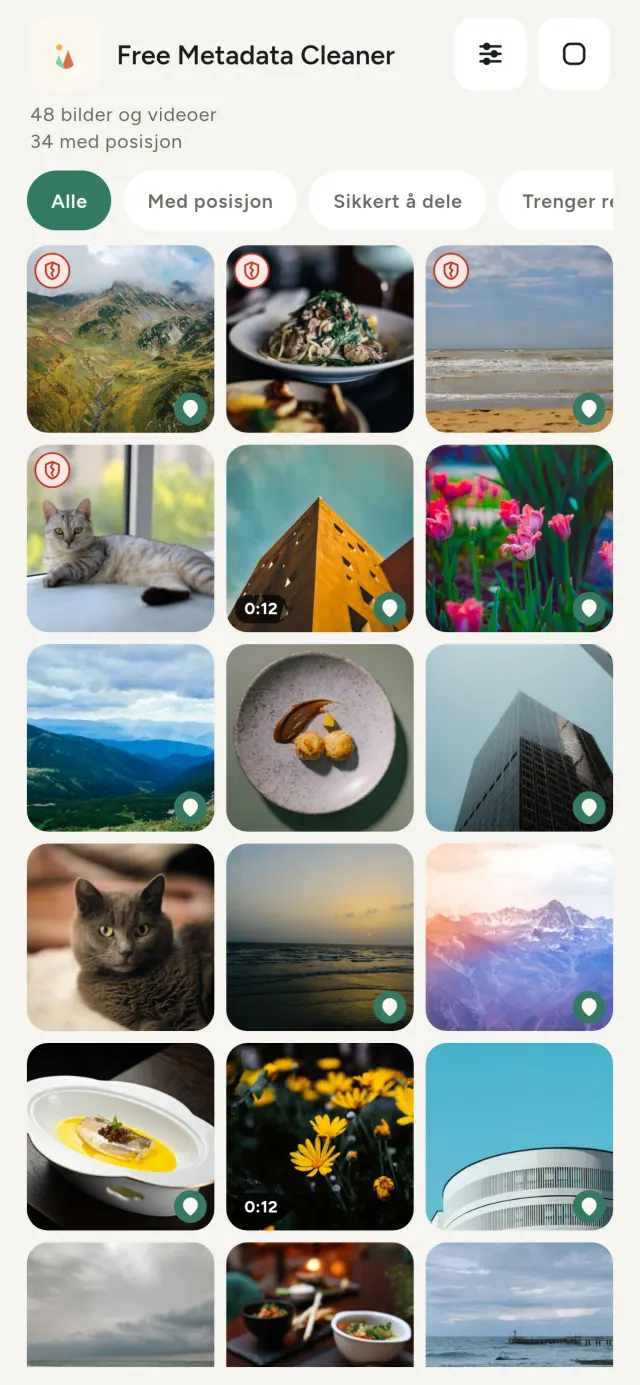
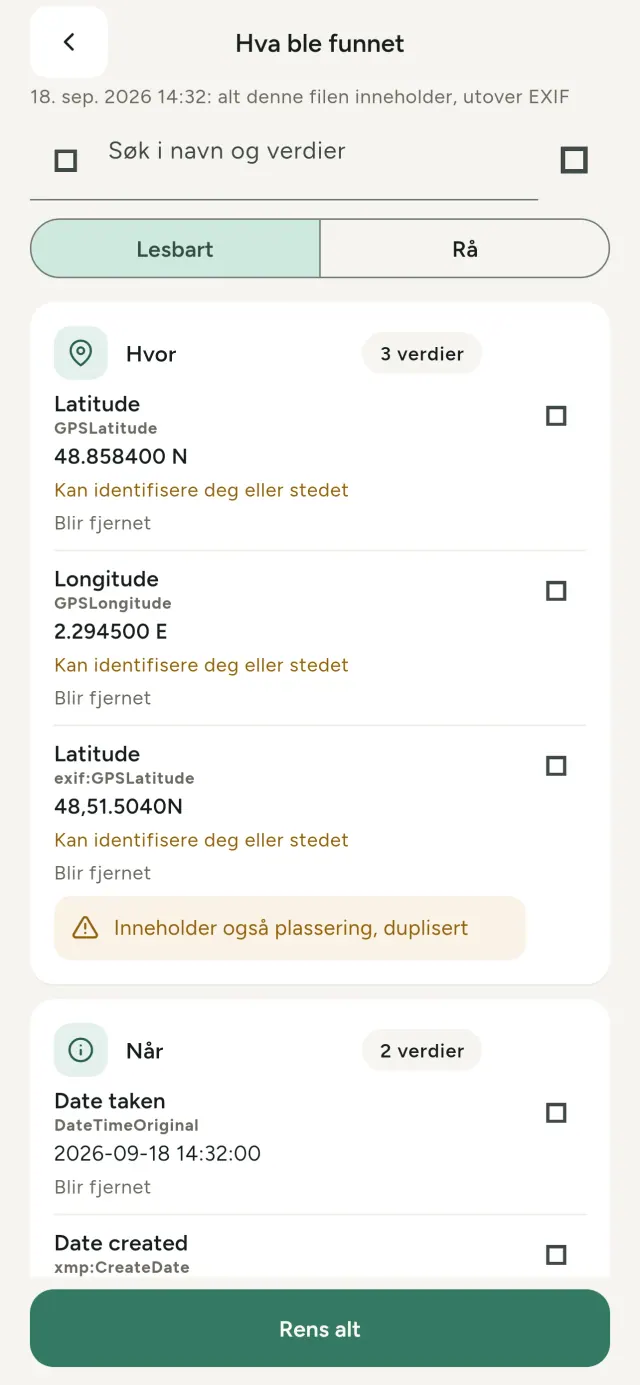
Alle bilder du tar, inneholder skjult informasjon: hvor og når de ble tatt, hvilken telefon du brukte, og noen ganger et lite forhåndsvisningsbilde av originalen. Når du deler bildet, følger alt med.
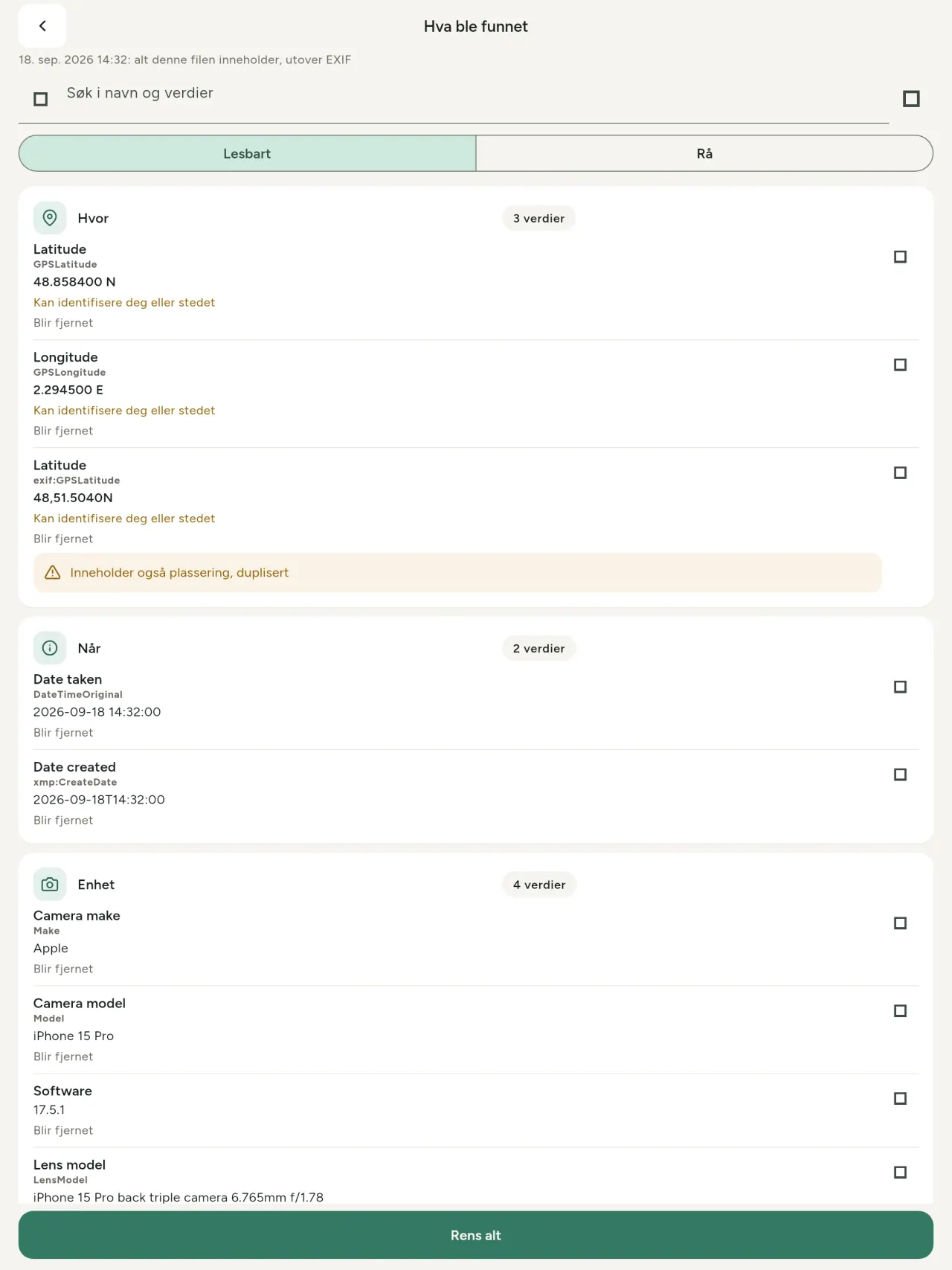
Metadata Cleaner gjør tre ting på telefonen din: viser hva bildene og videoene inneholder, lar deg rette det og fjerner det.
Hva Metadata Cleaner gjør
Les
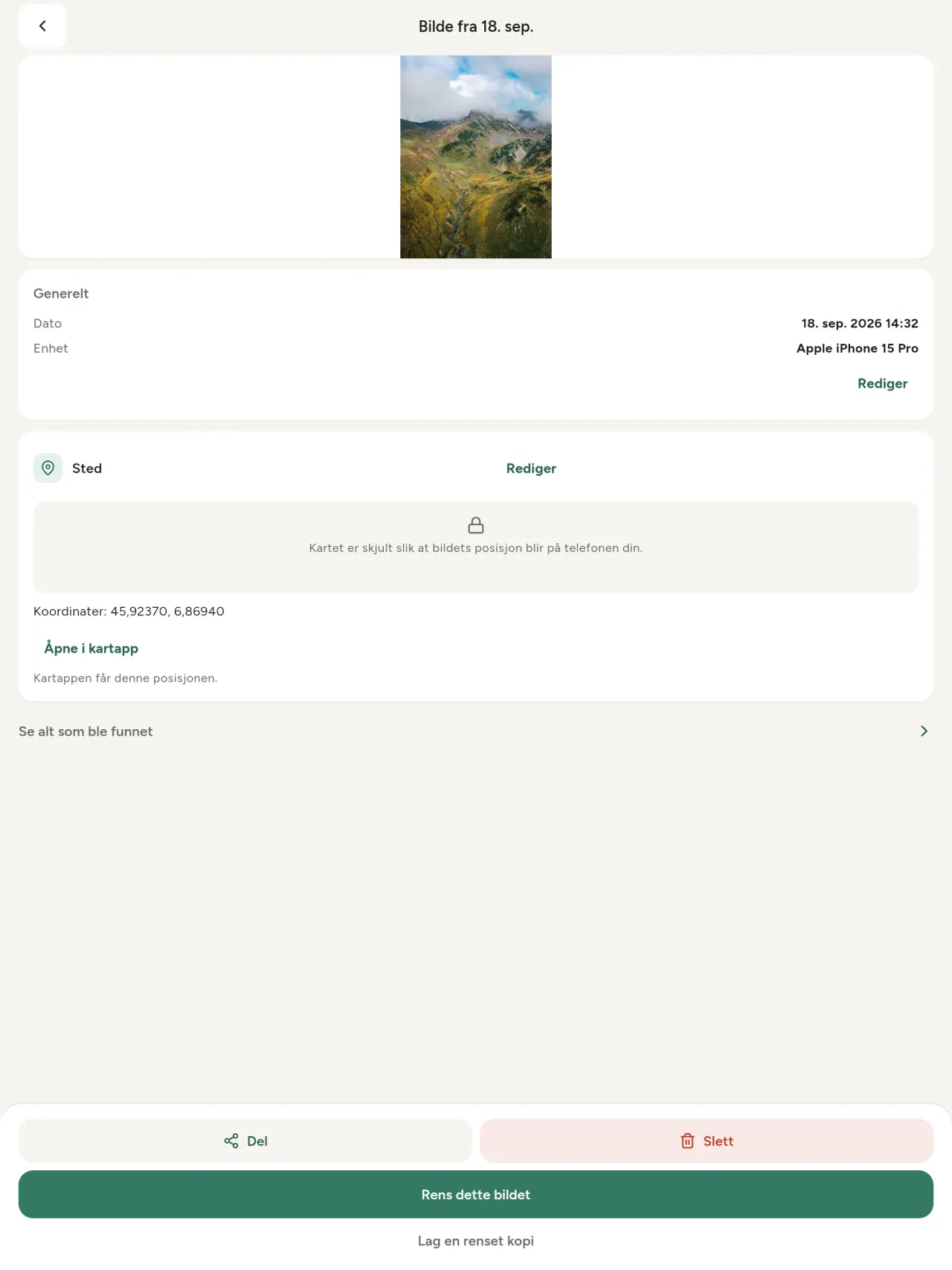
En ekte metadata-viser: alle verdier som finnes i et bilde eller en video (EXIF, IPTC, XMP, videokodeker, varighet og oppløsning), gruppert, søkbare og kopierbare, med det som skal fjernes markert. AI-opphav (C2PA og genereringsparametere) blir også oppdaget.
Rediger
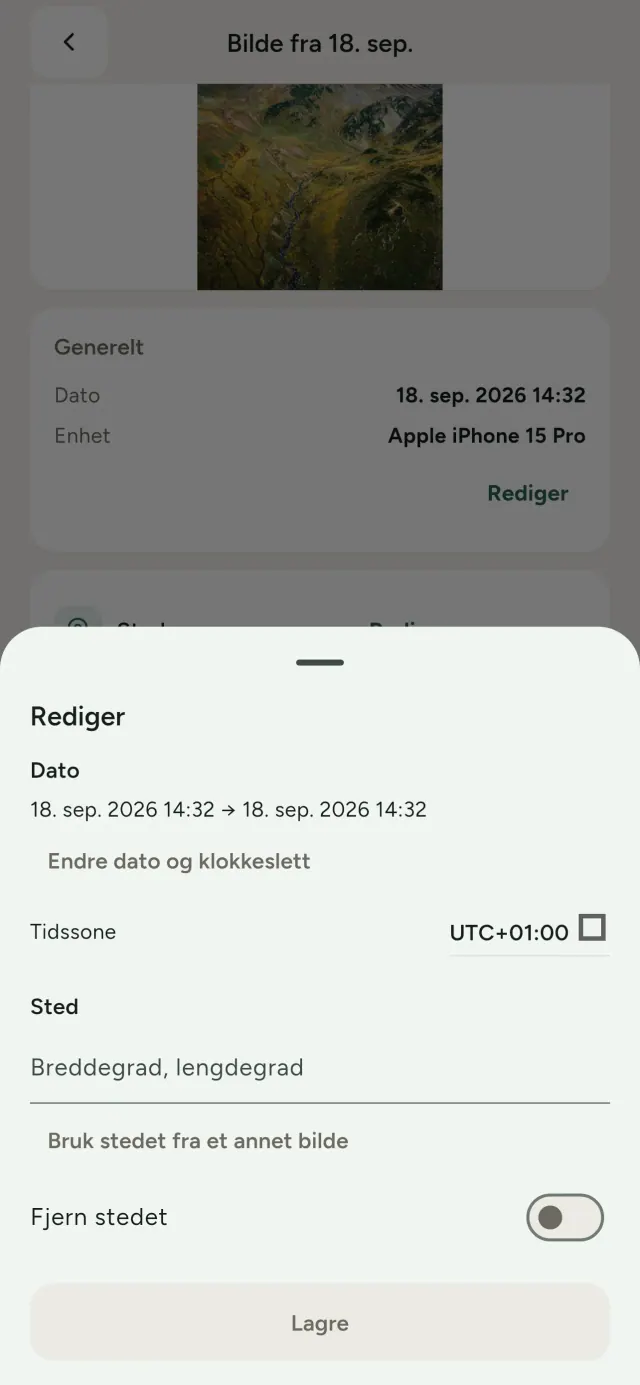
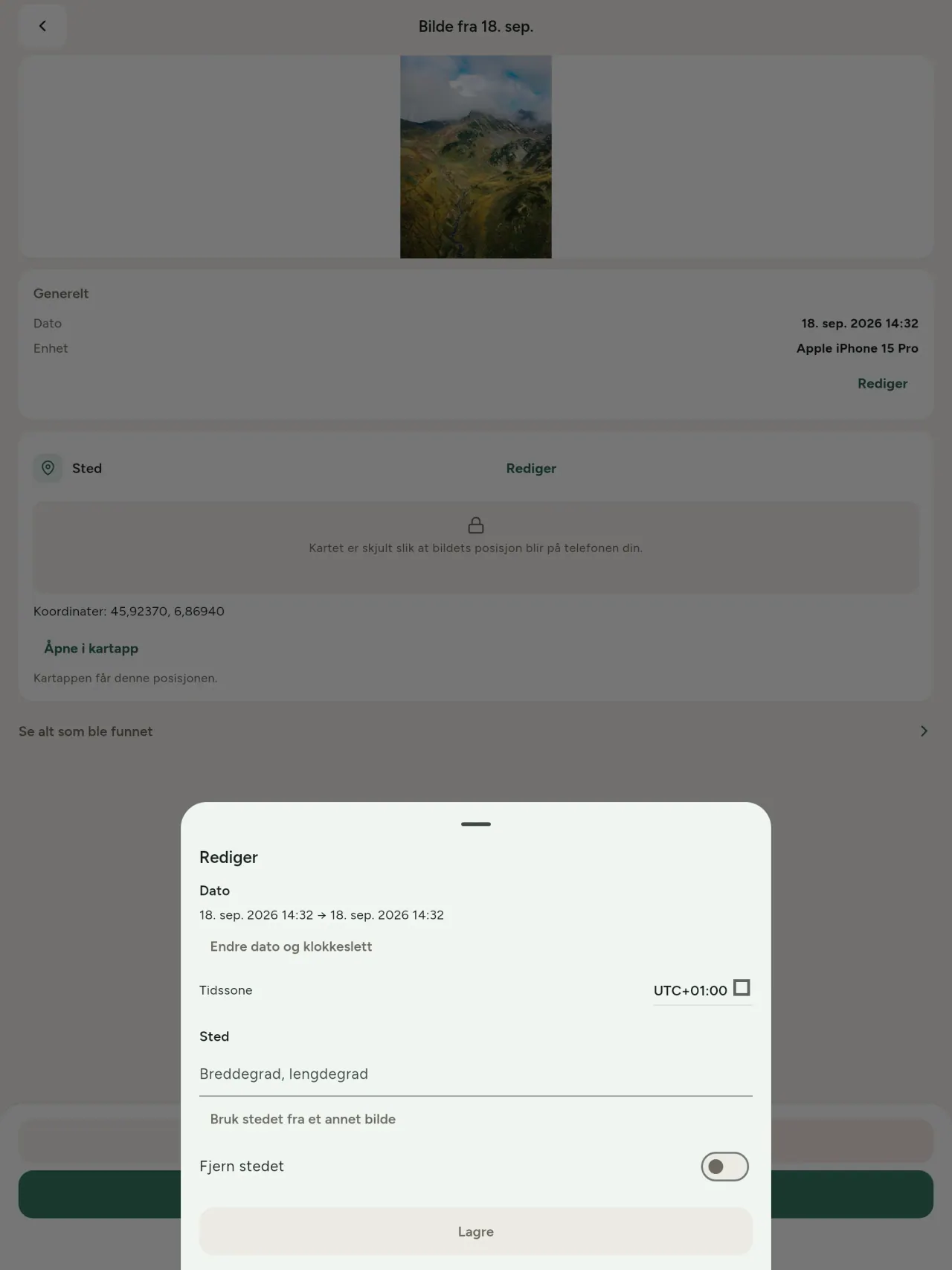
Endre eller erstatt dato og sted for et bilde, også når bildet mangler metadata. Kopier stedet fra et annet bilde eller velg det på et kart (appen spør hver gang først). Sammenlign før og etter.
Fjern
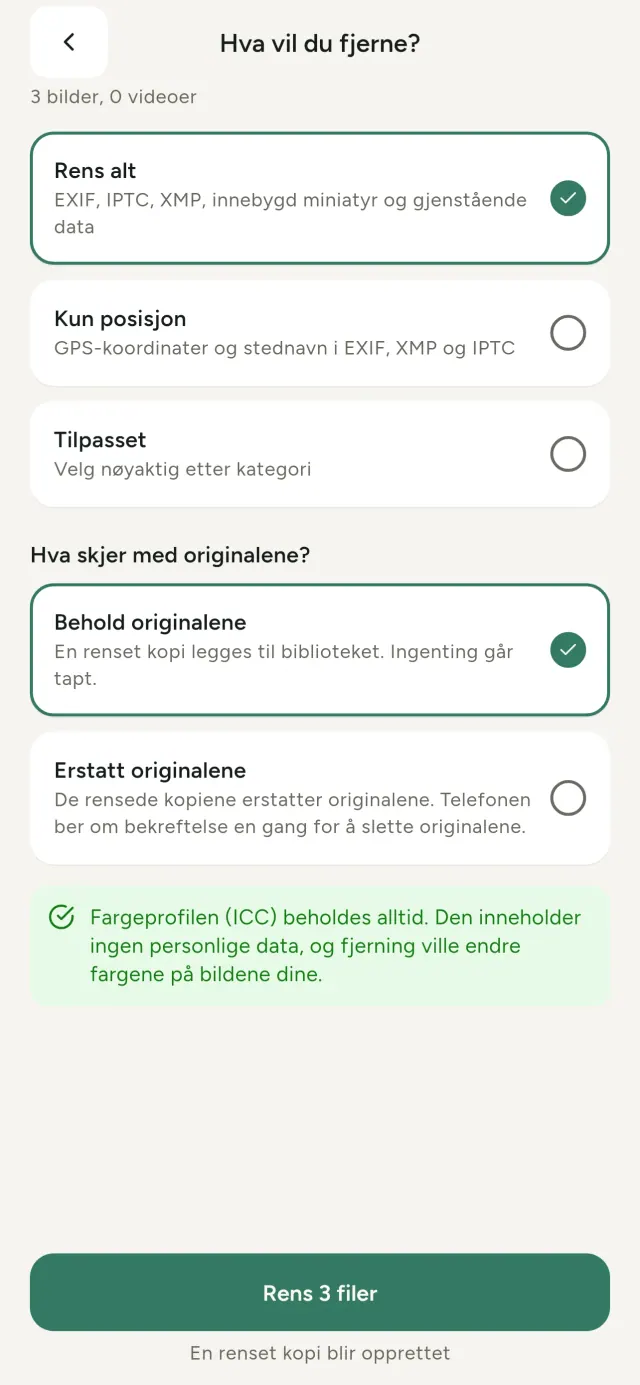
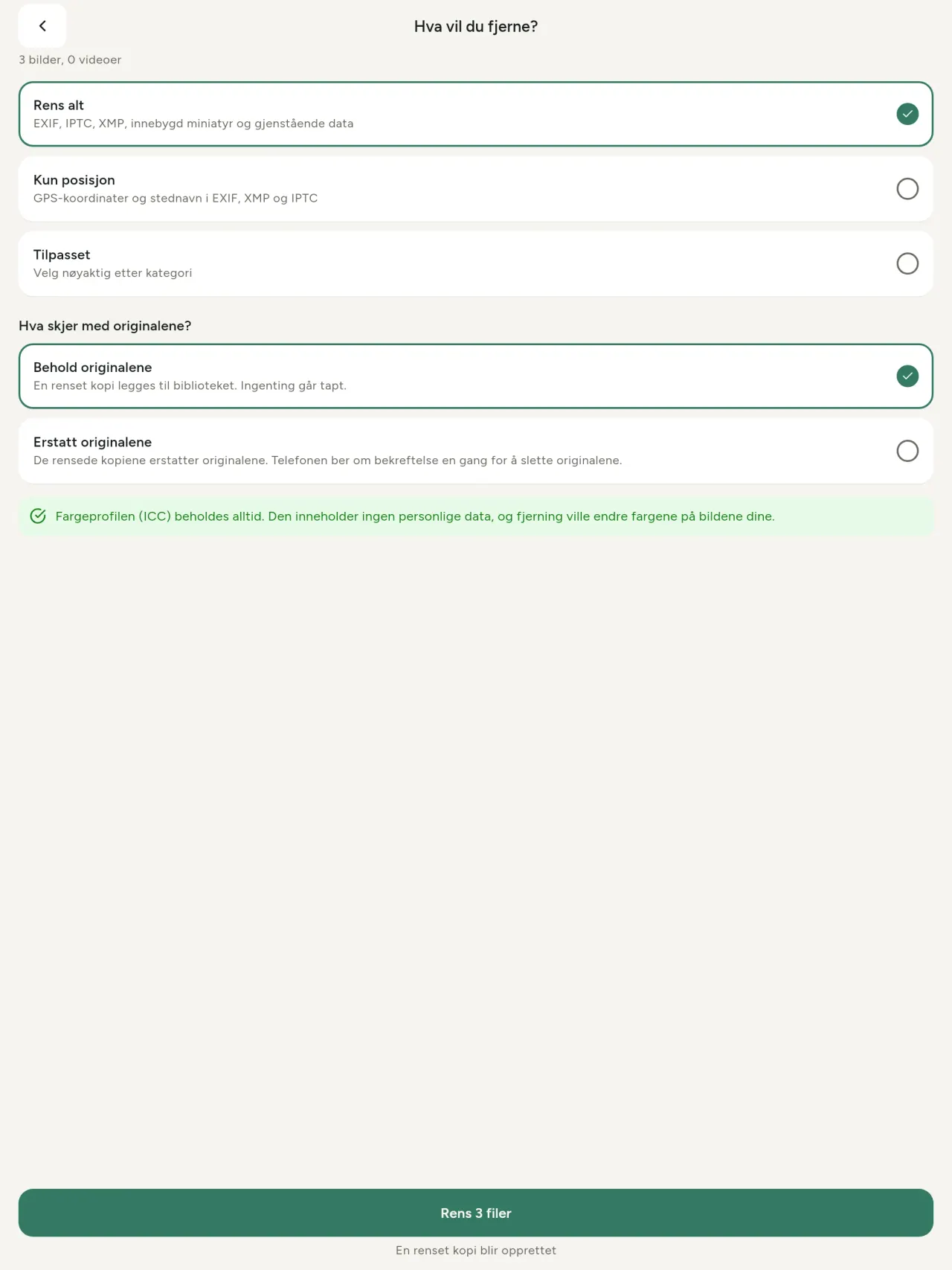
Alt, bare stedet eller kategoriene du velger: EXIF-, IPTC- og XMP-data, innebygde miniatyrbilder, kameraprodusentens notater, AI-opphav og overflødige byte som enkelte redigeringsverktøy etterlater etter beskjæring. Rens et helt utvalg på én gang, og behold eller erstatt originalene.
Trygt å dele med et blikk
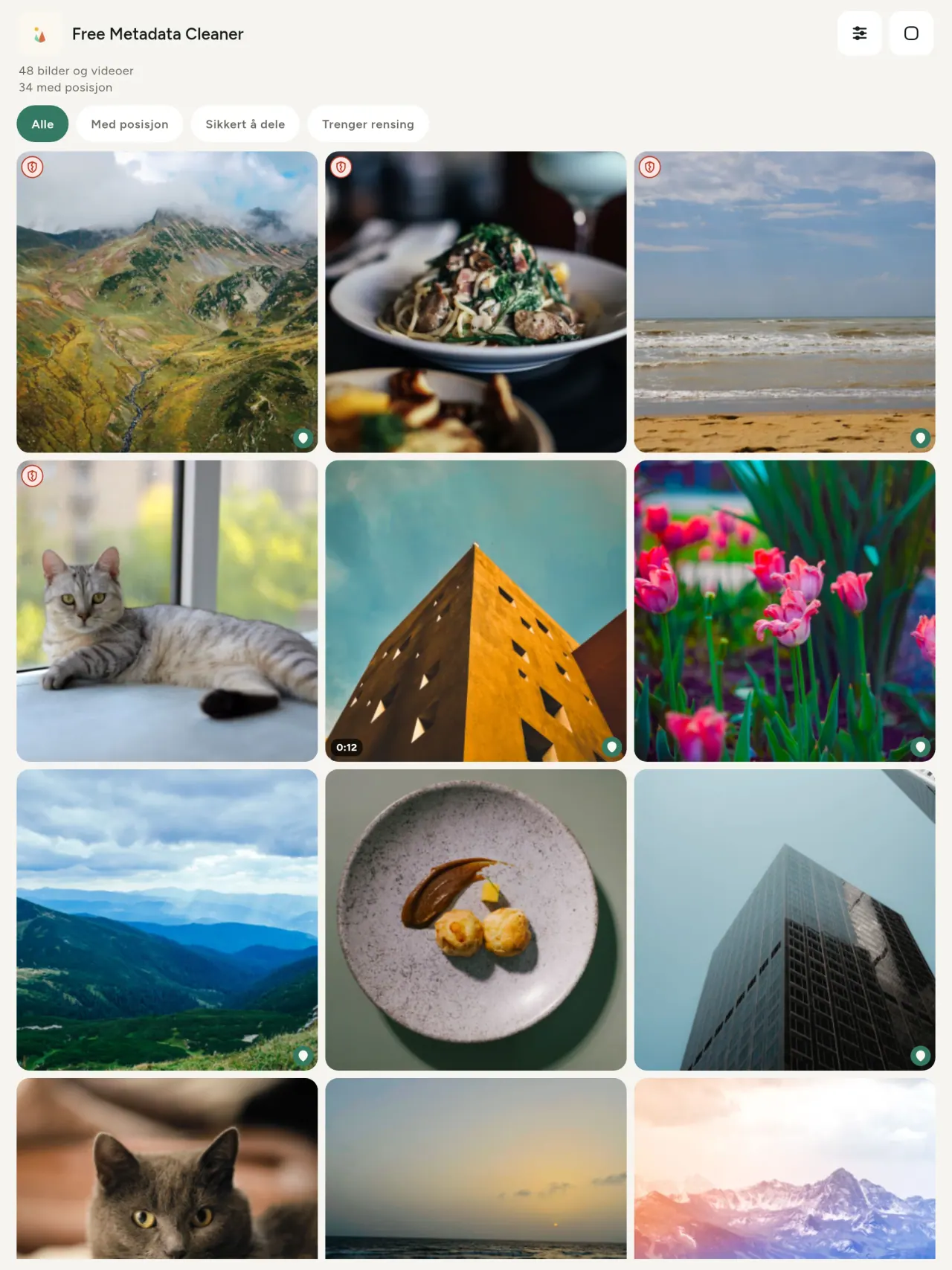
Et grønt skjold markerer filer uten metadata; et rødt, sprukket skjold markerer filer som fortsatt har noe.
Ingen kvalitetstap
Bilder kodes aldri på nytt: selve bildet forblir urørt.
Privat fra start
Bildene dine leses, redigeres og renses på enheten din. Ingen konto, reklame eller analyse. Det eneste valgfrie unntaket er kartet: når du ber om å se et bildes sted eller velge et sted, spør appen alltid først og laster deretter kartet fra OpenStreetMap (bildet sendes aldri).
Gratis og uten reklame
Hvis appen hjelper deg, kan du gi et valgfritt tips.
Hvem den er for
- Alle som vil vite hva et bilde avslører (GPS-posisjon, dato, kamera) før de legger det ut, selger det eller sender det.
- Folk som selger på annonsesider og ikke vil vise hvor de bor.
- Foreldre og alle som vil holde et sensitivt sted (hjem, skole, arbeidsplass) utenfor bildene de deler.
- Journalister, aktivister og folk i risikosonen, som må dele et bilde uten å legge igjen spor.
- Folk som er lei av datalekkasjer og vil ta tilbake kontrollen over den personlige informasjonen deres egne bilder bærer på.
Hvorfor velge Metadata Cleaner
- Tre ting i én app: Les hva et bilde eller en video avslører, rediger det (dato tatt, sted), og fjern metadataen med noen få trykk.
- Alt kjører på telefonen. Bildene dine sendes ingen steder.
- Bilder (JPEG, HEIC, PNG, WebP, GIF) og videoer (MP4, MOV, 3GP).
Hva appen ikke gjør ennå
- Bare formatene som er oppført ovenfor støttes. Flere formater er planlagt.
Pixeon-prinsippet. Pixeon-appene er lokale først: ingen konto, ingen sporing, og dataene dine blir på telefonen din. Hvis en app noen gang kobler til nettverket, er det bare når du selv velger å slå på en funksjon du trenger, og personvernerklæringen oppdateres før den slippes.
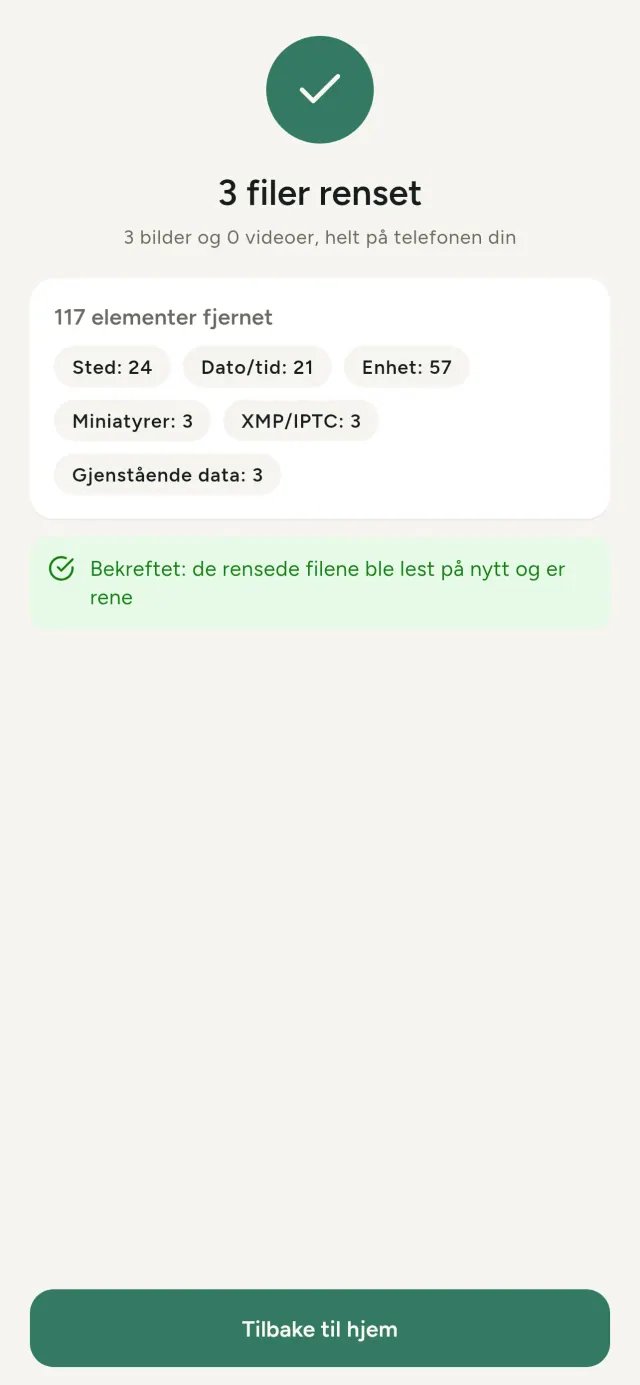
Se Metadata Cleaner i aksjon.
Hent Metadata Cleaner.
Gratis på iPhone og Android.
SHA-256: A4:38:C9:B4:A9:3F:97:7B:E8:98:AD:B7:3B:30:5F:63:01:22:E0:D9:F8:CF:5D:2B:D7:4E:38:CB:9A:CF:5A:A2
Versjon 1.1
- App Store Kommer snart
- Google Play Kommer snart
Hva er nytt
Denne teksten er på engelsk.
- Read: see exactly what a photo or video reveals (location, date, camera, AI provenance labels such as C2PA and generation parameters, video duration, codecs, resolution and frame rate).
- Edit: change the date a photo was taken and its location (JPEG, HEIC, AVIF), even on a photo with no metadata, reuse the location of another photo, or pick it on an OpenStreetMap map after your confirmation.
- Remove: clean metadata in a few taps, with a before and after view on the result screen.
- DNG photos are supported.
- Translations aligned across 91 languages.
Privacy policy
Teksten nedenfor er på engelsk. Den engelske versjonen gjelder.
Last updated: 2026-11-18 · applies to version 1.1 and later
Policy versions: 1.1 and later (this text) · version 1.0 (still the policy of the app version 1.0). The version number of your app is shown at the bottom of its Settings screen.
Free Metadata Cleaner shows and removes the metadata hidden in your photos and videos (location, date and time, camera and lens details, thumbnails…). The short version: everything happens on your device, and we collect nothing.
What the app accesses
Your photo and video library, only after you grant permission (and, where your system requires it, the permission to read the location stored in your photos, so that it can be shown to you). The files you choose are read and cleaned on your device; the cleaned copy is saved to your library. If you choose to replace the originals, the system asks you to confirm before deleting them.
To show which photos are already clean, the app reads the metadata of the photos displayed on screen, on your device. This result is kept in memory only and is never stored.
What we collect
Nothing. No account, no analytics or usage tracking, no advertising or advertising identifiers, no crash or diagnostics reporting beyond what the app stores provide, and no third-party SDK that sends data anywhere. There is no Free Metadata Cleaner server. Cleaning a photo or video never uses the network, at all: turn on airplane mode and clean one to check for yourself. The only network request the app itself can ever make is described under “Location” below, and it only ever happens if you ask for it. The one other connection is the optional tip purchase, handled by the store (see “Optional support”).
Temporary files and history
The app keeps no history and no database. Temporary files created while cleaning are deleted after each item and purged when the app starts.
Deleted originals
Originals that are deleted remain in your system's trash (such as “Recently Deleted” or the trash) for about 30 days, with their metadata. The app cannot empty it: do it yourself if you need the originals gone at once.
iCloud and cloud photos
If a photo is stored in iCloud and not on your device, the operating system may download it before the app can process it. That transfer is made by the system, under the provider's own terms, not by the app.
Location
When a photo contains a location, the app shows the coordinates as text, which stays on your device. Three actions can send location information off your device, only when you choose them, each time: “Open in…” hands the coordinates to the maps application you select, under its own privacy policy; “Show the map” asks you to confirm first (“Showing the map sends this photo's position to a map service. Nothing else is sent.”), then loads a small map from OpenStreetMap for that one position; and, when you edit a photo's place, “Choose on the map” asks you to confirm first, then opens a full-screen map from OpenStreetMap. This map does not use your phone's location. As you move and zoom it, the app requests the map tiles of the area you are browsing, so OpenStreetMap receives the position of the area shown on screen, which starts on the photo's current place if it has one, and otherwise on a world view. The photo itself is never sent, and nothing is sent before you confirm. The place you choose on the map (or copy from another photo) is written into the photo's file only when you save, on your device. In every case OpenStreetMap receives, as with any web request, technical details like your IP address; it does not receive your name, an account, or anything else about you or your other photos. See OpenStreetMap's own privacy policy. Outside of these explicit actions, the app never sends a photo's location, or anything else, anywhere.
Optional support
The app is free. If you wish, you can leave a tip. On iPhone and in the Google Play version for Android, tips are in-app purchases processed by Apple or Google under their own terms and privacy policy; the app adds the Google Play billing permission for this, makes no network call itself, and receives no payment or personal details. Versions installed outside Google Play may instead open an external donation page in your browser, operated by a third party under its own privacy policy; nothing from the app is sent to it. A tip unlocks nothing.
Contact form on this website
If you write to us through this site, we use your message and the email address you optionally give only to reply. Bot protection is provided by Cloudflare and email delivery by Resend.
Language choice on this website
When you choose a language, or when this site opens a page in your browser's language, it stores
one small functional cookie (pxl, a language code, one year) so that your choice is
remembered. If this site suggests a page in your browser's language and you close that suggestion,
your browser also keeps a local note (pxl-banner-off, in local storage, 30 days) so the
suggestion does not come back. Neither identifies anyone, neither is used for tracking or advertising,
and neither is shared. You can delete them in your browser at any time.
Website statistics
This website uses Cloudflare Web Analytics to count visits (pages viewed, country, browser type, loading speed). It sets no cookie, does not use local storage, does not fingerprint your device, does not follow you across sites and does not build a profile of you. Search engines (for example Google Search Console) give us aggregated search statistics, without any data about individual visitors. Our own web server also counts the pages and APK downloads it serves: for each request it keeps the address, the site or social network that sent you (only its name, or the campaign tag written in the link), the country, the type of device and whether the request came from a robot. It keeps no IP address, no identifier and no cookie, and these counts are anonymous. We use no advertising or other analytics service. None of this concerns the app itself, which collects nothing.
Children
The app is a general-purpose tool and is not directed at children.
Changes
An updated policy will be published at this URL with a new date above.
Contact
Questions about privacy: metadata-cleaner-contact@pixeon.net
Versjon 1.0
- App Store Publisert
- Google Play Publisert
Hva er nytt
Denne teksten er på engelsk.
- Cleans JPEG, HEIC, PNG, WebP, GIF, MP4, MOV and 3GP files, with no video re-encoding.
- "Safe to share" and "To clean" filters.
- New green design.
- Help screen with a FAQ.
- Settings: share, rate, feedback, unsupported formats.
- Optional tips.
Privacy policy, version 1.0
Teksten nedenfor er på engelsk. Den engelske versjonen gjelder.
Applies to version 1.0 of the app (the first release). Later versions: current policy.
Free Metadata Cleaner shows and removes the metadata hidden in your photos and videos (location, date and time, camera and lens details, thumbnails…). The short version: everything happens on your device, and we collect nothing.
What the app accesses
Your photo and video library, only after you grant permission (and, where your system requires it, the permission to read the location stored in your photos, so that it can be shown to you). The files you choose are read and cleaned on your device; the cleaned copy is saved to your library. If you choose to replace the originals, the system asks you to confirm before deleting them.
To show which photos are already clean, the app reads the metadata of the photos displayed on screen, on your device. This result is kept in memory only and is never stored.
What we collect
Nothing. No account, no analytics or usage tracking, no advertising or advertising identifiers, no crash or diagnostics reporting beyond what the app stores provide, and no third-party SDK that sends data anywhere. There is no Free Metadata Cleaner server. Cleaning a photo or video never uses the network, at all: turn on airplane mode and clean one to check for yourself. The only network request the app itself can ever make is described under “Location” below, and it only ever happens if you ask for it. The one other connection is the optional tip purchase, handled by the store (see “Optional support”).
Temporary files and history
The app keeps no history and no database. Temporary files created while cleaning are deleted after each item and purged when the app starts.
Deleted originals
Originals that are deleted remain in your system's trash (such as “Recently Deleted” or the trash) for about 30 days, with their metadata. The app cannot empty it: do it yourself if you need the originals gone at once.
iCloud and cloud photos
If a photo is stored in iCloud and not on your device, the operating system may download it before the app can process it. That transfer is made by the system, under the provider's own terms, not by the app.
Location
When a photo contains a location, the app shows the coordinates as text, which stays on your device. Two actions send that one photo's position off your device, only when you choose them, each time: “Open in…” hands the coordinates to the maps application you select, under its own privacy policy; “Show the map” asks you to confirm first (“Showing the map sends this photo's position to a map service. Nothing else is sent.”), then loads a small map from OpenStreetMap for that one position. OpenStreetMap receives the coordinates and, as with any web request, technical details like your IP address; it does not receive your name, an account, or anything else about you or your other photos. See OpenStreetMap's own privacy policy. Outside of these two explicit actions, the app never sends a photo's location, or anything else, anywhere.
Optional support
The app is free. If you wish, you can leave a tip. On iPhone and in the Google Play version for Android, tips are in-app purchases processed by Apple or Google under their own terms and privacy policy; the app adds the Google Play billing permission for this, makes no network call itself, and receives no payment or personal details. Versions installed outside Google Play may instead open an external donation page in your browser, operated by a third party under its own privacy policy; nothing from the app is sent to it. A tip unlocks nothing.
Contact form on this website
If you write to us through this site, we use your message and the email address you optionally give only to reply. Bot protection is provided by Cloudflare and email delivery by Resend.
Language choice on this website
When you choose a language, or when this site opens a page in your browser's language, it stores
one small functional cookie (pxl, a language code, one year) so that your choice is
remembered. If this site suggests a page in your browser's language and you close that suggestion,
your browser also keeps a local note (pxl-banner-off, in local storage, 30 days) so the
suggestion does not come back. Neither identifies anyone, neither is used for tracking or advertising,
and neither is shared. You can delete them in your browser at any time.
Website statistics
This website uses Cloudflare Web Analytics to count visits (pages viewed, country, browser type, loading speed). It sets no cookie, does not use local storage, does not fingerprint your device, does not follow you across sites and does not build a profile of you. Search engines (for example Google Search Console) give us aggregated search statistics, without any data about individual visitors. Our own web server also counts the pages and APK downloads it serves: for each request it keeps the address, the site or social network that sent you (only its name, or the campaign tag written in the link), the country, the type of device and whether the request came from a robot. It keeps no IP address, no identifier and no cookie, and these counts are anonymous. We use no advertising or other analytics service. None of this concerns the app itself, which collects nothing.
Children
The app is a general-purpose tool and is not directed at children.
Changes
An updated policy will be published at this URL with a new date above.
Contact
Questions about privacy: metadata-cleaner-contact@pixeon.net
Credits
Android is a trademark of Google LLC. The Android robot is reproduced or modified from work created and shared by Google and used according to terms described in the Creative Commons 3.0 Attribution License. This site is not affiliated with or endorsed by Google.
Støtte
Sist oppdatert: 2026-10-08
Free Metadata Cleaner er en liten, uavhengig app. Nedenfor finner du svar på de vanligste spørsmålene.
Vi gjør vårt beste for å svare innen noen dager. For å hjelpe oss, fortell hvilken enhetsmodell du har, systemversjonen og hva du holdt på med. Ikke send private bilder.
Hvilke data lagrer eller sender appen?
Ingen. Den lagrer ingen historikk og har ingen konto eller server. Du finner mer informasjon i personvernerklæringen.
Hvordan renser jeg et bilde?
- Åpne appen og gi tilgang til biblioteket ditt når du blir spurt.
- Velg bildene eller videoene som skal renses.
- Velg hva som skal fjernes, og om originalene skal erstattes eller en renset kopi skal opprettes.
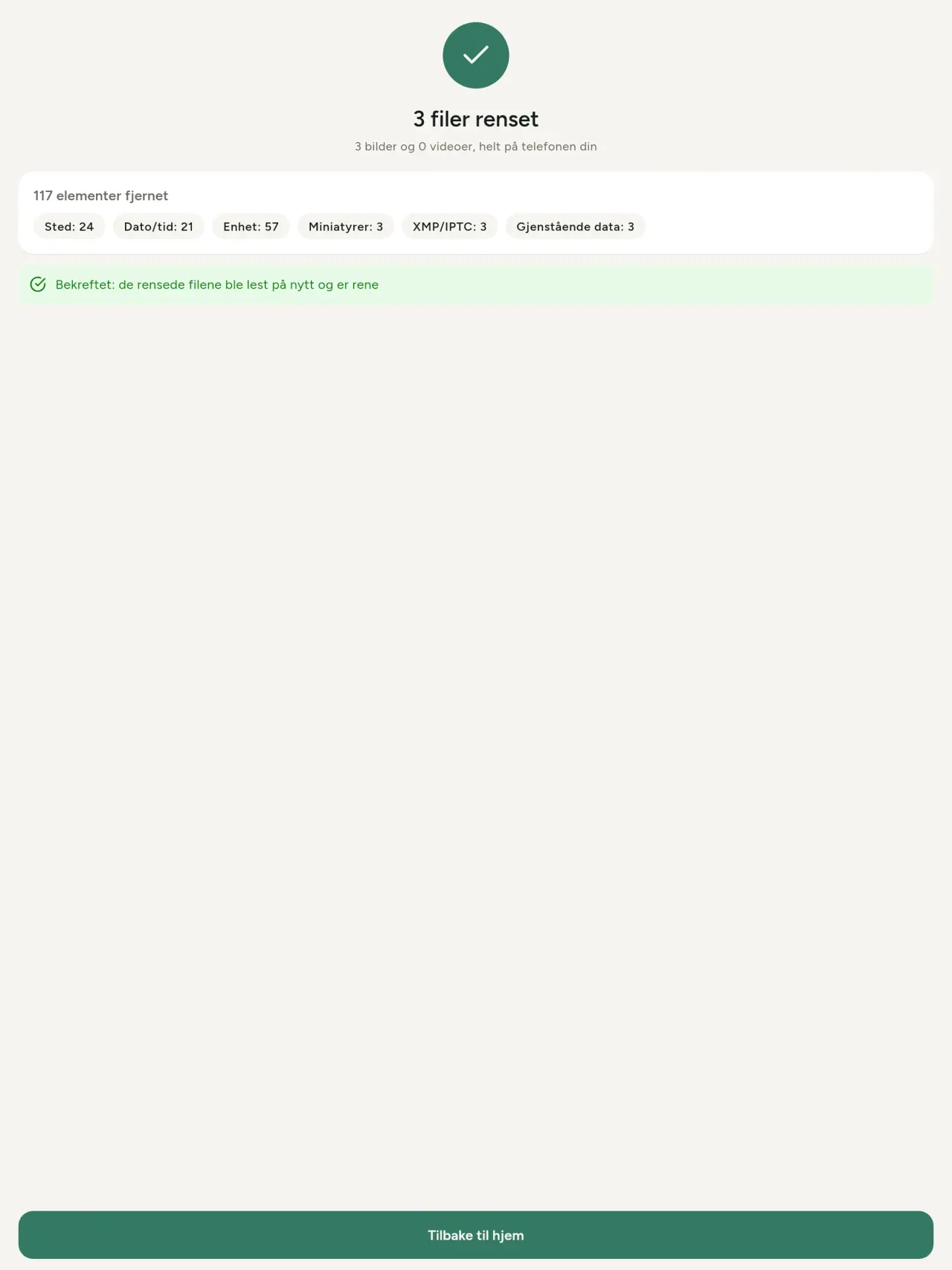
- Bekreft. En oppsummering viser hva som ble fjernet og eventuelle filer som ikke kunne behandles.
Hvor havner de rensede kopiene?
I bildebiblioteket ditt. Biblioteksdatoen til originalen beholdes, slik at et renset bilde ikke plutselig havner øverst i galleriet.
Jeg valgte "erstatt originalene", men originalene finnes fortsatt.
Slettede originaler blir liggende i systemets papirkurv (for eksempel "Nylig slettet" eller papirkurven) i omtrent 30 dager, sammen med metadataene. Tøm papirkurven for å fjerne dem med en gang. Hvis du avslår systemets forespørsel om sletting, beholdes originalene, og de rensede kopiene legges fortsatt til.
Hvilke filer støttes?
Bilder i JPEG, HEIC, AVIF, PNG, WebP og GIF, samt videoer i MP4, MOV og 3GP (flere formater blir lagt til). En fil appen ikke kan rense, forblir urørt og vises i oppsummeringen med årsaken, uten at resten av bunten stoppes.
Hvorfor trenger appen tilgang til bildene mine?
For å vise bildene du kan velge mellom og lagre de rensede kopiene. Der systemet krever det, ber appen også om tillatelse til å lese posisjonen som er lagret i bilder: uten den skjuler systemet posisjonen, slik at appen ikke kan vise deg hva et bilde avslører. Ingenting lastes opp.
Hvordan kan jeg kontrollere at ingenting forlater telefonen min?
Slå på flymodus og rens et bilde: det fungerer på samme måte. Det eneste unntaket er kartet: Hvis du trykker på “Vis kartet” for et bildes posisjon og bekrefter, sendes denne ene posisjonen til OpenStreetMap for å vise et kart, og ikke noe annet. Se “Posisjon” ovenfor.
Hvilke språk er tilgjengelige?
Appen er tilgjengelig på engelsk, fransk, tysk, spansk, italiensk, portugisisk og arabisk. Dette nettstedet er tilgjengelig på flere språk, og flere appspråk kommer snart.
Støtt prosjektet
Metadata Cleaner forblir gratis og reklamefri. Hvis den er nyttig for deg, kan du støtte utviklingen (valgfritt):
Buy Me a CoffeeUtgiftssporer og familiebudsjett på mobilen, helt offline.
Også fra PixeonVaultMarkLokalt dokumenthvelv: dokumentskanner, vannmerke og fjern metadata fra PDF.
Også fra PixeonLittle RelayBreastfeeding, sleep and starting solids tracker. No account, works offline.
Også fra PixeonMenuloopPlanlegg måltider og lage handlelister enkelt
Også fra PixeonIndie OfficeQuote maker and self-employed invoices. Offline, no account, no ads.