
Metadata Cleaner: Hoto/Bidiyo
Mai duba, gyara da gogewa EXIF: karanta, gyara ko cire bayanan hotuna.


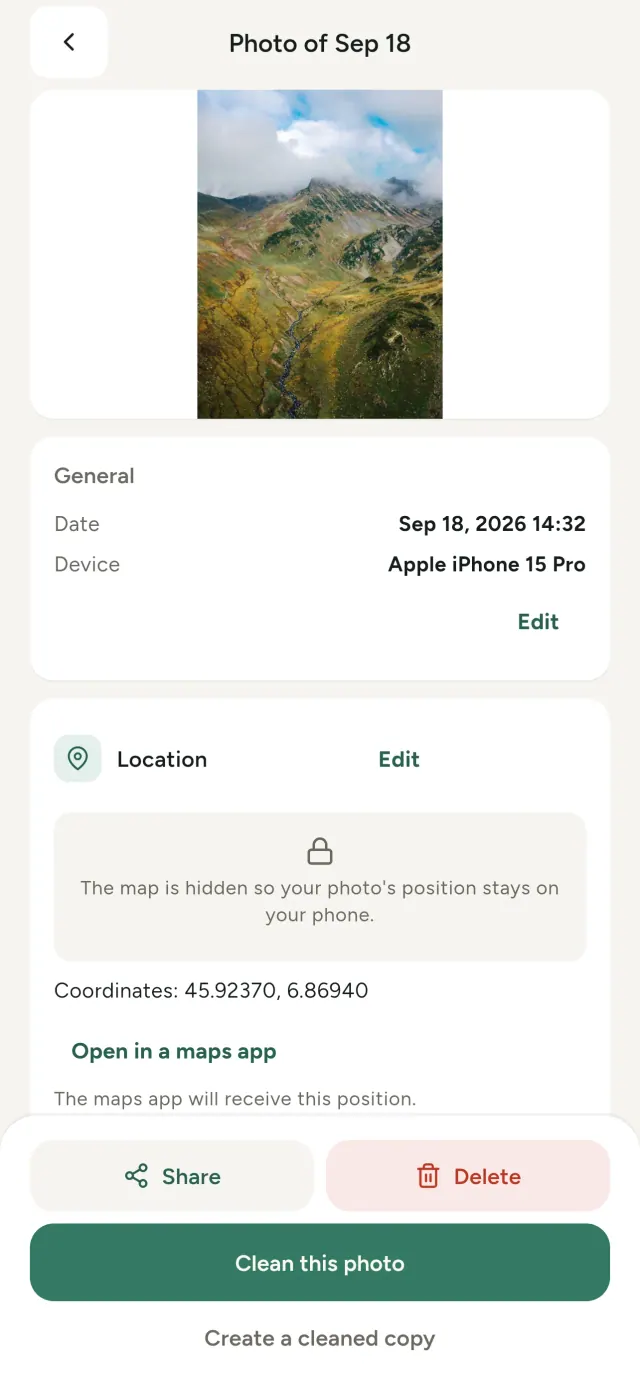
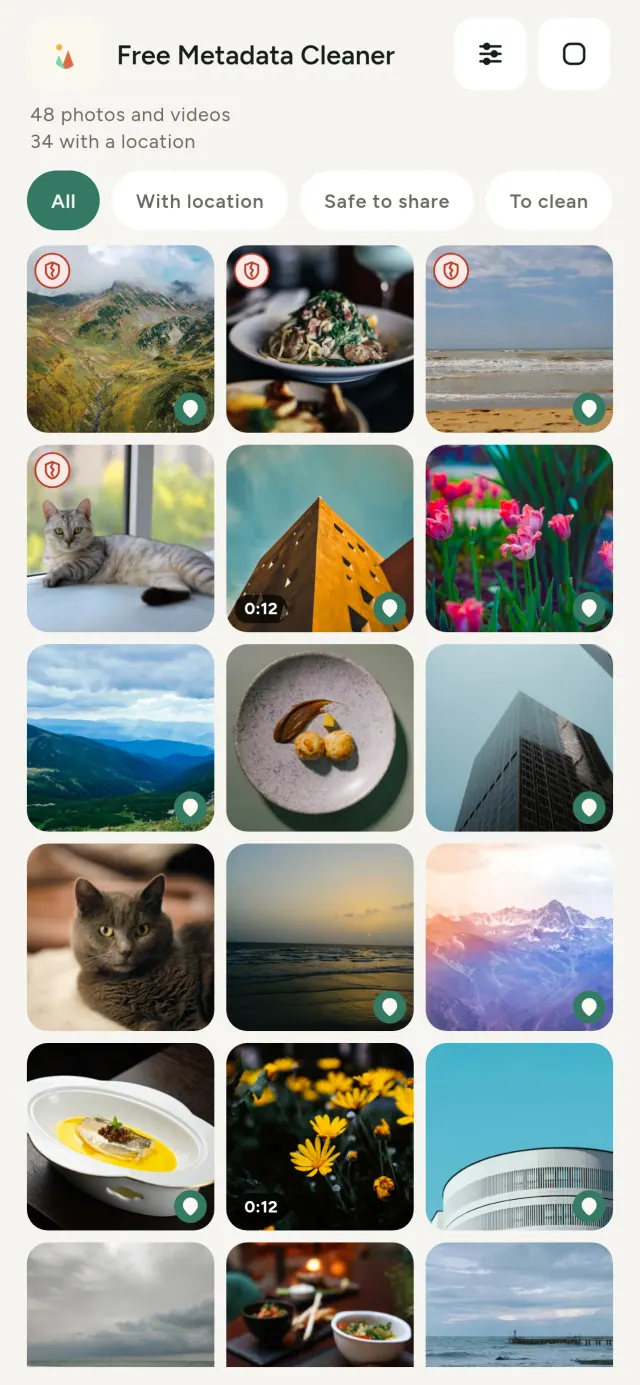
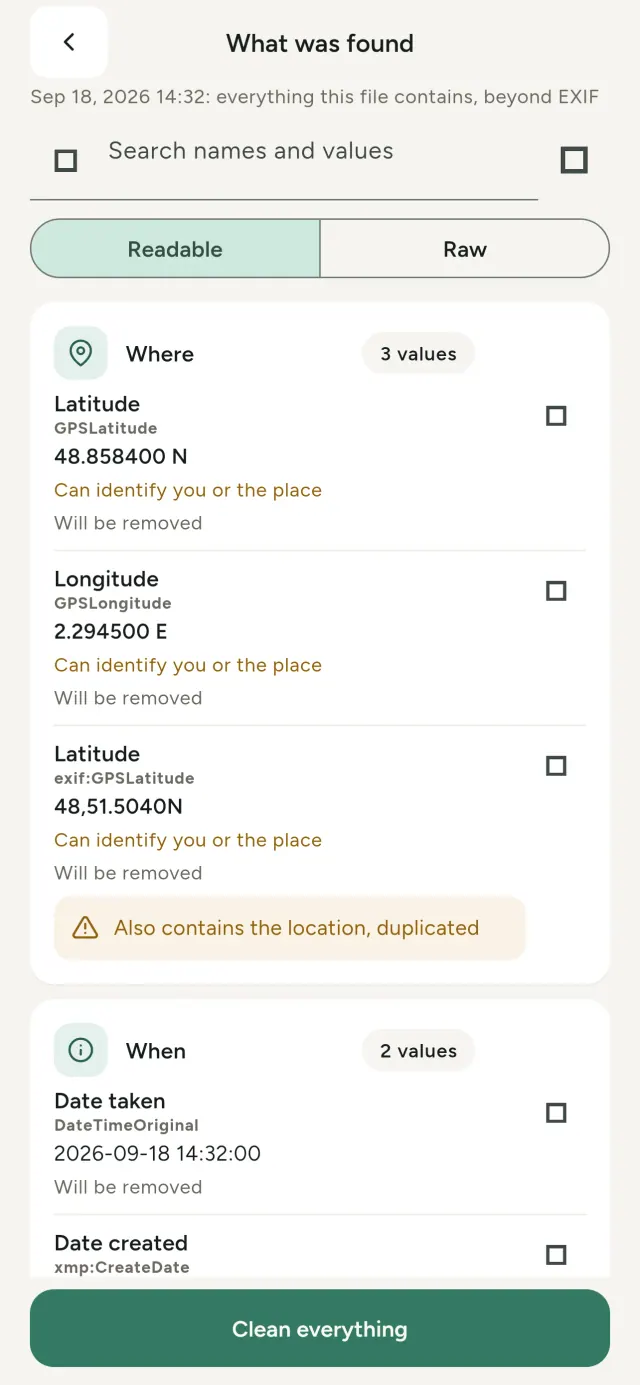
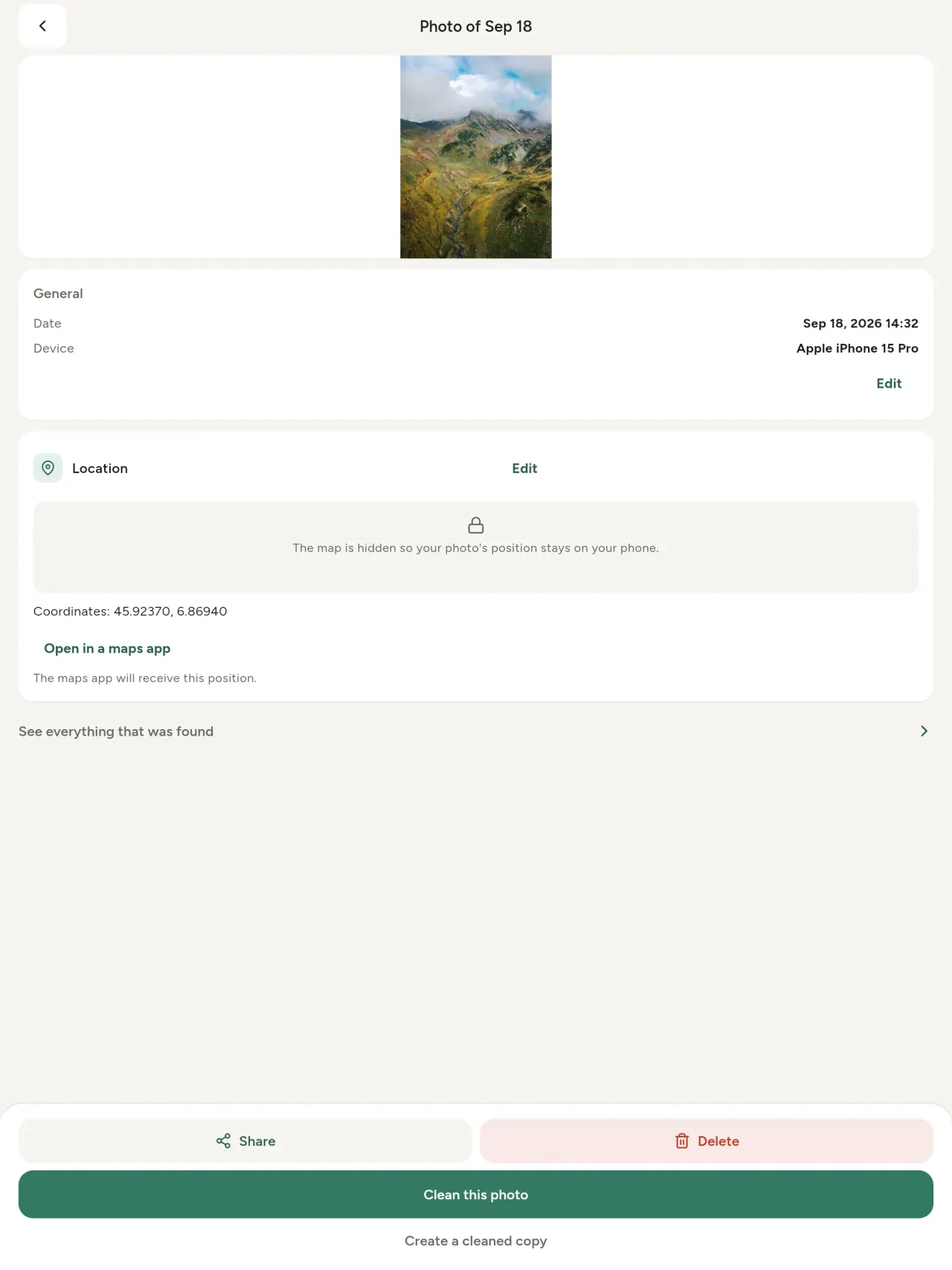
Kowane hoto yana ɗauke da bayanan ɓoye: inda aka ɗauke shi, yaushe, da irin wayar da aka yi amfani da ita, wani lokaci har da ƙaramin samfuri na asalin hoton. Idan ka raba shi, duk wannan yana tafiya tare da shi.
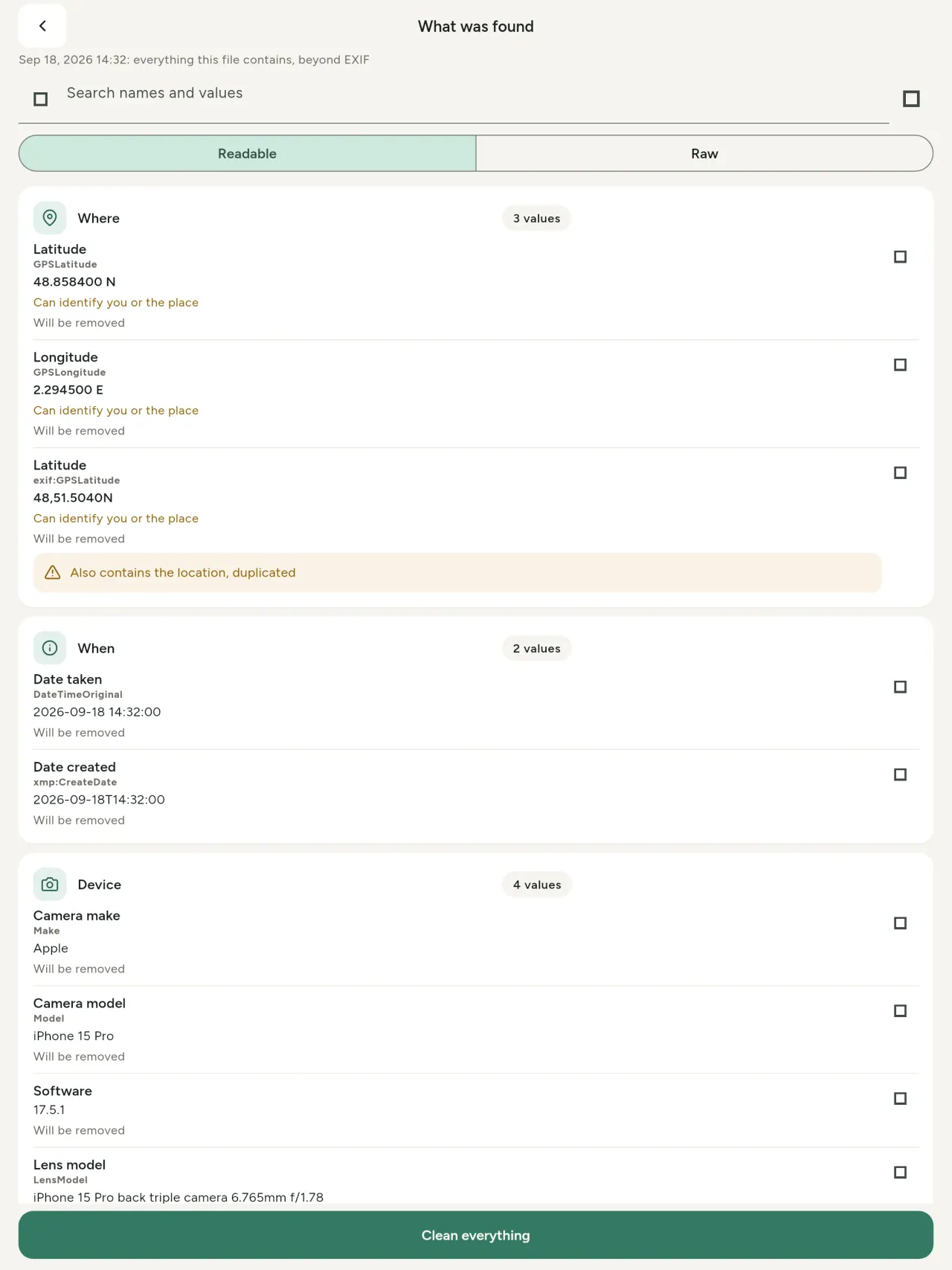
Metadata Cleaner yana yin abubuwa uku a wayarka: yana nuna abin da hotuna da bidiyoyinka suka ƙunsa, yana ba ka damar gyara shi, kuma yana cire shi.
Abin da Metadata Cleaner ke yi
Karanta
Mai duba metadata na gaske: kowane ƙima a hoto ko bidiyo (EXIF, IPTC, XMP, codecs na bidiyo, tsawo da ƙuduri), a rukuni, ana iya nema da kwafa. Ana alamar abin da za a cire. Ana gano asalin AI (C2PA da sigogin samarwa) ma.
Gyara
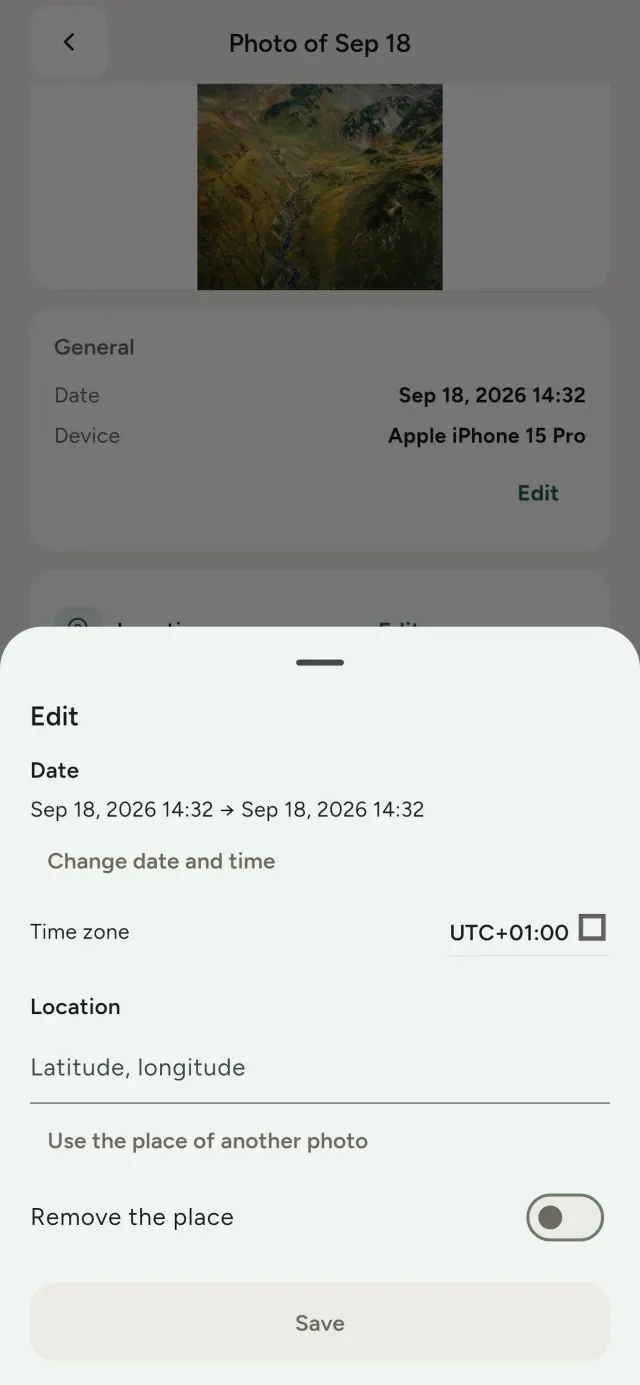
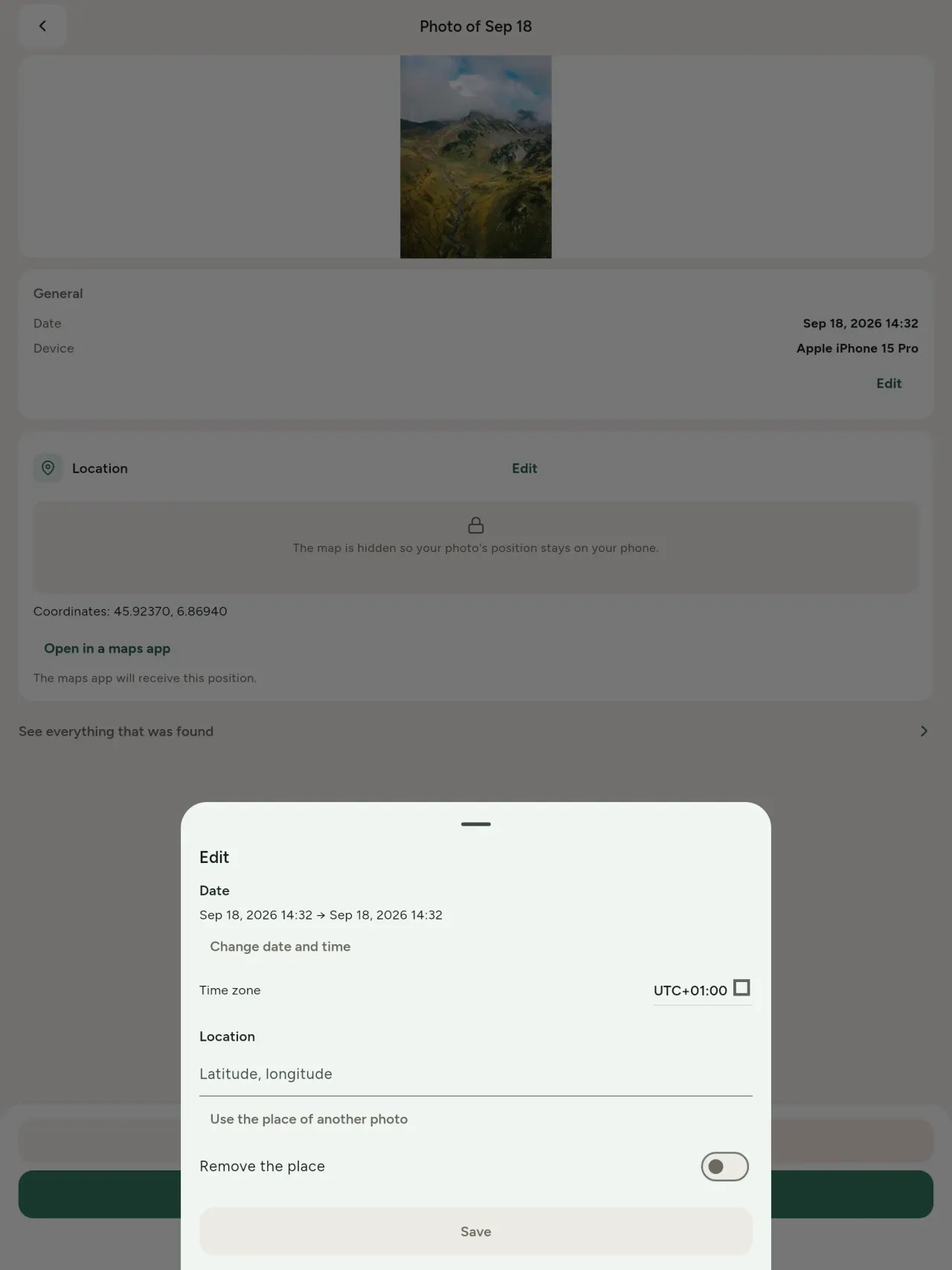
Canja kwanan wata da wurin hoto, ko da babu metadata. Kwafa wuri daga wani hoto, ko zaɓe shi a taswira (ana tambaya da farko, kowane lokaci). Kwatanta kafin da bayan.
Cire
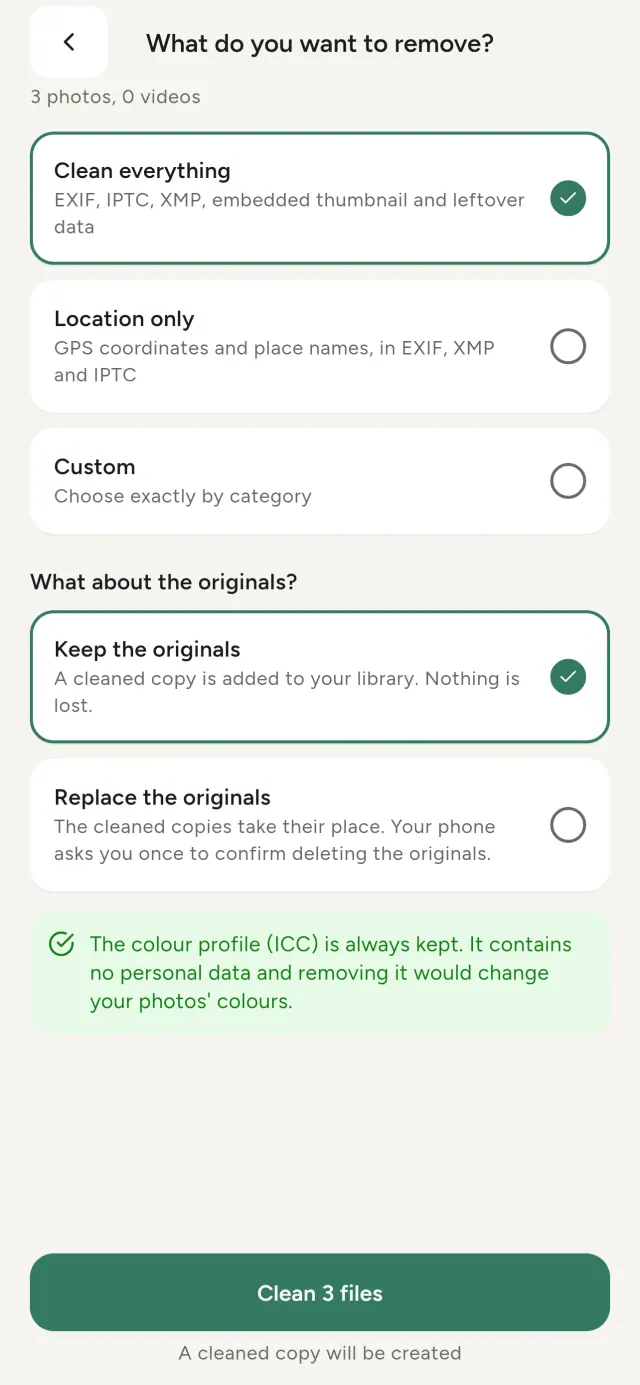
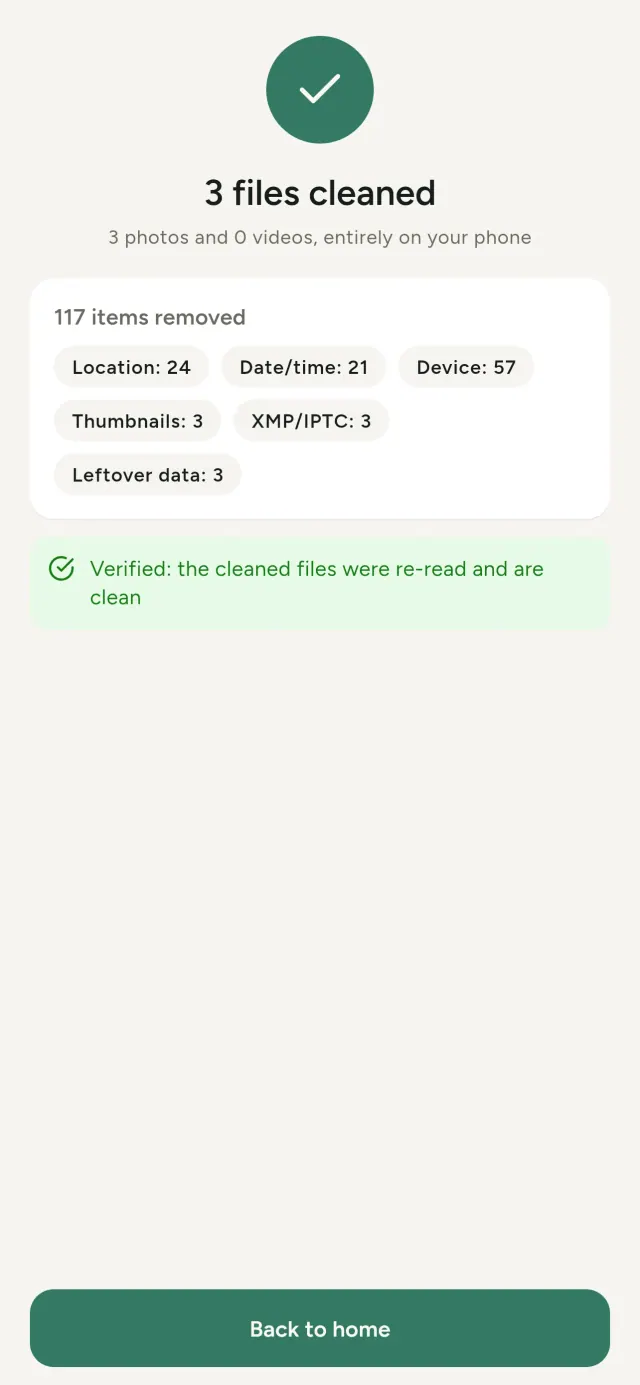
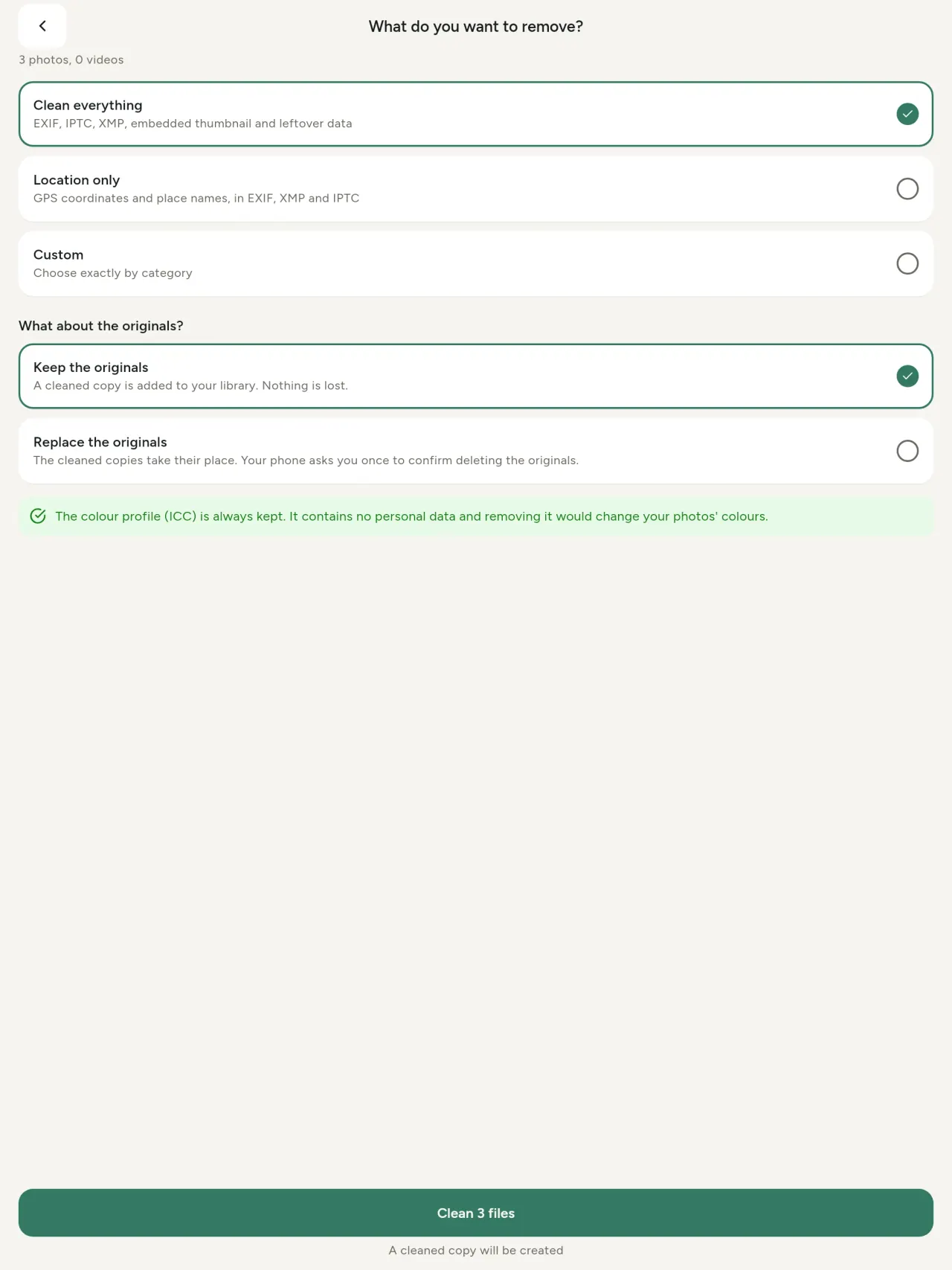
Komai, wuri kawai, ko rukunonin da ka zaɓa: bayanan EXIF, IPTC da XMP, ƙananan samfura, bayanan kamara, asalin AI da ragowar bytes. Tsaftace zaɓi gaba ɗaya lokaci guda, ka riƙe na asali ko maye gurbinsu.
Amintacce don rabawa nan take
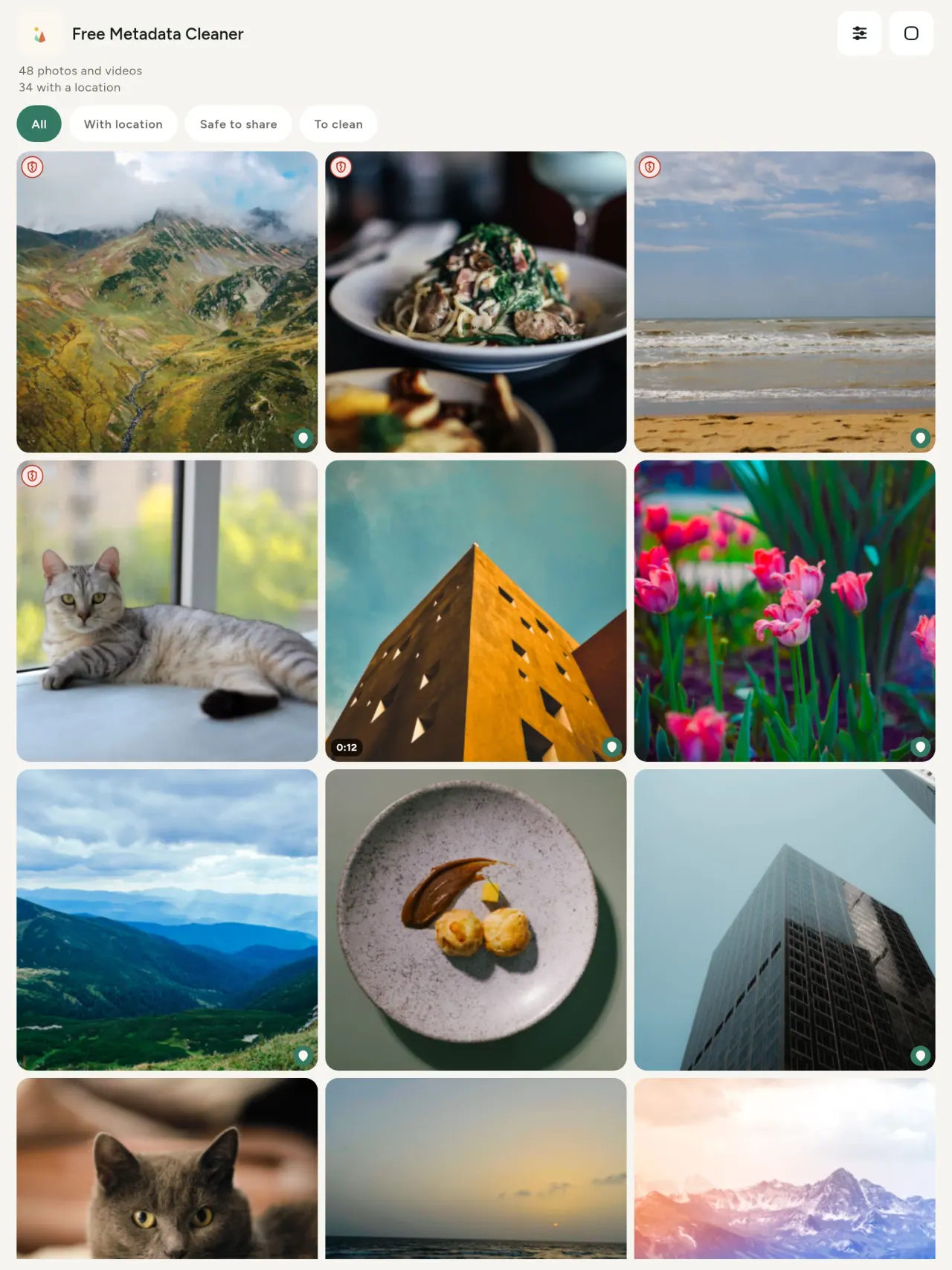
Garkuwar kore tana nuna fayiloli marasa metadata; garkuwar ja mai tsagewa tana nuna waɗanda suka rage da wani.
Babu asarar inganci
Ba a sake ɓoye hotuna ba.
Keɓantawa tun daga zane
Ana karanta, gyarawa da tsaftace hotunanka a na'urarka. Babu asusu, talla ko nazari. Taswira ce kaɗai zaɓi: bayan ka amince, ana lodata daga OpenStreetMap; ba a aika hoton ba.
Kyauta, babu talla
Idan manhajar ta taimake ka, za ka iya ba da gudummawa.
Ga wa wannan ya dace
- Duk wanda ke son sanin abin da hoto ke bayyanawa (inda ya dauka, rana, kyamara) kafin turawa, sayarwa ko aikawa.
- Wadanda ke sayarwa a shafukan talla kuma ba sa son nuna inda suke zaune.
- Iyaye da duk mai son kare mahalli (gida, makaranta, wurin aiki) daga bayyana a hotunan da suka raba.
- ’Yan jarida, masu fafutuka da masu cikin hadari da ke bukatar tura hoto ba tare da wata alama ba.
- Masu gajiya da zubewar bayanai da ke son kare bayanan sirri da hotunansu ke dauke da su.
Dalilan zabar Metadata Cleaner
- Abu uku a manhaja guda: karanta abin da hoto ko bidiyo ke bayyanawa, gyara shi (ranar dauka, wuri), kuma cire metadata cikin dan dama.
- Duk aiki na faruwa a wayarka. Ba a turawa ko ina hotunka.
- Hotuna (JPEG, HEIC, PNG, WebP, GIF) da bidiyo (MP4, MOV, 3GP).
Abubuwan da manhajar ba ta iya yanzu
- Ana goyan bayan nau'ikan da ke sama kawai. Za a ƙara wasu nau’ikan nan gaba.
Manufar Pixeon. Manhajojin Pixeon suna da fifikon amfani a kan na'ura: babu asusu, babu bin diddigi, bayananka suna kan wayarka. Idan ya zama dole manhaja ta haɗu da intanet, sai idan ka zaɓi kunna wata fasali da kake so, kuma za a sabunta manufar sirri kafin hakan ya fara.
Duba Metadata Cleaner a aikace.
Samu Metadata Cleaner.
Kyauta a iPhone da Android.
Nau'i 1.1
- App Store Mai zuwa
- Google Play Mai zuwa
Sabbin abubuwa
Wannan rubutun yana cikin Turanci.
- Read: see exactly what a photo or video reveals (location, date, camera, AI provenance labels such as C2PA and generation parameters, video duration, codecs, resolution and frame rate).
- Edit: change the date a photo was taken and its location (JPEG, HEIC, AVIF), even on a photo with no metadata, reuse the location of another photo, or pick it on an OpenStreetMap map after your confirmation.
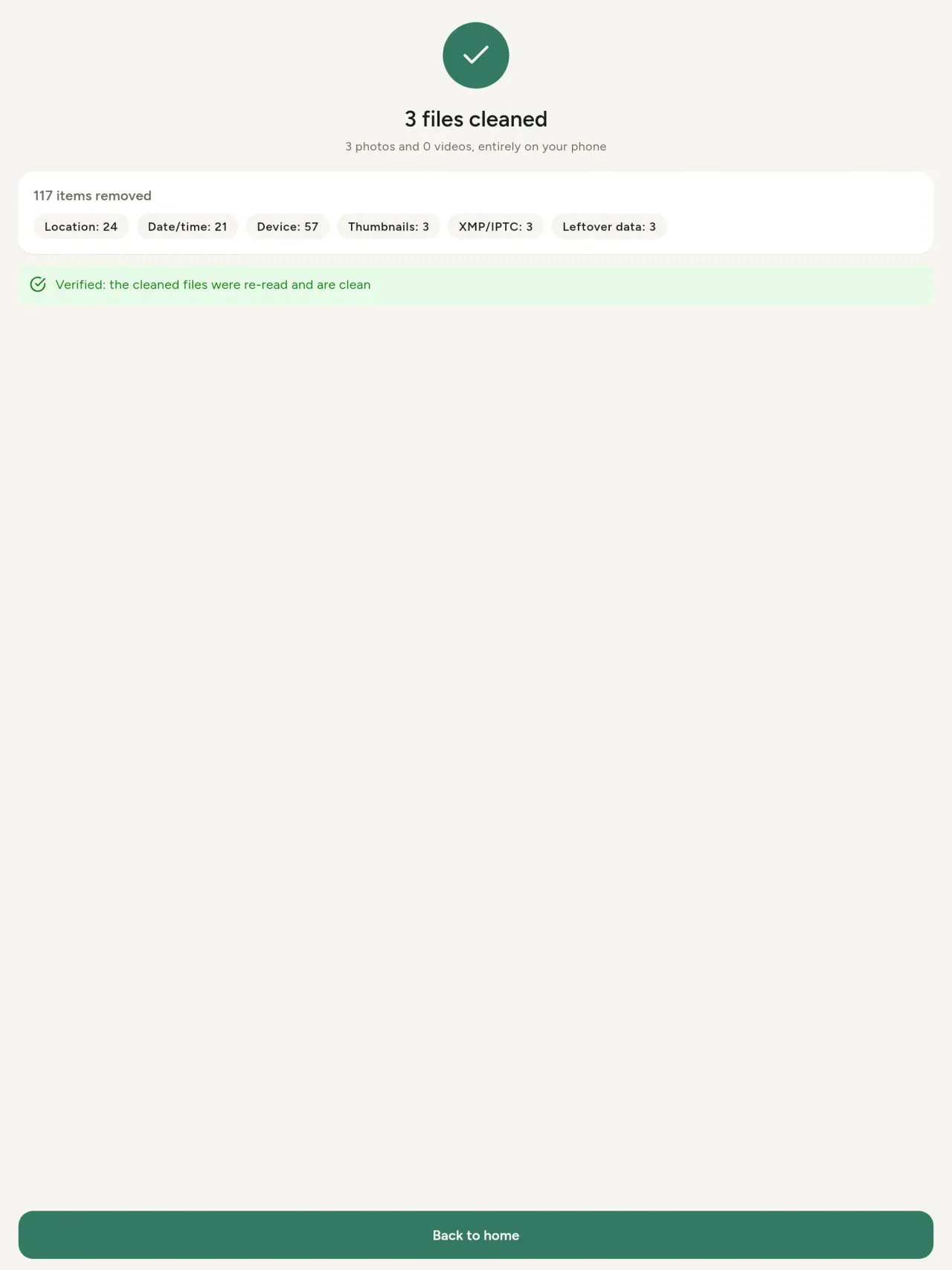
- Remove: clean metadata in a few taps, with a before and after view on the result screen.
- DNG photos are supported.
- Translations aligned across 91 languages.
Privacy policy
Rubutun da ke ƙasa yana Turanci. Sigar Turanci ce ke da iko.
Last updated: 2026-11-03 · applies to version 1.1 and later
Policy versions: 1.1 and later (this text) · version 1.0 (still the policy of the app version 1.0). The version number of your app is shown at the bottom of its Settings screen.
Free Metadata Cleaner shows and removes the metadata hidden in your photos and videos (location, date and time, camera and lens details, thumbnails…). The short version: everything happens on your device, and we collect nothing.
What the app accesses
Your photo and video library, only after you grant permission (and, where your system requires it, the permission to read the location stored in your photos, so that it can be shown to you). The files you choose are read and cleaned on your device; the cleaned copy is saved to your library. If you choose to replace the originals, the system asks you to confirm before deleting them.
To show which photos are already clean, the app reads the metadata of the photos displayed on screen, on your device. This result is kept in memory only and is never stored.
What we collect
Nothing. No account, no analytics or usage tracking, no advertising or advertising identifiers, no crash or diagnostics reporting beyond what the app stores provide, and no third-party SDK that sends data anywhere. There is no Free Metadata Cleaner server. Cleaning a photo or video never uses the network, at all: turn on airplane mode and clean one to check for yourself. The only network request the app itself can ever make is described under “Location” below, and it only ever happens if you ask for it. The one other connection is the optional tip purchase, handled by the store (see “Optional support”).
Temporary files and history
The app keeps no history and no database. Temporary files created while cleaning are deleted after each item and purged when the app starts.
Deleted originals
Originals that are deleted remain in your system's trash (such as “Recently Deleted” or the trash) for about 30 days, with their metadata. The app cannot empty it: do it yourself if you need the originals gone at once.
iCloud and cloud photos
If a photo is stored in iCloud and not on your device, the operating system may download it before the app can process it. That transfer is made by the system, under the provider's own terms, not by the app.
Location
When a photo contains a location, the app shows the coordinates as text, which stays on your device. Three actions can send location information off your device, only when you choose them, each time: “Open in…” hands the coordinates to the maps application you select, under its own privacy policy; “Show the map” asks you to confirm first (“Showing the map sends this photo's position to a map service. Nothing else is sent.”), then loads a small map from OpenStreetMap for that one position; and, when you edit a photo's place, “Choose on the map” asks you to confirm first, then opens a full-screen map from OpenStreetMap. This map does not use your phone's location. As you move and zoom it, the app requests the map tiles of the area you are browsing, so OpenStreetMap receives the position of the area shown on screen, which starts on the photo's current place if it has one, and otherwise on a world view. The photo itself is never sent, and nothing is sent before you confirm. The place you choose on the map (or copy from another photo) is written into the photo's file only when you save, on your device. In every case OpenStreetMap receives, as with any web request, technical details like your IP address; it does not receive your name, an account, or anything else about you or your other photos. See OpenStreetMap's own privacy policy. Outside of these explicit actions, the app never sends a photo's location, or anything else, anywhere.
Optional support
The app is free. If you wish, you can leave a tip. On iPhone and in the Google Play version for Android, tips are in-app purchases processed by Apple or Google under their own terms and privacy policy; the app adds the Google Play billing permission for this, makes no network call itself, and receives no payment or personal details. Versions installed outside Google Play may instead open an external donation page in your browser, operated by a third party under its own privacy policy; nothing from the app is sent to it. A tip unlocks nothing.
Contact form on this website
If you write to us through this site, we use your message and the email address you optionally give only to reply. Bot protection is provided by Cloudflare and email delivery by Resend.
Language choice on this website
When you choose a language, or when this site opens a page in your browser's language, it stores
one small functional cookie (pxl, a language code, one year) so that your choice is
remembered. If this site suggests a page in your browser's language and you close that suggestion,
your browser also keeps a local note (pxl-banner-off, in local storage, 30 days) so the
suggestion does not come back. Neither identifies anyone, neither is used for tracking or advertising,
and neither is shared. You can delete them in your browser at any time.
Website statistics
This website uses Cloudflare Web Analytics to count visits (pages viewed, country, browser type, loading speed). It sets no cookie, does not use local storage, does not fingerprint your device, does not follow you across sites and does not build a profile of you. Search engines (for example Google Search Console) give us aggregated search statistics, without any data about individual visitors. Our own web server also counts the pages it serves: for each page it keeps the page address, the site or social network that sent you (only its name, or the campaign tag written in the link), the country, the type of device and whether the request came from a robot. It keeps no IP address, no identifier and no cookie, and these counts are anonymous. We use no advertising or other analytics service. None of this concerns the app itself, which collects nothing.
Children
The app is a general-purpose tool and is not directed at children.
Changes
An updated policy will be published at this URL with a new date above.
Contact
Questions about privacy: metadata-cleaner-contact@pixeon.net
Nau'i 1.0
- App Store An fitar
- Google Play An fitar
Sabbin abubuwa
Wannan rubutun yana cikin Turanci.
- Cleans JPEG, HEIC, PNG, WebP, GIF, MP4, MOV and 3GP files, with no video re-encoding.
- "Safe to share" and "To clean" filters.
- New green design.
- Help screen with a FAQ.
- Settings: share, rate, feedback, unsupported formats.
- Optional tips.
Privacy policy, version 1.0
Rubutun da ke ƙasa yana Turanci. Sigar Turanci ce ke da iko.
Applies to version 1.0 of the app (the first release). Later versions: current policy.
Free Metadata Cleaner shows and removes the metadata hidden in your photos and videos (location, date and time, camera and lens details, thumbnails…). The short version: everything happens on your device, and we collect nothing.
What the app accesses
Your photo and video library, only after you grant permission (and, where your system requires it, the permission to read the location stored in your photos, so that it can be shown to you). The files you choose are read and cleaned on your device; the cleaned copy is saved to your library. If you choose to replace the originals, the system asks you to confirm before deleting them.
To show which photos are already clean, the app reads the metadata of the photos displayed on screen, on your device. This result is kept in memory only and is never stored.
What we collect
Nothing. No account, no analytics or usage tracking, no advertising or advertising identifiers, no crash or diagnostics reporting beyond what the app stores provide, and no third-party SDK that sends data anywhere. There is no Free Metadata Cleaner server. Cleaning a photo or video never uses the network, at all: turn on airplane mode and clean one to check for yourself. The only network request the app itself can ever make is described under “Location” below, and it only ever happens if you ask for it. The one other connection is the optional tip purchase, handled by the store (see “Optional support”).
Temporary files and history
The app keeps no history and no database. Temporary files created while cleaning are deleted after each item and purged when the app starts.
Deleted originals
Originals that are deleted remain in your system's trash (such as “Recently Deleted” or the trash) for about 30 days, with their metadata. The app cannot empty it: do it yourself if you need the originals gone at once.
iCloud and cloud photos
If a photo is stored in iCloud and not on your device, the operating system may download it before the app can process it. That transfer is made by the system, under the provider's own terms, not by the app.
Location
When a photo contains a location, the app shows the coordinates as text, which stays on your device. Two actions send that one photo's position off your device, only when you choose them, each time: “Open in…” hands the coordinates to the maps application you select, under its own privacy policy; “Show the map” asks you to confirm first (“Showing the map sends this photo's position to a map service. Nothing else is sent.”), then loads a small map from OpenStreetMap for that one position. OpenStreetMap receives the coordinates and, as with any web request, technical details like your IP address; it does not receive your name, an account, or anything else about you or your other photos. See OpenStreetMap's own privacy policy. Outside of these two explicit actions, the app never sends a photo's location, or anything else, anywhere.
Optional support
The app is free. If you wish, you can leave a tip. On iPhone and in the Google Play version for Android, tips are in-app purchases processed by Apple or Google under their own terms and privacy policy; the app adds the Google Play billing permission for this, makes no network call itself, and receives no payment or personal details. Versions installed outside Google Play may instead open an external donation page in your browser, operated by a third party under its own privacy policy; nothing from the app is sent to it. A tip unlocks nothing.
Contact form on this website
If you write to us through this site, we use your message and the email address you optionally give only to reply. Bot protection is provided by Cloudflare and email delivery by Resend.
Language choice on this website
When you choose a language, or when this site opens a page in your browser's language, it stores
one small functional cookie (pxl, a language code, one year) so that your choice is
remembered. If this site suggests a page in your browser's language and you close that suggestion,
your browser also keeps a local note (pxl-banner-off, in local storage, 30 days) so the
suggestion does not come back. Neither identifies anyone, neither is used for tracking or advertising,
and neither is shared. You can delete them in your browser at any time.
Website statistics
This website uses Cloudflare Web Analytics to count visits (pages viewed, country, browser type, loading speed). It sets no cookie, does not use local storage, does not fingerprint your device, does not follow you across sites and does not build a profile of you. Search engines (for example Google Search Console) give us aggregated search statistics, without any data about individual visitors. Our own web server also counts the pages it serves: for each page it keeps the page address, the site or social network that sent you (only its name, or the campaign tag written in the link), the country, the type of device and whether the request came from a robot. It keeps no IP address, no identifier and no cookie, and these counts are anonymous. We use no advertising or other analytics service. None of this concerns the app itself, which collects nothing.
Children
The app is a general-purpose tool and is not directed at children.
Changes
An updated policy will be published at this URL with a new date above.
Contact
Questions about privacy: metadata-cleaner-contact@pixeon.net
Taimako
An sabunta: 2026-10-08
Free Metadata Cleaner ƙaramar manhaja ce mai zaman kanta. Ga amsoshin tambayoyi mafi yawa a ƙasa.
Za mu ƙoƙarta mu amsa a cikin 'yan kwanaki. Don taimakawa, gayamana samfurin na'urarka, sigar tsarin ta da abin da kake yi. Don Allah kada a aika hotuna na sirri.
Wane bayanai manhajar ke adanawa ko aikawa?
Babu ko ɗaya. Ba ta adana tarihi, babu asusu, babu sabar. Karin bayani a cikin manufar sirri.
Ta yaya zan tsabtace hoto?
- Bude manhajar kuma bada izinin shiga ɗakin hotunanka idan an tambaya.
- Zaɓi hotuna ko bidiyo da kake son tsabtacewa.
- Zaɓi abin da za a cire, da ko a maye gurbin asali ko a ƙirƙiri kwafin tsabtacce.
- Tabbatar. Za a nuna jadawalin abin da aka cire da duk fayil ɗin da ba a iya sarrafawa ba.
Ina kwafin tsabtattun hotuna suke zuwa?
Suna shiga ɗakin hotunanka. Ranar ɗakunan hoton asali tana nan, don haka hoto da aka tsabtace ba zai hau saman gallery dinka ba.
Na zaɓi "mayar da asali" amma har yanzu asali yana nan.
Hotunan da aka share suna zaune a cikin ajiyar shara na tsarin (kamar "An share kwanan nan" ko shara) har na kusan kwana 30, tare da bayanansu. Yi shara gabaɗaya don cire su nan take. Idan ka ƙi izinin sharewar tsarin, asalin zai tsaya kuma kwafin da aka tsabtace zai ci gaba da samuwa.
Wane fayiloli ne ake goyon baya?
Hotuna cikin JPEG, HEIC, AVIF, PNG, WebP da GIF, da bidiyo cikin MP4, MOV da 3GP (ana ƙara ƙarin nau'i). Fayil ɗin da manhaja ba ta iya tsabtacewa za a barshi ba tare da canji ba kuma a nuna shi a cikin jadawalin da dalili, ba tare da katse sauran ba.
Me yasa manhajar ke bukatar izini zuwa hotuna na?
Don jera hotunan da zaka iya zaɓa da adana tsabtattun kwafi. Idan tsarin naka ya bukata, manhajar za ta nemi izinin karanta wurin da aka adana a hotuna: ba tare da shi ba, tsarin zai ɓoye wuri, don haka manhajar ba za ta nuna maka abin da hoto ke bayyanawa ba. Babu wani abu da ake dora wa (uploading).
Ta yaya zan tabbatar da cewa babu komai da ke fita daga wayata?
Kunna yanayin jirgi sannan ka tsabtace hoto: zai yi aiki daidai. Banda taswira: idan ka danna "Nuna taswira" akan wurin hoto ka tabbatar, za a aika wannan wurin zuwa OpenStreetMap don nuna taswira, babu wani abu dabam. Duba "Wuri" a sama.
Wane harsuna ake da su?
Ana samun manhajar cikin Turanci, Faransanci, Jamusanci, Sifaniyanci, Italiyanci, Fotugis da Larabci. Wannan gidan yanar gizon yana samuwa a cikin ƙarin harsuna, kuma za a ƙara wasu harsuna a manhajar nan gaba.
Tallafa aikin
Metadata Cleaner yana kasancewa kyauta ba tare da talla ba. Idan yana da amfani a gare ka, zaka iya tallafawa ci gabansa (ba dole ba):
Buy Me a CoffeeExpense tracker and family budget planner. Free phone sync, no account.
Har ila yau daga PixeonVaultMarkEncrypted document vault. Watermark documents, remove metadata before sharing.
Har ila yau daga PixeonLittle RelayBreastfeeding, sleep and starting solids tracker. No account, works offline.
Har ila yau daga PixeonMenuloopPlan the week's meals, build your grocery list and keep recipes with photos.