
Metadata Cleaner: Argazki
EXIF ikuskatzailea eta argazkien metadatuak editatu eta kentzeko tresna


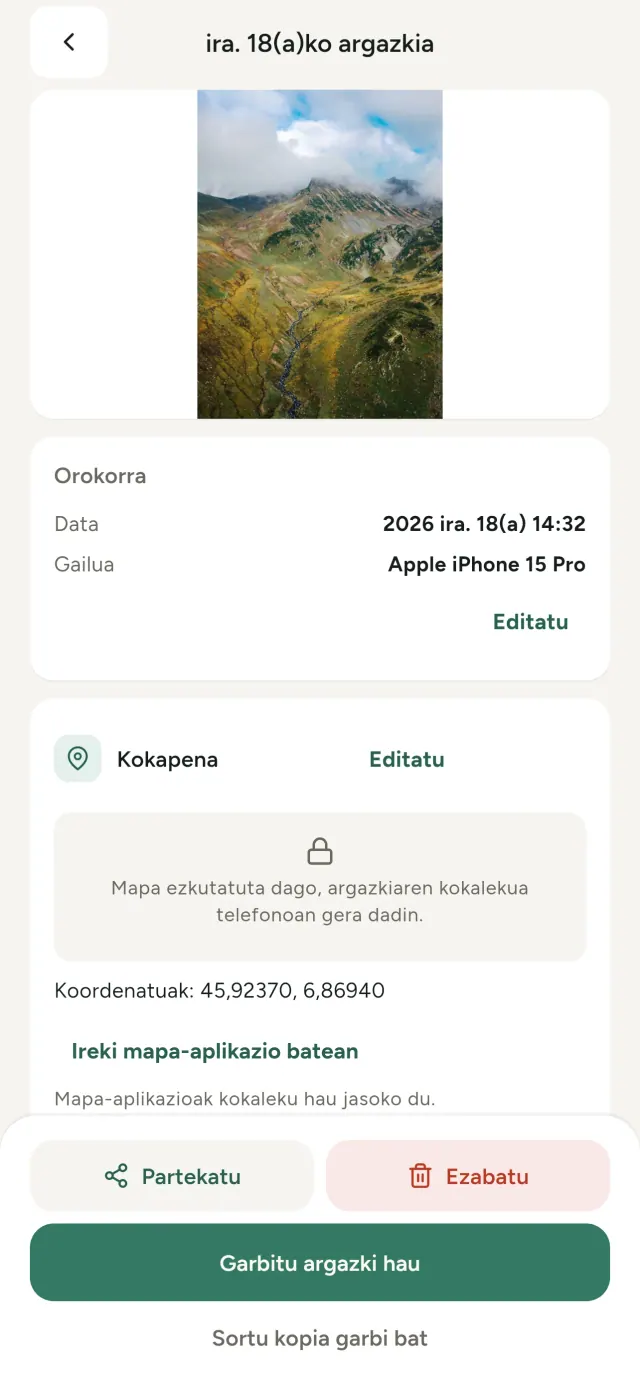
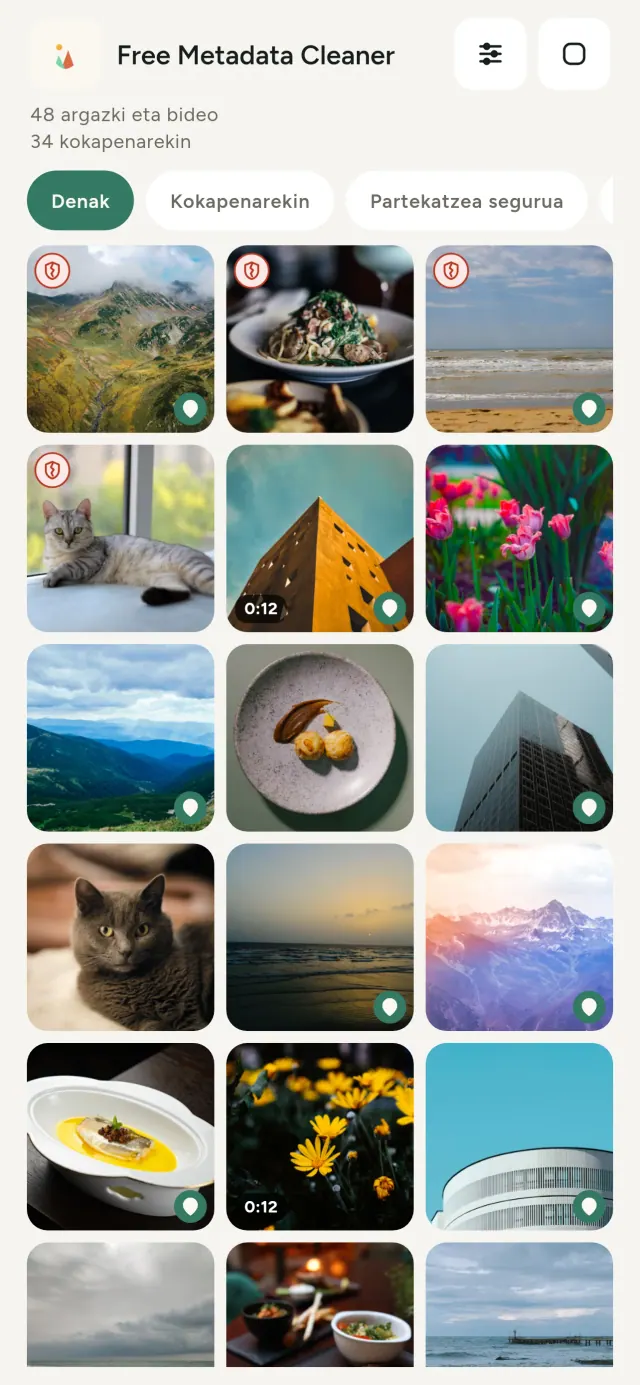
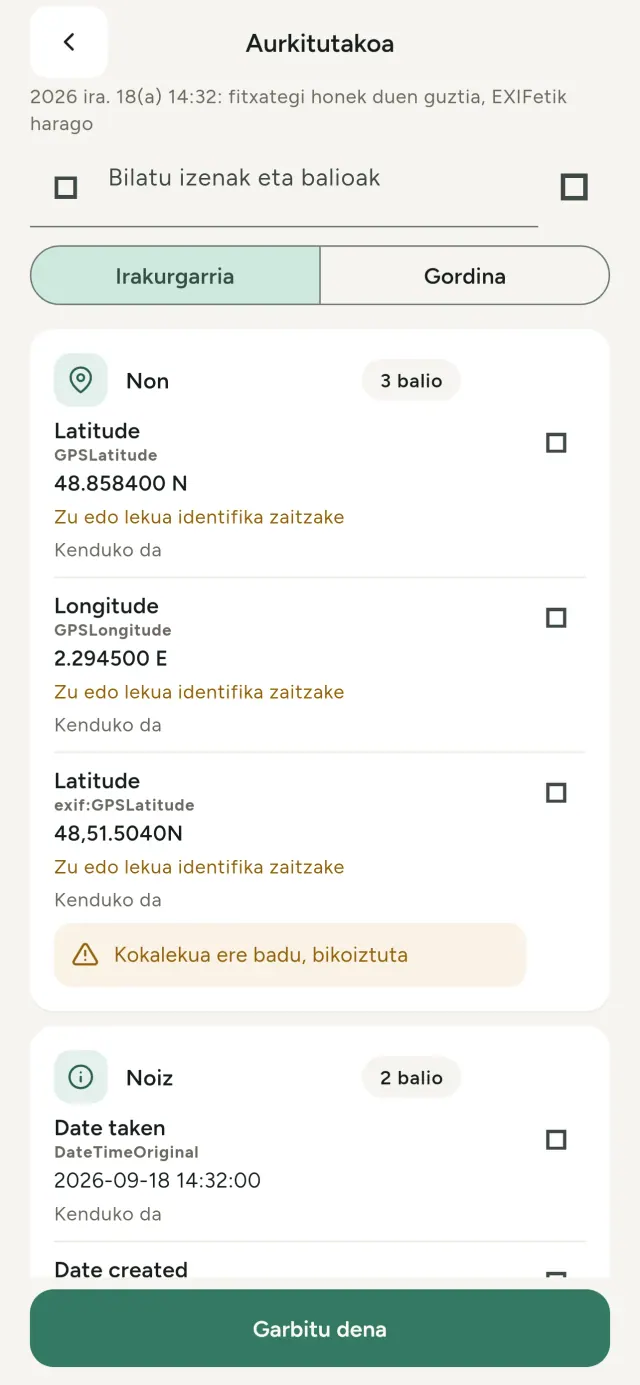
Ateratzen duzun argazki bakoitzak informazio ezkutua darama: non eta noiz atera zen, zein telefonorekin, batzuetan jatorrizkoaren aurrebista txiki bat ere. Partekatzean, hori guztia berarekin doa.
Metadata Cleaner-ek hiru gauza egiten ditu zure telefonoan: argazki eta bideoek zer duten erakusten du, zuzentzeko aukera ematen du eta kentzen du.
Zer egiten duen Metadata Cleaner-k
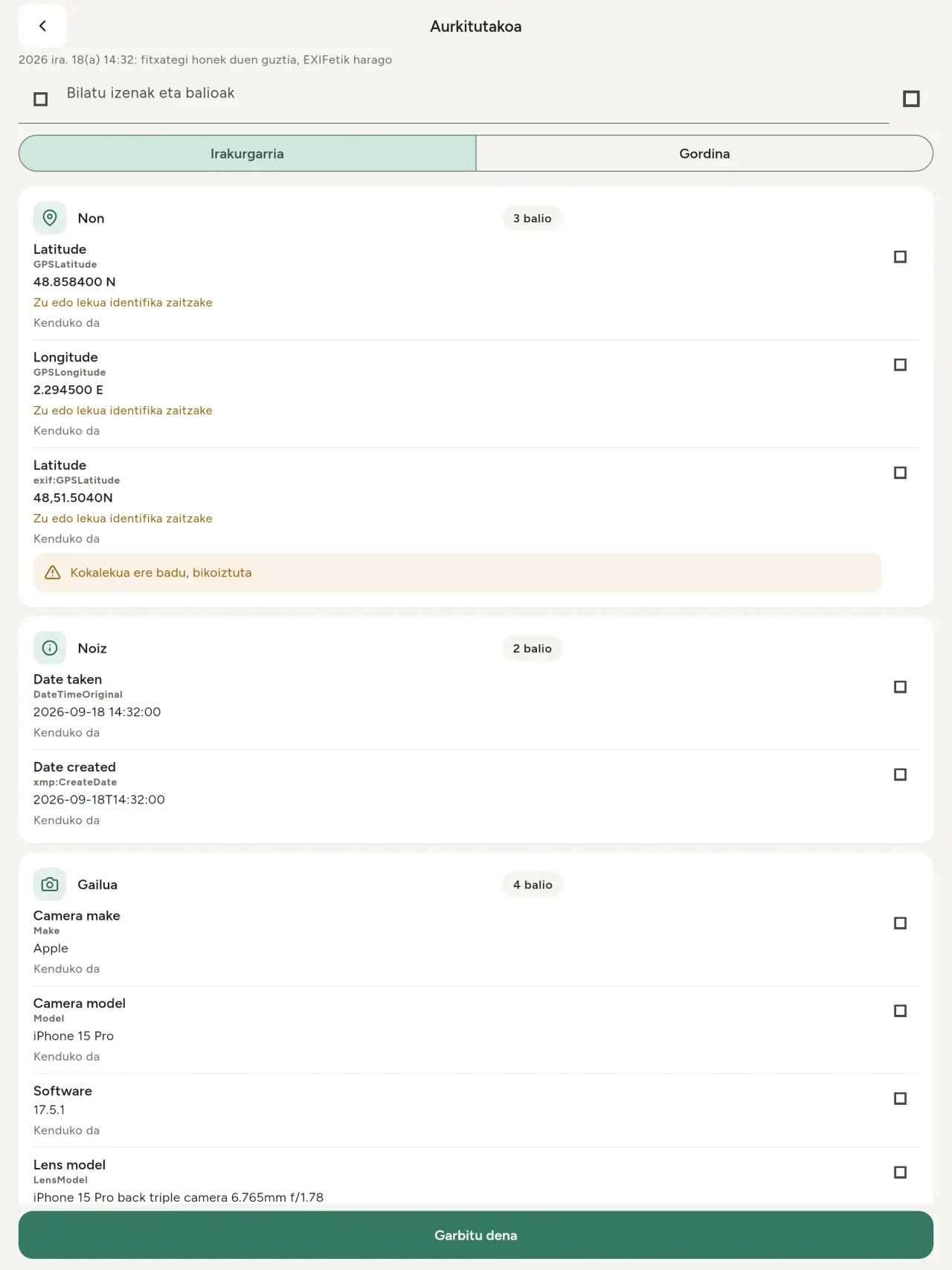
Irakurri
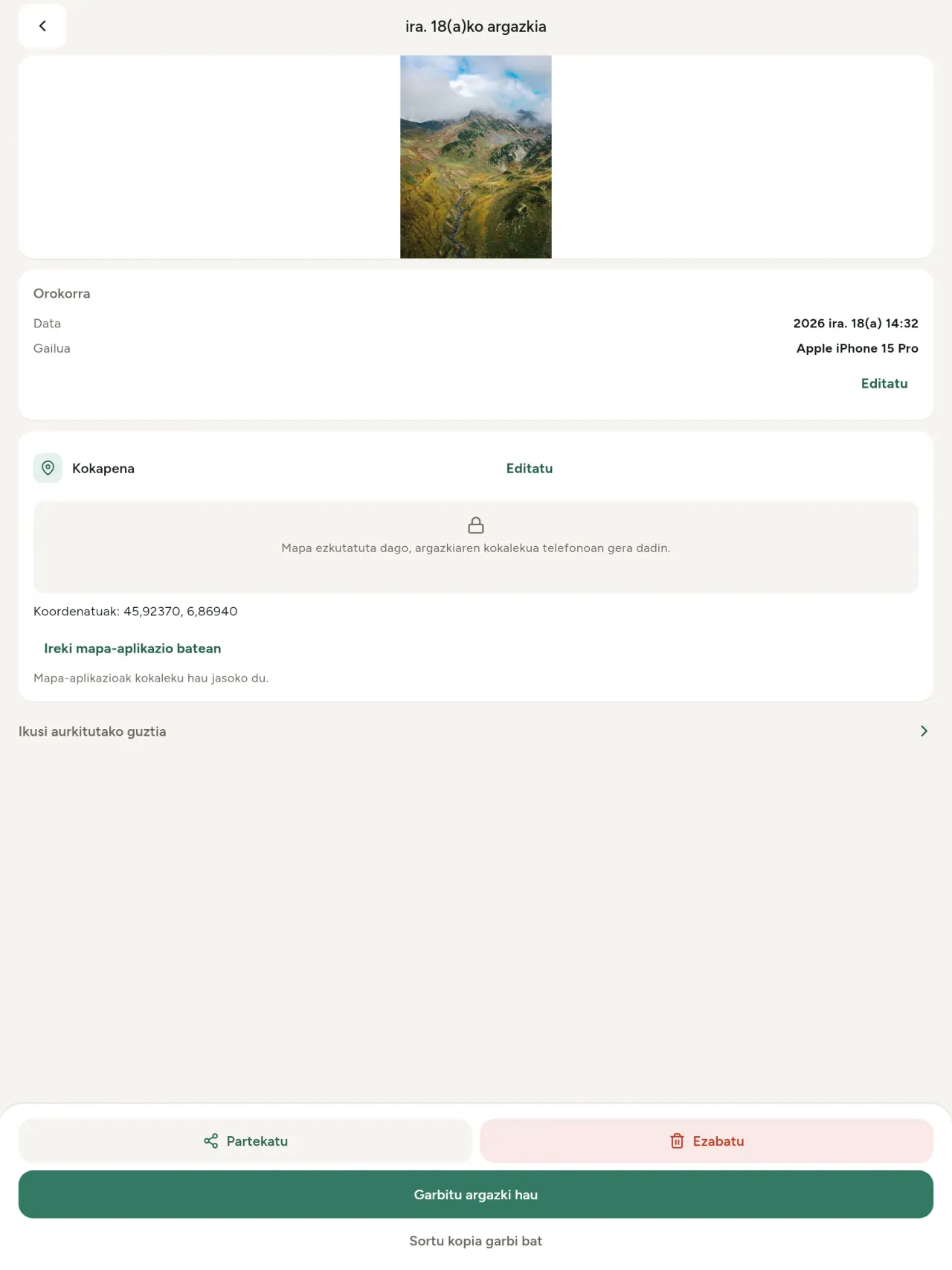
Benetako metadatu-ikuskatzailea: argazki edo bideo batean aurkitutako balio guztiak (EXIF, IPTC, XMP, bideo-kodekak, iraupena eta bereizmena), multzokatuta, bilagarri eta kopiagarri, kenduko dena markatuta. IA jatorria (C2PA, sorkuntza-parametroak) ere detektatzen du.
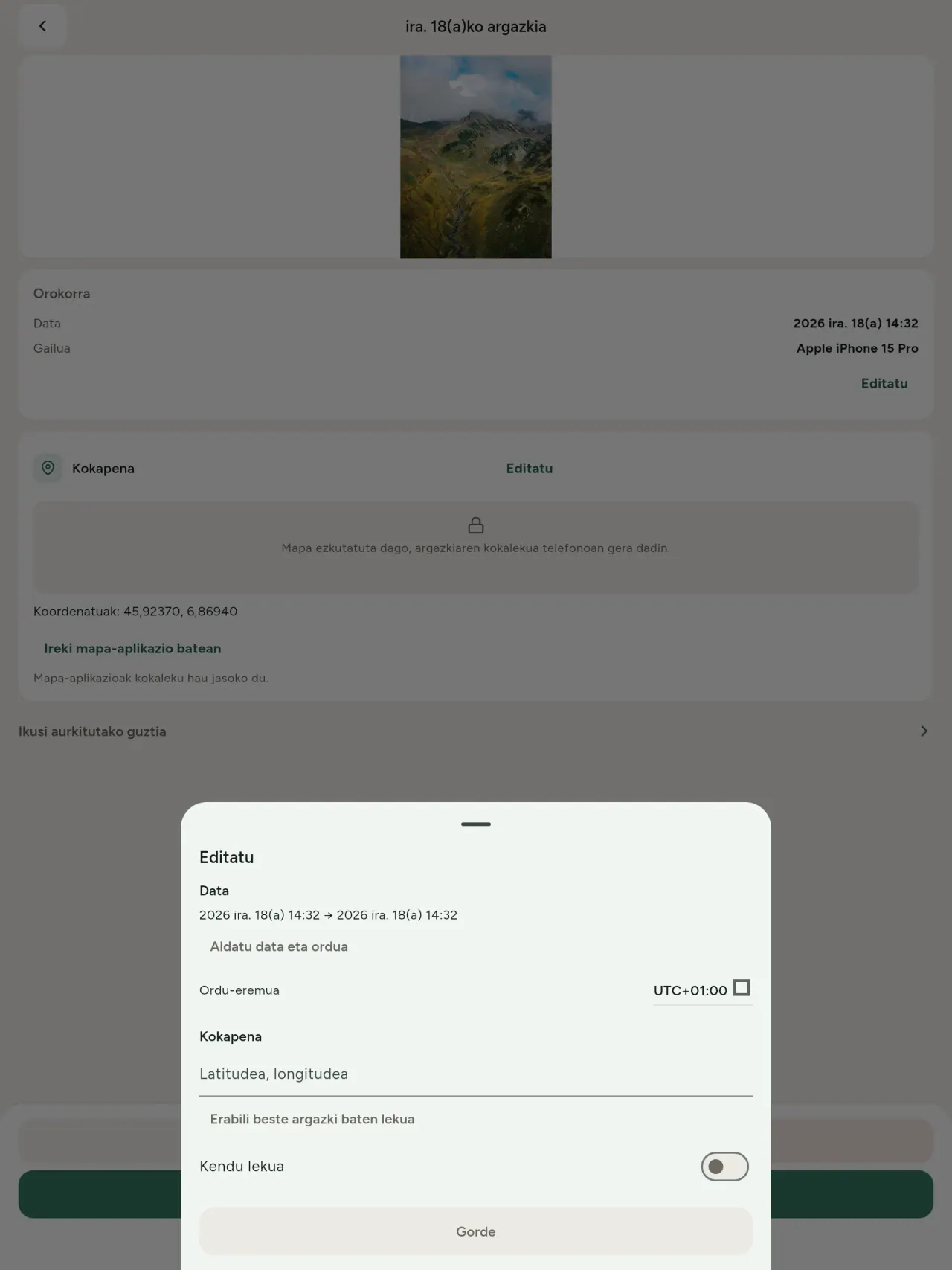
Editatu
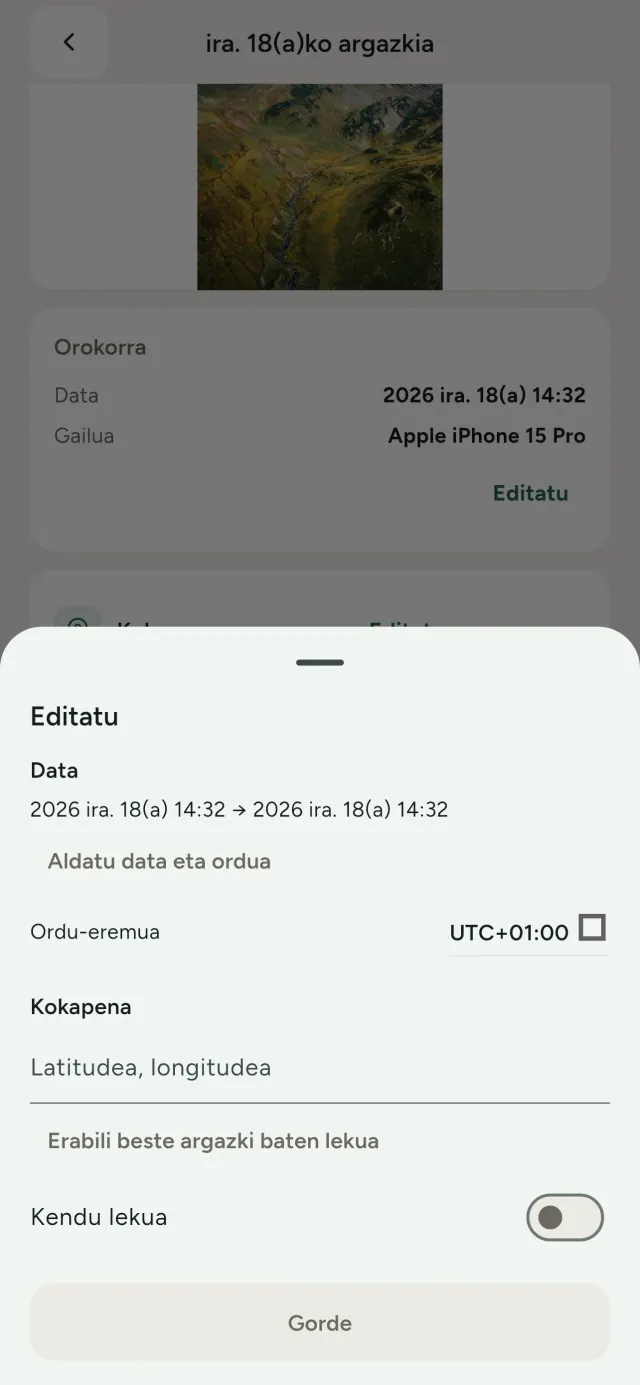
Aldatu edo ordezkatu argazki baten data eta kokalekua, metadaturik ez badu ere. Kopiatu beste argazki baten kokalekua edo aukeratu mapan (beti galdetzen du lehenik). Alderatu aurretik eta ondoren.
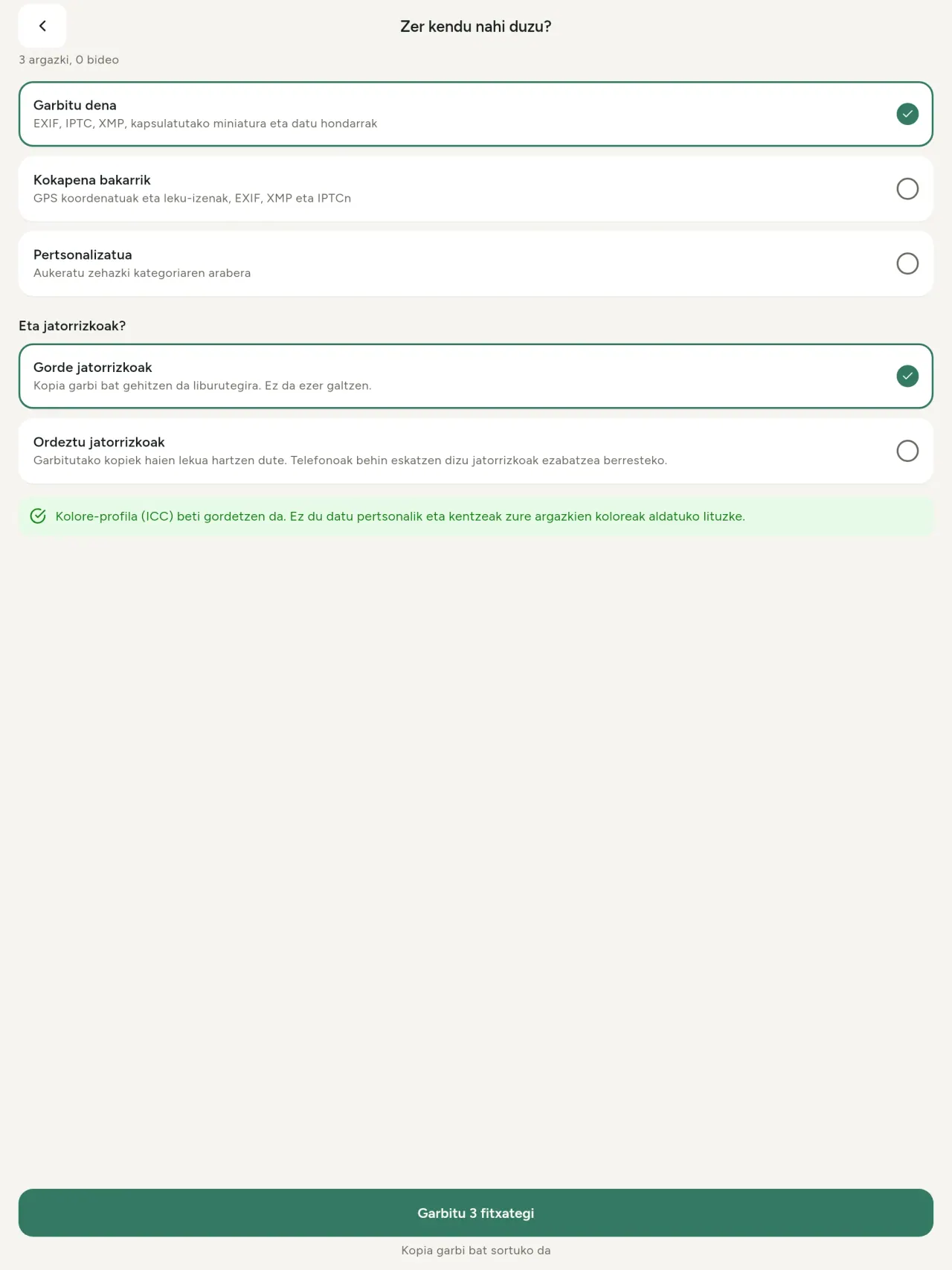
Kendu
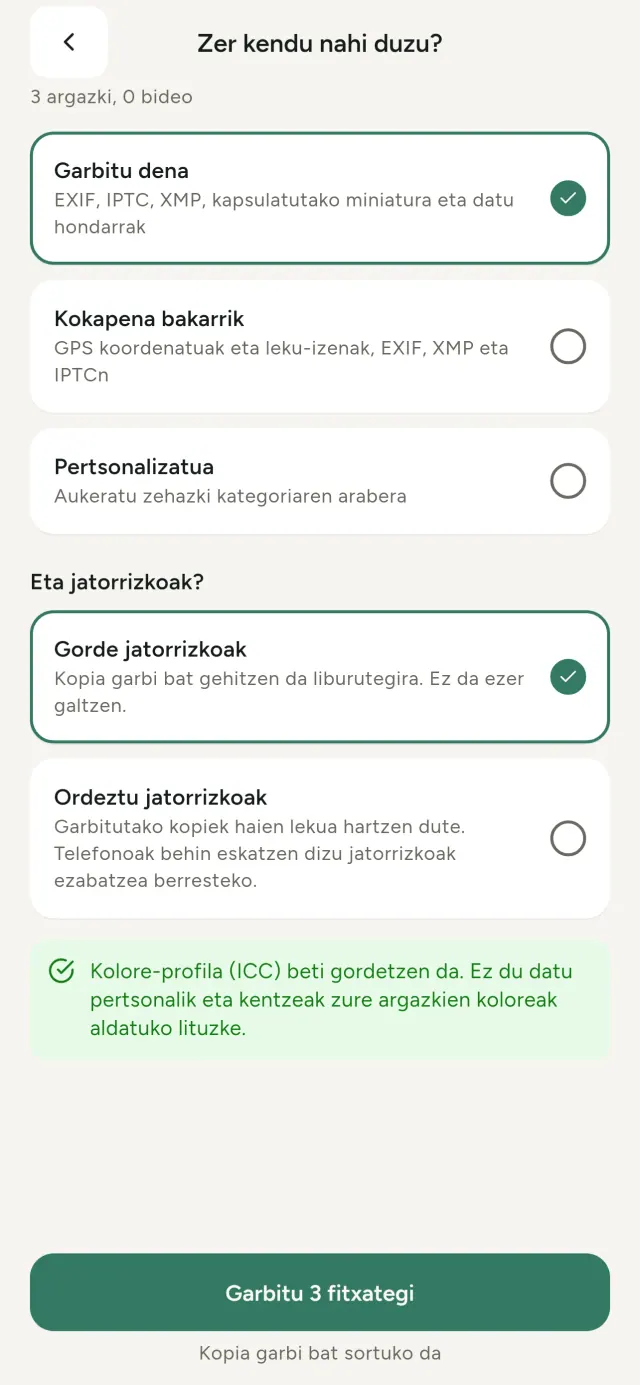
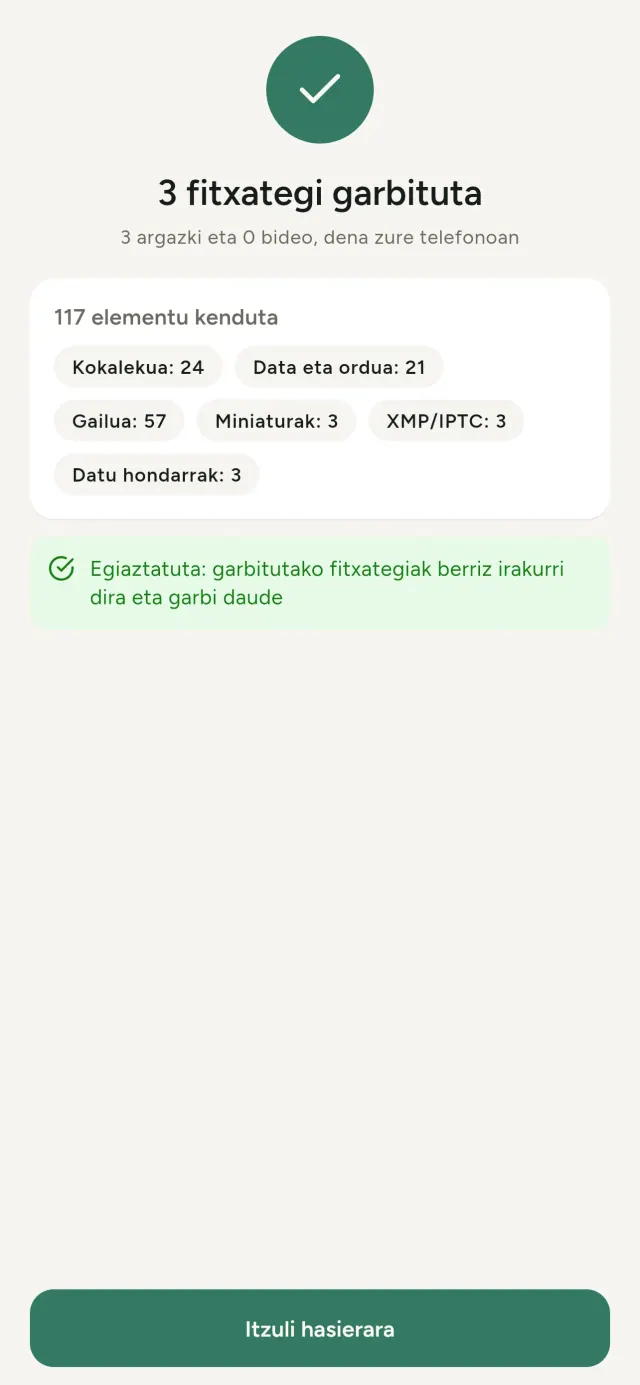
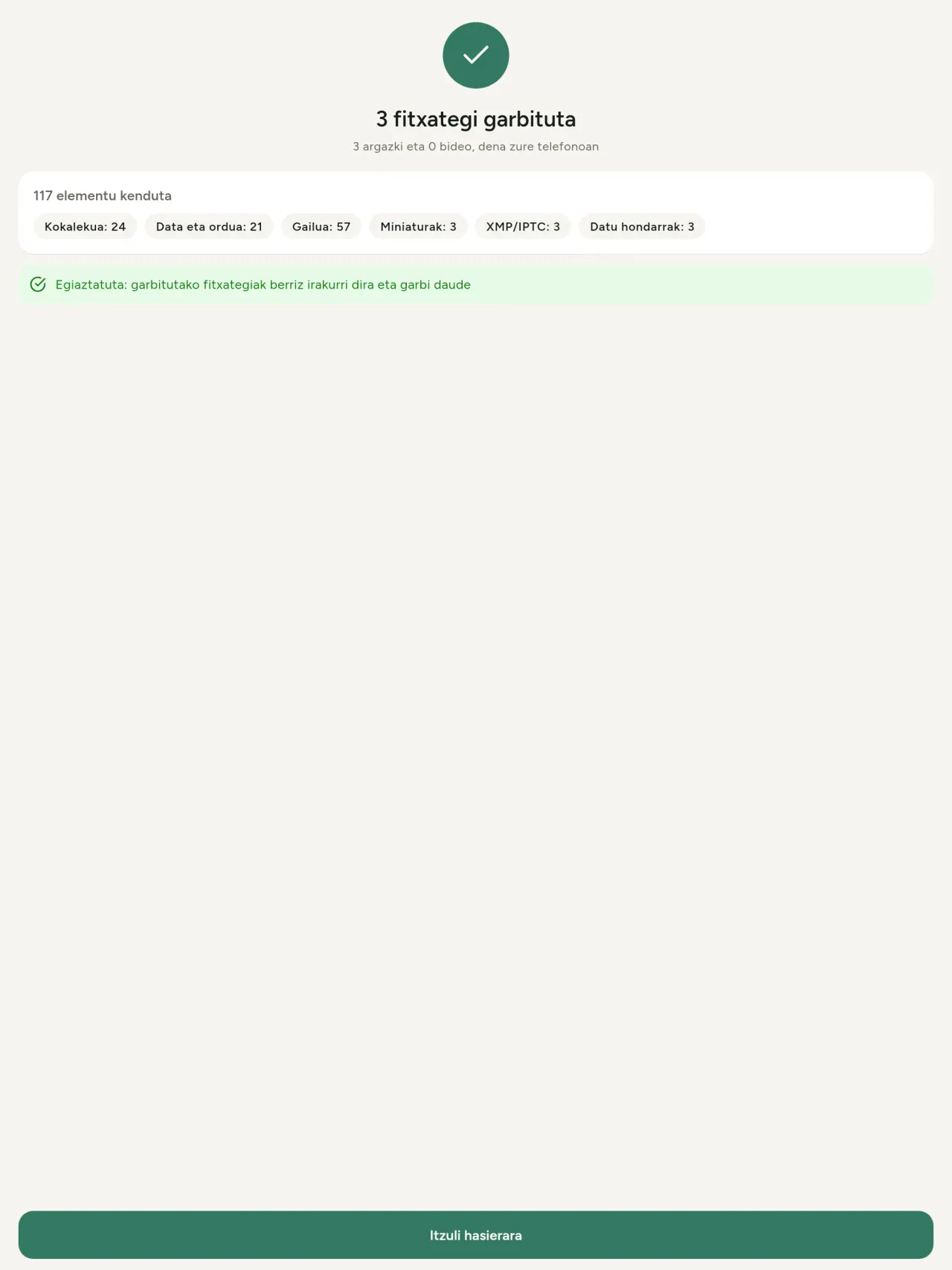
Dena, kokalekua bakarrik edo aukeratutako kategoriak: EXIF, IPTC eta XMP datuak, txertatutako miniaturak, kamera-fabrikatzailearen oharrak, IA jatorria eta editore batzuek moztutako irudiaren atzean uzten dituzten soberako byteak. Garbitu hautapen osoa batera eta gorde edo ordezkatu jatorrizkoak.
Partekatzeko segurua begirada batean
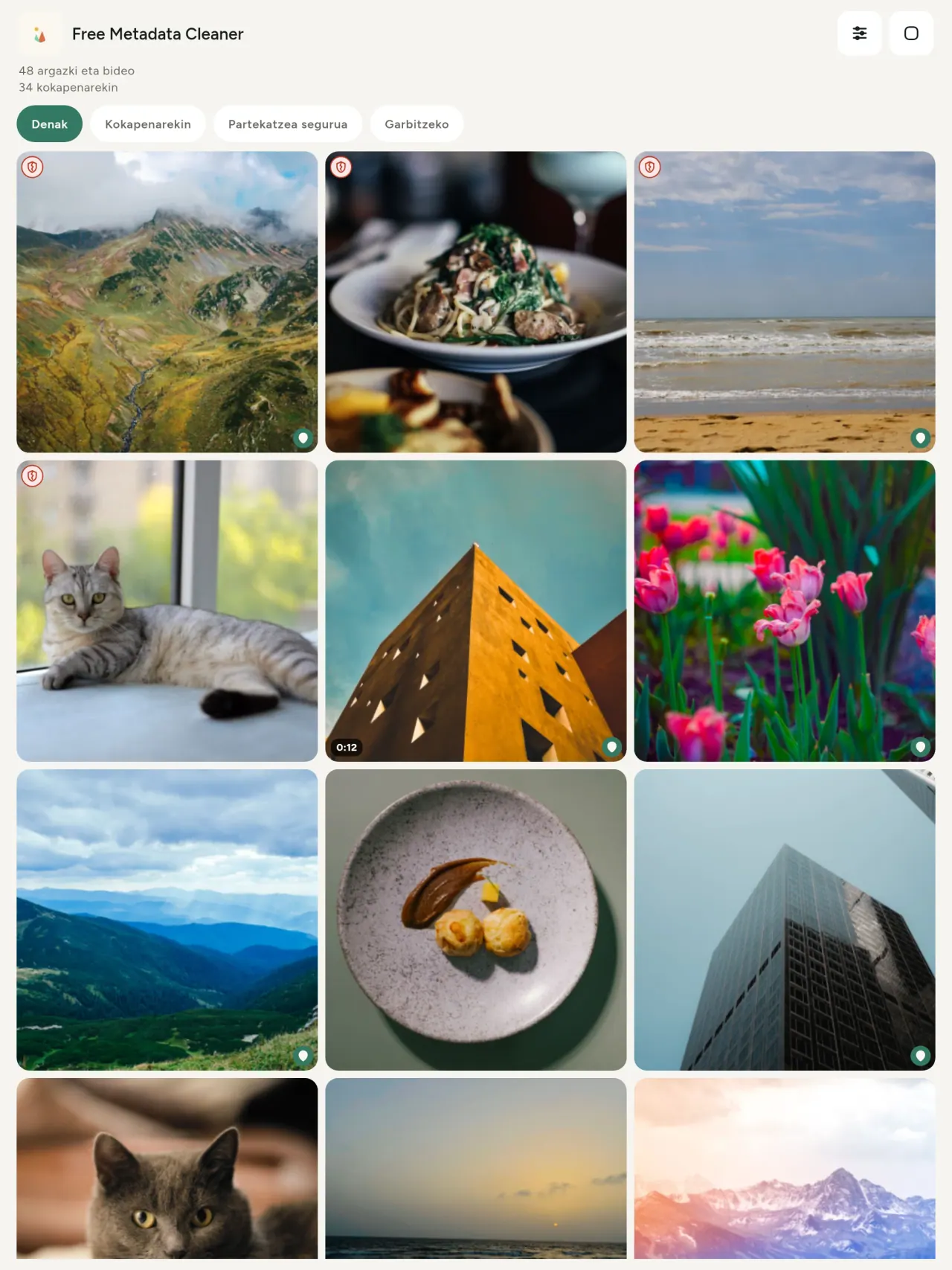
Ezkutu berdeak metadaturik gabeko fitxategiak markatzen ditu; ezkutu gorri pitzatuak, oraindik metadatuak dituztenak.
Kalitaterik galdu gabe
Irudiak ez dira berriro kodetzen: irudia bera ukitu gabe geratzen da.
Pribatua jatorritik
Zure argazkiak gailuan irakurtzen, editatzen eta garbitzen dira. Konturik, iragarkirik edo analitikarik gabe. Aukerazko salbuespen bakarra mapa da: argazki baten kokalekua ikusteko edo leku bat aukeratzeko eskatzen duzunean, aplikazioak beti galdetzen du lehenik eta mapa OpenStreetMap-etik kargatzen du (argazkia ez da inoiz bidaltzen).
Doakoa eta iragarkirik gabea
Aplikazioak laguntzen badizu, aukerazko aholku bat utz dezakezu.
Norentzat den
- Argazki bat argitaratu, saldu edo bidali aurretik zer erakusten duen (GPS kokapena, data, kamera) jakin nahi duen edonor.
- Iragarki-guneetan saltzen duten eta non bizi diren erakutsi nahi ez duten pertsonak.
- Gurasoak eta leku sentibera (etxea, eskola, lantokia) partekatzen dituzten argazkietatik kanpo mantendu nahi duen edonor.
- Kazetariak, aktibistak eta arriskuan dauden pertsonak, irudi bat arrastorik utzi gabe partekatu behar dutenak.
- Datu-ihesez nazkatuta dauden eta beren argazkiek daramaten informazio pertsonalaren gaineko kontrola berreskuratu nahi duten pertsonak.
Zergatik aukeratu Metadata Cleaner
- Gauza hiru aplikazio bakarrean: argazki edo bideo batek zer erakusten duen irakurri, editatu (ateratako data, kokapena) eta metadatuak ezabatu ukitu gutxitan.
- Dena telefonoan exekutatzen da. Zure argazkiak ez dira inora bidaltzen.
- Argazkiak (JPEG, HEIC, PNG, WebP, GIF) eta bideoak (MP4, MOV, 3GP).
Aplikazioak oraindik egiten ez duena
- Goian zerrendatutako formatuak soilik onartzen dira. Formatu gehiago planifikatuta daude.
Pixeon-en printzipioa. Pixeon aplikazioak lokalak dira lehenik: konturik ez, jarraipenik ez, eta zure datuak zure telefonoan geratzen dira. Aplikazio bat sarera konektatzen bada noizbait, zuk behar duzun eginbide bat aktibatzea aukeratzen duzunean bakarrik izango da, eta pribatutasun-politika eguneratu egiten da kaleratu aurretik.
Ikusi Metadata Cleaner lanean.
Lortu Metadata Cleaner.
Doan iPhonerako eta Androidentzat.
SHA-256: A4:38:C9:B4:A9:3F:97:7B:E8:98:AD:B7:3B:30:5F:63:01:22:E0:D9:F8:CF:5D:2B:D7:4E:38:CB:9A:CF:5A:A2
1.1 bertsioa
- App Store Laster
- Google Play Laster
Berritasunak
Testu hau ingelesez dago.
- Read: see exactly what a photo or video reveals (location, date, camera, AI provenance labels such as C2PA and generation parameters, video duration, codecs, resolution and frame rate).
- Edit: change the date a photo was taken and its location (JPEG, HEIC, AVIF), even on a photo with no metadata, reuse the location of another photo, or pick it on an OpenStreetMap map after your confirmation.
- Remove: clean metadata in a few taps, with a before and after view on the result screen.
- DNG photos are supported.
- Translations aligned across 91 languages.
Privacy policy
Beheko testua ingelesez dago. Ingelesezko bertsioak lehentasuna du.
Last updated: 2026-11-18 · applies to version 1.1 and later
Policy versions: 1.1 and later (this text) · version 1.0 (still the policy of the app version 1.0). The version number of your app is shown at the bottom of its Settings screen.
Free Metadata Cleaner shows and removes the metadata hidden in your photos and videos (location, date and time, camera and lens details, thumbnails…). The short version: everything happens on your device, and we collect nothing.
What the app accesses
Your photo and video library, only after you grant permission (and, where your system requires it, the permission to read the location stored in your photos, so that it can be shown to you). The files you choose are read and cleaned on your device; the cleaned copy is saved to your library. If you choose to replace the originals, the system asks you to confirm before deleting them.
To show which photos are already clean, the app reads the metadata of the photos displayed on screen, on your device. This result is kept in memory only and is never stored.
What we collect
Nothing. No account, no analytics or usage tracking, no advertising or advertising identifiers, no crash or diagnostics reporting beyond what the app stores provide, and no third-party SDK that sends data anywhere. There is no Free Metadata Cleaner server. Cleaning a photo or video never uses the network, at all: turn on airplane mode and clean one to check for yourself. The only network request the app itself can ever make is described under “Location” below, and it only ever happens if you ask for it. The one other connection is the optional tip purchase, handled by the store (see “Optional support”).
Temporary files and history
The app keeps no history and no database. Temporary files created while cleaning are deleted after each item and purged when the app starts.
Deleted originals
Originals that are deleted remain in your system's trash (such as “Recently Deleted” or the trash) for about 30 days, with their metadata. The app cannot empty it: do it yourself if you need the originals gone at once.
iCloud and cloud photos
If a photo is stored in iCloud and not on your device, the operating system may download it before the app can process it. That transfer is made by the system, under the provider's own terms, not by the app.
Location
When a photo contains a location, the app shows the coordinates as text, which stays on your device. Three actions can send location information off your device, only when you choose them, each time: “Open in…” hands the coordinates to the maps application you select, under its own privacy policy; “Show the map” asks you to confirm first (“Showing the map sends this photo's position to a map service. Nothing else is sent.”), then loads a small map from OpenStreetMap for that one position; and, when you edit a photo's place, “Choose on the map” asks you to confirm first, then opens a full-screen map from OpenStreetMap. This map does not use your phone's location. As you move and zoom it, the app requests the map tiles of the area you are browsing, so OpenStreetMap receives the position of the area shown on screen, which starts on the photo's current place if it has one, and otherwise on a world view. The photo itself is never sent, and nothing is sent before you confirm. The place you choose on the map (or copy from another photo) is written into the photo's file only when you save, on your device. In every case OpenStreetMap receives, as with any web request, technical details like your IP address; it does not receive your name, an account, or anything else about you or your other photos. See OpenStreetMap's own privacy policy. Outside of these explicit actions, the app never sends a photo's location, or anything else, anywhere.
Optional support
The app is free. If you wish, you can leave a tip. On iPhone and in the Google Play version for Android, tips are in-app purchases processed by Apple or Google under their own terms and privacy policy; the app adds the Google Play billing permission for this, makes no network call itself, and receives no payment or personal details. Versions installed outside Google Play may instead open an external donation page in your browser, operated by a third party under its own privacy policy; nothing from the app is sent to it. A tip unlocks nothing.
Contact form on this website
If you write to us through this site, we use your message and the email address you optionally give only to reply. Bot protection is provided by Cloudflare and email delivery by Resend.
Language choice on this website
When you choose a language, or when this site opens a page in your browser's language, it stores
one small functional cookie (pxl, a language code, one year) so that your choice is
remembered. If this site suggests a page in your browser's language and you close that suggestion,
your browser also keeps a local note (pxl-banner-off, in local storage, 30 days) so the
suggestion does not come back. Neither identifies anyone, neither is used for tracking or advertising,
and neither is shared. You can delete them in your browser at any time.
Website statistics
This website uses Cloudflare Web Analytics to count visits (pages viewed, country, browser type, loading speed). It sets no cookie, does not use local storage, does not fingerprint your device, does not follow you across sites and does not build a profile of you. Search engines (for example Google Search Console) give us aggregated search statistics, without any data about individual visitors. Our own web server also counts the pages and APK downloads it serves: for each request it keeps the address, the site or social network that sent you (only its name, or the campaign tag written in the link), the country, the type of device and whether the request came from a robot. It keeps no IP address, no identifier and no cookie, and these counts are anonymous. We use no advertising or other analytics service. None of this concerns the app itself, which collects nothing.
Children
The app is a general-purpose tool and is not directed at children.
Changes
An updated policy will be published at this URL with a new date above.
Contact
Questions about privacy: metadata-cleaner-contact@pixeon.net
1.0 bertsioa
- App Store Argitaratuta
- Google Play Argitaratuta
Berritasunak
Testu hau ingelesez dago.
- Cleans JPEG, HEIC, PNG, WebP, GIF, MP4, MOV and 3GP files, with no video re-encoding.
- "Safe to share" and "To clean" filters.
- New green design.
- Help screen with a FAQ.
- Settings: share, rate, feedback, unsupported formats.
- Optional tips.
Privacy policy, version 1.0
Beheko testua ingelesez dago. Ingelesezko bertsioak lehentasuna du.
Applies to version 1.0 of the app (the first release). Later versions: current policy.
Free Metadata Cleaner shows and removes the metadata hidden in your photos and videos (location, date and time, camera and lens details, thumbnails…). The short version: everything happens on your device, and we collect nothing.
What the app accesses
Your photo and video library, only after you grant permission (and, where your system requires it, the permission to read the location stored in your photos, so that it can be shown to you). The files you choose are read and cleaned on your device; the cleaned copy is saved to your library. If you choose to replace the originals, the system asks you to confirm before deleting them.
To show which photos are already clean, the app reads the metadata of the photos displayed on screen, on your device. This result is kept in memory only and is never stored.
What we collect
Nothing. No account, no analytics or usage tracking, no advertising or advertising identifiers, no crash or diagnostics reporting beyond what the app stores provide, and no third-party SDK that sends data anywhere. There is no Free Metadata Cleaner server. Cleaning a photo or video never uses the network, at all: turn on airplane mode and clean one to check for yourself. The only network request the app itself can ever make is described under “Location” below, and it only ever happens if you ask for it. The one other connection is the optional tip purchase, handled by the store (see “Optional support”).
Temporary files and history
The app keeps no history and no database. Temporary files created while cleaning are deleted after each item and purged when the app starts.
Deleted originals
Originals that are deleted remain in your system's trash (such as “Recently Deleted” or the trash) for about 30 days, with their metadata. The app cannot empty it: do it yourself if you need the originals gone at once.
iCloud and cloud photos
If a photo is stored in iCloud and not on your device, the operating system may download it before the app can process it. That transfer is made by the system, under the provider's own terms, not by the app.
Location
When a photo contains a location, the app shows the coordinates as text, which stays on your device. Two actions send that one photo's position off your device, only when you choose them, each time: “Open in…” hands the coordinates to the maps application you select, under its own privacy policy; “Show the map” asks you to confirm first (“Showing the map sends this photo's position to a map service. Nothing else is sent.”), then loads a small map from OpenStreetMap for that one position. OpenStreetMap receives the coordinates and, as with any web request, technical details like your IP address; it does not receive your name, an account, or anything else about you or your other photos. See OpenStreetMap's own privacy policy. Outside of these two explicit actions, the app never sends a photo's location, or anything else, anywhere.
Optional support
The app is free. If you wish, you can leave a tip. On iPhone and in the Google Play version for Android, tips are in-app purchases processed by Apple or Google under their own terms and privacy policy; the app adds the Google Play billing permission for this, makes no network call itself, and receives no payment or personal details. Versions installed outside Google Play may instead open an external donation page in your browser, operated by a third party under its own privacy policy; nothing from the app is sent to it. A tip unlocks nothing.
Contact form on this website
If you write to us through this site, we use your message and the email address you optionally give only to reply. Bot protection is provided by Cloudflare and email delivery by Resend.
Language choice on this website
When you choose a language, or when this site opens a page in your browser's language, it stores
one small functional cookie (pxl, a language code, one year) so that your choice is
remembered. If this site suggests a page in your browser's language and you close that suggestion,
your browser also keeps a local note (pxl-banner-off, in local storage, 30 days) so the
suggestion does not come back. Neither identifies anyone, neither is used for tracking or advertising,
and neither is shared. You can delete them in your browser at any time.
Website statistics
This website uses Cloudflare Web Analytics to count visits (pages viewed, country, browser type, loading speed). It sets no cookie, does not use local storage, does not fingerprint your device, does not follow you across sites and does not build a profile of you. Search engines (for example Google Search Console) give us aggregated search statistics, without any data about individual visitors. Our own web server also counts the pages and APK downloads it serves: for each request it keeps the address, the site or social network that sent you (only its name, or the campaign tag written in the link), the country, the type of device and whether the request came from a robot. It keeps no IP address, no identifier and no cookie, and these counts are anonymous. We use no advertising or other analytics service. None of this concerns the app itself, which collects nothing.
Children
The app is a general-purpose tool and is not directed at children.
Changes
An updated policy will be published at this URL with a new date above.
Contact
Questions about privacy: metadata-cleaner-contact@pixeon.net
Credits
Android is a trademark of Google LLC. The Android robot is reproduced or modified from work created and shared by Google and used according to terms described in the Creative Commons 3.0 Attribution License. This site is not affiliated with or endorsed by Google.
Laguntza
Azken eguneratzea: 2026-10-08
Free Metadata Cleaner aplikazio independente txiki bat da. Hona hemen ohiko galderen erantzunak.
Ahal dugun guztia egiten dugu egun gutxiren barruan erantzuteko. Laguntzeko, esan gailuaren modeloa, sistemaren bertsioa eta zer egiten ari zinen. Ez bidali argazki pribaturik.
Zer datu gordetzen edo bidaltzen ditu aplikazioak?
Bat ere ez. Ez du historiarik gordetzen, eta ez du konturik ez zerbitzaririk. Xehetasunak pribatutasun-politikan.
Nola garbitu argazki bat?
- Ireki aplikazioa eta eman zure liburutegirako sarbidea eskatzen zaizunean.
- Hautatu garbitu nahi dituzun argazkiak edo bideoak.
- Aukeratu zer kendu eta jatorrizkoak ordezkatu edo kopia garbi bat sortu nahi duzun.
- Berretsi. Laburpenak kendutakoak eta prozesatu ezin izan den fitxategia erakusten ditu.
Nora doaz kopia garbiak?
Zure argazki-liburutegira. Jatorrizkoaren liburutegi-data mantentzen da, beraz, argazki garbia ez da galeriaren goialdera igotzen.
«Ordezkatu jatorrizkoak» aukeratu dut, baina jatorrizkoak oraindik hor daude.
Ezabatutako jatorrizkoak sistemaren zakarrontzian (adibidez, «Ezabatu berriak» atalean edo zakarrontzian) geratzen dira 30 bat egunez, metadatuekin. Hustu zakarrontzia berehala kentzeko. Sistemaren ezabatze-eskaerari uko egiten badiozu, jatorrizkoak mantendu egingo dira eta kopia garbiak hala ere gehituko dira.
Zein fitxategi dira bateragarriak?
JPEG, HEIC, AVIF, PNG, WebP eta GIF formatuko argazkiak, eta MP4, MOV eta 3GP formatuko bideoak (formatu gehiago gehitzen ari gara). Aplikazioak garbitu ezin duen fitxategia aldatu gabe uzten da eta arrazoiarekin agertzen da laburpenean, sortaren gainerakoa gelditu gabe.
Zergatik behar du aplikazioak nire argazkietarako sarbidea?
Aukera ditzakezun argazkiak zerrendatzeko eta kopia garbiak gordetzeko. Zure sistemak hala eskatzen duenean, aplikazioak argazkietan gordetako kokapena irakurtzeko baimena ere eskatzen du: baimenik gabe sistemak kokapena ezkutatzen du, eta aplikazioak ezin izango lizuke erakutsi argazki batek zer agerian uzten duen. Ez da ezer igotzen.
Nola egiazta dezaket ezer ez dela nire telefonotik ateratzen?
Aktibatu hegazkin-modua eta garbitu argazki bat: berdin funtzionatuko du. Salbuespen bakarra mapa da: argazki baten kokapenean «Erakutsi mapa» sakatu eta berretsiz gero, kokapen hori OpenStreetMap-era bidaltzen da mapa erakusteko, eta besterik ez. Ikus goiko «Kokapena» atala.
Zein hizkuntza daude erabilgarri?
Aplikazioa ingelesez, frantsesez, alemanez, gaztelaniaz, italieraz, portugesez eta arabieraz dago eskuragarri. Webgune hau hizkuntza gehiagotan dago, eta laster aplikaziorako hizkuntza gehiago egongo dira.
Lagundu proiektua
Metadata Cleaner doakoa eta iragarkirik gabea izango da. Baliagarria bada, bere garapena lagun dezakezu (aukerakoa):
Buy Me a CoffeeGastuen kontrola eta familiaren aurrekontua, offline.
Pixeon-en beste batzukVaultMarkTokiko dokumentu kutxa: dokumentu eskanerra, ur marka eta metadatuak PDF.
Pixeon-en beste batzukLittle RelayBreastfeeding, sleep and starting solids tracker. No account, works offline.
Pixeon-en beste batzukMenuloopAstea eta janaria antolatu MenuLoop-ekin
Pixeon-en beste batzukIndie OfficeQuote maker and self-employed invoices. Offline, no account, no ads.