
Metadata Cleaner: Photo/Video
Jereo, ovay, fafao ny metadata amin'ny sary.


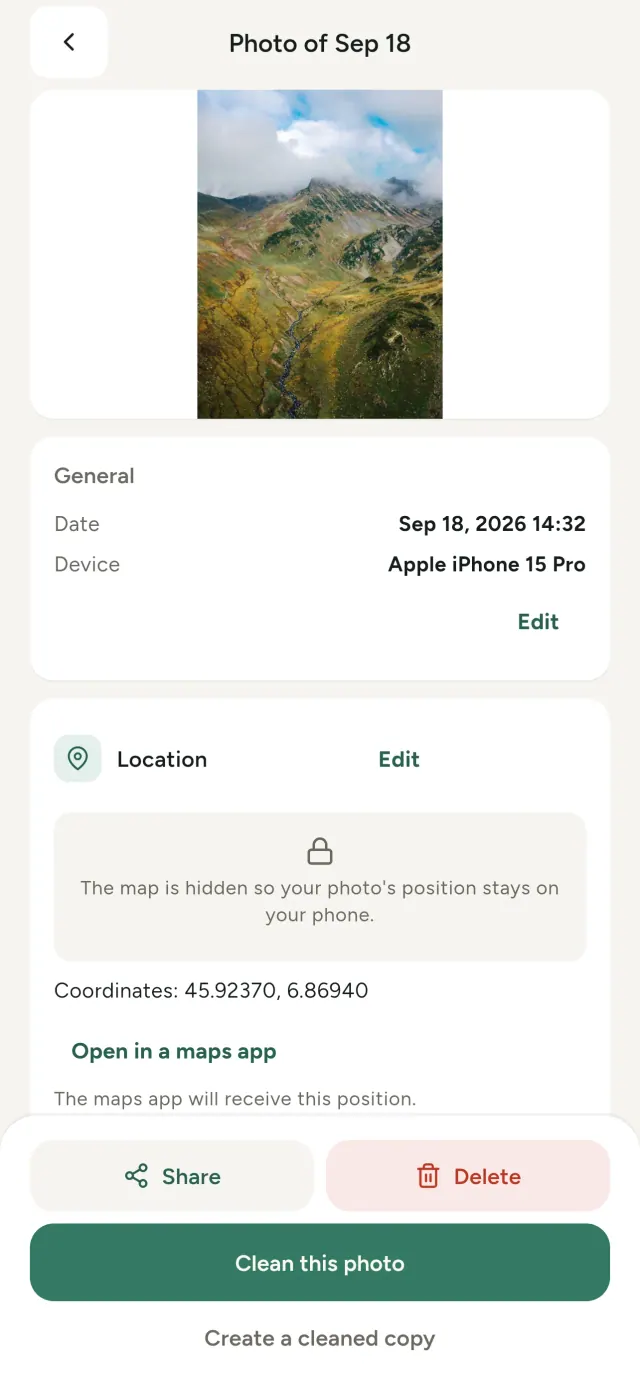
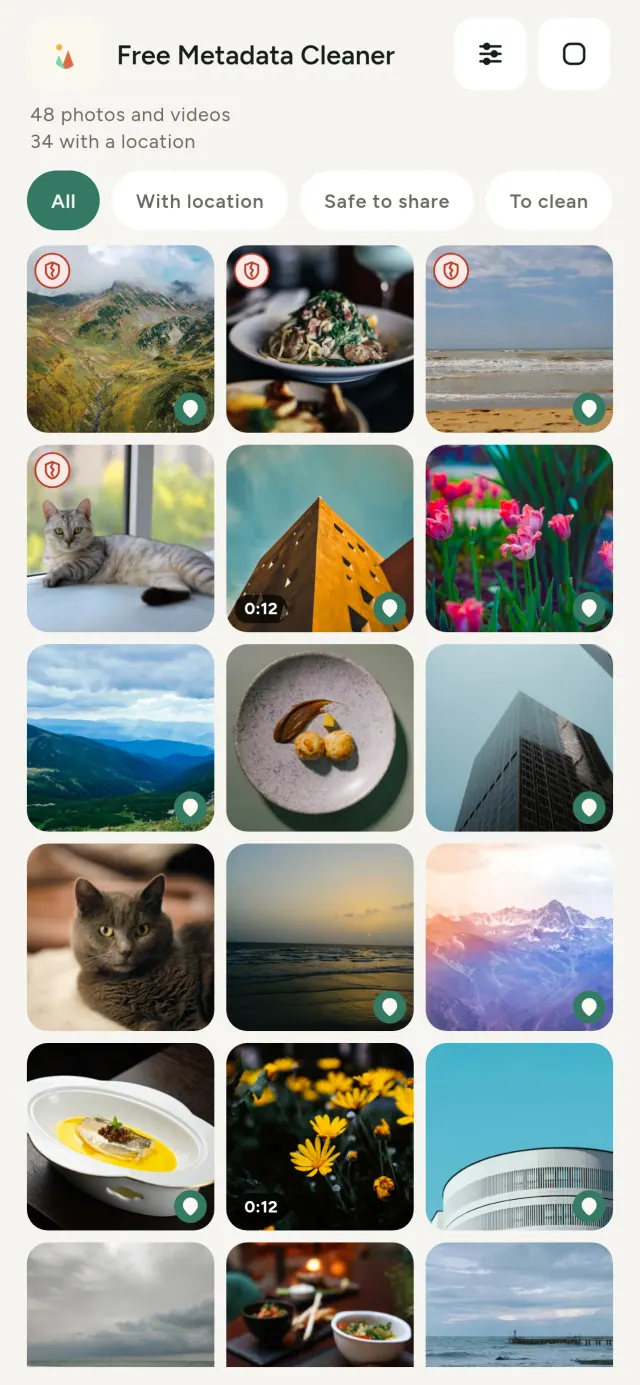
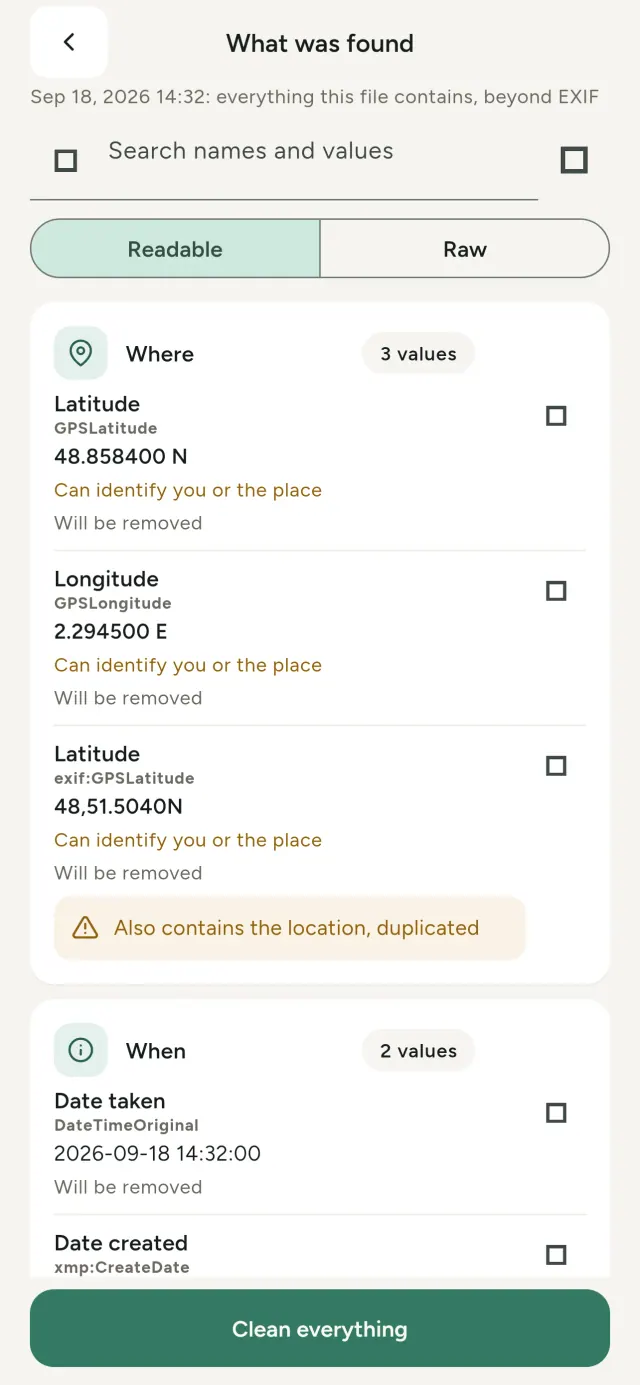
Ny sary rehetra dia mitondra angona miafina: toerana, daty, finday nampiasaina, ary indraindray topimaso kely. Rehefa zaraina izy dia miaraka aminy ireo.
Metadata Cleaner dia manao zavatra telo ao amin'ny fitaovanao: mampiseho, manova ary manala metadata.
Asa ataon'i Metadata Cleaner
Vakio
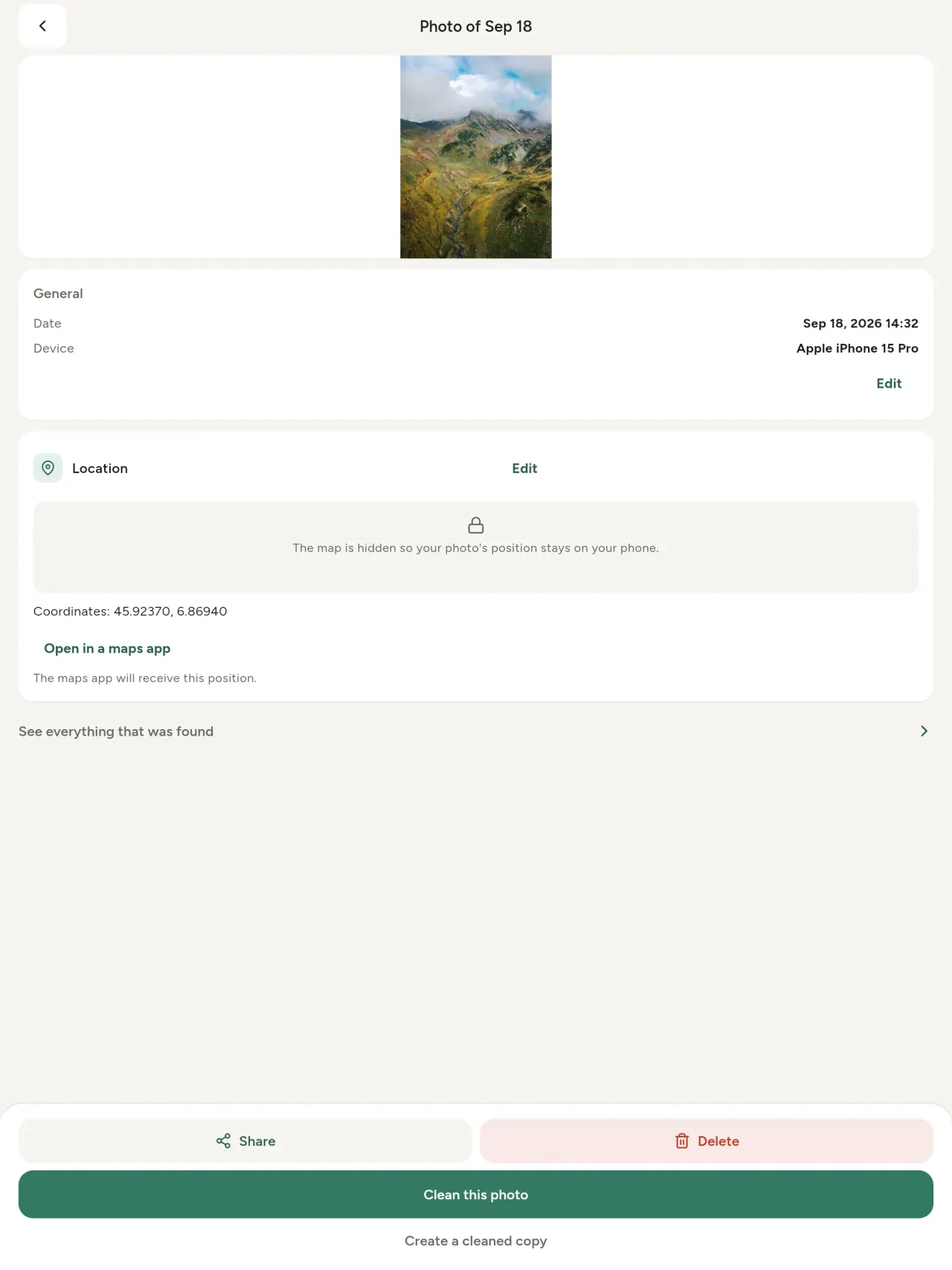
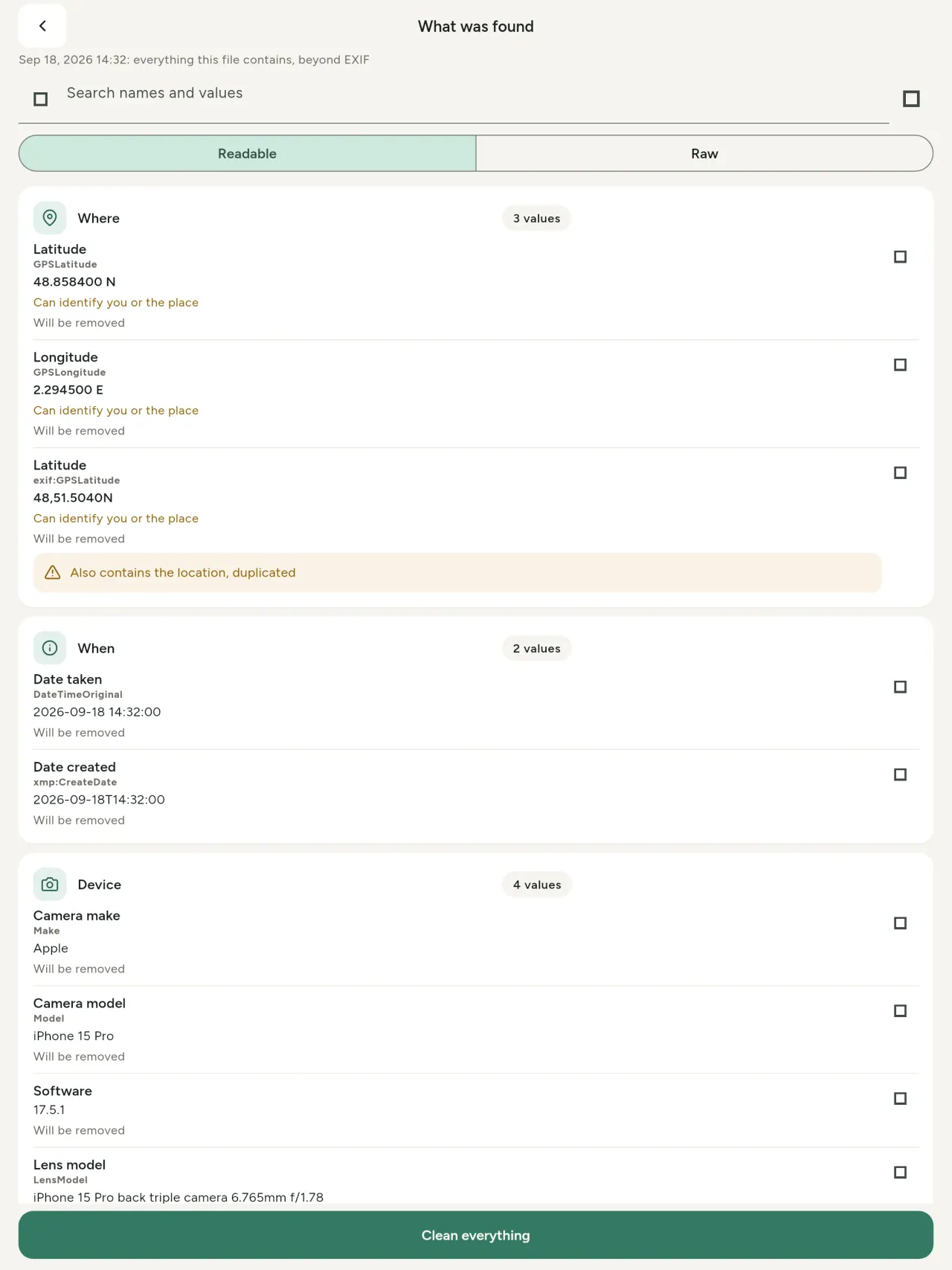
Mpijery metadata tena izy: ny sanda rehetra ao amin'ny sary sy horonantsary (EXIF, IPTC, XMP, codec, faharetana ary famahana), voalamina, azo tadiavina sy adika. Hita koa ny fiavian'ny AI (C2PA).
Ovay
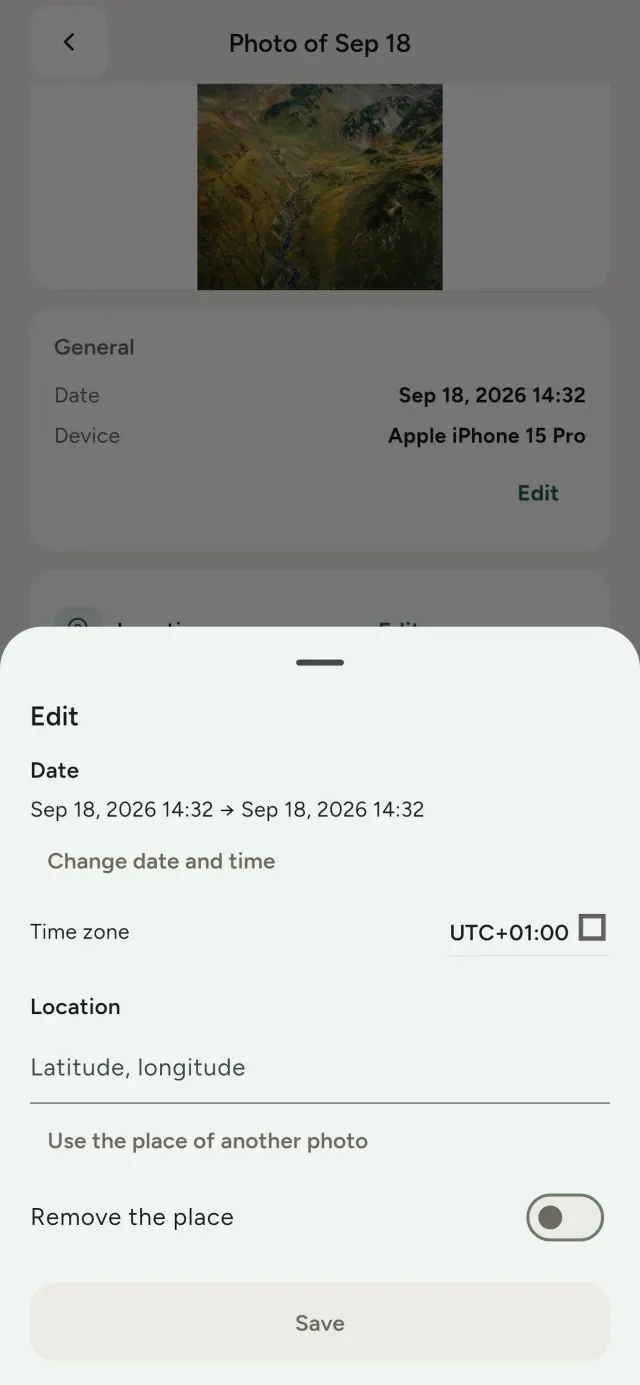
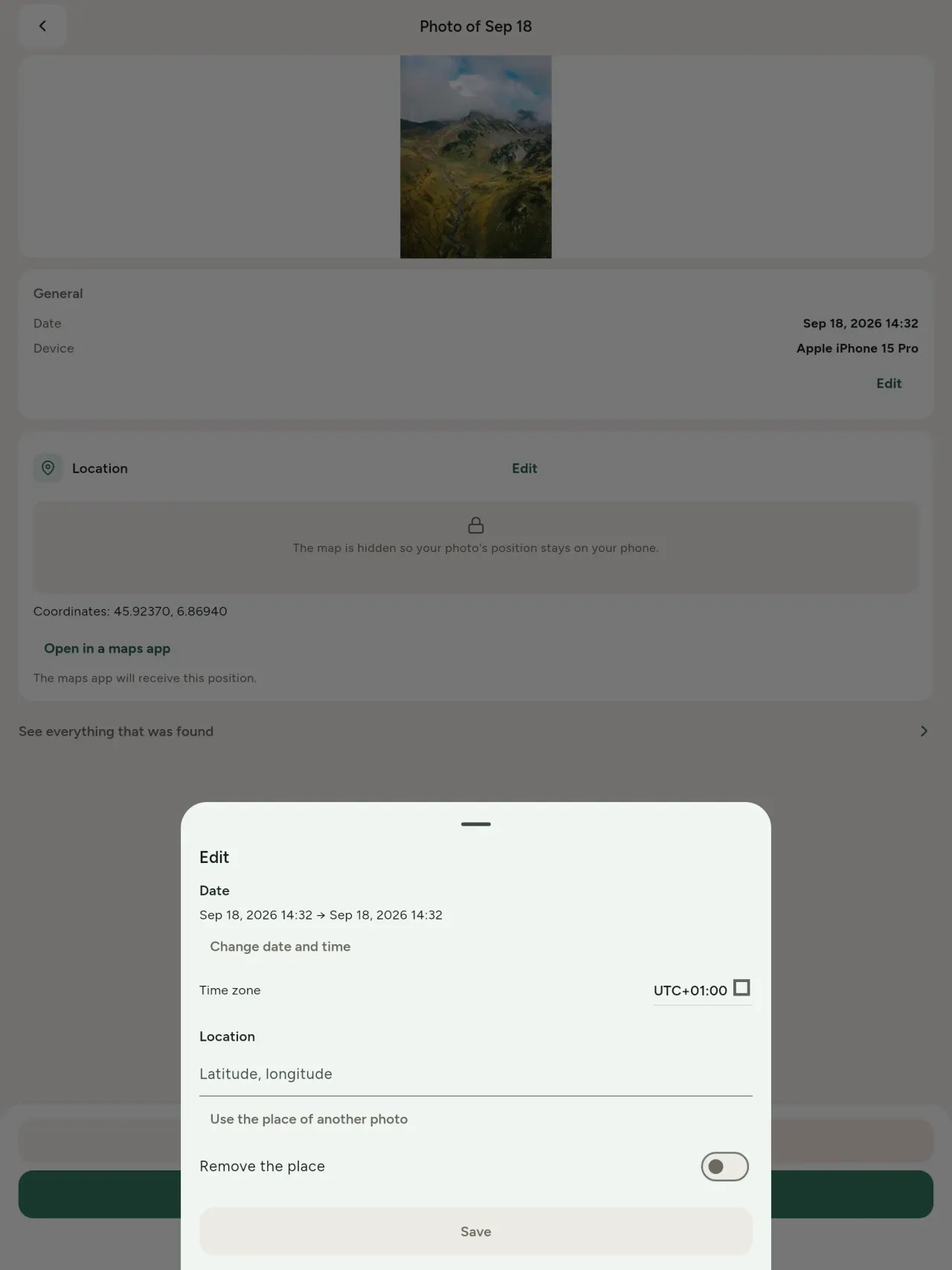
Ovay ny daty sy toerana, na dia tsy manana metadata aza ilay sary. Adikao ny toerana amin'ny sary hafa, na fidio amin'ny sarintany. Ampitahao ny taloha sy vaovao.
Esory
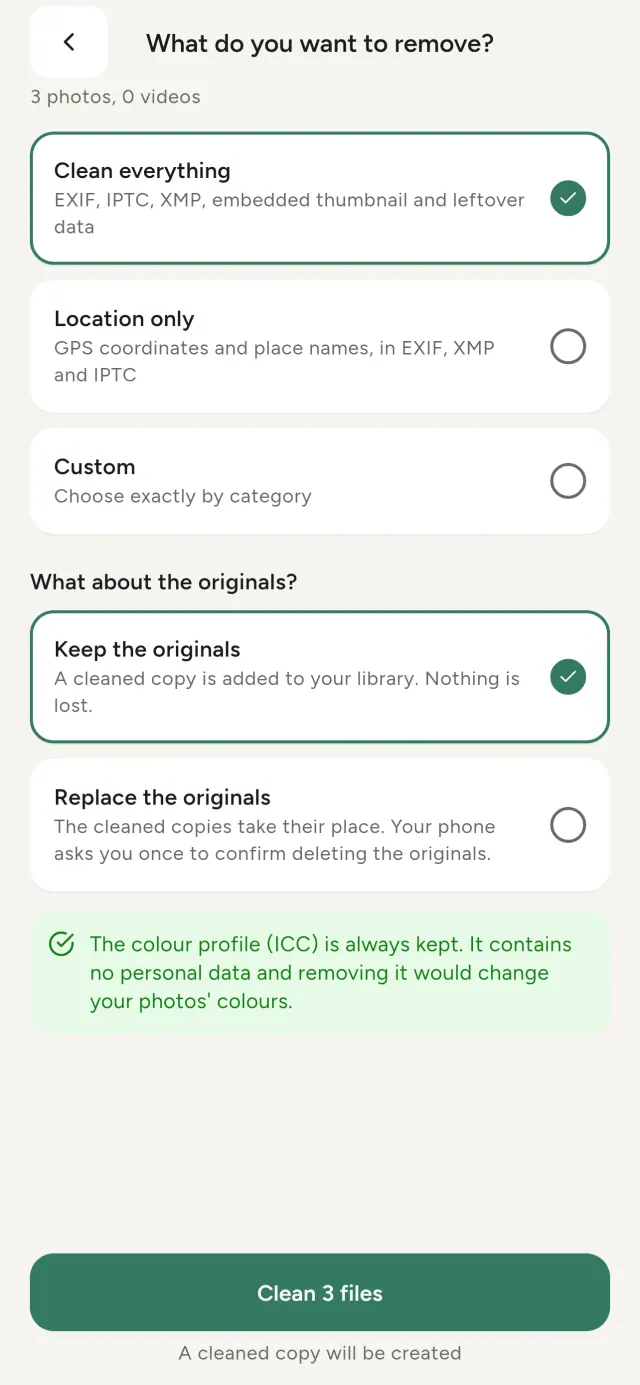
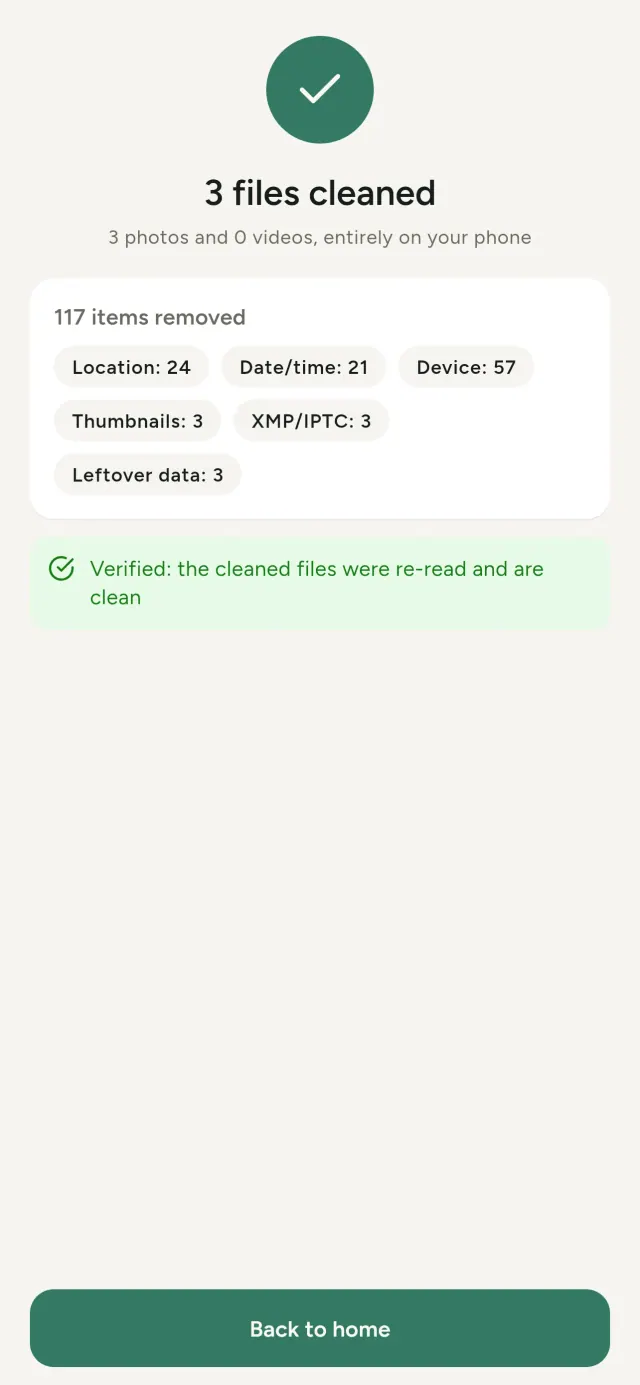
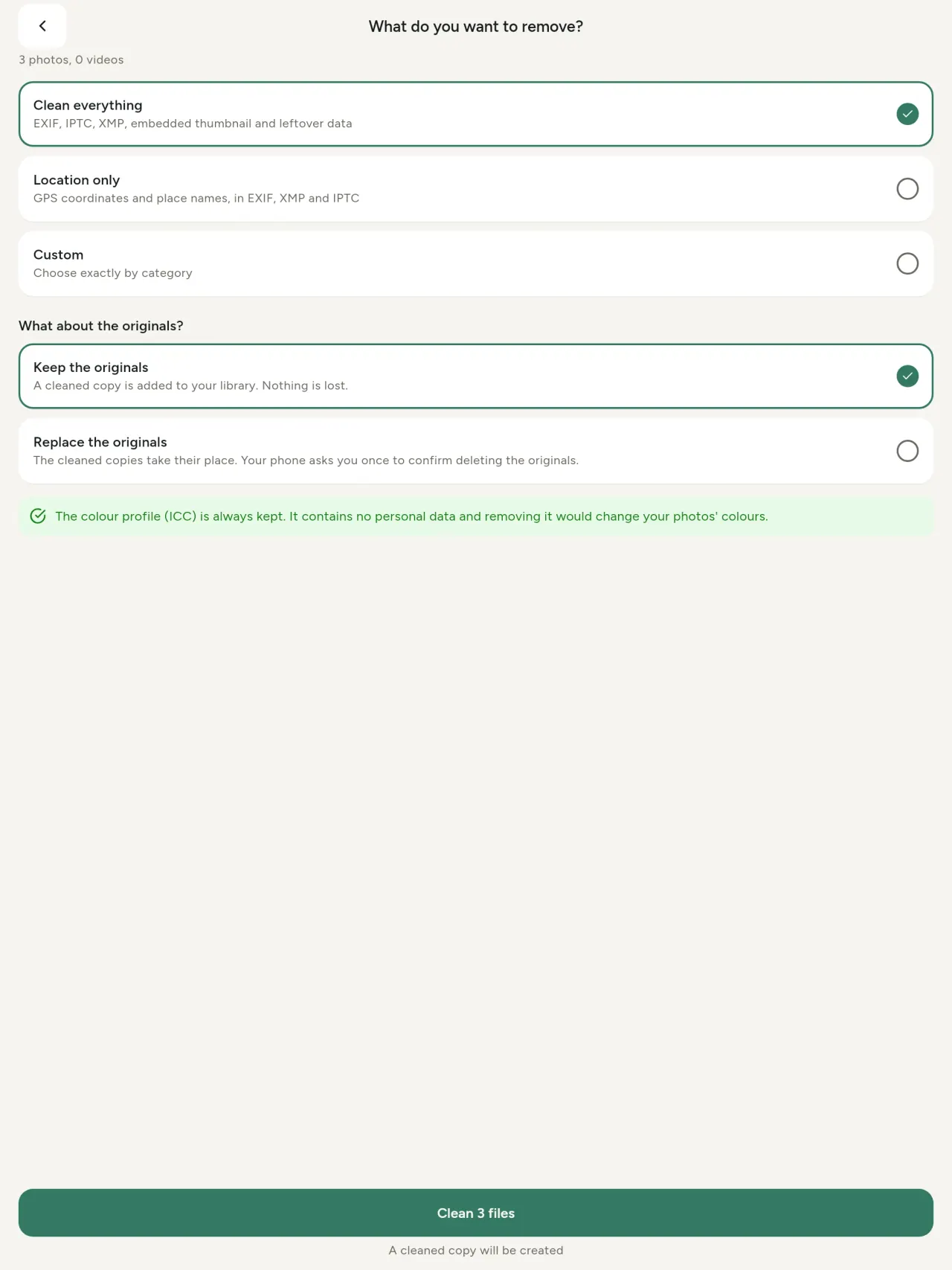
Rehetra, toerana ihany, na sokajy fidinao: EXIF, IPTC, XMP, topimaso tafiditra, naoty fakantsary ary fiavian'ny AI. Diovy indray mandeha ny safidy maro, dia tazomy na soloina ny tany am-boalohany.
Mora zaraina
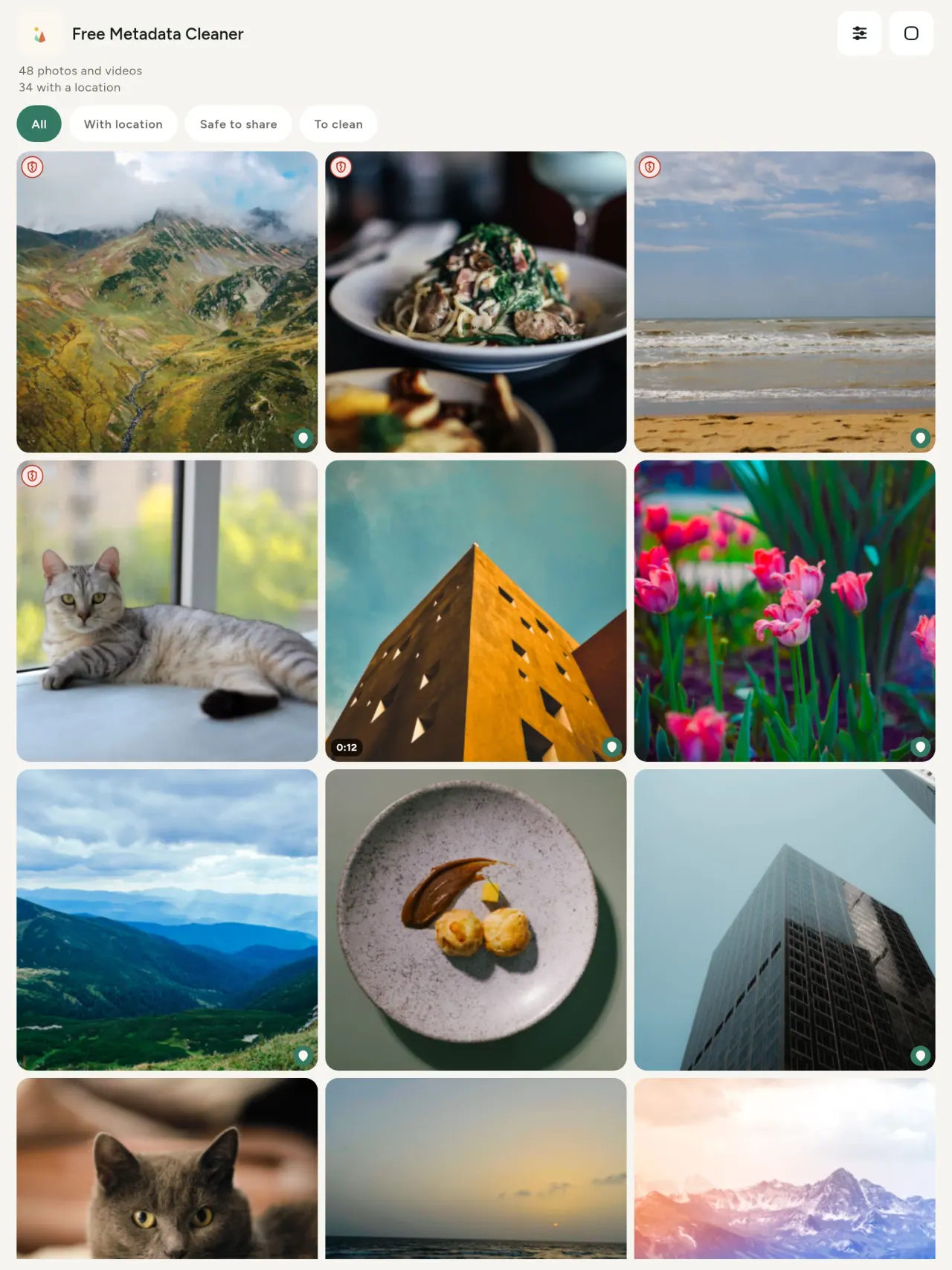
Ampinga maitso no manamarika rakitra tsy misy metadata; mena kosa ireo mbola misy.
Tsy very kalitao
Tsy averina kodina ny sary.
Miaro fiainana manokana
Vakiana, ovaina ary diovina ao amin'ny fitaovanao ny sary. Tsy misy kaonty, doka na fanadihadiana. Ny sarintany OpenStreetMap ihany no mandeha an-tserasera rehefa manaiky ianao; tsy alefa mihitsy ilay sary.
Maimaim-poana, tsy misy doka
Afaka manome fanohanana an-tsitrapo ianao.
Ho an'iza
- Ireo te hahafantatra izay asehon'ny sary iray (toerana GPS, daty, appareil photo) alohan'ny hamoahana, hivarotana na handefasana.
- Ireo mivarotra amin'ny tranokala fivarotana sy tsy te haneho ny adiresiny.
- Ray aman-dreny sy iza na iza te hitazona toerana manan-danja (trano, sekoly, toerana iasana) tsy ho hita amin'ny sary zarainy.
- Mpanao gazety, mpikatroka sy olona manan-kery mila mizara sary tsy mamela dia.
- Ireo leo fivoahan-drahara sy mila mifehy tanteraka izay rakitra manokana entin'ny sariny.
Nahoana no misafidy an'i Metadata Cleaner
- Telo amin'ny iray: mamaky izay asehon'ny sary na lahatsary, manitsy (daty, toerana), manala metadata amin'ny paika vitsy.
- Miasa amin'ny finday ihany. Tsy misy sary alefa an-kafa.
- Sary (JPEG, HEIC, PNG, WebP, GIF) sy lahatsary (MP4, MOV, 3GP).
Zavatra tsy mbola ataon'ny app
- Ireo endrika voalaza etsy ambony ihany no tohana. Hisy fanampy endrika vaovao.
Fitsipika Pixeon. App Pixeon dia atao amin'ny fitsipika hoe: eo an-toerana voalohany - tsy misy kaonty, tsy misy fitsikilovana, ny tahirinanao dia mijanona amin'ny findainao. Raha sendra misy app mampifandray amin'ny tambajotra dia rehefa misafidy hanokatra endri-javatra iray ianao ihany, ary havaozina ny politika fiarovana mialoha ny hamoahana azy.
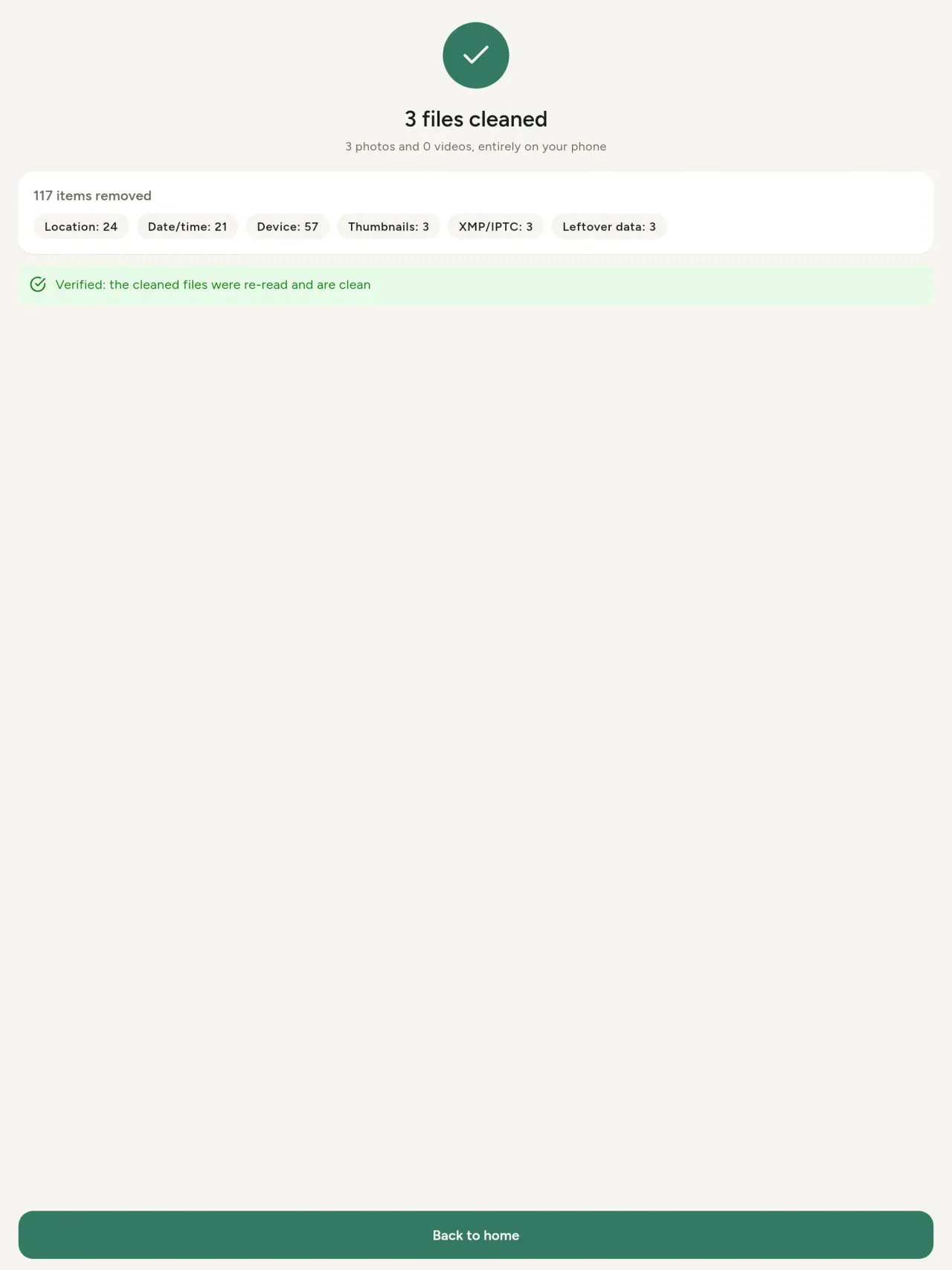
Jereo Metadata Cleaner miasa.
Makà Metadata Cleaner.
Maimaim-poana amin'ny iPhone sy Android.
Kinova 1.1
- App Store Ho avy tsy ho ela
- Google Play Ho avy tsy ho ela
Vaovao
Amin'ny teny anglisy ity lahatsoratra ity.
- Read: see exactly what a photo or video reveals (location, date, camera, AI provenance labels such as C2PA and generation parameters, video duration, codecs, resolution and frame rate).
- Edit: change the date a photo was taken and its location (JPEG, HEIC, AVIF), even on a photo with no metadata, reuse the location of another photo, or pick it on an OpenStreetMap map after your confirmation.
- Remove: clean metadata in a few taps, with a before and after view on the result screen.
- DNG photos are supported.
- Translations aligned across 91 languages.
Privacy policy
Ny lahatsoratra eto ambany dia amin'ny teny anglisy. Ny dikan-teny anglisy no mitombina.
Last updated: 2026-11-03 · applies to version 1.1 and later
Policy versions: 1.1 and later (this text) · version 1.0 (still the policy of the app version 1.0). The version number of your app is shown at the bottom of its Settings screen.
Free Metadata Cleaner shows and removes the metadata hidden in your photos and videos (location, date and time, camera and lens details, thumbnails…). The short version: everything happens on your device, and we collect nothing.
What the app accesses
Your photo and video library, only after you grant permission (and, where your system requires it, the permission to read the location stored in your photos, so that it can be shown to you). The files you choose are read and cleaned on your device; the cleaned copy is saved to your library. If you choose to replace the originals, the system asks you to confirm before deleting them.
To show which photos are already clean, the app reads the metadata of the photos displayed on screen, on your device. This result is kept in memory only and is never stored.
What we collect
Nothing. No account, no analytics or usage tracking, no advertising or advertising identifiers, no crash or diagnostics reporting beyond what the app stores provide, and no third-party SDK that sends data anywhere. There is no Free Metadata Cleaner server. Cleaning a photo or video never uses the network, at all: turn on airplane mode and clean one to check for yourself. The only network request the app itself can ever make is described under “Location” below, and it only ever happens if you ask for it. The one other connection is the optional tip purchase, handled by the store (see “Optional support”).
Temporary files and history
The app keeps no history and no database. Temporary files created while cleaning are deleted after each item and purged when the app starts.
Deleted originals
Originals that are deleted remain in your system's trash (such as “Recently Deleted” or the trash) for about 30 days, with their metadata. The app cannot empty it: do it yourself if you need the originals gone at once.
iCloud and cloud photos
If a photo is stored in iCloud and not on your device, the operating system may download it before the app can process it. That transfer is made by the system, under the provider's own terms, not by the app.
Location
When a photo contains a location, the app shows the coordinates as text, which stays on your device. Three actions can send location information off your device, only when you choose them, each time: “Open in…” hands the coordinates to the maps application you select, under its own privacy policy; “Show the map” asks you to confirm first (“Showing the map sends this photo's position to a map service. Nothing else is sent.”), then loads a small map from OpenStreetMap for that one position; and, when you edit a photo's place, “Choose on the map” asks you to confirm first, then opens a full-screen map from OpenStreetMap. This map does not use your phone's location. As you move and zoom it, the app requests the map tiles of the area you are browsing, so OpenStreetMap receives the position of the area shown on screen, which starts on the photo's current place if it has one, and otherwise on a world view. The photo itself is never sent, and nothing is sent before you confirm. The place you choose on the map (or copy from another photo) is written into the photo's file only when you save, on your device. In every case OpenStreetMap receives, as with any web request, technical details like your IP address; it does not receive your name, an account, or anything else about you or your other photos. See OpenStreetMap's own privacy policy. Outside of these explicit actions, the app never sends a photo's location, or anything else, anywhere.
Optional support
The app is free. If you wish, you can leave a tip. On iPhone and in the Google Play version for Android, tips are in-app purchases processed by Apple or Google under their own terms and privacy policy; the app adds the Google Play billing permission for this, makes no network call itself, and receives no payment or personal details. Versions installed outside Google Play may instead open an external donation page in your browser, operated by a third party under its own privacy policy; nothing from the app is sent to it. A tip unlocks nothing.
Contact form on this website
If you write to us through this site, we use your message and the email address you optionally give only to reply. Bot protection is provided by Cloudflare and email delivery by Resend.
Language choice on this website
When you choose a language, or when this site opens a page in your browser's language, it stores
one small functional cookie (pxl, a language code, one year) so that your choice is
remembered. If this site suggests a page in your browser's language and you close that suggestion,
your browser also keeps a local note (pxl-banner-off, in local storage, 30 days) so the
suggestion does not come back. Neither identifies anyone, neither is used for tracking or advertising,
and neither is shared. You can delete them in your browser at any time.
Website statistics
This website uses Cloudflare Web Analytics to count visits (pages viewed, country, browser type, loading speed). It sets no cookie, does not use local storage, does not fingerprint your device, does not follow you across sites and does not build a profile of you. Search engines (for example Google Search Console) give us aggregated search statistics, without any data about individual visitors. Our own web server also counts the pages it serves: for each page it keeps the page address, the site or social network that sent you (only its name, or the campaign tag written in the link), the country, the type of device and whether the request came from a robot. It keeps no IP address, no identifier and no cookie, and these counts are anonymous. We use no advertising or other analytics service. None of this concerns the app itself, which collects nothing.
Children
The app is a general-purpose tool and is not directed at children.
Changes
An updated policy will be published at this URL with a new date above.
Contact
Questions about privacy: metadata-cleaner-contact@pixeon.net
Kinova 1.0
- App Store Hivoaka
- Google Play Hivoaka
Vaovao
Amin'ny teny anglisy ity lahatsoratra ity.
- Cleans JPEG, HEIC, PNG, WebP, GIF, MP4, MOV and 3GP files, with no video re-encoding.
- "Safe to share" and "To clean" filters.
- New green design.
- Help screen with a FAQ.
- Settings: share, rate, feedback, unsupported formats.
- Optional tips.
Privacy policy, version 1.0
Ny lahatsoratra eto ambany dia amin'ny teny anglisy. Ny dikan-teny anglisy no mitombina.
Applies to version 1.0 of the app (the first release). Later versions: current policy.
Free Metadata Cleaner shows and removes the metadata hidden in your photos and videos (location, date and time, camera and lens details, thumbnails…). The short version: everything happens on your device, and we collect nothing.
What the app accesses
Your photo and video library, only after you grant permission (and, where your system requires it, the permission to read the location stored in your photos, so that it can be shown to you). The files you choose are read and cleaned on your device; the cleaned copy is saved to your library. If you choose to replace the originals, the system asks you to confirm before deleting them.
To show which photos are already clean, the app reads the metadata of the photos displayed on screen, on your device. This result is kept in memory only and is never stored.
What we collect
Nothing. No account, no analytics or usage tracking, no advertising or advertising identifiers, no crash or diagnostics reporting beyond what the app stores provide, and no third-party SDK that sends data anywhere. There is no Free Metadata Cleaner server. Cleaning a photo or video never uses the network, at all: turn on airplane mode and clean one to check for yourself. The only network request the app itself can ever make is described under “Location” below, and it only ever happens if you ask for it. The one other connection is the optional tip purchase, handled by the store (see “Optional support”).
Temporary files and history
The app keeps no history and no database. Temporary files created while cleaning are deleted after each item and purged when the app starts.
Deleted originals
Originals that are deleted remain in your system's trash (such as “Recently Deleted” or the trash) for about 30 days, with their metadata. The app cannot empty it: do it yourself if you need the originals gone at once.
iCloud and cloud photos
If a photo is stored in iCloud and not on your device, the operating system may download it before the app can process it. That transfer is made by the system, under the provider's own terms, not by the app.
Location
When a photo contains a location, the app shows the coordinates as text, which stays on your device. Two actions send that one photo's position off your device, only when you choose them, each time: “Open in…” hands the coordinates to the maps application you select, under its own privacy policy; “Show the map” asks you to confirm first (“Showing the map sends this photo's position to a map service. Nothing else is sent.”), then loads a small map from OpenStreetMap for that one position. OpenStreetMap receives the coordinates and, as with any web request, technical details like your IP address; it does not receive your name, an account, or anything else about you or your other photos. See OpenStreetMap's own privacy policy. Outside of these two explicit actions, the app never sends a photo's location, or anything else, anywhere.
Optional support
The app is free. If you wish, you can leave a tip. On iPhone and in the Google Play version for Android, tips are in-app purchases processed by Apple or Google under their own terms and privacy policy; the app adds the Google Play billing permission for this, makes no network call itself, and receives no payment or personal details. Versions installed outside Google Play may instead open an external donation page in your browser, operated by a third party under its own privacy policy; nothing from the app is sent to it. A tip unlocks nothing.
Contact form on this website
If you write to us through this site, we use your message and the email address you optionally give only to reply. Bot protection is provided by Cloudflare and email delivery by Resend.
Language choice on this website
When you choose a language, or when this site opens a page in your browser's language, it stores
one small functional cookie (pxl, a language code, one year) so that your choice is
remembered. If this site suggests a page in your browser's language and you close that suggestion,
your browser also keeps a local note (pxl-banner-off, in local storage, 30 days) so the
suggestion does not come back. Neither identifies anyone, neither is used for tracking or advertising,
and neither is shared. You can delete them in your browser at any time.
Website statistics
This website uses Cloudflare Web Analytics to count visits (pages viewed, country, browser type, loading speed). It sets no cookie, does not use local storage, does not fingerprint your device, does not follow you across sites and does not build a profile of you. Search engines (for example Google Search Console) give us aggregated search statistics, without any data about individual visitors. Our own web server also counts the pages it serves: for each page it keeps the page address, the site or social network that sent you (only its name, or the campaign tag written in the link), the country, the type of device and whether the request came from a robot. It keeps no IP address, no identifier and no cookie, and these counts are anonymous. We use no advertising or other analytics service. None of this concerns the app itself, which collects nothing.
Children
The app is a general-purpose tool and is not directed at children.
Changes
An updated policy will be published at this URL with a new date above.
Contact
Questions about privacy: metadata-cleaner-contact@pixeon.net
Fanohanana
Nohavaozina farany: 2026-10-08
Free Metadata Cleaner dia rindranasa kely tsy miankina. Ireto ambany ireto ny valin'ireo fanontaniana mahazatra.
Miezaka mamaly ao anatin'ny andro vitsy izahay. Mba hanampiana anay, lazao ny modely sy kinovan'ny rafitra ampiasainao ary ny zavatra nataonao tamin'izany fotoana izany. Aza mandefa sary manokana mihitsy.
Inona no tahiry tehirizin'ny app na alefany?
Tsy misy. Tsy mitahiry tantara, tsy manana kaonty ary tsy misy serveur. Famaritana ao amin'ny politikam-piarovana.
Ahoana ny fanadiovana sary?
- Sokafy ny app ary omeo fidirana amin'ny tahirinao rehefa angatahina.
- Fidio ny sary na lahatsary tianao hadio.
- Safidio izay tianao esorina, sy raha soloina ve ny niaviany na ovaina ho dika madio vaovao.
- Hamarino. Hisy topy maso fohy ny zavatra nesorina sy izay rakitra tsy voatsabo.
Aiza no alefan'ireo dika voadio?
Amin'ny tahiry sary-n'dry zareo. Mitazona ny daty tany am-boalohany ilay dika, ka tsy miakatra amin'ny tampon'ny galerie-anao ny sary voadio.
Nifidy "soloina ny fiaviana" aho fa mbola misy ihany ny niaviany.
Ny niaviana voafafa dia mijanona ao amin'ny fako an'ny rafitra (ohatra hoe "Recently Deleted" na fako) mandritra ny 30 andro eo ho eo, miaraka amin'ny metadata-ny. Esory ao amin'ny fako raha te-hanaisotra avy hatrany. Raha tsy ekenao ny fanontanian'ny rafitra hanesorana dia mbola mijanona mandeha ho azy ilay niaviana fa koa mbola ampidirina ihany ny dika voadio.
Inona ireo rakitra tohana?
Sary amin'ny endrika JPEG, HEIC, AVIF, PNG, WebP sy GIF, ary lahatsary amin'ny MP4, MOV ary 3GP (ampiana tsy tapaka ireo endrika hafa). Raha tsy voadio ilay rakitra dia asiana filazàna ao amin'ny topy maso miaraka amin'ny antony, tsy sakanana ny ankoatra.
Nahoana no ilana fidirana amin'ny sariko?
Ilaina izany mba hisafidiananao sy hitahirizana ireo dika voadio. Rehefa takian'ny rafitrao, angatahin'ny app ihany koa ny alalana hamaky ny toerana voatahiry amin'ny sary: raha tsy izany dia afenin'ny rafitra ilay toerana, ka tsy ho afaka hanome anao fampisehoana ny zavatra asehon'ny sary amin'ny toerana misy azy ny app. Tsy misy zavatra ampidirina amin'ny aterineto.
Ahoana no ahafahako manamarina fa tsy misy mivoaka amin'ny findaiko?
Alefaso airplane mode ary manadio sary: mitovy hatrany no fiasany. Ny fanavahana tokana dia ny sarintany: raha manindry "Asehoy ny sarintany" amin'ny toerana misy sary ianao sy manaiky, dia io toerana io ihany no alefa amin'ny OpenStreetMap mba hampisehoana sarintany, tsy misy hafa. Jereo "Location" etsy ambony.
Teny inona no ananan'ny app?
Misy amin'ny teny Anglisy, Frantsay, Alemaina, Espaniola, Italiana, Portiogey ary Arabo ny app. Betsaka kokoa ny fiteny amin'ity tranonkala ity, ary mbola hisy fanampin-teny ao amin'ny app ho avy.
Tohano ny tetikasa
Metadata Cleaner dia maimaim-poana ary tsy misy dokam-barotra. Raha mahasoa anao ilay izy dia azonao tohanana ny fandrosoana (tsy voatery):
Buy Me a CoffeeExpense tracker and family budget planner. Free phone sync, no account.
Avy amin'i Pixeon ihany koaVaultMarkEncrypted document vault. Watermark documents, remove metadata before sharing.
Avy amin'i Pixeon ihany koaLittle RelayBreastfeeding, sleep and starting solids tracker. No account, works offline.
Avy amin'i Pixeon ihany koaMenuloopPlan the week's meals, build your grocery list and keep recipes with photos.