
Metadata Cleaner: Photo/Video
EXIF kucken, änneren a Foto-Metadonnée läschen.


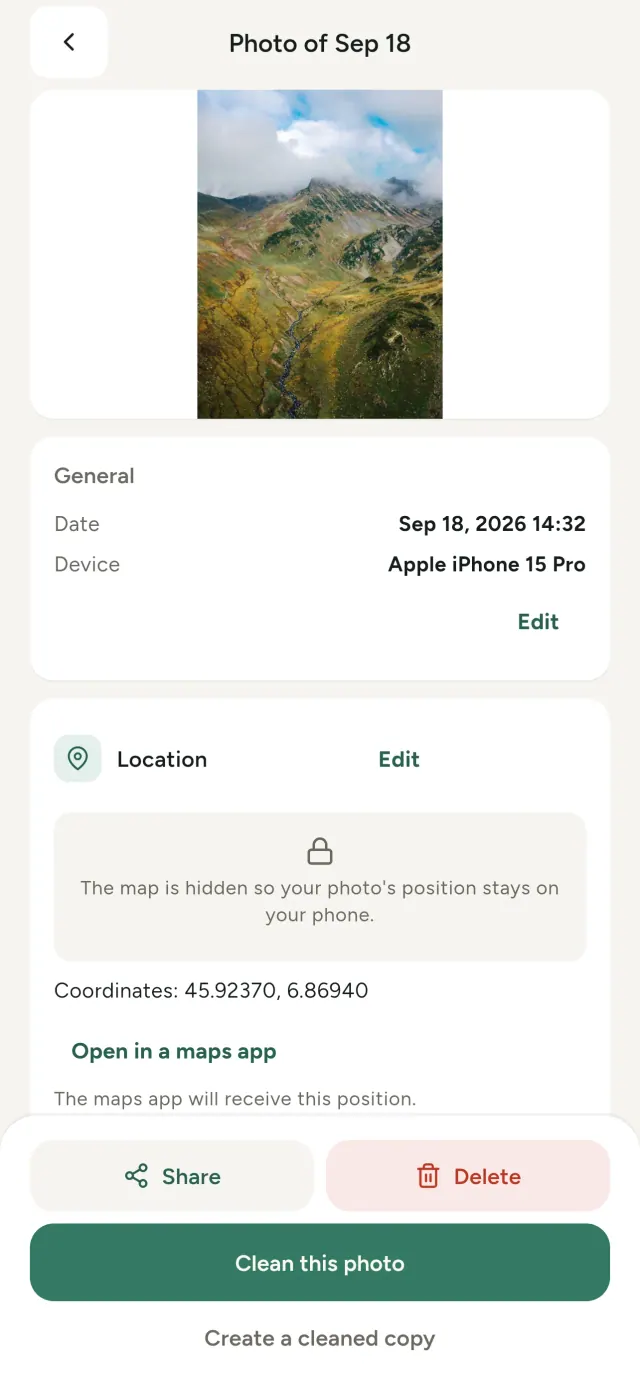
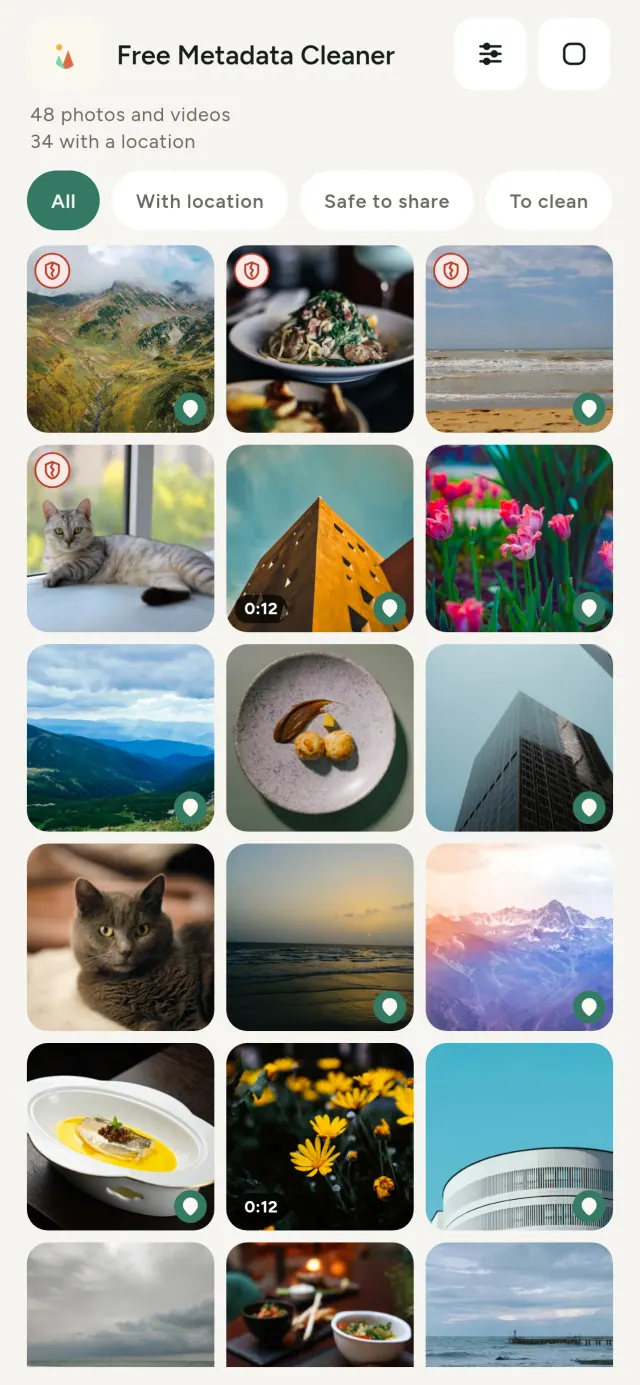
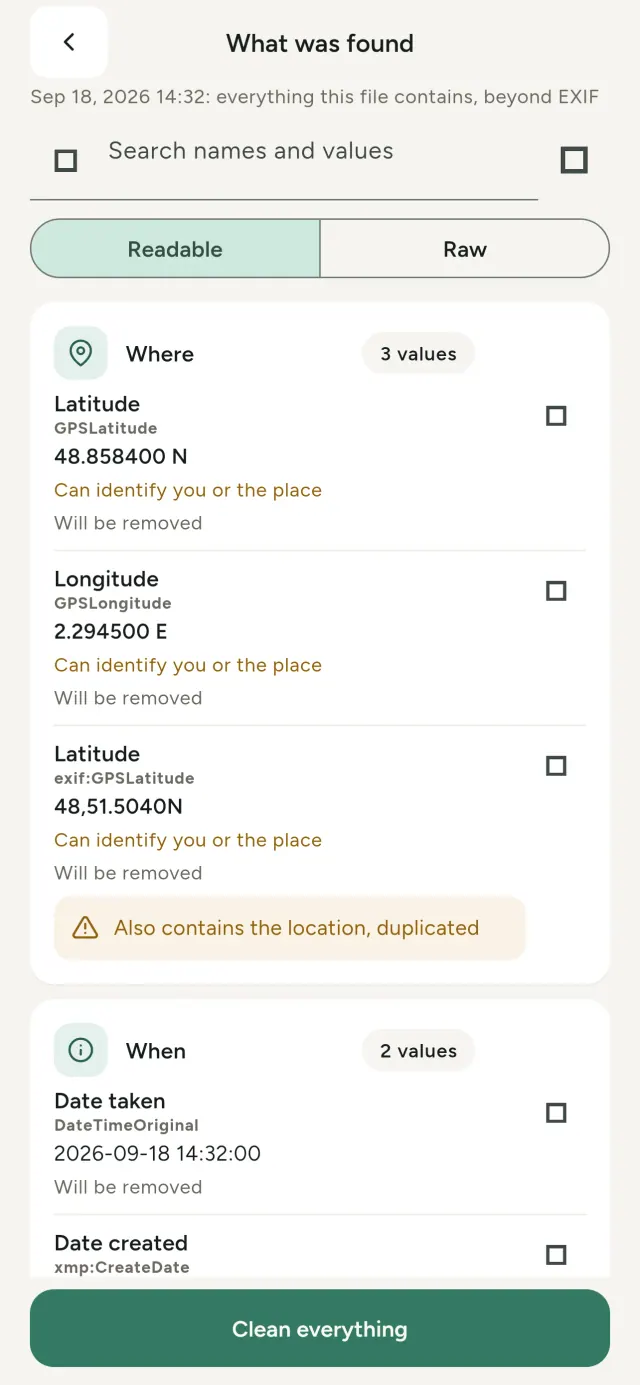
All Foto enthält verstoppt Informatiounen: wou a wéini se gemaach gouf, mat wéi engem Telefon, heiansdo esouguer eng kleng Virschau. Wann s de se deels, ginn dës Daten mat.
Metadata Cleaner mécht dräi Saachen op denger Apparat: et weist den Inhalt, léisst en änneren a läscht en.
Wat Metadata Cleaner mécht
Liesen
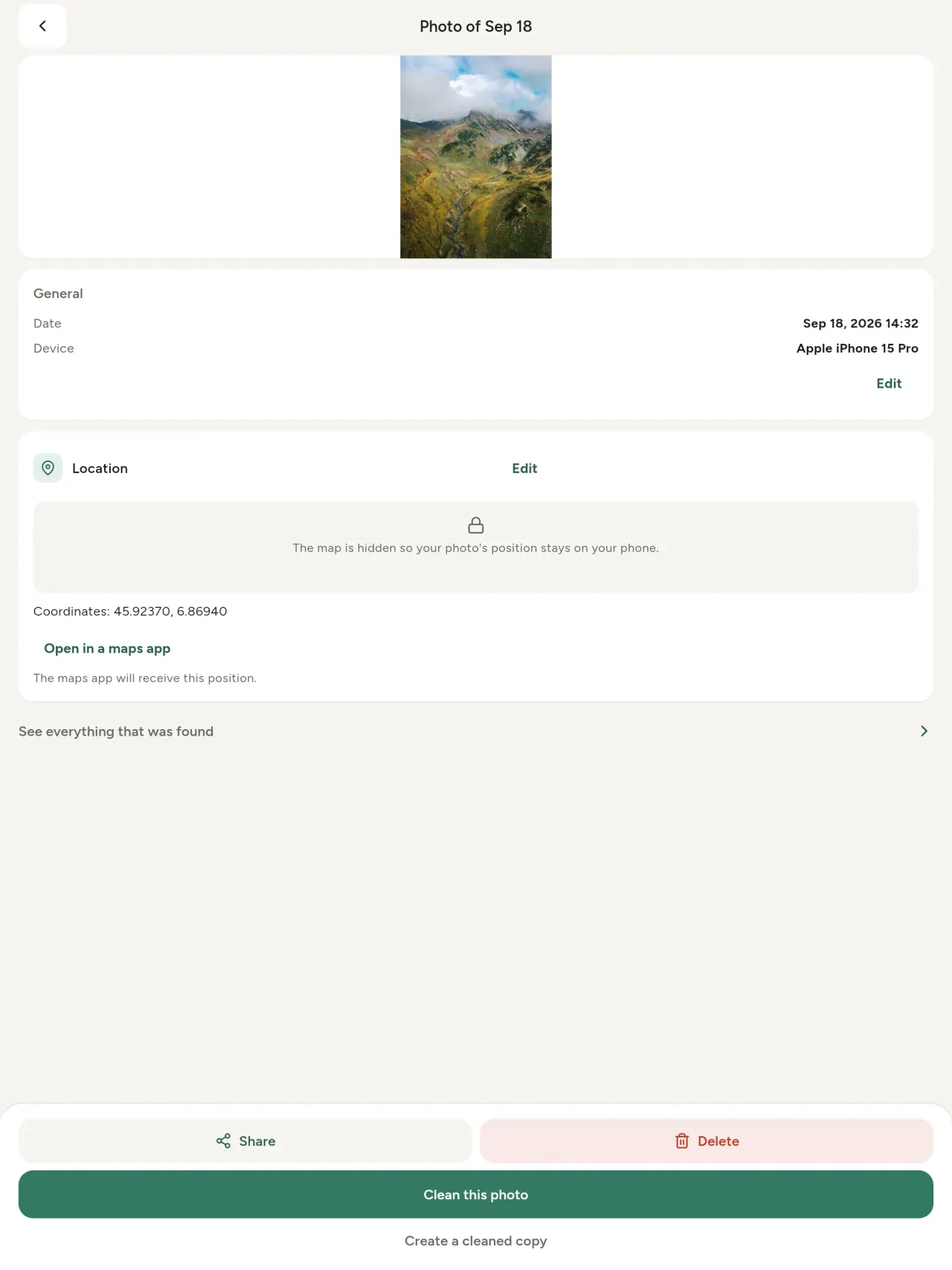
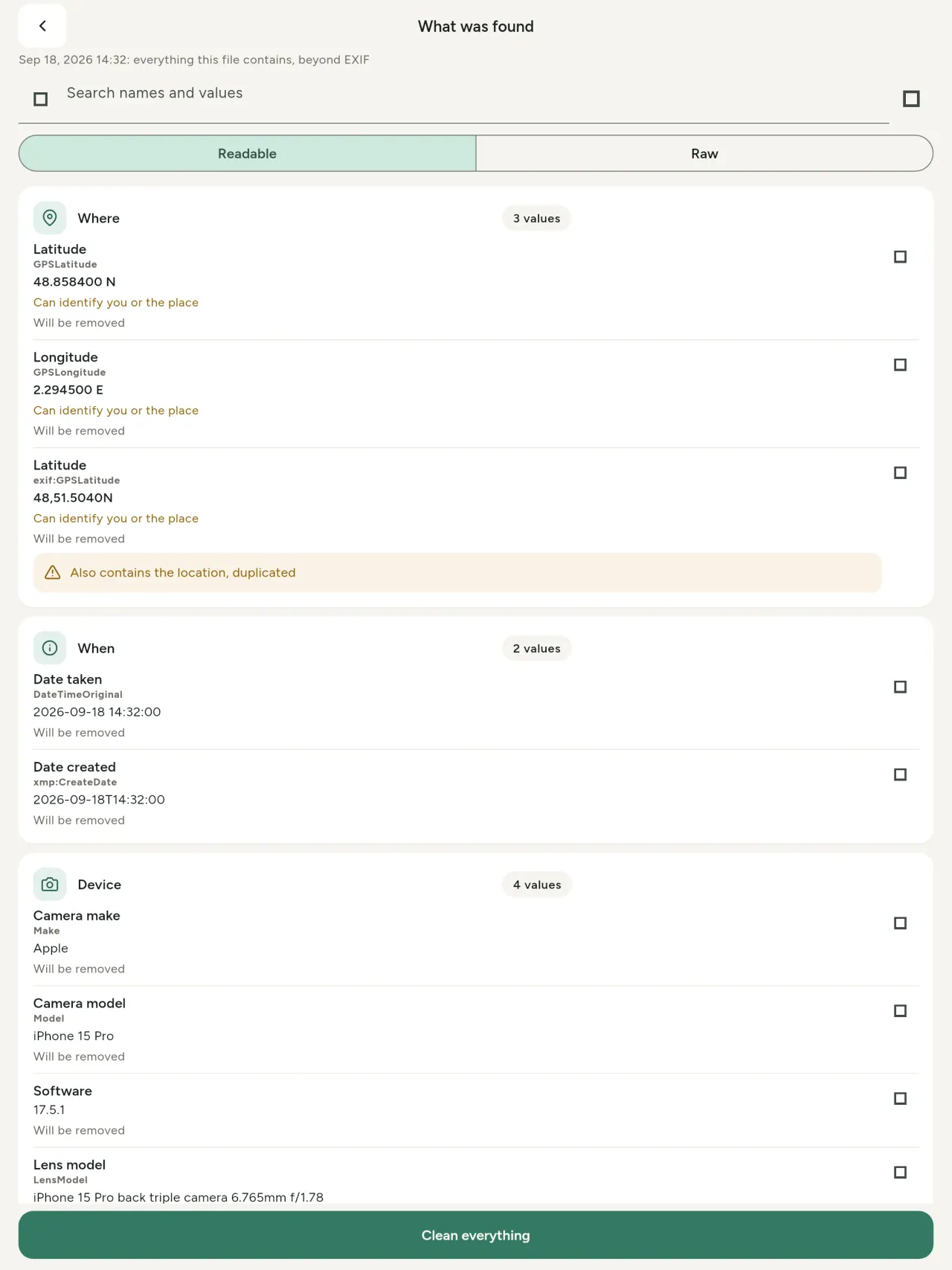
E richtege Metadonnée-Viewer: all Wäert aus Fotoen a Videoen (EXIF, IPTC, XMP, Video-Codecen, Dauer an Opléisung), gruppéiert, duerchsichbar a kopéierbar. AI-Hierkonft (C2PA) gëtt och erkannt.
Änneren
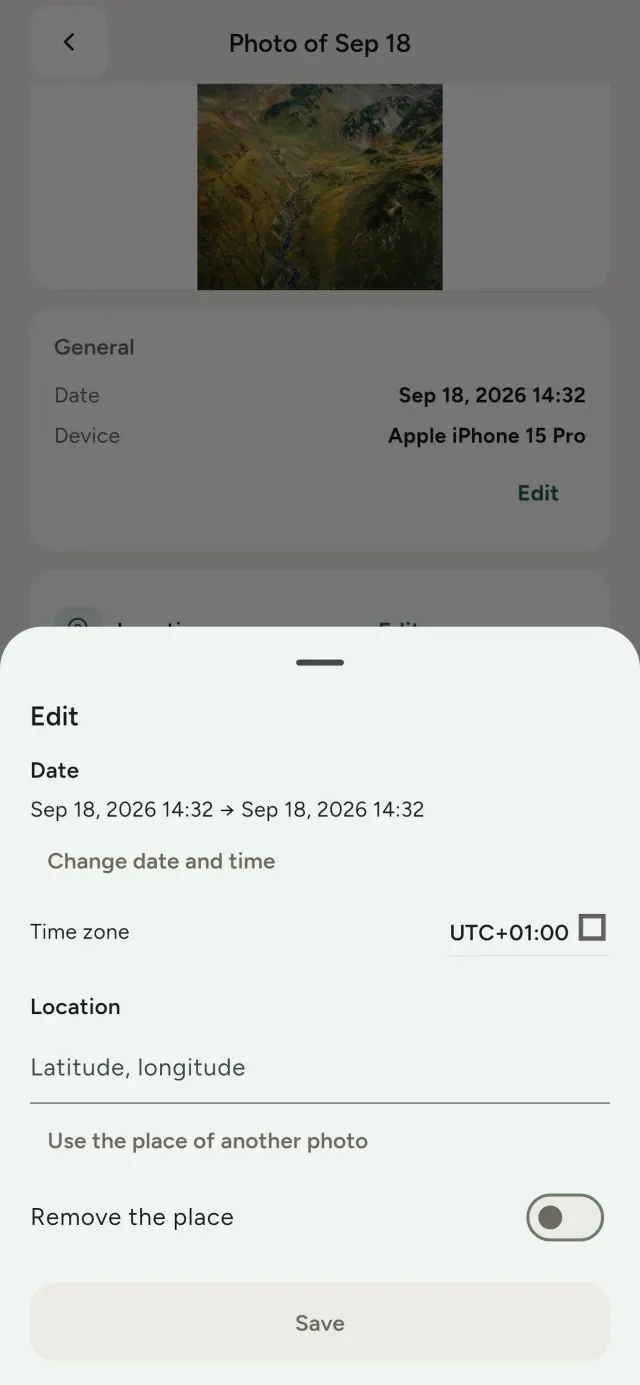
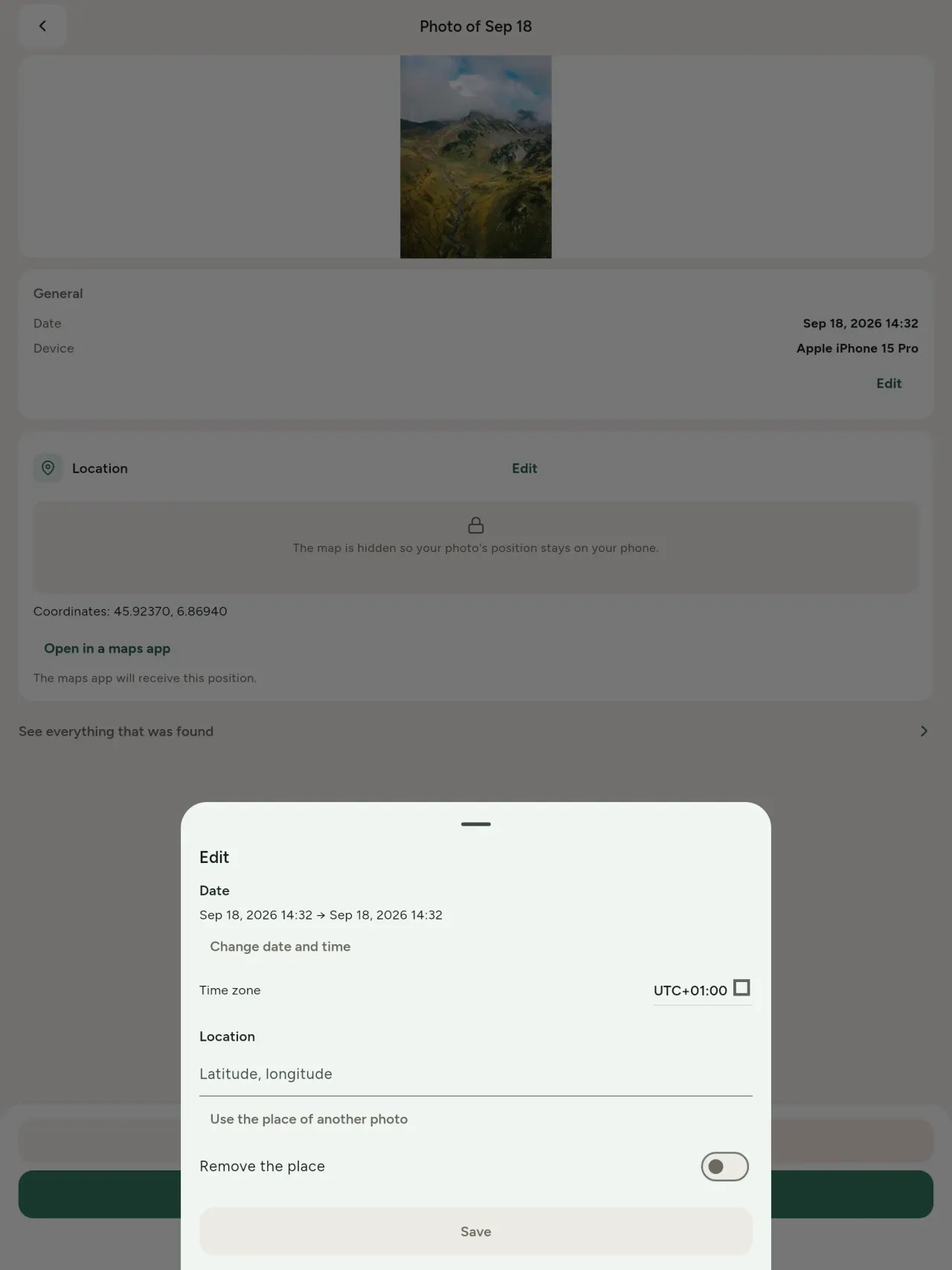
Änner Datum a Plaz vun enger Foto, och ouni Metadonnée. Kopéier eng Plaz vun enger anerer Foto oder wiel se op enger Kaart. Vergläich virdrun an duerno.
Läschen
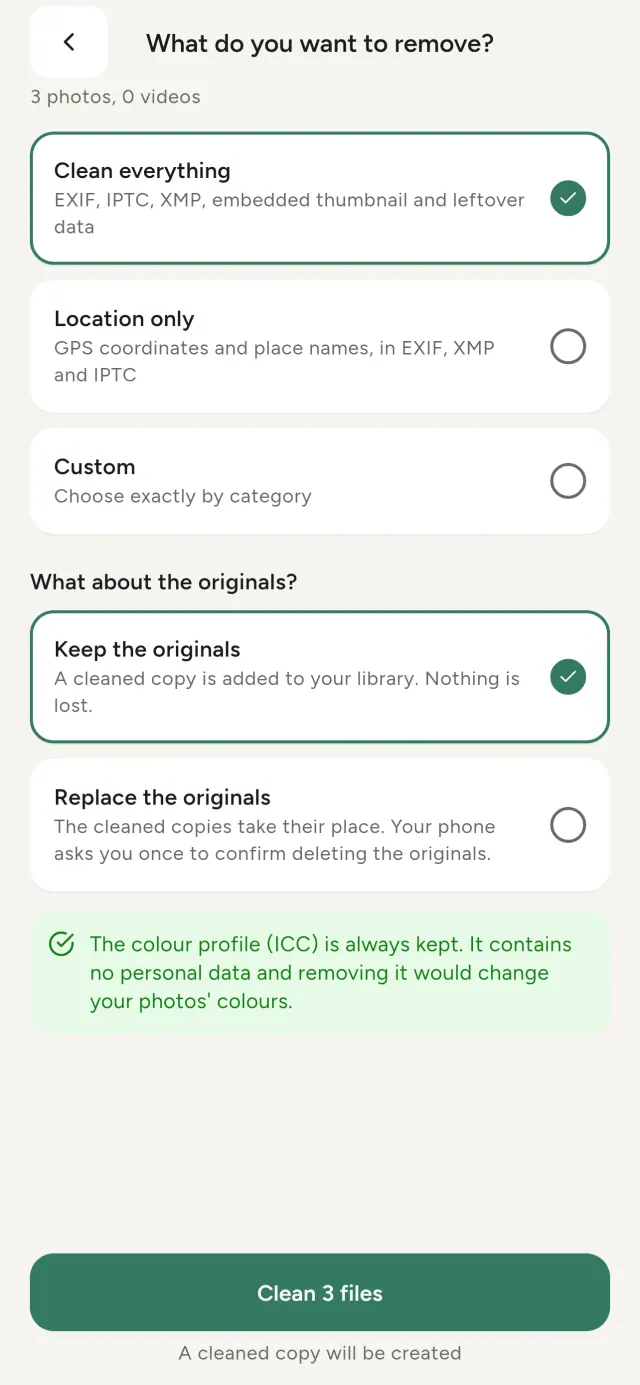
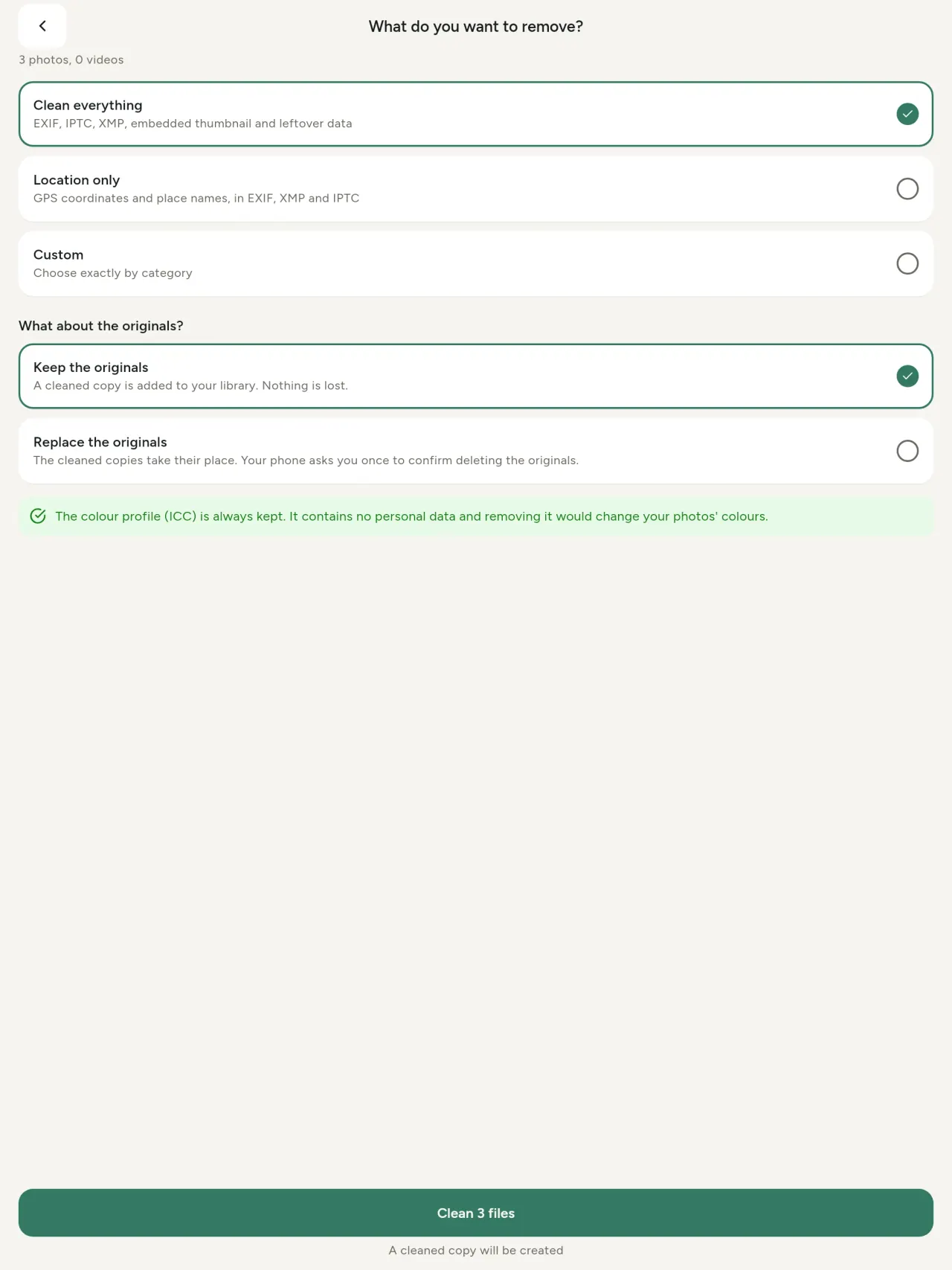
Alles, nëmmen d'Plaz, oder ausgewielte Kategorien: EXIF-, IPTC- an XMP-Daten, agebett Virschauen, Kamera-Notizen an AI-Hierkonft. Botz eng ganz Auswiel a behal oder ersetz d'Originaler.
Sécher deelen
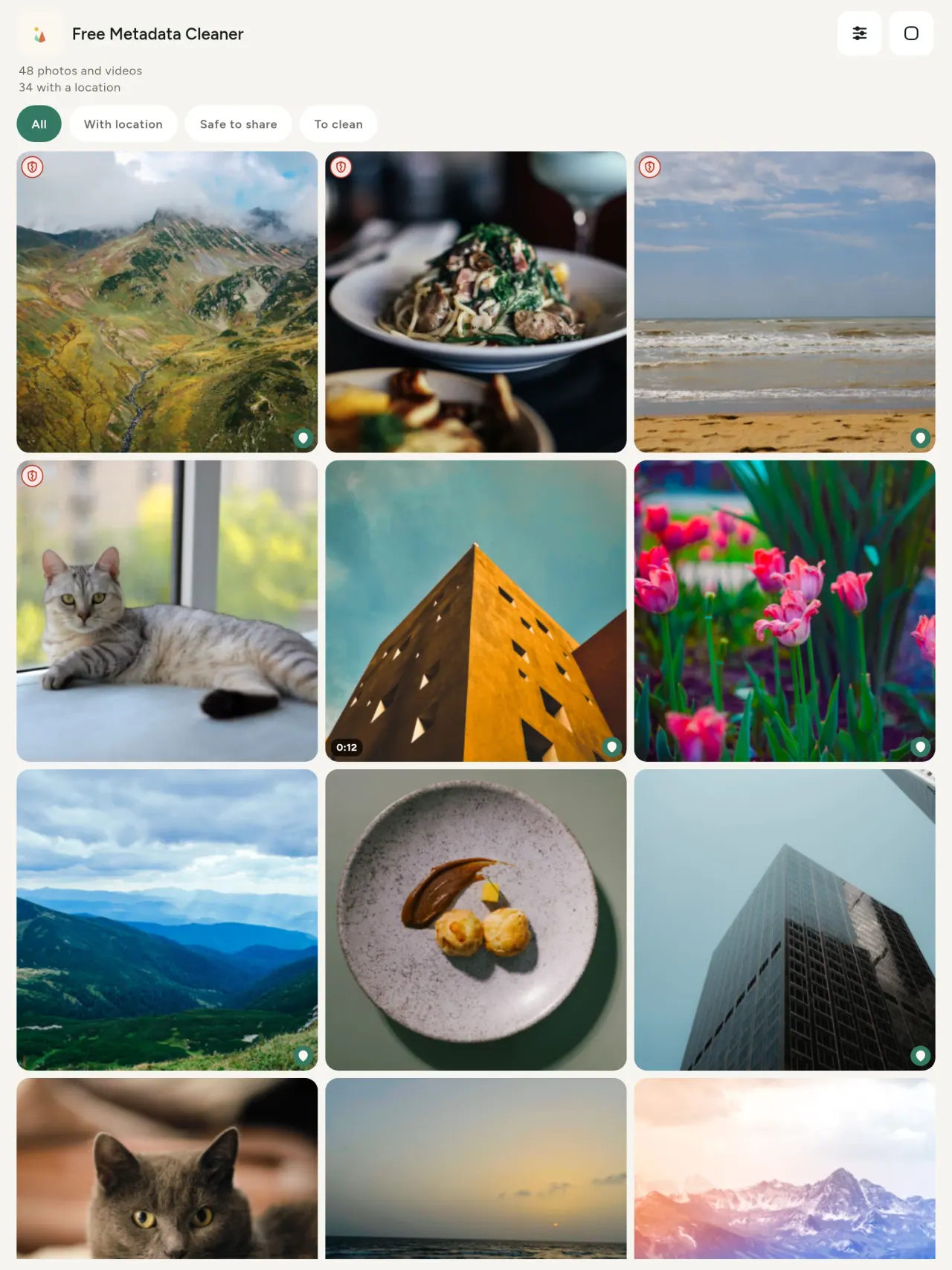
E grénge Schëld markéiert Dateie ouni Metadonnée; e roude Schëld déi, wou nach Daten do sinn.
Kee Qualitéitsverloscht
Biller ginn ni nei kodéiert.
Privatsphär
Fotoe ginn op denger Apparat gelies, geännert a gebotzt. Kee Kont, keng Reklammen, keng Analytik. Nëmmen déi optional Kaart geet no denger Bestätegung iwwer OpenStreetMap online; d'Foto gëtt ni geschéckt.
Gratis, ouni Reklammen
Eng fakultativ Ënnerstëtzung ass méiglech.
Fir ween
- Jiddereen dee wëll wëssen, wat eng Foto weist (GPS-Positioun, Datum, Kamera) ier si gepost, verkaaft oder geschéckt gëtt.
- Leit, déi op Kiannzopen-Seiten verkafen an net wëllen, datt d’Lokalitéit sichtbar ass.
- Elteren an all déi, déi e sensibele Lieu (Doheem, Schoul, Aarbecht) matgedeelt Fotoen eraushalen wëllen.
- Journalisten, Aktivisten an déi, déi Risken ausginn a Biller ouni Spueren deele wëllen.
- Leit déi hiren eegenen Dateleak verhënneren a wëllen hir Foto-Metadonnéeën komplett ënner Kontroll halen.
Firwat Metadata Cleaner wielen
- Dräi Funktiounen an enger: Metadonnéeë liesen, editéieren (Datum, Plaz), an ewechhuelen mat e puer Toucher.
- Alles leeft op dem Telefon. Är Fotoe ginn net geschéckt.
- Fotoe (JPEG, HEIC, PNG, WebP, GIF) a Videoen (MP4, MOV, 3GP).
Wat d’App nach net kann
- Just déi ugeschwate Formater ginn ënnerstëtzt. Weider Formater kommen no.
De Pixeon-Prinzip. Pixeon-Apps si lokal als éischt: keen Account, keen Tracking, an Är Donnéeë bleiwen op Ärem Telefon. Wann eng App jeemools op d’Netzwierk geet, da just wa Dir eng speziellt Funktioun aktivéiert, an d'Dateschutzpolitik gëtt aktualiséiert ier et erauskënnt.
Kuckt Metadata Cleaner am Asaz.
Metadata Cleaner eroflueden.
Gratis op iPhone an Android.
Versioun 1.1
- App Store Kommt geschwënn
- Google Play Kommt geschwënn
Nei Funktiounen
Dësen Text ass op Englesch.
- Read: see exactly what a photo or video reveals (location, date, camera, AI provenance labels such as C2PA and generation parameters, video duration, codecs, resolution and frame rate).
- Edit: change the date a photo was taken and its location (JPEG, HEIC, AVIF), even on a photo with no metadata, reuse the location of another photo, or pick it on an OpenStreetMap map after your confirmation.
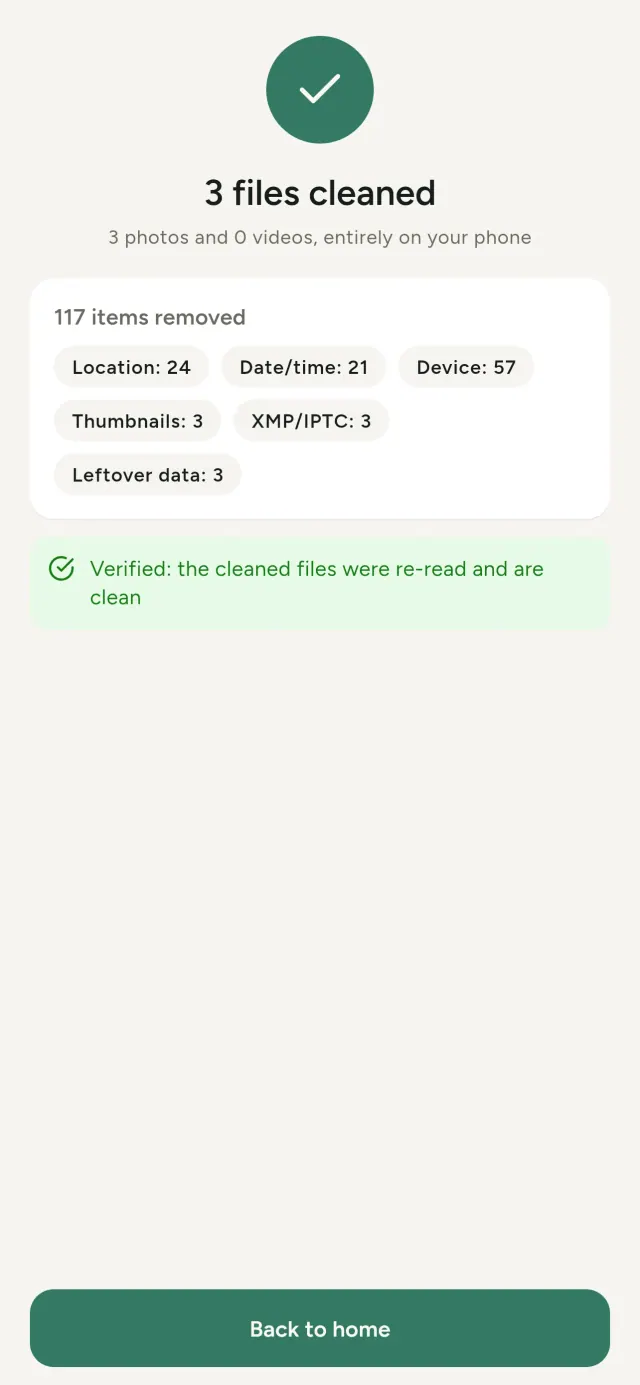
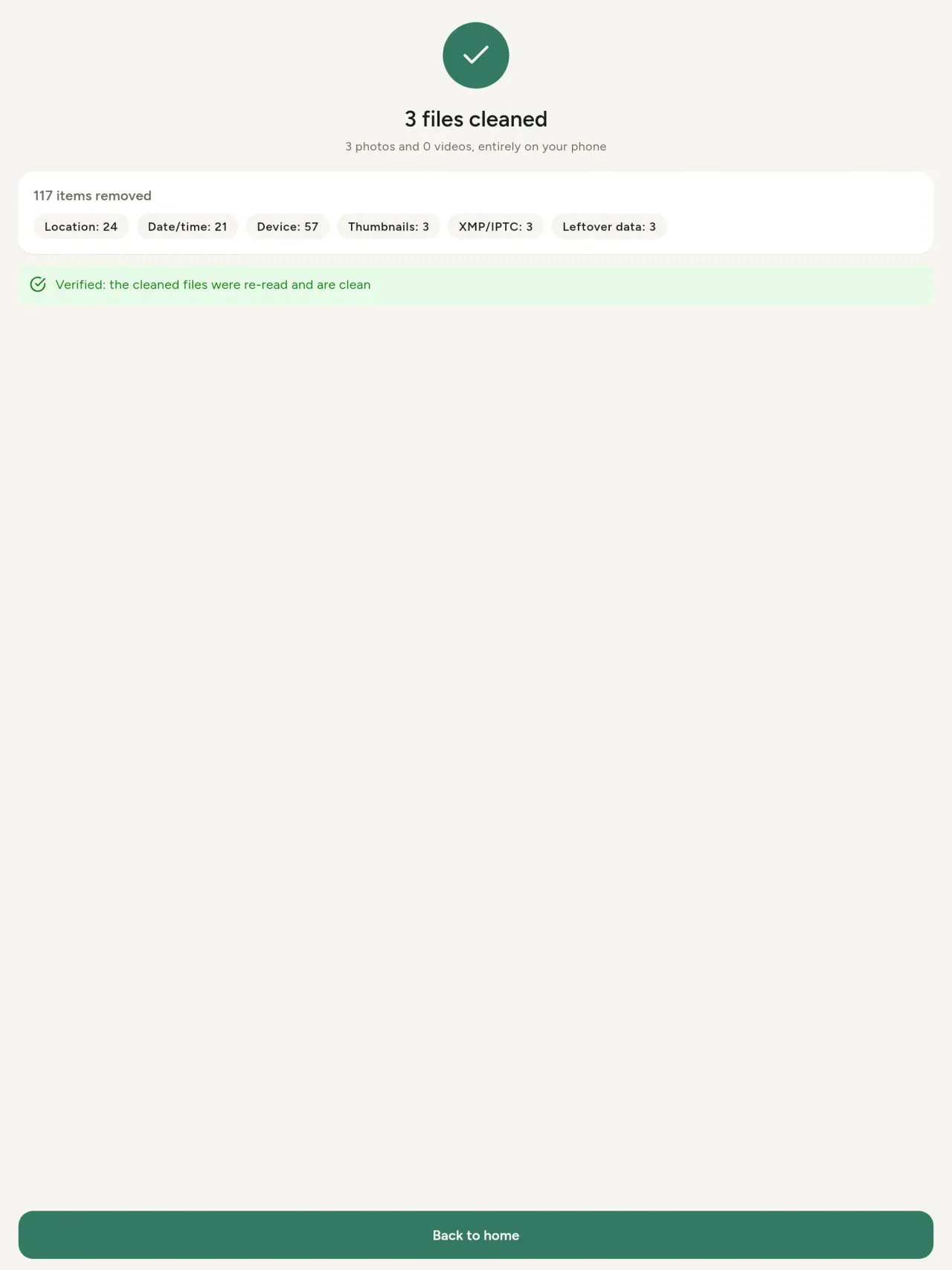
- Remove: clean metadata in a few taps, with a before and after view on the result screen.
- DNG photos are supported.
- Translations aligned across 91 languages.
Privacy policy
Den Text hei drënner ass op Englesch. D’Englesch Versioun ass déi valabel.
Last updated: 2026-11-03 · applies to version 1.1 and later
Policy versions: 1.1 and later (this text) · version 1.0 (still the policy of the app version 1.0). The version number of your app is shown at the bottom of its Settings screen.
Free Metadata Cleaner shows and removes the metadata hidden in your photos and videos (location, date and time, camera and lens details, thumbnails…). The short version: everything happens on your device, and we collect nothing.
What the app accesses
Your photo and video library, only after you grant permission (and, where your system requires it, the permission to read the location stored in your photos, so that it can be shown to you). The files you choose are read and cleaned on your device; the cleaned copy is saved to your library. If you choose to replace the originals, the system asks you to confirm before deleting them.
To show which photos are already clean, the app reads the metadata of the photos displayed on screen, on your device. This result is kept in memory only and is never stored.
What we collect
Nothing. No account, no analytics or usage tracking, no advertising or advertising identifiers, no crash or diagnostics reporting beyond what the app stores provide, and no third-party SDK that sends data anywhere. There is no Free Metadata Cleaner server. Cleaning a photo or video never uses the network, at all: turn on airplane mode and clean one to check for yourself. The only network request the app itself can ever make is described under “Location” below, and it only ever happens if you ask for it. The one other connection is the optional tip purchase, handled by the store (see “Optional support”).
Temporary files and history
The app keeps no history and no database. Temporary files created while cleaning are deleted after each item and purged when the app starts.
Deleted originals
Originals that are deleted remain in your system's trash (such as “Recently Deleted” or the trash) for about 30 days, with their metadata. The app cannot empty it: do it yourself if you need the originals gone at once.
iCloud and cloud photos
If a photo is stored in iCloud and not on your device, the operating system may download it before the app can process it. That transfer is made by the system, under the provider's own terms, not by the app.
Location
When a photo contains a location, the app shows the coordinates as text, which stays on your device. Three actions can send location information off your device, only when you choose them, each time: “Open in…” hands the coordinates to the maps application you select, under its own privacy policy; “Show the map” asks you to confirm first (“Showing the map sends this photo's position to a map service. Nothing else is sent.”), then loads a small map from OpenStreetMap for that one position; and, when you edit a photo's place, “Choose on the map” asks you to confirm first, then opens a full-screen map from OpenStreetMap. This map does not use your phone's location. As you move and zoom it, the app requests the map tiles of the area you are browsing, so OpenStreetMap receives the position of the area shown on screen, which starts on the photo's current place if it has one, and otherwise on a world view. The photo itself is never sent, and nothing is sent before you confirm. The place you choose on the map (or copy from another photo) is written into the photo's file only when you save, on your device. In every case OpenStreetMap receives, as with any web request, technical details like your IP address; it does not receive your name, an account, or anything else about you or your other photos. See OpenStreetMap's own privacy policy. Outside of these explicit actions, the app never sends a photo's location, or anything else, anywhere.
Optional support
The app is free. If you wish, you can leave a tip. On iPhone and in the Google Play version for Android, tips are in-app purchases processed by Apple or Google under their own terms and privacy policy; the app adds the Google Play billing permission for this, makes no network call itself, and receives no payment or personal details. Versions installed outside Google Play may instead open an external donation page in your browser, operated by a third party under its own privacy policy; nothing from the app is sent to it. A tip unlocks nothing.
Contact form on this website
If you write to us through this site, we use your message and the email address you optionally give only to reply. Bot protection is provided by Cloudflare and email delivery by Resend.
Language choice on this website
When you choose a language, or when this site opens a page in your browser's language, it stores
one small functional cookie (pxl, a language code, one year) so that your choice is
remembered. If this site suggests a page in your browser's language and you close that suggestion,
your browser also keeps a local note (pxl-banner-off, in local storage, 30 days) so the
suggestion does not come back. Neither identifies anyone, neither is used for tracking or advertising,
and neither is shared. You can delete them in your browser at any time.
Website statistics
This website uses Cloudflare Web Analytics to count visits (pages viewed, country, browser type, loading speed). It sets no cookie, does not use local storage, does not fingerprint your device, does not follow you across sites and does not build a profile of you. Search engines (for example Google Search Console) give us aggregated search statistics, without any data about individual visitors. Our own web server also counts the pages it serves: for each page it keeps the page address, the site or social network that sent you (only its name, or the campaign tag written in the link), the country, the type of device and whether the request came from a robot. It keeps no IP address, no identifier and no cookie, and these counts are anonymous. We use no advertising or other analytics service. None of this concerns the app itself, which collects nothing.
Children
The app is a general-purpose tool and is not directed at children.
Changes
An updated policy will be published at this URL with a new date above.
Contact
Questions about privacy: metadata-cleaner-contact@pixeon.net
Versioun 1.0
- App Store Verëffentlecht
- Google Play Verëffentlecht
Nei Funktiounen
Dësen Text ass op Englesch.
- Cleans JPEG, HEIC, PNG, WebP, GIF, MP4, MOV and 3GP files, with no video re-encoding.
- "Safe to share" and "To clean" filters.
- New green design.
- Help screen with a FAQ.
- Settings: share, rate, feedback, unsupported formats.
- Optional tips.
Privacy policy, version 1.0
Den Text hei drënner ass op Englesch. D’Englesch Versioun ass déi valabel.
Applies to version 1.0 of the app (the first release). Later versions: current policy.
Free Metadata Cleaner shows and removes the metadata hidden in your photos and videos (location, date and time, camera and lens details, thumbnails…). The short version: everything happens on your device, and we collect nothing.
What the app accesses
Your photo and video library, only after you grant permission (and, where your system requires it, the permission to read the location stored in your photos, so that it can be shown to you). The files you choose are read and cleaned on your device; the cleaned copy is saved to your library. If you choose to replace the originals, the system asks you to confirm before deleting them.
To show which photos are already clean, the app reads the metadata of the photos displayed on screen, on your device. This result is kept in memory only and is never stored.
What we collect
Nothing. No account, no analytics or usage tracking, no advertising or advertising identifiers, no crash or diagnostics reporting beyond what the app stores provide, and no third-party SDK that sends data anywhere. There is no Free Metadata Cleaner server. Cleaning a photo or video never uses the network, at all: turn on airplane mode and clean one to check for yourself. The only network request the app itself can ever make is described under “Location” below, and it only ever happens if you ask for it. The one other connection is the optional tip purchase, handled by the store (see “Optional support”).
Temporary files and history
The app keeps no history and no database. Temporary files created while cleaning are deleted after each item and purged when the app starts.
Deleted originals
Originals that are deleted remain in your system's trash (such as “Recently Deleted” or the trash) for about 30 days, with their metadata. The app cannot empty it: do it yourself if you need the originals gone at once.
iCloud and cloud photos
If a photo is stored in iCloud and not on your device, the operating system may download it before the app can process it. That transfer is made by the system, under the provider's own terms, not by the app.
Location
When a photo contains a location, the app shows the coordinates as text, which stays on your device. Two actions send that one photo's position off your device, only when you choose them, each time: “Open in…” hands the coordinates to the maps application you select, under its own privacy policy; “Show the map” asks you to confirm first (“Showing the map sends this photo's position to a map service. Nothing else is sent.”), then loads a small map from OpenStreetMap for that one position. OpenStreetMap receives the coordinates and, as with any web request, technical details like your IP address; it does not receive your name, an account, or anything else about you or your other photos. See OpenStreetMap's own privacy policy. Outside of these two explicit actions, the app never sends a photo's location, or anything else, anywhere.
Optional support
The app is free. If you wish, you can leave a tip. On iPhone and in the Google Play version for Android, tips are in-app purchases processed by Apple or Google under their own terms and privacy policy; the app adds the Google Play billing permission for this, makes no network call itself, and receives no payment or personal details. Versions installed outside Google Play may instead open an external donation page in your browser, operated by a third party under its own privacy policy; nothing from the app is sent to it. A tip unlocks nothing.
Contact form on this website
If you write to us through this site, we use your message and the email address you optionally give only to reply. Bot protection is provided by Cloudflare and email delivery by Resend.
Language choice on this website
When you choose a language, or when this site opens a page in your browser's language, it stores
one small functional cookie (pxl, a language code, one year) so that your choice is
remembered. If this site suggests a page in your browser's language and you close that suggestion,
your browser also keeps a local note (pxl-banner-off, in local storage, 30 days) so the
suggestion does not come back. Neither identifies anyone, neither is used for tracking or advertising,
and neither is shared. You can delete them in your browser at any time.
Website statistics
This website uses Cloudflare Web Analytics to count visits (pages viewed, country, browser type, loading speed). It sets no cookie, does not use local storage, does not fingerprint your device, does not follow you across sites and does not build a profile of you. Search engines (for example Google Search Console) give us aggregated search statistics, without any data about individual visitors. Our own web server also counts the pages it serves: for each page it keeps the page address, the site or social network that sent you (only its name, or the campaign tag written in the link), the country, the type of device and whether the request came from a robot. It keeps no IP address, no identifier and no cookie, and these counts are anonymous. We use no advertising or other analytics service. None of this concerns the app itself, which collects nothing.
Children
The app is a general-purpose tool and is not directed at children.
Changes
An updated policy will be published at this URL with a new date above.
Contact
Questions about privacy: metadata-cleaner-contact@pixeon.net
Support
Lescht aktualiséiert: 2026-10-08
Free Metadata Cleaner ass eng kleng, onofhängeg App. Hei drënner fannt Dir Äntwerten op dacks gestallte Froen.
Mir ginn eis beschte Méi, bannent e puer Deeg ze äntweren. Fir eis ze hëllefen, sot eis wgl. Ären Apparat, d’Systemversioun an d’Aktioun. W.e.g. schéckt keng privat Fotoen.
Wéi eng Donnéeën späichert oder verschéckt d’App?
Guer keng. Et gëtt keng Geschicht, kee Kont a kee Server. Detailer an der Dateschutzerklärung.
Wéi propper ech eng Foto?
- Oppen d’App a ginn Zougang zu Ärer Bibliothéik wann gefrot.
- Wielt d’Foto(en) oder Video(en), déi propper solle ginn.
- Bestëmmt wat solle geläscht ginn a wielt of ob d’Originaler ersat ginn oder eng propper Kopie erstallt gëtt.
- Bestätegt. Eng Zesummefaassung weist wat geläscht gouf a wéini Dateien net konnte verschafft ginn.
Wou ginn déi propper Kopien gespäichert?
An Är Fotobibliothéik. Den Datum vun der originaler Bibliothéik gëtt bäibehalen, sou datt eng propper Foto net ganz uewen an der Galerie erschéngt.
Ech hu "Originaler ersetzen" gewielt, mee d’Originaler sinn nach do.
Geläscht Originaler bleiwen nach am System- Dreckskuerf (z. B. "Kürzlich geläscht" oder den Dreckskuerf) fir ronn 30 Deeg, mat hire Metadonnéeën. Maacht de Kuerf eidel fir se direkt komplett ze läschen. Wann Dir d'Fro vum System fir ze läschen net akzeptéiert, ginn d’Originaler behaalen an déi propper Kopien ginn trotzdem bäigefüügt.
Wéi eng Dateitypen ginn ënnerstëtzt?
Fotoen am JPEG, HEIC, AVIF, PNG, WebP an GIF Format, an Videoen am MP4, MOV an 3GP Format (weider Formater ginn derbäigesat). Dateien, déi d’App net propper maache kann, bleiwe onberéiert a ginn an der Zesummefaassung mat der Begrënnung opgelëscht, ouni déi aner Dateien ze stoppen.
Firwat brauch d'App Zougang zu menge Fotoen?
Fir d’Fotoen opzelëschten, fir ze wielen an d’propper Kopien ze späicheren. Äre System verlaangt eventuell zouzätzlech d’Rechter fir d’Positioun an de Fotoen ze liesen: ouni dës Rechter verstoppt de System d’Positioun, also kéint d’App Iech net weisen, wat eng Foto weist. Näischt gëtt eropgelueden.
Wéi kann ech kontrolléieren, datt näischt mäi Telefon verléisst?
Maacht den Flugmodus un a proppert eng Foto: et geet genee déiselwecht. Déi eenzeg Ausnahm ass d’Kaart: wann Dir "Kaart uweisen" op enger Foto-Positioun tippt a confirméiert, gëtt just dee Punkt un OpenStreetMap geschéckt fir d’Kaart unzefänken, näischt anescht. Kuckt "Positioun" hei driwwer.
A wéi enge Sprooche gëtt d’App ugebueden?
D’App gëtt ugebueden op Englesch, Franséisch, Däitsch, Spuenesch, Italienesch, Portugisesch an Arabesch. Dës Websäit ass a méi Sproochen, an nach weider App-Sproochen kommen no.
Projet ënnerstëtzen
Metadata Cleaner bleift gratis a ganz ouni Reklammen. Wann Dir se nëtzlech fannt, kënnt Dir d’Entwécklung ënnerstëtzen (fakultativ):
Buy Me a CoffeeExpense tracker and family budget planner. Free phone sync, no account.
Och vun PixeonVaultMarkEncrypted document vault. Watermark documents, remove metadata before sharing.
Och vun PixeonLittle RelayBreastfeeding, sleep and starting solids tracker. No account, works offline.
Och vun PixeonMenuloopPlan the week's meals, build your grocery list and keep recipes with photos.