
Metadata Cleaner: Foto/Video
EXIF-kyker, redigeerder en verwyderaar: lees, herstel of vee fotodata uit.


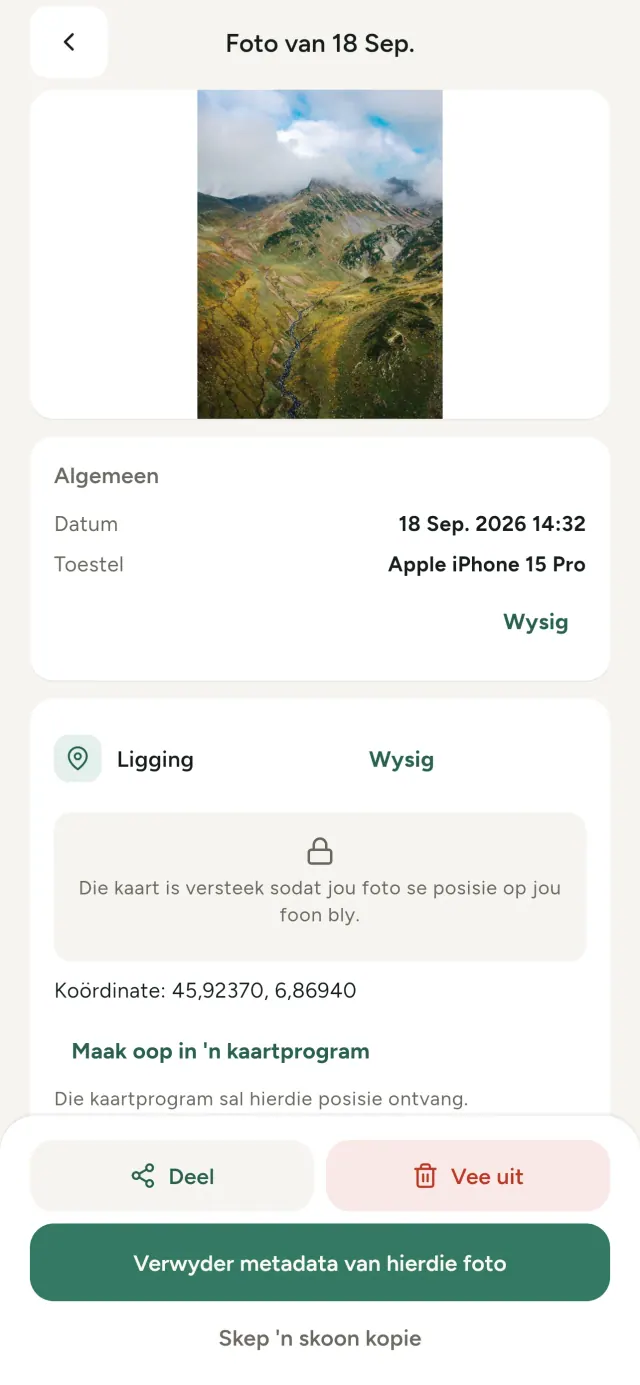
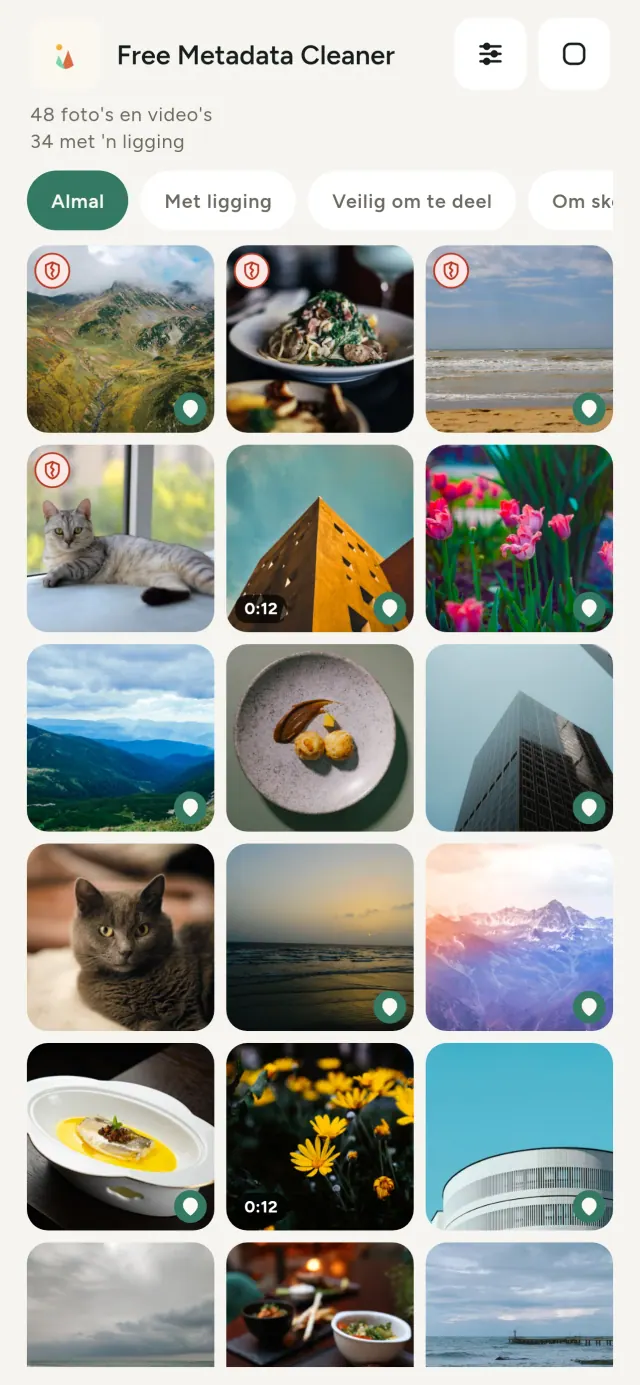
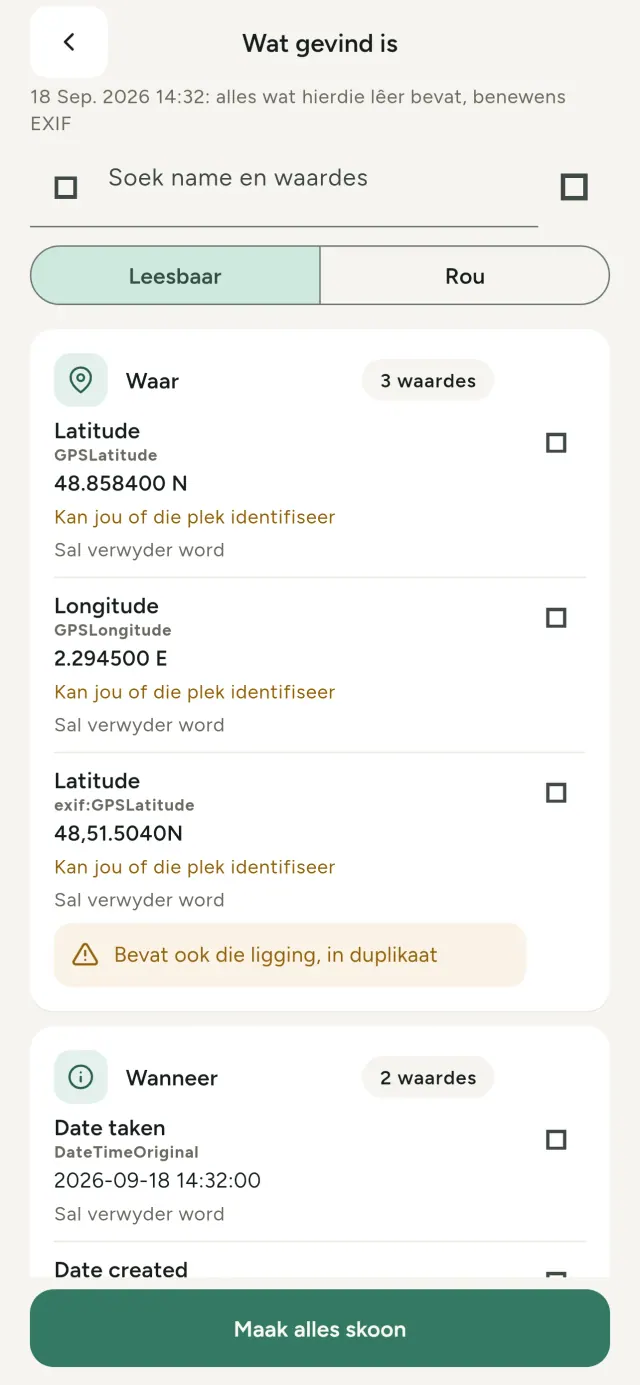
Elke foto wat jy neem, dra versteekte inligting: waar dit geneem is, wanneer, met watter foon, soms selfs 'n klein voorskou van die oorspronklike. Wanneer jy dit deel, gaan dit alles saam.
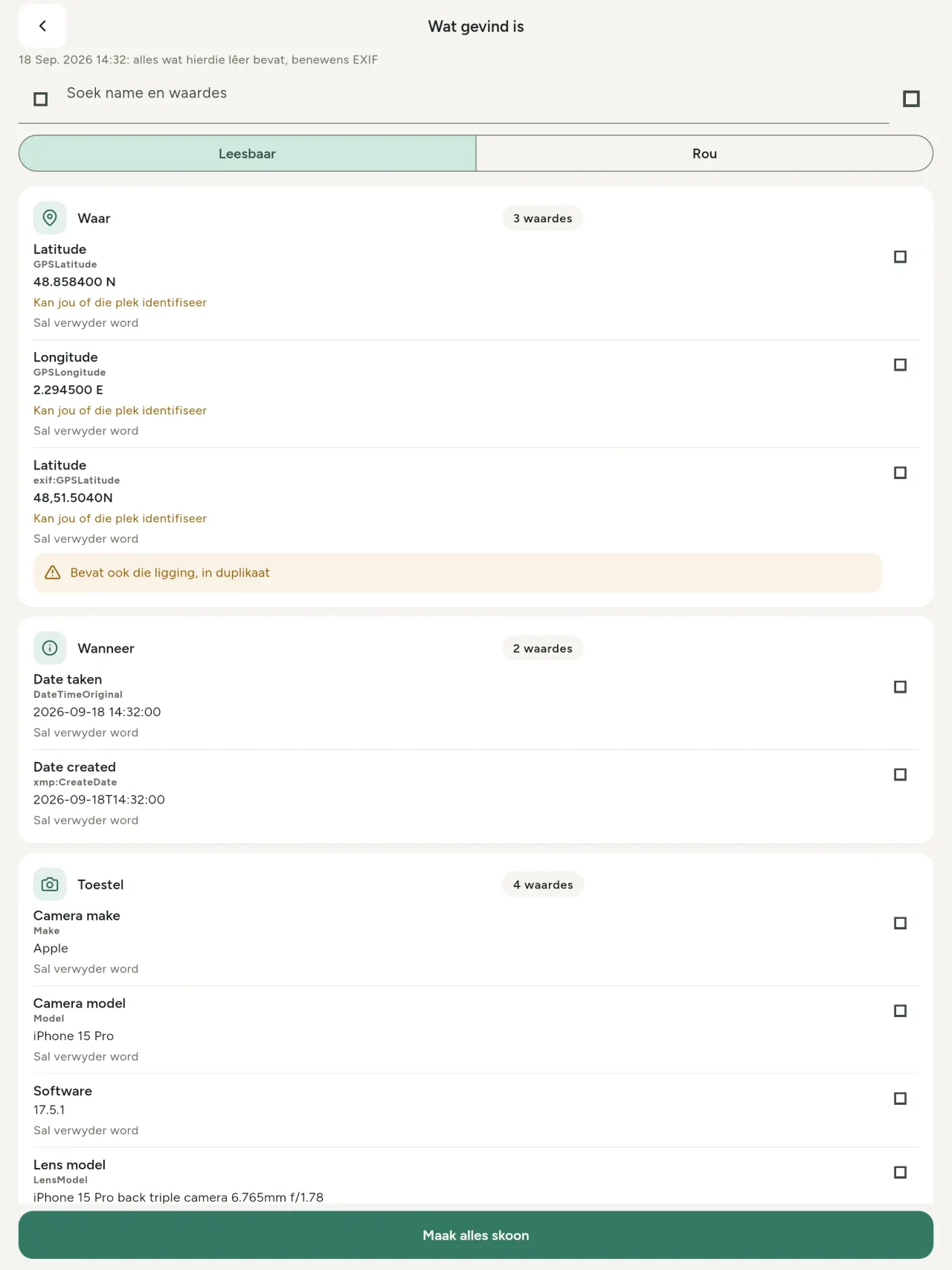
Metadata Cleaner doen drie dinge, op jou foon: dit wys wat jou foto's en video's bevat, laat jou dit regstel en verwyder dit.
Wat Metadata Cleaner doen
Lees
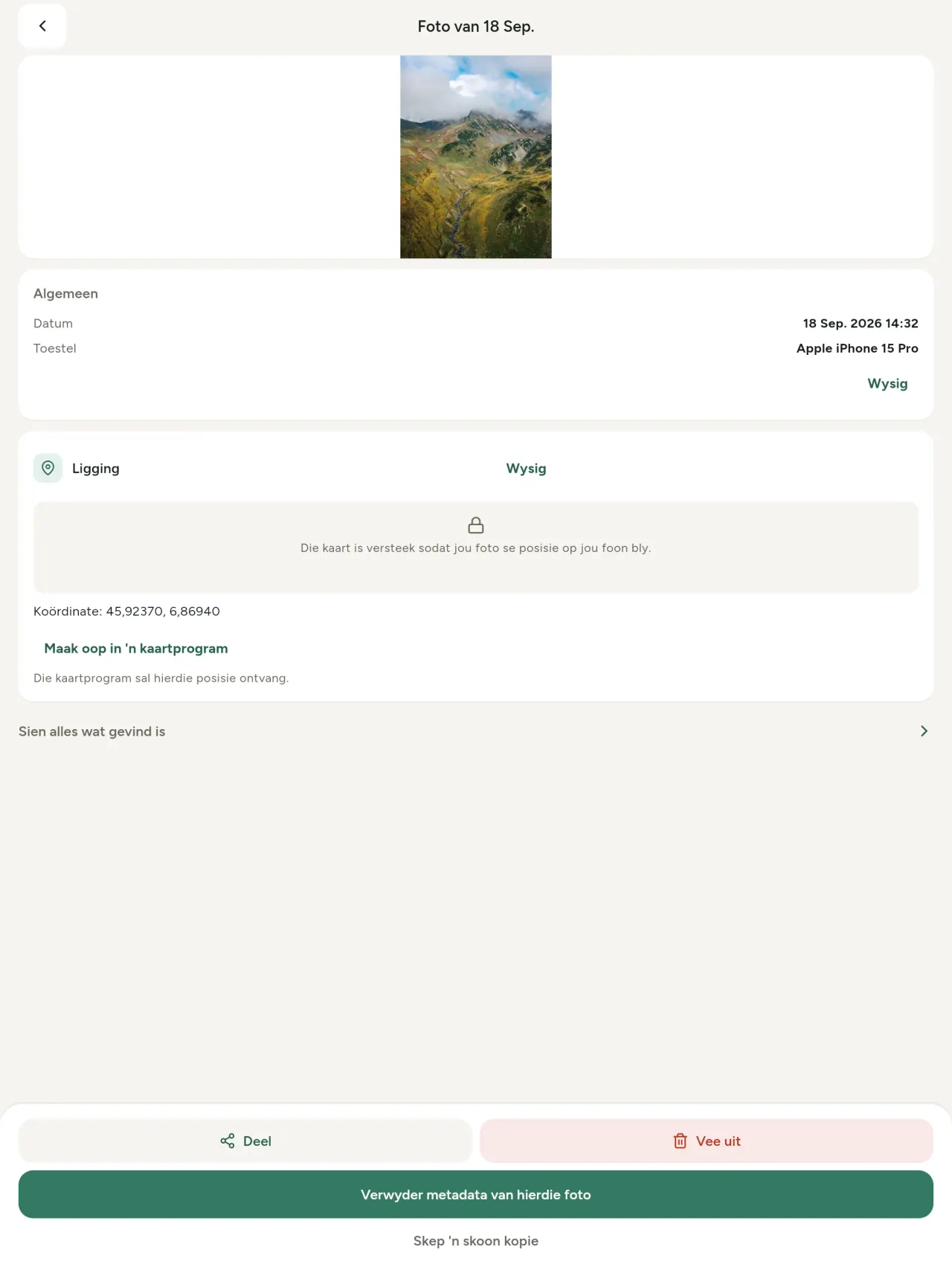
'n Regte metadatakyker: elke waarde wat in 'n foto of video gevind word (EXIF, IPTC, XMP, videokodeks, duur en resolusie), gegroepeer, deursoekbaar en kopieerbaar, met dit wat verwyder sal word gemerk. KI-herkoms (C2PA, genereringsparameters) word ook opgespoor.
Wysig
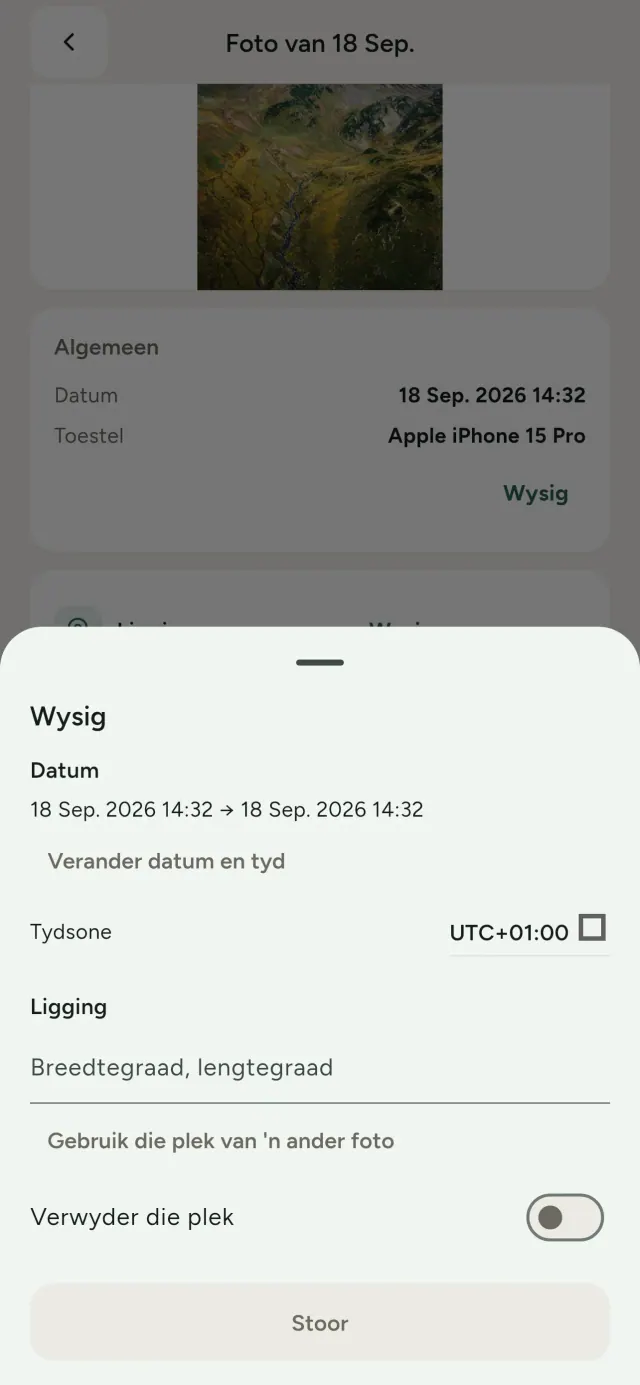
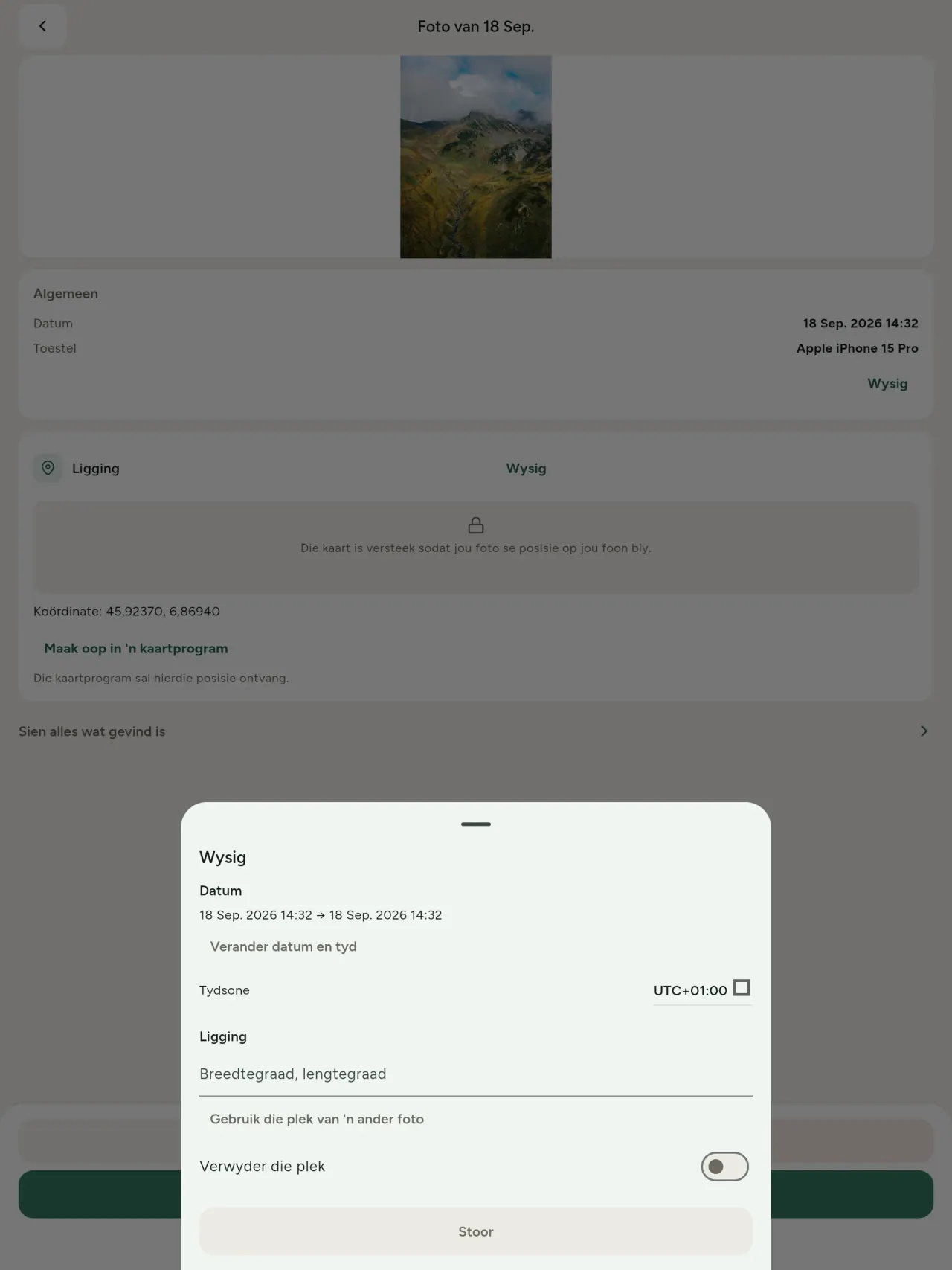
Verander of vervang die datum en plek van 'n foto, selfs een sonder enige metadata. Kopieer die plek van 'n ander foto of kies dit op 'n kaart (eers gevra, elke keer). Vergelyk voor en na.
Verwyder
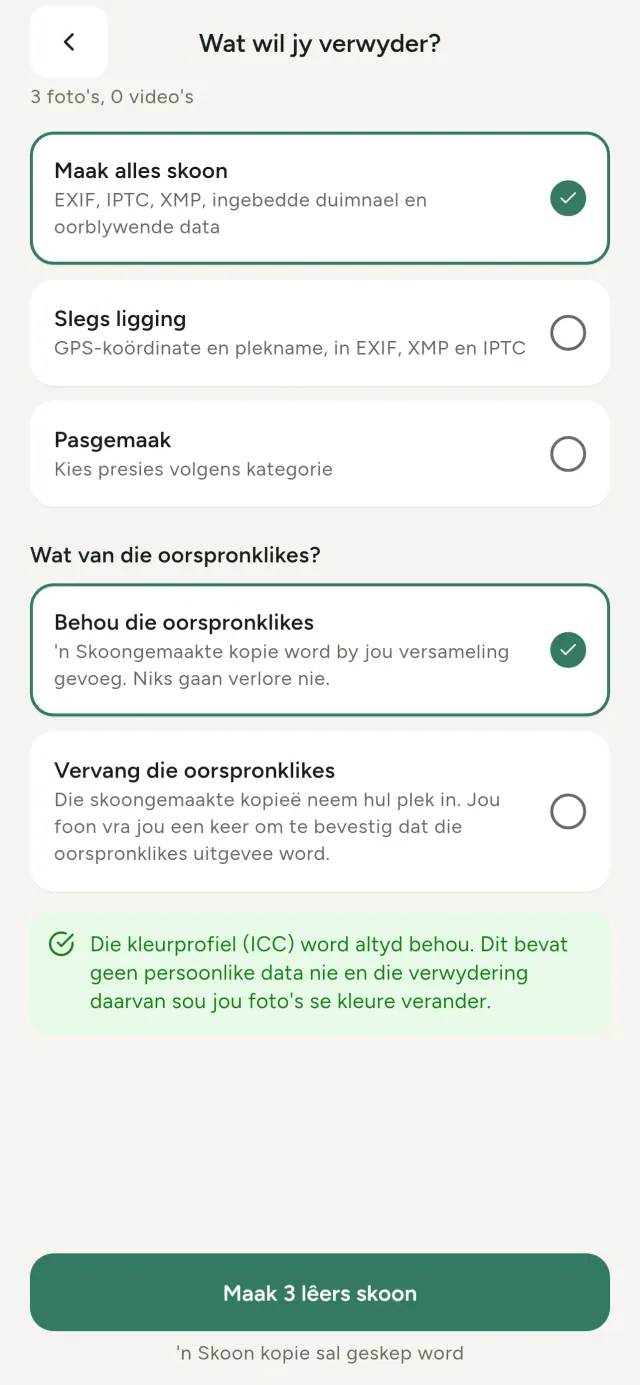
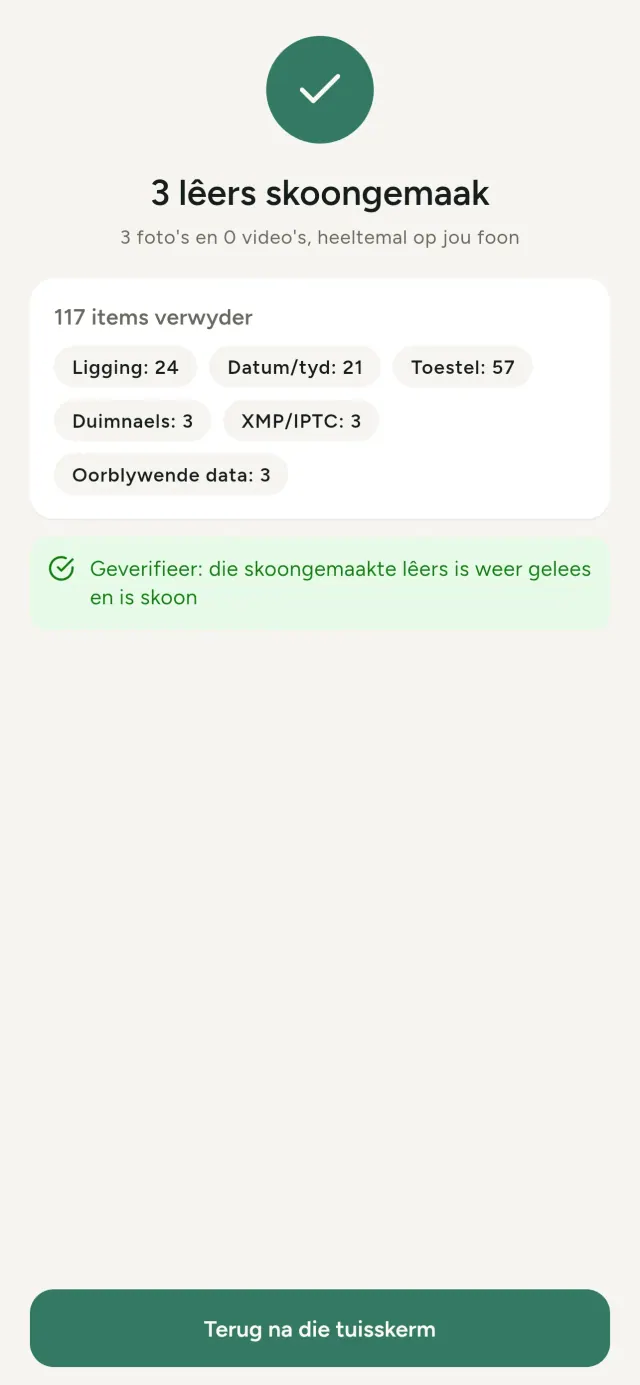
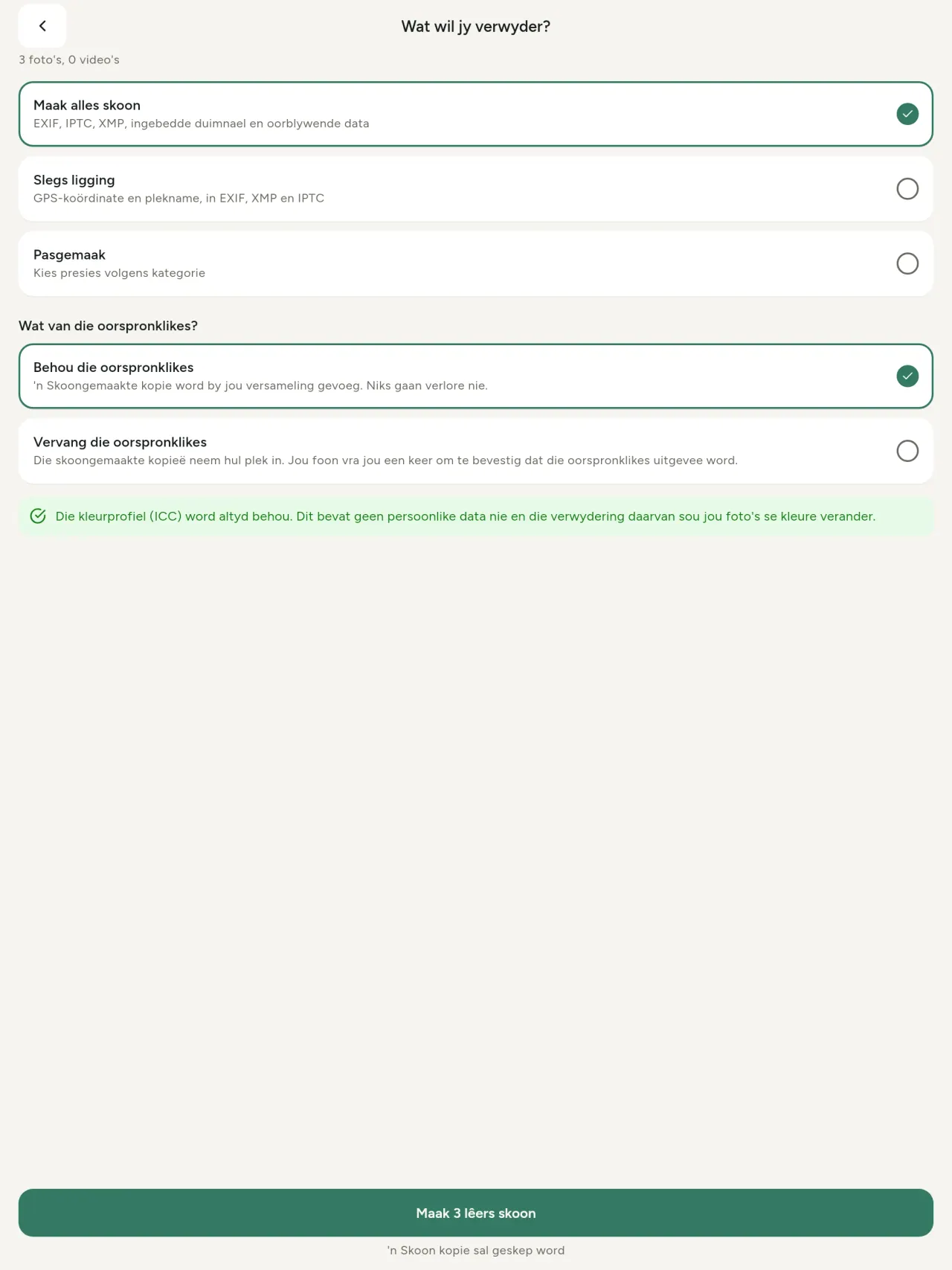
Alles, net die ligging of die kategorieë wat jy kies: EXIF-, IPTC- en XMP-data, ingebedde duimnaels, kameravervaardiger se aantekeninge, KI-herkoms en die oorblywende grepe wat sommige redigeerders ná afsny agterlaat. Maak 'n hele keuse tegelyk skoon en hou of vervang dan die oorspronklikes.
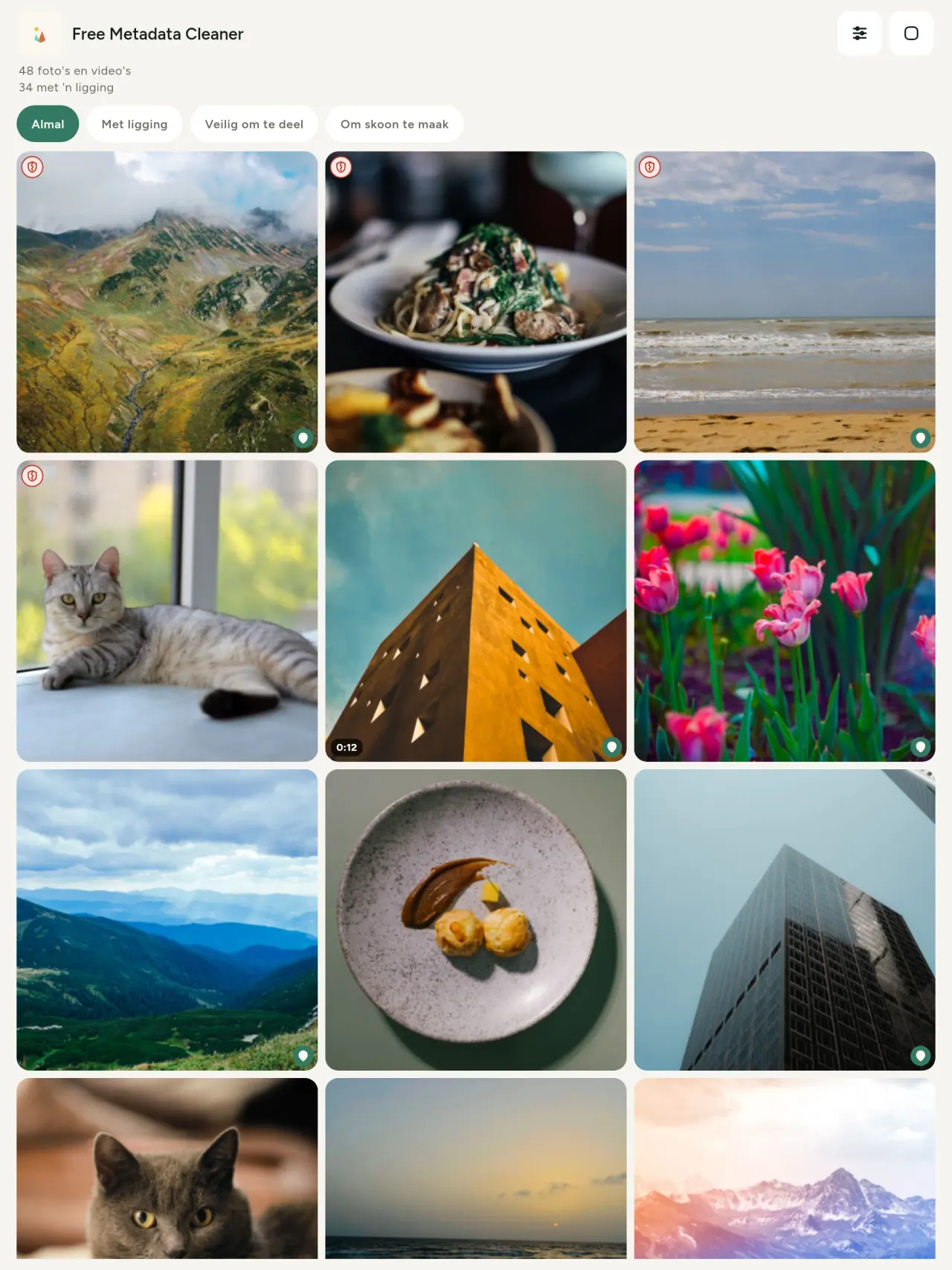
Veilig om in een oogopslag te deel
'n Groen skild merk lêers sonder metadata; 'n rooi gebarste skild merk dié wat nog metadata het.
Geen kwaliteitsverlies
Prente word nooit weer geënkodeer nie: die beeld self bly onaangeraak.
Privaatheid volgens ontwerp
Jou foto's word op jou toestel gelees, gewysig en skoongemaak. Geen rekening, advertensies of analise nie. Die een opsionele uitsondering is die kaart: wanneer jy vra om 'n foto se ligging te sien of 'n plek te kies, vra die app eers, elke keer, en laai dan die kaart van OpenStreetMap (die foto self word nooit gestuur nie).
Gratis, sonder advertensies
As die app jou help, kan jy 'n opsionele fooitjie los.
Vir wie dit is
- Enigiemand wat wil weet wat 'n foto verklap (GPS-ligging, datum, kamera) voordat dit geplaas, verkoop of gestuur word.
- Mense wat op advertensiewebwerwe verkoop en nie wil wys waar hulle woon nie.
- Ouers en enigiemand wat 'n sensitiewe plek (huis, skool, werkplek) uit die foto's wil hou wat hulle deel.
- Joernaliste, aktiviste en mense in gevaar, wat 'n beeld moet deel sonder om 'n spoor agter te laat.
- Mense wat moeg is vir datalekke en beheer wil terugneem oor die persoonlike inligting wat hul eie foto's dra.
Hoekom Metadata Cleaner kies
- Drie dinge in een toepassing: lees wat ’n foto of video openbaar, redigeer dit (datum geneem, ligging), en verwyder die metadata met ’n paar tikke.
- Alles werk op die foon. Jou foto's word nêrens heen gestuur nie.
- Foto's (JPEG, HEIC, PNG, WebP, GIF) en video's (MP4, MOV, 3GP).
Wat die toepassing nog nie doen nie
- Slegs die formate hierbo gelys word ondersteun. Meer formate is beplan.
Die Pixeon-beginsel. Pixeon-toepassings is plaaslik eerste: geen rekening, geen opsporing nie, en jou data bly op jou foon. As 'n toepassing ooit aan die netwerk koppel, is dit net wanneer jy kies om 'n kenmerk aan te skakel wat jy nodig het, en die privaatheidsbeleid word opgedateer voordat dit vrygestel word.
Sien Metadata Cleaner in aksie.
Kry Metadata Cleaner.
Gratis op iPhone en Android.
SHA-256: A4:38:C9:B4:A9:3F:97:7B:E8:98:AD:B7:3B:30:5F:63:01:22:E0:D9:F8:CF:5D:2B:D7:4E:38:CB:9A:CF:5A:A2
Weergawe 1.1
- App Store Kom binnekort
- Google Play Kom binnekort
Wat is nuut
Hierdie teks is in Engels.
- Read: see exactly what a photo or video reveals (location, date, camera, AI provenance labels such as C2PA and generation parameters, video duration, codecs, resolution and frame rate).
- Edit: change the date a photo was taken and its location (JPEG, HEIC, AVIF), even on a photo with no metadata, reuse the location of another photo, or pick it on an OpenStreetMap map after your confirmation.
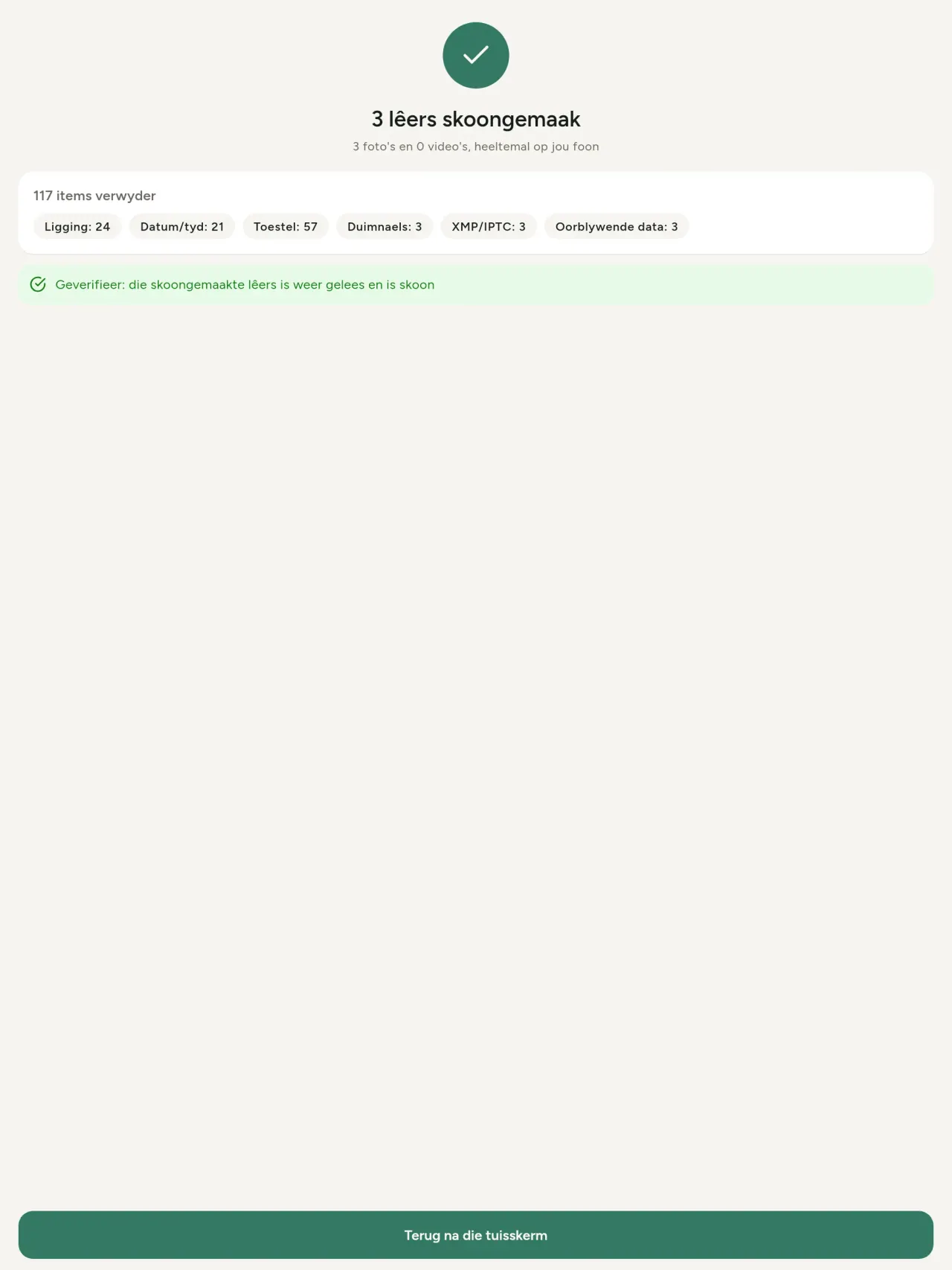
- Remove: clean metadata in a few taps, with a before and after view on the result screen.
- DNG photos are supported.
- Translations aligned across 91 languages.
Privacy policy
Die teks hieronder is in Engels. Die Engelse weergawe geld.
Last updated: 2026-11-18 · applies to version 1.1 and later
Policy versions: 1.1 and later (this text) · version 1.0 (still the policy of the app version 1.0). The version number of your app is shown at the bottom of its Settings screen.
Free Metadata Cleaner shows and removes the metadata hidden in your photos and videos (location, date and time, camera and lens details, thumbnails…). The short version: everything happens on your device, and we collect nothing.
What the app accesses
Your photo and video library, only after you grant permission (and, where your system requires it, the permission to read the location stored in your photos, so that it can be shown to you). The files you choose are read and cleaned on your device; the cleaned copy is saved to your library. If you choose to replace the originals, the system asks you to confirm before deleting them.
To show which photos are already clean, the app reads the metadata of the photos displayed on screen, on your device. This result is kept in memory only and is never stored.
What we collect
Nothing. No account, no analytics or usage tracking, no advertising or advertising identifiers, no crash or diagnostics reporting beyond what the app stores provide, and no third-party SDK that sends data anywhere. There is no Free Metadata Cleaner server. Cleaning a photo or video never uses the network, at all: turn on airplane mode and clean one to check for yourself. The only network request the app itself can ever make is described under “Location” below, and it only ever happens if you ask for it. The one other connection is the optional tip purchase, handled by the store (see “Optional support”).
Temporary files and history
The app keeps no history and no database. Temporary files created while cleaning are deleted after each item and purged when the app starts.
Deleted originals
Originals that are deleted remain in your system's trash (such as “Recently Deleted” or the trash) for about 30 days, with their metadata. The app cannot empty it: do it yourself if you need the originals gone at once.
iCloud and cloud photos
If a photo is stored in iCloud and not on your device, the operating system may download it before the app can process it. That transfer is made by the system, under the provider's own terms, not by the app.
Location
When a photo contains a location, the app shows the coordinates as text, which stays on your device. Three actions can send location information off your device, only when you choose them, each time: “Open in…” hands the coordinates to the maps application you select, under its own privacy policy; “Show the map” asks you to confirm first (“Showing the map sends this photo's position to a map service. Nothing else is sent.”), then loads a small map from OpenStreetMap for that one position; and, when you edit a photo's place, “Choose on the map” asks you to confirm first, then opens a full-screen map from OpenStreetMap. This map does not use your phone's location. As you move and zoom it, the app requests the map tiles of the area you are browsing, so OpenStreetMap receives the position of the area shown on screen, which starts on the photo's current place if it has one, and otherwise on a world view. The photo itself is never sent, and nothing is sent before you confirm. The place you choose on the map (or copy from another photo) is written into the photo's file only when you save, on your device. In every case OpenStreetMap receives, as with any web request, technical details like your IP address; it does not receive your name, an account, or anything else about you or your other photos. See OpenStreetMap's own privacy policy. Outside of these explicit actions, the app never sends a photo's location, or anything else, anywhere.
Optional support
The app is free. If you wish, you can leave a tip. On iPhone and in the Google Play version for Android, tips are in-app purchases processed by Apple or Google under their own terms and privacy policy; the app adds the Google Play billing permission for this, makes no network call itself, and receives no payment or personal details. Versions installed outside Google Play may instead open an external donation page in your browser, operated by a third party under its own privacy policy; nothing from the app is sent to it. A tip unlocks nothing.
Contact form on this website
If you write to us through this site, we use your message and the email address you optionally give only to reply. Bot protection is provided by Cloudflare and email delivery by Resend.
Language choice on this website
When you choose a language, or when this site opens a page in your browser's language, it stores
one small functional cookie (pxl, a language code, one year) so that your choice is
remembered. If this site suggests a page in your browser's language and you close that suggestion,
your browser also keeps a local note (pxl-banner-off, in local storage, 30 days) so the
suggestion does not come back. Neither identifies anyone, neither is used for tracking or advertising,
and neither is shared. You can delete them in your browser at any time.
Website statistics
This website uses Cloudflare Web Analytics to count visits (pages viewed, country, browser type, loading speed). It sets no cookie, does not use local storage, does not fingerprint your device, does not follow you across sites and does not build a profile of you. Search engines (for example Google Search Console) give us aggregated search statistics, without any data about individual visitors. Our own web server also counts the pages and APK downloads it serves: for each request it keeps the address, the site or social network that sent you (only its name, or the campaign tag written in the link), the country, the type of device and whether the request came from a robot. It keeps no IP address, no identifier and no cookie, and these counts are anonymous. We use no advertising or other analytics service. None of this concerns the app itself, which collects nothing.
Children
The app is a general-purpose tool and is not directed at children.
Changes
An updated policy will be published at this URL with a new date above.
Contact
Questions about privacy: metadata-cleaner-contact@pixeon.net
Weergawe 1.0
- App Store Gepubliseer
- Google Play Gepubliseer
Wat is nuut
Hierdie teks is in Engels.
- Cleans JPEG, HEIC, PNG, WebP, GIF, MP4, MOV and 3GP files, with no video re-encoding.
- "Safe to share" and "To clean" filters.
- New green design.
- Help screen with a FAQ.
- Settings: share, rate, feedback, unsupported formats.
- Optional tips.
Privacy policy, version 1.0
Die teks hieronder is in Engels. Die Engelse weergawe geld.
Applies to version 1.0 of the app (the first release). Later versions: current policy.
Free Metadata Cleaner shows and removes the metadata hidden in your photos and videos (location, date and time, camera and lens details, thumbnails…). The short version: everything happens on your device, and we collect nothing.
What the app accesses
Your photo and video library, only after you grant permission (and, where your system requires it, the permission to read the location stored in your photos, so that it can be shown to you). The files you choose are read and cleaned on your device; the cleaned copy is saved to your library. If you choose to replace the originals, the system asks you to confirm before deleting them.
To show which photos are already clean, the app reads the metadata of the photos displayed on screen, on your device. This result is kept in memory only and is never stored.
What we collect
Nothing. No account, no analytics or usage tracking, no advertising or advertising identifiers, no crash or diagnostics reporting beyond what the app stores provide, and no third-party SDK that sends data anywhere. There is no Free Metadata Cleaner server. Cleaning a photo or video never uses the network, at all: turn on airplane mode and clean one to check for yourself. The only network request the app itself can ever make is described under “Location” below, and it only ever happens if you ask for it. The one other connection is the optional tip purchase, handled by the store (see “Optional support”).
Temporary files and history
The app keeps no history and no database. Temporary files created while cleaning are deleted after each item and purged when the app starts.
Deleted originals
Originals that are deleted remain in your system's trash (such as “Recently Deleted” or the trash) for about 30 days, with their metadata. The app cannot empty it: do it yourself if you need the originals gone at once.
iCloud and cloud photos
If a photo is stored in iCloud and not on your device, the operating system may download it before the app can process it. That transfer is made by the system, under the provider's own terms, not by the app.
Location
When a photo contains a location, the app shows the coordinates as text, which stays on your device. Two actions send that one photo's position off your device, only when you choose them, each time: “Open in…” hands the coordinates to the maps application you select, under its own privacy policy; “Show the map” asks you to confirm first (“Showing the map sends this photo's position to a map service. Nothing else is sent.”), then loads a small map from OpenStreetMap for that one position. OpenStreetMap receives the coordinates and, as with any web request, technical details like your IP address; it does not receive your name, an account, or anything else about you or your other photos. See OpenStreetMap's own privacy policy. Outside of these two explicit actions, the app never sends a photo's location, or anything else, anywhere.
Optional support
The app is free. If you wish, you can leave a tip. On iPhone and in the Google Play version for Android, tips are in-app purchases processed by Apple or Google under their own terms and privacy policy; the app adds the Google Play billing permission for this, makes no network call itself, and receives no payment or personal details. Versions installed outside Google Play may instead open an external donation page in your browser, operated by a third party under its own privacy policy; nothing from the app is sent to it. A tip unlocks nothing.
Contact form on this website
If you write to us through this site, we use your message and the email address you optionally give only to reply. Bot protection is provided by Cloudflare and email delivery by Resend.
Language choice on this website
When you choose a language, or when this site opens a page in your browser's language, it stores
one small functional cookie (pxl, a language code, one year) so that your choice is
remembered. If this site suggests a page in your browser's language and you close that suggestion,
your browser also keeps a local note (pxl-banner-off, in local storage, 30 days) so the
suggestion does not come back. Neither identifies anyone, neither is used for tracking or advertising,
and neither is shared. You can delete them in your browser at any time.
Website statistics
This website uses Cloudflare Web Analytics to count visits (pages viewed, country, browser type, loading speed). It sets no cookie, does not use local storage, does not fingerprint your device, does not follow you across sites and does not build a profile of you. Search engines (for example Google Search Console) give us aggregated search statistics, without any data about individual visitors. Our own web server also counts the pages and APK downloads it serves: for each request it keeps the address, the site or social network that sent you (only its name, or the campaign tag written in the link), the country, the type of device and whether the request came from a robot. It keeps no IP address, no identifier and no cookie, and these counts are anonymous. We use no advertising or other analytics service. None of this concerns the app itself, which collects nothing.
Children
The app is a general-purpose tool and is not directed at children.
Changes
An updated policy will be published at this URL with a new date above.
Contact
Questions about privacy: metadata-cleaner-contact@pixeon.net
Credits
Android is a trademark of Google LLC. The Android robot is reproduced or modified from work created and shared by Google and used according to terms described in the Creative Commons 3.0 Attribution License. This site is not affiliated with or endorsed by Google.
Ondersteuning
Laas opgedateer: 2026-10-08
Free Metadata Cleaner is 'n klein onafhanklike app. Antwoorde op die mees algemene vrae is hieronder.
Ons doen ons bes om binne 'n paar dae te antwoord. Om ons te help, gee jou toestelmodel, sy stelselweergawe en wat jy gedoen het. Moet asseblief nie privaat foto's stuur nie.
Watter data word gestoor of gestuur?
Geen. Dit hou geen geskiedenis, het geen rekening of bediener nie. Besonderhede in die privaatheidsbeleid.
Hoe maak ek 'n foto skoon?
- Maak die app oop en gee toegang tot jou biblioteek wanneer daar gevra word.
- Kies die foto's of video's om skoon te maak.
- Kies wat om te verwyder, en of die oorspronklike vervang moet word of 'n skoon kopie geskep moet word.
- Bevestig. 'n Opsomming wys wat verwyder is en enige lêer wat nie verwerk kon word nie.
Waar gaan die skoongemaakte kopieë?
Na jou fotobiblioteek. Die biblioteekdatum van die oorspronklike word behou, so 'n skoongemaakte foto verskuif nie na bo in jou galery nie.
Ek het 'vervang oorspronklike' gekies maar die oorspronklike bestaan steeds.
Uitgevee oorspronklikes bly ongeveer 30 dae in die stelsel se asblik (soos 'Onlangs Uitgevee' of die asblik), met hul metadata. Maak die asblik leeg om hulle onmiddellik te verwyder. As jy die stelsel se uitvee-prompt afwys, word die oorspronklike behou en die skoongemaakte kopieë word steeds bygevoeg.
Watter lêers word ondersteun?
Foto's in JPEG, HEIC, AVIF, PNG, WebP en GIF, en video's in MP4, MOV en 3GP (meer formate word bygevoeg). 'n Lêer wat die app nie kan skoonmaak nie, word onaangeraak gelaat en in die opsomming gelys met die rede, sonder om die res van die bondel te stop.
Hoekom benodig die app toegang tot my foto's?
Om jou foto's te lys waarvan jy kan kies, en om die skoongemaakte kopieë te stoor. Waar jou stelsel dit vereis, vra die app ook vir die toestemming om die plek wat in foto's gestoor is te lees: sonder dit verberg die stelsel die plek, so die app kan jou nie wys wat 'n foto openbaar nie. Niks word opgelaai nie.
Hoe kan ek seker maak niks verlaat my foon nie?
Skakel vliegtuigmodus aan en maak 'n foto skoon: dit werk dieselfde. Die enigste uitsondering is die kaart: as jy 'Wys die kaart' op 'n foto se plek tik en bevestig, word daardie een posisie na OpenStreetMap gestuur om 'n kaart te vertoon, en niks anders nie. Sien 'Plek' hierbo.
Watter tale is beskikbaar?
Die app is beskikbaar in Engels, Frans, Duits, Spaans, Italiaans, Portugees en Arabies. Hierdie webwerf is beskikbaar in meer tale, en meer app-tale word bygevoeg.
Ondersteun die projek
Metadata Cleaner bly gratis en sonder advertensies. As dit vir jou nuttig is, kan jy die ontwikkeling ondersteun (opsioneel):
Buy Me a CoffeeBegroting en uitgawe tracker vir jou gesin, volledig vanlyn.
Ook van PixeonVaultMarkPlaaslike dokumentkluis: skandeerder, watermerk PDF en verwyder metadata.
Ook van PixeonLittle RelayBreastfeeding, sleep and starting solids tracker. No account, works offline.
Ook van PixeonMenuloopBeplan etes, maak inkopielys en ontdek resepte
Ook van PixeonIndie OfficeQuote maker and self-employed invoices. Offline, no account, no ads.