
Metadata Cleaner: عکس/ویدیو
نمایشگر EXIF، ویرایش و حذف فراداده عکس: مکان، تاریخ و دوربین


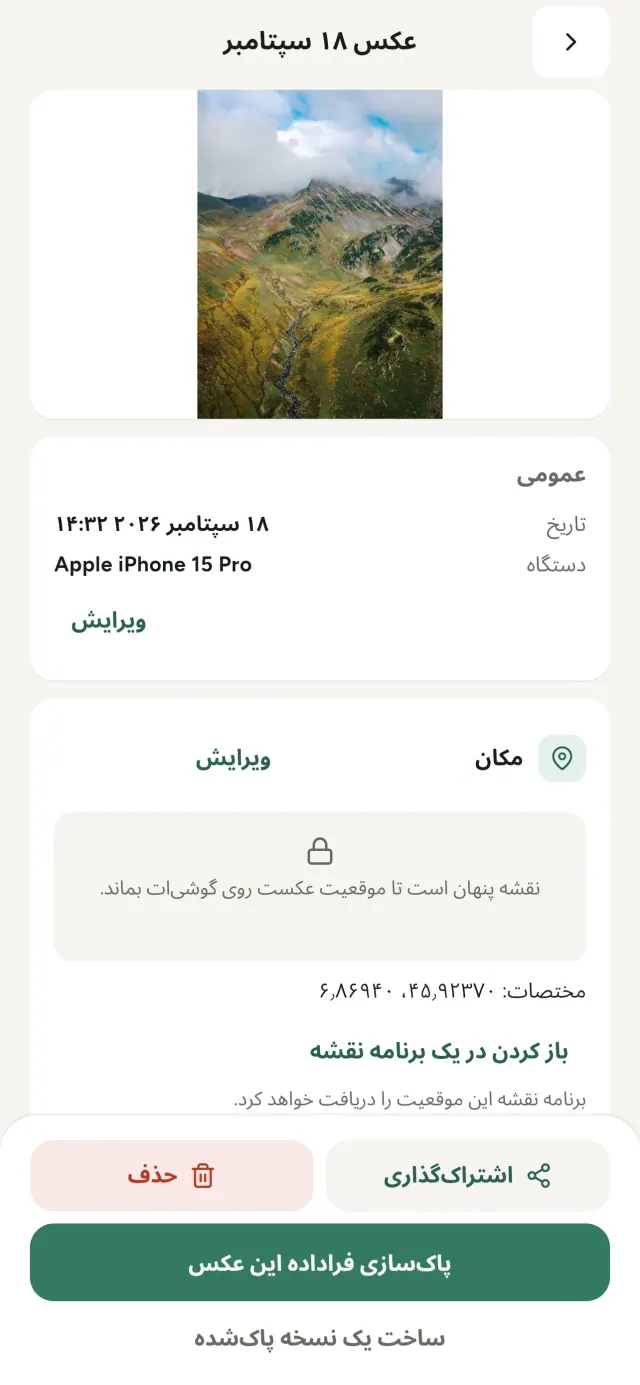
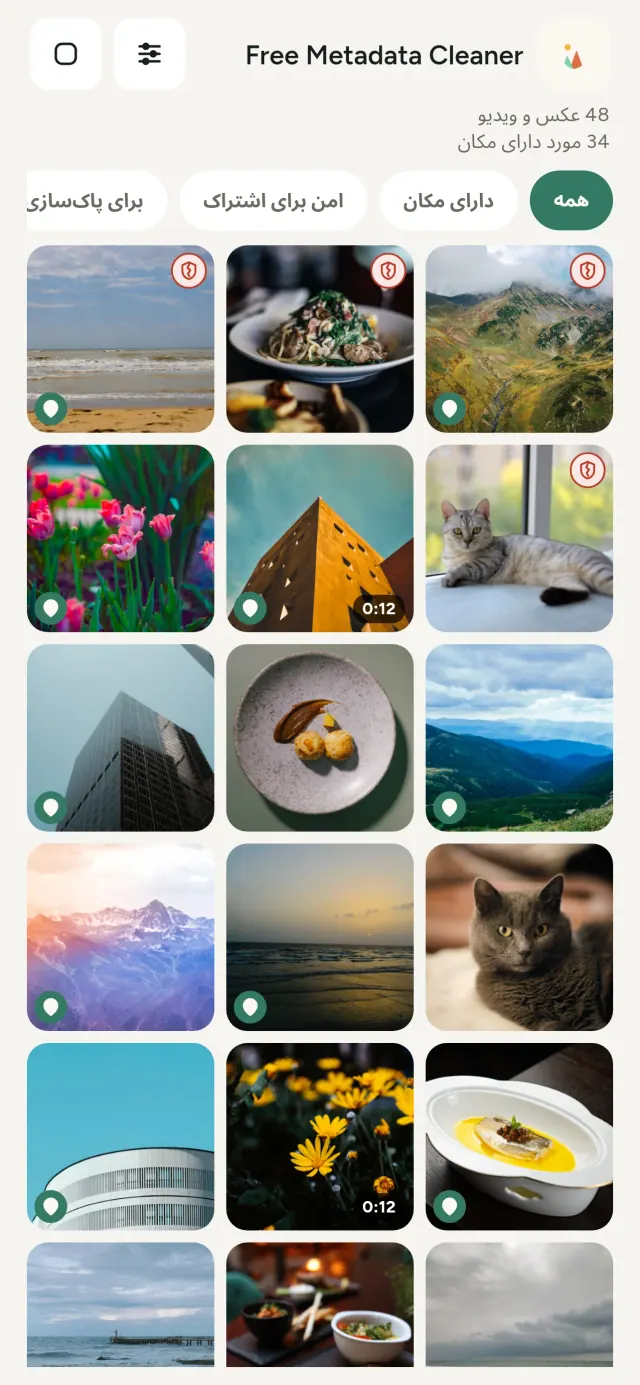
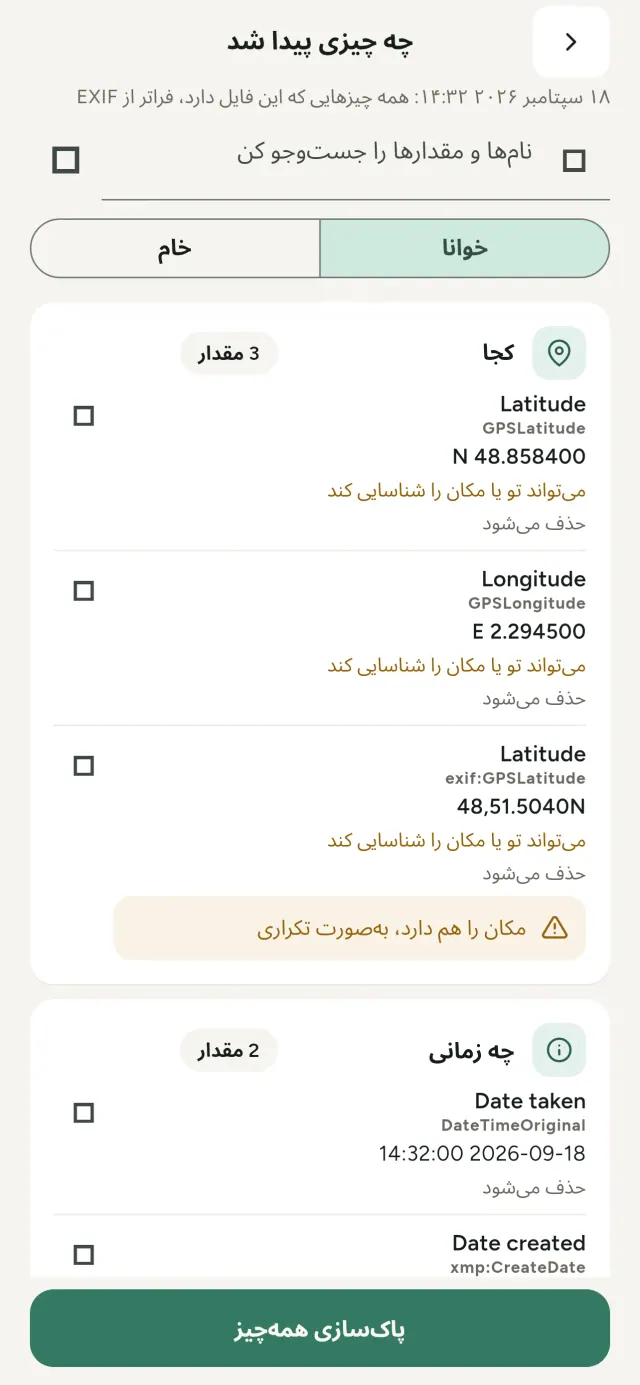
هر عکسی که میگیری اطلاعات پنهانی با خود دارد: کجا و کی گرفته شده، با کدام گوشی، گاهی حتی یک پیشنمایش کوچک از عکس اصلی. وقتی آن را به اشتراک میگذاری، همه اینها هم همراهش میرود.
Metadata Cleaner روی گوشی تو سه کار انجام میدهد: محتوای عکسها و ویدیوهایت را نشان میدهد، امکان اصلاح آن را میدهد و حذفش میکند.
Metadata Cleaner چه کاری انجام میدهد
خواندن
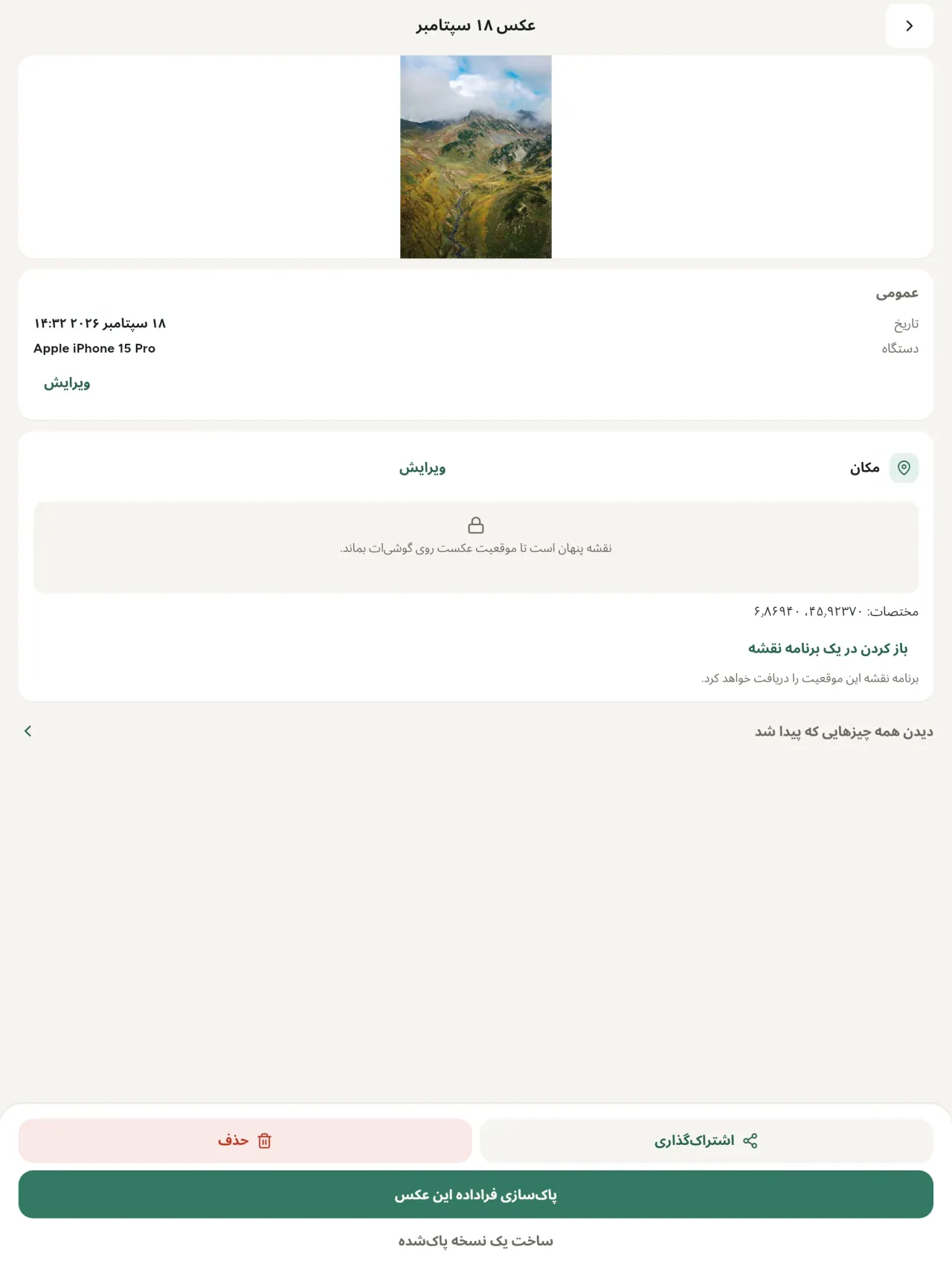
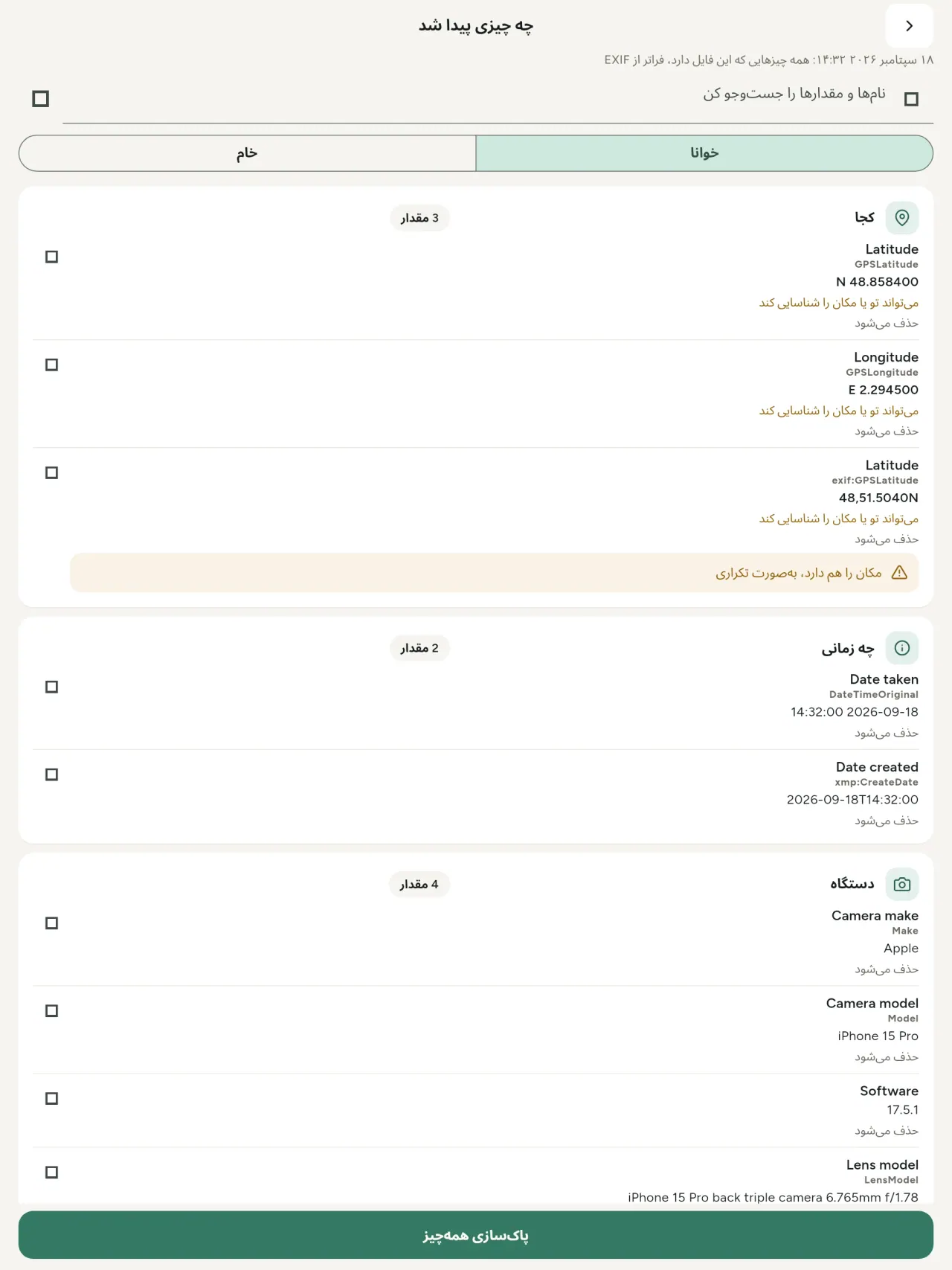
نمایشگر واقعی فراداده: همه مقدارهای پیداشده در عکس یا ویدیو (EXIF، IPTC، XMP، کدکهای ویدیو، مدتزمان و وضوح)، گروهبندیشده، قابل جستوجو و کپی، با مشخصکردن مواردی که حذف میشوند. منشأ هوش مصنوعی (C2PA، پارامترهای تولید) را هم تشخیص میدهد.
ویرایش
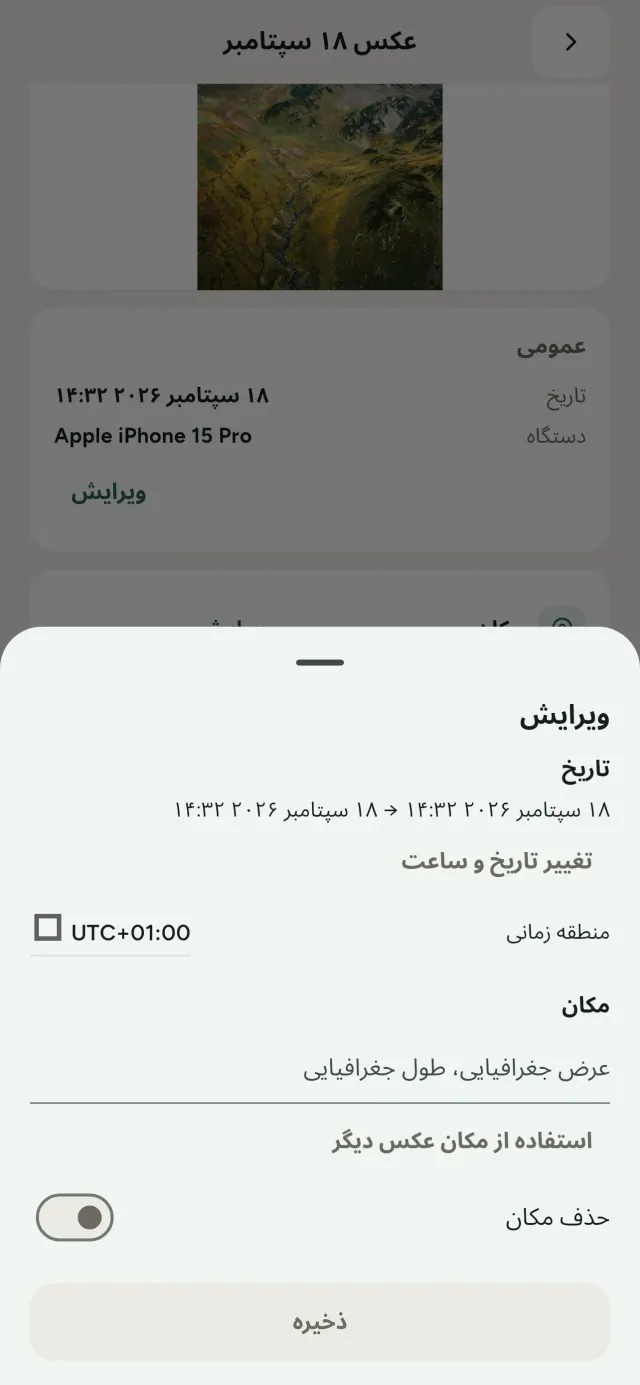
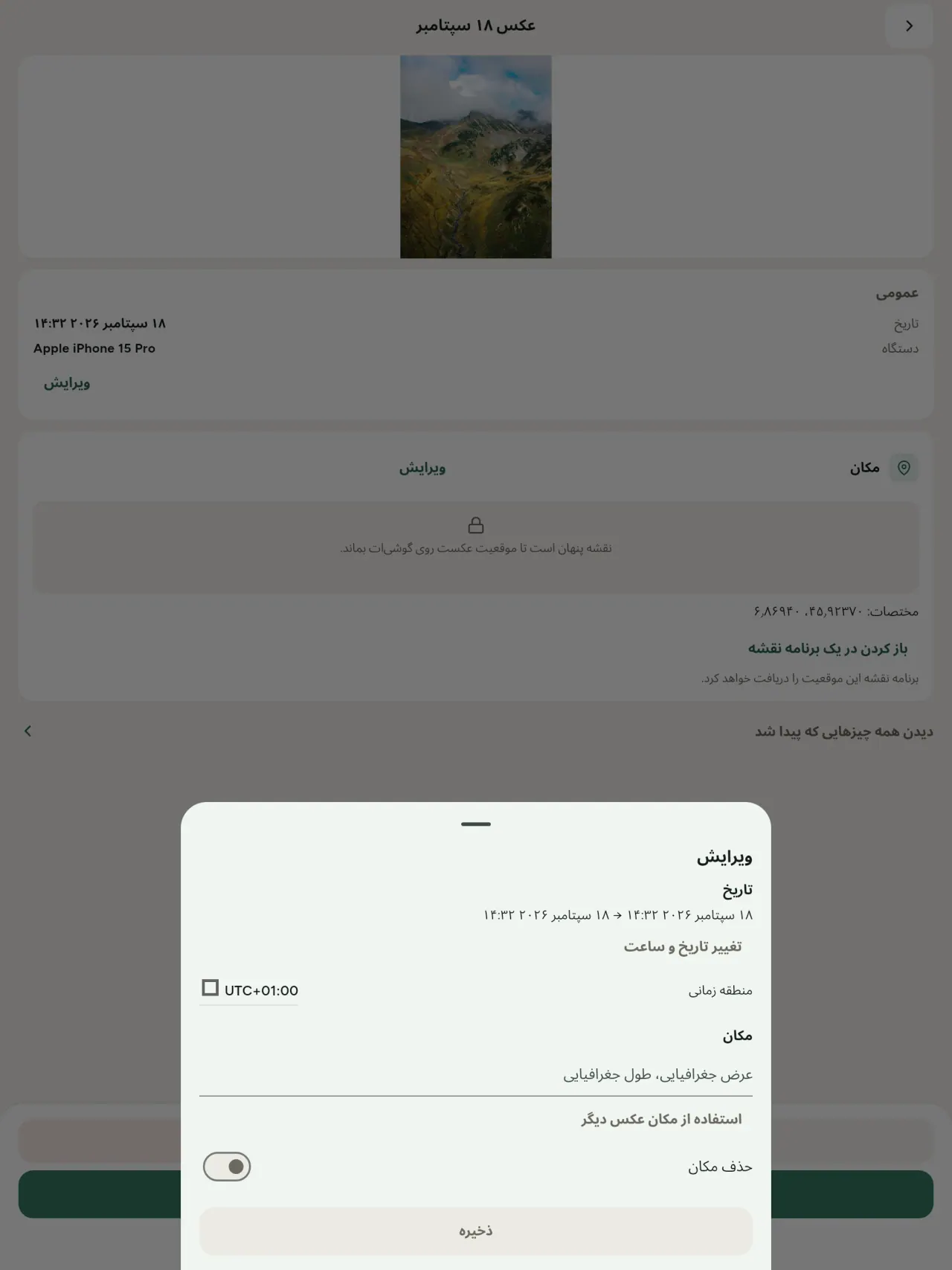
تاریخ و مکان عکس را تغییر بده یا جایگزین کن، حتی اگر اصلاً فراداده نداشته باشد. مکان را از عکس دیگری کپی کن یا روی نقشه انتخاب کن (هر بار اول میپرسد). قبل و بعد را مقایسه کن.
حذف
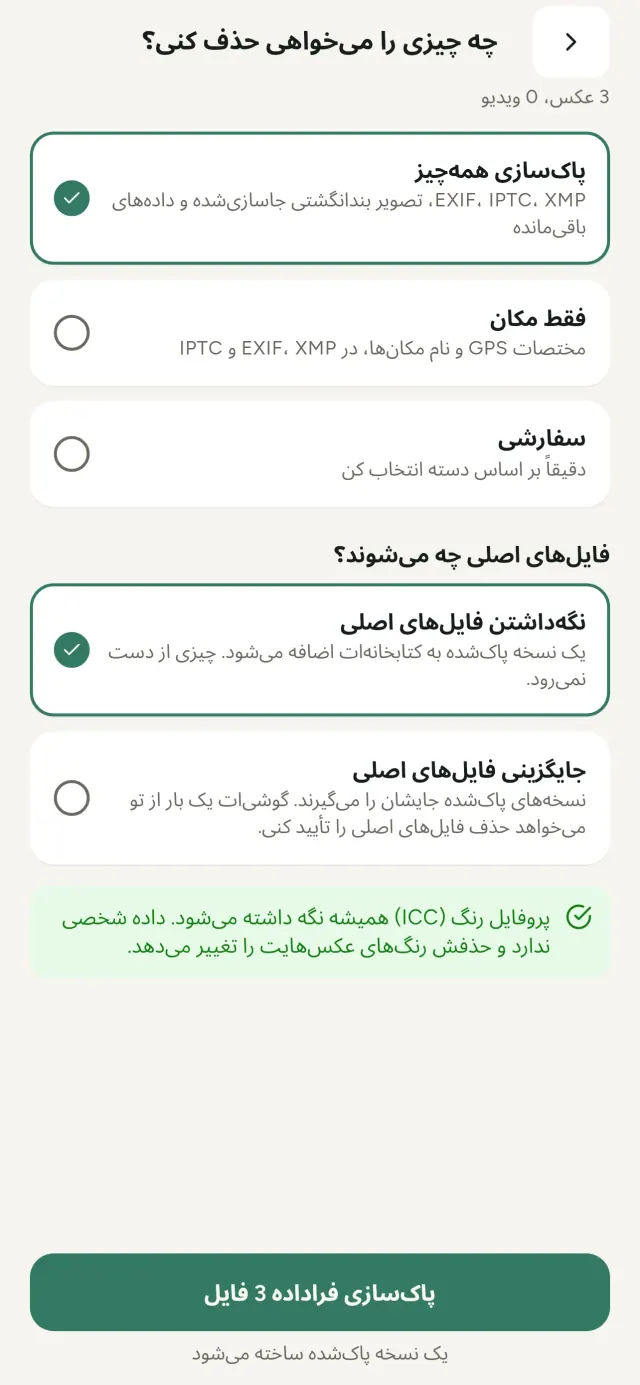
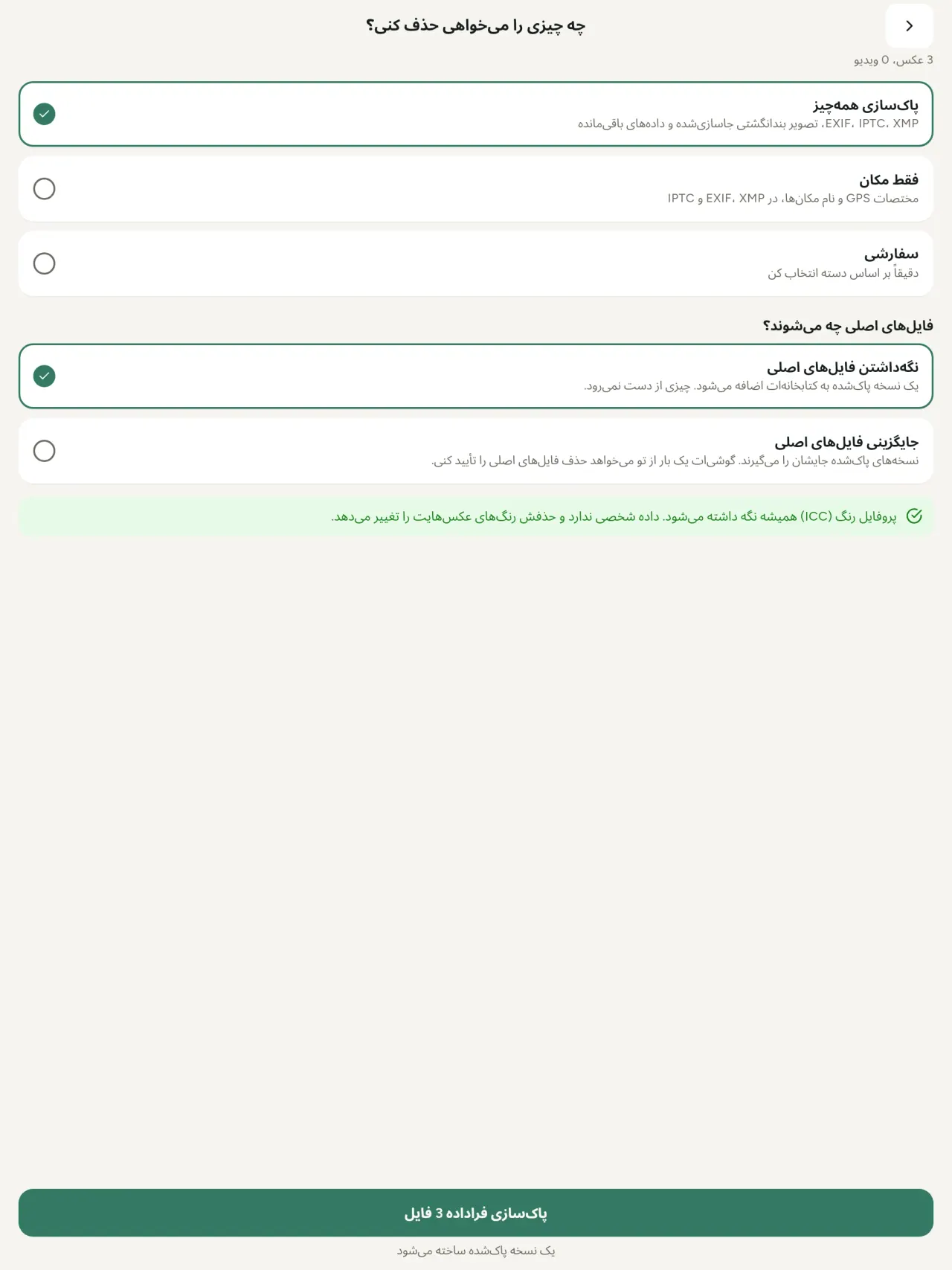
همهچیز، فقط مکان یا دستههای انتخابی تو: دادههای EXIF، IPTC و XMP، پیشنمایشهای جاسازیشده، یادداشتهای سازنده دوربین، منشأ هوش مصنوعی و بایتهای باقیماندهای که بعضی ابزارهای ویرایش پشت تصویر برشخورده میگذارند. یک انتخاب کامل را یکجا پاک کن و نسخههای اصلی را نگه دار یا جایگزین کن.
اشتراک امن با یک نگاه
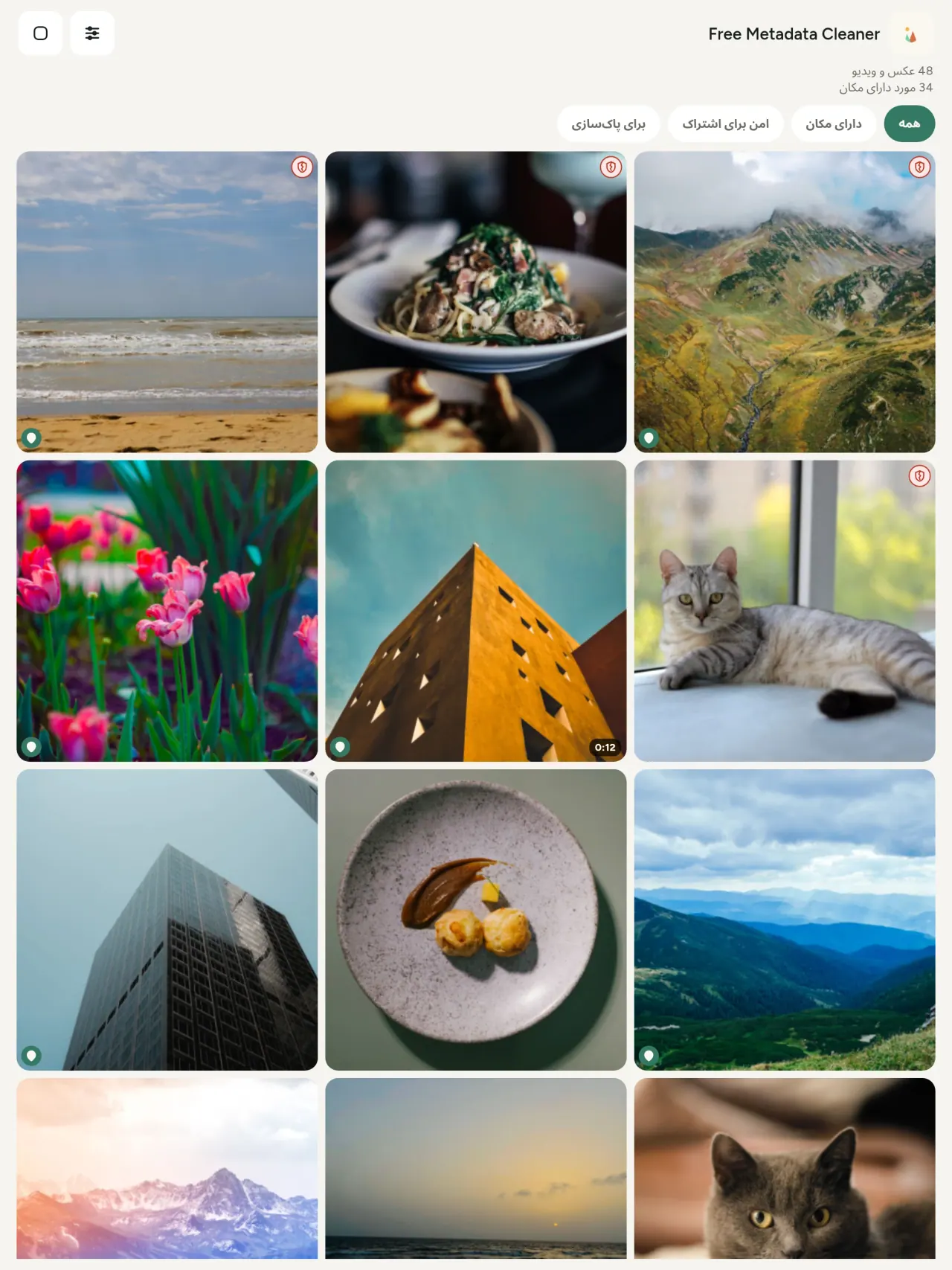
سپر سبز فایلهای بدون فراداده را نشان میدهد؛ سپر قرمز ترکخورده یعنی هنوز مقداری فراداده وجود دارد.
بدون افت کیفیت
تصاویر هرگز دوباره کدگذاری نمیشوند: خود تصویر دستنخورده میماند.
حریم خصوصی از پایه
عکسهایت روی دستگاه خودت خوانده، ویرایش و پاک میشوند. بدون حساب، تبلیغ و تحلیل. تنها استثنای اختیاری نقشه است: وقتی میخواهی مکان عکس را ببینی یا مکانی انتخاب کنی، برنامه هر بار اول میپرسد و بعد نقشه را از OpenStreetMap بارگیری میکند (عکس هرگز ارسال نمیشود).
رایگان و بدون تبلیغ
اگر برنامه به کارت آمد، میتوانی انعام اختیاری بدهی.
برای چه کسانی است
- هرکسی که میخواهد پیش از انتشار، فروش یا ارسال یک عکس بداند آن عکس چه چیزهایی را فاش میکند، مانند موقعیت GPS، تاریخ و دوربین.
- افرادی که در سایتهای آگهی فروش میفروشند و نمیخواهند محل زندگیشان را نشان دهند.
- والدین و هرکسی که میخواهد یک مکان حساس، مانند خانه، مدرسه یا محل کار، در عکسهای اشتراکیاش مشخص نباشد.
- روزنامهنگاران، کنشگران و افراد در معرض خطر که باید تصویری را بدون بر جا گذاشتن رد به اشتراک بگذارند.
- افرادی که از نشت داده خسته شدهاند و میخواهند کنترل اطلاعات شخصی همراه عکسهای خود را دوباره در دست بگیرند.
چرا Metadata Cleaner را انتخاب کنیم
- سه کار در یک برنامه: ببینید عکس یا ویدیو چه اطلاعاتی را نشان میدهد، آن را ویرایش کنید (تاریخ ثبت، مکان)، و تنها با چند ضربه متادیتا را حذف کنید.
- همهچیز روی گوشی انجام میشود. عکسهای شما به جایی ارسال نمیشوند.
- عکسها، JPEG، HEIC، PNG، WebP، GIF، و ویدیوها، MP4، MOV، 3GP.
اپ هنوز چه کارهایی انجام نمیدهد
- فقط قالبهای فهرستشده در بالا پشتیبانی میشوند. قالبهای بیشتری برنامهریزی شدهاند.
اصل Pixeon. اپهای Pixeon در درجه اول محلی هستند: بدون حساب کاربری، بدون ردیابی، و دادههای شما روی گوشیتان میمانند. اگر اپی زمانی به شبکه متصل شود، فقط وقتی است که خودتان انتخاب کنید قابلیت موردنیازتان را فعال کنید و پیش از انتشار آن، سیاست حریم خصوصی بهروزرسانی میشود.
Metadata Cleaner را در عمل ببینید.
Metadata Cleaner را دریافت کنید.
رایگان برای iPhone و Android.
SHA-256: A4:38:C9:B4:A9:3F:97:7B:E8:98:AD:B7:3B:30:5F:63:01:22:E0:D9:F8:CF:5D:2B:D7:4E:38:CB:9A:CF:5A:A2
نسخه 1.1
- App Store بهزودی
- Google Play بهزودی
چه چیز جدیدی وجود دارد
این متن به زبان انگلیسی است.
- Read: see exactly what a photo or video reveals (location, date, camera, AI provenance labels such as C2PA and generation parameters, video duration, codecs, resolution and frame rate).
- Edit: change the date a photo was taken and its location (JPEG, HEIC, AVIF), even on a photo with no metadata, reuse the location of another photo, or pick it on an OpenStreetMap map after your confirmation.
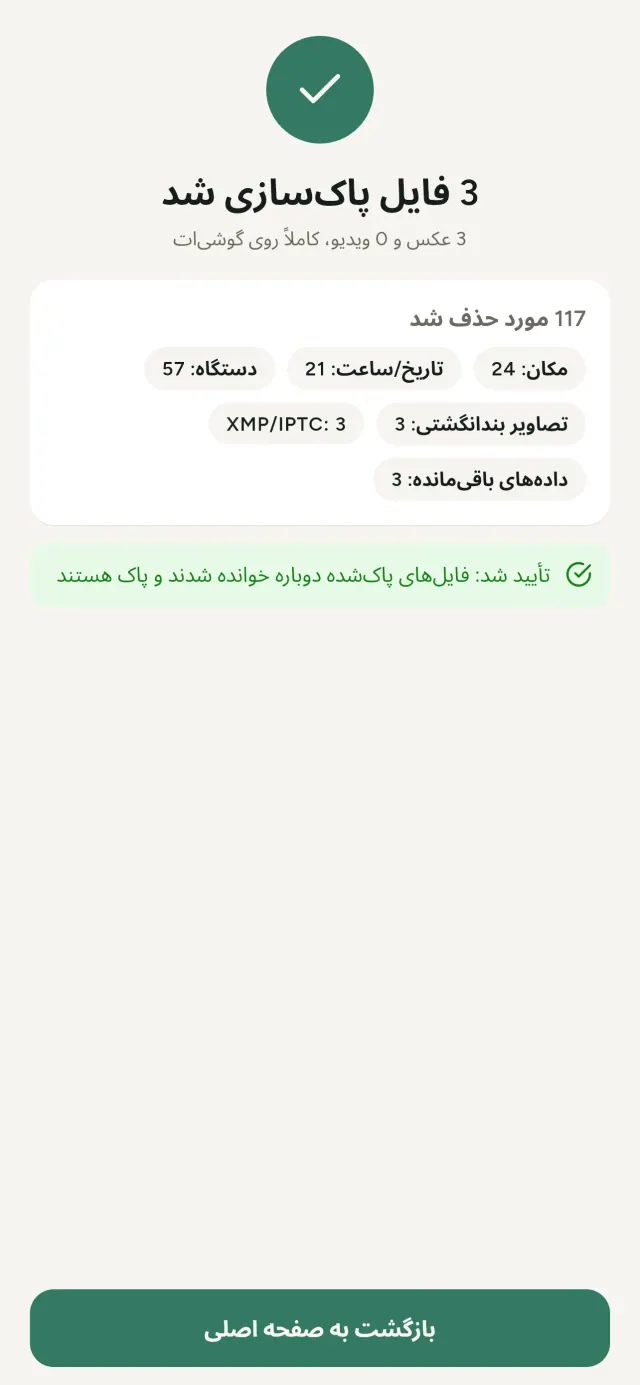
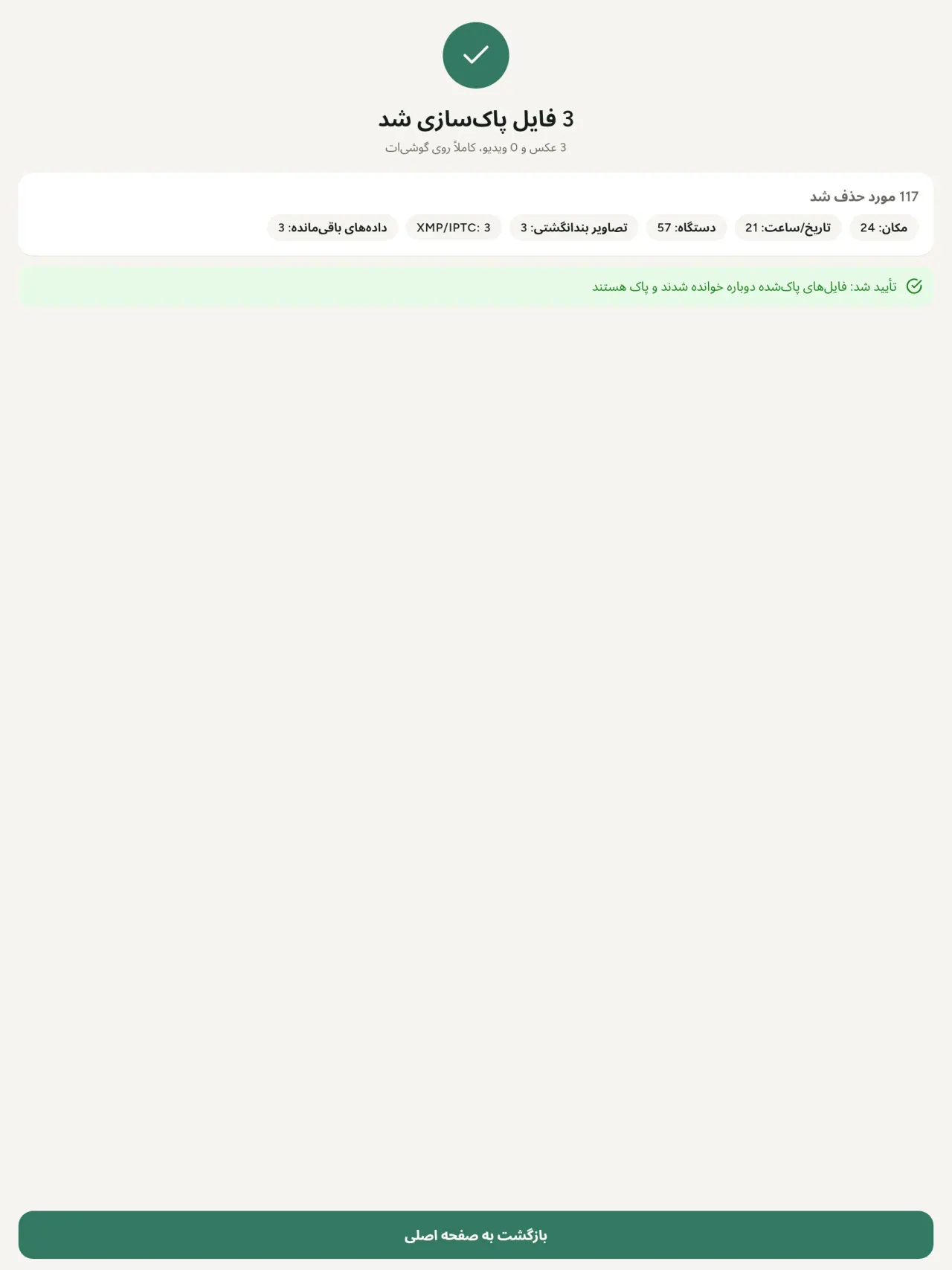
- Remove: clean metadata in a few taps, with a before and after view on the result screen.
- DNG photos are supported.
- Translations aligned across 91 languages.
Privacy policy
متن زیر به انگلیسی است. نسخه انگلیسی ملاک است.
Last updated: 2026-11-18 · applies to version 1.1 and later
Policy versions: 1.1 and later (this text) · version 1.0 (still the policy of the app version 1.0). The version number of your app is shown at the bottom of its Settings screen.
Free Metadata Cleaner shows and removes the metadata hidden in your photos and videos (location, date and time, camera and lens details, thumbnails…). The short version: everything happens on your device, and we collect nothing.
What the app accesses
Your photo and video library, only after you grant permission (and, where your system requires it, the permission to read the location stored in your photos, so that it can be shown to you). The files you choose are read and cleaned on your device; the cleaned copy is saved to your library. If you choose to replace the originals, the system asks you to confirm before deleting them.
To show which photos are already clean, the app reads the metadata of the photos displayed on screen, on your device. This result is kept in memory only and is never stored.
What we collect
Nothing. No account, no analytics or usage tracking, no advertising or advertising identifiers, no crash or diagnostics reporting beyond what the app stores provide, and no third-party SDK that sends data anywhere. There is no Free Metadata Cleaner server. Cleaning a photo or video never uses the network, at all: turn on airplane mode and clean one to check for yourself. The only network request the app itself can ever make is described under “Location” below, and it only ever happens if you ask for it. The one other connection is the optional tip purchase, handled by the store (see “Optional support”).
Temporary files and history
The app keeps no history and no database. Temporary files created while cleaning are deleted after each item and purged when the app starts.
Deleted originals
Originals that are deleted remain in your system's trash (such as “Recently Deleted” or the trash) for about 30 days, with their metadata. The app cannot empty it: do it yourself if you need the originals gone at once.
iCloud and cloud photos
If a photo is stored in iCloud and not on your device, the operating system may download it before the app can process it. That transfer is made by the system, under the provider's own terms, not by the app.
Location
When a photo contains a location, the app shows the coordinates as text, which stays on your device. Three actions can send location information off your device, only when you choose them, each time: “Open in…” hands the coordinates to the maps application you select, under its own privacy policy; “Show the map” asks you to confirm first (“Showing the map sends this photo's position to a map service. Nothing else is sent.”), then loads a small map from OpenStreetMap for that one position; and, when you edit a photo's place, “Choose on the map” asks you to confirm first, then opens a full-screen map from OpenStreetMap. This map does not use your phone's location. As you move and zoom it, the app requests the map tiles of the area you are browsing, so OpenStreetMap receives the position of the area shown on screen, which starts on the photo's current place if it has one, and otherwise on a world view. The photo itself is never sent, and nothing is sent before you confirm. The place you choose on the map (or copy from another photo) is written into the photo's file only when you save, on your device. In every case OpenStreetMap receives, as with any web request, technical details like your IP address; it does not receive your name, an account, or anything else about you or your other photos. See OpenStreetMap's own privacy policy. Outside of these explicit actions, the app never sends a photo's location, or anything else, anywhere.
Optional support
The app is free. If you wish, you can leave a tip. On iPhone and in the Google Play version for Android, tips are in-app purchases processed by Apple or Google under their own terms and privacy policy; the app adds the Google Play billing permission for this, makes no network call itself, and receives no payment or personal details. Versions installed outside Google Play may instead open an external donation page in your browser, operated by a third party under its own privacy policy; nothing from the app is sent to it. A tip unlocks nothing.
Contact form on this website
If you write to us through this site, we use your message and the email address you optionally give only to reply. Bot protection is provided by Cloudflare and email delivery by Resend.
Language choice on this website
When you choose a language, or when this site opens a page in your browser's language, it stores
one small functional cookie (pxl, a language code, one year) so that your choice is
remembered. If this site suggests a page in your browser's language and you close that suggestion,
your browser also keeps a local note (pxl-banner-off, in local storage, 30 days) so the
suggestion does not come back. Neither identifies anyone, neither is used for tracking or advertising,
and neither is shared. You can delete them in your browser at any time.
Website statistics
This website uses Cloudflare Web Analytics to count visits (pages viewed, country, browser type, loading speed). It sets no cookie, does not use local storage, does not fingerprint your device, does not follow you across sites and does not build a profile of you. Search engines (for example Google Search Console) give us aggregated search statistics, without any data about individual visitors. Our own web server also counts the pages and APK downloads it serves: for each request it keeps the address, the site or social network that sent you (only its name, or the campaign tag written in the link), the country, the type of device and whether the request came from a robot. It keeps no IP address, no identifier and no cookie, and these counts are anonymous. We use no advertising or other analytics service. None of this concerns the app itself, which collects nothing.
Children
The app is a general-purpose tool and is not directed at children.
Changes
An updated policy will be published at this URL with a new date above.
Contact
Questions about privacy: metadata-cleaner-contact@pixeon.net
نسخه 1.0
- App Store منتشرشده
- Google Play منتشرشده
چه چیز جدیدی وجود دارد
این متن به زبان انگلیسی است.
- Cleans JPEG, HEIC, PNG, WebP, GIF, MP4, MOV and 3GP files, with no video re-encoding.
- "Safe to share" and "To clean" filters.
- New green design.
- Help screen with a FAQ.
- Settings: share, rate, feedback, unsupported formats.
- Optional tips.
Privacy policy, version 1.0
متن زیر به انگلیسی است. نسخه انگلیسی ملاک است.
Applies to version 1.0 of the app (the first release). Later versions: current policy.
Free Metadata Cleaner shows and removes the metadata hidden in your photos and videos (location, date and time, camera and lens details, thumbnails…). The short version: everything happens on your device, and we collect nothing.
What the app accesses
Your photo and video library, only after you grant permission (and, where your system requires it, the permission to read the location stored in your photos, so that it can be shown to you). The files you choose are read and cleaned on your device; the cleaned copy is saved to your library. If you choose to replace the originals, the system asks you to confirm before deleting them.
To show which photos are already clean, the app reads the metadata of the photos displayed on screen, on your device. This result is kept in memory only and is never stored.
What we collect
Nothing. No account, no analytics or usage tracking, no advertising or advertising identifiers, no crash or diagnostics reporting beyond what the app stores provide, and no third-party SDK that sends data anywhere. There is no Free Metadata Cleaner server. Cleaning a photo or video never uses the network, at all: turn on airplane mode and clean one to check for yourself. The only network request the app itself can ever make is described under “Location” below, and it only ever happens if you ask for it. The one other connection is the optional tip purchase, handled by the store (see “Optional support”).
Temporary files and history
The app keeps no history and no database. Temporary files created while cleaning are deleted after each item and purged when the app starts.
Deleted originals
Originals that are deleted remain in your system's trash (such as “Recently Deleted” or the trash) for about 30 days, with their metadata. The app cannot empty it: do it yourself if you need the originals gone at once.
iCloud and cloud photos
If a photo is stored in iCloud and not on your device, the operating system may download it before the app can process it. That transfer is made by the system, under the provider's own terms, not by the app.
Location
When a photo contains a location, the app shows the coordinates as text, which stays on your device. Two actions send that one photo's position off your device, only when you choose them, each time: “Open in…” hands the coordinates to the maps application you select, under its own privacy policy; “Show the map” asks you to confirm first (“Showing the map sends this photo's position to a map service. Nothing else is sent.”), then loads a small map from OpenStreetMap for that one position. OpenStreetMap receives the coordinates and, as with any web request, technical details like your IP address; it does not receive your name, an account, or anything else about you or your other photos. See OpenStreetMap's own privacy policy. Outside of these two explicit actions, the app never sends a photo's location, or anything else, anywhere.
Optional support
The app is free. If you wish, you can leave a tip. On iPhone and in the Google Play version for Android, tips are in-app purchases processed by Apple or Google under their own terms and privacy policy; the app adds the Google Play billing permission for this, makes no network call itself, and receives no payment or personal details. Versions installed outside Google Play may instead open an external donation page in your browser, operated by a third party under its own privacy policy; nothing from the app is sent to it. A tip unlocks nothing.
Contact form on this website
If you write to us through this site, we use your message and the email address you optionally give only to reply. Bot protection is provided by Cloudflare and email delivery by Resend.
Language choice on this website
When you choose a language, or when this site opens a page in your browser's language, it stores
one small functional cookie (pxl, a language code, one year) so that your choice is
remembered. If this site suggests a page in your browser's language and you close that suggestion,
your browser also keeps a local note (pxl-banner-off, in local storage, 30 days) so the
suggestion does not come back. Neither identifies anyone, neither is used for tracking or advertising,
and neither is shared. You can delete them in your browser at any time.
Website statistics
This website uses Cloudflare Web Analytics to count visits (pages viewed, country, browser type, loading speed). It sets no cookie, does not use local storage, does not fingerprint your device, does not follow you across sites and does not build a profile of you. Search engines (for example Google Search Console) give us aggregated search statistics, without any data about individual visitors. Our own web server also counts the pages and APK downloads it serves: for each request it keeps the address, the site or social network that sent you (only its name, or the campaign tag written in the link), the country, the type of device and whether the request came from a robot. It keeps no IP address, no identifier and no cookie, and these counts are anonymous. We use no advertising or other analytics service. None of this concerns the app itself, which collects nothing.
Children
The app is a general-purpose tool and is not directed at children.
Changes
An updated policy will be published at this URL with a new date above.
Contact
Questions about privacy: metadata-cleaner-contact@pixeon.net
Credits
Android is a trademark of Google LLC. The Android robot is reproduced or modified from work created and shared by Google and used according to terms described in the Creative Commons 3.0 Attribution License. This site is not affiliated with or endorsed by Google.
پشتیبانی
آخرین بهروزرسانی: 2026-10-08
Free Metadata Cleaner یک برنامه مستقل و کوچک است. پاسخ رایجترین پرسشها در زیر آمده است.
ما تمام تلاش خود را میکنیم تا ظرف چند روز پاسخ دهیم. برای کمک به ما، مدل دستگاه، نسخه سیستم و کاری را که انجام میدادید بگویید. لطفاً عکسهای خصوصی ارسال نکنید.
برنامه چه دادهای ذخیره یا ارسال میکند؟
هیچ دادهای. برنامه هیچ سابقه، حساب یا سروری ندارد. جزئیات در سیاست حفظ حریم خصوصی آمده است.
چطور یک عکس را پاکسازی کنم؟
- برنامه را باز کنید و هنگام درخواست، اجازه دسترسی به گالری خود را بدهید.
- عکسها یا ویدیوهایی را که میخواهید پاکسازی کنید انتخاب کنید.
- مواردی را که باید حذف شوند و اینکه اصل فایلها جایگزین شوند یا یک نسخه پاکسازیشده ساخته شود، انتخاب کنید.
- تأیید کنید. خلاصهای نشان میدهد چه چیزهایی حذف شدهاند و کدام فایل قابل پردازش نبوده است.
نسخههای پاکسازیشده کجا میروند؟
به گالری عکس شما. تاریخ فایل اصلی در گالری حفظ میشود، بنابراین عکس پاکسازیشده به بالای گالری منتقل نمیشود.
گزینه «جایگزینی اصل فایلها» را انتخاب کردم، اما اصل فایلها هنوز وجود دارند.
اصل فایلهای حذفشده حدود ۳۰ روز همراه با فرادادههایشان در سطل زباله سیستم، مانند «حذفشدههای اخیر» یا سطل زباله، میمانند. برای حذف فوری آنها سطل زباله را خالی کنید. اگر درخواست حذف سیستم را رد کنید، اصل فایلها نگه داشته میشوند و نسخههای پاکسازیشده همچنان اضافه میشوند.
چه فایلهایی پشتیبانی میشوند؟
عکسهای JPEG، HEIC، AVIF، PNG، WebP و GIF، و ویدیوهای MP4، MOV و 3GP، و قالبهای بیشتری نیز در حال اضافه شدن هستند. فایلی که برنامه نمیتواند پاکسازی کند بدون تغییر باقی میماند و همراه با دلیل در خلاصه فهرست میشود، بدون آنکه ادامه پردازش گروه متوقف شود.
چرا برنامه به دسترسی به عکسهایم نیاز دارد؟
برای فهرست کردن عکسهایی که میتوانید انتخاب کنید و ذخیره نسخههای پاکسازیشده. هر جا سیستم شما لازم بداند، برنامه اجازه خواندن موقعیت ذخیرهشده در عکسها را نیز درخواست میکند: بدون این اجازه سیستم موقعیت را پنهان میکند و برنامه نمیتواند آنچه را که یک عکس آشکار میکند به شما نشان دهد. هیچ چیزی آپلود نمیشود.
چطور بررسی کنم چیزی از گوشیام خارج نمیشود؟
حالت هواپیما را روشن کنید و یک عکس را پاکسازی کنید: عملکرد همان است. تنها استثنا نقشه است: اگر روی «نمایش نقشه» برای موقعیت یک عکس بزنید و تأیید کنید، همان یک موقعیت برای نمایش نقشه به OpenStreetMap فرستاده میشود و چیز دیگری ارسال نمیشود. بخش «موقعیت» را در بالا ببینید.
چه زبانهایی در دسترس هستند؟
برنامه به زبانهای انگلیسی، فرانسوی، آلمانی، اسپانیایی، ایتالیایی، پرتغالی و عربی در دسترس است. این وبسایت به زبانهای بیشتری در دسترس است و زبانهای بیشتری برای برنامه نیز در راه هستند.
حمایت از پروژه
Metadata Cleaner رایگان و بدون تبلیغ میماند. اگر برایتان مفید است، میتوانید از توسعه آن حمایت کنید (اختیاری):
Buy Me a Coffeeمدیریت هزینه و بودجه خانوادگی، ساده و همیشه در دسترس، حتی آفلاین.
محصول دیگری از PixeonVaultMarkگاوصندوق اسناد محلی: اسکنر، واترمارک و حذف متادیتا پیش از ارسال PDF.
محصول دیگری از PixeonLittle RelayBreastfeeding, sleep and starting solids tracker. No account, works offline.
محصول دیگری از PixeonMenuloopMenuLoop: برنامهریزی غذا و خرید هفتگی به سادگی.
محصول دیگری از PixeonIndie OfficeQuote maker and self-employed invoices. Offline, no account, no ads.