
Metadata Cleaner · фото/видео
метаданные фото, exif и exif viewer: безопасно очистите геолокацию фото.

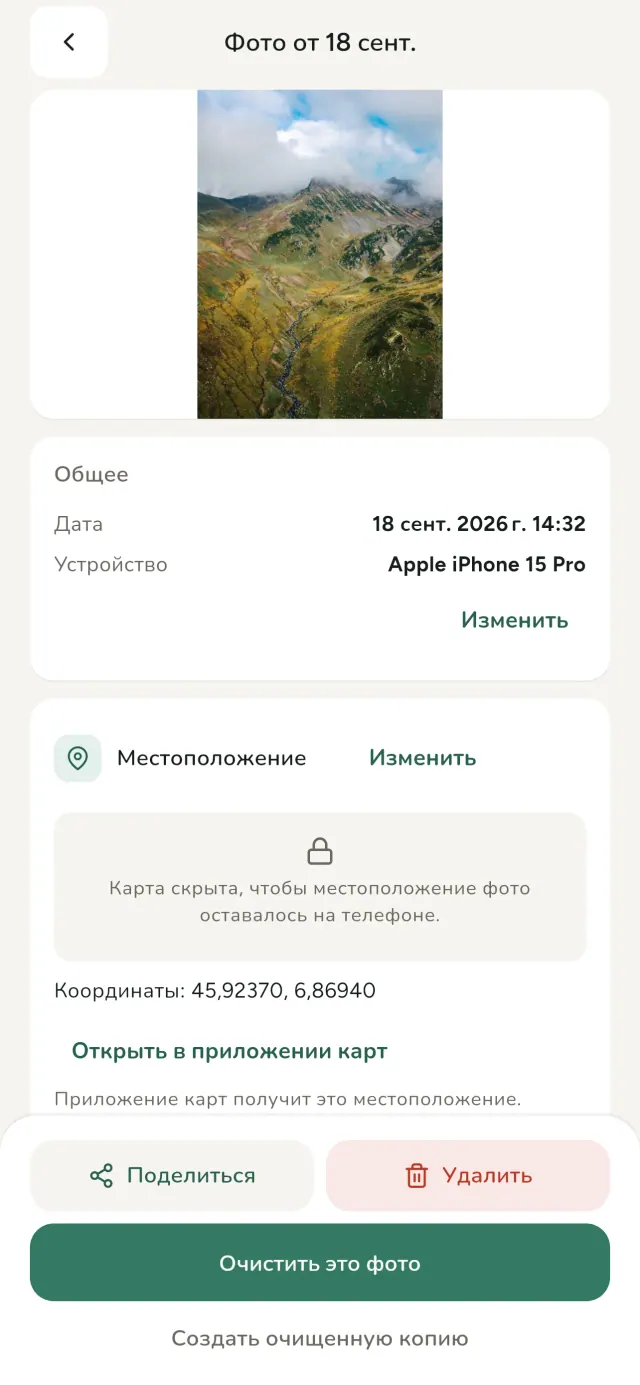
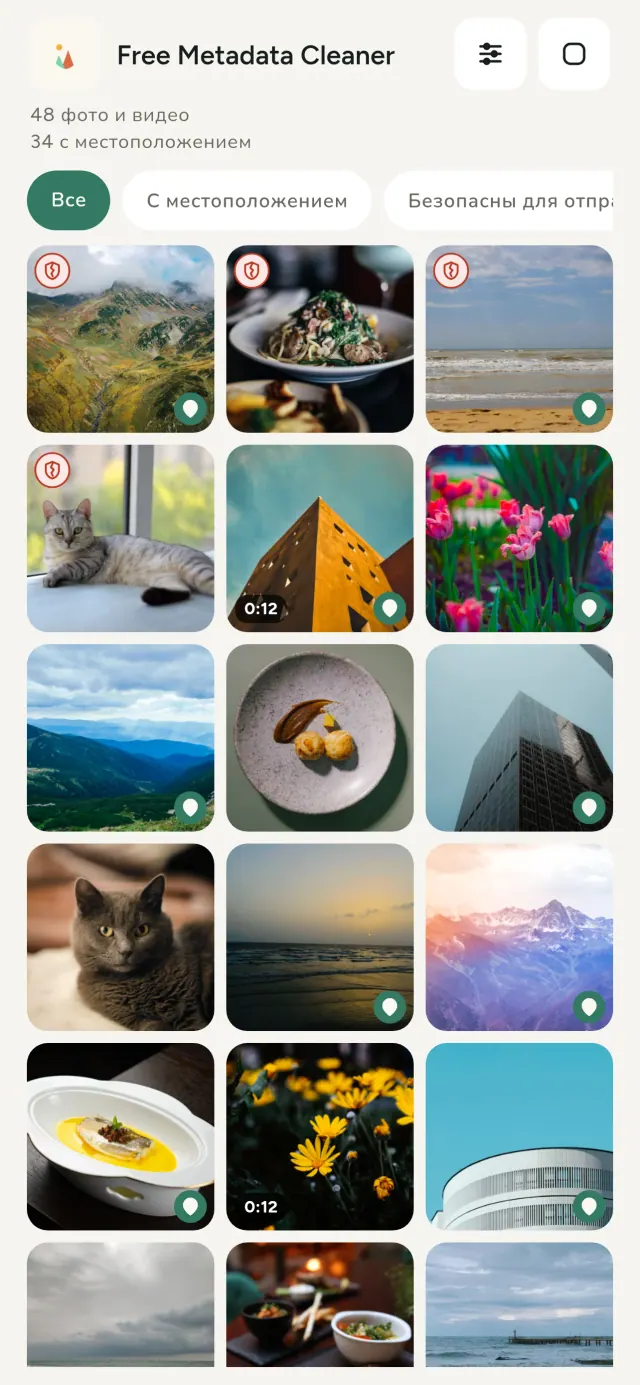
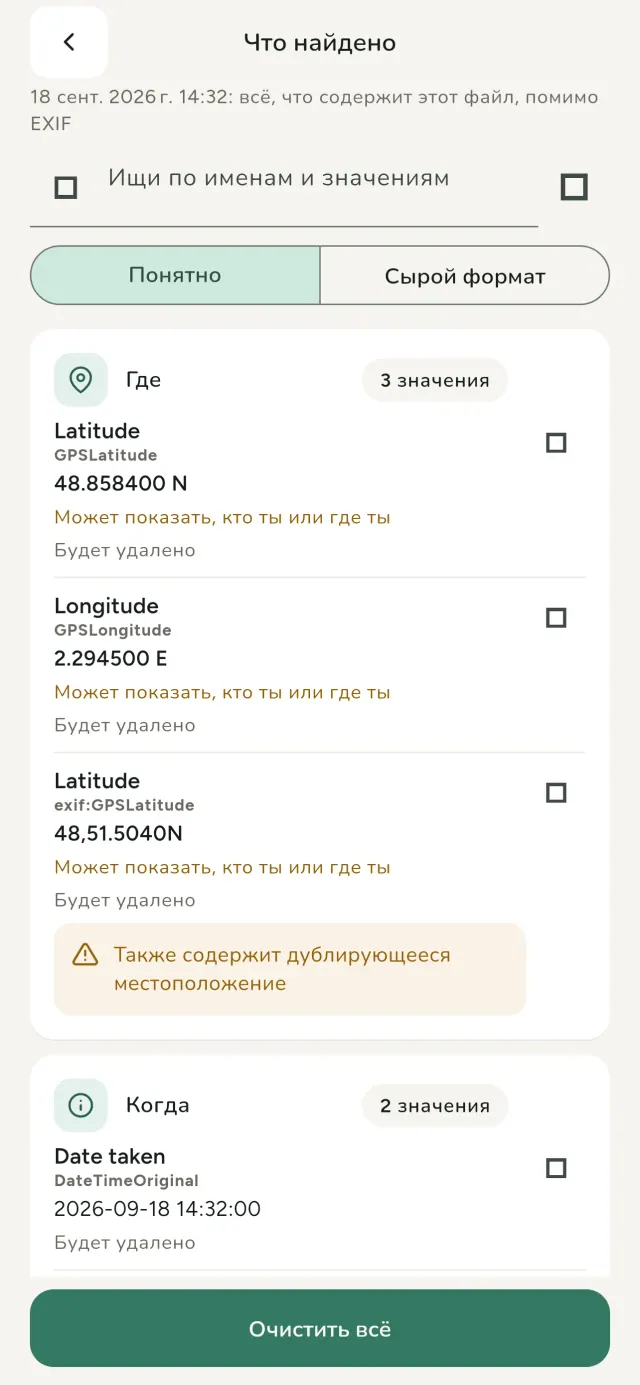
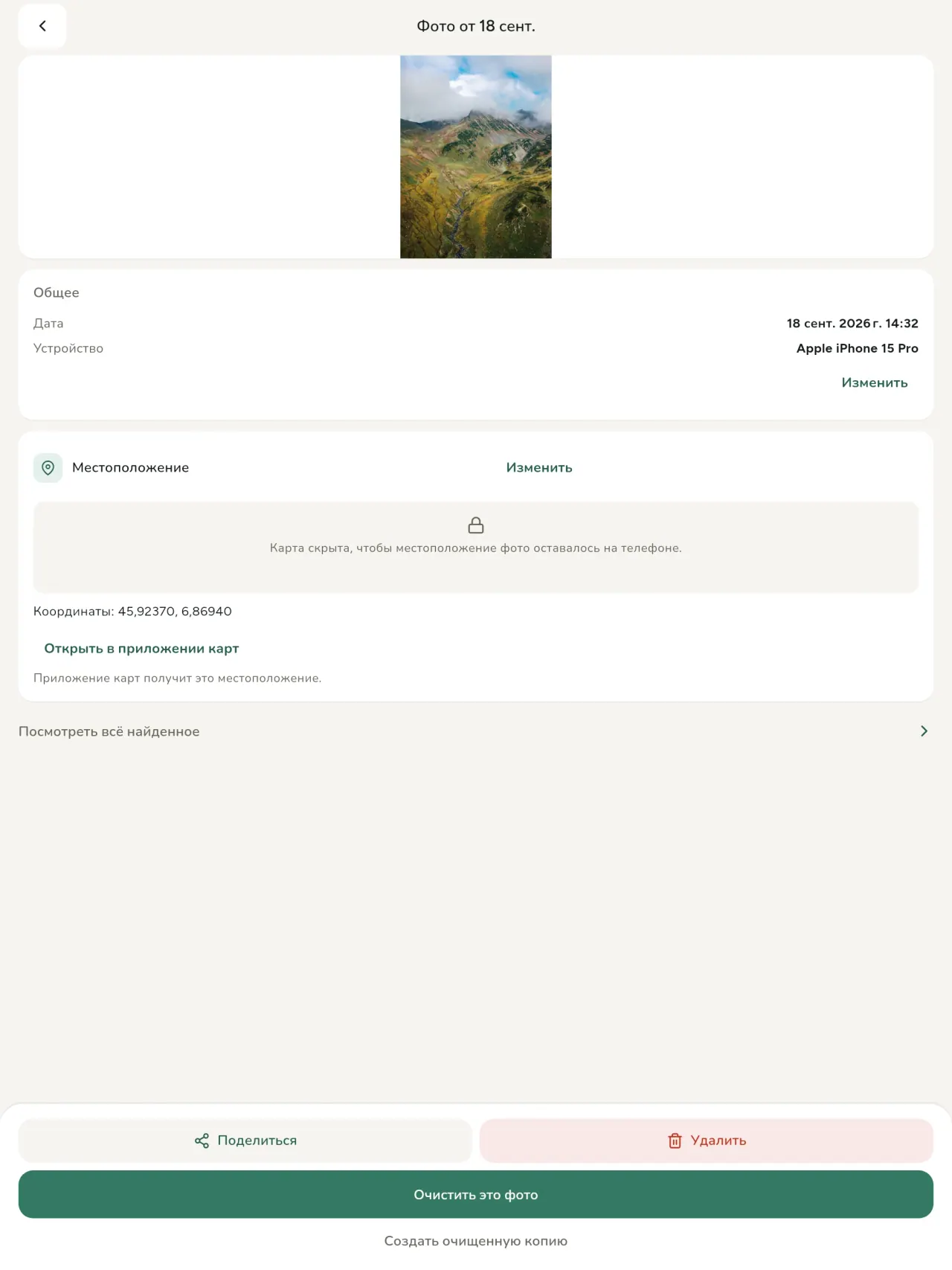
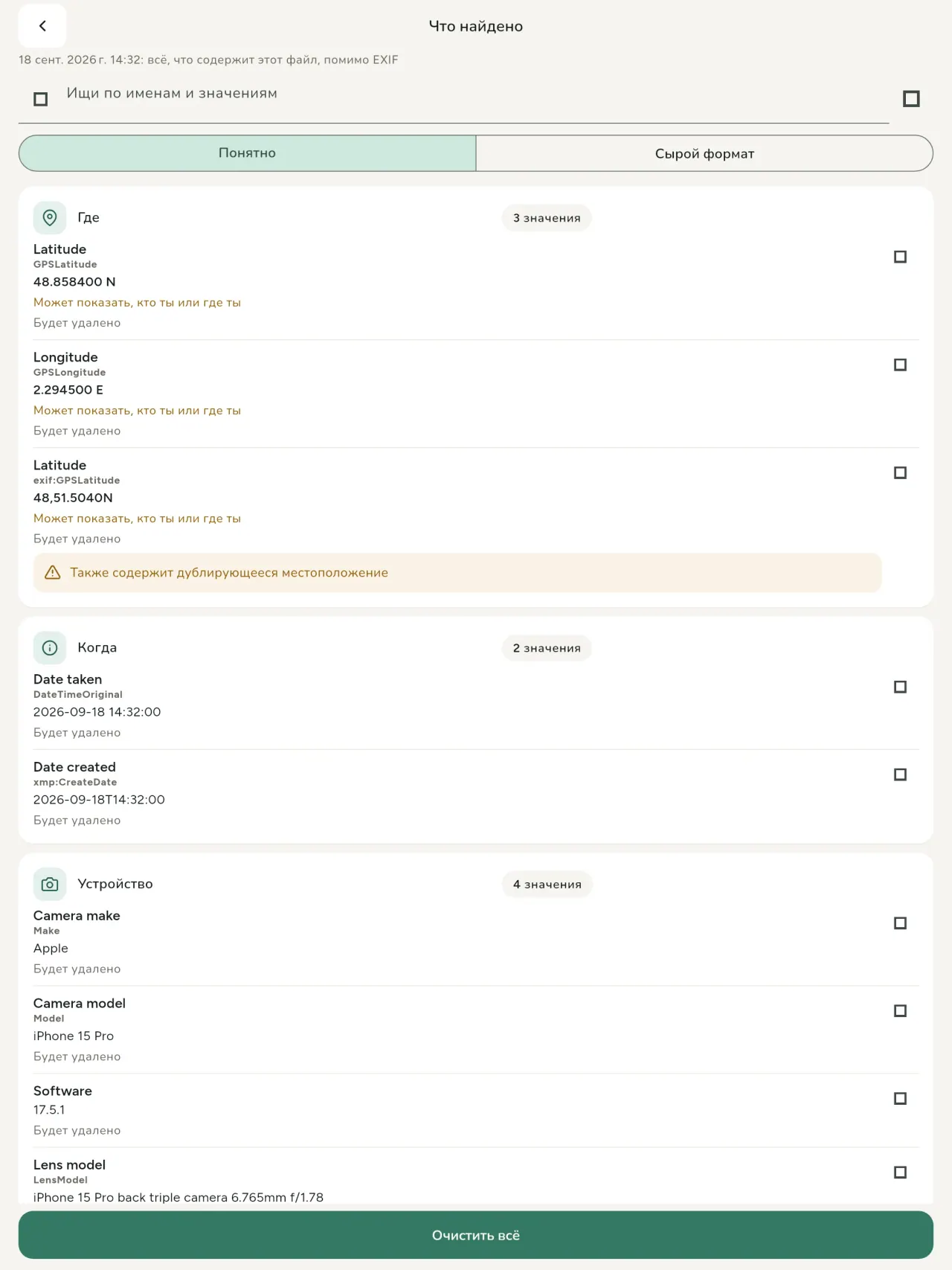
Каждое фото и видео содержит скрытые данные: где и когда снято, каким телефоном, иногда миниатюру исходного кадра. При отправке всё это уходит вместе с файлом.
Metadata Cleaner показывает photo metadata, помогает исправить их и очищает прямо на телефоне.
Помогает удалить геолокацию дома перед продажей, безопасно делиться в соцсетях и исправлять неверную дату или геолокацию.
Вопросы: можно ли удалить или исправить gps на JPEG, HEIC и AVIF? Да. Чтение, редактирование и очистка работают офлайн; онлайн загружается только подтверждённая карта. Оригиналы можно сохранить или заменить.
Поддерживаются JPEG, HEIC, AVIF, DNG, PNG, WebP и GIF, а также видео MP4, MOV и 3GP.
Три инструмента в одном: exif viewer, редактор и photo metadata remover. Ваша приватность остаётся на телефоне.
Всё в одном: метаданные фото, геолокация фото и EXIF viewer. Читайте, правьте и удаляйте на своём телефоне.
Что делает Metadata Cleaner
Читайте
Это exif viewer: он показывает каждое значение EXIF, IPTC, XMP, кодеков, длительности и разрешения фото и видео. Данные происхождения AI, включая C2PA, тоже определяются.
Редактируйте
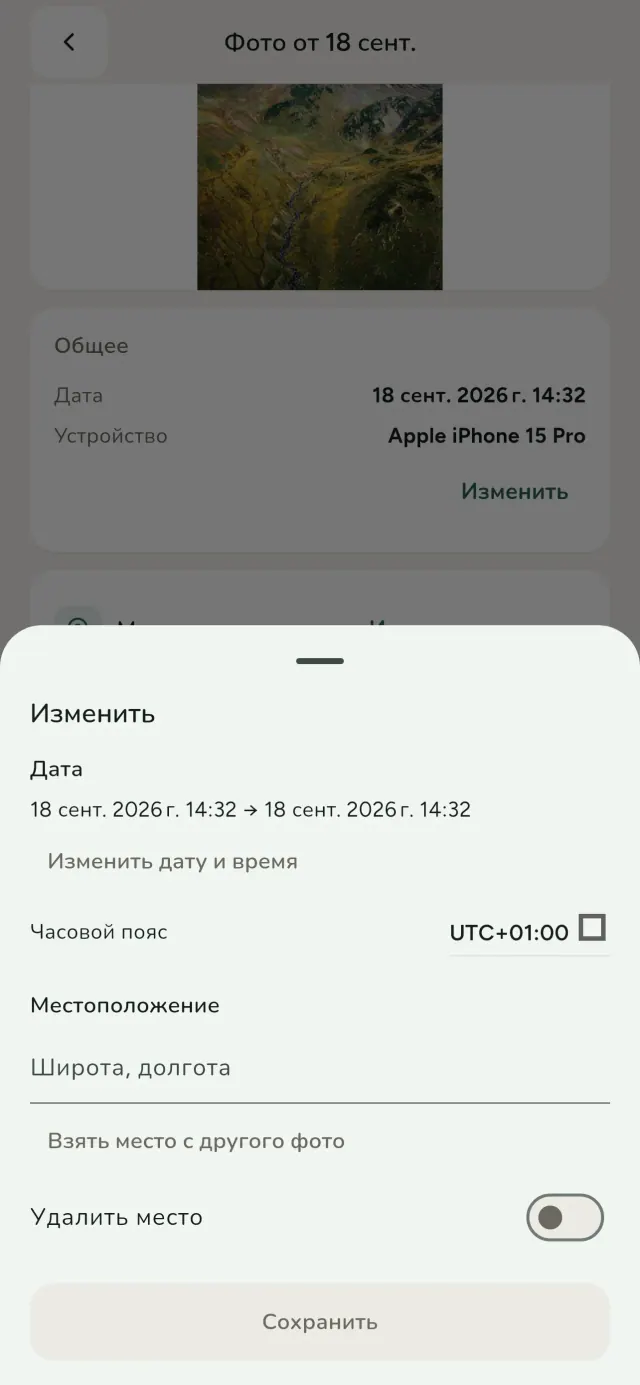
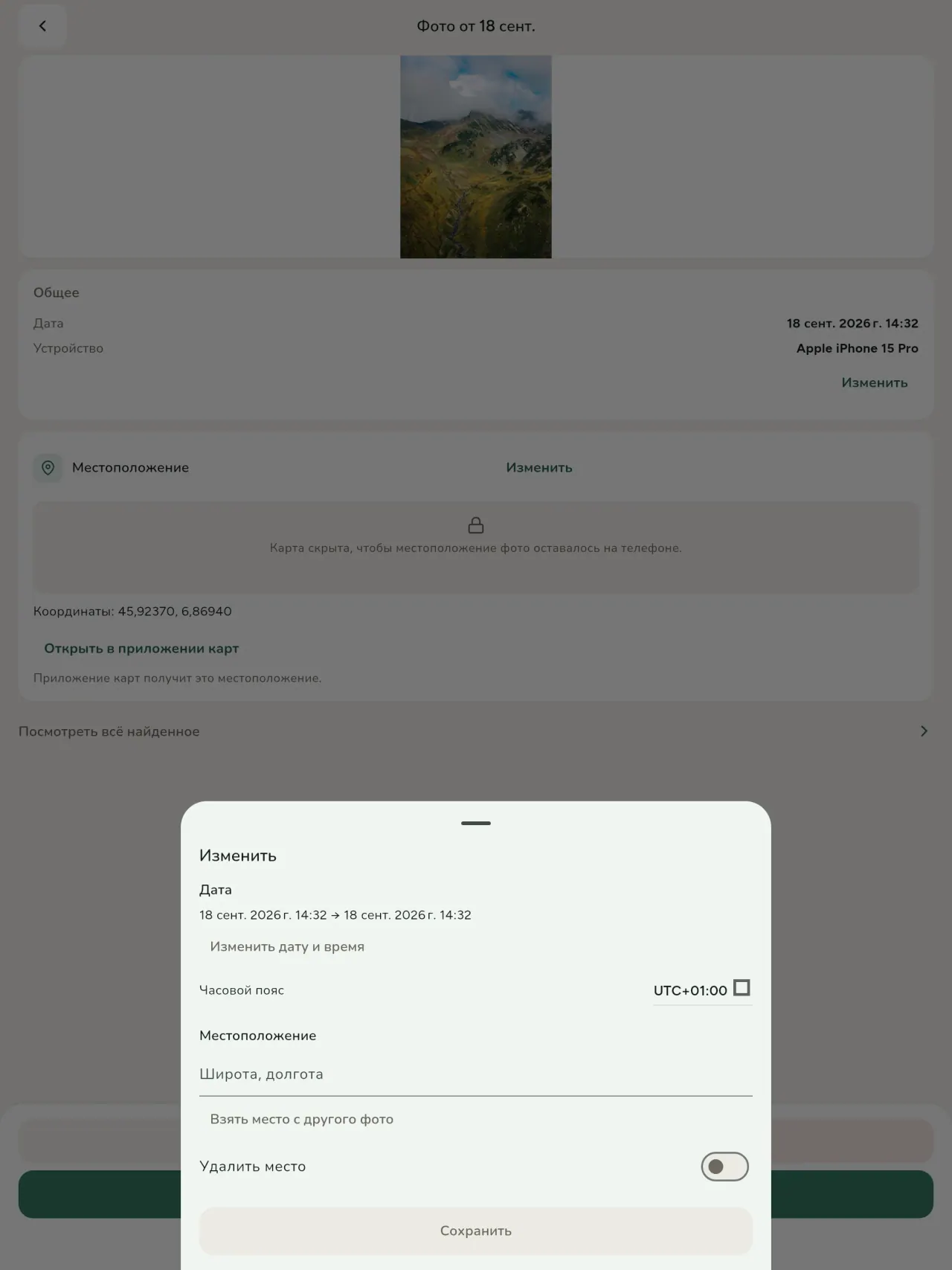
Меняйте дату или геолокацию фото, даже если метаданных нет. Скопируйте геолокацию другого снимка или выберите её на карте после подтверждения.
Удаляйте
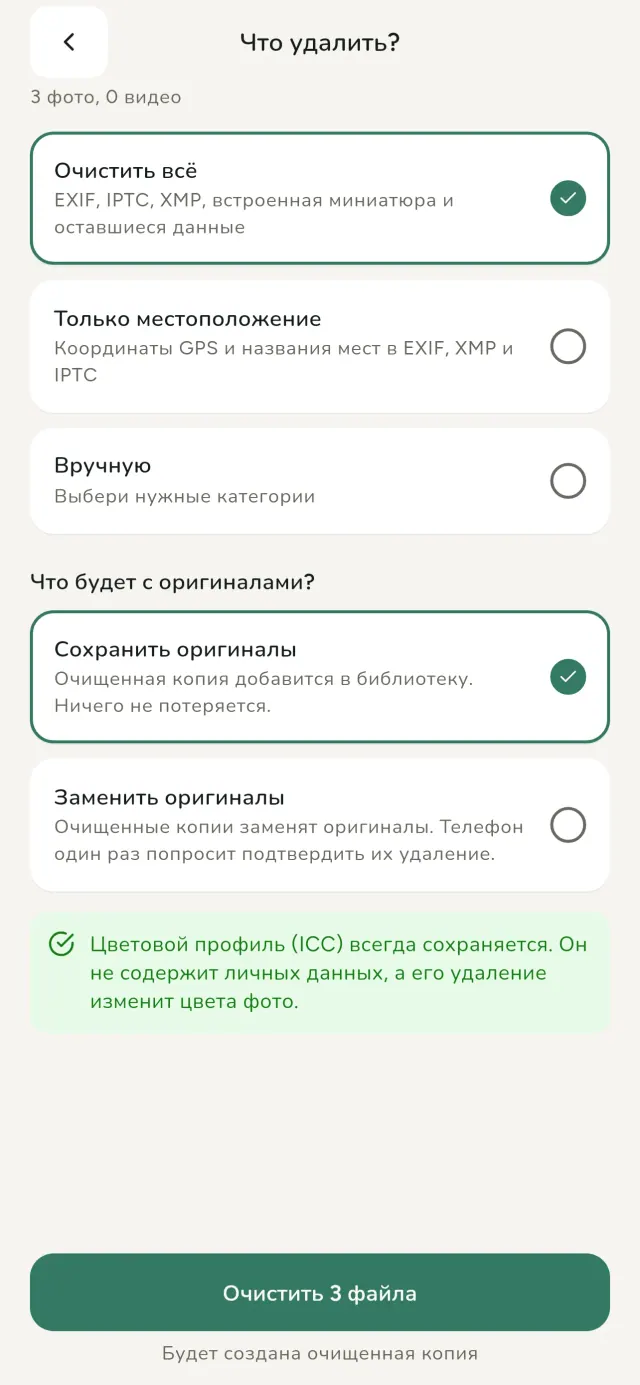
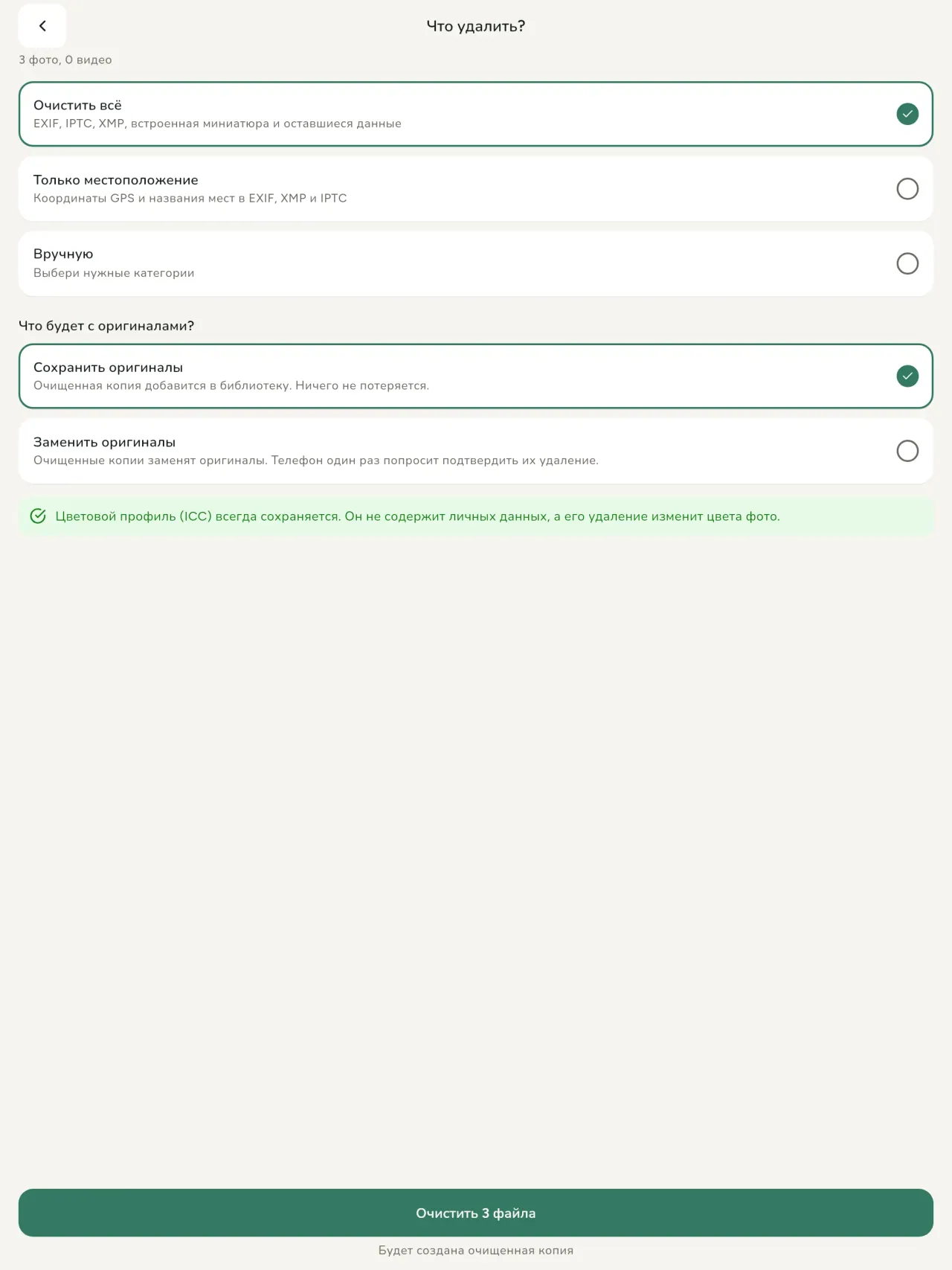
Всё, только gps или выбранные категории: EXIF, IPTC, XMP, миниатюры, заметки камеры и оставшиеся после обрезки байты.
Безопасность видна сразу
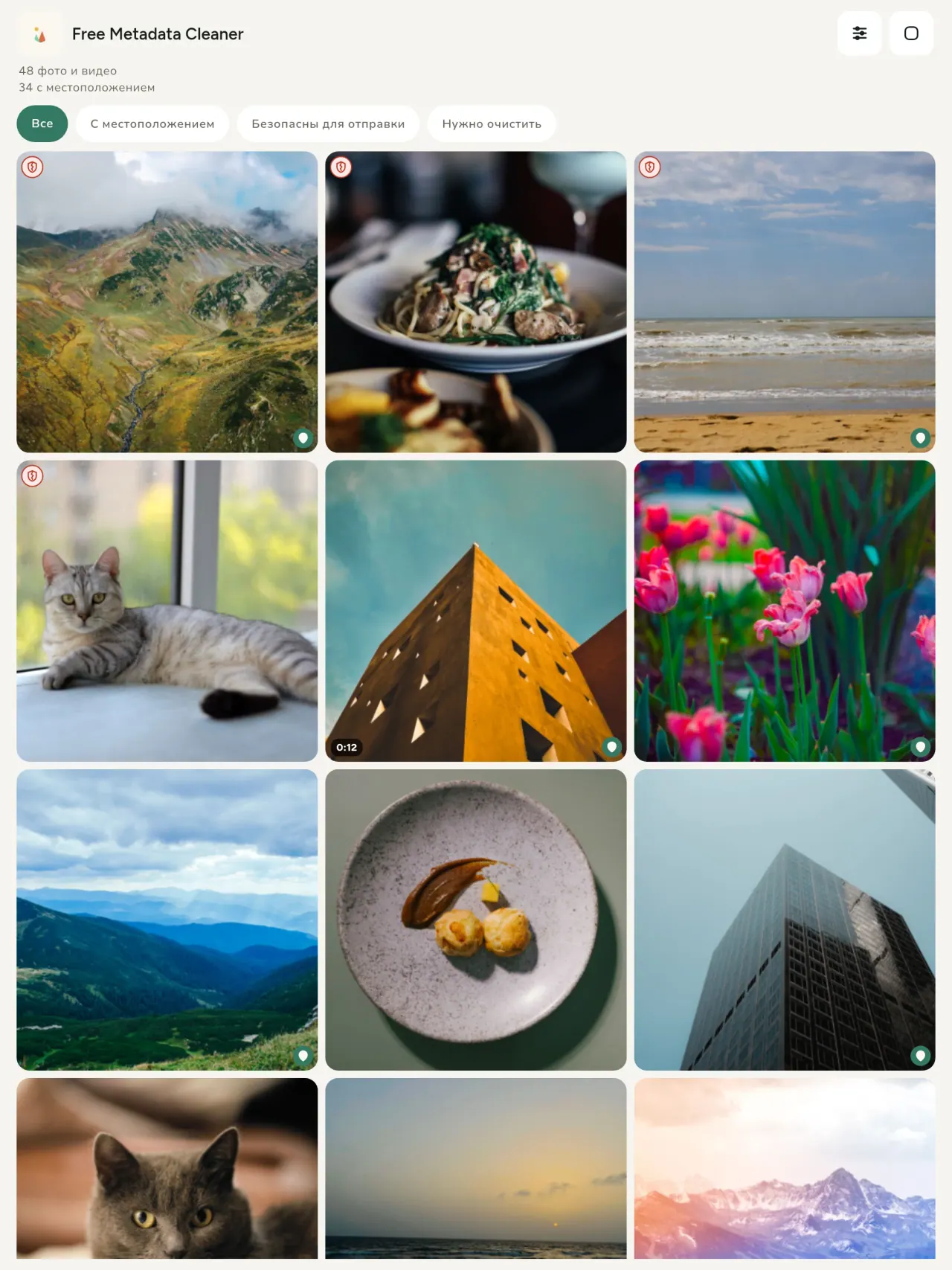
Зелёный щит означает, что метаданных нет, красный треснувший щит показывает остаток.
Без потери качества
Изображения не перекодируются.
Приватность прежде всего
Файлы читаются и очищаются на устройстве. Нет аккаунта, рекламы и аналитики. Для карты сначала запрашивается разрешение, затем карта загружается из OpenStreetMap; фото не отправляется.
Бесплатно и без рекламы
При желании оставьте чаевые.
Для кого
- Все, кто хочет знать, что раскрывает фото (место по GPS, дату, камеру), прежде чем публиковать, продавать или отправлять его.
- Те, кто продаёт на сайтах объявлений и не хочет показывать, где живёт.
- Родители и все, кто хочет, чтобы чувствительные места (дом, школа, работа) не попадали на фото, которыми они делятся.
- Журналисты, активисты и люди в зоне риска, которым нужно поделиться изображением, не оставив следов.
- Люди, уставшие от утечек данных и желающие контролировать личную информацию в собственных фотографиях.
Почему стоит выбрать Metadata Cleaner
- Три функции в одном приложении: узнать, что скрыто в фото или видео, изменить данные (дату съёмки, местоположение) и удалить метаданные всего в несколько касаний.
- Всё работает на телефоне. Ваши фото никуда не отправляются.
- Фото (JPEG, HEIC, PNG, WebP, GIF) и видео (MP4, MOV, 3GP).
Чего приложение пока не умеет
- Поддерживаются только перечисленные выше форматы. Другие форматы запланированы.
Принцип Pixeon. Приложения Pixeon прежде всего локальные: без учётной записи, без отслеживания, а ваши данные остаются на вашем телефоне. Если приложение когда-нибудь подключается к сети, то только когда вы сами включаете нужную функцию, а политику конфиденциальности обновляют до её выхода.
Посмотрите Metadata Cleaner в деле.
Установите Metadata Cleaner.
Бесплатно на iPhone и Android.
SHA-256: A4:38:C9:B4:A9:3F:97:7B:E8:98:AD:B7:3B:30:5F:63:01:22:E0:D9:F8:CF:5D:2B:D7:4E:38:CB:9A:CF:5A:A2
Версия 1.1
- App Store Скоро
- Google Play Скоро
Что нового
Этот текст на английском языке.
- Read: see exactly what a photo or video reveals (location, date, camera, AI provenance labels such as C2PA and generation parameters, video duration, codecs, resolution and frame rate).
- Edit: change the date a photo was taken and its location (JPEG, HEIC, AVIF), even on a photo with no metadata, reuse the location of another photo, or pick it on an OpenStreetMap map after your confirmation.
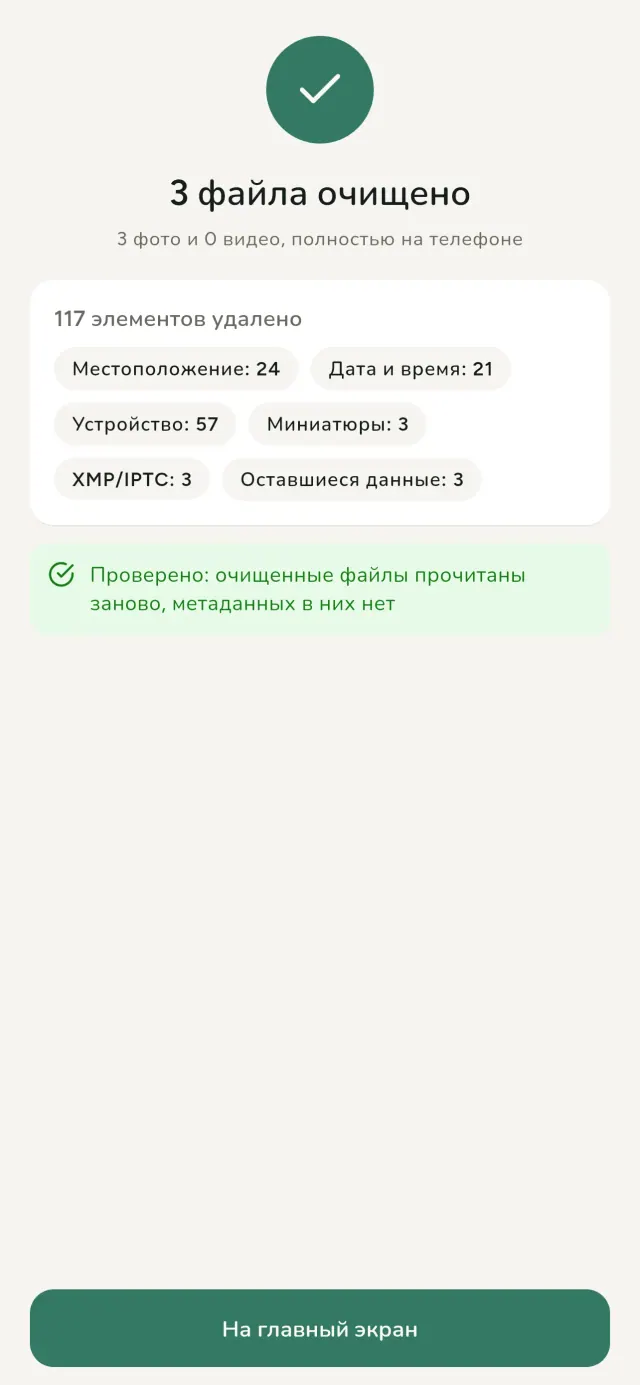
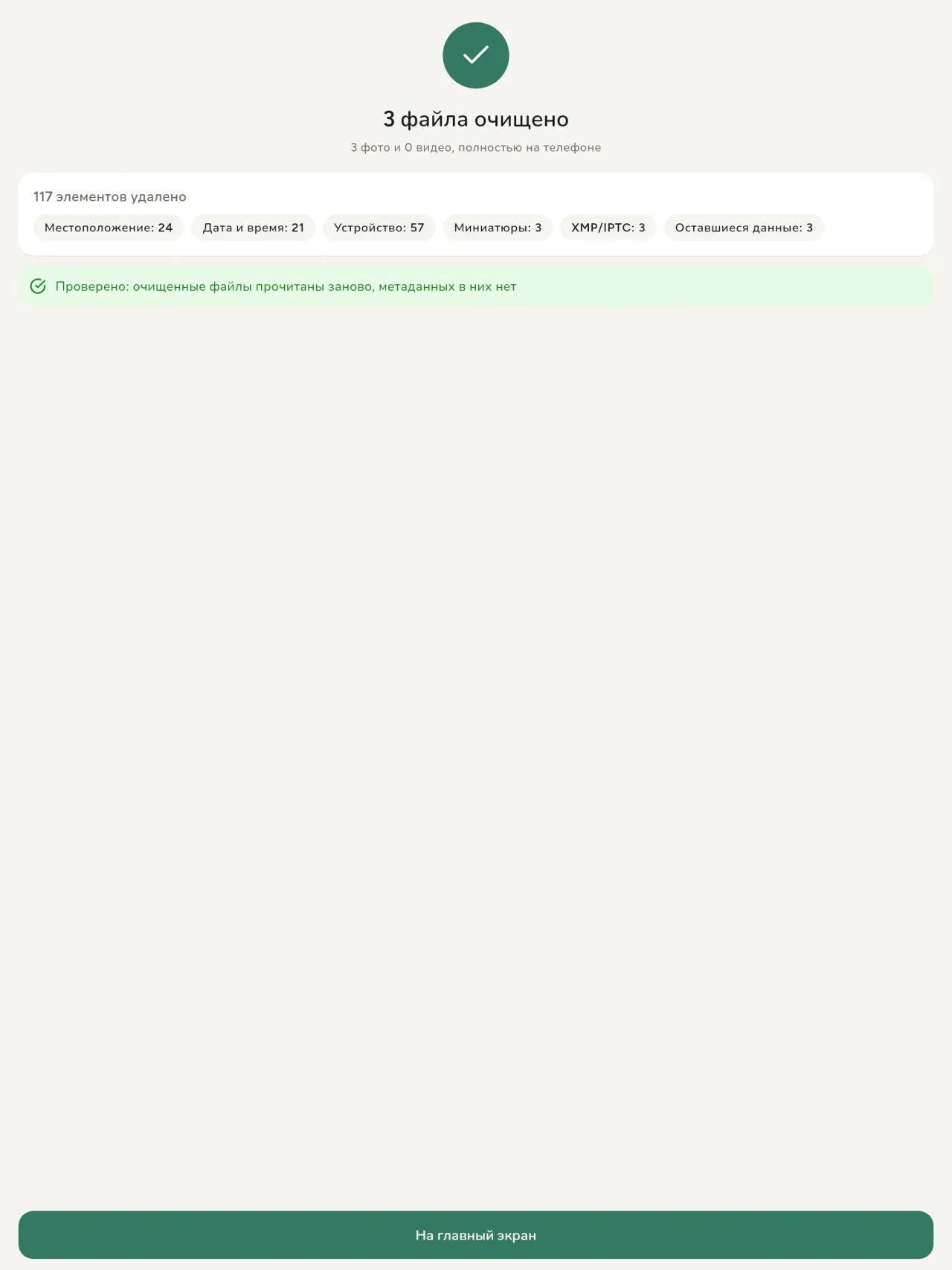
- Remove: clean metadata in a few taps, with a before and after view on the result screen.
- DNG photos are supported.
- Translations aligned across 91 languages.
Privacy policy
Текст ниже на английском. Приоритетной является английская версия.
Last updated: 2026-11-18 · applies to version 1.1 and later
Policy versions: 1.1 and later (this text) · version 1.0 (still the policy of the app version 1.0). The version number of your app is shown at the bottom of its Settings screen.
Free Metadata Cleaner shows and removes the metadata hidden in your photos and videos (location, date and time, camera and lens details, thumbnails…). The short version: everything happens on your device, and we collect nothing.
What the app accesses
Your photo and video library, only after you grant permission (and, where your system requires it, the permission to read the location stored in your photos, so that it can be shown to you). The files you choose are read and cleaned on your device; the cleaned copy is saved to your library. If you choose to replace the originals, the system asks you to confirm before deleting them.
To show which photos are already clean, the app reads the metadata of the photos displayed on screen, on your device. This result is kept in memory only and is never stored.
What we collect
Nothing. No account, no analytics or usage tracking, no advertising or advertising identifiers, no crash or diagnostics reporting beyond what the app stores provide, and no third-party SDK that sends data anywhere. There is no Free Metadata Cleaner server. Cleaning a photo or video never uses the network, at all: turn on airplane mode and clean one to check for yourself. The only network request the app itself can ever make is described under “Location” below, and it only ever happens if you ask for it. The one other connection is the optional tip purchase, handled by the store (see “Optional support”).
Temporary files and history
The app keeps no history and no database. Temporary files created while cleaning are deleted after each item and purged when the app starts.
Deleted originals
Originals that are deleted remain in your system's trash (such as “Recently Deleted” or the trash) for about 30 days, with their metadata. The app cannot empty it: do it yourself if you need the originals gone at once.
iCloud and cloud photos
If a photo is stored in iCloud and not on your device, the operating system may download it before the app can process it. That transfer is made by the system, under the provider's own terms, not by the app.
Location
When a photo contains a location, the app shows the coordinates as text, which stays on your device. Three actions can send location information off your device, only when you choose them, each time: “Open in…” hands the coordinates to the maps application you select, under its own privacy policy; “Show the map” asks you to confirm first (“Showing the map sends this photo's position to a map service. Nothing else is sent.”), then loads a small map from OpenStreetMap for that one position; and, when you edit a photo's place, “Choose on the map” asks you to confirm first, then opens a full-screen map from OpenStreetMap. This map does not use your phone's location. As you move and zoom it, the app requests the map tiles of the area you are browsing, so OpenStreetMap receives the position of the area shown on screen, which starts on the photo's current place if it has one, and otherwise on a world view. The photo itself is never sent, and nothing is sent before you confirm. The place you choose on the map (or copy from another photo) is written into the photo's file only when you save, on your device. In every case OpenStreetMap receives, as with any web request, technical details like your IP address; it does not receive your name, an account, or anything else about you or your other photos. See OpenStreetMap's own privacy policy. Outside of these explicit actions, the app never sends a photo's location, or anything else, anywhere.
Optional support
The app is free. If you wish, you can leave a tip. On iPhone and in the Google Play version for Android, tips are in-app purchases processed by Apple or Google under their own terms and privacy policy; the app adds the Google Play billing permission for this, makes no network call itself, and receives no payment or personal details. Versions installed outside Google Play may instead open an external donation page in your browser, operated by a third party under its own privacy policy; nothing from the app is sent to it. A tip unlocks nothing.
Contact form on this website
If you write to us through this site, we use your message and the email address you optionally give only to reply. Bot protection is provided by Cloudflare and email delivery by Resend.
Language choice on this website
When you choose a language, or when this site opens a page in your browser's language, it stores
one small functional cookie (pxl, a language code, one year) so that your choice is
remembered. If this site suggests a page in your browser's language and you close that suggestion,
your browser also keeps a local note (pxl-banner-off, in local storage, 30 days) so the
suggestion does not come back. Neither identifies anyone, neither is used for tracking or advertising,
and neither is shared. You can delete them in your browser at any time.
Website statistics
This website uses Cloudflare Web Analytics to count visits (pages viewed, country, browser type, loading speed). It sets no cookie, does not use local storage, does not fingerprint your device, does not follow you across sites and does not build a profile of you. Search engines (for example Google Search Console) give us aggregated search statistics, without any data about individual visitors. Our own web server also counts the pages and APK downloads it serves: for each request it keeps the address, the site or social network that sent you (only its name, or the campaign tag written in the link), the country, the type of device and whether the request came from a robot. It keeps no IP address, no identifier and no cookie, and these counts are anonymous. We use no advertising or other analytics service. None of this concerns the app itself, which collects nothing.
Children
The app is a general-purpose tool and is not directed at children.
Changes
An updated policy will be published at this URL with a new date above.
Contact
Questions about privacy: metadata-cleaner-contact@pixeon.net
Версия 1.0
- App Store Опубликовано
- Google Play Опубликовано
Что нового
Этот текст на английском языке.
- Cleans JPEG, HEIC, PNG, WebP, GIF, MP4, MOV and 3GP files, with no video re-encoding.
- "Safe to share" and "To clean" filters.
- New green design.
- Help screen with a FAQ.
- Settings: share, rate, feedback, unsupported formats.
- Optional tips.
Privacy policy, version 1.0
Текст ниже на английском. Приоритетной является английская версия.
Applies to version 1.0 of the app (the first release). Later versions: current policy.
Free Metadata Cleaner shows and removes the metadata hidden in your photos and videos (location, date and time, camera and lens details, thumbnails…). The short version: everything happens on your device, and we collect nothing.
What the app accesses
Your photo and video library, only after you grant permission (and, where your system requires it, the permission to read the location stored in your photos, so that it can be shown to you). The files you choose are read and cleaned on your device; the cleaned copy is saved to your library. If you choose to replace the originals, the system asks you to confirm before deleting them.
To show which photos are already clean, the app reads the metadata of the photos displayed on screen, on your device. This result is kept in memory only and is never stored.
What we collect
Nothing. No account, no analytics or usage tracking, no advertising or advertising identifiers, no crash or diagnostics reporting beyond what the app stores provide, and no third-party SDK that sends data anywhere. There is no Free Metadata Cleaner server. Cleaning a photo or video never uses the network, at all: turn on airplane mode and clean one to check for yourself. The only network request the app itself can ever make is described under “Location” below, and it only ever happens if you ask for it. The one other connection is the optional tip purchase, handled by the store (see “Optional support”).
Temporary files and history
The app keeps no history and no database. Temporary files created while cleaning are deleted after each item and purged when the app starts.
Deleted originals
Originals that are deleted remain in your system's trash (such as “Recently Deleted” or the trash) for about 30 days, with their metadata. The app cannot empty it: do it yourself if you need the originals gone at once.
iCloud and cloud photos
If a photo is stored in iCloud and not on your device, the operating system may download it before the app can process it. That transfer is made by the system, under the provider's own terms, not by the app.
Location
When a photo contains a location, the app shows the coordinates as text, which stays on your device. Two actions send that one photo's position off your device, only when you choose them, each time: “Open in…” hands the coordinates to the maps application you select, under its own privacy policy; “Show the map” asks you to confirm first (“Showing the map sends this photo's position to a map service. Nothing else is sent.”), then loads a small map from OpenStreetMap for that one position. OpenStreetMap receives the coordinates and, as with any web request, technical details like your IP address; it does not receive your name, an account, or anything else about you or your other photos. See OpenStreetMap's own privacy policy. Outside of these two explicit actions, the app never sends a photo's location, or anything else, anywhere.
Optional support
The app is free. If you wish, you can leave a tip. On iPhone and in the Google Play version for Android, tips are in-app purchases processed by Apple or Google under their own terms and privacy policy; the app adds the Google Play billing permission for this, makes no network call itself, and receives no payment or personal details. Versions installed outside Google Play may instead open an external donation page in your browser, operated by a third party under its own privacy policy; nothing from the app is sent to it. A tip unlocks nothing.
Contact form on this website
If you write to us through this site, we use your message and the email address you optionally give only to reply. Bot protection is provided by Cloudflare and email delivery by Resend.
Language choice on this website
When you choose a language, or when this site opens a page in your browser's language, it stores
one small functional cookie (pxl, a language code, one year) so that your choice is
remembered. If this site suggests a page in your browser's language and you close that suggestion,
your browser also keeps a local note (pxl-banner-off, in local storage, 30 days) so the
suggestion does not come back. Neither identifies anyone, neither is used for tracking or advertising,
and neither is shared. You can delete them in your browser at any time.
Website statistics
This website uses Cloudflare Web Analytics to count visits (pages viewed, country, browser type, loading speed). It sets no cookie, does not use local storage, does not fingerprint your device, does not follow you across sites and does not build a profile of you. Search engines (for example Google Search Console) give us aggregated search statistics, without any data about individual visitors. Our own web server also counts the pages and APK downloads it serves: for each request it keeps the address, the site or social network that sent you (only its name, or the campaign tag written in the link), the country, the type of device and whether the request came from a robot. It keeps no IP address, no identifier and no cookie, and these counts are anonymous. We use no advertising or other analytics service. None of this concerns the app itself, which collects nothing.
Children
The app is a general-purpose tool and is not directed at children.
Changes
An updated policy will be published at this URL with a new date above.
Contact
Questions about privacy: metadata-cleaner-contact@pixeon.net
Credits
Android is a trademark of Google LLC. The Android robot is reproduced or modified from work created and shared by Google and used according to terms described in the Creative Commons 3.0 Attribution License. This site is not affiliated with or endorsed by Google.
Поддержка
Последнее обновление: 2026-10-08
Free Metadata Cleaner - небольшое независимое приложение. Ответы на самые частые вопросы ниже.
Мы стараемся отвечать в течение нескольких дней. Чтобы помочь нам, укажите модель устройства, версию системы и что вы делали. Пожалуйста, не отправляйте личные фотографии.
Какие данные приложение хранит или отправляет?
Никакие. История не сохраняется, аккаунта и сервера нет. Подробнее в политике конфиденциальности.
Как очистить фотографию?
- Откройте приложение и разрешите доступ к вашей библиотеке, когда потребуется.
- Выберите фото или видео для очистки.
- Выберите, что удалить, и хотите ли заменить оригинал или создать копию без метаданных.
- Подтвердите. В итоговом отчете будет указано, что удалено и какие файлы не удалось обработать.
Куда сохраняются очищенные копии?
В вашу фотобиблиотеку. Дата оригинала остаётся, так что очищенное фото не поднимется наверх вашей галереи.
Я выбрал 'заменить оригиналы', но они остались.
Удаленные оригиналы остаются в системной корзине (например, "Недавно удаленные" или просто корзина) примерно 30 дней, с их метаданными. Очистите корзину, чтобы удалить их сразу. Если вы отклоните системное предложение удалить файл, оригиналы сохранятся, а очищенные копии добавятся.
Какие файлы поддерживаются?
Фото в форматах JPEG, HEIC, AVIF, PNG, WebP и GIF, видео в MP4, MOV и 3GP (добавляются новые форматы). Файл, который приложение не может очистить, остается нетронутым и указано в итоговом отчете с причиной, при этом остальные файлы обрабатываются.
Почему приложению нужен доступ к фотографиям?
Чтобы показать список фото для выбора и сохранить очищенные копии. Если система требует, приложение также запросит разрешение читать местоположение, записанное на фото: без него система скрывает локацию, и приложение не сможет показать, какую информацию раскрывает фото. Ничего не загружается в сеть.
Как убедиться, что ничего не покидает мой телефон?
Включите авиарежим и очистите фото - всё работает так же. Исключение - карта: если вы нажмёте "Показать карту" на локации фото и подтвердите, только эта координата передается на OpenStreetMap для отображения карты, больше ничего не отправляется. См. "Местоположение" выше.
На каких языках доступно приложение?
Приложение доступно на английском, французском, немецком, испанском, итальянском, португальском и арабском языках. Этот сайт доступен на большем количестве языков, новые языки приложений добавляются.
Поддержать проект
Metadata Cleaner остаётся бесплатным и без рекламы. Если он вам полезен, вы можете поддержать его разработку (по желанию):
Buy Me a CoffeeУчет расходов, семейный бюджет и планировщик бюджета в одном приложении.
Также от PixeonVaultMarkЛокальный сейф документов: сканер, водяной знак и метаданные PDF.
Также от PixeonLittle RelayBreastfeeding, sleep and starting solids tracker. No account, works offline.
Также от PixeonMenuloopПланируйте меню, покупки и рецепты легко и офлайн.
Также от PixeonIndie OfficeQuote maker and self-employed invoices. Offline, no account, no ads.