
Metadata Cleaner: Foto/Video
EXIF-visare, redigera och rensa metadata: plats och datum.


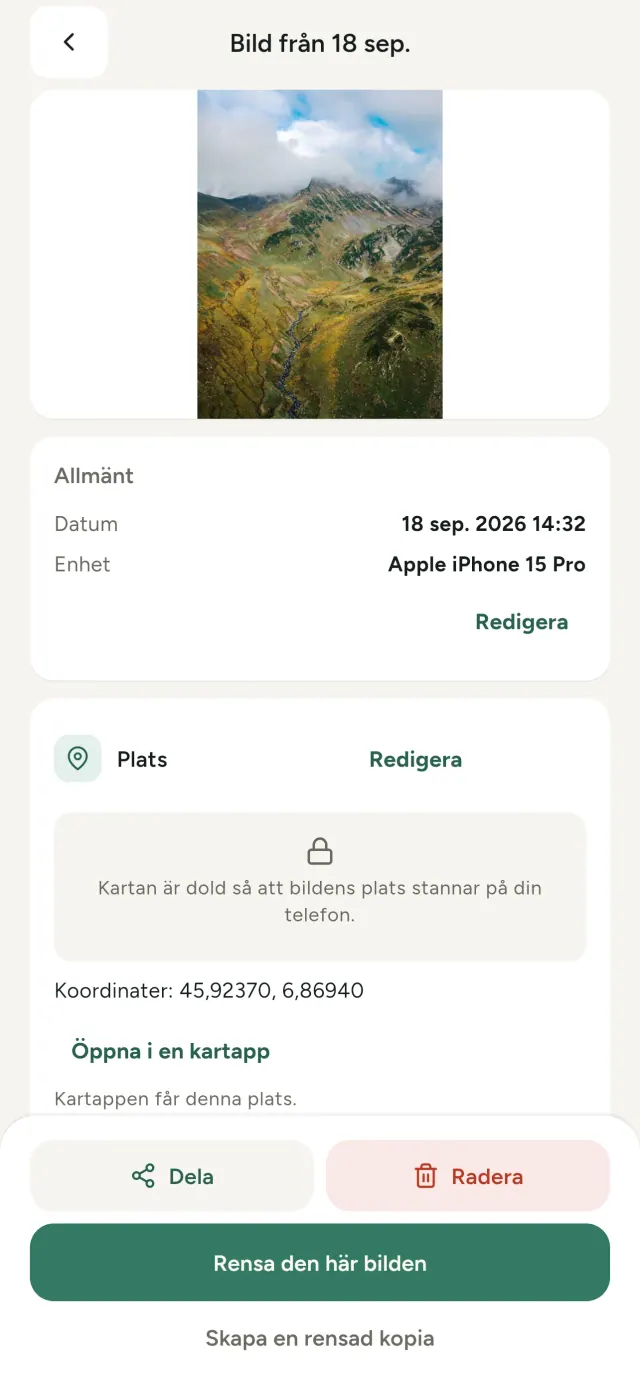
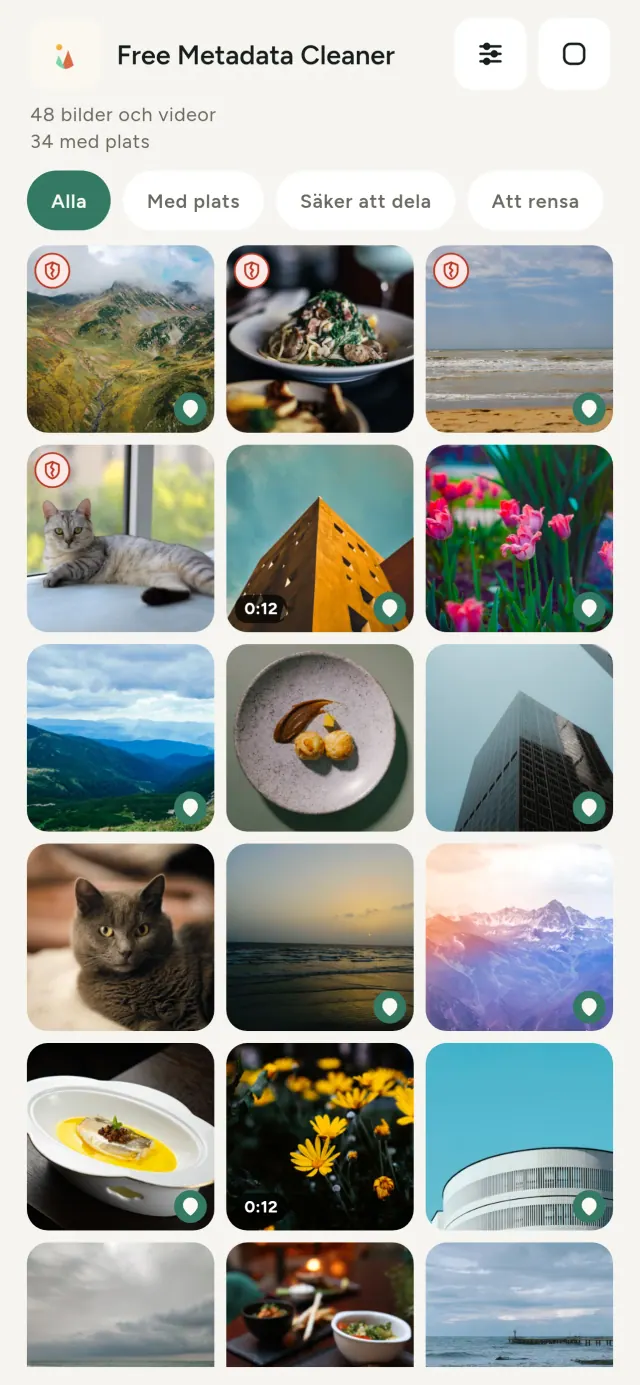
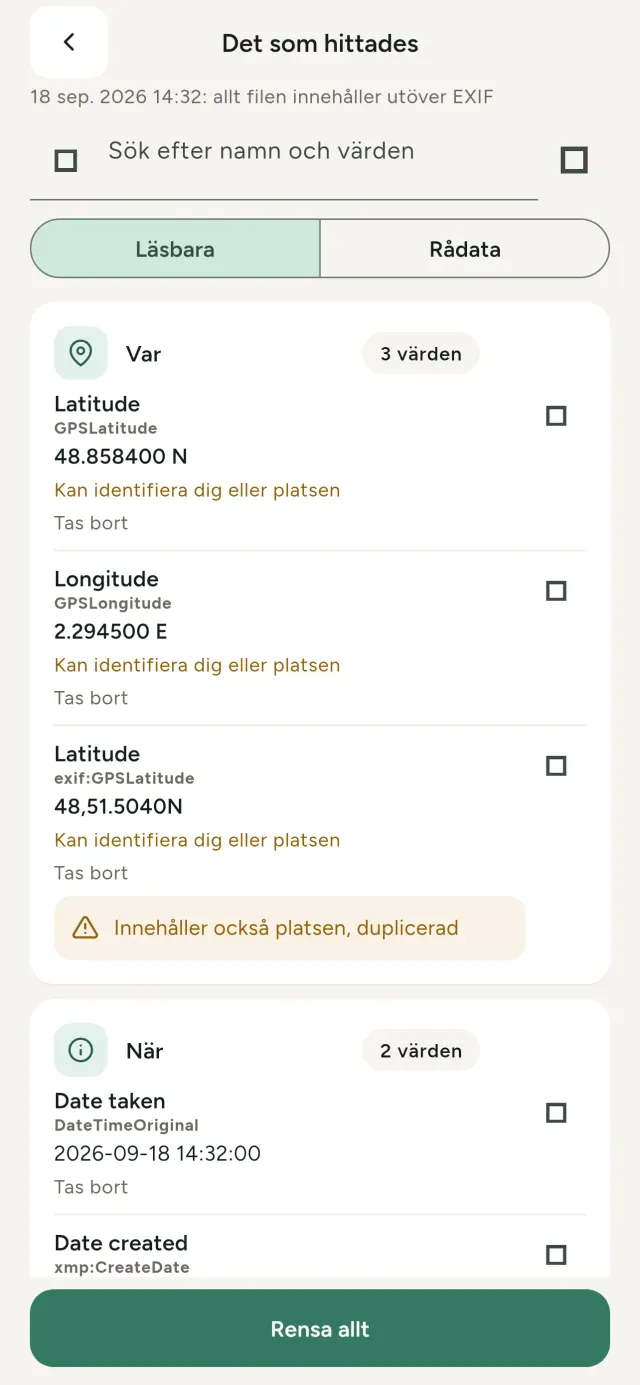
Varje foto du tar bär dold information: var det togs, när, med vilken telefon och ibland även en liten förhandsbild av originalet. När du delar det följer allt med.
Metadata Cleaner gör tre saker i din telefon: visar vad dina foton och videor innehåller, låter dig rätta det och tar bort det.
Så fungerar Metadata Cleaner
Läs
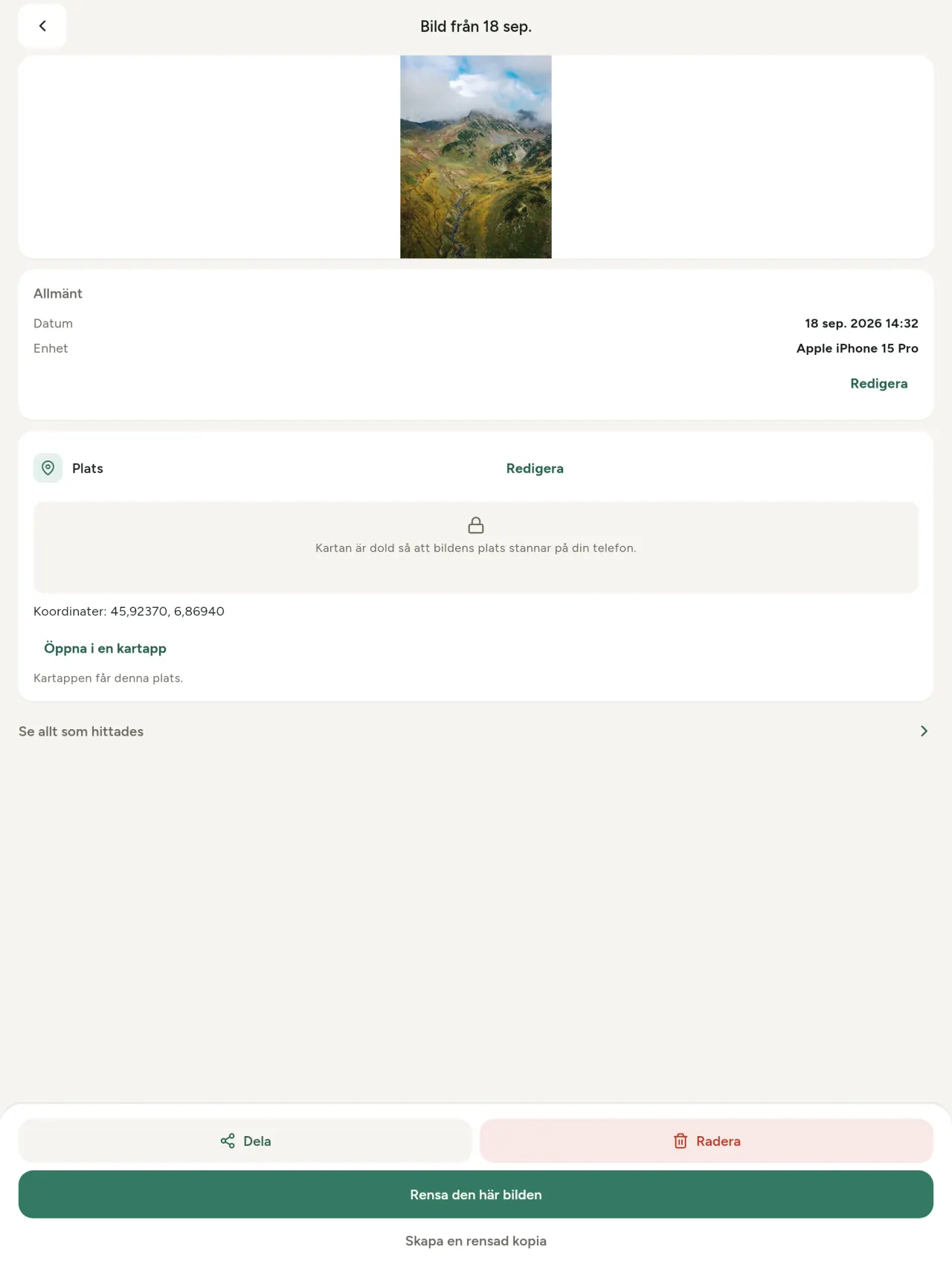
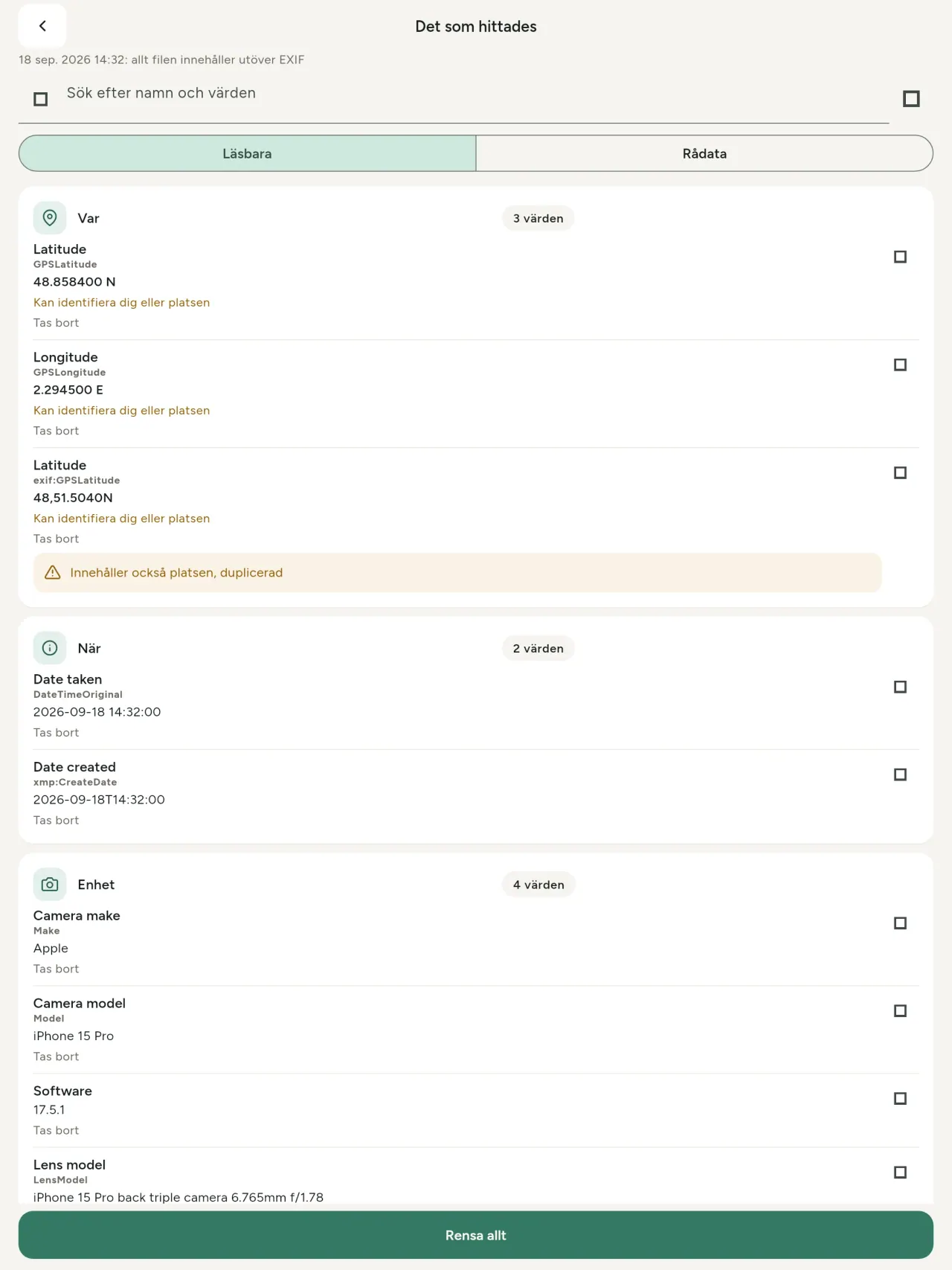
En riktig metadatavisare: varje värde i ett foto eller en video (EXIF, IPTC, XMP, videokodekar, längd och upplösning), grupperat, sökbart och kopierbart, med det som tas bort markerat. Hittar även AI-ursprung (C2PA, genereringsparametrar).
Redigera
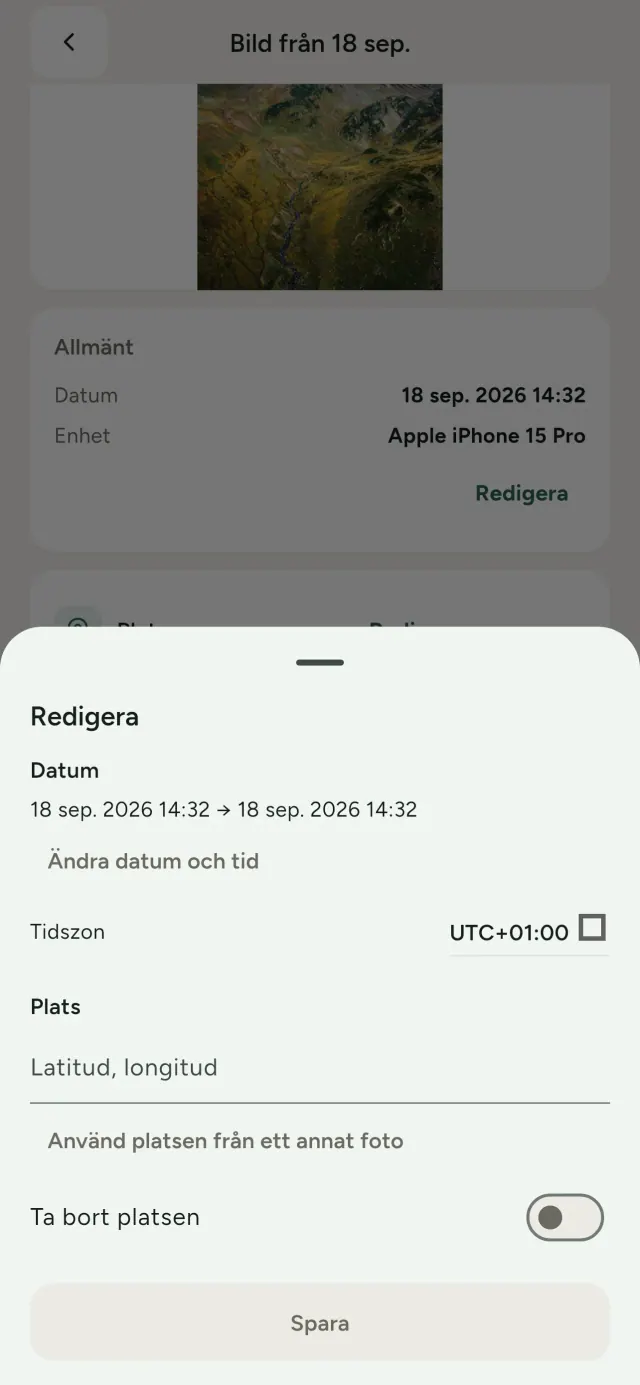
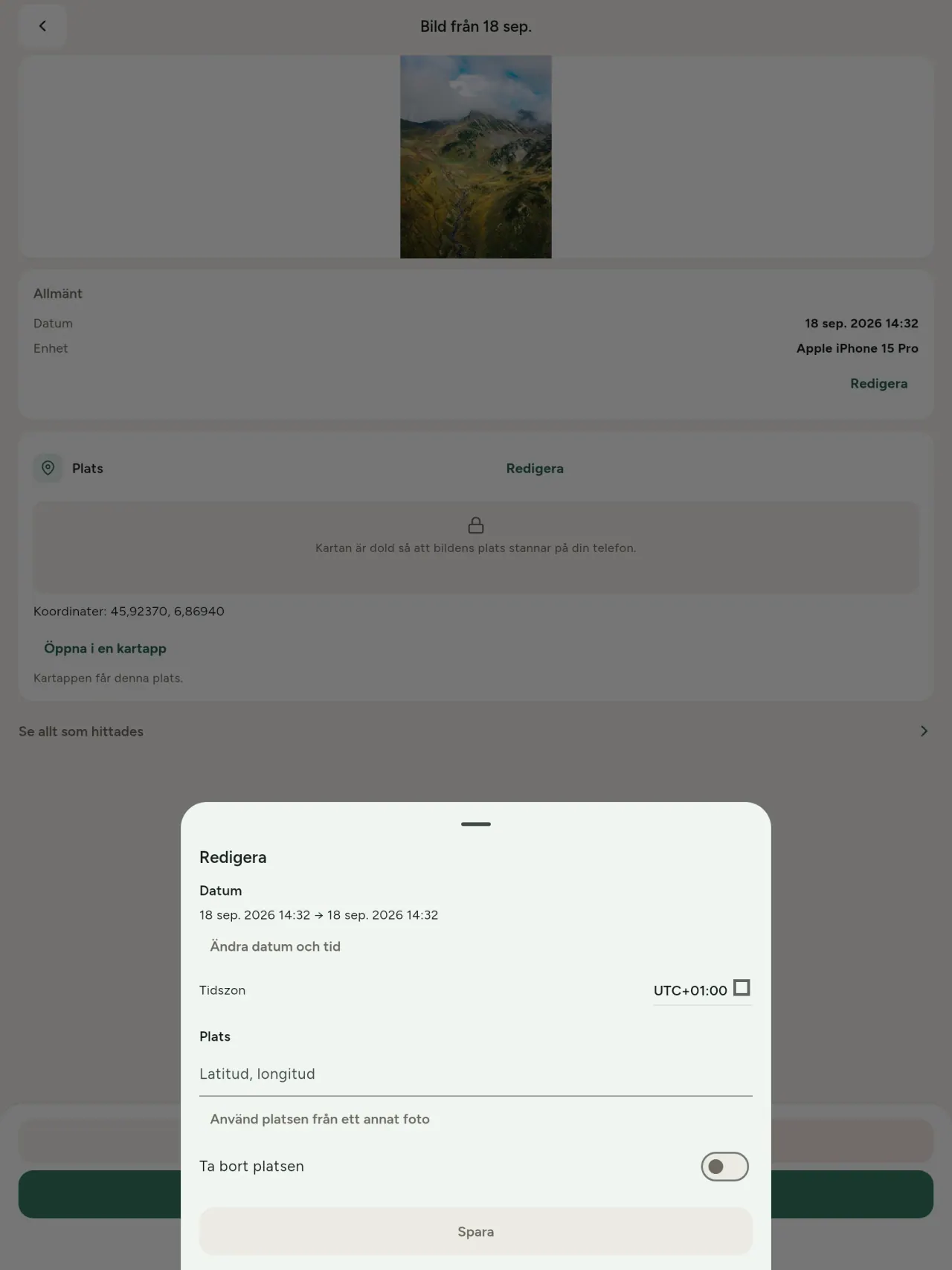
Ändra eller byt fotots datum och plats, även när det saknar metadata. Kopiera platsen från ett annat foto eller välj den på en karta (appen frågar alltid först). Jämför före och efter.
Ta bort
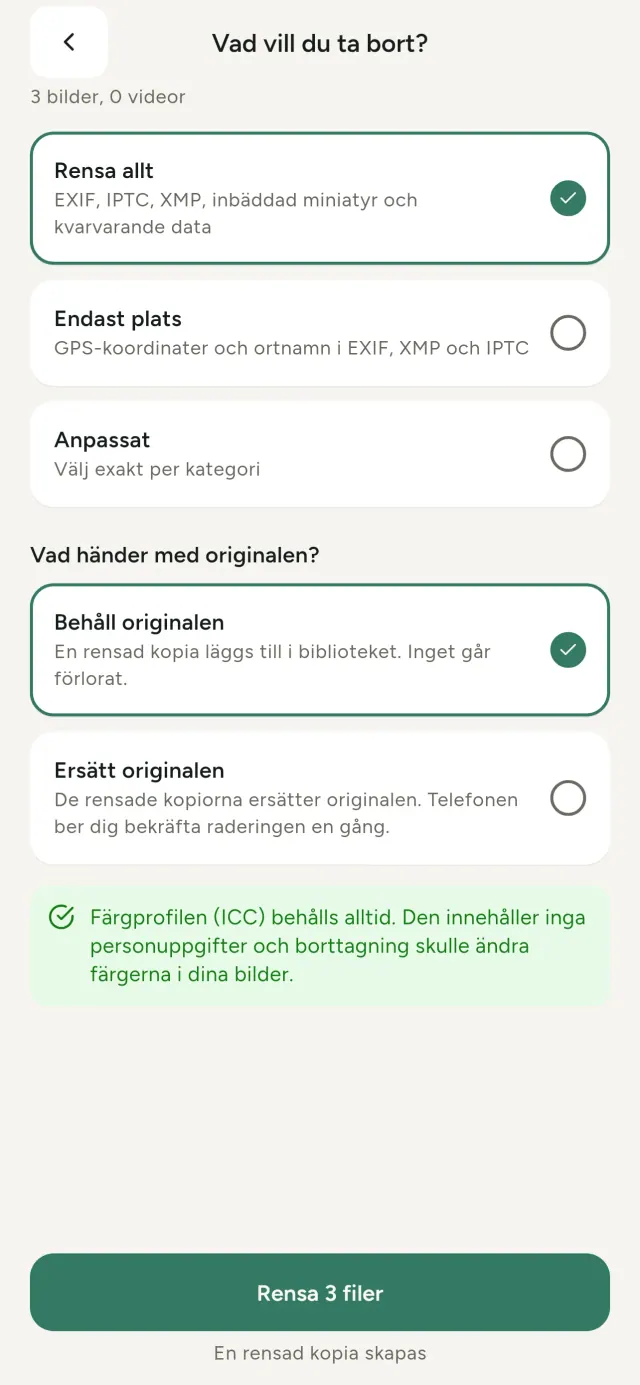
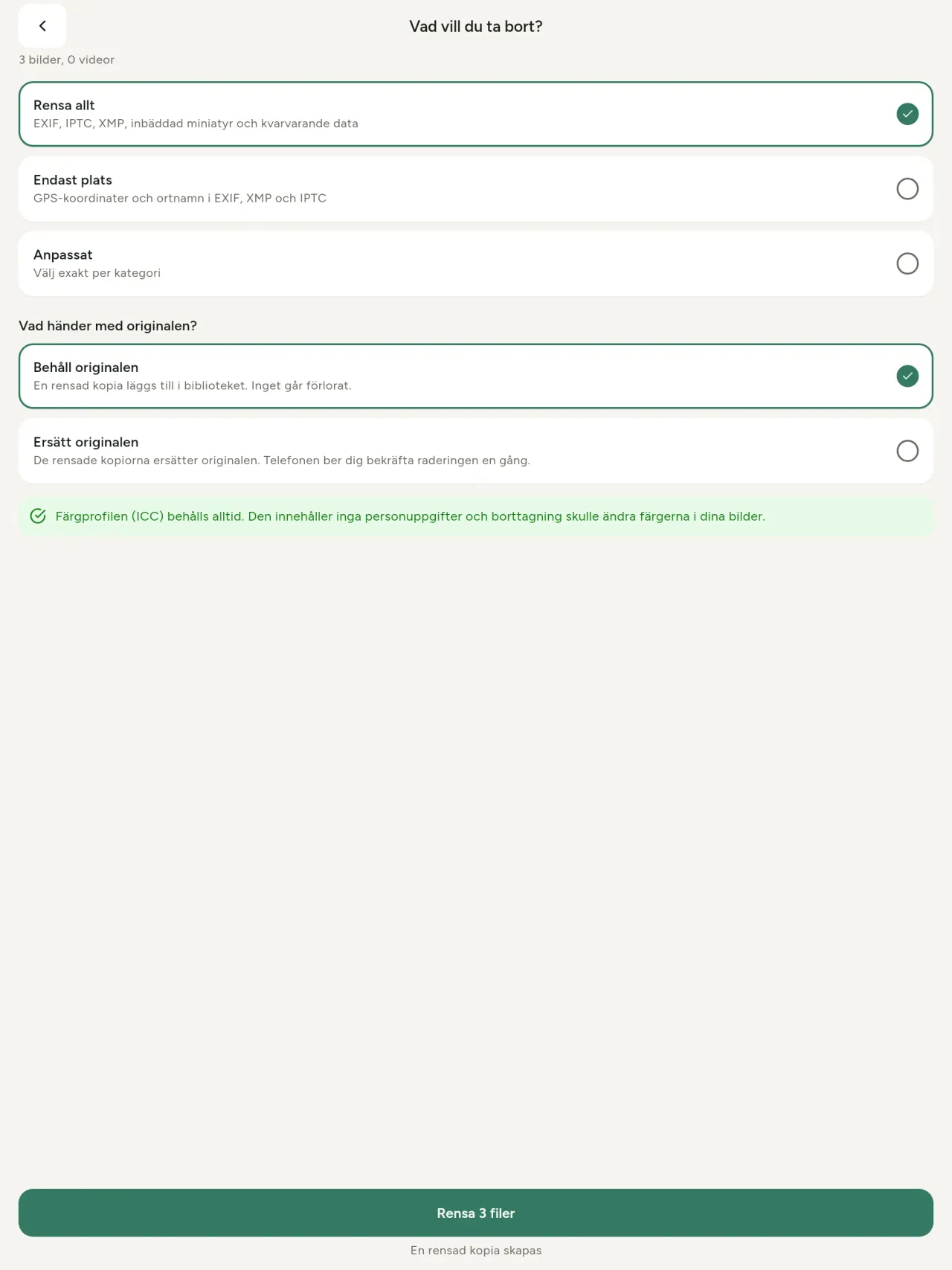
Allt, bara platsen eller valda kategorier: EXIF-, IPTC- och XMP-data, inbäddade miniatyrer, kameratillverkarens anteckningar, AI-ursprung och överblivna byte som vissa verktyg lämnar efter beskärning. Rensa ett helt urval på en gång och behåll eller ersätt originalen.
Tryggt att dela med en blick
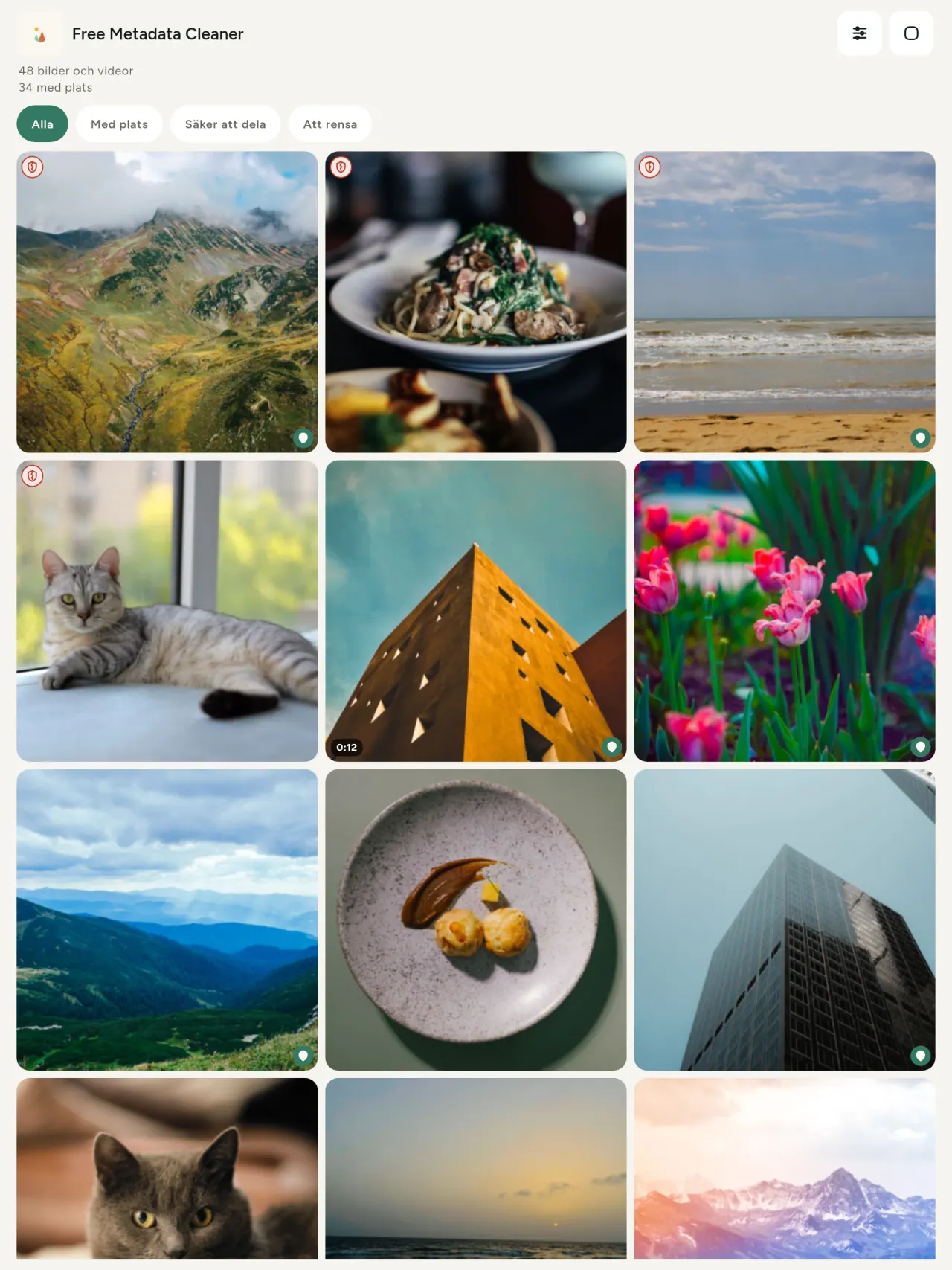
En grön sköld markerar filer utan metadata; en röd spräckt sköld markerar dem som fortfarande har metadata.
Ingen kvalitetsförlust
Bilderna kodas aldrig om: själva bilden rörs inte.
Privat från start
Dina foton läses, redigeras och rensas på din enhet. Inget konto, inga annonser, ingen analys. Det enda valfria undantaget är kartan: när du vill se ett fotos plats eller välja en plats frågar appen varje gång först och hämtar sedan kartan från OpenStreetMap (fotot skickas aldrig).
Gratis och utan annonser
Om appen hjälper dig kan du lämna en frivillig dricks.
Vem den är för
- Alla som vill veta vad ett foto avslöjar (GPS-position, datum, kamera) innan det publiceras, säljs eller skickas.
- Personer som säljer på annonssajter och inte vill visa var de bor.
- Föräldrar och alla som vill hålla en känslig plats (hem, skola, arbetsplats) borta från de bilder de delar.
- Journalister, aktivister och personer i riskzonen som behöver dela en bild utan att lämna spår.
- Personer som är trötta på dataläckor och vill återta kontrollen över den personliga information som deras egna bilder innehåller.
Varför välja Metadata Cleaner
- Tre saker i en app: läs vad ett foto eller en video avslöjar, redigera det (datum taget, plats), och ta bort metadata med några få tryck.
- Allt körs på telefonen. Dina bilder skickas ingenstans.
- Foton (JPEG, HEIC, PNG, WebP, GIF) och videor (MP4, MOV, 3GP).
Vad appen ännu inte gör
- Endast formaten ovan stöds. Fler format är planerade.
Pixeon-principen. Pixeons appar är lokala från början: inget konto, ingen spårning och dina data stannar på din telefon. Om en app någon gång ansluter till nätverket sker det bara när du väljer att aktivera en funktion du behöver, och integritetspolicyn uppdateras innan funktionen släpps.
Se Metadata Cleaner i användning.
Hämta Metadata Cleaner.
Gratis på iPhone och Android.
SHA-256: A4:38:C9:B4:A9:3F:97:7B:E8:98:AD:B7:3B:30:5F:63:01:22:E0:D9:F8:CF:5D:2B:D7:4E:38:CB:9A:CF:5A:A2
Version 1.1
- App Store Kommer snart
- Google Play Kommer snart
Nyheter
Den här texten är på engelska.
- Read: see exactly what a photo or video reveals (location, date, camera, AI provenance labels such as C2PA and generation parameters, video duration, codecs, resolution and frame rate).
- Edit: change the date a photo was taken and its location (JPEG, HEIC, AVIF), even on a photo with no metadata, reuse the location of another photo, or pick it on an OpenStreetMap map after your confirmation.
- Remove: clean metadata in a few taps, with a before and after view on the result screen.
- DNG photos are supported.
- Translations aligned across 91 languages.
Privacy policy
Texten nedan är på engelska. Den engelska versionen gäller.
Last updated: 2026-11-18 · applies to version 1.1 and later
Policy versions: 1.1 and later (this text) · version 1.0 (still the policy of the app version 1.0). The version number of your app is shown at the bottom of its Settings screen.
Free Metadata Cleaner shows and removes the metadata hidden in your photos and videos (location, date and time, camera and lens details, thumbnails…). The short version: everything happens on your device, and we collect nothing.
What the app accesses
Your photo and video library, only after you grant permission (and, where your system requires it, the permission to read the location stored in your photos, so that it can be shown to you). The files you choose are read and cleaned on your device; the cleaned copy is saved to your library. If you choose to replace the originals, the system asks you to confirm before deleting them.
To show which photos are already clean, the app reads the metadata of the photos displayed on screen, on your device. This result is kept in memory only and is never stored.
What we collect
Nothing. No account, no analytics or usage tracking, no advertising or advertising identifiers, no crash or diagnostics reporting beyond what the app stores provide, and no third-party SDK that sends data anywhere. There is no Free Metadata Cleaner server. Cleaning a photo or video never uses the network, at all: turn on airplane mode and clean one to check for yourself. The only network request the app itself can ever make is described under “Location” below, and it only ever happens if you ask for it. The one other connection is the optional tip purchase, handled by the store (see “Optional support”).
Temporary files and history
The app keeps no history and no database. Temporary files created while cleaning are deleted after each item and purged when the app starts.
Deleted originals
Originals that are deleted remain in your system's trash (such as “Recently Deleted” or the trash) for about 30 days, with their metadata. The app cannot empty it: do it yourself if you need the originals gone at once.
iCloud and cloud photos
If a photo is stored in iCloud and not on your device, the operating system may download it before the app can process it. That transfer is made by the system, under the provider's own terms, not by the app.
Location
When a photo contains a location, the app shows the coordinates as text, which stays on your device. Three actions can send location information off your device, only when you choose them, each time: “Open in…” hands the coordinates to the maps application you select, under its own privacy policy; “Show the map” asks you to confirm first (“Showing the map sends this photo's position to a map service. Nothing else is sent.”), then loads a small map from OpenStreetMap for that one position; and, when you edit a photo's place, “Choose on the map” asks you to confirm first, then opens a full-screen map from OpenStreetMap. This map does not use your phone's location. As you move and zoom it, the app requests the map tiles of the area you are browsing, so OpenStreetMap receives the position of the area shown on screen, which starts on the photo's current place if it has one, and otherwise on a world view. The photo itself is never sent, and nothing is sent before you confirm. The place you choose on the map (or copy from another photo) is written into the photo's file only when you save, on your device. In every case OpenStreetMap receives, as with any web request, technical details like your IP address; it does not receive your name, an account, or anything else about you or your other photos. See OpenStreetMap's own privacy policy. Outside of these explicit actions, the app never sends a photo's location, or anything else, anywhere.
Optional support
The app is free. If you wish, you can leave a tip. On iPhone and in the Google Play version for Android, tips are in-app purchases processed by Apple or Google under their own terms and privacy policy; the app adds the Google Play billing permission for this, makes no network call itself, and receives no payment or personal details. Versions installed outside Google Play may instead open an external donation page in your browser, operated by a third party under its own privacy policy; nothing from the app is sent to it. A tip unlocks nothing.
Contact form on this website
If you write to us through this site, we use your message and the email address you optionally give only to reply. Bot protection is provided by Cloudflare and email delivery by Resend.
Language choice on this website
When you choose a language, or when this site opens a page in your browser's language, it stores
one small functional cookie (pxl, a language code, one year) so that your choice is
remembered. If this site suggests a page in your browser's language and you close that suggestion,
your browser also keeps a local note (pxl-banner-off, in local storage, 30 days) so the
suggestion does not come back. Neither identifies anyone, neither is used for tracking or advertising,
and neither is shared. You can delete them in your browser at any time.
Website statistics
This website uses Cloudflare Web Analytics to count visits (pages viewed, country, browser type, loading speed). It sets no cookie, does not use local storage, does not fingerprint your device, does not follow you across sites and does not build a profile of you. Search engines (for example Google Search Console) give us aggregated search statistics, without any data about individual visitors. Our own web server also counts the pages and APK downloads it serves: for each request it keeps the address, the site or social network that sent you (only its name, or the campaign tag written in the link), the country, the type of device and whether the request came from a robot. It keeps no IP address, no identifier and no cookie, and these counts are anonymous. We use no advertising or other analytics service. None of this concerns the app itself, which collects nothing.
Children
The app is a general-purpose tool and is not directed at children.
Changes
An updated policy will be published at this URL with a new date above.
Contact
Questions about privacy: metadata-cleaner-contact@pixeon.net
Version 1.0
- App Store Publicerad
- Google Play Publicerad
Nyheter
Den här texten är på engelska.
- Cleans JPEG, HEIC, PNG, WebP, GIF, MP4, MOV and 3GP files, with no video re-encoding.
- "Safe to share" and "To clean" filters.
- New green design.
- Help screen with a FAQ.
- Settings: share, rate, feedback, unsupported formats.
- Optional tips.
Privacy policy, version 1.0
Texten nedan är på engelska. Den engelska versionen gäller.
Applies to version 1.0 of the app (the first release). Later versions: current policy.
Free Metadata Cleaner shows and removes the metadata hidden in your photos and videos (location, date and time, camera and lens details, thumbnails…). The short version: everything happens on your device, and we collect nothing.
What the app accesses
Your photo and video library, only after you grant permission (and, where your system requires it, the permission to read the location stored in your photos, so that it can be shown to you). The files you choose are read and cleaned on your device; the cleaned copy is saved to your library. If you choose to replace the originals, the system asks you to confirm before deleting them.
To show which photos are already clean, the app reads the metadata of the photos displayed on screen, on your device. This result is kept in memory only and is never stored.
What we collect
Nothing. No account, no analytics or usage tracking, no advertising or advertising identifiers, no crash or diagnostics reporting beyond what the app stores provide, and no third-party SDK that sends data anywhere. There is no Free Metadata Cleaner server. Cleaning a photo or video never uses the network, at all: turn on airplane mode and clean one to check for yourself. The only network request the app itself can ever make is described under “Location” below, and it only ever happens if you ask for it. The one other connection is the optional tip purchase, handled by the store (see “Optional support”).
Temporary files and history
The app keeps no history and no database. Temporary files created while cleaning are deleted after each item and purged when the app starts.
Deleted originals
Originals that are deleted remain in your system's trash (such as “Recently Deleted” or the trash) for about 30 days, with their metadata. The app cannot empty it: do it yourself if you need the originals gone at once.
iCloud and cloud photos
If a photo is stored in iCloud and not on your device, the operating system may download it before the app can process it. That transfer is made by the system, under the provider's own terms, not by the app.
Location
When a photo contains a location, the app shows the coordinates as text, which stays on your device. Two actions send that one photo's position off your device, only when you choose them, each time: “Open in…” hands the coordinates to the maps application you select, under its own privacy policy; “Show the map” asks you to confirm first (“Showing the map sends this photo's position to a map service. Nothing else is sent.”), then loads a small map from OpenStreetMap for that one position. OpenStreetMap receives the coordinates and, as with any web request, technical details like your IP address; it does not receive your name, an account, or anything else about you or your other photos. See OpenStreetMap's own privacy policy. Outside of these two explicit actions, the app never sends a photo's location, or anything else, anywhere.
Optional support
The app is free. If you wish, you can leave a tip. On iPhone and in the Google Play version for Android, tips are in-app purchases processed by Apple or Google under their own terms and privacy policy; the app adds the Google Play billing permission for this, makes no network call itself, and receives no payment or personal details. Versions installed outside Google Play may instead open an external donation page in your browser, operated by a third party under its own privacy policy; nothing from the app is sent to it. A tip unlocks nothing.
Contact form on this website
If you write to us through this site, we use your message and the email address you optionally give only to reply. Bot protection is provided by Cloudflare and email delivery by Resend.
Language choice on this website
When you choose a language, or when this site opens a page in your browser's language, it stores
one small functional cookie (pxl, a language code, one year) so that your choice is
remembered. If this site suggests a page in your browser's language and you close that suggestion,
your browser also keeps a local note (pxl-banner-off, in local storage, 30 days) so the
suggestion does not come back. Neither identifies anyone, neither is used for tracking or advertising,
and neither is shared. You can delete them in your browser at any time.
Website statistics
This website uses Cloudflare Web Analytics to count visits (pages viewed, country, browser type, loading speed). It sets no cookie, does not use local storage, does not fingerprint your device, does not follow you across sites and does not build a profile of you. Search engines (for example Google Search Console) give us aggregated search statistics, without any data about individual visitors. Our own web server also counts the pages and APK downloads it serves: for each request it keeps the address, the site or social network that sent you (only its name, or the campaign tag written in the link), the country, the type of device and whether the request came from a robot. It keeps no IP address, no identifier and no cookie, and these counts are anonymous. We use no advertising or other analytics service. None of this concerns the app itself, which collects nothing.
Children
The app is a general-purpose tool and is not directed at children.
Changes
An updated policy will be published at this URL with a new date above.
Contact
Questions about privacy: metadata-cleaner-contact@pixeon.net
Credits
Android is a trademark of Google LLC. The Android robot is reproduced or modified from work created and shared by Google and used according to terms described in the Creative Commons 3.0 Attribution License. This site is not affiliated with or endorsed by Google.
Support
Senast uppdaterad: 2026-10-08
Free Metadata Cleaner är en liten oberoende app. Svar på de vanligaste frågorna finns nedan.
Vi gör vårt bästa för att svara inom några dagar. Berätta gärna vilken enhetsmodell och systemversion du har och vad du gjorde, så hjälper du oss. Skicka inte privata foton.
Vilka data lagrar eller skickar appen?
Inga. Den sparar ingen historik, har inget konto och ingen server. Mer information finns i integritetspolicyn.
Hur rengör jag ett foto?
- Öppna appen och tillåt åtkomst till ditt bibliotek när du blir tillfrågad.
- Välj de foton eller videor som ska rengöras.
- Välj vad som ska tas bort och om originalen ska ersättas eller om en rengjord kopia ska skapas.
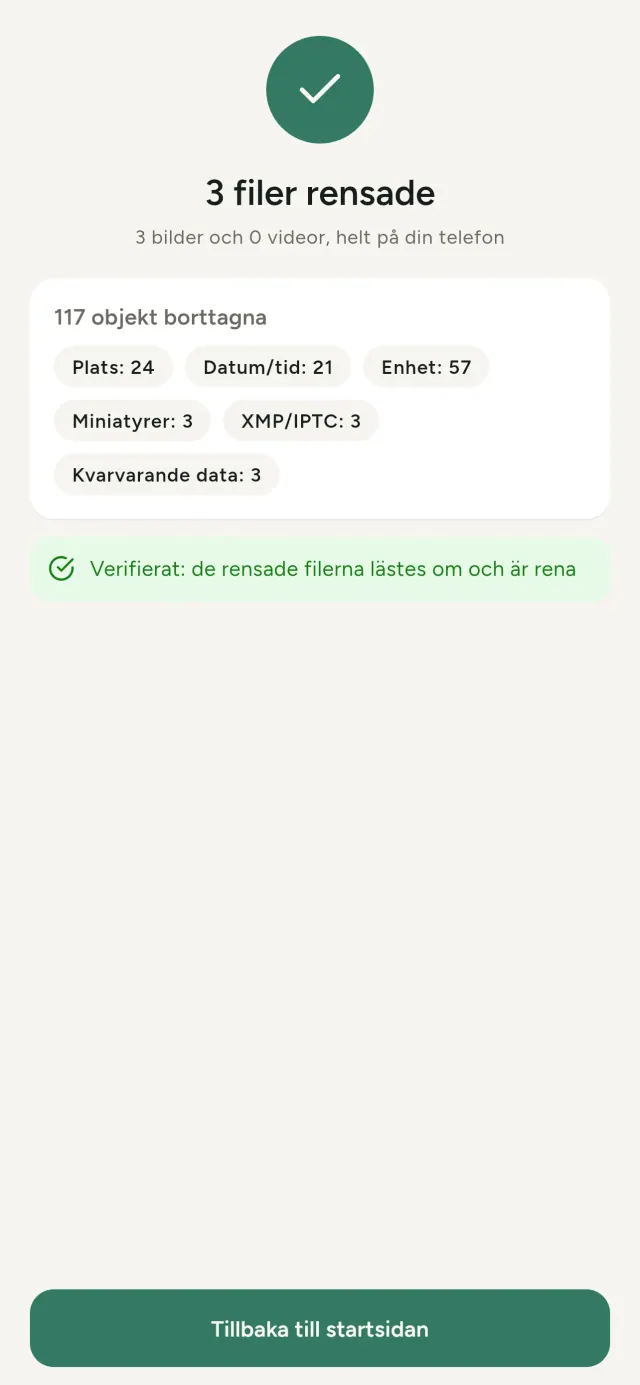
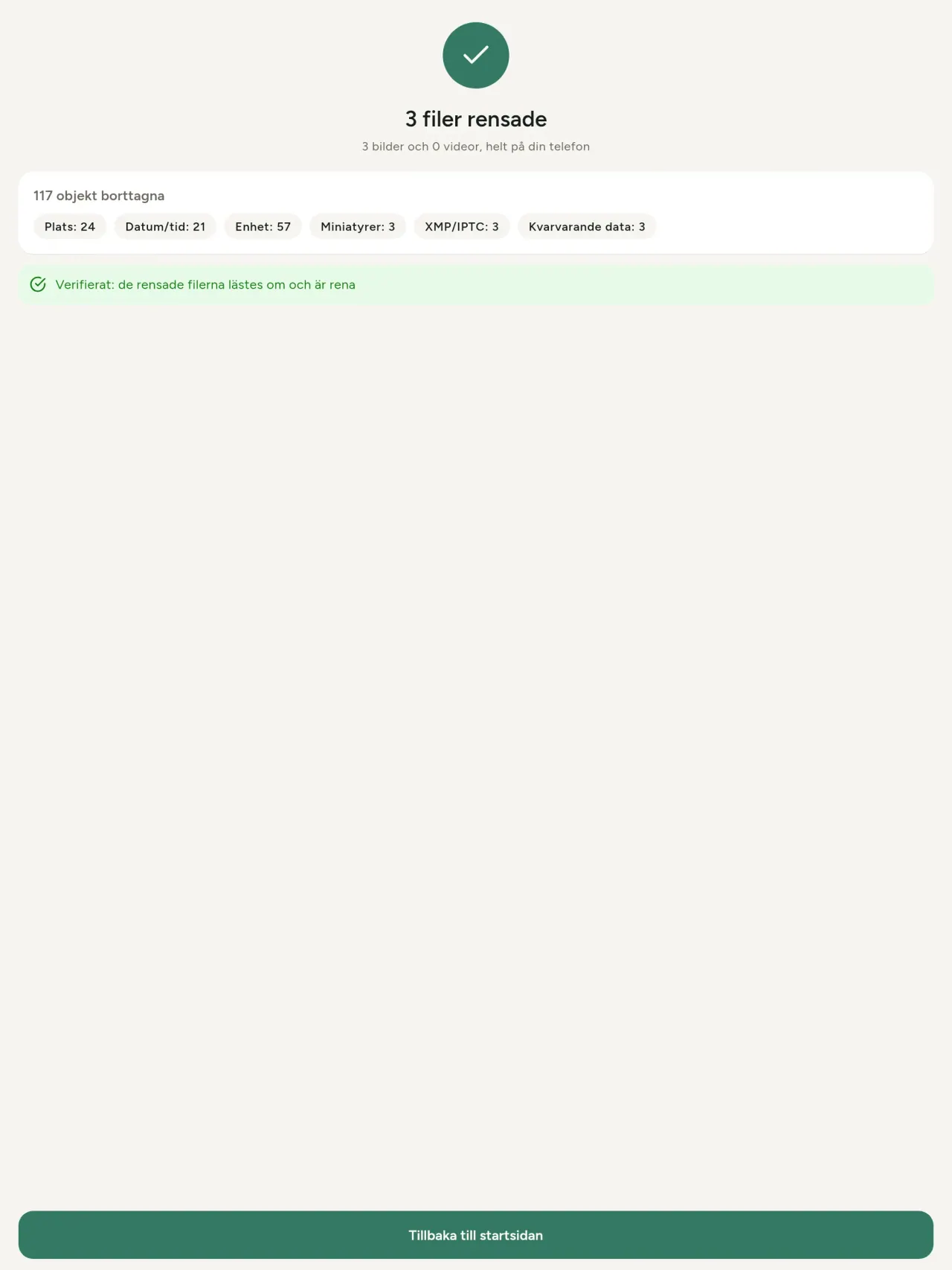
- Bekräfta. En sammanfattning visar vad som togs bort och vilka filer som inte kunde behandlas.
Vart sparas de rengjorda kopiorna?
Till ditt fotobibliotek. Originalets biblioteksdatum behålls, så ett rengjort foto hamnar inte överst i galleriet.
Jag valde “ersätt originalen”, men originalen finns fortfarande kvar.
Raderade original ligger kvar i systemets papperskorg, till exempel “Nyligen raderade” eller papperskorgen, i ungefär 30 dagar tillsammans med sina metadata. Töm papperskorgen för att ta bort dem direkt. Om du avböjer systemets fråga om radering behålls originalen, och de rengjorda kopiorna läggs ändå till.
Vilka filer stöds?
Foton i JPEG, HEIC, AVIF, PNG, WebP och GIF samt videor i MP4, MOV och 3GP, fler format läggs till. En fil som appen inte kan rengöra lämnas orörd och listas i sammanfattningen med orsaken, utan att resten av omgången stoppas.
Varför behöver appen åtkomst till mina foton?
För att lista de foton du kan välja bland och spara de rengjorda kopiorna. När systemet kräver det ber appen också om tillstånd att läsa platsen som lagras i foton. Utan det döljer systemet platsen, så appen skulle inte kunna visa dig vad ett foto avslöjar. Ingenting laddas upp.
Hur kan jag kontrollera att inget lämnar min telefon?
Slå på flygplansläget och rengör ett foto, det fungerar på samma sätt. Det enda undantaget är kartan: om du trycker på “Visa kartan” för en bilds plats och bekräftar skickas den positionen till OpenStreetMap för att visa en karta, och inget annat. Se “Plats” ovan.
Vilka språk finns tillgängliga?
Appen finns på engelska, franska, tyska, spanska, italienska, portugisiska och arabiska. Den här webbplatsen finns på fler språk, och fler appspråk är på väg.
Stöd projektet
Metadata Cleaner förblir gratis och reklamfri. Om den är till nytta för dig kan du stödja utvecklingen (frivilligt):
Buy Me a CoffeeBudget, utgiftsspårare och familjebudget, allt samlat på din enhet.
Även från PixeonVaultMarkLokalt dokumentvalv: dokumentskanner, vattenstämpel och ta bort metadata PDF.
Även från PixeonLittle RelayBreastfeeding, sleep and starting solids tracker. No account, works offline.
Även från PixeonMenuloopOrganisera inköpslistor och recept enkelt
Även från PixeonIndie OfficeQuote maker and self-employed invoices. Offline, no account, no ads.