
Metadata Cleaner:写真/動画
写真メタデータ、exif、写真の位置情報を読む EXIF viewer。修正・削除もできます。

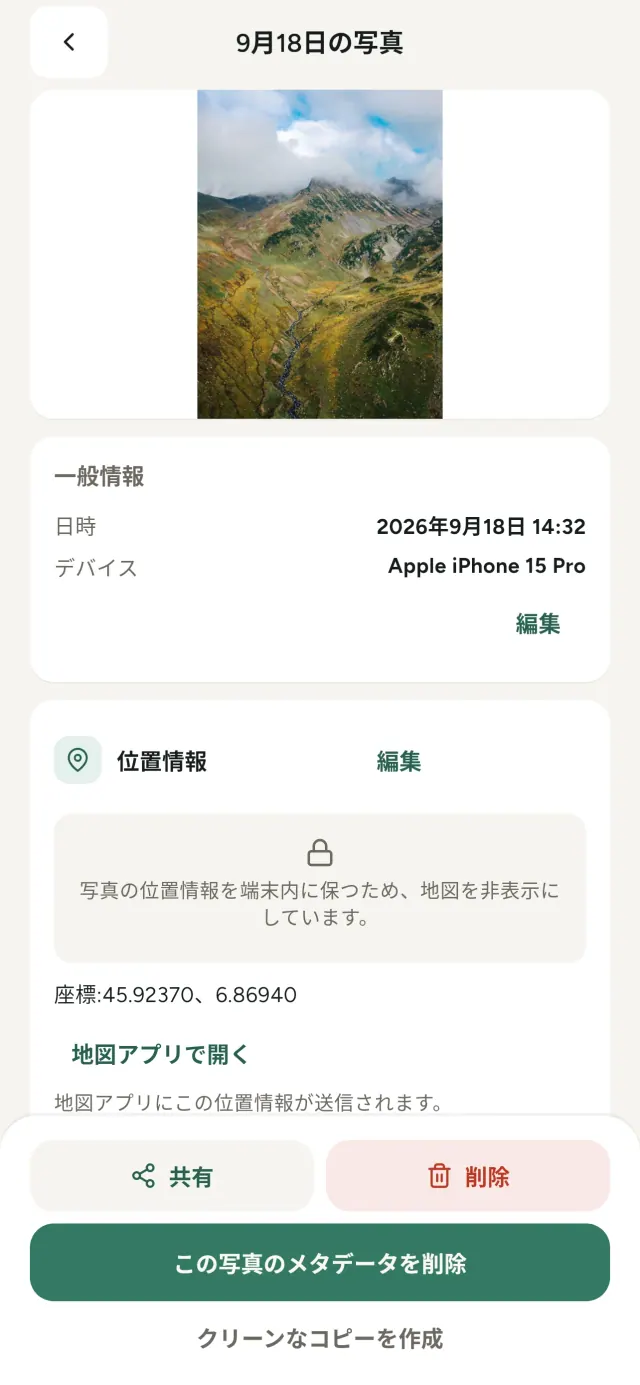
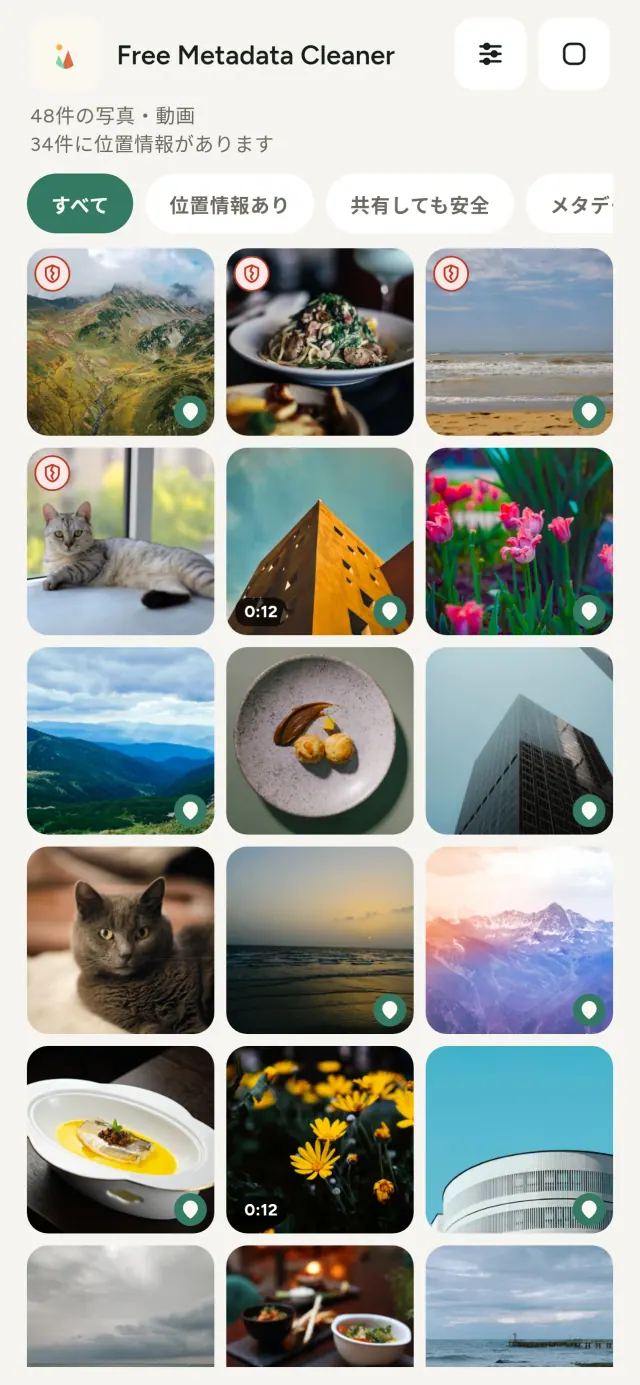
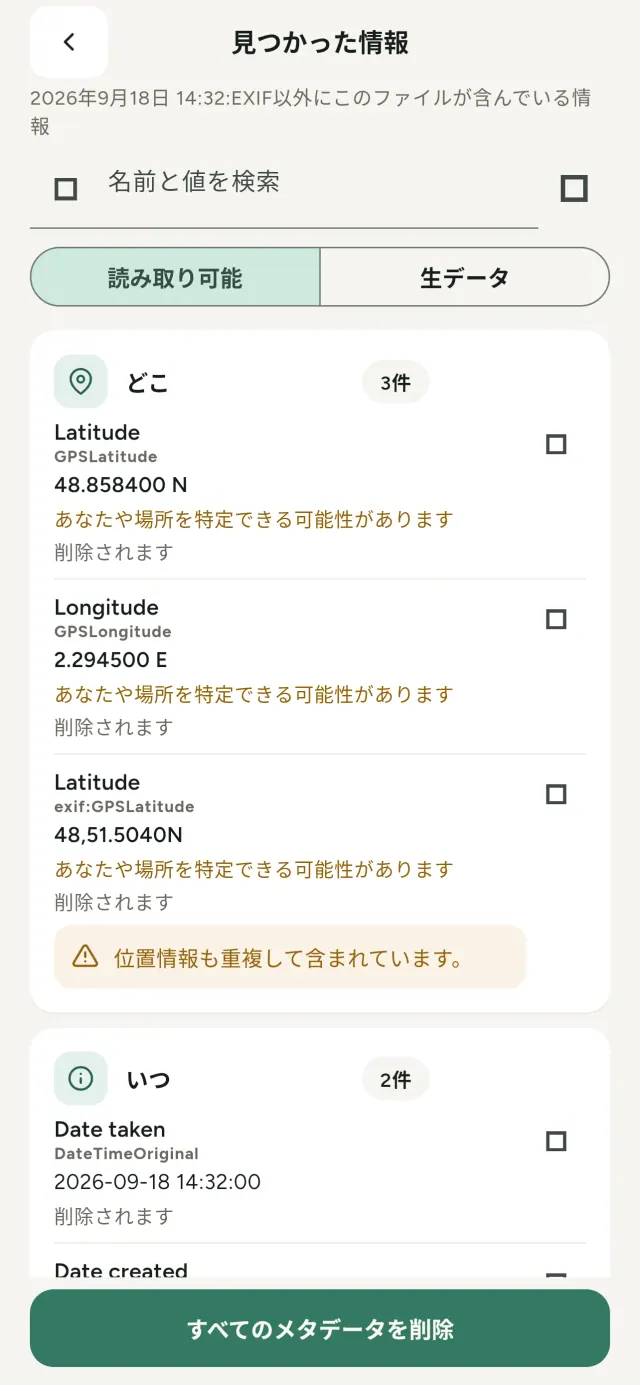
写真や動画には、撮影場所、日時、端末、カメラ、元画像のサムネイルなど、見えない情報が含まれています。共有すると、その情報も一緒に送られることがあります。
Metadata Cleanerは、写真メタデータを端末上で確認、編集、削除できるアプリです。写真の位置情報や日時を直したり、不要な情報をまとめて消したりできます。
Metadata Cleaner ができること
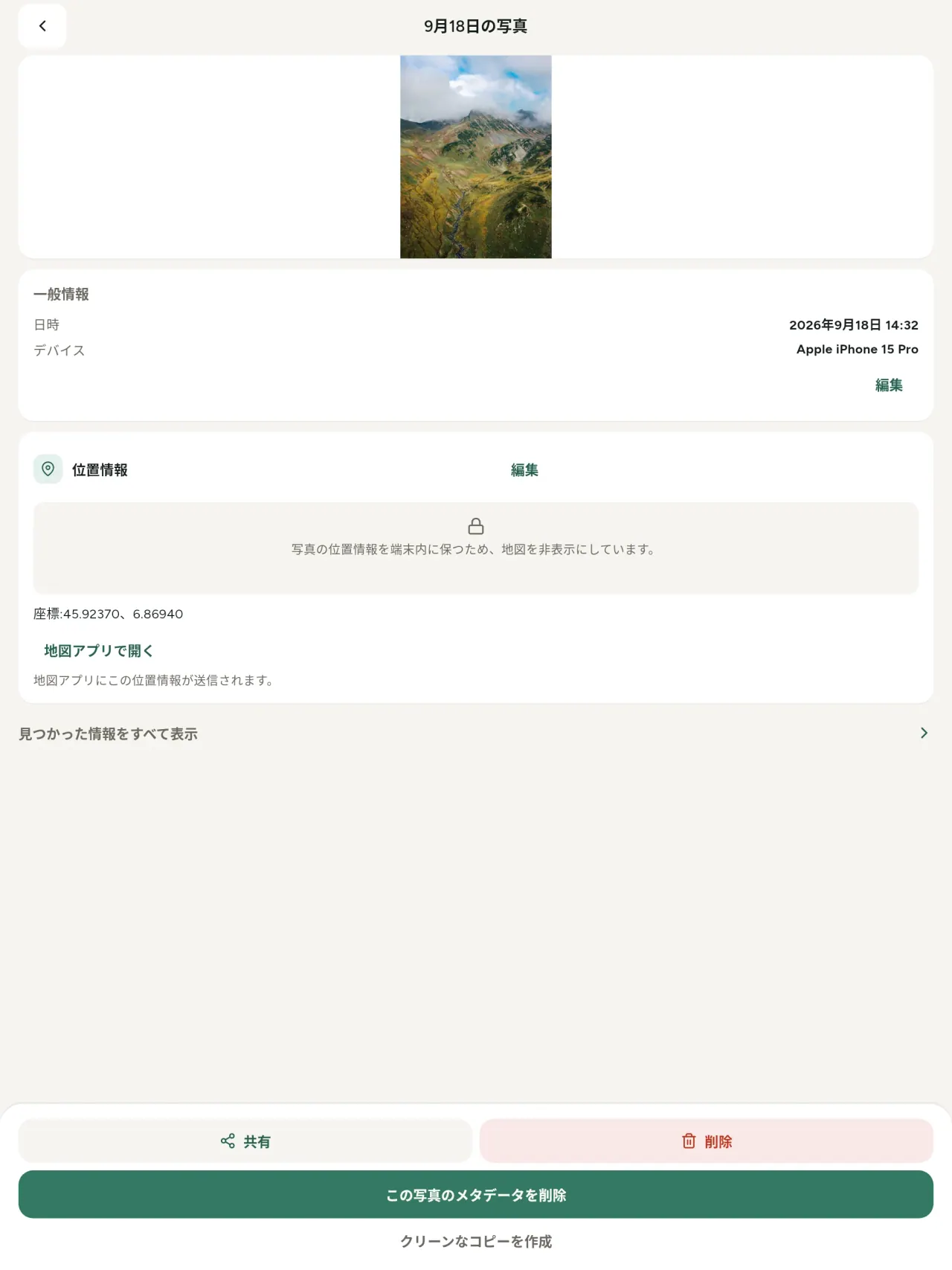
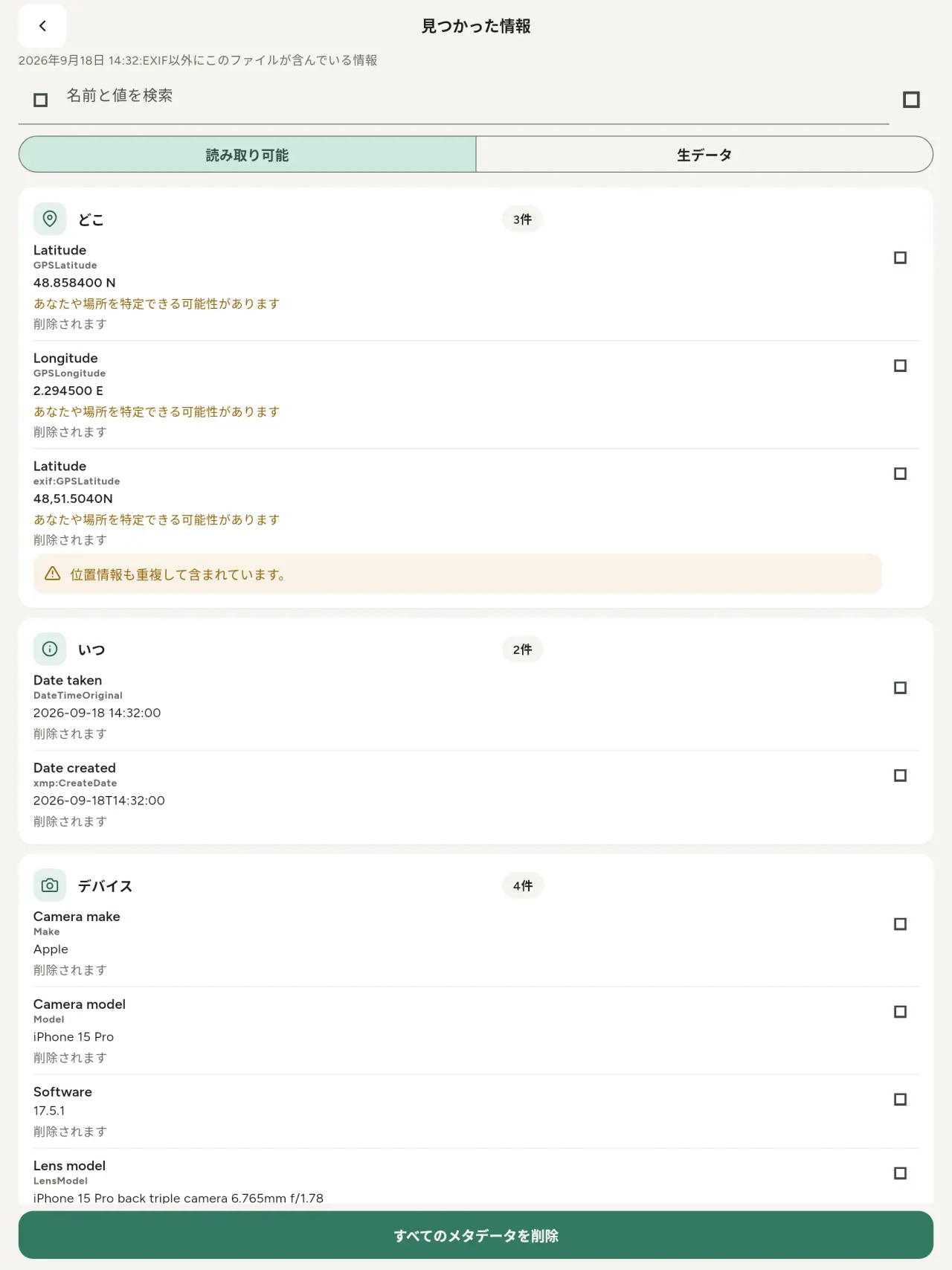
読む。EXIF viewerとして、写真や動画に含まれるすべての値を表示します
EXIF、IPTC、XMP、動画のコーデック、再生時間、解像度を整理して表示し、検索やコピーも可能です。AIの出所情報であるC2PAや生成パラメータも検出します。
編集する
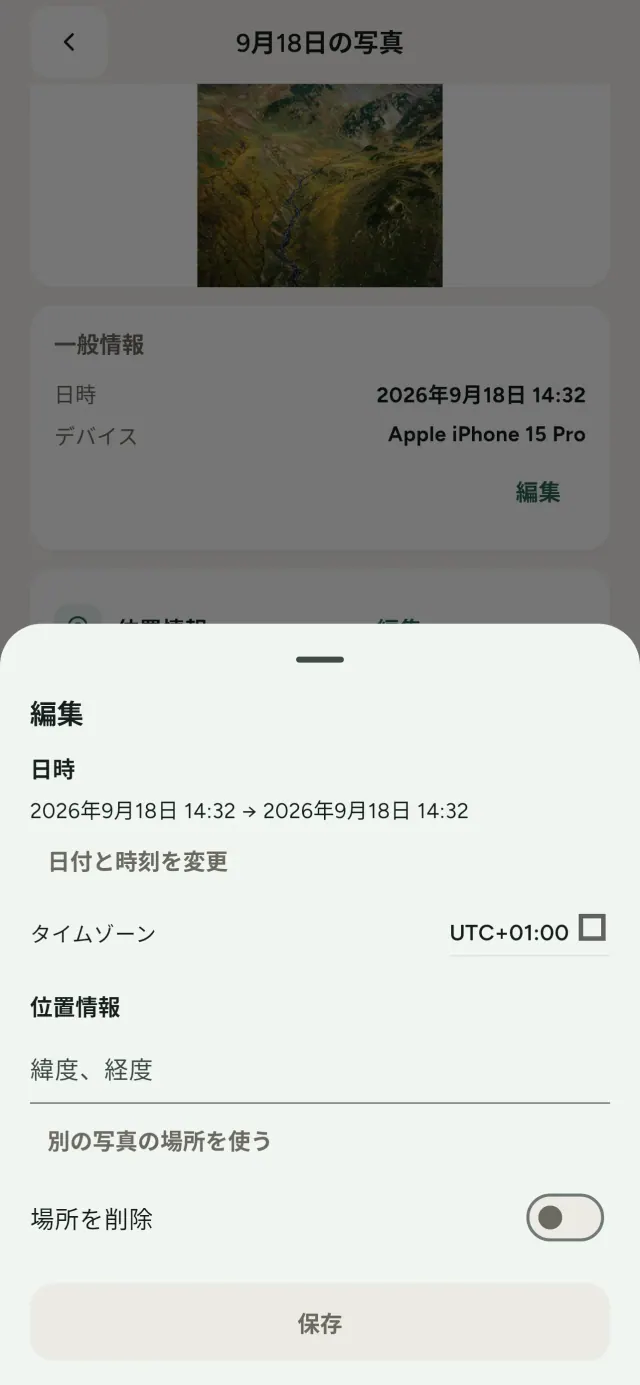
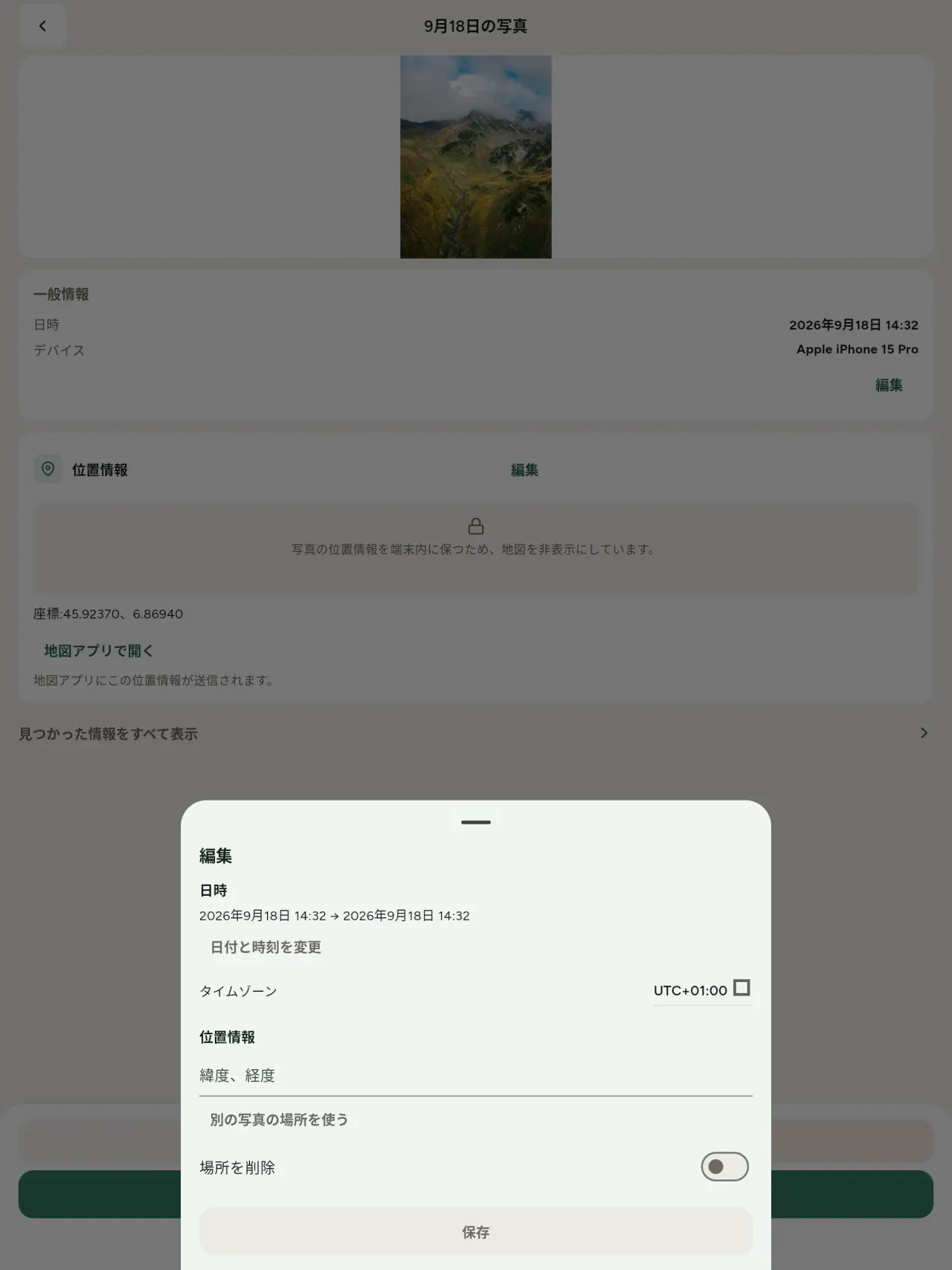
写真の日時や場所を変更できます。メタデータがない写真にも設定でき、別の写真から場所をコピーしたり、地図から選んだりできます。地図を使うときは毎回確認します。変更前と変更後も比較できます。
削除する
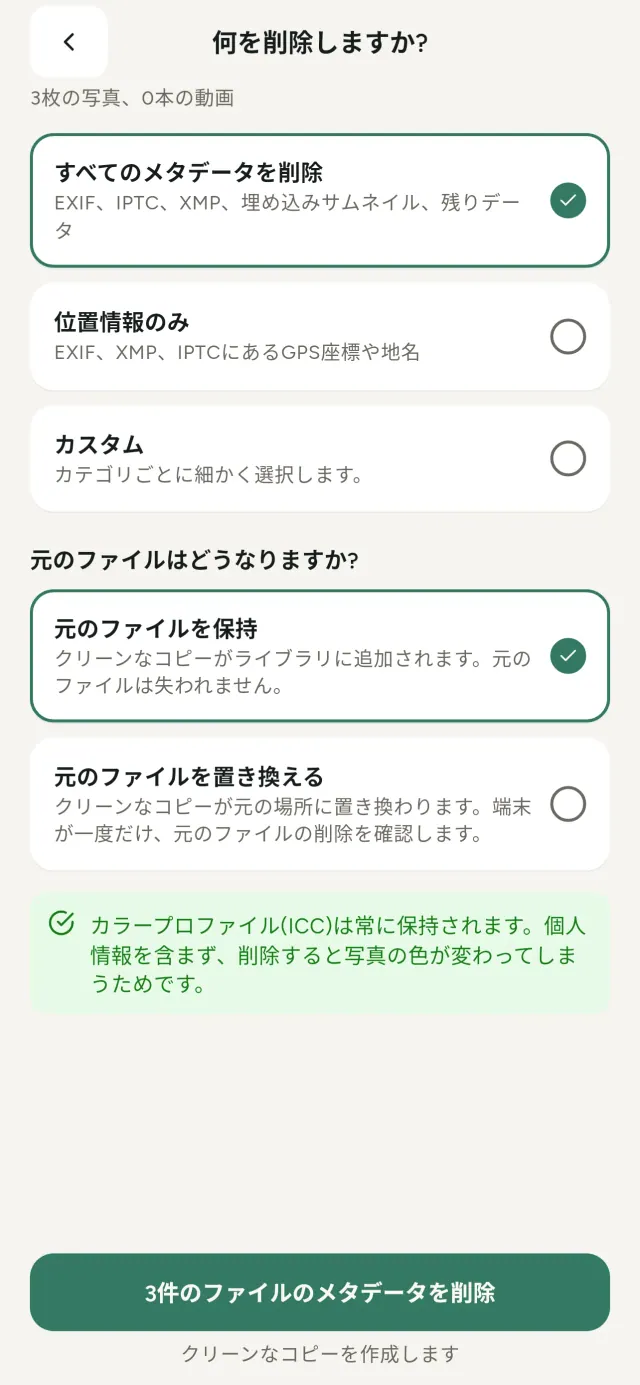
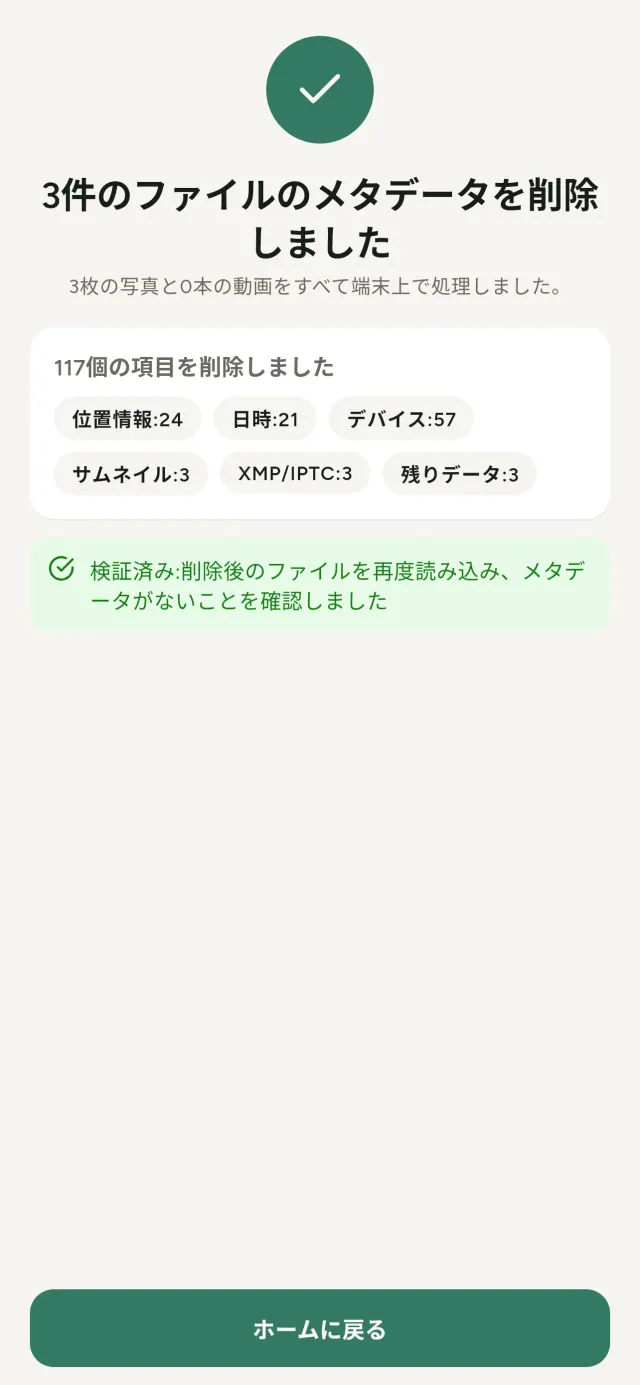
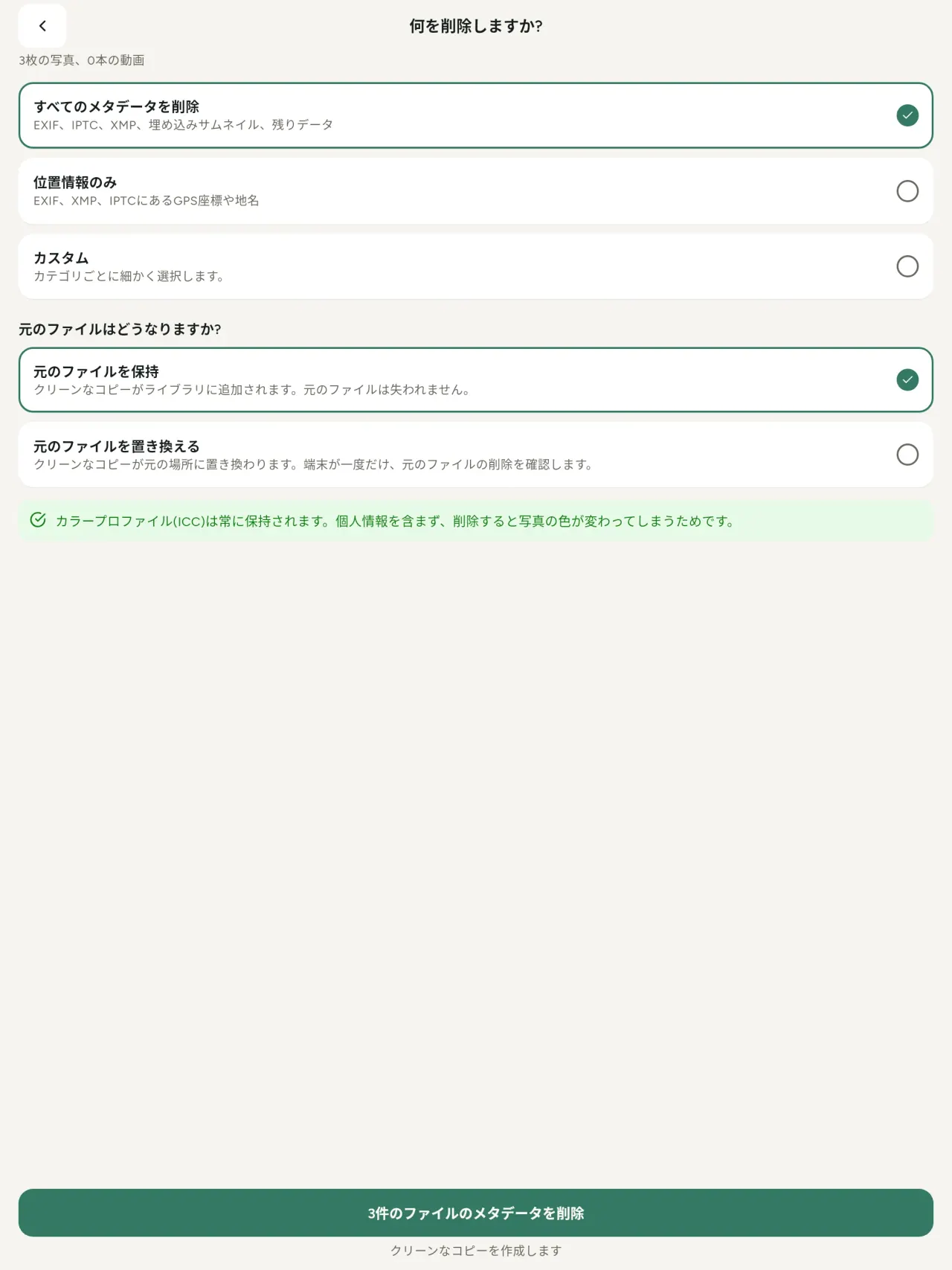
すべて、位置情報だけ、または選択したカテゴリを削除できます。EXIF、IPTC、XMP、埋め込みサムネイル、カメラメーカーのメモ、AIの出所情報、編集ツールが残す余分なデータまで対象です。複数ファイルを一度に処理し、元のファイルを残すか置き換えるか選べます。
安全性をすぐ確認
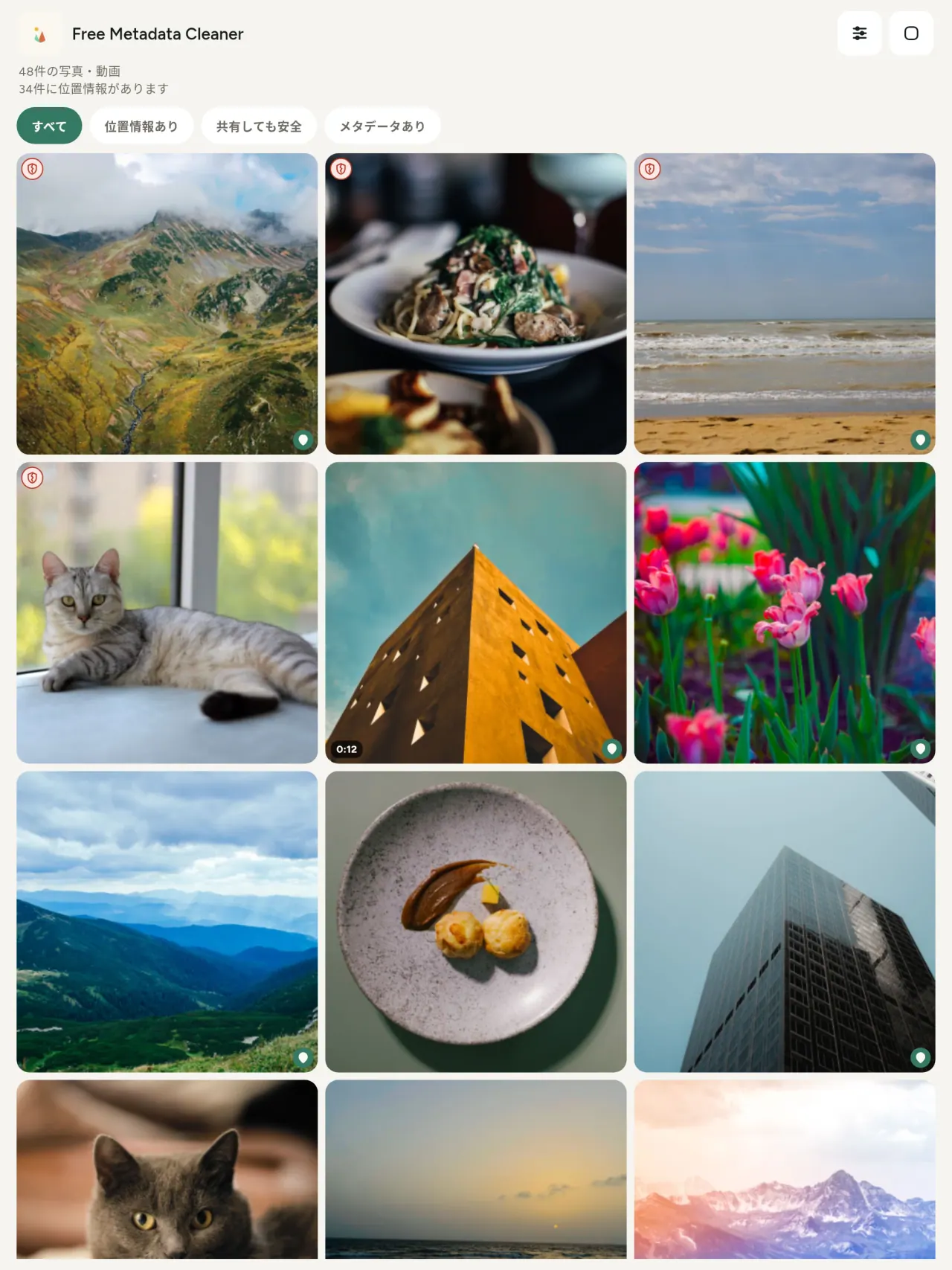
メタデータがないファイルには緑の盾、残っているファイルには赤いひび割れた盾を表示します。
画質を維持
画像を再エンコードしないため、写真そのものは変わりません。
プライバシー重視
写真は端末内で読み取り、編集、削除します。アカウント、広告、解析はありません。任意の地図機能を使う場合だけ、確認後にOpenStreetMapから地図を読み込みます。写真自体は送信されません。
無料、広告なし
役に立った場合は任意でチップを送れます。
こんな方におすすめ
- 写真を投稿、販売、送信する前に、そこに何が含まれているか(GPSの位置情報、日付、カメラ)を知りたい方。
- フリマや掲示板サイトで売買していて、住んでいる場所を知られたくない方。
- 自宅、学校、職場などの場所が共有する写真に写り込まないようにしたい保護者や方々。
- 痕跡を残さずに画像を共有する必要があるジャーナリスト、活動家、危険にさらされている方。
- データ漏えいにうんざりして、自分の写真に含まれる個人情報を自分で管理したい方。
Metadata Cleanerが選ばれる理由
- 1つのアプリで3つのことができます。写真や動画から分かる情報を読む、撮影日や場所などを編集する、そして数回のタップでメタデータを削除することができます。
- すべてスマートフォン上で処理されます。写真はどこにも送信されません。
- 写真(JPEG、HEIC、PNG、WebP、GIF)と動画(MP4、MOV、3GP)に対応。
まだできないこと
- 対応しているのは上記の形式のみです。今後さらに追加する予定です。
Pixeonの原則. Pixeonのアプリはローカル優先です。アカウントも、トラッキングもなく、データはお使いのスマートフォンの中にとどまります。アプリがネットワークに接続するのは、必要な機能をご自身でオンにしたときだけで、その機能を公開する前にプライバシーポリシーを更新します。
Metadata Cleaner の動きを見る
Metadata Cleaner を入手
iPhone と Android で無料で利用できます。
SHA-256: A4:38:C9:B4:A9:3F:97:7B:E8:98:AD:B7:3B:30:5F:63:01:22:E0:D9:F8:CF:5D:2B:D7:4E:38:CB:9A:CF:5A:A2
バージョン 1.1
- App Store 近日公開
- Google Play 近日公開
新機能
このテキストは英語です。
- Read: see exactly what a photo or video reveals (location, date, camera, AI provenance labels such as C2PA and generation parameters, video duration, codecs, resolution and frame rate).
- Edit: change the date a photo was taken and its location (JPEG, HEIC, AVIF), even on a photo with no metadata, reuse the location of another photo, or pick it on an OpenStreetMap map after your confirmation.
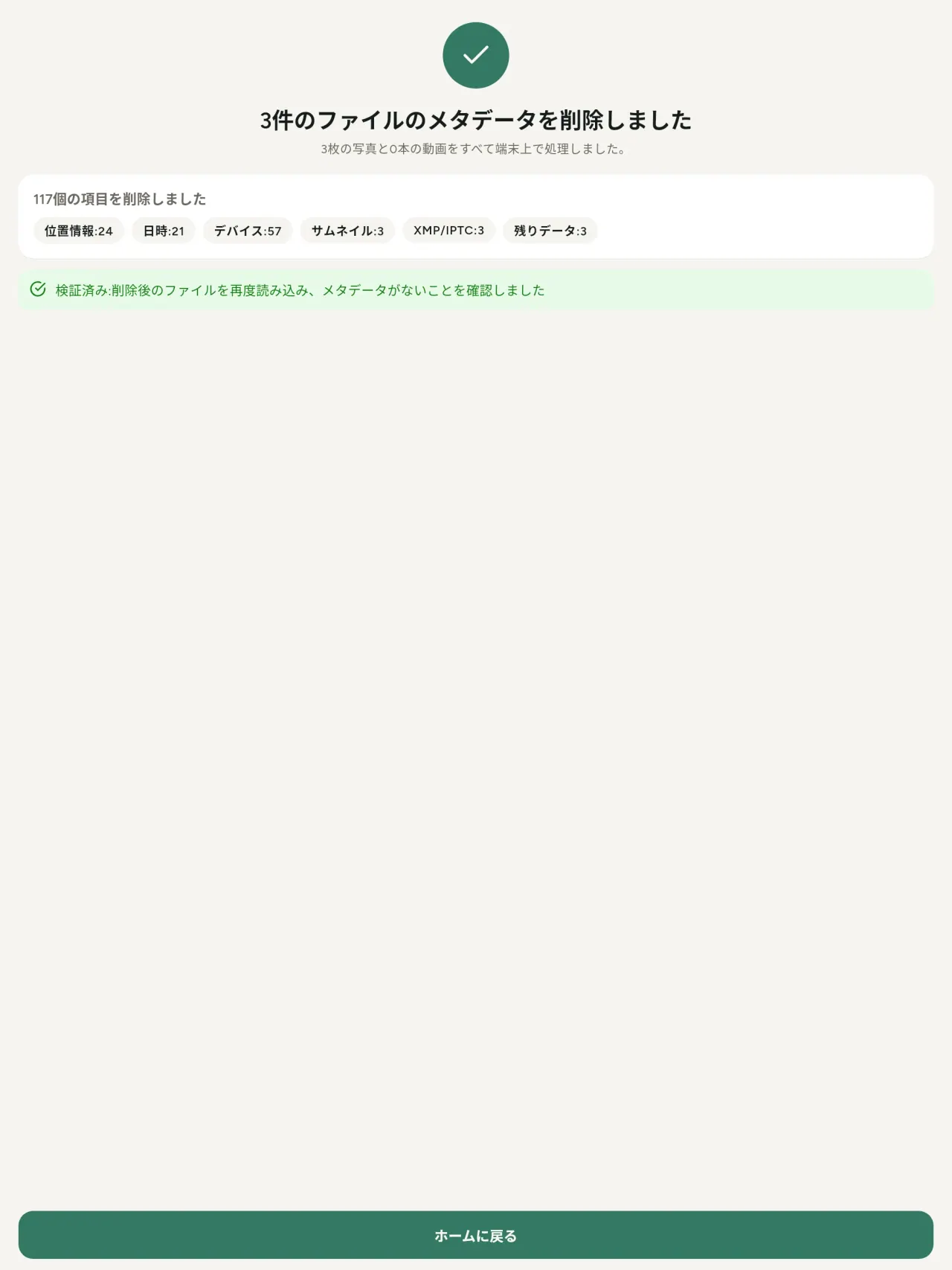
- Remove: clean metadata in a few taps, with a before and after view on the result screen.
- DNG photos are supported.
- Translations aligned across 91 languages.
Privacy policy
以下のテキストは英語です。英語版が優先されます。
Last updated: 2026-11-18 · applies to version 1.1 and later
Policy versions: 1.1 and later (this text) · version 1.0 (still the policy of the app version 1.0). The version number of your app is shown at the bottom of its Settings screen.
Free Metadata Cleaner shows and removes the metadata hidden in your photos and videos (location, date and time, camera and lens details, thumbnails…). The short version: everything happens on your device, and we collect nothing.
What the app accesses
Your photo and video library, only after you grant permission (and, where your system requires it, the permission to read the location stored in your photos, so that it can be shown to you). The files you choose are read and cleaned on your device; the cleaned copy is saved to your library. If you choose to replace the originals, the system asks you to confirm before deleting them.
To show which photos are already clean, the app reads the metadata of the photos displayed on screen, on your device. This result is kept in memory only and is never stored.
What we collect
Nothing. No account, no analytics or usage tracking, no advertising or advertising identifiers, no crash or diagnostics reporting beyond what the app stores provide, and no third-party SDK that sends data anywhere. There is no Free Metadata Cleaner server. Cleaning a photo or video never uses the network, at all: turn on airplane mode and clean one to check for yourself. The only network request the app itself can ever make is described under “Location” below, and it only ever happens if you ask for it. The one other connection is the optional tip purchase, handled by the store (see “Optional support”).
Temporary files and history
The app keeps no history and no database. Temporary files created while cleaning are deleted after each item and purged when the app starts.
Deleted originals
Originals that are deleted remain in your system's trash (such as “Recently Deleted” or the trash) for about 30 days, with their metadata. The app cannot empty it: do it yourself if you need the originals gone at once.
iCloud and cloud photos
If a photo is stored in iCloud and not on your device, the operating system may download it before the app can process it. That transfer is made by the system, under the provider's own terms, not by the app.
Location
When a photo contains a location, the app shows the coordinates as text, which stays on your device. Three actions can send location information off your device, only when you choose them, each time: “Open in…” hands the coordinates to the maps application you select, under its own privacy policy; “Show the map” asks you to confirm first (“Showing the map sends this photo's position to a map service. Nothing else is sent.”), then loads a small map from OpenStreetMap for that one position; and, when you edit a photo's place, “Choose on the map” asks you to confirm first, then opens a full-screen map from OpenStreetMap. This map does not use your phone's location. As you move and zoom it, the app requests the map tiles of the area you are browsing, so OpenStreetMap receives the position of the area shown on screen, which starts on the photo's current place if it has one, and otherwise on a world view. The photo itself is never sent, and nothing is sent before you confirm. The place you choose on the map (or copy from another photo) is written into the photo's file only when you save, on your device. In every case OpenStreetMap receives, as with any web request, technical details like your IP address; it does not receive your name, an account, or anything else about you or your other photos. See OpenStreetMap's own privacy policy. Outside of these explicit actions, the app never sends a photo's location, or anything else, anywhere.
Optional support
The app is free. If you wish, you can leave a tip. On iPhone and in the Google Play version for Android, tips are in-app purchases processed by Apple or Google under their own terms and privacy policy; the app adds the Google Play billing permission for this, makes no network call itself, and receives no payment or personal details. Versions installed outside Google Play may instead open an external donation page in your browser, operated by a third party under its own privacy policy; nothing from the app is sent to it. A tip unlocks nothing.
Contact form on this website
If you write to us through this site, we use your message and the email address you optionally give only to reply. Bot protection is provided by Cloudflare and email delivery by Resend.
Language choice on this website
When you choose a language, or when this site opens a page in your browser's language, it stores
one small functional cookie (pxl, a language code, one year) so that your choice is
remembered. If this site suggests a page in your browser's language and you close that suggestion,
your browser also keeps a local note (pxl-banner-off, in local storage, 30 days) so the
suggestion does not come back. Neither identifies anyone, neither is used for tracking or advertising,
and neither is shared. You can delete them in your browser at any time.
Website statistics
This website uses Cloudflare Web Analytics to count visits (pages viewed, country, browser type, loading speed). It sets no cookie, does not use local storage, does not fingerprint your device, does not follow you across sites and does not build a profile of you. Search engines (for example Google Search Console) give us aggregated search statistics, without any data about individual visitors. Our own web server also counts the pages and APK downloads it serves: for each request it keeps the address, the site or social network that sent you (only its name, or the campaign tag written in the link), the country, the type of device and whether the request came from a robot. It keeps no IP address, no identifier and no cookie, and these counts are anonymous. We use no advertising or other analytics service. None of this concerns the app itself, which collects nothing.
Children
The app is a general-purpose tool and is not directed at children.
Changes
An updated policy will be published at this URL with a new date above.
Contact
Questions about privacy: metadata-cleaner-contact@pixeon.net
バージョン 1.0
- App Store 公開済み
- Google Play 公開済み
新機能
このテキストは英語です。
- Cleans JPEG, HEIC, PNG, WebP, GIF, MP4, MOV and 3GP files, with no video re-encoding.
- "Safe to share" and "To clean" filters.
- New green design.
- Help screen with a FAQ.
- Settings: share, rate, feedback, unsupported formats.
- Optional tips.
Privacy policy, version 1.0
以下のテキストは英語です。英語版が優先されます。
Applies to version 1.0 of the app (the first release). Later versions: current policy.
Free Metadata Cleaner shows and removes the metadata hidden in your photos and videos (location, date and time, camera and lens details, thumbnails…). The short version: everything happens on your device, and we collect nothing.
What the app accesses
Your photo and video library, only after you grant permission (and, where your system requires it, the permission to read the location stored in your photos, so that it can be shown to you). The files you choose are read and cleaned on your device; the cleaned copy is saved to your library. If you choose to replace the originals, the system asks you to confirm before deleting them.
To show which photos are already clean, the app reads the metadata of the photos displayed on screen, on your device. This result is kept in memory only and is never stored.
What we collect
Nothing. No account, no analytics or usage tracking, no advertising or advertising identifiers, no crash or diagnostics reporting beyond what the app stores provide, and no third-party SDK that sends data anywhere. There is no Free Metadata Cleaner server. Cleaning a photo or video never uses the network, at all: turn on airplane mode and clean one to check for yourself. The only network request the app itself can ever make is described under “Location” below, and it only ever happens if you ask for it. The one other connection is the optional tip purchase, handled by the store (see “Optional support”).
Temporary files and history
The app keeps no history and no database. Temporary files created while cleaning are deleted after each item and purged when the app starts.
Deleted originals
Originals that are deleted remain in your system's trash (such as “Recently Deleted” or the trash) for about 30 days, with their metadata. The app cannot empty it: do it yourself if you need the originals gone at once.
iCloud and cloud photos
If a photo is stored in iCloud and not on your device, the operating system may download it before the app can process it. That transfer is made by the system, under the provider's own terms, not by the app.
Location
When a photo contains a location, the app shows the coordinates as text, which stays on your device. Two actions send that one photo's position off your device, only when you choose them, each time: “Open in…” hands the coordinates to the maps application you select, under its own privacy policy; “Show the map” asks you to confirm first (“Showing the map sends this photo's position to a map service. Nothing else is sent.”), then loads a small map from OpenStreetMap for that one position. OpenStreetMap receives the coordinates and, as with any web request, technical details like your IP address; it does not receive your name, an account, or anything else about you or your other photos. See OpenStreetMap's own privacy policy. Outside of these two explicit actions, the app never sends a photo's location, or anything else, anywhere.
Optional support
The app is free. If you wish, you can leave a tip. On iPhone and in the Google Play version for Android, tips are in-app purchases processed by Apple or Google under their own terms and privacy policy; the app adds the Google Play billing permission for this, makes no network call itself, and receives no payment or personal details. Versions installed outside Google Play may instead open an external donation page in your browser, operated by a third party under its own privacy policy; nothing from the app is sent to it. A tip unlocks nothing.
Contact form on this website
If you write to us through this site, we use your message and the email address you optionally give only to reply. Bot protection is provided by Cloudflare and email delivery by Resend.
Language choice on this website
When you choose a language, or when this site opens a page in your browser's language, it stores
one small functional cookie (pxl, a language code, one year) so that your choice is
remembered. If this site suggests a page in your browser's language and you close that suggestion,
your browser also keeps a local note (pxl-banner-off, in local storage, 30 days) so the
suggestion does not come back. Neither identifies anyone, neither is used for tracking or advertising,
and neither is shared. You can delete them in your browser at any time.
Website statistics
This website uses Cloudflare Web Analytics to count visits (pages viewed, country, browser type, loading speed). It sets no cookie, does not use local storage, does not fingerprint your device, does not follow you across sites and does not build a profile of you. Search engines (for example Google Search Console) give us aggregated search statistics, without any data about individual visitors. Our own web server also counts the pages and APK downloads it serves: for each request it keeps the address, the site or social network that sent you (only its name, or the campaign tag written in the link), the country, the type of device and whether the request came from a robot. It keeps no IP address, no identifier and no cookie, and these counts are anonymous. We use no advertising or other analytics service. None of this concerns the app itself, which collects nothing.
Children
The app is a general-purpose tool and is not directed at children.
Changes
An updated policy will be published at this URL with a new date above.
Contact
Questions about privacy: metadata-cleaner-contact@pixeon.net
Credits
Android is a trademark of Google LLC. The Android robot is reproduced or modified from work created and shared by Google and used according to terms described in the Creative Commons 3.0 Attribution License. This site is not affiliated with or endorsed by Google.
サポート
最終更新:2026-10-08
Free Metadata Cleanerは独立型の無料アプリです。よくあるご質問への回答を下にまとめました。
できるだけ数日以内に返信いたします。ご利用端末の機種、OSバージョン、行っていた操作を教えていただけると助かります。プライベート写真は送信しないでください。
アプリはどんなデータを保存または送信しますか?
何も保存または送信しません。履歴もアカウントもサーバーもありません。詳細はプライバシーポリシーをご覧ください。
写真をきれいにするには?
- アプリを開き、ライブラリへのアクセス許可が求められたら許可します。
- きれいにしたい写真や動画を選択します。
- 除去する項目や、元のファイルを置き換えるかクリーニング済みコピーを作るか選びます。
- 確認します。除去された内容や処理できなかったファイルの概要が表示されます。
クリーニング後のコピーはどこへ保存されますか?
端末の写真ライブラリに保存されます。元写真のライブラリ日付はそのままなので、クリーニング後もギャラリーの上に表示されることはありません。
「元のファイルを置き換える」を選んだのに元の写真が残っています。
削除された写真は端末のゴミ箱(「最近削除されたもの」など)に約30日間残り、メタデータも保存されたままです。すぐに削除したい場合はゴミ箱を空にしてください。システムの削除確認を拒否した場合は元ファイルが残り、クリーニング済みコピーのみ追加されます。
どのファイル形式に対応していますか?
JPEG, HEIC, AVIF, PNG, WebP, GIFの写真とMP4, MOV, 3GPの動画(今後さらに追加予定)。処理できないファイルはそのまま残り、理由付きで概要に表示されます。他のファイルの処理は中断されません。
なぜアプリは写真へのアクセスが必要なのですか?
選択可能な写真一覧を表示したりクリーニングコピーを保存するためです。システム側で求められる場合、位置情報閲覧許可も求めます。許可がない場合、システムが位置情報を隠すため、写真がどんな情報を持つかアプリで表示できません。何もアップロードされません。
本当に端末外へデータが出ていないか確認する方法は?
機内モードにして写真をクリーニングしてみてください。通常通り動作します。ただし、マップ表示のみ例外です。「地図を表示」を選択し確認すると、その位置のみOpenStreetMapに送信されて地図が表示されます。他には何も送信されません。「位置情報」項目を参照してください。
どの言語に対応していますか?
アプリは英語、フランス語、ドイツ語、スペイン語、イタリア語、ポルトガル語、アラビア語に対応しています。このウェブサイトはさらに多くの言語でご覧いただけます。今後も対応言語を増やしていきます。
「支出管理」「予算管理」を、端末内でシンプルに。
Pixeon の他のアプリVaultMark端末内暗号化の書類保管庫。書類スキャン後に透かし文字を入れ、メタデータを削除して共有。
Pixeon の他のアプリLittle RelayBreastfeeding, sleep and starting solids tracker. No account, works offline.
Pixeon の他のアプリMenuloop献立計画、レシピ管理、買い物リスト。写真付きで便利。
Pixeon の他のアプリIndie OfficeQuote maker and self-employed invoices. Offline, no account, no ads.