
Metadata Cleaner: Foto/Video
EXIF preglednik, čišćenje i uređivanje metapodataka: mjesto, datum, uređaj.


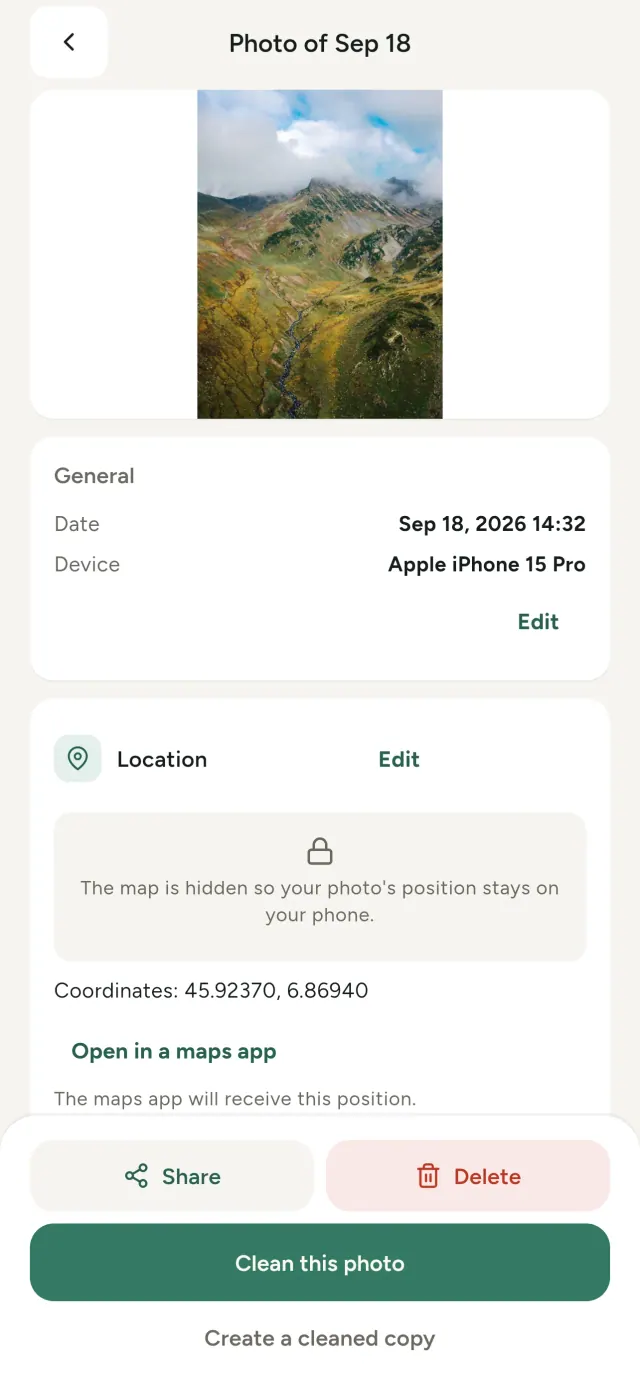
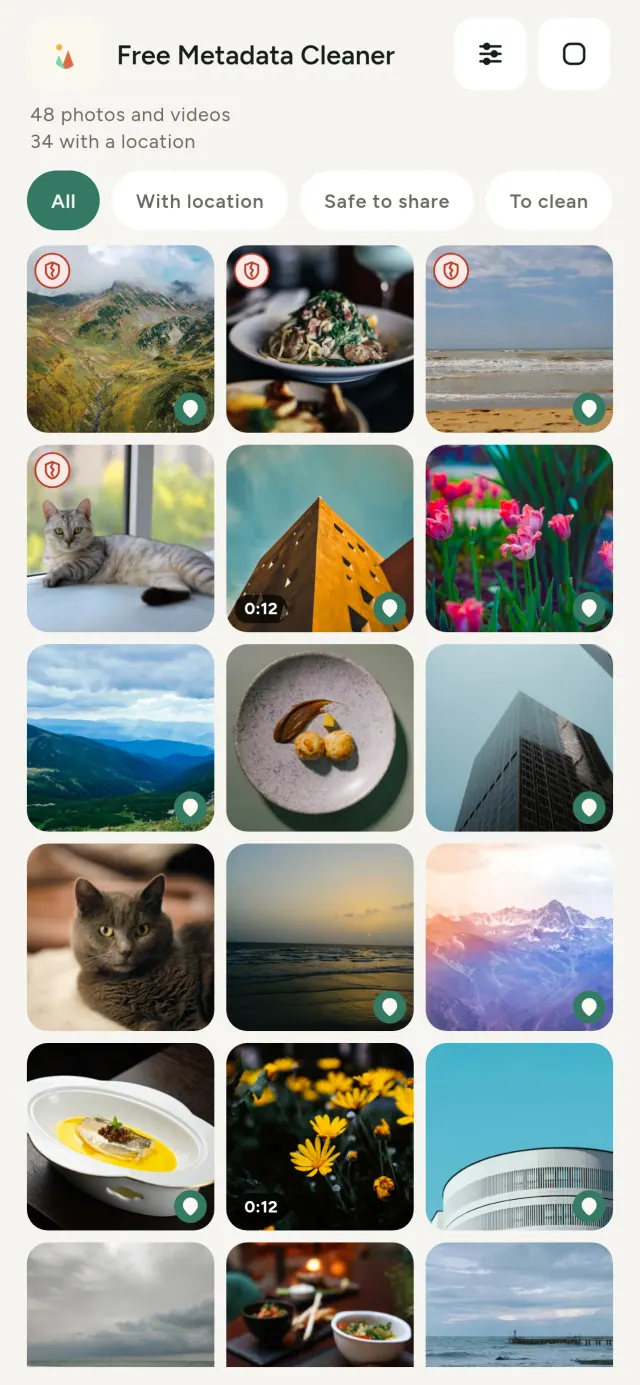
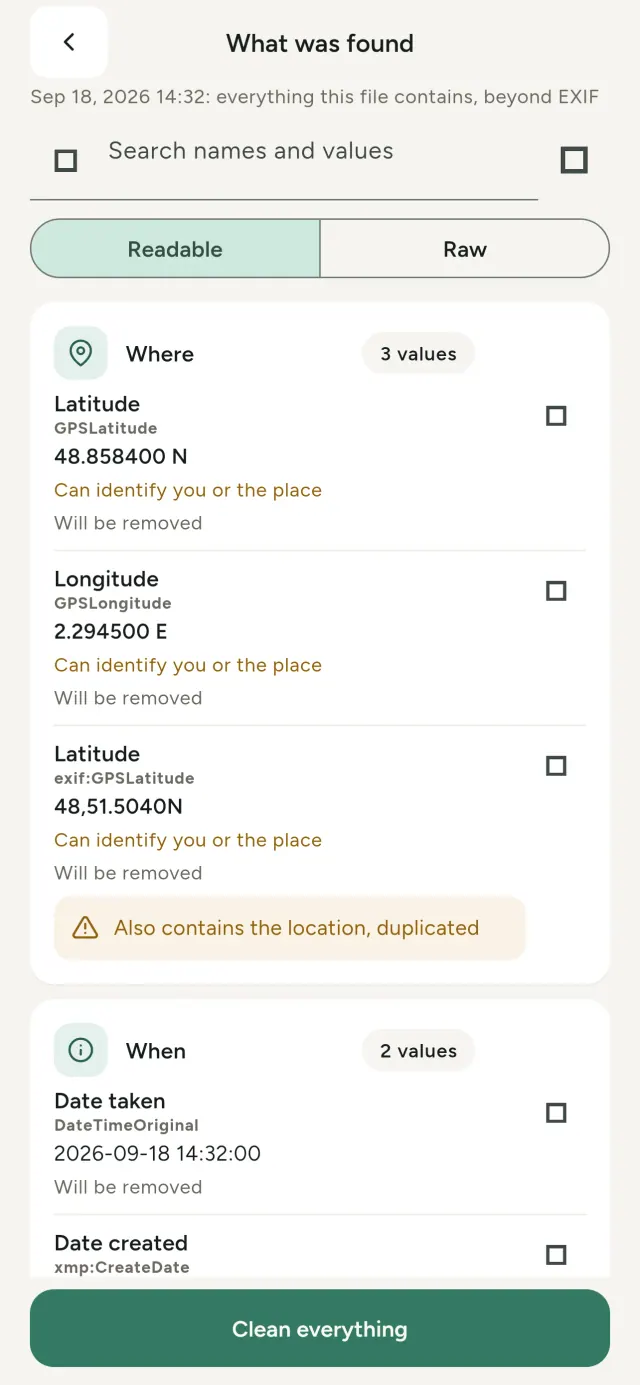
Svaka fotografija koju snimiš nosi skrivene podatke: gdje je snimljena, kada, kojim telefonom, ponekad čak i malu sličicu originalne slike. Kada je podijeliš, sve to ide s njom.
Metadata Cleaner radi tri stvari, na tvom telefonu: pokazuje koje metapodatke sadrže tvoje fotografije i videozapisi, dopušta da ih ispraviš i uklanja ih.
Šta Metadata Cleaner radi
Pregled
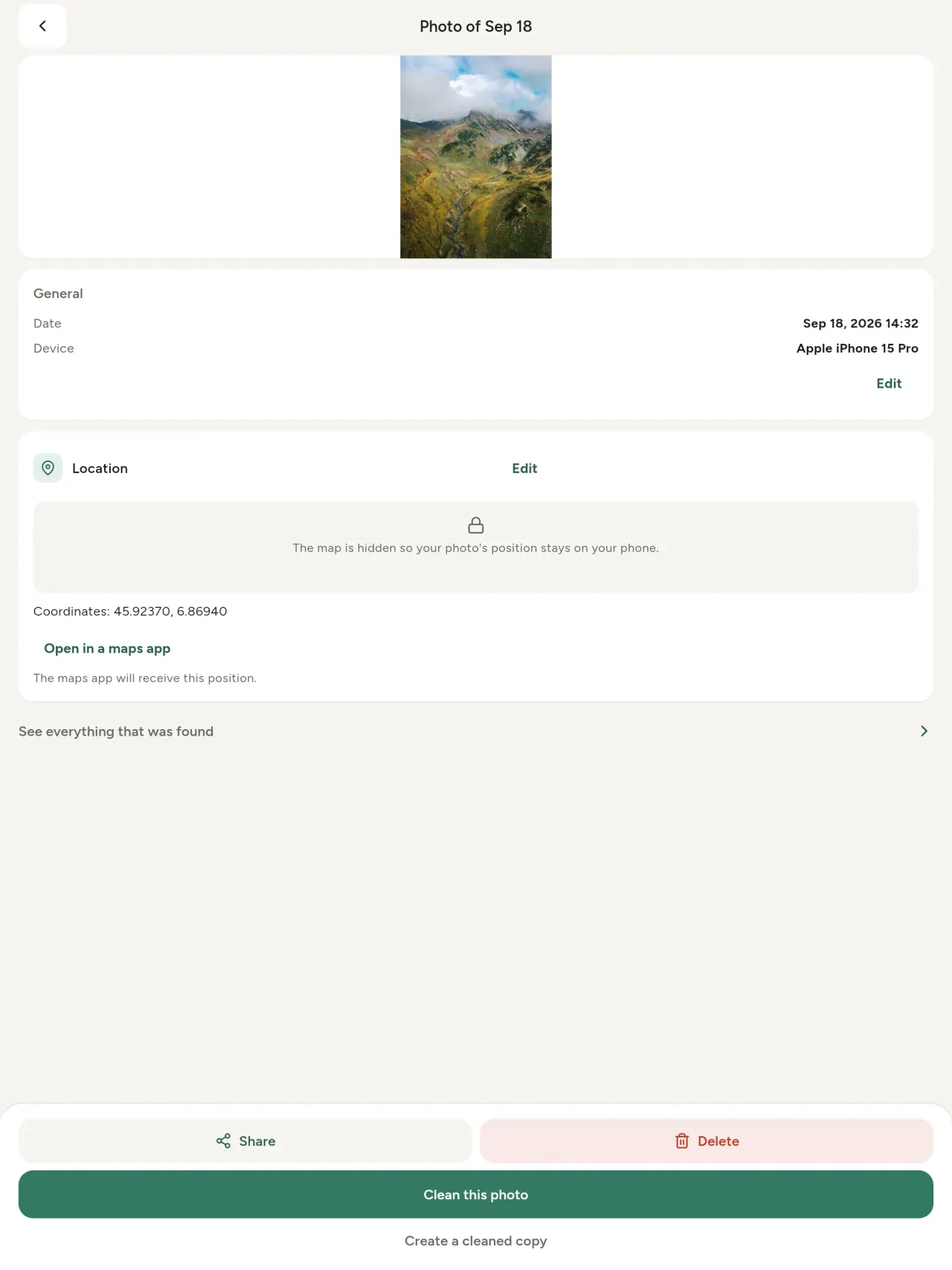
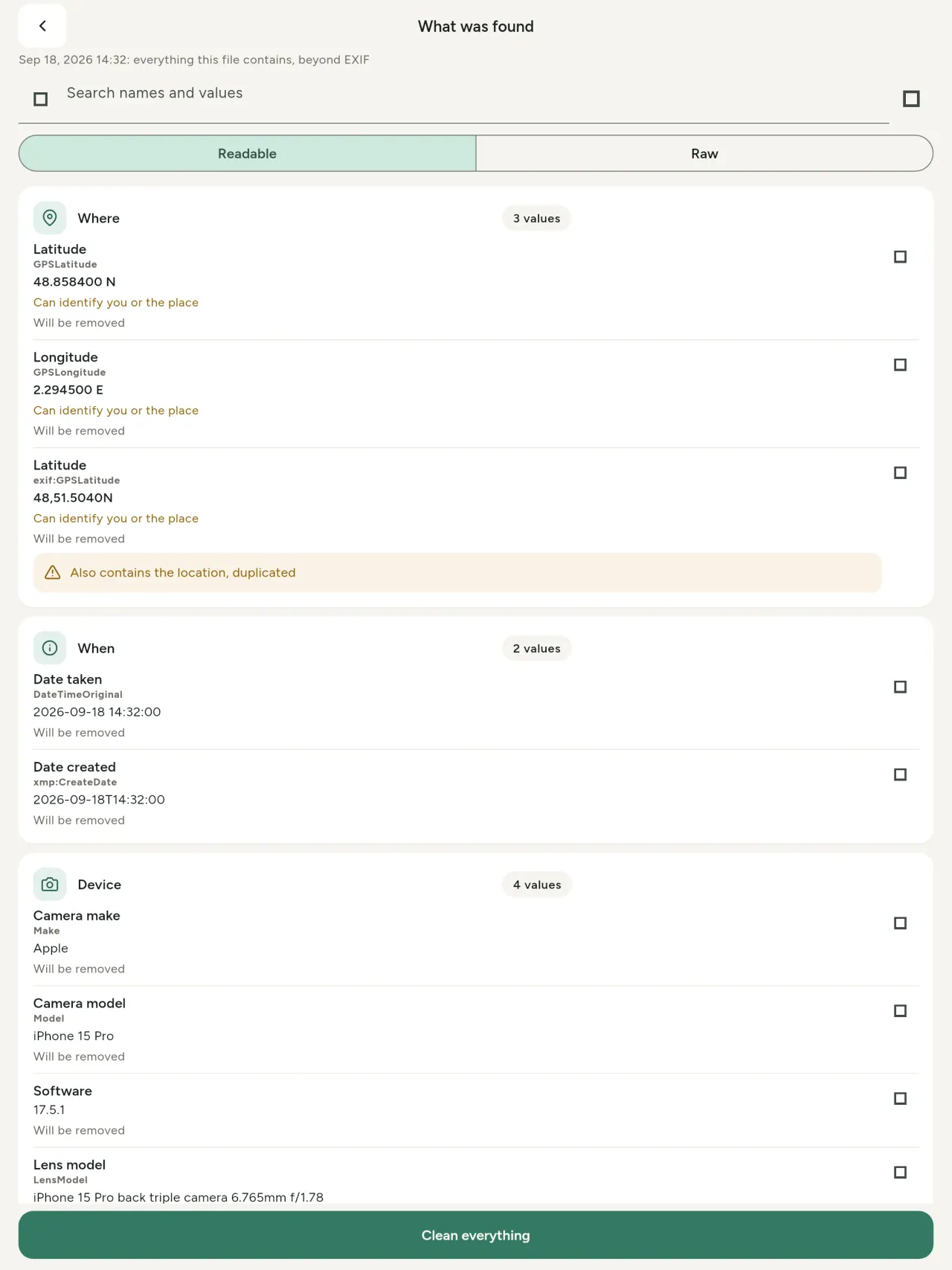
Pravi preglednik metapodataka: svaka vrijednost pronađena u fotografiji ili videu (EXIF, IPTC, XMP, video kodeci, trajanje i rezolucija), grupisana, pretraživa i kopirljiva, uz jasno označeno šta će biti uklonjeno. Otkriva i AI porijeklo (C2PA, parametri generisanja).
Uređivanje
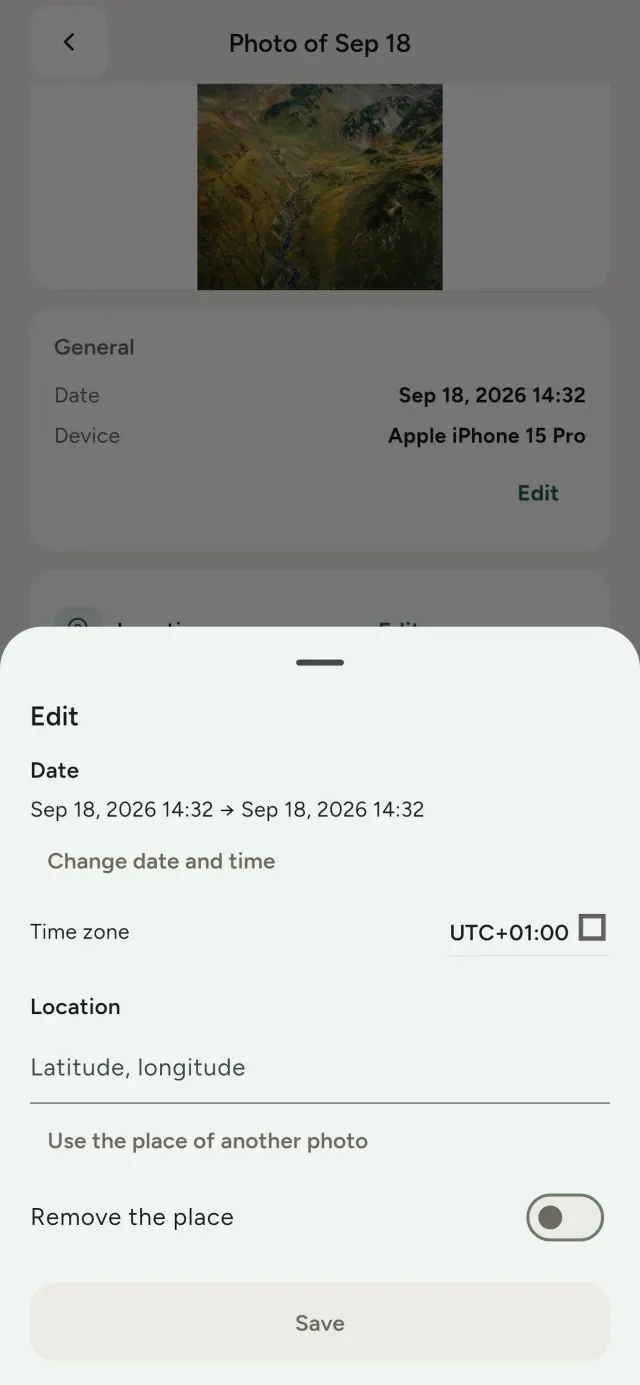
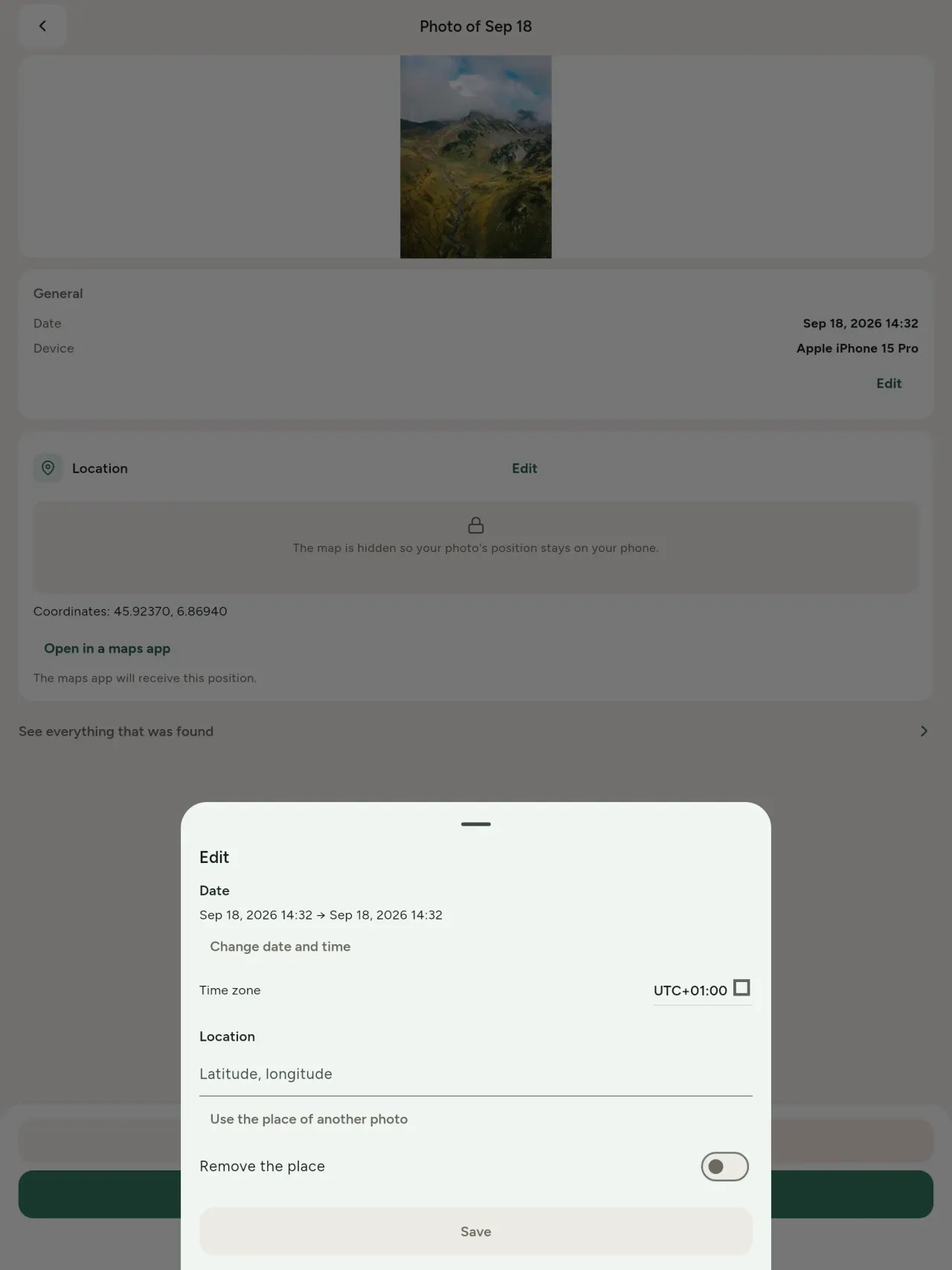
Promijeni ili ispravi datum i mjesto fotografije, čak i ako nema metapodataka. Preuzmi mjesto s druge fotografije ili ga odaberi na karti (aplikacija pita svaki put). Uporedi stanje prije i poslije.
Uklanjanje
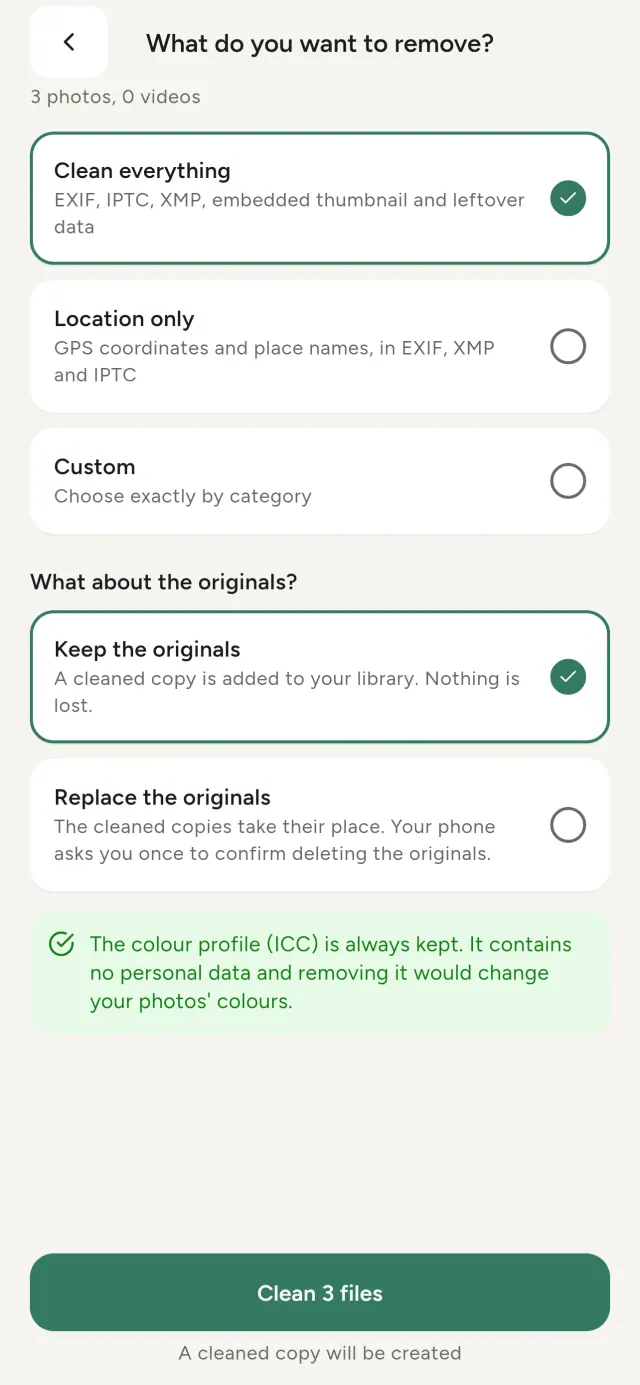
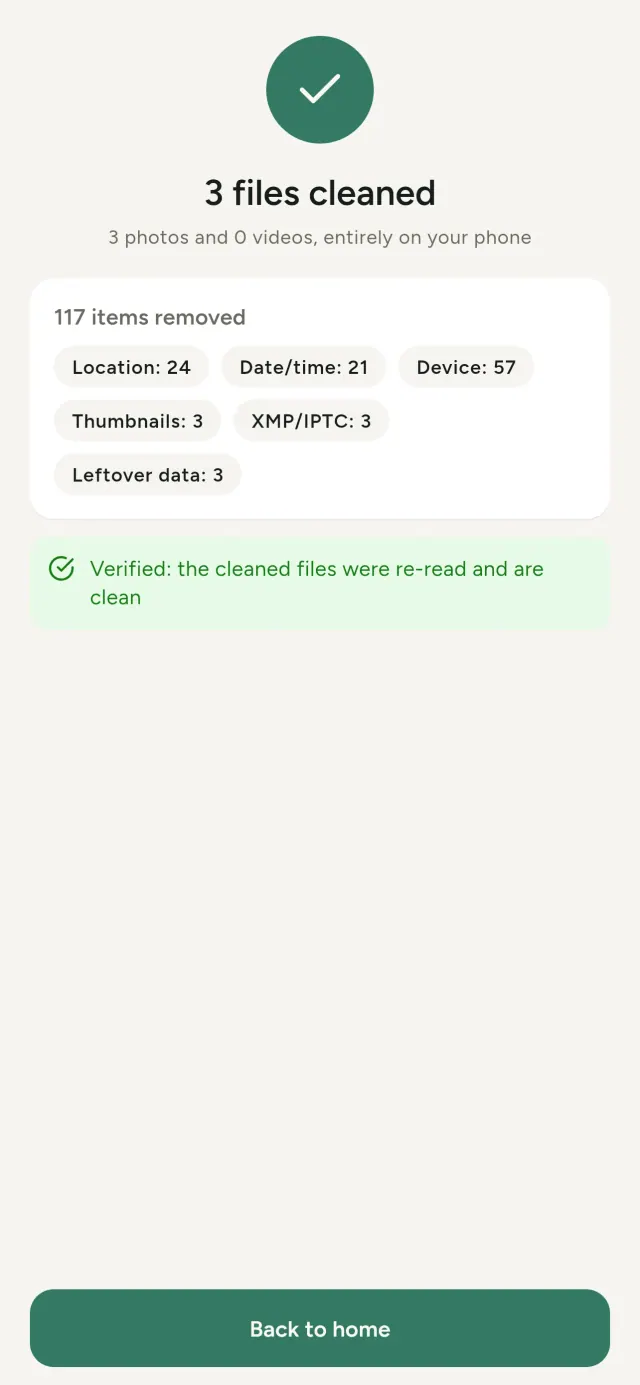
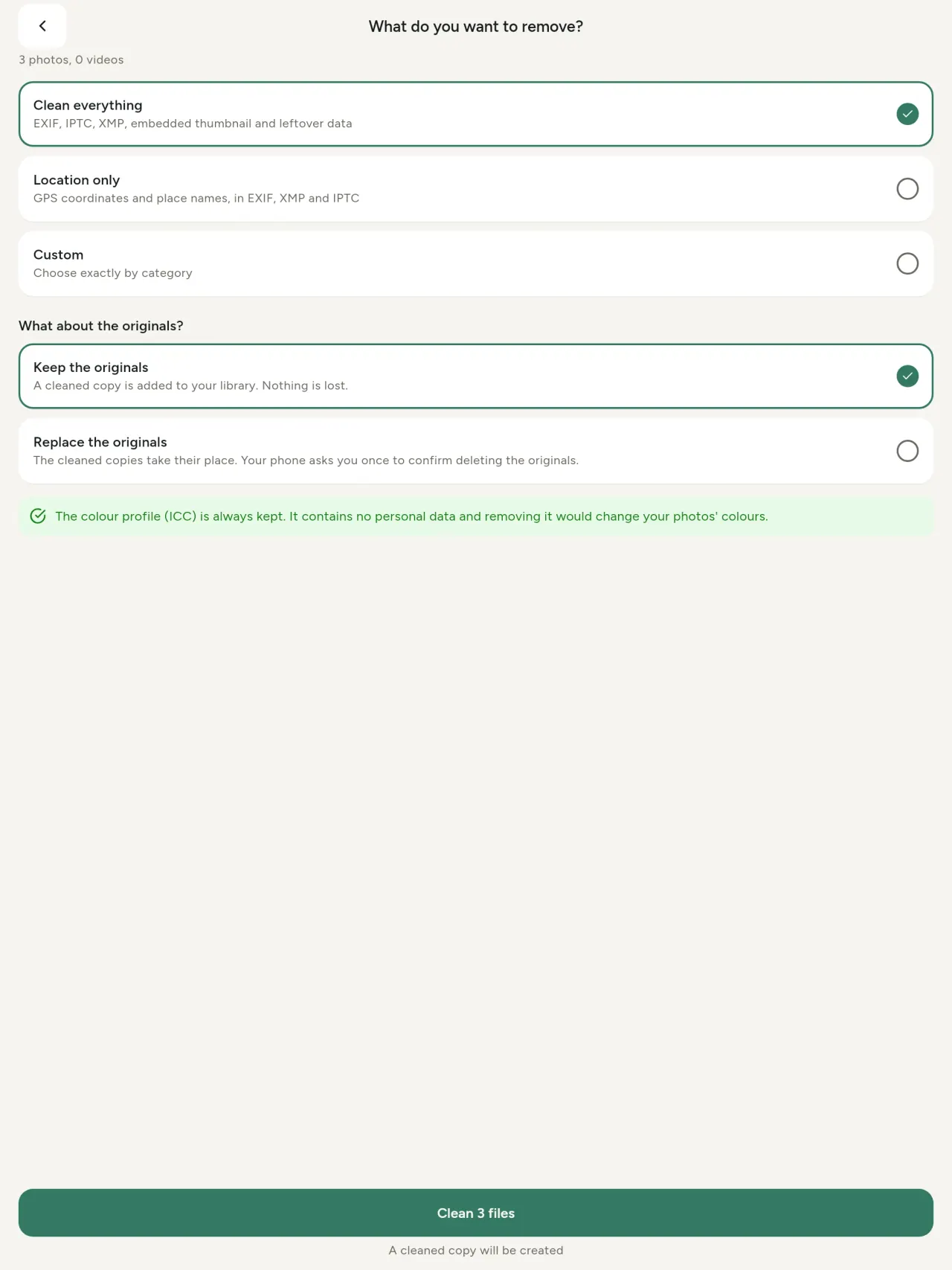
Sve, samo lokaciju ili kategorije koje odabereš: EXIF, IPTC i XMP podaci, ugrađene sličice, bilješke proizvođača kamere, AI porijeklo i višak bajtova koje neki alati ostave iza izrezane slike. Očisti cijeli odabir odjednom, pa zadrži originale ili ih zamijeni.
Sigurno dijeljenje na prvi pogled
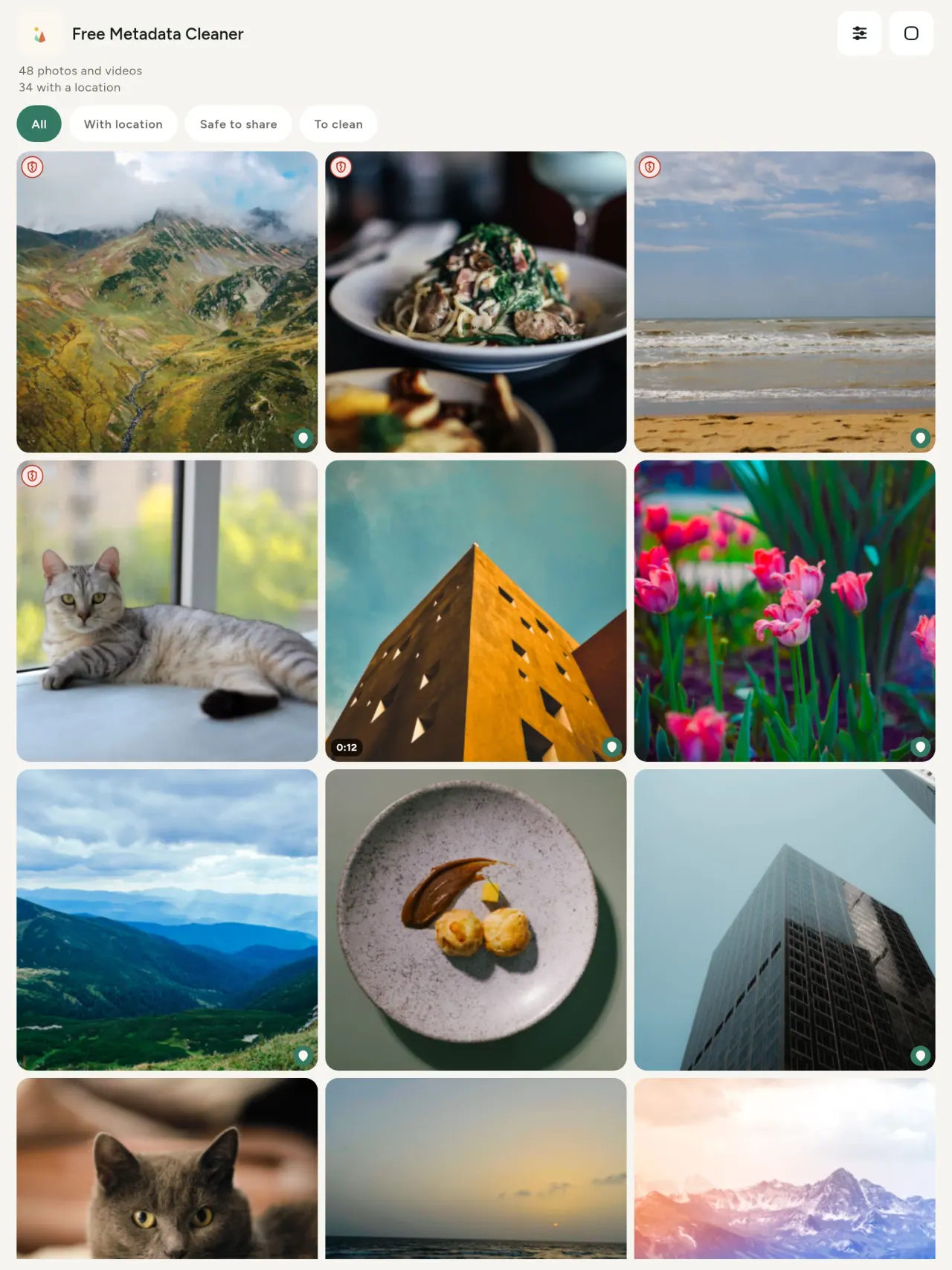
Zeleni štit označava datoteke bez preostalih metapodataka, crveni napukli štit one koje ih još imaju.
Bez gubitka kvaliteta
Fotografije se nikada ne rekodiraju: sama slika ostaje netaknuta.
Privatnost po dizajnu
Tvoje fotografije se čitaju, uređuju i čiste na tvom uređaju. Bez računa, bez reklama, bez analitike. Jedini neobavezni izuzetak je karta: kad zatražiš da vidiš lokaciju fotografije ili da odabereš mjesto, aplikacija te prvo pita, a zatim učita kartu s OpenStreetMap (sama fotografija se nikad ne šalje).
Besplatno, bez reklama
Ako ti aplikacija pomaže, možeš ostaviti neobaveznu napojnicu.
Za koga je namijenjeno
- Svako ko želi znati šta fotografija otkriva (GPS lokaciju, datum, kameru) prije objave, prodaje ili slanja.
- Ljudi koji prodaju na oglasnicima i ne žele pokazati gdje žive.
- Roditelji i svi koji žele sakriti osjetljivo mjesto iz fotografija koje dijele.
- Novinari, aktivisti i ugrožene osobe kojima treba slika bez tragova.
- Ljudi umorni od curenja podataka koji žele preuzeti kontrolu nad ličnim podacima u vlastitim fotografijama.
Zašto odabrati Metadata Cleaner
- Tri stvari u jednoj aplikaciji: pročitajte šta otkriva fotografija ili video, uredite ih (datum snimanja, lokaciju) i uklonite metapodatke u nekoliko dodira.
- Sve radi na telefonu. Fotografije se nigdje ne šalju.
- Fotografije (JPEG, HEIC, PNG, WebP, GIF) i videozapisi (MP4, MOV, 3GP).
Šta aplikacija još ne radi
- Podržani su samo gore navedeni formati. Planirani su novi formati.
Pixeon princip. Pixeon aplikacije su prvenstveno lokalne: bez naloga i praćenja, a podaci ostaju na telefonu. Ako se aplikacija ikad poveže s mrežom, to je samo kada odlučite uključiti potrebnu funkciju, a politika privatnosti se ažurira prije objave.
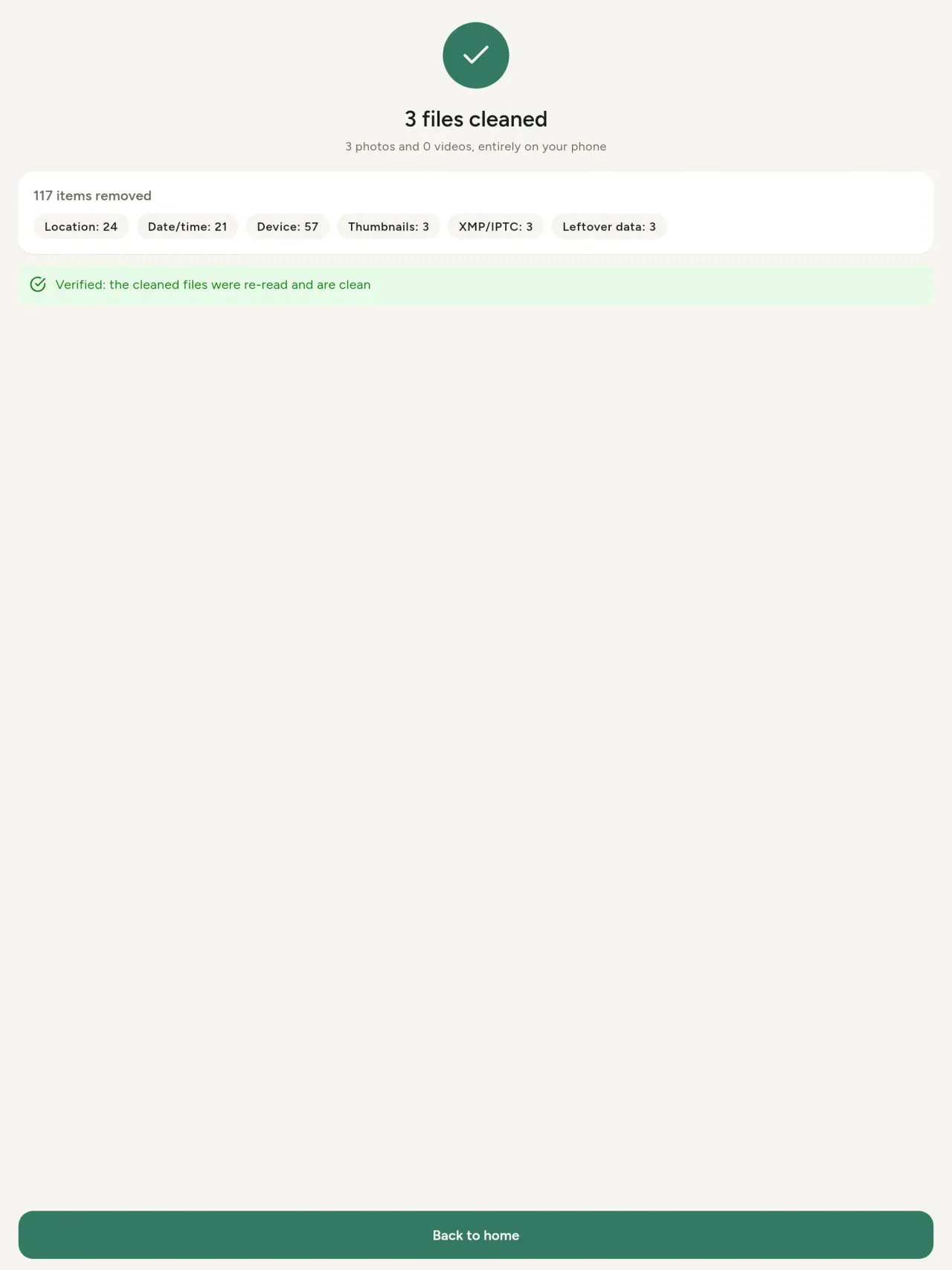
Pogledajte Metadata Cleaner na djelu.
Preuzmite Metadata Cleaner.
Besplatno na iPhoneu i Androidu.
Verzija 1.1
- App Store Predstojeće
- Google Play Predstojeće
Novosti
Ovaj tekst je na engleskom.
- Read: see exactly what a photo or video reveals (location, date, camera, AI provenance labels such as C2PA and generation parameters, video duration, codecs, resolution and frame rate).
- Edit: change the date a photo was taken and its location (JPEG, HEIC, AVIF), even on a photo with no metadata, reuse the location of another photo, or pick it on an OpenStreetMap map after your confirmation.
- Remove: clean metadata in a few taps, with a before and after view on the result screen.
- DNG photos are supported.
- Translations aligned across 91 languages.
Privacy policy
Tekst ispod je na engleskom. Engleska verzija je mjerodavna.
Last updated: 2026-11-03 · applies to version 1.1 and later
Policy versions: 1.1 and later (this text) · version 1.0 (still the policy of the app version 1.0). The version number of your app is shown at the bottom of its Settings screen.
Free Metadata Cleaner shows and removes the metadata hidden in your photos and videos (location, date and time, camera and lens details, thumbnails…). The short version: everything happens on your device, and we collect nothing.
What the app accesses
Your photo and video library, only after you grant permission (and, where your system requires it, the permission to read the location stored in your photos, so that it can be shown to you). The files you choose are read and cleaned on your device; the cleaned copy is saved to your library. If you choose to replace the originals, the system asks you to confirm before deleting them.
To show which photos are already clean, the app reads the metadata of the photos displayed on screen, on your device. This result is kept in memory only and is never stored.
What we collect
Nothing. No account, no analytics or usage tracking, no advertising or advertising identifiers, no crash or diagnostics reporting beyond what the app stores provide, and no third-party SDK that sends data anywhere. There is no Free Metadata Cleaner server. Cleaning a photo or video never uses the network, at all: turn on airplane mode and clean one to check for yourself. The only network request the app itself can ever make is described under “Location” below, and it only ever happens if you ask for it. The one other connection is the optional tip purchase, handled by the store (see “Optional support”).
Temporary files and history
The app keeps no history and no database. Temporary files created while cleaning are deleted after each item and purged when the app starts.
Deleted originals
Originals that are deleted remain in your system's trash (such as “Recently Deleted” or the trash) for about 30 days, with their metadata. The app cannot empty it: do it yourself if you need the originals gone at once.
iCloud and cloud photos
If a photo is stored in iCloud and not on your device, the operating system may download it before the app can process it. That transfer is made by the system, under the provider's own terms, not by the app.
Location
When a photo contains a location, the app shows the coordinates as text, which stays on your device. Three actions can send location information off your device, only when you choose them, each time: “Open in…” hands the coordinates to the maps application you select, under its own privacy policy; “Show the map” asks you to confirm first (“Showing the map sends this photo's position to a map service. Nothing else is sent.”), then loads a small map from OpenStreetMap for that one position; and, when you edit a photo's place, “Choose on the map” asks you to confirm first, then opens a full-screen map from OpenStreetMap. This map does not use your phone's location. As you move and zoom it, the app requests the map tiles of the area you are browsing, so OpenStreetMap receives the position of the area shown on screen, which starts on the photo's current place if it has one, and otherwise on a world view. The photo itself is never sent, and nothing is sent before you confirm. The place you choose on the map (or copy from another photo) is written into the photo's file only when you save, on your device. In every case OpenStreetMap receives, as with any web request, technical details like your IP address; it does not receive your name, an account, or anything else about you or your other photos. See OpenStreetMap's own privacy policy. Outside of these explicit actions, the app never sends a photo's location, or anything else, anywhere.
Optional support
The app is free. If you wish, you can leave a tip. On iPhone and in the Google Play version for Android, tips are in-app purchases processed by Apple or Google under their own terms and privacy policy; the app adds the Google Play billing permission for this, makes no network call itself, and receives no payment or personal details. Versions installed outside Google Play may instead open an external donation page in your browser, operated by a third party under its own privacy policy; nothing from the app is sent to it. A tip unlocks nothing.
Contact form on this website
If you write to us through this site, we use your message and the email address you optionally give only to reply. Bot protection is provided by Cloudflare and email delivery by Resend.
Language choice on this website
When you choose a language, or when this site opens a page in your browser's language, it stores
one small functional cookie (pxl, a language code, one year) so that your choice is
remembered. If this site suggests a page in your browser's language and you close that suggestion,
your browser also keeps a local note (pxl-banner-off, in local storage, 30 days) so the
suggestion does not come back. Neither identifies anyone, neither is used for tracking or advertising,
and neither is shared. You can delete them in your browser at any time.
Website statistics
This website uses Cloudflare Web Analytics to count visits (pages viewed, country, browser type, loading speed). It sets no cookie, does not use local storage, does not fingerprint your device, does not follow you across sites and does not build a profile of you. Search engines (for example Google Search Console) give us aggregated search statistics, without any data about individual visitors. Our own web server also counts the pages it serves: for each page it keeps the page address, the site or social network that sent you (only its name, or the campaign tag written in the link), the country, the type of device and whether the request came from a robot. It keeps no IP address, no identifier and no cookie, and these counts are anonymous. We use no advertising or other analytics service. None of this concerns the app itself, which collects nothing.
Children
The app is a general-purpose tool and is not directed at children.
Changes
An updated policy will be published at this URL with a new date above.
Contact
Questions about privacy: metadata-cleaner-contact@pixeon.net
Verzija 1.0
- App Store Objavljeno
- Google Play Objavljeno
Novosti
Ovaj tekst je na engleskom.
- Cleans JPEG, HEIC, PNG, WebP, GIF, MP4, MOV and 3GP files, with no video re-encoding.
- "Safe to share" and "To clean" filters.
- New green design.
- Help screen with a FAQ.
- Settings: share, rate, feedback, unsupported formats.
- Optional tips.
Privacy policy, version 1.0
Tekst ispod je na engleskom. Engleska verzija je mjerodavna.
Applies to version 1.0 of the app (the first release). Later versions: current policy.
Free Metadata Cleaner shows and removes the metadata hidden in your photos and videos (location, date and time, camera and lens details, thumbnails…). The short version: everything happens on your device, and we collect nothing.
What the app accesses
Your photo and video library, only after you grant permission (and, where your system requires it, the permission to read the location stored in your photos, so that it can be shown to you). The files you choose are read and cleaned on your device; the cleaned copy is saved to your library. If you choose to replace the originals, the system asks you to confirm before deleting them.
To show which photos are already clean, the app reads the metadata of the photos displayed on screen, on your device. This result is kept in memory only and is never stored.
What we collect
Nothing. No account, no analytics or usage tracking, no advertising or advertising identifiers, no crash or diagnostics reporting beyond what the app stores provide, and no third-party SDK that sends data anywhere. There is no Free Metadata Cleaner server. Cleaning a photo or video never uses the network, at all: turn on airplane mode and clean one to check for yourself. The only network request the app itself can ever make is described under “Location” below, and it only ever happens if you ask for it. The one other connection is the optional tip purchase, handled by the store (see “Optional support”).
Temporary files and history
The app keeps no history and no database. Temporary files created while cleaning are deleted after each item and purged when the app starts.
Deleted originals
Originals that are deleted remain in your system's trash (such as “Recently Deleted” or the trash) for about 30 days, with their metadata. The app cannot empty it: do it yourself if you need the originals gone at once.
iCloud and cloud photos
If a photo is stored in iCloud and not on your device, the operating system may download it before the app can process it. That transfer is made by the system, under the provider's own terms, not by the app.
Location
When a photo contains a location, the app shows the coordinates as text, which stays on your device. Two actions send that one photo's position off your device, only when you choose them, each time: “Open in…” hands the coordinates to the maps application you select, under its own privacy policy; “Show the map” asks you to confirm first (“Showing the map sends this photo's position to a map service. Nothing else is sent.”), then loads a small map from OpenStreetMap for that one position. OpenStreetMap receives the coordinates and, as with any web request, technical details like your IP address; it does not receive your name, an account, or anything else about you or your other photos. See OpenStreetMap's own privacy policy. Outside of these two explicit actions, the app never sends a photo's location, or anything else, anywhere.
Optional support
The app is free. If you wish, you can leave a tip. On iPhone and in the Google Play version for Android, tips are in-app purchases processed by Apple or Google under their own terms and privacy policy; the app adds the Google Play billing permission for this, makes no network call itself, and receives no payment or personal details. Versions installed outside Google Play may instead open an external donation page in your browser, operated by a third party under its own privacy policy; nothing from the app is sent to it. A tip unlocks nothing.
Contact form on this website
If you write to us through this site, we use your message and the email address you optionally give only to reply. Bot protection is provided by Cloudflare and email delivery by Resend.
Language choice on this website
When you choose a language, or when this site opens a page in your browser's language, it stores
one small functional cookie (pxl, a language code, one year) so that your choice is
remembered. If this site suggests a page in your browser's language and you close that suggestion,
your browser also keeps a local note (pxl-banner-off, in local storage, 30 days) so the
suggestion does not come back. Neither identifies anyone, neither is used for tracking or advertising,
and neither is shared. You can delete them in your browser at any time.
Website statistics
This website uses Cloudflare Web Analytics to count visits (pages viewed, country, browser type, loading speed). It sets no cookie, does not use local storage, does not fingerprint your device, does not follow you across sites and does not build a profile of you. Search engines (for example Google Search Console) give us aggregated search statistics, without any data about individual visitors. Our own web server also counts the pages it serves: for each page it keeps the page address, the site or social network that sent you (only its name, or the campaign tag written in the link), the country, the type of device and whether the request came from a robot. It keeps no IP address, no identifier and no cookie, and these counts are anonymous. We use no advertising or other analytics service. None of this concerns the app itself, which collects nothing.
Children
The app is a general-purpose tool and is not directed at children.
Changes
An updated policy will be published at this URL with a new date above.
Contact
Questions about privacy: metadata-cleaner-contact@pixeon.net
Podrška
Posljednje ažurirano: 2026-10-08
Free Metadata Cleaner je mala nezavisna aplikacija. Odgovori na najčešća pitanja nalaze se u nastavku.
Trudimo se odgovoriti u roku od nekoliko dana. Da biste nam pomogli, navedite model uređaja, verziju sistema i šta ste radili. Nemojte slati privatne fotografije.
Koje podatke aplikacija čuva ili šalje?
Nikakve. Ne čuva historiju, nema nalog ni server. Detalji su u politici privatnosti.
Kako očistiti fotografiju?
- Otvorite aplikaciju i dozvolite pristup biblioteci kada se to zatraži.
- Odaberite fotografije ili videozapise za čišćenje.
- Odaberite šta želite ukloniti i da li će originali biti zamijenjeni ili će biti napravljena očišćena kopija.
- Potvrdite. Sažetak prikazuje šta je uklonjeno i koje datoteke nisu mogle biti obrađene.
Gdje se nalaze očišćene kopije?
U vašoj biblioteci fotografija. Datum originala u biblioteci ostaje sačuvan, pa se očišćena fotografija ne premješta na vrh galerije.
Odabrao/la sam „zamijeni originale“, ali originali su i dalje tu.
Izbrisani originali ostaju u sistemskoj kanti (kao što su „Nedavno izbrisano“ ili kanta) oko 30 dana, zajedno s metapodacima. Ispraznite kantu da biste ih odmah uklonili. Ako odbijete sistemski upit za brisanje, originali ostaju sačuvani, a očišćene kopije se ipak dodaju.
Koje datoteke su podržane?
Fotografije u formatima JPEG, HEIC, AVIF, PNG, WebP i GIF, te videozapisi u formatima MP4, MOV i 3GP (dodaju se i drugi formati). Datoteka koju aplikacija ne može očistiti ostaje nepromijenjena i navodi se u sažetku s razlogom, bez zaustavljanja ostatka grupe.
Zašto aplikaciji treba pristup mojim fotografijama?
Da bi prikazala fotografije koje možete odabrati i sačuvala očišćene kopije. Tamo gdje sistem to zahtijeva, aplikacija traži i dozvolu za čitanje lokacije sačuvane u fotografijama: bez toga sistem skriva lokaciju, pa aplikacija ne bi mogla pokazati šta fotografija otkriva. Ništa se ne otprema.
Kako mogu provjeriti da ništa ne napušta moj telefon?
Uključite način rada u avionu i očistite fotografiju: radi isto. Jedini izuzetak je mapa: ako na lokaciji fotografije dodirnete „Prikaži mapu“ i potvrdite, ta se pozicija šalje OpenStreetMapu radi prikaza mape, i ništa drugo. Pogledajte „Lokacija“ iznad.
Koji jezici su dostupni?
Aplikacija je dostupna na engleskom, francuskom, njemačkom, španskom, italijanskom, portugalskom i arapskom jeziku. Ova web-stranica dostupna je na više jezika, a uskoro stižu i novi jezici aplikacije.
Podrži projekat
Metadata Cleaner ostaje besplatan i bez oglasa. Ako vam je koristan, možete podržati njegov razvoj (opcionalno):
Buy Me a CoffeeExpense tracker and family budget planner. Free phone sync, no account.
Još od PixeonaVaultMarkEncrypted document vault. Watermark documents, remove metadata before sharing.
Još od PixeonaLittle RelayBreastfeeding, sleep and starting solids tracker. No account, works offline.
Još od PixeonaMenuloopPlan the week's meals, build your grocery list and keep recipes with photos.