
Metadata Cleaner: Photo/Video
EXIF ko‘rish, tahrirlash va o‘chirish: surat metadata va GPS uchun.


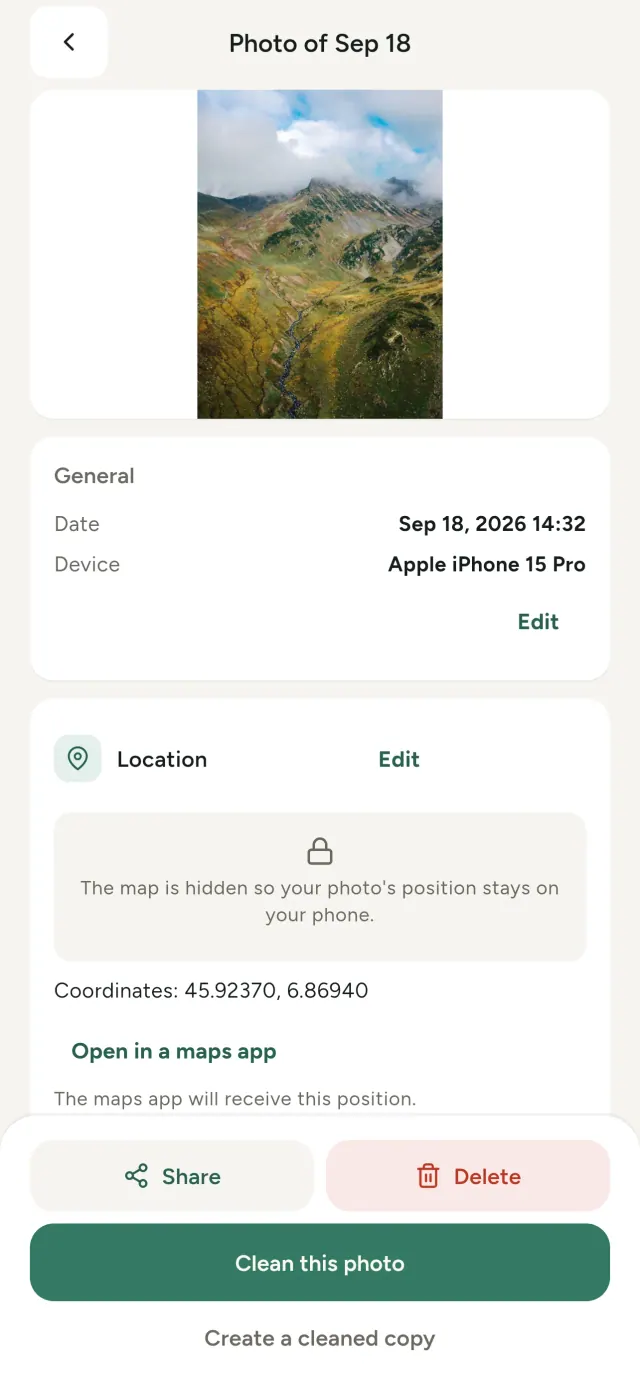
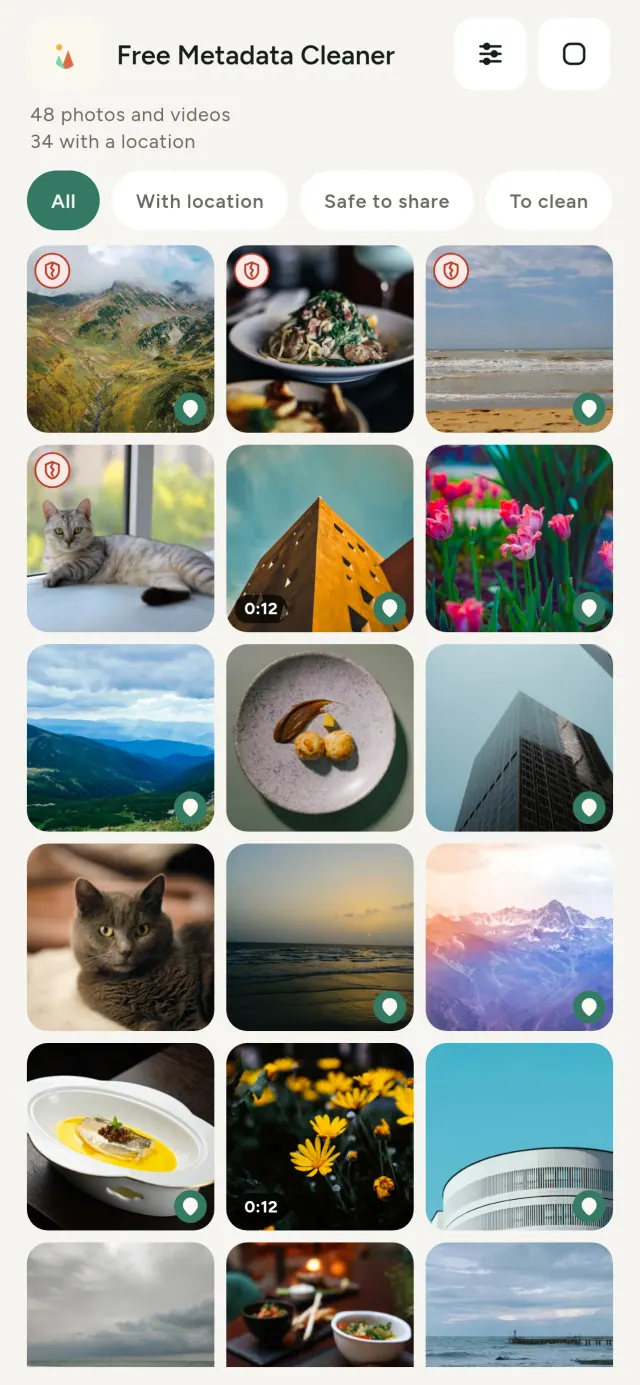
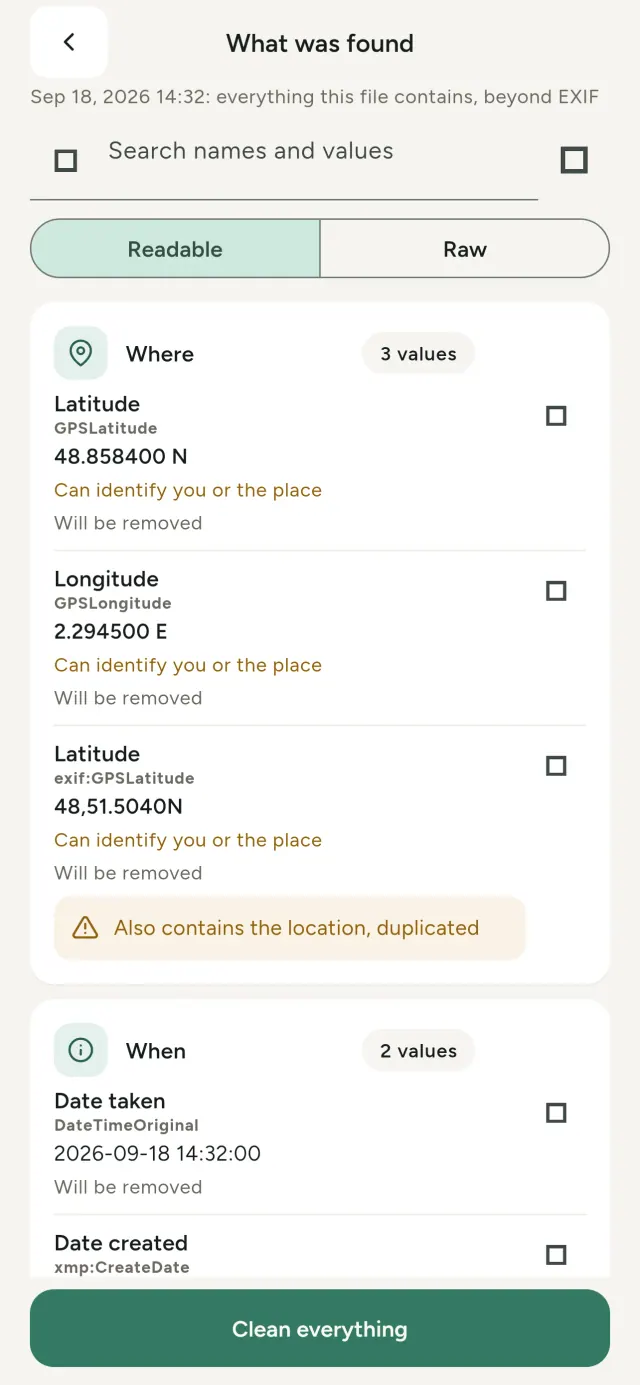
Har bir olgan suratlaringiz yashirin ma’lumotlarni olib yuradi: qayerda olingani, qachon olingani, qaysi telefon bilan, ba’zida hatto asl suratning kichik ko‘rinishi. Uni ulashsangiz, mana shu ma’lumotlar ham birga yuboriladi.
Metadata Cleaner telefoningizda uchta ishni bajaradi: suratlardagi va videolardagi ma’lumotlarni ko‘rsatadi, ularni tuzatadi va olib tashlaydi.
Metadata Cleaner nimalar qiladi
O‘qish
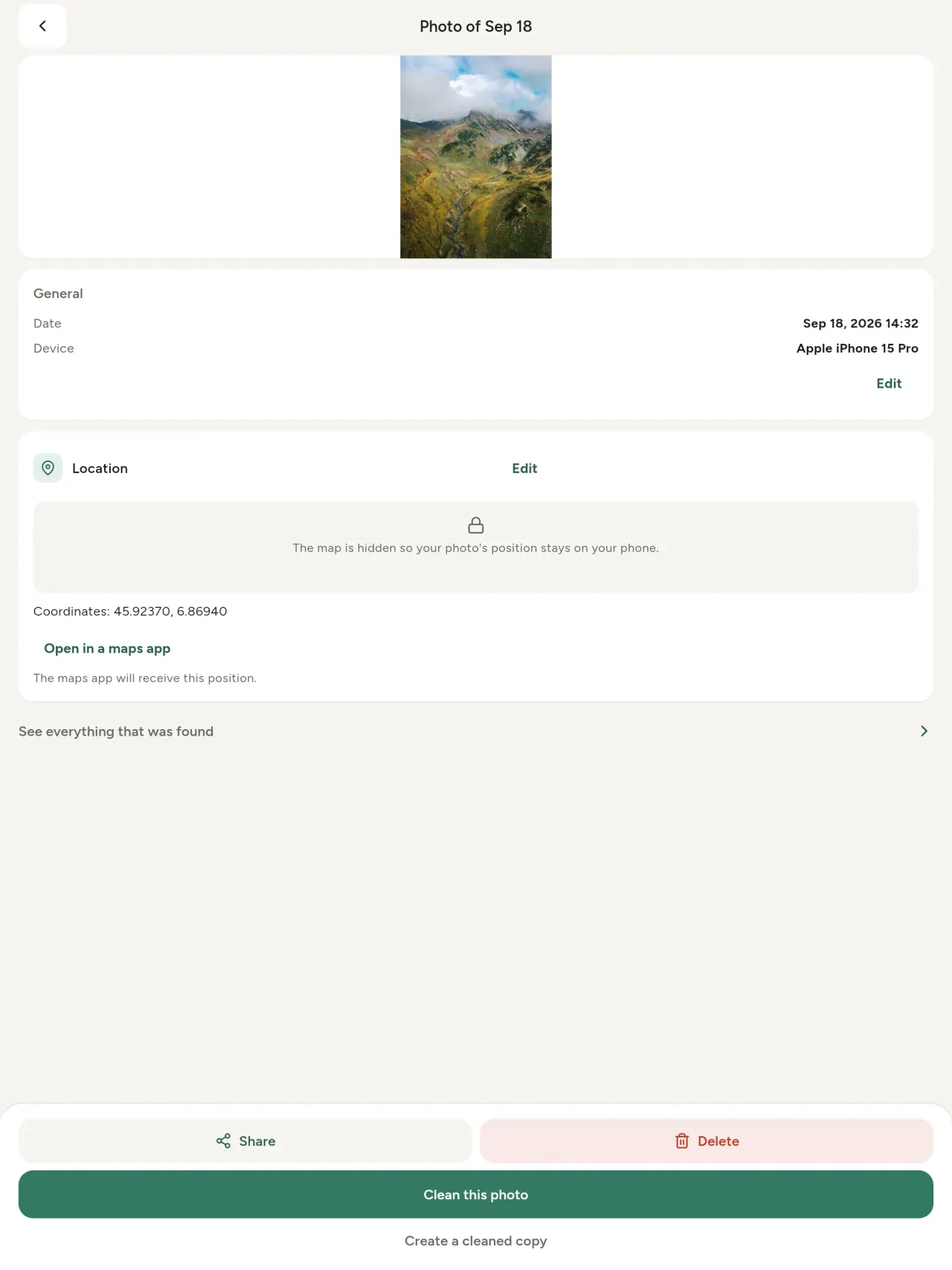
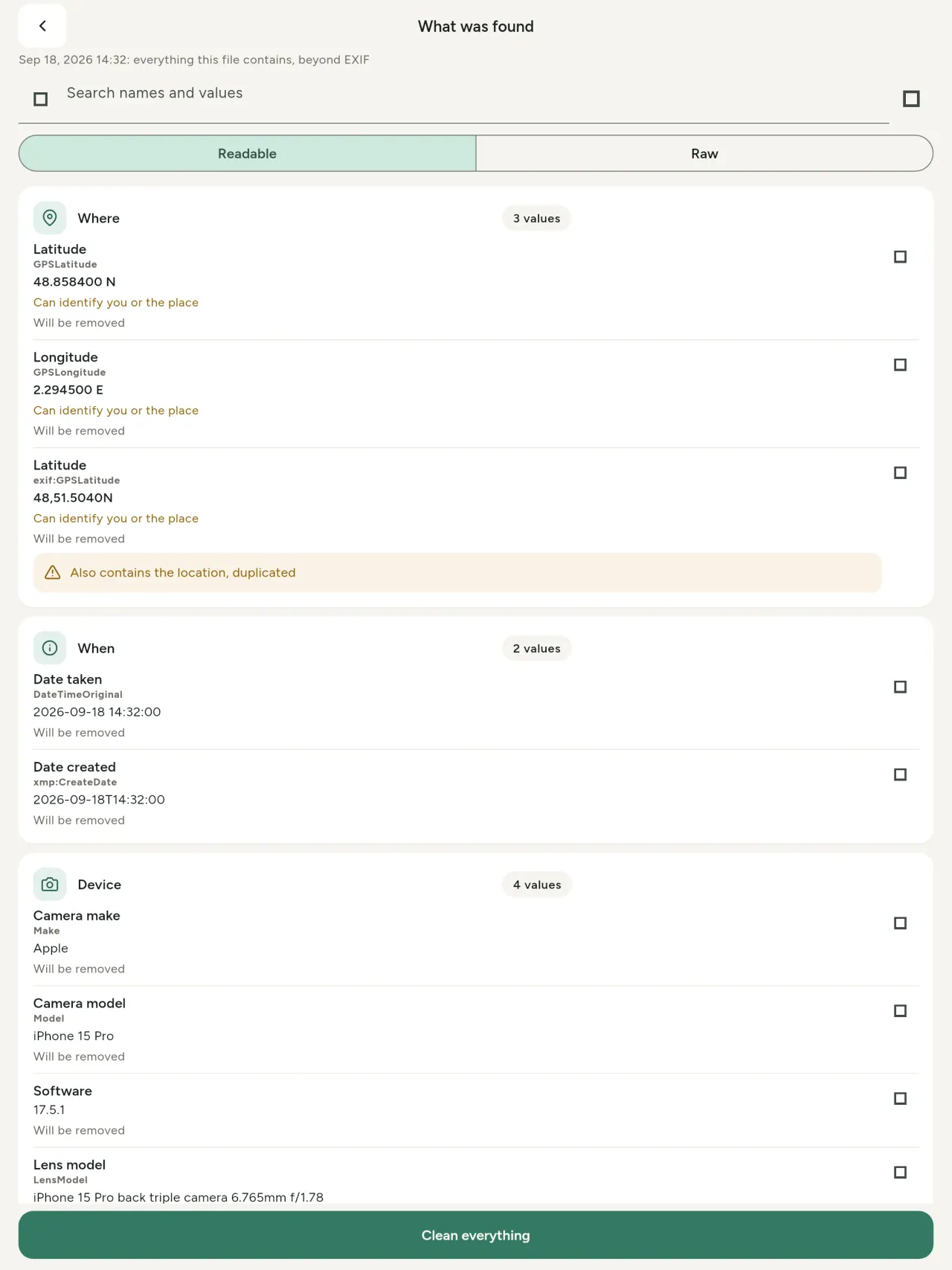
Haqiqiy metadata ko‘ruvchi: surat yoki video ichidagi har bir qiymatni (EXIF, IPTC, XMP, video kodlari, davomiyligi va o‘lchamlari) guruhlangan holda, izlash va nusxalash imkoniyati bilan ko‘rsatadi; olib tashlanadiganlar belgilanadi. Sun’iy intellekt (AI) manbasi (C2PA, generatsiya parametrlari) ham aniqlanadi.
Tahrirlash
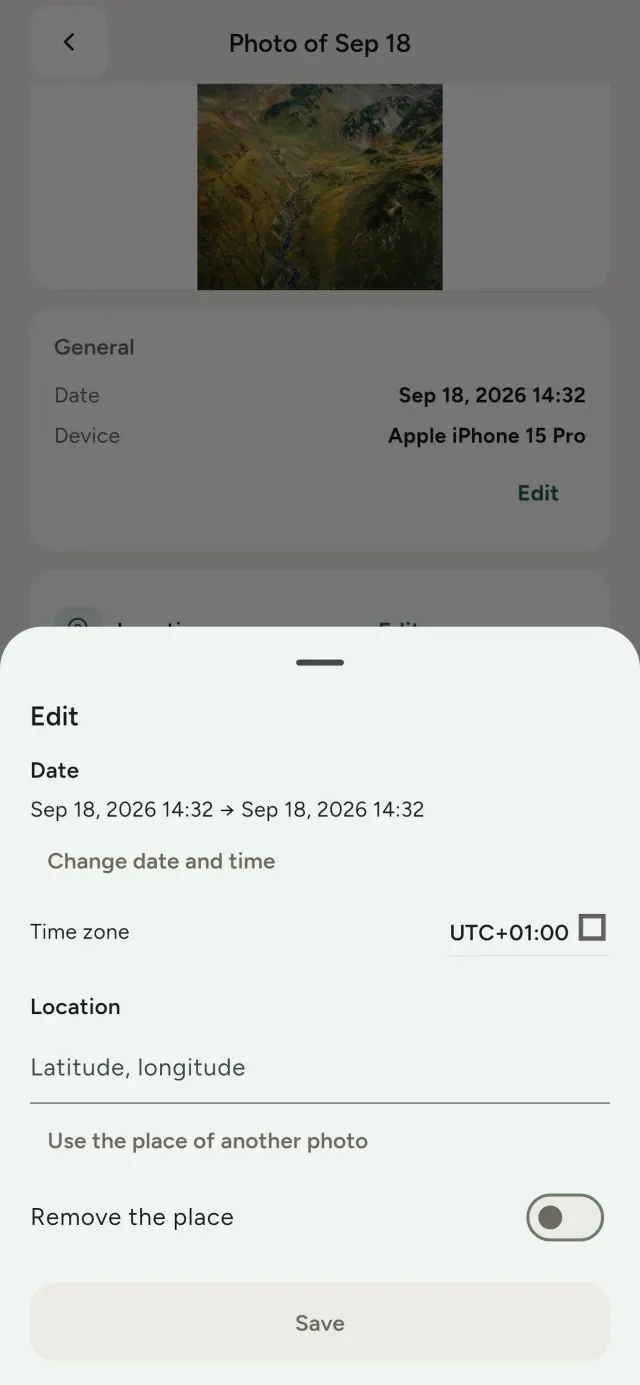
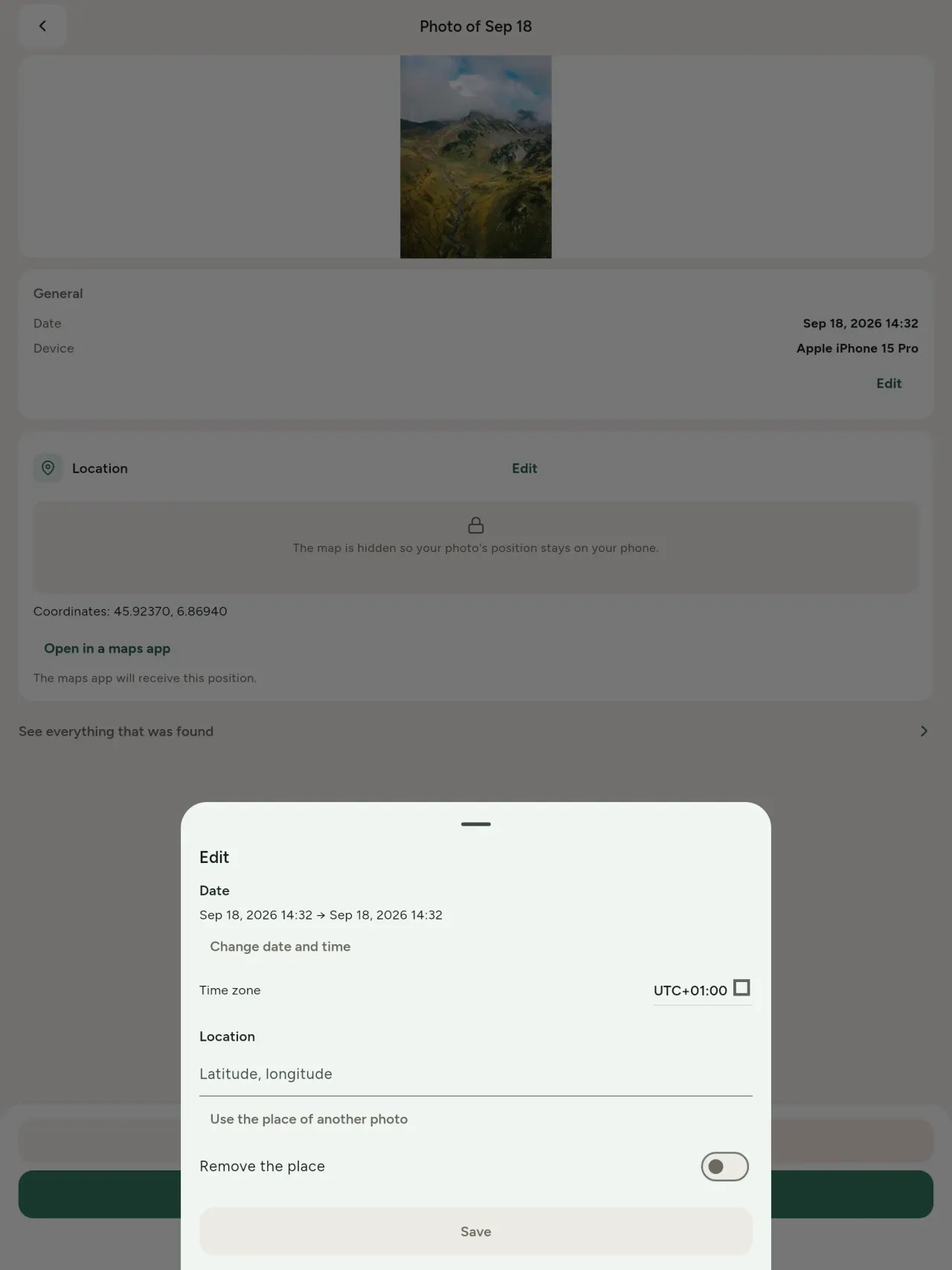
Suratingiz sanasi va joyini o‘zgartiring yoki yangisini kiriting, hatto metadata bo‘lmasa ham. Boshqa suratdan joyni ko‘chiring yoki xaritada tanlang (har safar alohida so‘raladi). O‘zgartirishdan oldingi va keyingi holatni solishtiring.
O‘chirish
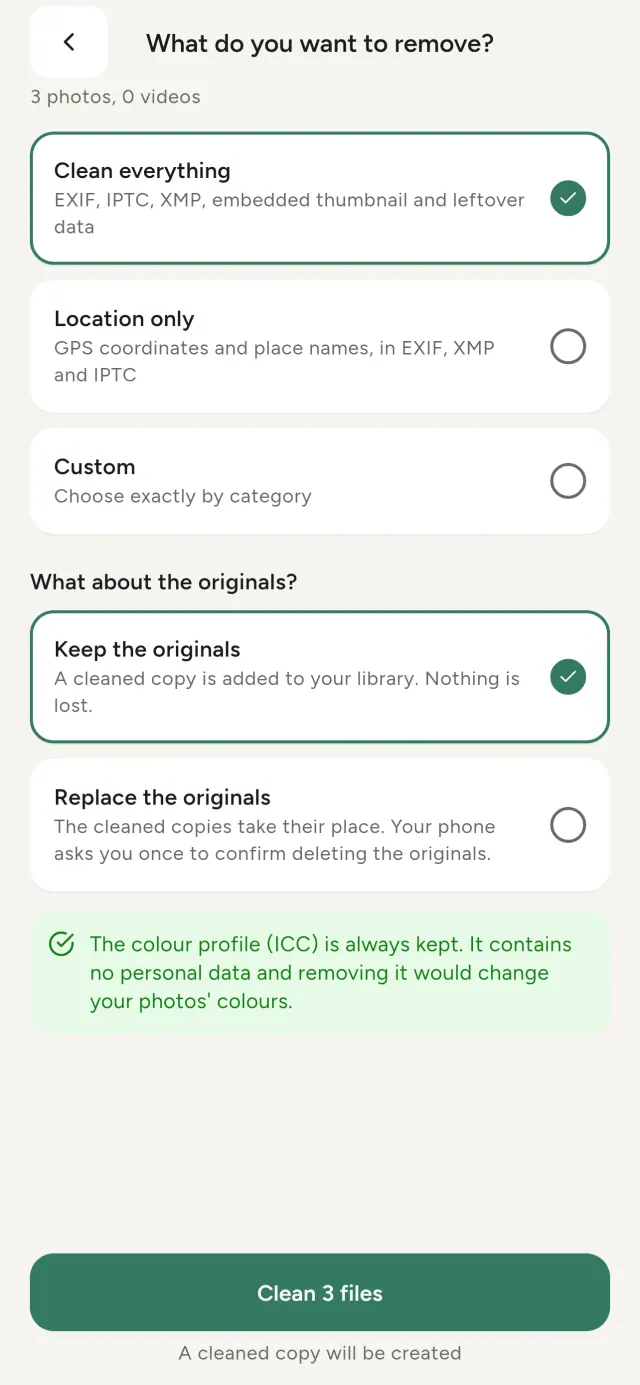
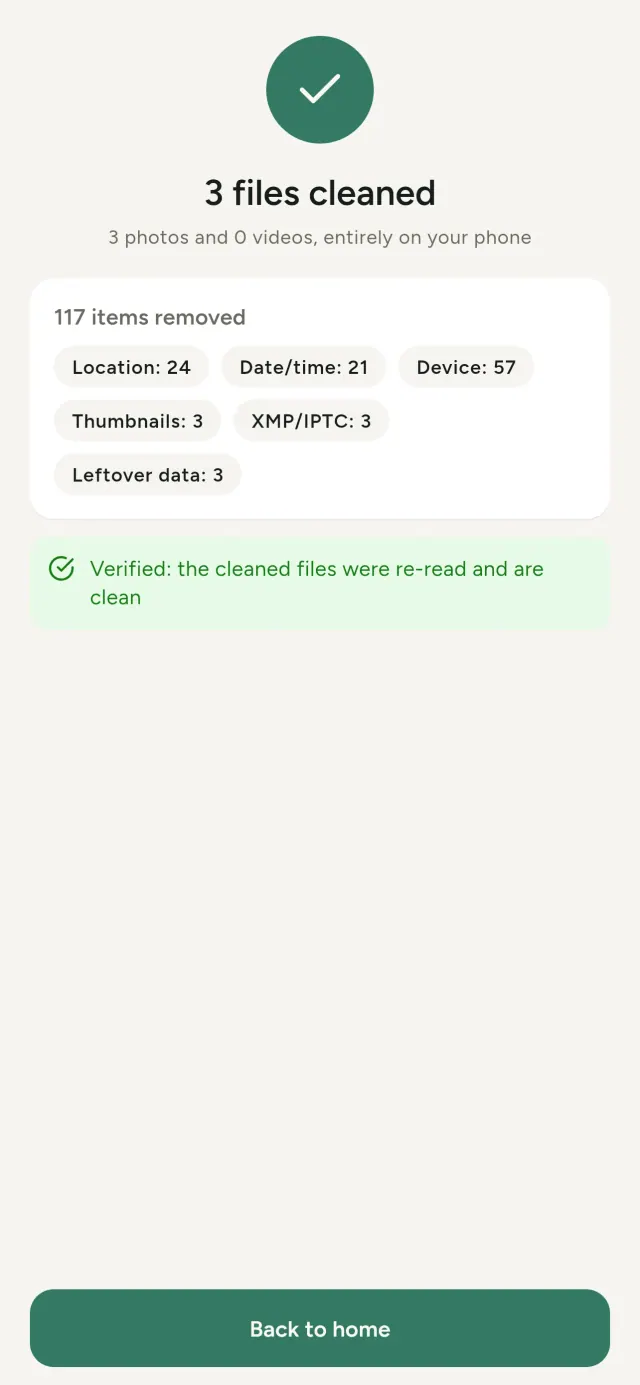
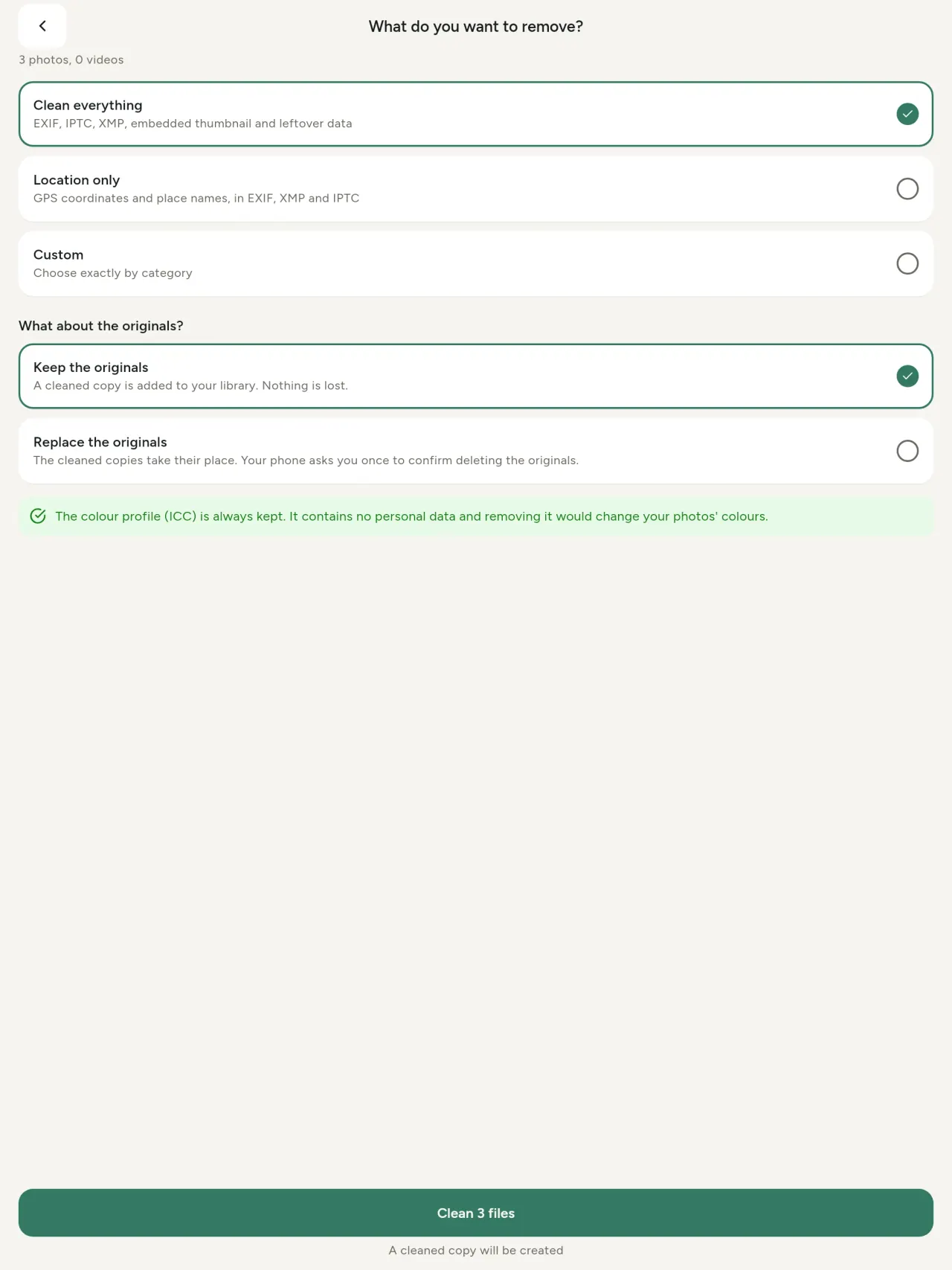
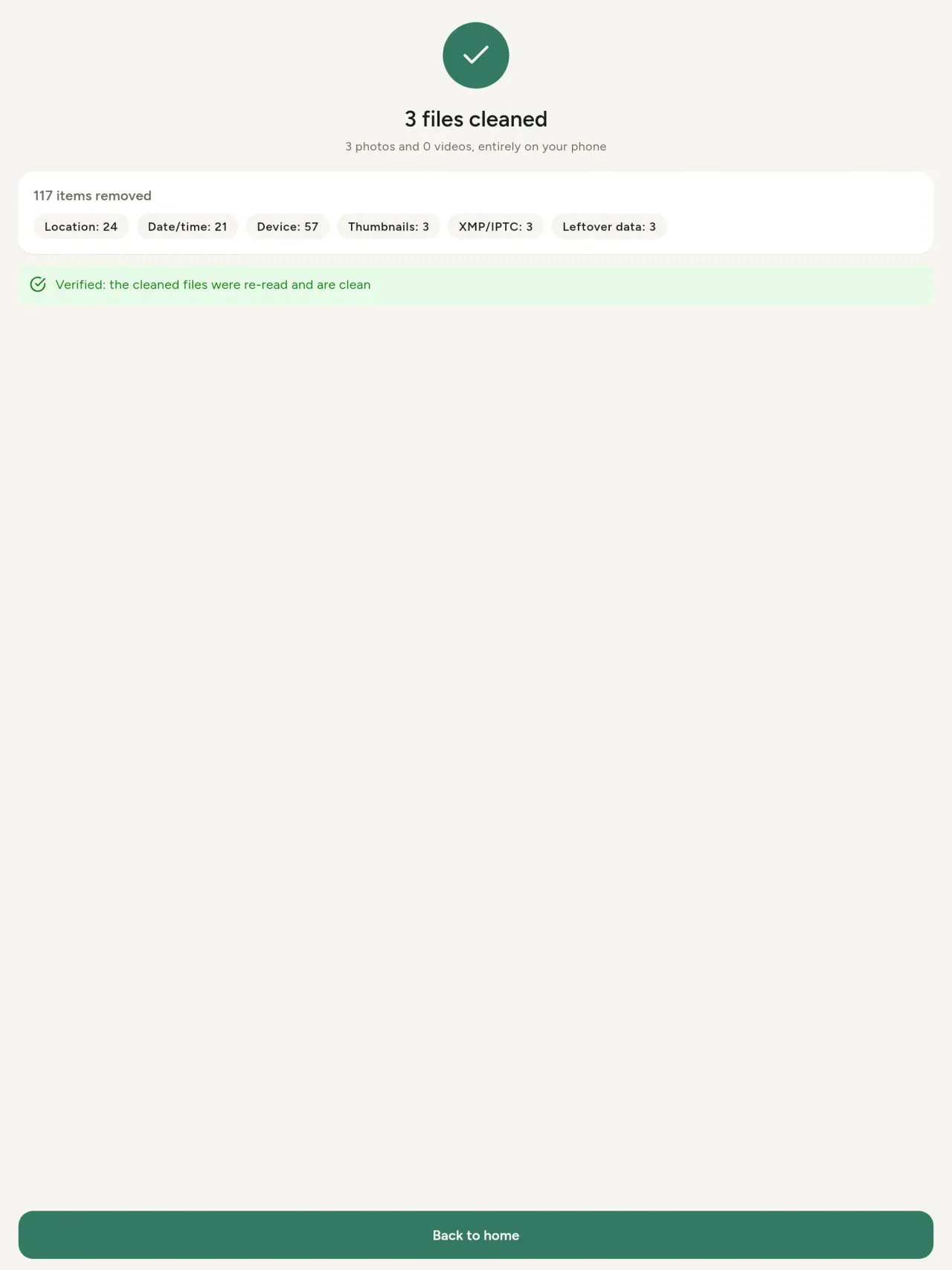
Hammasini, faqat joylashuvni yoki siz tanlagan kategoriyalarni olib tashlang: EXIF, IPTC va XMP ma’lumotlari, o‘rnatilgan kichik ko‘rinishlar, kamera ishlab chiqaruvchisi eslatmalari, AI manbaasi va tahrirlangan suratda qolib ketgan yozuvlar. Bir necha suratni birdan tozalang, so‘ngra asl nusxani saqlang yoki almashtiring.
Tezda xavfsiz ulashish
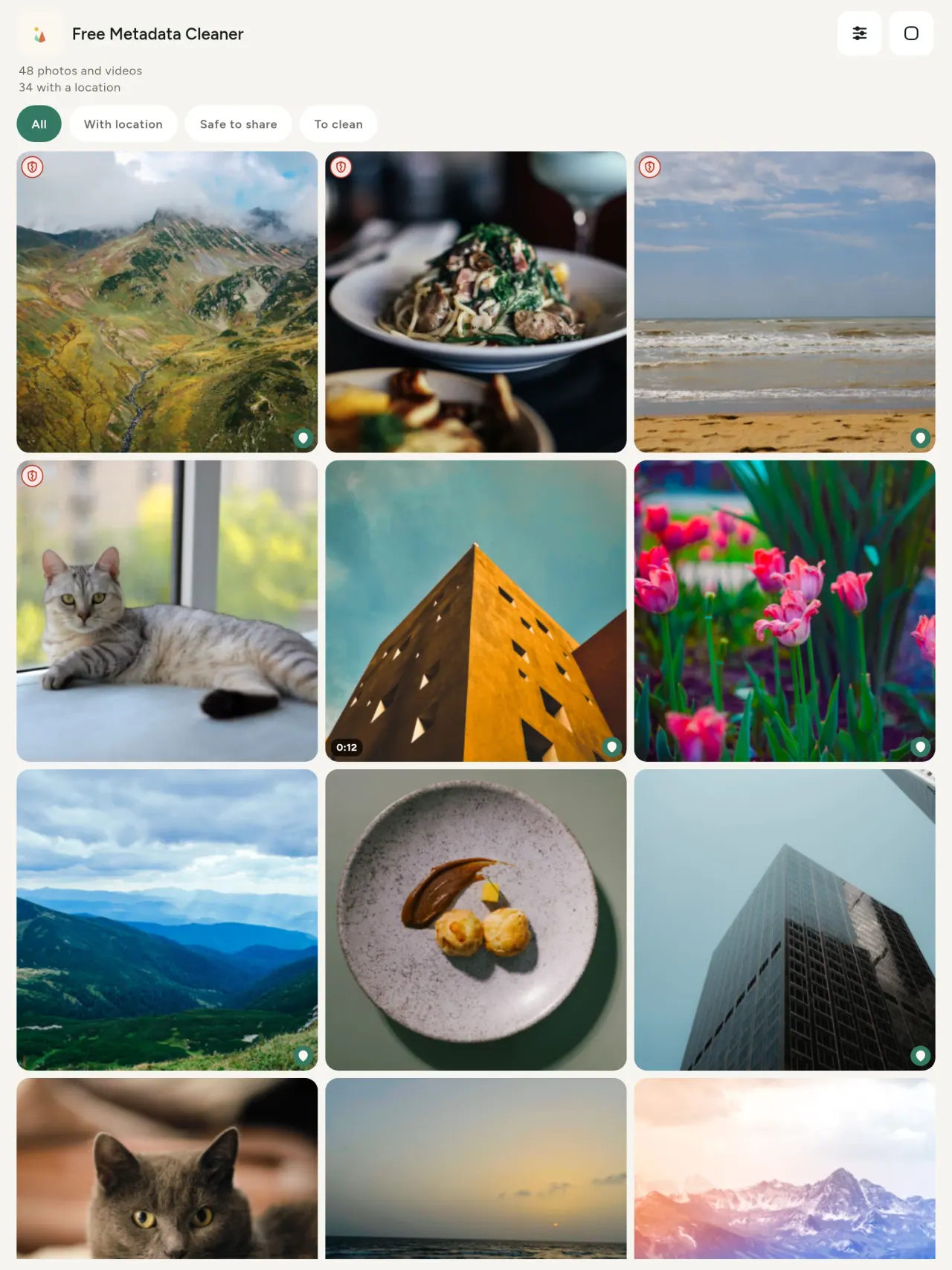
Yashil qalqon metadata qolmagan fayllarni belgilaydi; qizil yorilgan qalqon hali metadata qolganlarini ko‘rsatadi.
Sifatning yo‘qolishi yo‘q
Suratlar qayta kodlanmaydi: tasvirning o‘zi o‘zgarmaydi.
Maxfiylik asosida
Suratlaringiz qurilmangizda o‘qiladi, tahrir qilinadi va tozalanadi. Akkount shart emas, reklama yo‘q, analiz yo‘q. Bitta istisno: xarita. Surat joylashuvini ochishni yoki joy tanlashni so‘rasangiz, dastur har safar ruxsatingizni so‘raydi, so‘ng xaritani OpenStreetMap orqali yuklaydi (suratning o‘zi yuborilmaydi).
Bepul, reklamasiz
Dastur yordam bermoqda deb o‘ylasangiz, ixtiyoriy ravishda xayriya qoldirishingiz mumkin.
Kimlar uchun
- Rasm nimani ochiqlashi (GPS joylashuvi, sana, kamera) haqida joylash, sotish yoki pochta orqali yuborishdan oldin bilmoqchi bo‘lganlar.
- E’lon saytlarida sotadigan va manzilini oshkor qilmoqchi bo‘lmaganlar.
- Farzandi bor ota-onalar va boshqalar: ulashadigan suratlarida uy, maktab, ish joyi kabi maxfiy joylar ko‘rinishini istamaydiganlar.
- Jurnalistlar, faol (aktivist) va xavf ostidagi shaxslar – rasmni iz qoldirmay ulashish zarur bo‘lganda.
- Rasmlaridagi shaxsiy ma’lumotlarni nazoratga olmoqchi va axborot sizib chiqishidan charchaganlar.
Nega Metadata Cleaner ni tanlash kerak
- Bir ilovada uchta imkoniyat: rasm yoki video nimani ochiqlashini ko‘ring, ma’lumotlarni (olingan sana, joy) tahrirlang va metama’lumotlarni bir necha teginishda olib tashlang.
- Hammasi telefonning o‘zida ishlaydi. Rasmlaringiz hech qayerga yuborilmaydi.
- Fotosurat (JPEG, HEIC, PNG, WebP, GIF) va video (MP4, MOV, 3GP) formatlarini qo‘llab-quvvatlaydi.
Dastur hali nima qila olmaydi
- Faqat yuqoridagi formatlar hozircha qo‘llab-quvvatlanadi. Yaqinda boshqalar ham qo‘shiladi.
Pixeon printsipi. Pixeon ilovalari avval lokal ishlaydi: hisob yo‘q, kuzatuv yo‘q, va ma’lumotlaringiz faqat telefoningizda qoladi. Agar dastur biror marta tarmoqqa ulansa, bu siz kerakli funksiyani faollashtirganingizda va maxfiylik siyosati dastur chiqarilishidan oldin yangilanganida bo‘ladi.
Metadata Cleaner dasturini amalda ko‘ring.
Metadata Cleaner ni oling.
iPhone va Androidda bepul.
1.1 versiya
- App Store Kutilmoqda
- Google Play Kutilmoqda
Yangiliklar
Ushbu matn ingliz tilida.
- Read: see exactly what a photo or video reveals (location, date, camera, AI provenance labels such as C2PA and generation parameters, video duration, codecs, resolution and frame rate).
- Edit: change the date a photo was taken and its location (JPEG, HEIC, AVIF), even on a photo with no metadata, reuse the location of another photo, or pick it on an OpenStreetMap map after your confirmation.
- Remove: clean metadata in a few taps, with a before and after view on the result screen.
- DNG photos are supported.
- Translations aligned across 91 languages.
Privacy policy
Quyidagi matn ingliz tilida. Inglizcha versiyasi ustun hisoblanadi.
Last updated: 2026-11-03 · applies to version 1.1 and later
Policy versions: 1.1 and later (this text) · version 1.0 (still the policy of the app version 1.0). The version number of your app is shown at the bottom of its Settings screen.
Free Metadata Cleaner shows and removes the metadata hidden in your photos and videos (location, date and time, camera and lens details, thumbnails…). The short version: everything happens on your device, and we collect nothing.
What the app accesses
Your photo and video library, only after you grant permission (and, where your system requires it, the permission to read the location stored in your photos, so that it can be shown to you). The files you choose are read and cleaned on your device; the cleaned copy is saved to your library. If you choose to replace the originals, the system asks you to confirm before deleting them.
To show which photos are already clean, the app reads the metadata of the photos displayed on screen, on your device. This result is kept in memory only and is never stored.
What we collect
Nothing. No account, no analytics or usage tracking, no advertising or advertising identifiers, no crash or diagnostics reporting beyond what the app stores provide, and no third-party SDK that sends data anywhere. There is no Free Metadata Cleaner server. Cleaning a photo or video never uses the network, at all: turn on airplane mode and clean one to check for yourself. The only network request the app itself can ever make is described under “Location” below, and it only ever happens if you ask for it. The one other connection is the optional tip purchase, handled by the store (see “Optional support”).
Temporary files and history
The app keeps no history and no database. Temporary files created while cleaning are deleted after each item and purged when the app starts.
Deleted originals
Originals that are deleted remain in your system's trash (such as “Recently Deleted” or the trash) for about 30 days, with their metadata. The app cannot empty it: do it yourself if you need the originals gone at once.
iCloud and cloud photos
If a photo is stored in iCloud and not on your device, the operating system may download it before the app can process it. That transfer is made by the system, under the provider's own terms, not by the app.
Location
When a photo contains a location, the app shows the coordinates as text, which stays on your device. Three actions can send location information off your device, only when you choose them, each time: “Open in…” hands the coordinates to the maps application you select, under its own privacy policy; “Show the map” asks you to confirm first (“Showing the map sends this photo's position to a map service. Nothing else is sent.”), then loads a small map from OpenStreetMap for that one position; and, when you edit a photo's place, “Choose on the map” asks you to confirm first, then opens a full-screen map from OpenStreetMap. This map does not use your phone's location. As you move and zoom it, the app requests the map tiles of the area you are browsing, so OpenStreetMap receives the position of the area shown on screen, which starts on the photo's current place if it has one, and otherwise on a world view. The photo itself is never sent, and nothing is sent before you confirm. The place you choose on the map (or copy from another photo) is written into the photo's file only when you save, on your device. In every case OpenStreetMap receives, as with any web request, technical details like your IP address; it does not receive your name, an account, or anything else about you or your other photos. See OpenStreetMap's own privacy policy. Outside of these explicit actions, the app never sends a photo's location, or anything else, anywhere.
Optional support
The app is free. If you wish, you can leave a tip. On iPhone and in the Google Play version for Android, tips are in-app purchases processed by Apple or Google under their own terms and privacy policy; the app adds the Google Play billing permission for this, makes no network call itself, and receives no payment or personal details. Versions installed outside Google Play may instead open an external donation page in your browser, operated by a third party under its own privacy policy; nothing from the app is sent to it. A tip unlocks nothing.
Contact form on this website
If you write to us through this site, we use your message and the email address you optionally give only to reply. Bot protection is provided by Cloudflare and email delivery by Resend.
Language choice on this website
When you choose a language, or when this site opens a page in your browser's language, it stores
one small functional cookie (pxl, a language code, one year) so that your choice is
remembered. If this site suggests a page in your browser's language and you close that suggestion,
your browser also keeps a local note (pxl-banner-off, in local storage, 30 days) so the
suggestion does not come back. Neither identifies anyone, neither is used for tracking or advertising,
and neither is shared. You can delete them in your browser at any time.
Website statistics
This website uses Cloudflare Web Analytics to count visits (pages viewed, country, browser type, loading speed). It sets no cookie, does not use local storage, does not fingerprint your device, does not follow you across sites and does not build a profile of you. Search engines (for example Google Search Console) give us aggregated search statistics, without any data about individual visitors. Our own web server also counts the pages it serves: for each page it keeps the page address, the site or social network that sent you (only its name, or the campaign tag written in the link), the country, the type of device and whether the request came from a robot. It keeps no IP address, no identifier and no cookie, and these counts are anonymous. We use no advertising or other analytics service. None of this concerns the app itself, which collects nothing.
Children
The app is a general-purpose tool and is not directed at children.
Changes
An updated policy will be published at this URL with a new date above.
Contact
Questions about privacy: metadata-cleaner-contact@pixeon.net
1.0 versiya
- App Store E’lon qilingan
- Google Play E’lon qilingan
Yangiliklar
Ushbu matn ingliz tilida.
- Cleans JPEG, HEIC, PNG, WebP, GIF, MP4, MOV and 3GP files, with no video re-encoding.
- "Safe to share" and "To clean" filters.
- New green design.
- Help screen with a FAQ.
- Settings: share, rate, feedback, unsupported formats.
- Optional tips.
Privacy policy, version 1.0
Quyidagi matn ingliz tilida. Inglizcha versiyasi ustun hisoblanadi.
Applies to version 1.0 of the app (the first release). Later versions: current policy.
Free Metadata Cleaner shows and removes the metadata hidden in your photos and videos (location, date and time, camera and lens details, thumbnails…). The short version: everything happens on your device, and we collect nothing.
What the app accesses
Your photo and video library, only after you grant permission (and, where your system requires it, the permission to read the location stored in your photos, so that it can be shown to you). The files you choose are read and cleaned on your device; the cleaned copy is saved to your library. If you choose to replace the originals, the system asks you to confirm before deleting them.
To show which photos are already clean, the app reads the metadata of the photos displayed on screen, on your device. This result is kept in memory only and is never stored.
What we collect
Nothing. No account, no analytics or usage tracking, no advertising or advertising identifiers, no crash or diagnostics reporting beyond what the app stores provide, and no third-party SDK that sends data anywhere. There is no Free Metadata Cleaner server. Cleaning a photo or video never uses the network, at all: turn on airplane mode and clean one to check for yourself. The only network request the app itself can ever make is described under “Location” below, and it only ever happens if you ask for it. The one other connection is the optional tip purchase, handled by the store (see “Optional support”).
Temporary files and history
The app keeps no history and no database. Temporary files created while cleaning are deleted after each item and purged when the app starts.
Deleted originals
Originals that are deleted remain in your system's trash (such as “Recently Deleted” or the trash) for about 30 days, with their metadata. The app cannot empty it: do it yourself if you need the originals gone at once.
iCloud and cloud photos
If a photo is stored in iCloud and not on your device, the operating system may download it before the app can process it. That transfer is made by the system, under the provider's own terms, not by the app.
Location
When a photo contains a location, the app shows the coordinates as text, which stays on your device. Two actions send that one photo's position off your device, only when you choose them, each time: “Open in…” hands the coordinates to the maps application you select, under its own privacy policy; “Show the map” asks you to confirm first (“Showing the map sends this photo's position to a map service. Nothing else is sent.”), then loads a small map from OpenStreetMap for that one position. OpenStreetMap receives the coordinates and, as with any web request, technical details like your IP address; it does not receive your name, an account, or anything else about you or your other photos. See OpenStreetMap's own privacy policy. Outside of these two explicit actions, the app never sends a photo's location, or anything else, anywhere.
Optional support
The app is free. If you wish, you can leave a tip. On iPhone and in the Google Play version for Android, tips are in-app purchases processed by Apple or Google under their own terms and privacy policy; the app adds the Google Play billing permission for this, makes no network call itself, and receives no payment or personal details. Versions installed outside Google Play may instead open an external donation page in your browser, operated by a third party under its own privacy policy; nothing from the app is sent to it. A tip unlocks nothing.
Contact form on this website
If you write to us through this site, we use your message and the email address you optionally give only to reply. Bot protection is provided by Cloudflare and email delivery by Resend.
Language choice on this website
When you choose a language, or when this site opens a page in your browser's language, it stores
one small functional cookie (pxl, a language code, one year) so that your choice is
remembered. If this site suggests a page in your browser's language and you close that suggestion,
your browser also keeps a local note (pxl-banner-off, in local storage, 30 days) so the
suggestion does not come back. Neither identifies anyone, neither is used for tracking or advertising,
and neither is shared. You can delete them in your browser at any time.
Website statistics
This website uses Cloudflare Web Analytics to count visits (pages viewed, country, browser type, loading speed). It sets no cookie, does not use local storage, does not fingerprint your device, does not follow you across sites and does not build a profile of you. Search engines (for example Google Search Console) give us aggregated search statistics, without any data about individual visitors. Our own web server also counts the pages it serves: for each page it keeps the page address, the site or social network that sent you (only its name, or the campaign tag written in the link), the country, the type of device and whether the request came from a robot. It keeps no IP address, no identifier and no cookie, and these counts are anonymous. We use no advertising or other analytics service. None of this concerns the app itself, which collects nothing.
Children
The app is a general-purpose tool and is not directed at children.
Changes
An updated policy will be published at this URL with a new date above.
Contact
Questions about privacy: metadata-cleaner-contact@pixeon.net
Qo‘llab-quvvatlash
So‘nggi yangilanish: 2026-10-08
Free Metadata Cleaner kichik mustaqil dastur hisoblanadi. Eng ko'p beriladigan savollarga javoblar pastda.
Biz odatda bir necha kun ichida javob beramiz. Iltimos, qurilmangiz modeli, tizim versiyasi va nima qilganingizni ayting. Iltimos, shaxsiy fotosuratlarni yubormang.
Dastur qanday ma'lumotlarni saqlaydi yoki yuboradi?
Hech qanday ma'lumot. U tarixni saqlamaydi, hisob va server yo'q. Tafsilotlar maxfiylik siyosatida.
Rasmdan metama'lumotlarni qanday tozalash mumkin?
- Ilovani oching va so'ralganda kutubxonaga kirishga ruxsat bering.
- Tozalamoqchi bo'lgan surat va videolarni tanlang.
- Nimani olib tashlashni va asl nusxalar almashtiriladimi yoki tozalangan nusxa yaratiladimi, tanlang.
- Tasdiqlang. Yakunida olib tashlangan narsalar va qayta ishlash imkonsiz bo'lgan fayllar ro'yxati ko'rsatiladi.
Tozalangan nusxalar qayerga boradi?
Fotosuratlar kutubxonangizga. Asl rasm kutubxona sanasini saqlab qoladi, shuning uchun tozalangan rasm galereyaning yuqorisiga chiqmaydi.
Men “asl nusxalarni almashtirish”ni tanladim, lekin ular hali ham mavjud.
O'chirilgan asl nusxalar tizim chiqindilariga (masalan, “Yaqinda o'chirilganlar” yoki chiqindi savatiga) taxminan 30 kun davomida, o'z metama'lumotlari bilan qoladi. Chiqindi savatini bo'shatsangiz, ular zudlik bilan butunlay o'chiriladi. Agar tizimda chiqariladigan o'chirish so'rovidan voz kechsangiz, asl nusxalar saqlanadi va tozalangan kopiyalari ham qo'shiladi.
Qanday fayllar qo'llab-quvvatlanadi?
JPEG, HEIC, AVIF, PNG, WebP, GIF fotosuratlari va MP4, MOV va 3GP videolari (yana formatlar qo'shilmoqda). Dastur tozalay olmaydigan fayl o'zgartirilmaydi va yakuniy ro'yxatda sababi bilan ko'rsatiladi, lekin qolgan fayllar tozalanishda davom etadi.
Nima uchun dastur fotosuratlarimga kirishga ruxsat so'raydi?
Siz tanlaydigan fotosuratlarni ko'rsatish va tozalangan nusxalarni saqlash uchun. Agar tizimingiz talab qilsa, dastur suratdagi joylashuvni o'qish huquqi uchun ham so'raydi: ruxsat bermasangiz, tizim joylashuvni yashiradi va dasturning sizga nimani oshkor qilishini ko'rsata olmaydi. Hech nima yuklanmaydi.
Telefonimdan hech narsa chiqmayotganini qanday tekshira olaman?
Samolyot rejimini yoqing va rasmni tozalang: hammasi bir xil ishlaydi. Faqat istisno bu xarita: agar siz rasm manzilida “Xaritani ko'rsatish” tugmasini bossangiz va tasdiqlasangiz, shu aniq joy OpenStreetMap'ga xarita ko'rsatish uchun yuboriladi, boshqa ma'lumot yuborilmaydi. Yuqorida "Joylashuv" bo'limiga qarang.
Qanday tillar mavjud?
Dastur ingliz, fransuz, nemis, ispan, italyan, portugal va arab tillarida mavjud. Ushbu veb-sayt ko'proq tillarda mavjud va dasturga ham yangi tillar qo'shilmoqda.
Loyihani qo‘llab-quvvatlash
Metadata Cleaner bepul va reklamasiz. Agar siz uchun foydali bo‘lsa, rivojlanishiga ko‘mak bera olasiz (ixtiyoriy):
Buy Me a CoffeeExpense tracker and family budget planner. Free phone sync, no account.
Pixeon’dan boshqa ilovalarVaultMarkEncrypted document vault. Watermark documents, remove metadata before sharing.
Pixeon’dan boshqa ilovalarLittle RelayBreastfeeding, sleep and starting solids tracker. No account, works offline.
Pixeon’dan boshqa ilovalarMenuloopPlan the week's meals, build your grocery list and keep recipes with photos.