
Metadata Cleaner: ফটো/ভিডিঅ'
EXIF ভিউৱাৰ, এডিটৰ আৰু পৰিষ্কাৰক: ফটোৰ মেটাডাটা পঢ়ক, ঠিক কৰক বা আঁতৰাওক।


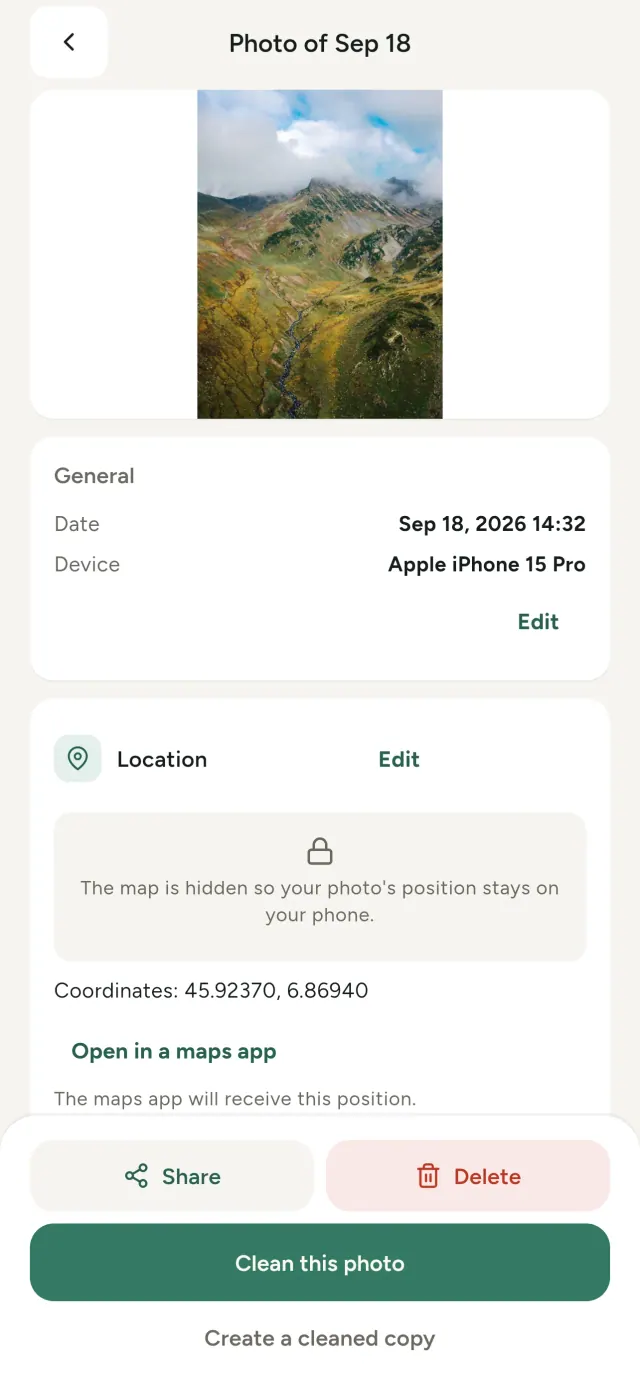
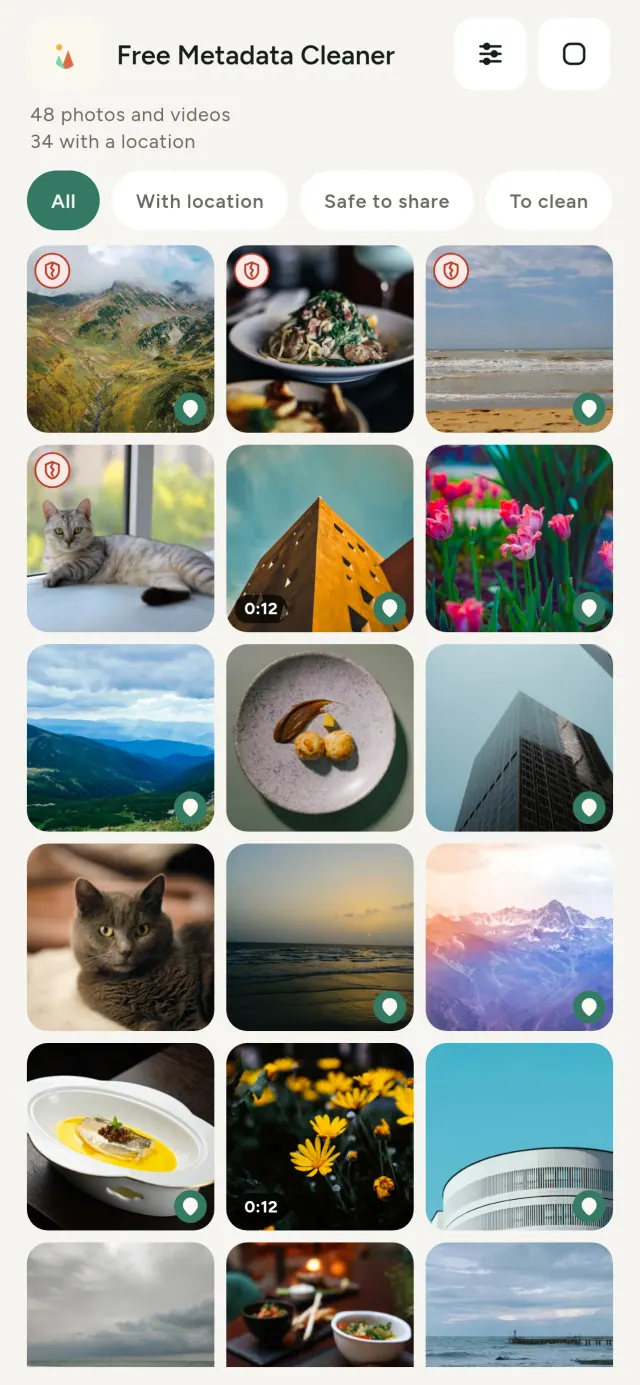
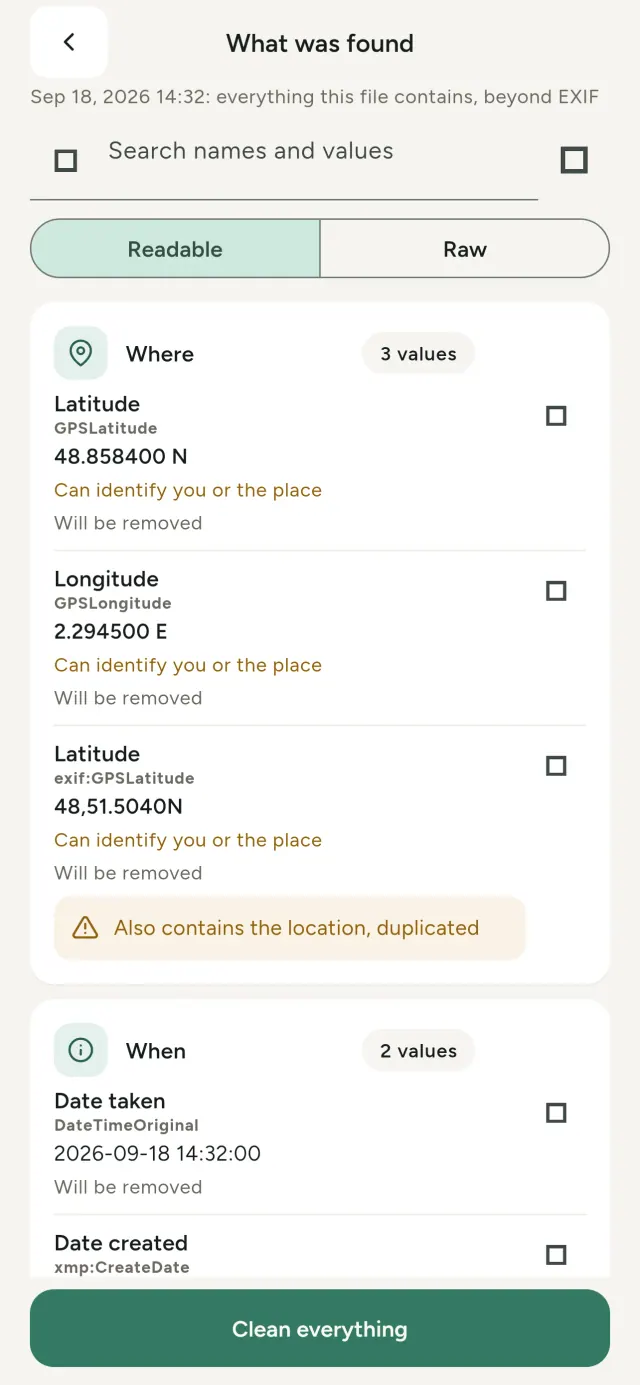
আপুনি তোলা প্ৰতিটো ফটোত লুকাই থকা তথ্য থাকে: ক'ত তোলা, কেতিয়া, কোন ফোনেৰে, কেতিয়াবা মূল ছবিৰ সৰু একটা থাম্বনেইল। আপুনি ভাগ কৰিলে সেই সকলো একেলগে যায়।
Metadata Cleaner এ আপোনাৰ ফোনত তিনিটা কাম কৰে: ই দেখুৱায় আপোনাৰ ফটো আৰু ভিডিঅ'ত কি আছে, সেইবোৰ সুধৰাবলৈ সহায় কৰে আৰু আঁতৰাই দিয়ে।
Metadata Cleaner কি কৰে
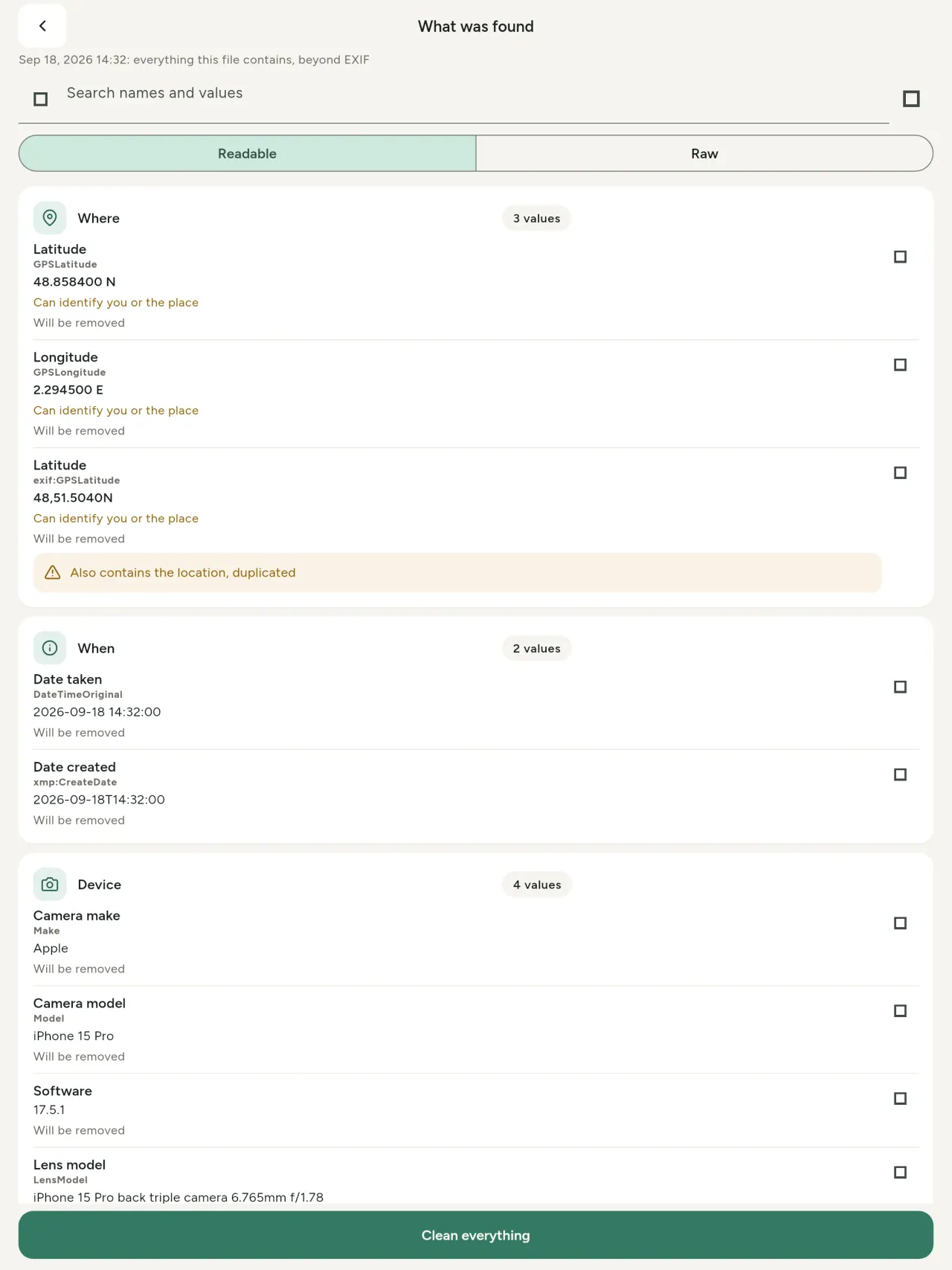
পঢ়ক। এটা বাস্তৱ মেটাডাটা ভিউৱাৰ
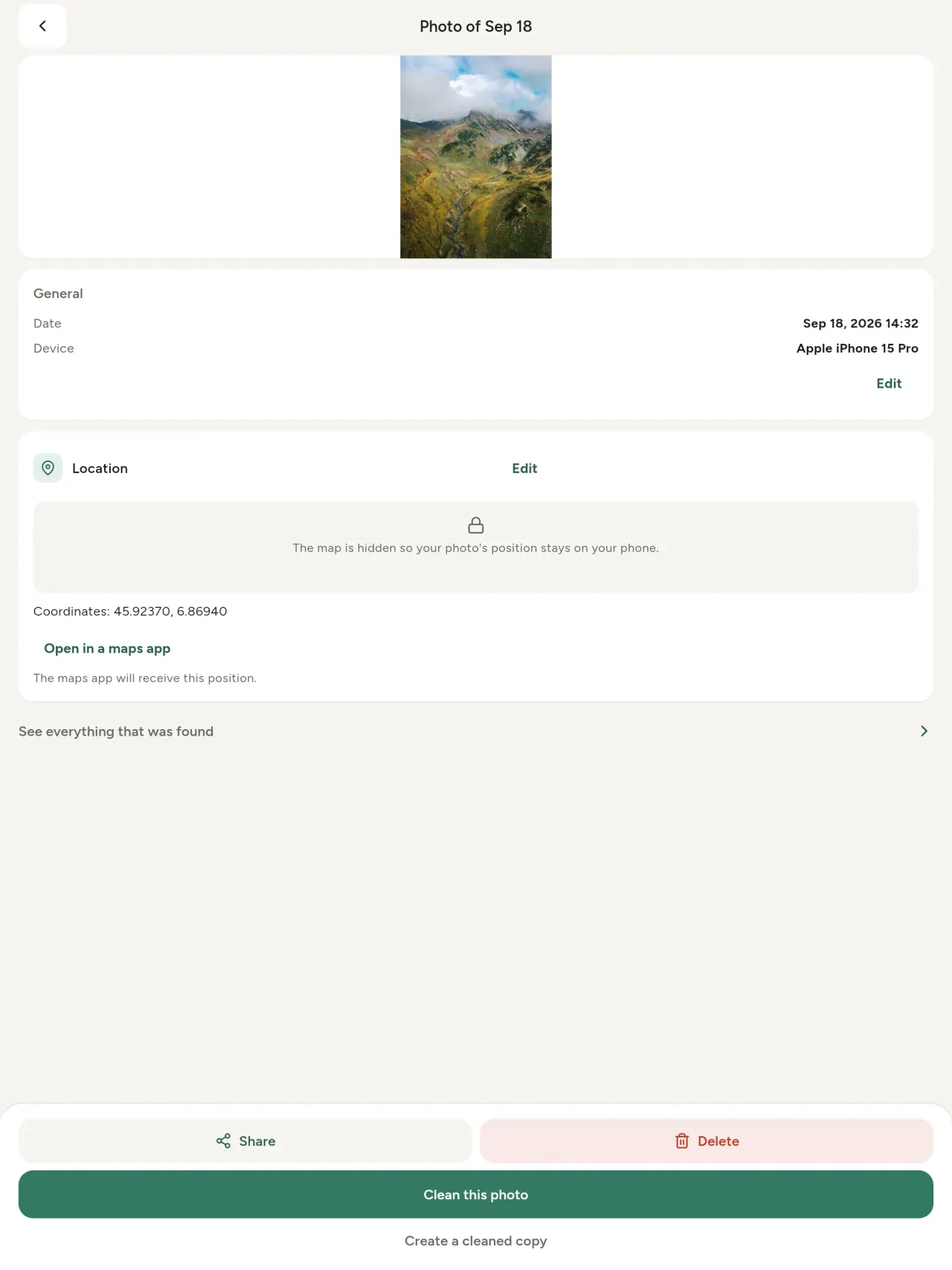
ফটো বা ভিডিঅ'ত পোৱা প্ৰতিটো মান (EXIF, IPTC, XMP, ভিডিঅ' কোডেক, সময়সীমা আৰু ৰেজ'লিউচন), গোট কৰা, সন্ধান কৰিব আৰু কপি কৰিব পৰা, আৰু যি আঁতৰোৱা হ'ব সেয়া চিহ্নিত থাকে। AI উৎপত্তি (C2PA, সৃষ্টি পেৰামিটাৰ)ও ধৰা পৰে।
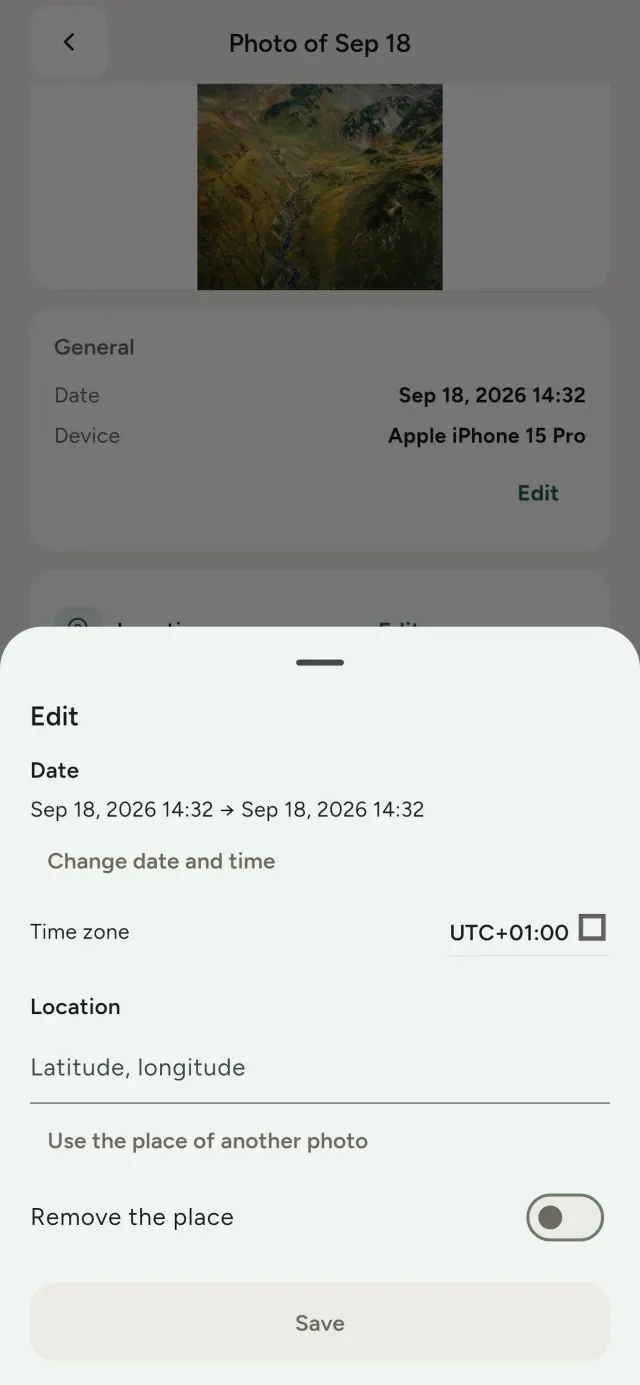
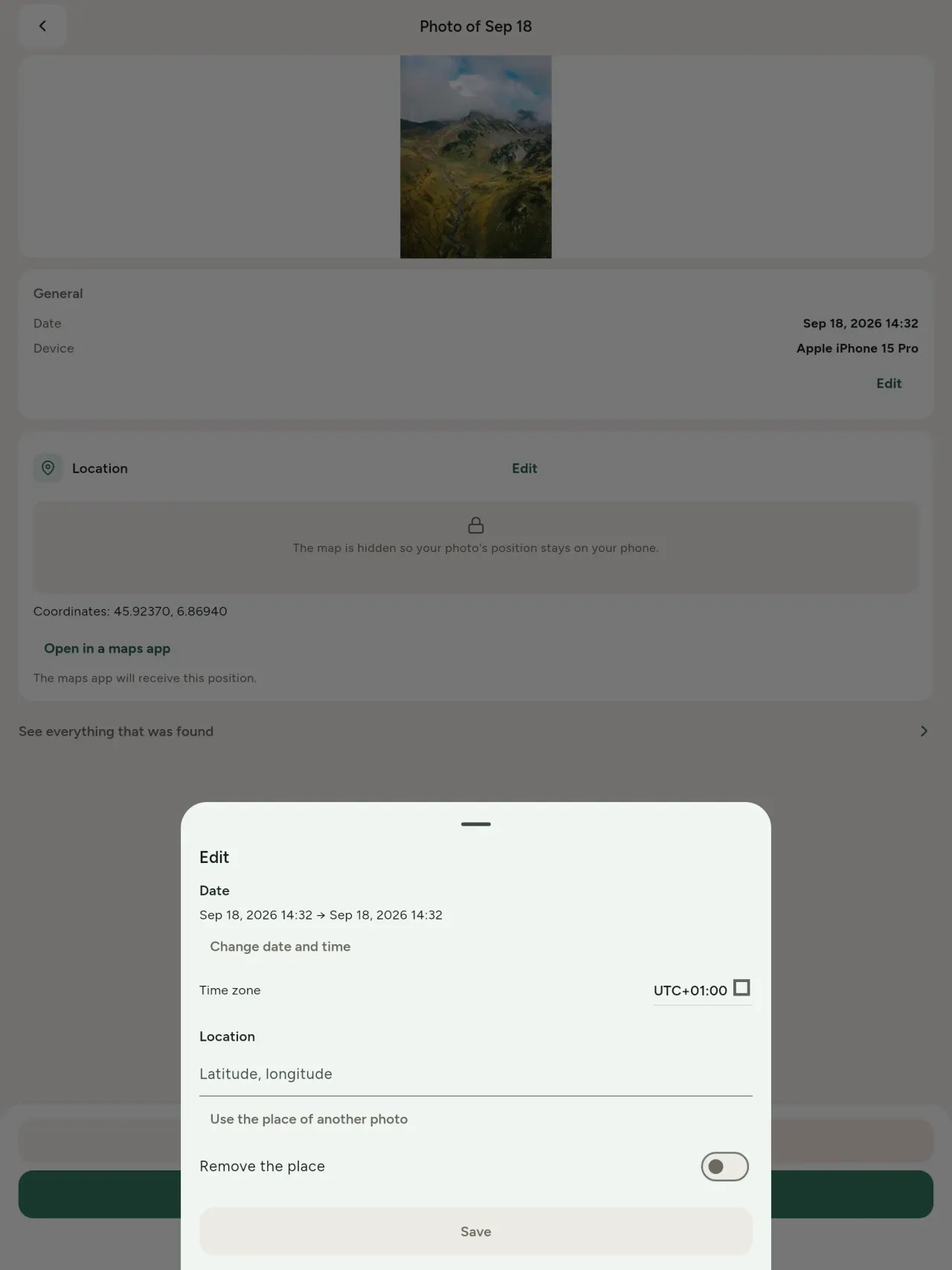
সম্পাদনা কৰক। মেটাডাটা নথকা ফটোও ধৰি, ফটোৰ তাৰিখ আৰু অৱস্থান সলনি বা সুধৰা কৰক। আন ফটোৰ পৰা অৱস্থান কপি কৰক বা মানচিত্ৰত বাছনি কৰক (প্ৰতিবাৰ আগতে সোধা হয়)। আগৰ আৰু পিছৰ তুলনা কৰক।
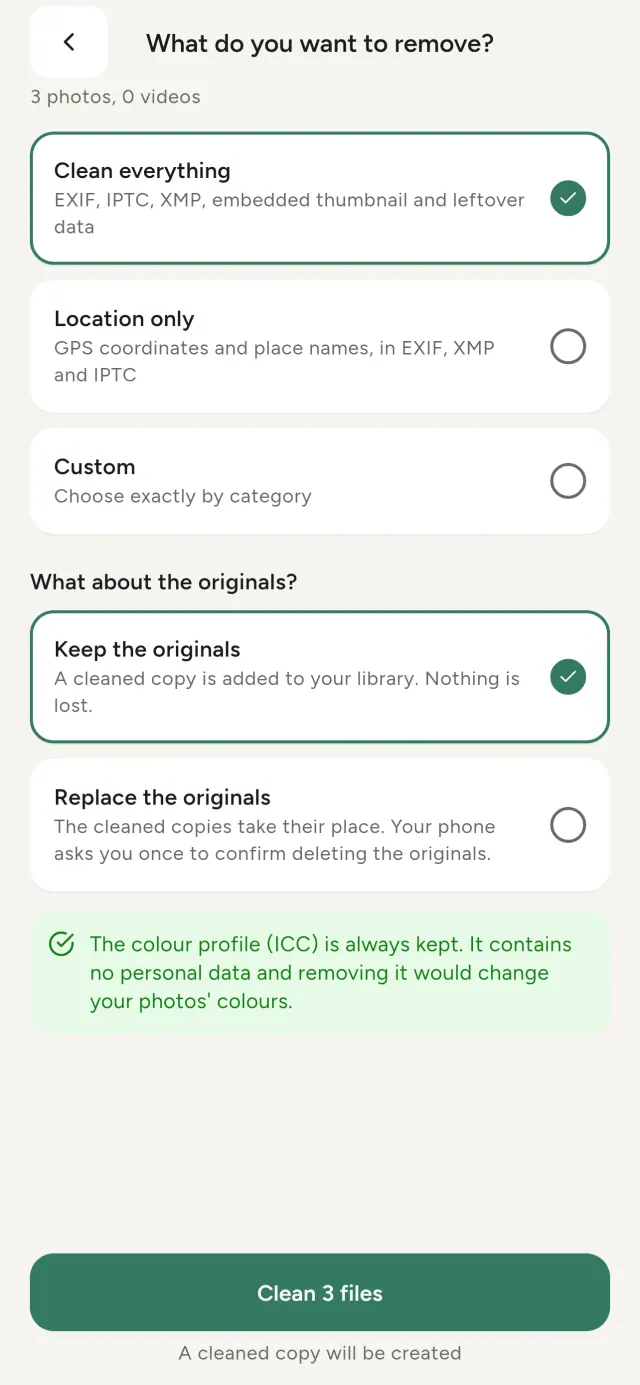
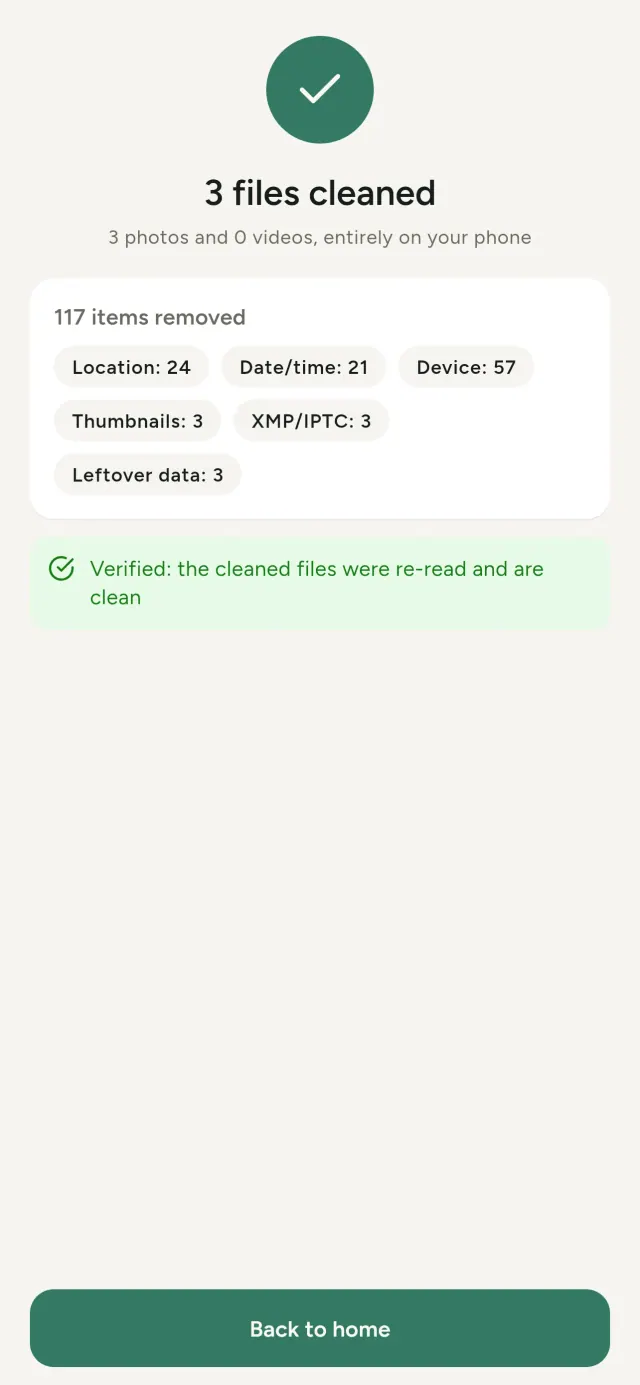
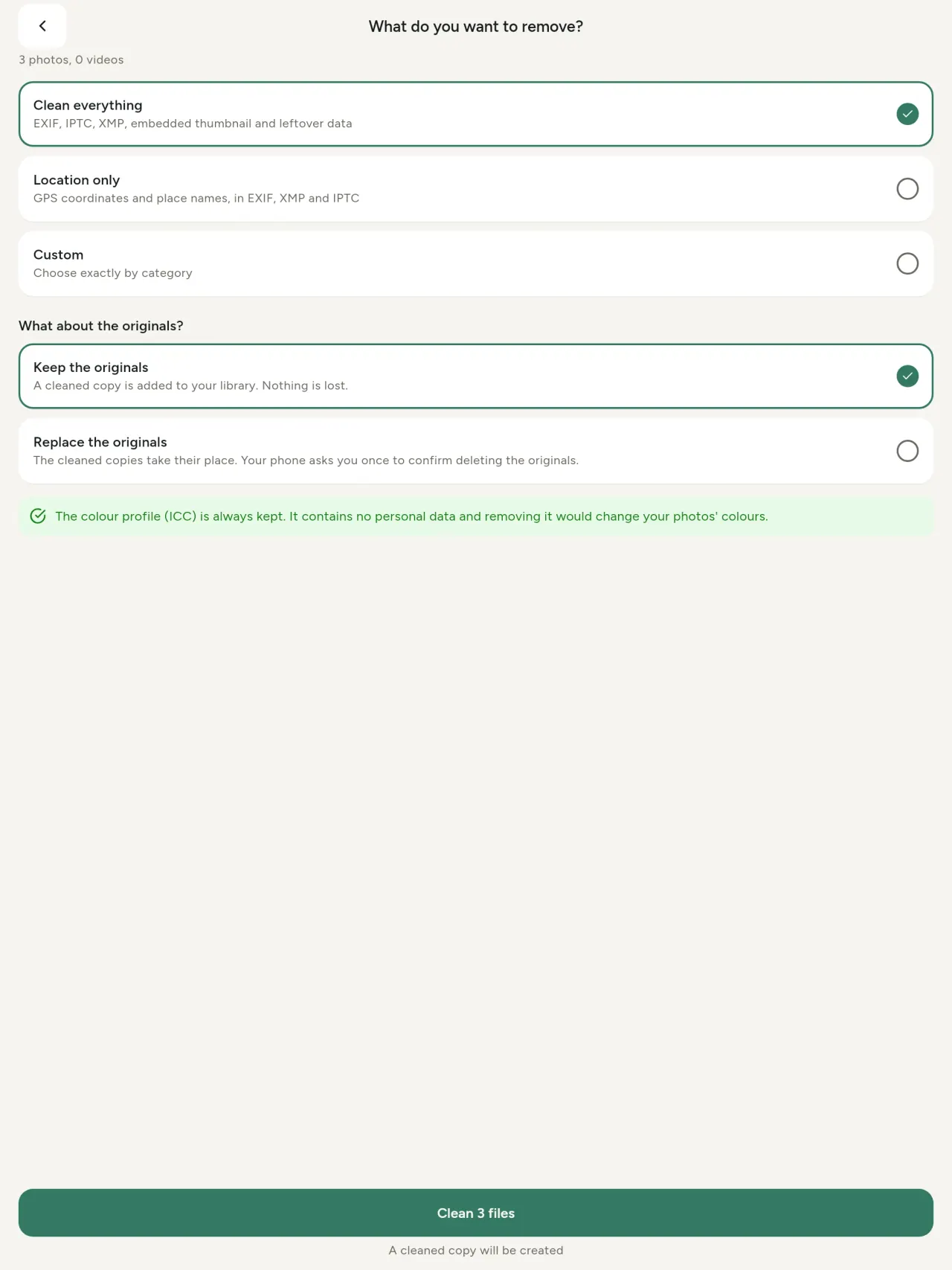
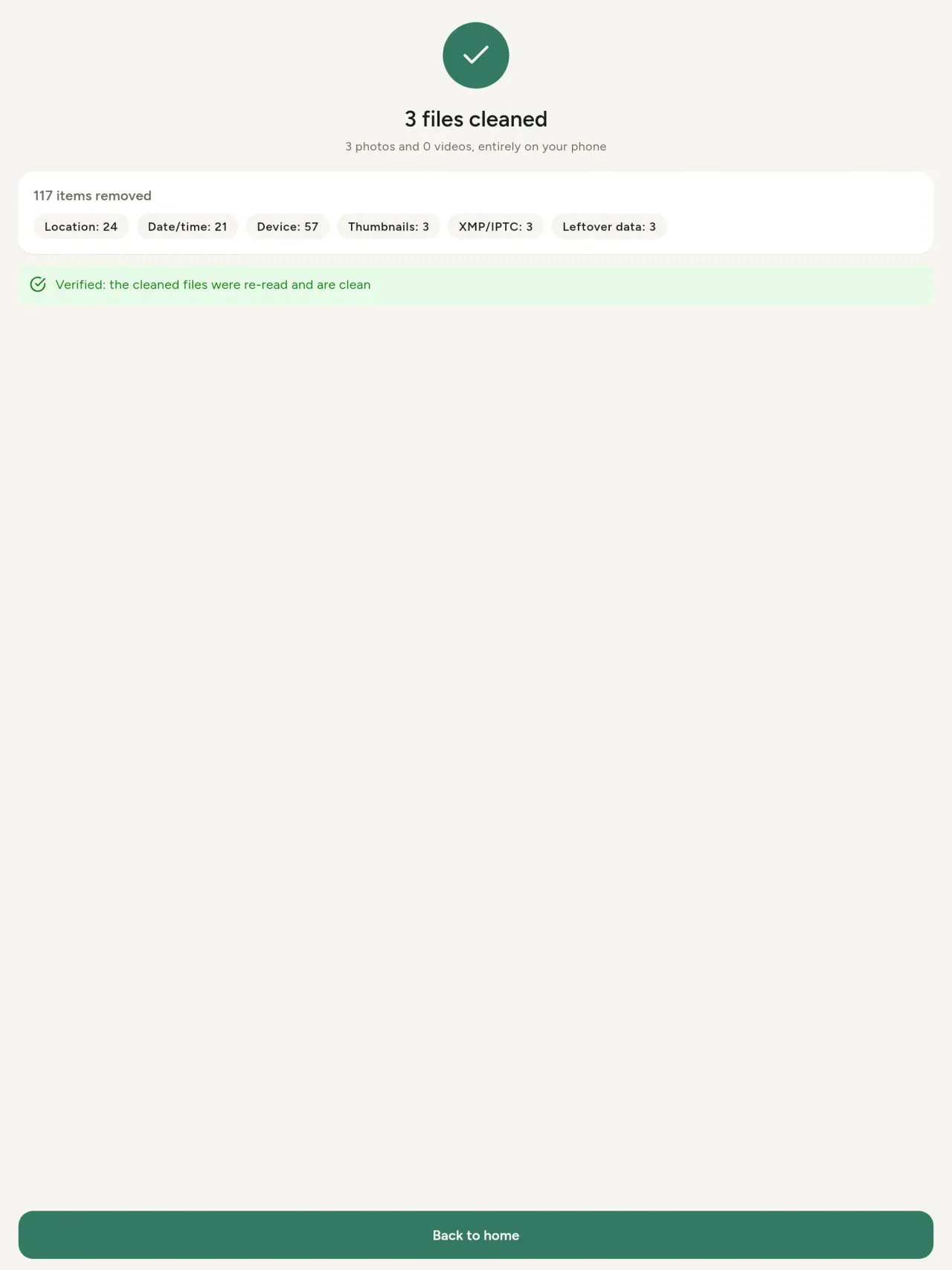
আঁতৰাওক। সকলো, কেৱল অৱস্থান বা আপুনি বাছনি কৰা শ্ৰেণী
EXIF, IPTC আৰু XMP তথ্য, সন্নিবিষ্ট থাম্বনেইল, কেমেৰা নিৰ্মাতাৰ টোকা, AI উৎপত্তি আৰু কিছুমান এডিটৰে ক্ৰপ কৰাৰ পিছত এৰি যোৱা অতিৰিক্ত বাইট। গোটেই বাছনি একেলগে পৰিষ্কাৰ কৰক আৰু মূল ফাইল ৰাখক বা সলনি কৰক।
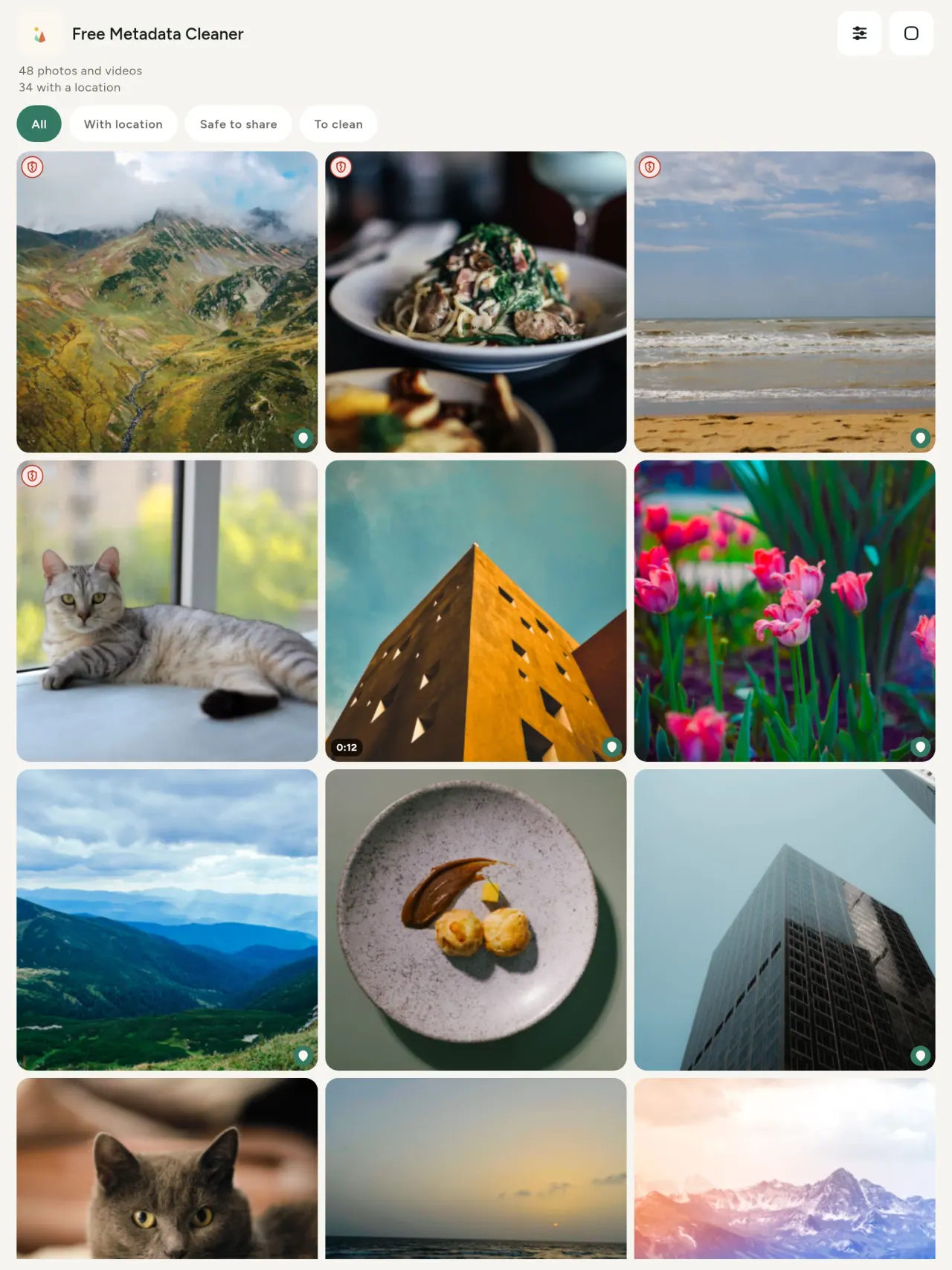
এক নজৰত ভাগ কৰিবলৈ সুৰক্ষিত। সেউজীয়া ঢালে মেটাডাটা নথকা ফাইল, ৰঙা ফাটি যোৱা ঢালে এতিয়াও মেটাডাটা থকা ফাইল সূচায়।
গুণগত মান হ্ৰাস নাই। ছবিবোৰ কেতিয়াও পুনৰ এনকোড কৰা নহয়
ছবিখন নিজেই অক্ষত থাকে।
নকশা অনুযায়ী গোপনীয়তা। আপোনাৰ ফটো আপোনাৰ ডিভাইচতেই পঢ়া, সম্পাদিত আৰু পৰিষ্কাৰ কৰা হয়। কোনো একাউণ্ট, বিজ্ঞাপন বা এনালিটিক্স নাই। এটা মাত্র ঐচ্ছিক ব্যতিক্ৰম মানচিত্ৰঃ আপুনি ফটোৰ অৱস্থান চাবলৈ বা মানচিত্ৰত স্থান বাছনি কৰিবলৈ ক'লে, এপে প্ৰতিবাৰ প্ৰথমে সোধে আৰু তাৰ পাছত OpenStreetMap ৰ পৰা মানচিত্ৰ লোড কৰে (ফটো নিজে কেতিয়াও পঠিওৱা নহয়)।
বিনামূলীয়া আৰু বিজ্ঞাপনবিহীন। এপে আপুনাক সহায় কৰিলে আপুনি ঐচ্ছিক টিপ দিব পাৰে।
কাৰ বাবে
- পোষ্ট, বিক্ৰী বা পঠোৱাৰ আগতে ফটোখনে কি প্ৰকাশ কৰে, যেনে GPS অৱস্থান, তাৰিখ বা কেমেৰা, জানিব বিচৰা যিকোনো ব্যক্তি।
- শ্ৰেণীবদ্ধ বিজ্ঞাপন চাইটত বিক্ৰী কৰা আৰু নিজৰ বাসস্থান দেখুৱাব নিবিচৰা লোক।
- শ্বেয়াৰ কৰা ফটোত ঘৰ, বিদ্যালয় বা কৰ্মস্থলীৰ দৰে সংবেদনশীল স্থান নৰখিব বিচৰা অভিভাৱক আৰু আন লোক।
- কোনো চিহ্ন নথকাকৈ ছবি শ্বেয়াৰ কৰিবলগীয়া সাংবাদিক, কৰ্মী আৰু বিপদত থকা লোক।
- ডাটা লিকত অতিষ্ঠ হৈ নিজৰ ফটোৱে কঢ়িয়াই ফুৰা ব্যক্তিগত তথ্যৰ নিয়ন্ত্ৰণ ঘূৰাই ল’ব বিচৰা লোক।
Metadata Cleaner কিয় বাছিব
- এটা এপ্লিকেশ্যনত তিনি টা বস্তু : এটা ফটো বা ভিডিঅ'য়ে কি আছে সেইটো পঢ়ক, তাৰ তথ্য (তਾਰੀখ, স্থান) সম্পাদনা কৰক, আৰু মেটাডাটা মাত্ৰ কেইটামান টিপত আঁতৰাওক।
- সকলো কাম ফোনতে হয়। আপোনাৰ ফটো ক’লৈও পঠিওৱা নহয়।
- ফটো (JPEG, HEIC, PNG, WebP, GIF) আৰু ভিডিঅ’ (MP4, MOV, 3GP)।
এপটোৱে এতিয়াও কি নকৰে
- ওপৰত তালিকাভুক্ত ফৰ্মেটসমূহহে সমৰ্থিত। অধিক ফৰ্মেটৰ পৰিকল্পনা আছে।
Pixeon নীতি. Pixeon এপসমূহ স্থানীয়ভাৱে অগ্ৰাধিকাৰ দিয়ে: কোনো একাউণ্ট বা ট্ৰেকিং নাই, আৰু আপোনাৰ ডাটা ফোনতে থাকে। কোনো এপে নেটৱৰ্কত সংযোগ কৰিলে সেয়া কেৱল আপুনি প্ৰয়োজনীয় সুবিধা অন কৰিবলৈ বাছিলে হয়, আৰু প্ৰকাশৰ আগতে গোপনীয়তা নীতি আপডেট কৰা হয়।
Metadata Cleaner-ক কাম কৰা দেখক।
Metadata Cleaner লওক।
iPhone আৰু Android দুয়োটাতে বিনামূলীয়া।
সংস্কৰণ 1.1
- App Store আগন্তুক
- Google Play আগন্তুক
নতুন কি
এই লিখনি ইংৰাজীত আছে।
- Read: see exactly what a photo or video reveals (location, date, camera, AI provenance labels such as C2PA and generation parameters, video duration, codecs, resolution and frame rate).
- Edit: change the date a photo was taken and its location (JPEG, HEIC, AVIF), even on a photo with no metadata, reuse the location of another photo, or pick it on an OpenStreetMap map after your confirmation.
- Remove: clean metadata in a few taps, with a before and after view on the result screen.
- DNG photos are supported.
- Translations aligned across 91 languages.
Privacy policy
তলৰ লিখনি ইংৰাজীত আছে। ইংৰাজী সংস্কৰণেই প্ৰাধান্য পায়।
Last updated: 2026-11-03 · applies to version 1.1 and later
Policy versions: 1.1 and later (this text) · version 1.0 (still the policy of the app version 1.0). The version number of your app is shown at the bottom of its Settings screen.
Free Metadata Cleaner shows and removes the metadata hidden in your photos and videos (location, date and time, camera and lens details, thumbnails…). The short version: everything happens on your device, and we collect nothing.
What the app accesses
Your photo and video library, only after you grant permission (and, where your system requires it, the permission to read the location stored in your photos, so that it can be shown to you). The files you choose are read and cleaned on your device; the cleaned copy is saved to your library. If you choose to replace the originals, the system asks you to confirm before deleting them.
To show which photos are already clean, the app reads the metadata of the photos displayed on screen, on your device. This result is kept in memory only and is never stored.
What we collect
Nothing. No account, no analytics or usage tracking, no advertising or advertising identifiers, no crash or diagnostics reporting beyond what the app stores provide, and no third-party SDK that sends data anywhere. There is no Free Metadata Cleaner server. Cleaning a photo or video never uses the network, at all: turn on airplane mode and clean one to check for yourself. The only network request the app itself can ever make is described under “Location” below, and it only ever happens if you ask for it. The one other connection is the optional tip purchase, handled by the store (see “Optional support”).
Temporary files and history
The app keeps no history and no database. Temporary files created while cleaning are deleted after each item and purged when the app starts.
Deleted originals
Originals that are deleted remain in your system's trash (such as “Recently Deleted” or the trash) for about 30 days, with their metadata. The app cannot empty it: do it yourself if you need the originals gone at once.
iCloud and cloud photos
If a photo is stored in iCloud and not on your device, the operating system may download it before the app can process it. That transfer is made by the system, under the provider's own terms, not by the app.
Location
When a photo contains a location, the app shows the coordinates as text, which stays on your device. Three actions can send location information off your device, only when you choose them, each time: “Open in…” hands the coordinates to the maps application you select, under its own privacy policy; “Show the map” asks you to confirm first (“Showing the map sends this photo's position to a map service. Nothing else is sent.”), then loads a small map from OpenStreetMap for that one position; and, when you edit a photo's place, “Choose on the map” asks you to confirm first, then opens a full-screen map from OpenStreetMap. This map does not use your phone's location. As you move and zoom it, the app requests the map tiles of the area you are browsing, so OpenStreetMap receives the position of the area shown on screen, which starts on the photo's current place if it has one, and otherwise on a world view. The photo itself is never sent, and nothing is sent before you confirm. The place you choose on the map (or copy from another photo) is written into the photo's file only when you save, on your device. In every case OpenStreetMap receives, as with any web request, technical details like your IP address; it does not receive your name, an account, or anything else about you or your other photos. See OpenStreetMap's own privacy policy. Outside of these explicit actions, the app never sends a photo's location, or anything else, anywhere.
Optional support
The app is free. If you wish, you can leave a tip. On iPhone and in the Google Play version for Android, tips are in-app purchases processed by Apple or Google under their own terms and privacy policy; the app adds the Google Play billing permission for this, makes no network call itself, and receives no payment or personal details. Versions installed outside Google Play may instead open an external donation page in your browser, operated by a third party under its own privacy policy; nothing from the app is sent to it. A tip unlocks nothing.
Contact form on this website
If you write to us through this site, we use your message and the email address you optionally give only to reply. Bot protection is provided by Cloudflare and email delivery by Resend.
Language choice on this website
When you choose a language, or when this site opens a page in your browser's language, it stores
one small functional cookie (pxl, a language code, one year) so that your choice is
remembered. If this site suggests a page in your browser's language and you close that suggestion,
your browser also keeps a local note (pxl-banner-off, in local storage, 30 days) so the
suggestion does not come back. Neither identifies anyone, neither is used for tracking or advertising,
and neither is shared. You can delete them in your browser at any time.
Website statistics
This website uses Cloudflare Web Analytics to count visits (pages viewed, country, browser type, loading speed). It sets no cookie, does not use local storage, does not fingerprint your device, does not follow you across sites and does not build a profile of you. Search engines (for example Google Search Console) give us aggregated search statistics, without any data about individual visitors. Our own web server also counts the pages it serves: for each page it keeps the page address, the site or social network that sent you (only its name, or the campaign tag written in the link), the country, the type of device and whether the request came from a robot. It keeps no IP address, no identifier and no cookie, and these counts are anonymous. We use no advertising or other analytics service. None of this concerns the app itself, which collects nothing.
Children
The app is a general-purpose tool and is not directed at children.
Changes
An updated policy will be published at this URL with a new date above.
Contact
Questions about privacy: metadata-cleaner-contact@pixeon.net
সংস্কৰণ 1.0
- App Store প্ৰকাশিত
- Google Play প্ৰকাশিত
নতুন কি
এই লিখনি ইংৰাজীত আছে।
- Cleans JPEG, HEIC, PNG, WebP, GIF, MP4, MOV and 3GP files, with no video re-encoding.
- "Safe to share" and "To clean" filters.
- New green design.
- Help screen with a FAQ.
- Settings: share, rate, feedback, unsupported formats.
- Optional tips.
Privacy policy, version 1.0
তলৰ লিখনি ইংৰাজীত আছে। ইংৰাজী সংস্কৰণেই প্ৰাধান্য পায়।
Applies to version 1.0 of the app (the first release). Later versions: current policy.
Free Metadata Cleaner shows and removes the metadata hidden in your photos and videos (location, date and time, camera and lens details, thumbnails…). The short version: everything happens on your device, and we collect nothing.
What the app accesses
Your photo and video library, only after you grant permission (and, where your system requires it, the permission to read the location stored in your photos, so that it can be shown to you). The files you choose are read and cleaned on your device; the cleaned copy is saved to your library. If you choose to replace the originals, the system asks you to confirm before deleting them.
To show which photos are already clean, the app reads the metadata of the photos displayed on screen, on your device. This result is kept in memory only and is never stored.
What we collect
Nothing. No account, no analytics or usage tracking, no advertising or advertising identifiers, no crash or diagnostics reporting beyond what the app stores provide, and no third-party SDK that sends data anywhere. There is no Free Metadata Cleaner server. Cleaning a photo or video never uses the network, at all: turn on airplane mode and clean one to check for yourself. The only network request the app itself can ever make is described under “Location” below, and it only ever happens if you ask for it. The one other connection is the optional tip purchase, handled by the store (see “Optional support”).
Temporary files and history
The app keeps no history and no database. Temporary files created while cleaning are deleted after each item and purged when the app starts.
Deleted originals
Originals that are deleted remain in your system's trash (such as “Recently Deleted” or the trash) for about 30 days, with their metadata. The app cannot empty it: do it yourself if you need the originals gone at once.
iCloud and cloud photos
If a photo is stored in iCloud and not on your device, the operating system may download it before the app can process it. That transfer is made by the system, under the provider's own terms, not by the app.
Location
When a photo contains a location, the app shows the coordinates as text, which stays on your device. Two actions send that one photo's position off your device, only when you choose them, each time: “Open in…” hands the coordinates to the maps application you select, under its own privacy policy; “Show the map” asks you to confirm first (“Showing the map sends this photo's position to a map service. Nothing else is sent.”), then loads a small map from OpenStreetMap for that one position. OpenStreetMap receives the coordinates and, as with any web request, technical details like your IP address; it does not receive your name, an account, or anything else about you or your other photos. See OpenStreetMap's own privacy policy. Outside of these two explicit actions, the app never sends a photo's location, or anything else, anywhere.
Optional support
The app is free. If you wish, you can leave a tip. On iPhone and in the Google Play version for Android, tips are in-app purchases processed by Apple or Google under their own terms and privacy policy; the app adds the Google Play billing permission for this, makes no network call itself, and receives no payment or personal details. Versions installed outside Google Play may instead open an external donation page in your browser, operated by a third party under its own privacy policy; nothing from the app is sent to it. A tip unlocks nothing.
Contact form on this website
If you write to us through this site, we use your message and the email address you optionally give only to reply. Bot protection is provided by Cloudflare and email delivery by Resend.
Language choice on this website
When you choose a language, or when this site opens a page in your browser's language, it stores
one small functional cookie (pxl, a language code, one year) so that your choice is
remembered. If this site suggests a page in your browser's language and you close that suggestion,
your browser also keeps a local note (pxl-banner-off, in local storage, 30 days) so the
suggestion does not come back. Neither identifies anyone, neither is used for tracking or advertising,
and neither is shared. You can delete them in your browser at any time.
Website statistics
This website uses Cloudflare Web Analytics to count visits (pages viewed, country, browser type, loading speed). It sets no cookie, does not use local storage, does not fingerprint your device, does not follow you across sites and does not build a profile of you. Search engines (for example Google Search Console) give us aggregated search statistics, without any data about individual visitors. Our own web server also counts the pages it serves: for each page it keeps the page address, the site or social network that sent you (only its name, or the campaign tag written in the link), the country, the type of device and whether the request came from a robot. It keeps no IP address, no identifier and no cookie, and these counts are anonymous. We use no advertising or other analytics service. None of this concerns the app itself, which collects nothing.
Children
The app is a general-purpose tool and is not directed at children.
Changes
An updated policy will be published at this URL with a new date above.
Contact
Questions about privacy: metadata-cleaner-contact@pixeon.net
সহায়তা
শেষবাৰৰ বাবে আপডেট: 2026-10-08
Free Metadata Cleaner এটা সৰু স্বতন্ত্ৰ এপ। আটাইতকৈ সাধাৰণ প্ৰশ্নসমূহৰ উত্তৰ তলত দিয়া হৈছে।
আমি কেইদিনমানৰ ভিতৰত উত্তৰ দিবলৈ যথাসাধ্য চেষ্টা কৰোঁ। আমাক সহায় কৰিবলৈ আপোনাৰ ডিভাইচৰ মডেল, ছিষ্টেমৰ সংস্কৰণ আৰু আপুনি কি কৰি আছিল সেই কথা জনাওক। অনুগ্ৰহ কৰি ব্যক্তিগত ফটো নপঠিয়াব।
এপটোৱে কি তথ্য সংৰক্ষণ বা পঠিয়ায়?
একোৱেই নহয়। ই কোনো ইতিহাস নাৰাখে, কোনো একাউণ্ট বা ছাৰ্ভাৰ নাই। গোপনীয়তা নীতিত বিতং তথ্য আছে।
ফটো কেনেকৈ পৰিষ্কাৰ কৰিম?
- এপটো খুলি সুধিলে আপোনাৰ লাইব্ৰেৰীলৈ প্ৰৱেশৰ অনুমতি দিয়ক।
- পৰিষ্কাৰ কৰিবলগীয়া ফটো বা ভিডিঅ' বাছক।
- কি আঁতৰাব লাগে আৰু মূল ফটো সলনি হ'ব নে পৰিষ্কাৰ কপি সৃষ্টি হ'ব, সেয়া বাছক।
- নিশ্চিত কৰক। সাৰাংশত কি আঁতৰোৱা হ'ল আৰু কোনটো ফাইল প্ৰক্ৰিয়াকৰণ কৰিব পৰা নগ'ল সেয়া দেখা যাব।
পৰিষ্কাৰ কপিসমূহ ক'লৈ যায়?
আপোনাৰ ফটো লাইব্ৰেৰীলৈ। মূল ফটোৰ লাইব্ৰেৰী তাৰিখটো ৰখা হয়, সেয়ে পৰিষ্কাৰ ফটো গেলাৰীৰ ওপৰলৈ নাহে।
মই “মূল ফটো সলনি কৰক” বাছিলোঁ, কিন্তু মূল ফটো এতিয়াও আছে।
মচা মূল ফটোসমূহ প্ৰায় ৩০ দিনলৈ ছিষ্টেমৰ আৱৰ্জনা বাকচত (যেনে “Recently Deleted” বা trash) মেটাডাটাসহ থাকে। তৎক্ষণাৎ আঁতৰাবলৈ আৱৰ্জনা বাকচ খালী কৰক। ছিষ্টেমৰ মচাৰ অনুৰোধ নাকচ কৰিলে মূল ফটো ৰৈ যায় আৰু পৰিষ্কাৰ কপিসমূহ তথাপি যোগ হয়।
কোনবোৰ ফাইল সমৰ্থিত?
JPEG, HEIC, AVIF, PNG, WebP আৰু GIF ফটো, লগতে MP4, MOV আৰু 3GP ভিডিঅ' (আৰু ফৰ্মেট যোগ হৈ আছে)। এপটোৱে পৰিষ্কাৰ কৰিব নোৱাৰা ফাইল অক্ষত থাকে আৰু কাৰণসহ সাৰাংশত তালিকাভুক্ত হয়; বাকী বেচৰ কাম বন্ধ নহয়।
এপটোক মোৰ ফটোলৈ প্ৰৱেশ কিয় লাগে?
আপুনি বাছিব পৰা ফটোসমূহ তালিকাভুক্ত কৰিবলৈ আৰু পৰিষ্কাৰ কপিসমূহ সংৰক্ষণ কৰিবলৈ। আপোনাৰ ছিষ্টেমত প্ৰয়োজন হ'লে ফটোত থকা স্থান পঢ়িবলৈও অনুমতি বিচাৰে: ইয়াৰ অবিহনে ছিষ্টেমে স্থানটো লুকুৱায়, সেয়ে এপটোৱে ফটোৱে কি প্ৰকাশ কৰে দেখুৱাব নোৱাৰে। একোৱেই আপলোড কৰা নহয়।
মোৰ ফোনৰ পৰা একোৱেই বাহিৰলৈ নাযায় বুলি কেনেকৈ পৰীক্ষা কৰিম?
এয়াৰপ্লেন মোড অন কৰি এখন ফটো পৰিষ্কাৰ কৰক: একেদৰেই কাম কৰিব। একমাত্ৰ ব্যতিক্ৰম মেপ: ফটোৰ স্থানত “Show the map” টেপ কৰি নিশ্চিত কৰিলে সেই এটা স্থান মেপ দেখুৱাবলৈ OpenStreetMapলৈ পঠিওৱা হয়, আন একোৱেই নহয়। ওপৰৰ “Location” চাওক।
কোনবোৰ ভাষা উপলব্ধ?
এপটো ইংৰাজী, ফৰাচী, জাৰ্মান, স্পেনিছ, ইটালীয়, পৰ্তুগীজ আৰু আৰবী ভাষাত উপলব্ধ। এই ৱেবছাইট অধিক ভাষাত উপলব্ধ, আৰু এপৰো অধিক ভাষা আহি আছে।
প্ৰকল্পটো সমৰ্থন কৰক
Metadata Cleaner বিনামূলীয়া আৰু বিজ্ঞাপনমুক্ত হৈ থাকে। উপযোগী লাগিলে ইয়াৰ উন্নয়নত সহায় কৰিব পাৰে (ঐচ্ছিক):
Buy Me a CoffeeExpense tracker and family budget planner. Free phone sync, no account.
Pixeon-ৰ পৰা আনবোৰVaultMarkEncrypted document vault. Watermark documents, remove metadata before sharing.
Pixeon-ৰ পৰা আনবোৰLittle RelayBreastfeeding, sleep and starting solids tracker. No account, works offline.
Pixeon-ৰ পৰা আনবোৰMenuloopPlan the week's meals, build your grocery list and keep recipes with photos.