
Metadata Cleaner: Llun/Fideo
Gwyliwr, golygydd a thynnwr EXIF: darllen, trwsio neu ddileu metadata lluniau.


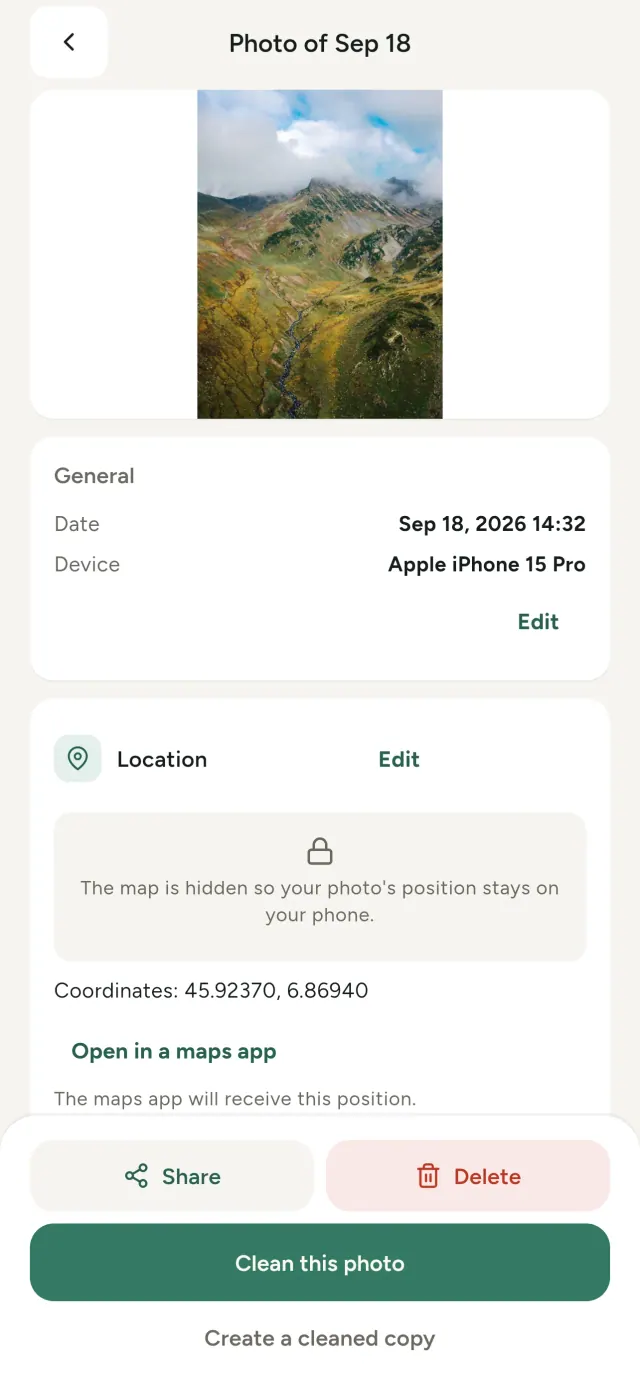
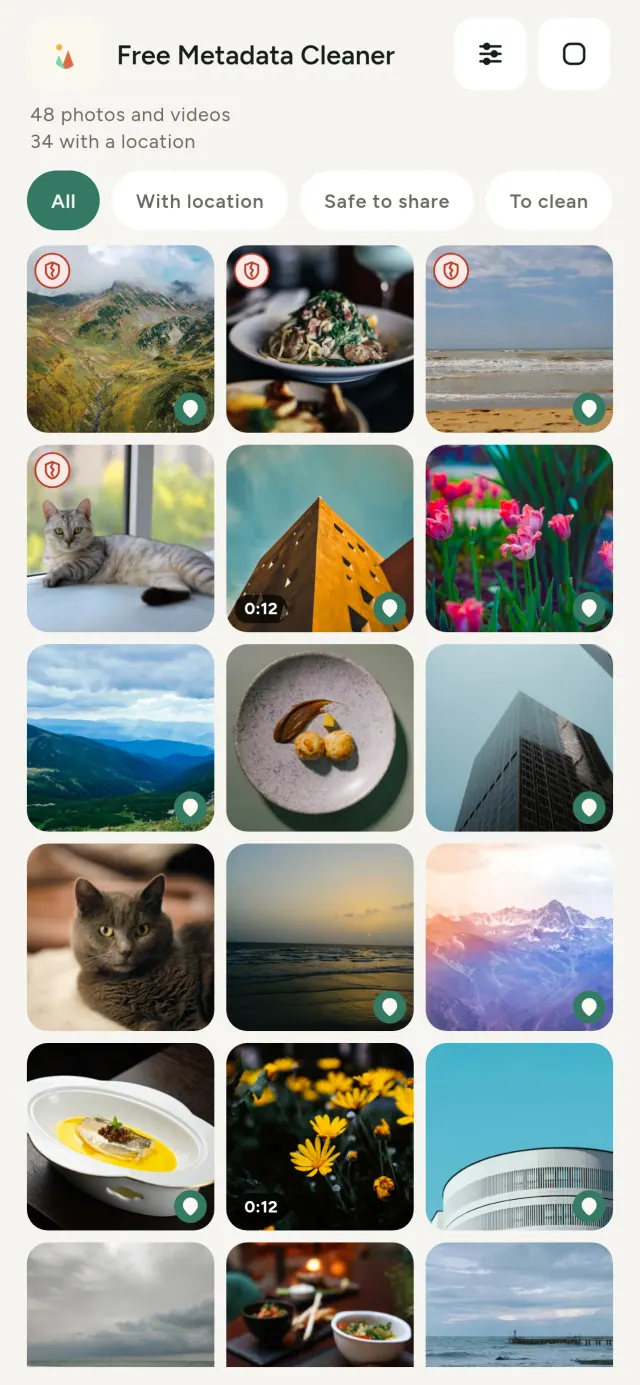
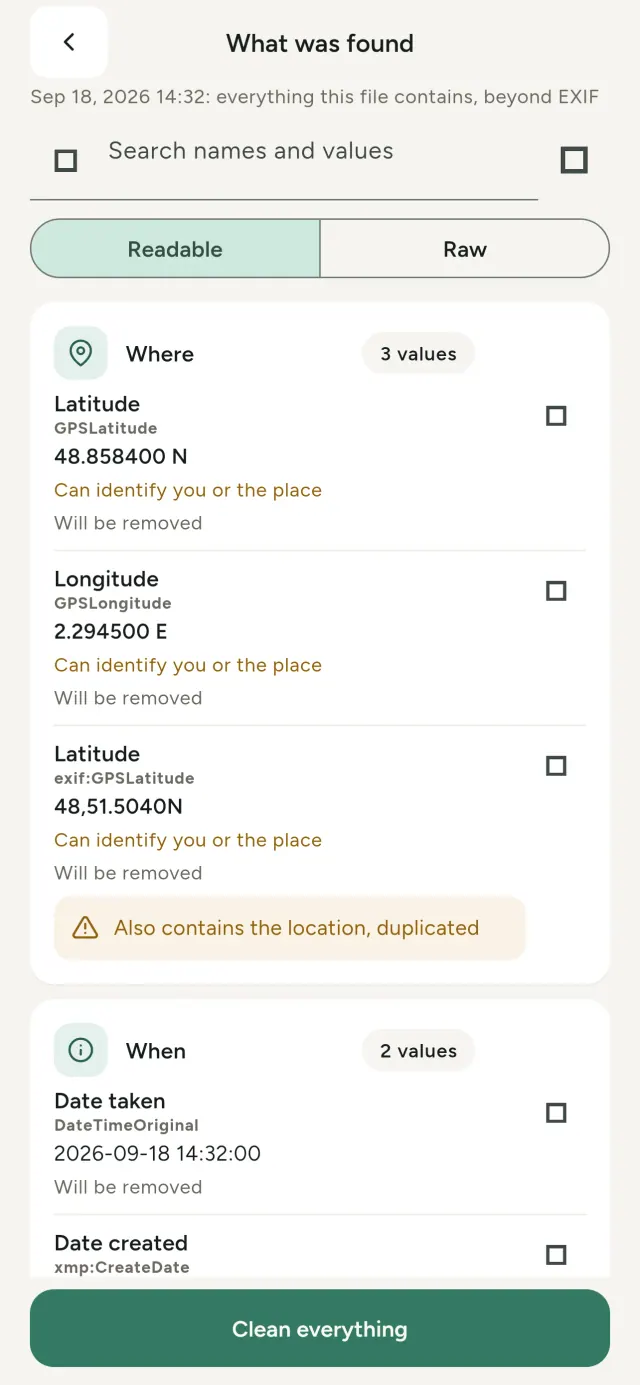
Mae gwybodaeth gudd ym mhob llun: ble a phryd y'i tynnwyd, pa ffôn a ddefnyddiwyd, ac weithiau rhagolwg bach o'r llun gwreiddiol. Wrth ei rannu, mae hynny i gyd yn mynd gydag ef.
Mae Metadata Cleaner yn gwneud tri pheth ar eich ffôn: dangos beth sydd yn eich lluniau a'ch fideos, eich gadael i'w drwsio, a'i dynnu.
Beth mae Metadata Cleaner yn ei wneud
Darllen
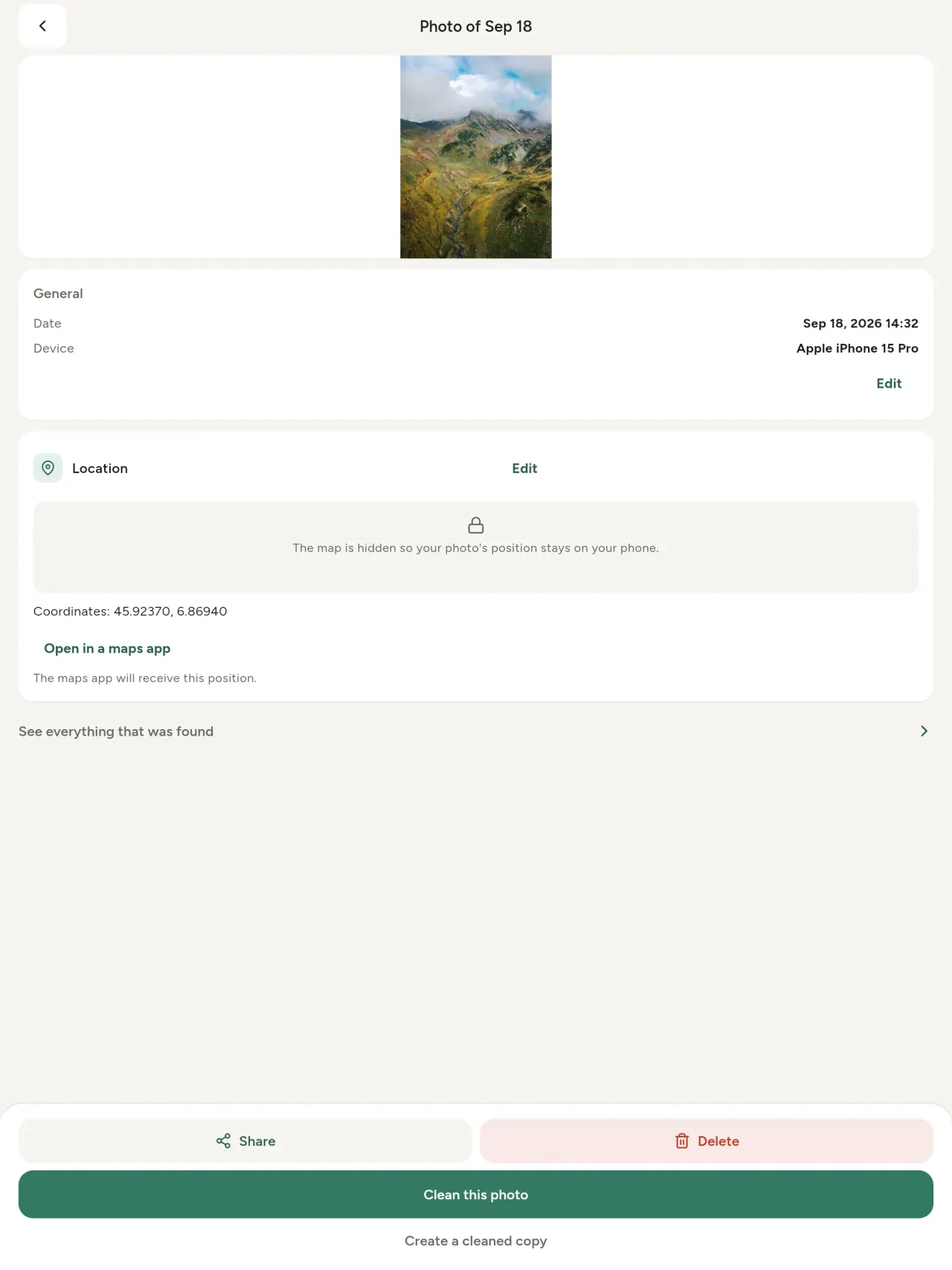
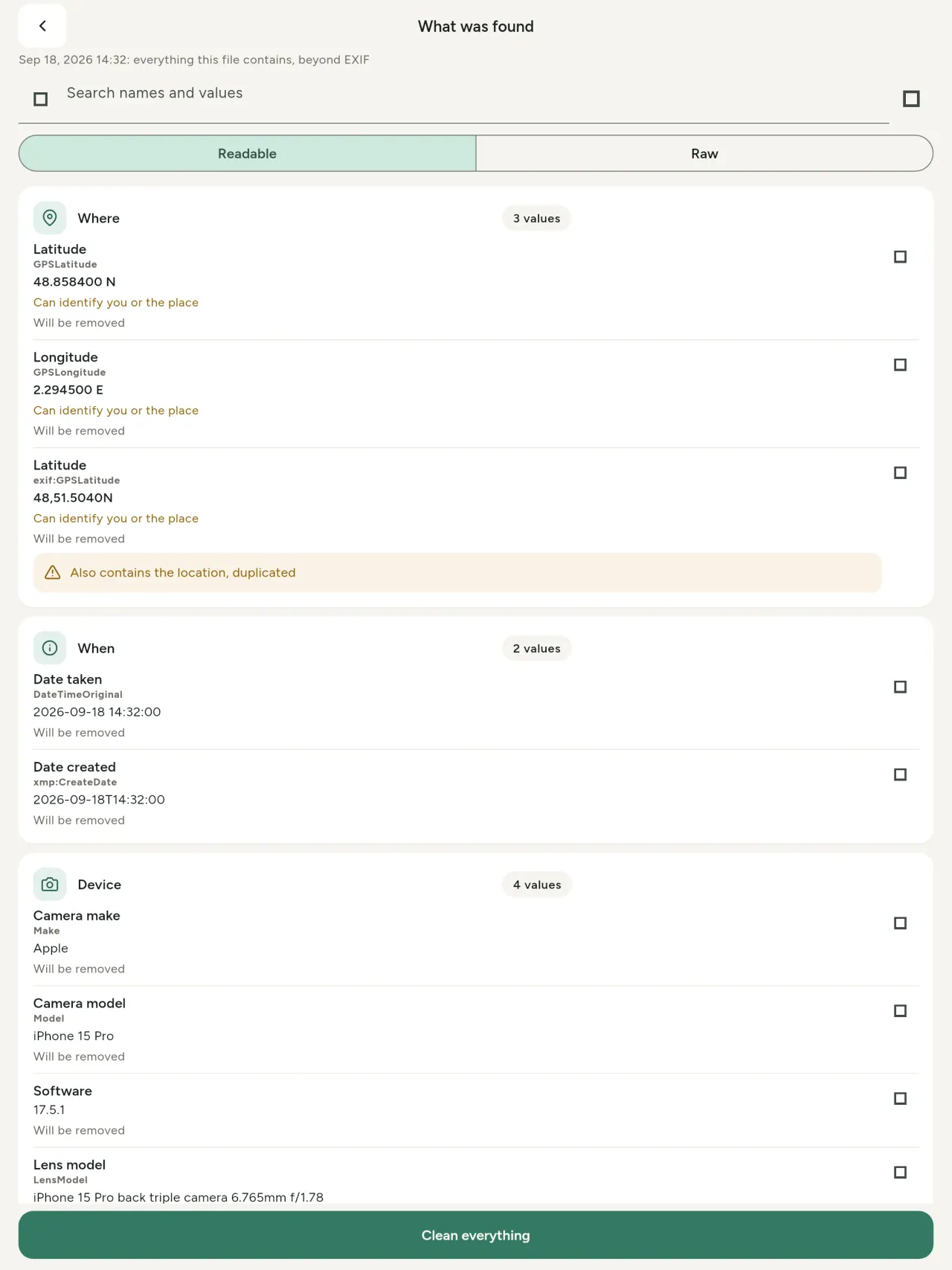
Gwyliwr metadata go iawn: pob gwerth mewn llun neu fideo (EXIF, IPTC, XMP, codecau fideo, hyd a chydraniad), wedi'u grwpio, chwiliadwy a chopïadwy. Mae'r hyn a dynnir yn cael ei farcio. Canfyddir tarddiad AI (C2PA a pharamedrau cynhyrchu) hefyd.
Golygu
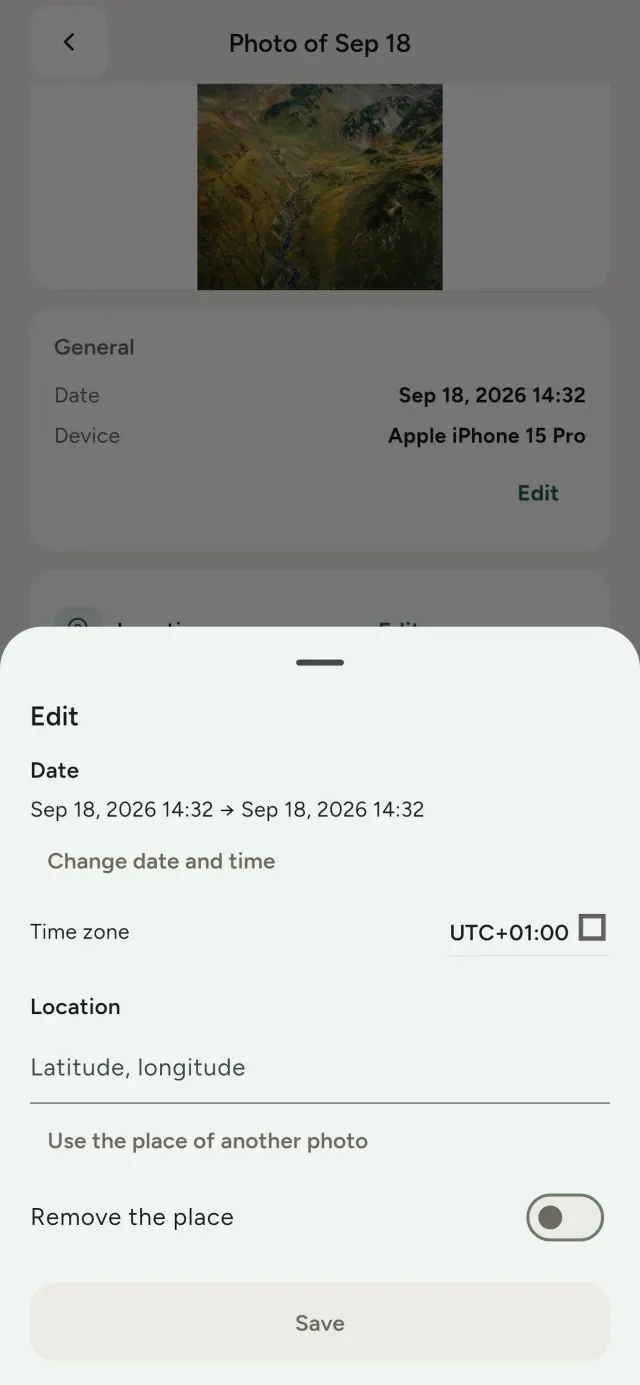
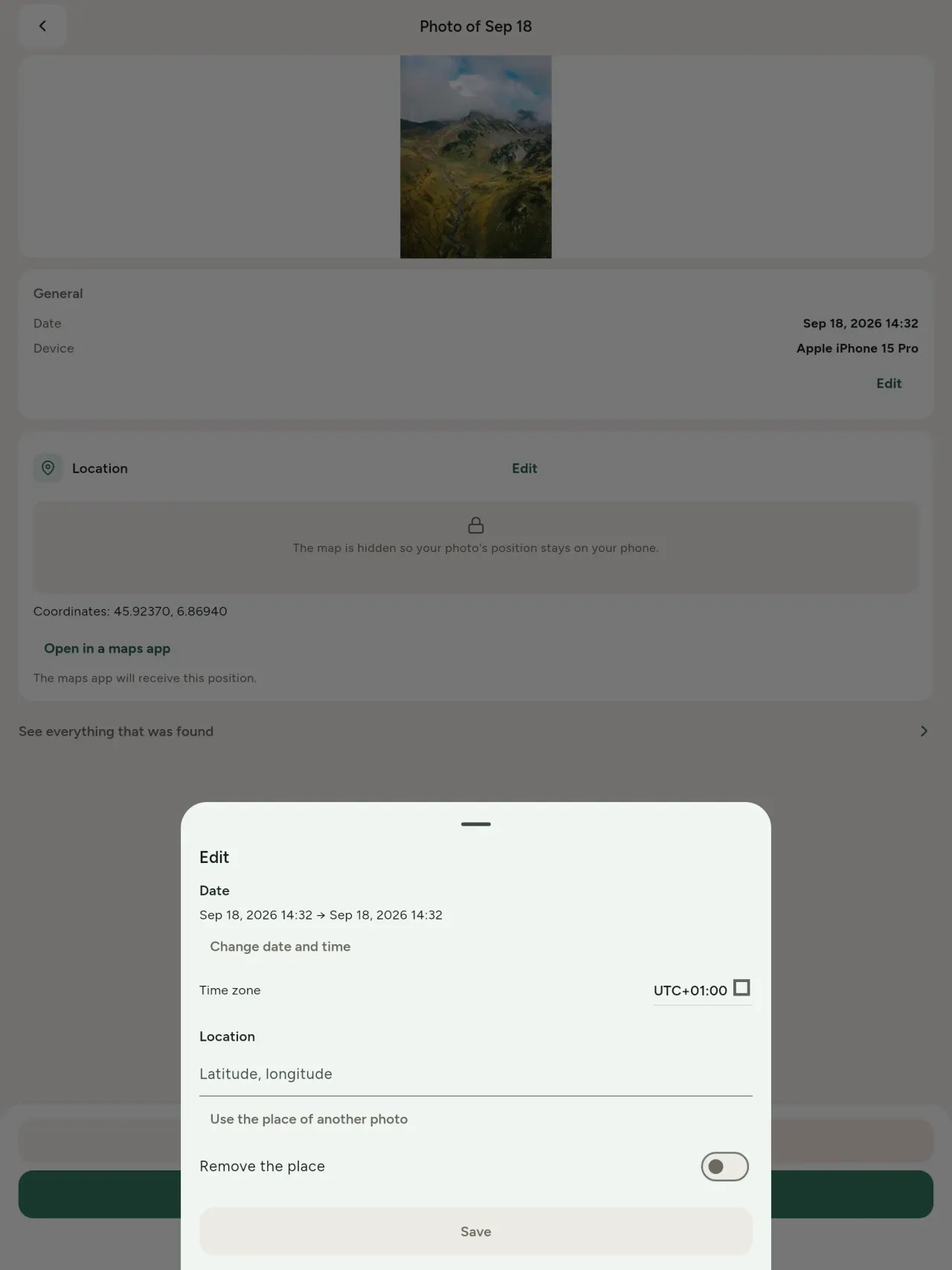
Newidiwch ddyddiad a lle llun, hyd yn oed heb unrhyw metadata. Copïwch leoliad llun arall, neu dewiswch ef ar fap (gofynnir yn gyntaf, bob tro). Cymharwch cyn ac ar ôl.
Tynnu
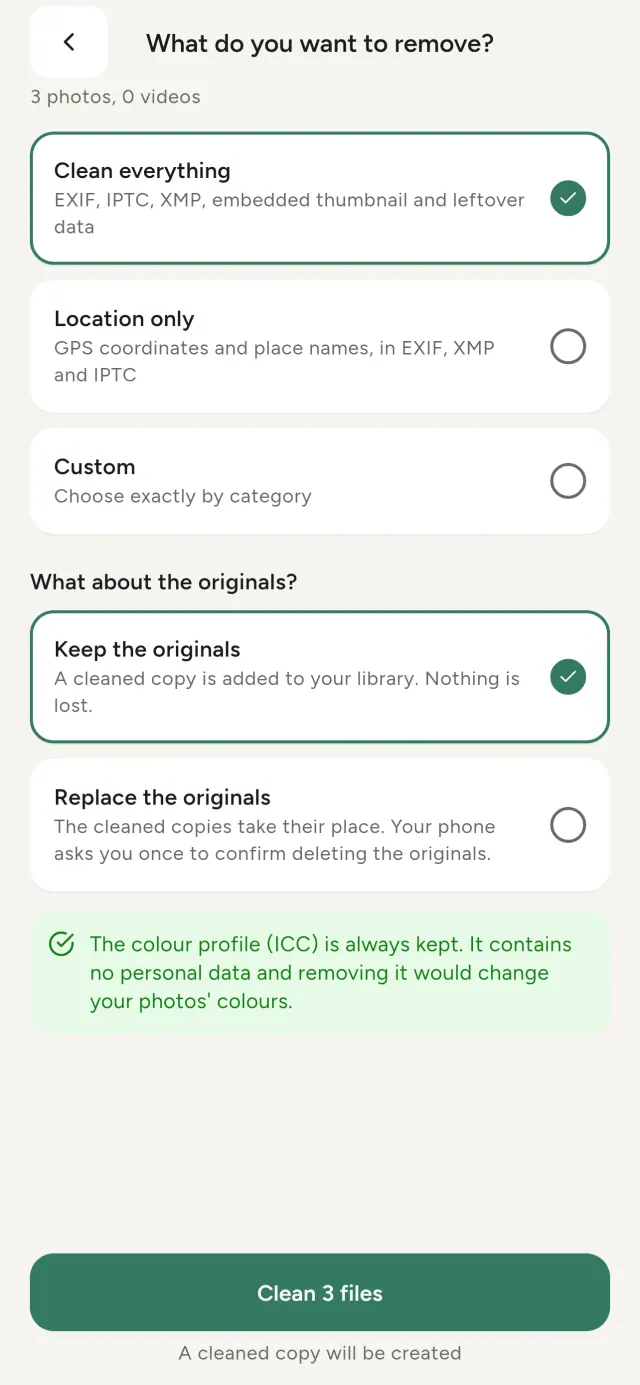
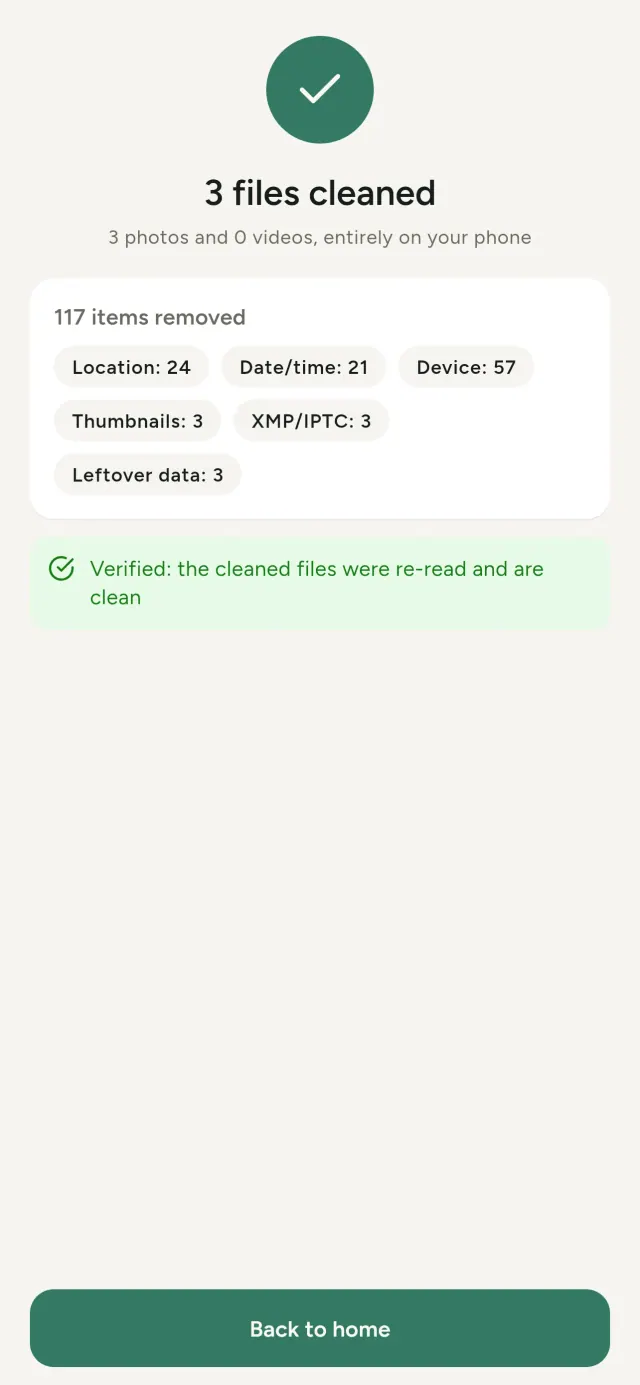
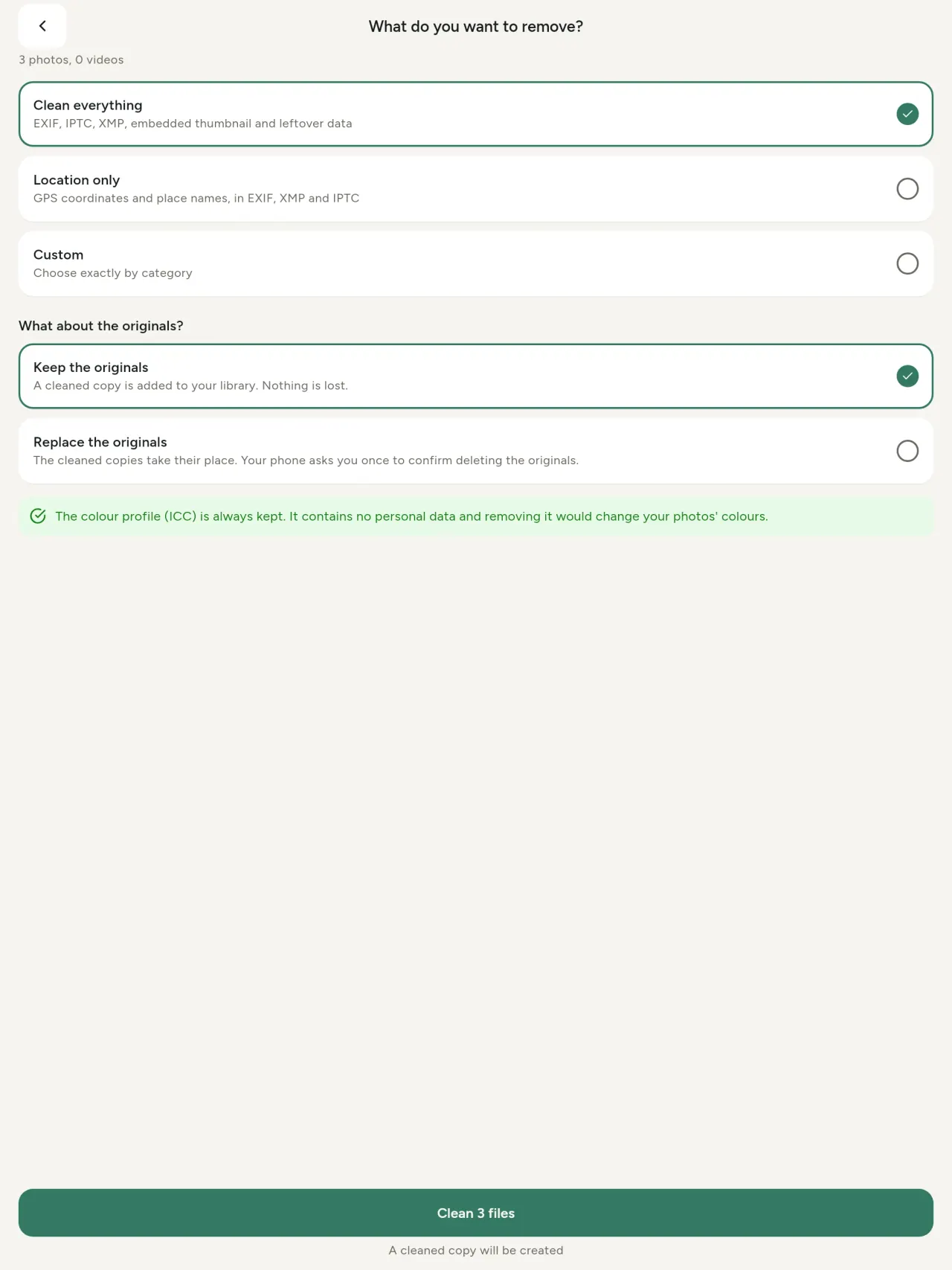
Popeth, y lleoliad yn unig, neu'r categorïau a ddewiswch: data EXIF, IPTC a XMP, mân-luniau, nodiadau'r camera, tarddiad AI a beitiau gweddillol. Glanhewch ddetholiad cyfan ar unwaith, gan gadw'r rhai gwreiddiol neu eu hamnewid.
Diogel i'w rannu ar gip
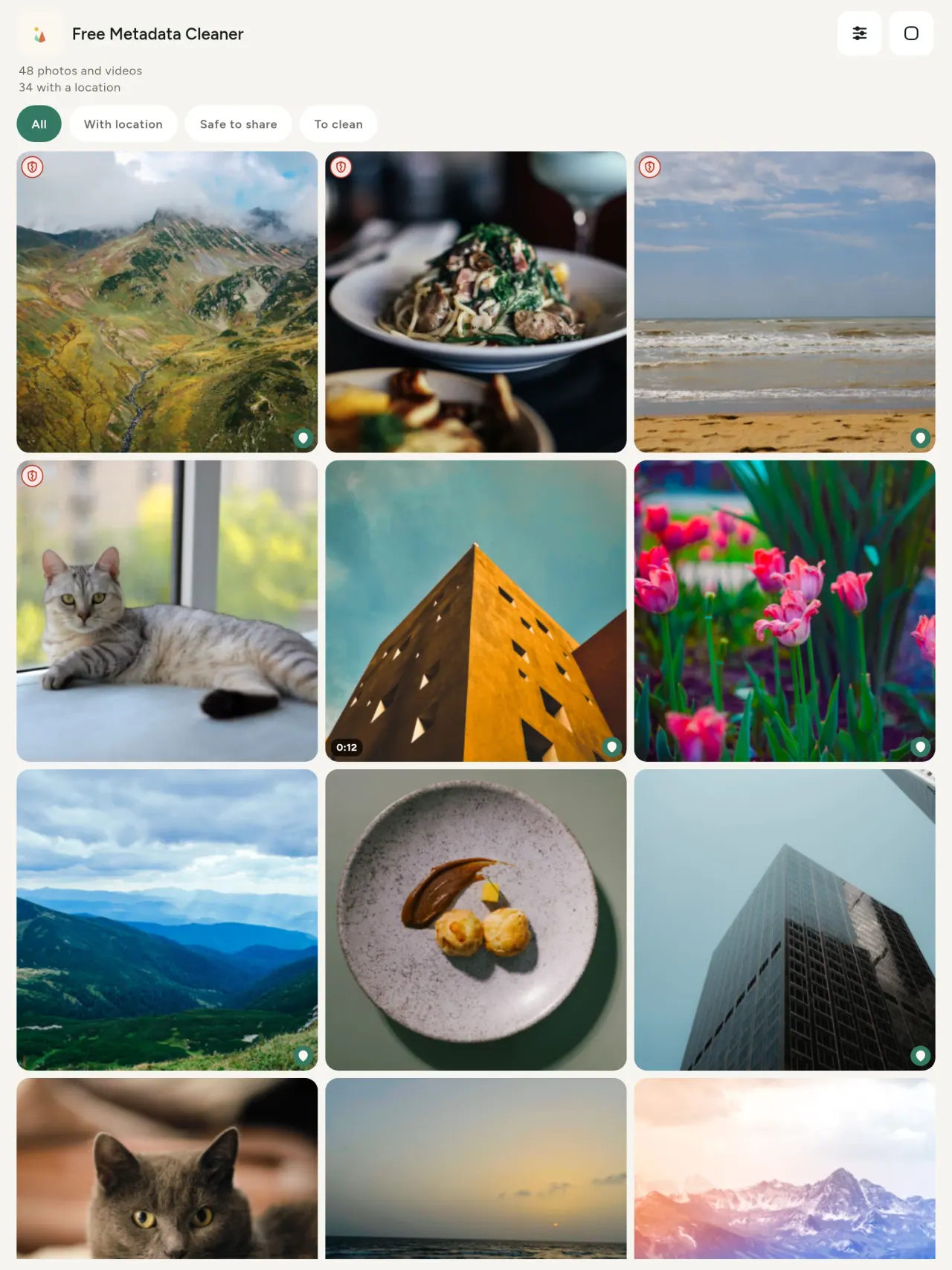
Mae tarian werdd yn nodi ffeiliau heb metadata; tarian goch hollt y rhai sydd â rhywfaint ar ôl.
Dim colli ansawdd
Nid yw lluniau'n cael eu hail-amgodio.
Preifatrwydd yn ôl dyluniad
Darllenir, golygir a glanheir eich lluniau ar eich dyfais. Dim cyfrif, hysbysebion na dadansoddeg. Yr unig eithriad dewisol yw'r map: ar ôl eich cadarnhad, daw o OpenStreetMap; ni anfonir y llun.
Am ddim, dim hysbysebion
Gallwch adael tip dewisol os yw'r ap yn eich helpu.
Ar gyfer pwy mae'n
- Unrhyw un sydd eisiau gwybod beth mae llun yn ei ddatgelu (lleoliad GPS, dyddiad, camera) cyn postio, gwerthu neu anfon.
- Pobl sy'n gwerthu ar safleoedd clasur ac nad ydynt eisiau dangos ble maent yn byw.
- Rhieni ac unrhyw un sy'n dymuno cadw lle sensitif (cartref, ysgol, gweithle) allan o'r lluniau maent yn eu rhannu.
- Newyddiadurwyr, gweithredwyr a phobl mewn perygl, sydd angen rhannu delwedd heb adael ôl.
- Pobl sy'n blino ar ollwng data ac eisiau adennill rheolaeth dros y wybodaeth bersonol sydd gan eu lluniau eu hunain.
Pam dewis Metadata Cleaner
- Tri pheth mewn un ap: darllen beth mae llun neu fideo yn ei ddatgelu, ei olygu (dyddiad tynnu, lleoliad), a chael gwared â'r metadata mewn ychydig o dapiau.
- Mae popeth yn rhedeg ar y ffôn. Nid yw eich lluniau'n cael eu hanfon unlle.
- Lluniau (JPEG, HEIC, PNG, WebP, GIF) a fideos (MP4, MOV, 3GP).
Beth nad yw'r ap yn ei wneud eto
- Dim ond y fformatau uchod sy'n cael eu cefnogi. Mwy o fformatau yn y cynllun.
Egwyddor Pixeon. Mae apiau Pixeon yn lleol yn gyntaf: dim cyfrif, dim olrhain, a bydd eich data yn aros ar eich ffôn. Os bydd ap erioed yn cysylltu â'r rhwydwaith, dim ond pan ddewiswch droi nodwedd ymlaen y mae ei angen arnoch, ac mae'r polisi preifatrwydd yn cael ei ddiweddaru cyn ei ryddhau.
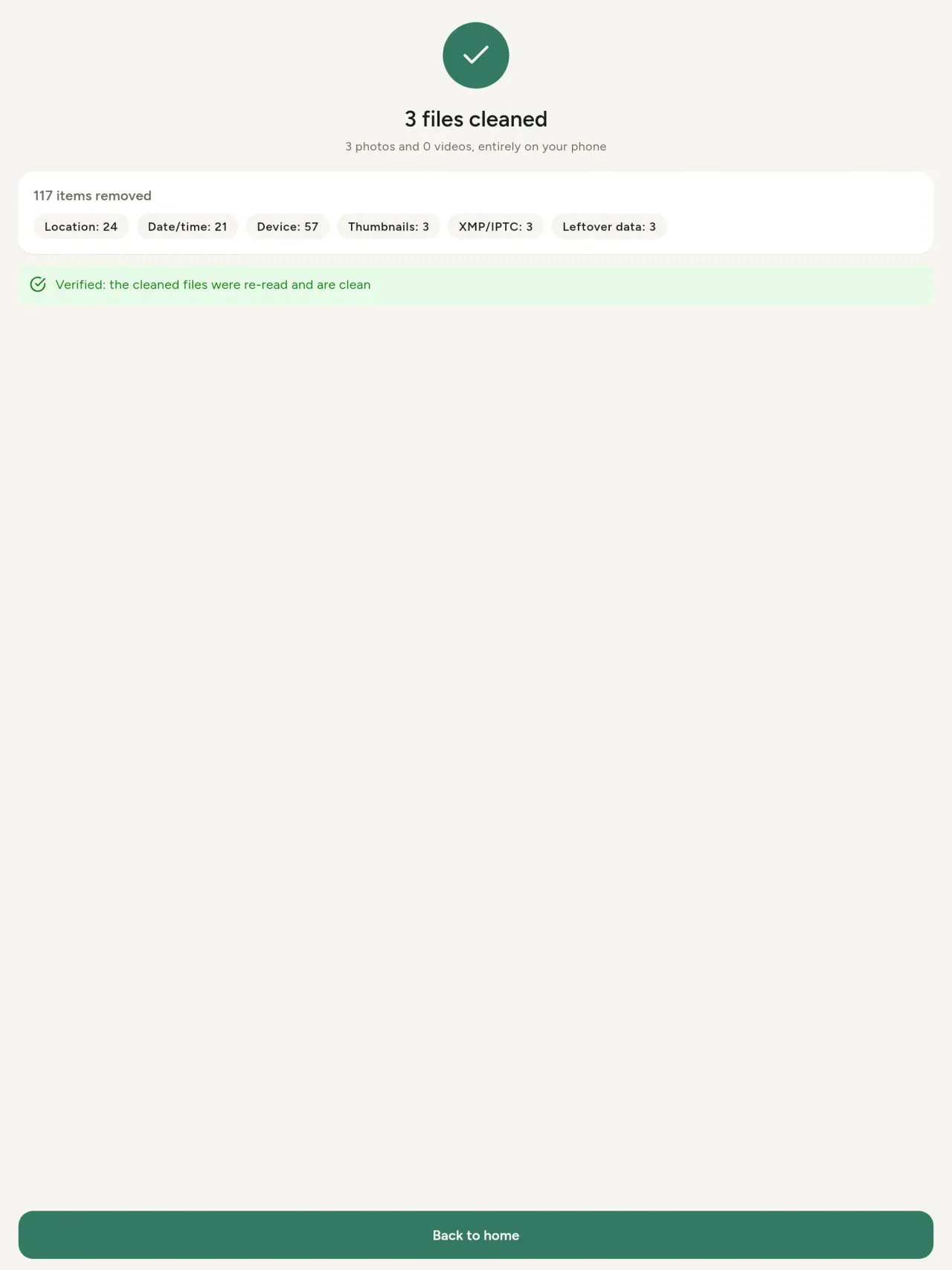
Gweld Metadata Cleaner ar waith.
Cael Metadata Cleaner.
Am ddim ar iPhone ac Android.
Fersiwn 1.1
- App Store Ar ddod
- Google Play Ar ddod
Beth sy'n newydd
Mae'r testun hwn yn Saesneg.
- Read: see exactly what a photo or video reveals (location, date, camera, AI provenance labels such as C2PA and generation parameters, video duration, codecs, resolution and frame rate).
- Edit: change the date a photo was taken and its location (JPEG, HEIC, AVIF), even on a photo with no metadata, reuse the location of another photo, or pick it on an OpenStreetMap map after your confirmation.
- Remove: clean metadata in a few taps, with a before and after view on the result screen.
- DNG photos are supported.
- Translations aligned across 91 languages.
Privacy policy
Mae'r testun isod yn Saesneg. Y fersiwn Saesneg sy'n drech.
Last updated: 2026-11-03 · applies to version 1.1 and later
Policy versions: 1.1 and later (this text) · version 1.0 (still the policy of the app version 1.0). The version number of your app is shown at the bottom of its Settings screen.
Free Metadata Cleaner shows and removes the metadata hidden in your photos and videos (location, date and time, camera and lens details, thumbnails…). The short version: everything happens on your device, and we collect nothing.
What the app accesses
Your photo and video library, only after you grant permission (and, where your system requires it, the permission to read the location stored in your photos, so that it can be shown to you). The files you choose are read and cleaned on your device; the cleaned copy is saved to your library. If you choose to replace the originals, the system asks you to confirm before deleting them.
To show which photos are already clean, the app reads the metadata of the photos displayed on screen, on your device. This result is kept in memory only and is never stored.
What we collect
Nothing. No account, no analytics or usage tracking, no advertising or advertising identifiers, no crash or diagnostics reporting beyond what the app stores provide, and no third-party SDK that sends data anywhere. There is no Free Metadata Cleaner server. Cleaning a photo or video never uses the network, at all: turn on airplane mode and clean one to check for yourself. The only network request the app itself can ever make is described under “Location” below, and it only ever happens if you ask for it. The one other connection is the optional tip purchase, handled by the store (see “Optional support”).
Temporary files and history
The app keeps no history and no database. Temporary files created while cleaning are deleted after each item and purged when the app starts.
Deleted originals
Originals that are deleted remain in your system's trash (such as “Recently Deleted” or the trash) for about 30 days, with their metadata. The app cannot empty it: do it yourself if you need the originals gone at once.
iCloud and cloud photos
If a photo is stored in iCloud and not on your device, the operating system may download it before the app can process it. That transfer is made by the system, under the provider's own terms, not by the app.
Location
When a photo contains a location, the app shows the coordinates as text, which stays on your device. Three actions can send location information off your device, only when you choose them, each time: “Open in…” hands the coordinates to the maps application you select, under its own privacy policy; “Show the map” asks you to confirm first (“Showing the map sends this photo's position to a map service. Nothing else is sent.”), then loads a small map from OpenStreetMap for that one position; and, when you edit a photo's place, “Choose on the map” asks you to confirm first, then opens a full-screen map from OpenStreetMap. This map does not use your phone's location. As you move and zoom it, the app requests the map tiles of the area you are browsing, so OpenStreetMap receives the position of the area shown on screen, which starts on the photo's current place if it has one, and otherwise on a world view. The photo itself is never sent, and nothing is sent before you confirm. The place you choose on the map (or copy from another photo) is written into the photo's file only when you save, on your device. In every case OpenStreetMap receives, as with any web request, technical details like your IP address; it does not receive your name, an account, or anything else about you or your other photos. See OpenStreetMap's own privacy policy. Outside of these explicit actions, the app never sends a photo's location, or anything else, anywhere.
Optional support
The app is free. If you wish, you can leave a tip. On iPhone and in the Google Play version for Android, tips are in-app purchases processed by Apple or Google under their own terms and privacy policy; the app adds the Google Play billing permission for this, makes no network call itself, and receives no payment or personal details. Versions installed outside Google Play may instead open an external donation page in your browser, operated by a third party under its own privacy policy; nothing from the app is sent to it. A tip unlocks nothing.
Contact form on this website
If you write to us through this site, we use your message and the email address you optionally give only to reply. Bot protection is provided by Cloudflare and email delivery by Resend.
Language choice on this website
When you choose a language, or when this site opens a page in your browser's language, it stores
one small functional cookie (pxl, a language code, one year) so that your choice is
remembered. If this site suggests a page in your browser's language and you close that suggestion,
your browser also keeps a local note (pxl-banner-off, in local storage, 30 days) so the
suggestion does not come back. Neither identifies anyone, neither is used for tracking or advertising,
and neither is shared. You can delete them in your browser at any time.
Website statistics
This website uses Cloudflare Web Analytics to count visits (pages viewed, country, browser type, loading speed). It sets no cookie, does not use local storage, does not fingerprint your device, does not follow you across sites and does not build a profile of you. Search engines (for example Google Search Console) give us aggregated search statistics, without any data about individual visitors. Our own web server also counts the pages it serves: for each page it keeps the page address, the site or social network that sent you (only its name, or the campaign tag written in the link), the country, the type of device and whether the request came from a robot. It keeps no IP address, no identifier and no cookie, and these counts are anonymous. We use no advertising or other analytics service. None of this concerns the app itself, which collects nothing.
Children
The app is a general-purpose tool and is not directed at children.
Changes
An updated policy will be published at this URL with a new date above.
Contact
Questions about privacy: metadata-cleaner-contact@pixeon.net
Fersiwn 1.0
- App Store Cyhoeddwyd
- Google Play Cyhoeddwyd
Beth sy'n newydd
Mae'r testun hwn yn Saesneg.
- Cleans JPEG, HEIC, PNG, WebP, GIF, MP4, MOV and 3GP files, with no video re-encoding.
- "Safe to share" and "To clean" filters.
- New green design.
- Help screen with a FAQ.
- Settings: share, rate, feedback, unsupported formats.
- Optional tips.
Privacy policy, version 1.0
Mae'r testun isod yn Saesneg. Y fersiwn Saesneg sy'n drech.
Applies to version 1.0 of the app (the first release). Later versions: current policy.
Free Metadata Cleaner shows and removes the metadata hidden in your photos and videos (location, date and time, camera and lens details, thumbnails…). The short version: everything happens on your device, and we collect nothing.
What the app accesses
Your photo and video library, only after you grant permission (and, where your system requires it, the permission to read the location stored in your photos, so that it can be shown to you). The files you choose are read and cleaned on your device; the cleaned copy is saved to your library. If you choose to replace the originals, the system asks you to confirm before deleting them.
To show which photos are already clean, the app reads the metadata of the photos displayed on screen, on your device. This result is kept in memory only and is never stored.
What we collect
Nothing. No account, no analytics or usage tracking, no advertising or advertising identifiers, no crash or diagnostics reporting beyond what the app stores provide, and no third-party SDK that sends data anywhere. There is no Free Metadata Cleaner server. Cleaning a photo or video never uses the network, at all: turn on airplane mode and clean one to check for yourself. The only network request the app itself can ever make is described under “Location” below, and it only ever happens if you ask for it. The one other connection is the optional tip purchase, handled by the store (see “Optional support”).
Temporary files and history
The app keeps no history and no database. Temporary files created while cleaning are deleted after each item and purged when the app starts.
Deleted originals
Originals that are deleted remain in your system's trash (such as “Recently Deleted” or the trash) for about 30 days, with their metadata. The app cannot empty it: do it yourself if you need the originals gone at once.
iCloud and cloud photos
If a photo is stored in iCloud and not on your device, the operating system may download it before the app can process it. That transfer is made by the system, under the provider's own terms, not by the app.
Location
When a photo contains a location, the app shows the coordinates as text, which stays on your device. Two actions send that one photo's position off your device, only when you choose them, each time: “Open in…” hands the coordinates to the maps application you select, under its own privacy policy; “Show the map” asks you to confirm first (“Showing the map sends this photo's position to a map service. Nothing else is sent.”), then loads a small map from OpenStreetMap for that one position. OpenStreetMap receives the coordinates and, as with any web request, technical details like your IP address; it does not receive your name, an account, or anything else about you or your other photos. See OpenStreetMap's own privacy policy. Outside of these two explicit actions, the app never sends a photo's location, or anything else, anywhere.
Optional support
The app is free. If you wish, you can leave a tip. On iPhone and in the Google Play version for Android, tips are in-app purchases processed by Apple or Google under their own terms and privacy policy; the app adds the Google Play billing permission for this, makes no network call itself, and receives no payment or personal details. Versions installed outside Google Play may instead open an external donation page in your browser, operated by a third party under its own privacy policy; nothing from the app is sent to it. A tip unlocks nothing.
Contact form on this website
If you write to us through this site, we use your message and the email address you optionally give only to reply. Bot protection is provided by Cloudflare and email delivery by Resend.
Language choice on this website
When you choose a language, or when this site opens a page in your browser's language, it stores
one small functional cookie (pxl, a language code, one year) so that your choice is
remembered. If this site suggests a page in your browser's language and you close that suggestion,
your browser also keeps a local note (pxl-banner-off, in local storage, 30 days) so the
suggestion does not come back. Neither identifies anyone, neither is used for tracking or advertising,
and neither is shared. You can delete them in your browser at any time.
Website statistics
This website uses Cloudflare Web Analytics to count visits (pages viewed, country, browser type, loading speed). It sets no cookie, does not use local storage, does not fingerprint your device, does not follow you across sites and does not build a profile of you. Search engines (for example Google Search Console) give us aggregated search statistics, without any data about individual visitors. Our own web server also counts the pages it serves: for each page it keeps the page address, the site or social network that sent you (only its name, or the campaign tag written in the link), the country, the type of device and whether the request came from a robot. It keeps no IP address, no identifier and no cookie, and these counts are anonymous. We use no advertising or other analytics service. None of this concerns the app itself, which collects nothing.
Children
The app is a general-purpose tool and is not directed at children.
Changes
An updated policy will be published at this URL with a new date above.
Contact
Questions about privacy: metadata-cleaner-contact@pixeon.net
Cefnogaeth
Diweddarwyd ddiwethaf: 2026-10-08
Mae Free Metadata Cleaner yn ap bach annibynnol. Ceir atebion i'r cwestiynau mwyaf cyffredin isod.
Rydym yn gwneud ein gorau i ymateb o fewn ychydig ddyddiau. I'n helpu, dywedwch wrthym fodel eich dyfais, ei fersiwn system a'r hyn yr oeddech yn ei wneud. Peidiwch â anfon lluniau preifat.
Pa ddata mae'r ap yn ei storio neu ei anfon?
Dim. Nid yw'n cadw hanes, nid oes ganddo gyfrif na gweinydd. Manylion yn y bolisi preifatrwydd.
Sut ydw i'n glanhau llun?
- Agorwch yr ap a chaniatáu mynediad i'ch llyfrgell pan ofynnir.
- Dewiswch y lluniau neu'r fideos i'w glanhau.
- Dewiswch beth i'w dynnu, a ph'un ai i ddisodli'r gwreiddiau neu greu copi glân.
- Cadarnhewch. Mae crynodeb yn dangos beth gafodd ei dynnu ac unrhyw ffeil na ellid ei phrosesu.
Ble mae'r copïau glân yn mynd?
I'ch llyfrgell luniau. Cedwir dyddiad llyfrgell y gwreiddiol, felly nid yw llun glân yn neidio i frig eich oriel.
Dewais “replace originals” ond mae'r gwreiddiau dal yn bodoli.
Mae gwreiddiau a ddilëwyd yn aros yn sbwriel y system (fel “Recently Deleted” neu'r sbwriel) am tua 30 diwrnod, gyda'u metadata. Gwagwch y sbwriel i'w tynnu ar unwaith. Os ydych yn gwrthod y neges dileu gan y system, cedwir y gwreiddiau ac ychwanegir y copïau glân o hyd.
Pa ffeiliau sy'n cael eu cefnogi?
Lluniau yn JPEG, HEIC, AVIF, PNG, WebP a GIF, a fideos yn MP4, MOV a 3GP (mae rhagor o fformatau'n cael eu hychwanegu). Mae ffeil na all yr ap ei glanhau yn cael ei gadael heb ei chyffwrdd ac wedi'i rhestru yn y crynodeb gyda'r rheswm, heb atal gweddill y swp.
Pam mae angen mynediad gan yr ap i'm lluniau?
I restru'r lluniau y gallwch eu dewis ac i gadw'r copïau glân. Lle bo eich system yn ei gwneud yn ofynnol, mae'r ap hefyd yn gofyn am ganiatâd i ddarllen y lleoliad sydd wedi'i storio mewn lluniau: heb hyn mae'r system yn cuddio'r lleoliad, felly ni allai'r ap ddangos beth mae llun yn ei ddatgelu. Nid oes dim yn cael ei uwchlwytho.
Sut alla i wirio nad oes dim yn gadael fy ffôn?
Trowch y modd awyren ymlaen a glanhau llun: mae'n gweithio yr un fath. Yr unig eithriad yw'r map: os byddwch yn tapio “Show the map” ar leoliad llun ac yn cadarnhau, anfonir y safle hwnnw yn unig at OpenStreetMap i ddangos map, a dim byd arall. Gweler “Location” uchod.
Pa ieithoedd sydd ar gael?
Mae'r ap ar gael yn Saesneg, Ffrangeg, Almaeneg, Sbaeneg, Eidaleg, Portiwgaleg ac Arabeg. Mae'r wefan hon ar gael mewn mwy o ieithoedd, ac mae rhagor o ieithoedd ap ar y ffordd.
Cefnogi'r prosiect
Mae Metadata Cleaner yn parhau'n rhad ac yn rhydd o hysbysebion. Os yw'n ddefnyddiol i chi, gallwch gefnogi ei ddatblygiad (dewisol):
Buy Me a CoffeeExpense tracker and family budget planner. Free phone sync, no account.
Hefyd gan PixeonVaultMarkEncrypted document vault. Watermark documents, remove metadata before sharing.
Hefyd gan PixeonLittle RelayBreastfeeding, sleep and starting solids tracker. No account, works offline.
Hefyd gan PixeonMenuloopPlan the week's meals, build your grocery list and keep recipes with photos.