
Metadata Cleaner: Foto/Video
EXIF viewer: Foto-Metadaten lesen, ändern und löschen.


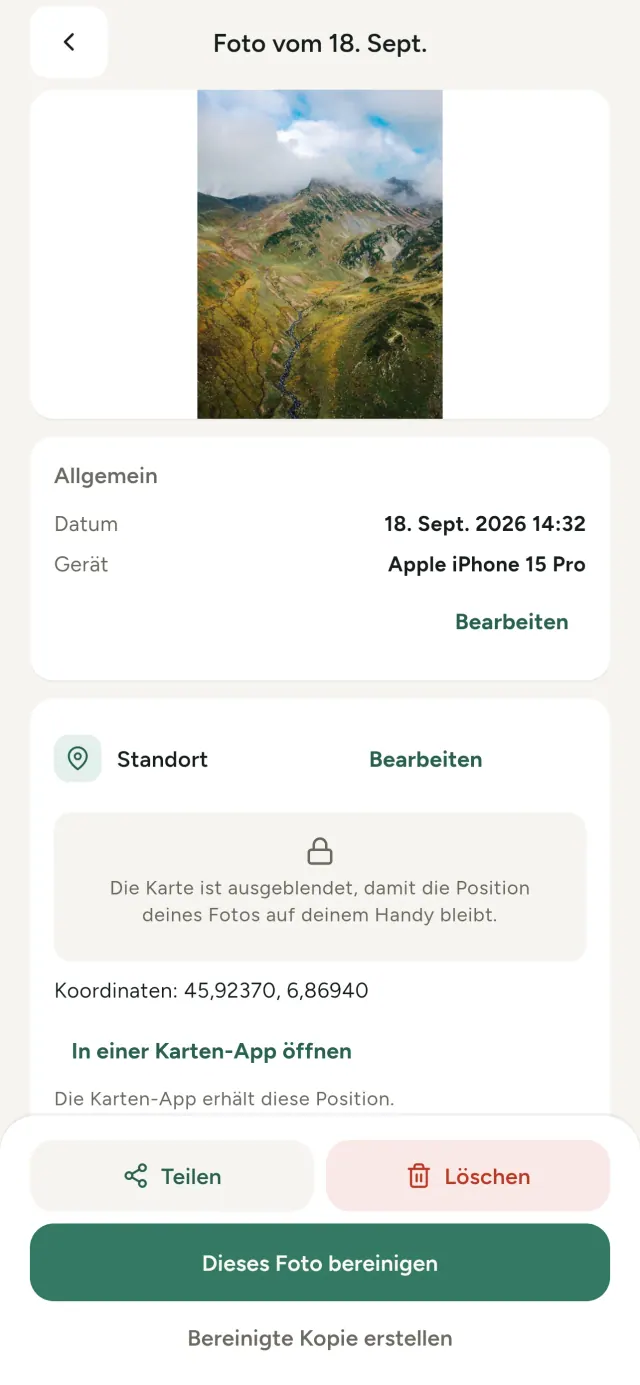
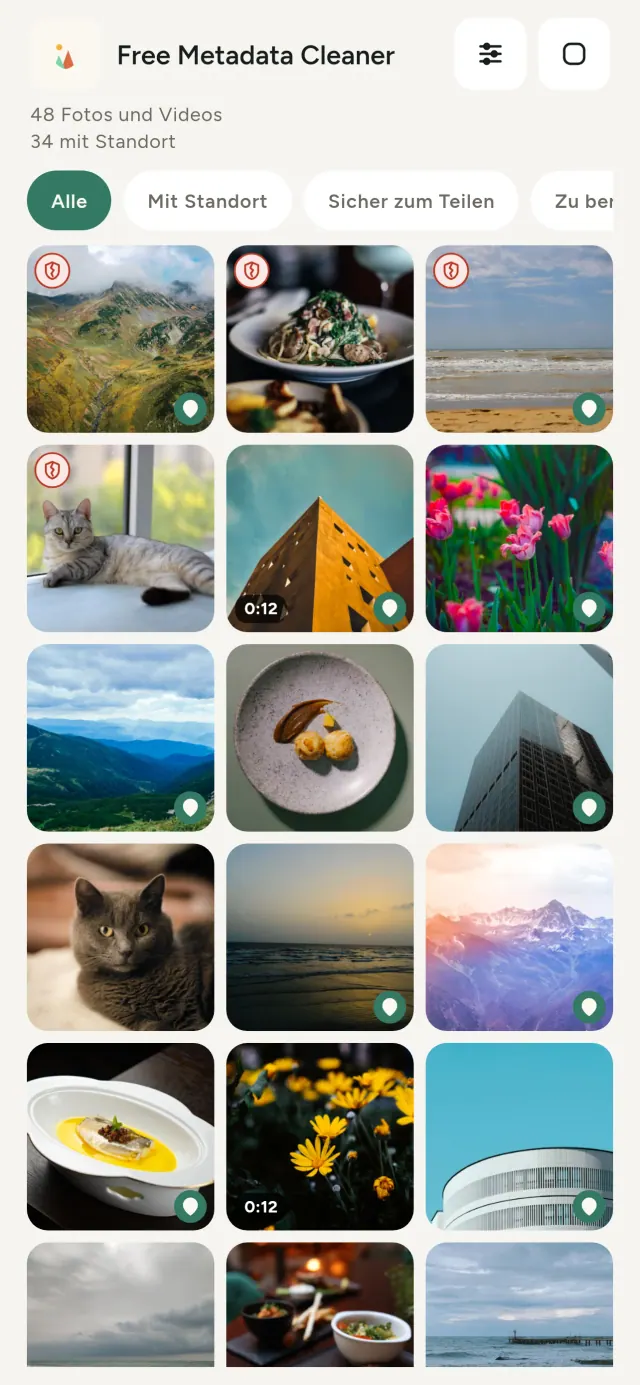
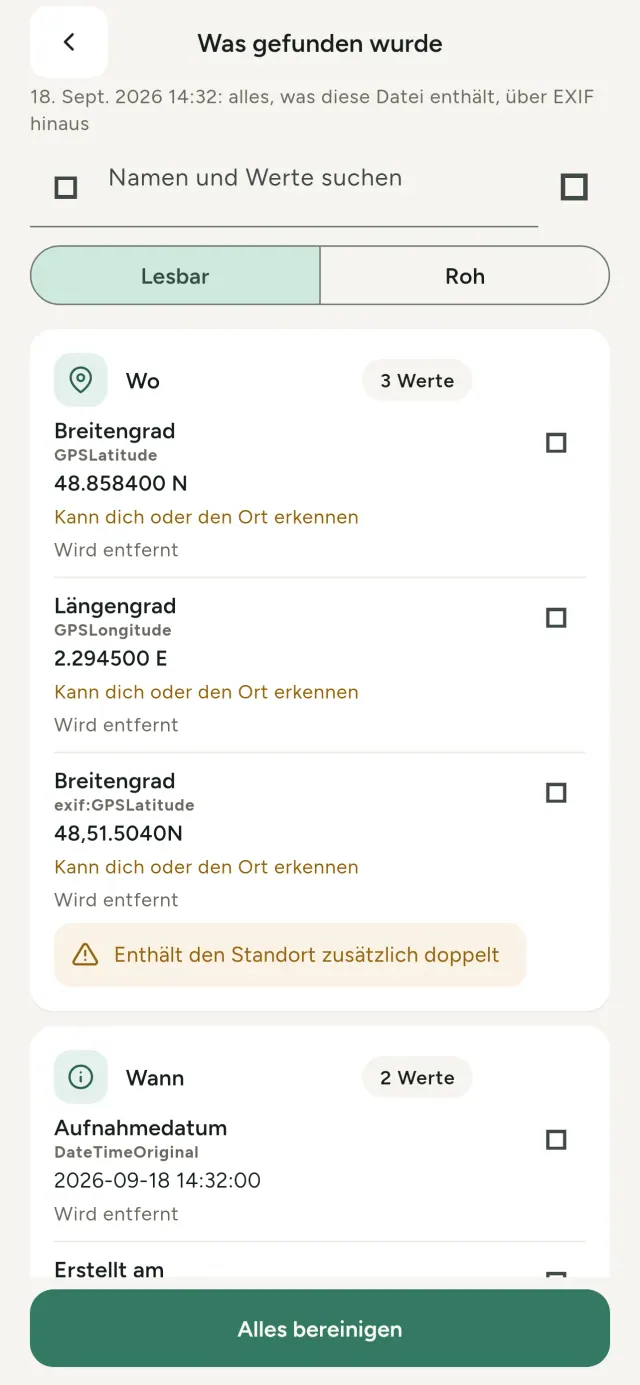
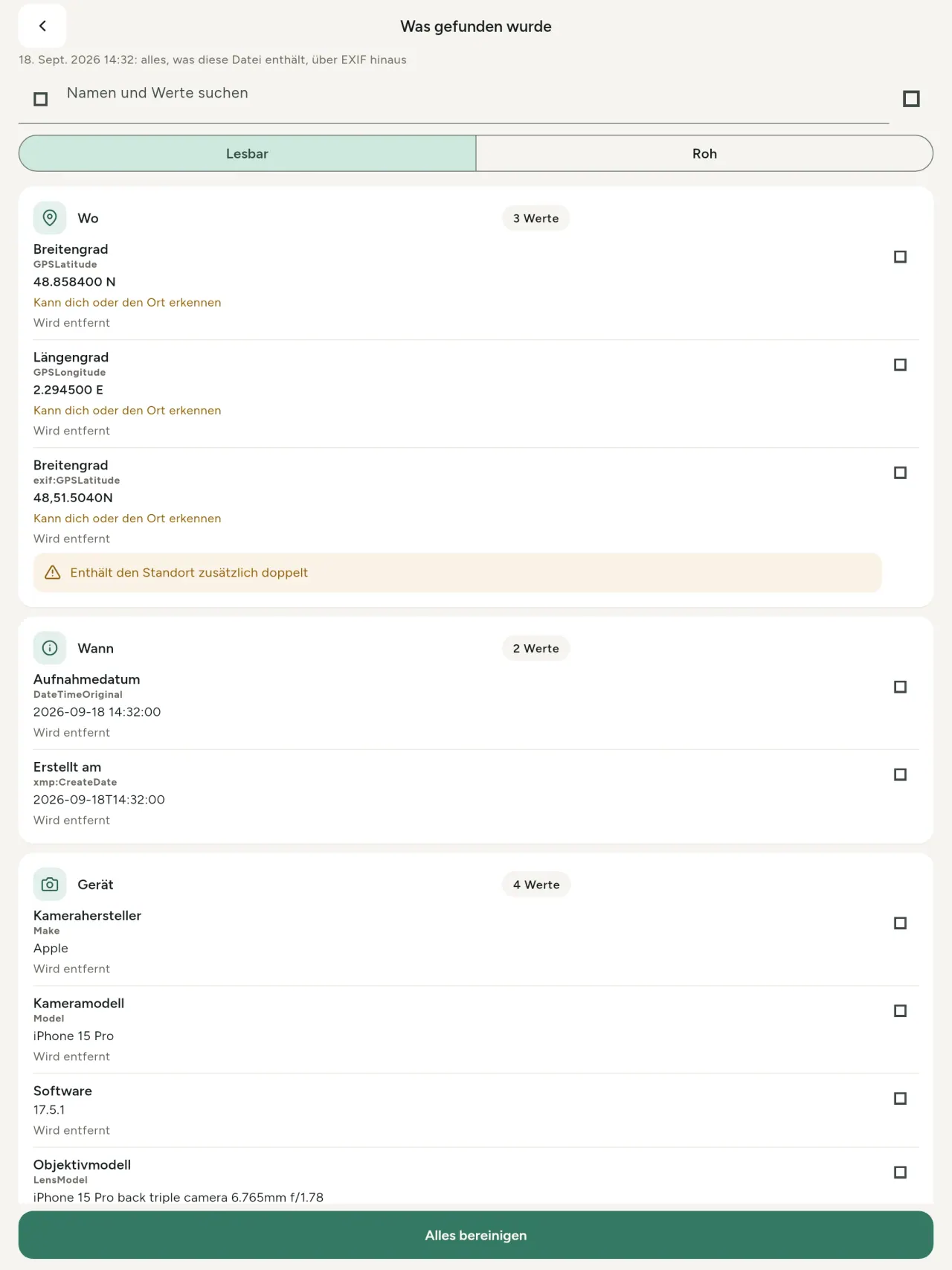
Jedes Foto enthält verborgene Informationen: Ort, Zeitpunkt, Handy und manchmal eine kleine Vorschau des Originalbilds. Beim Teilen gehen sie mit.
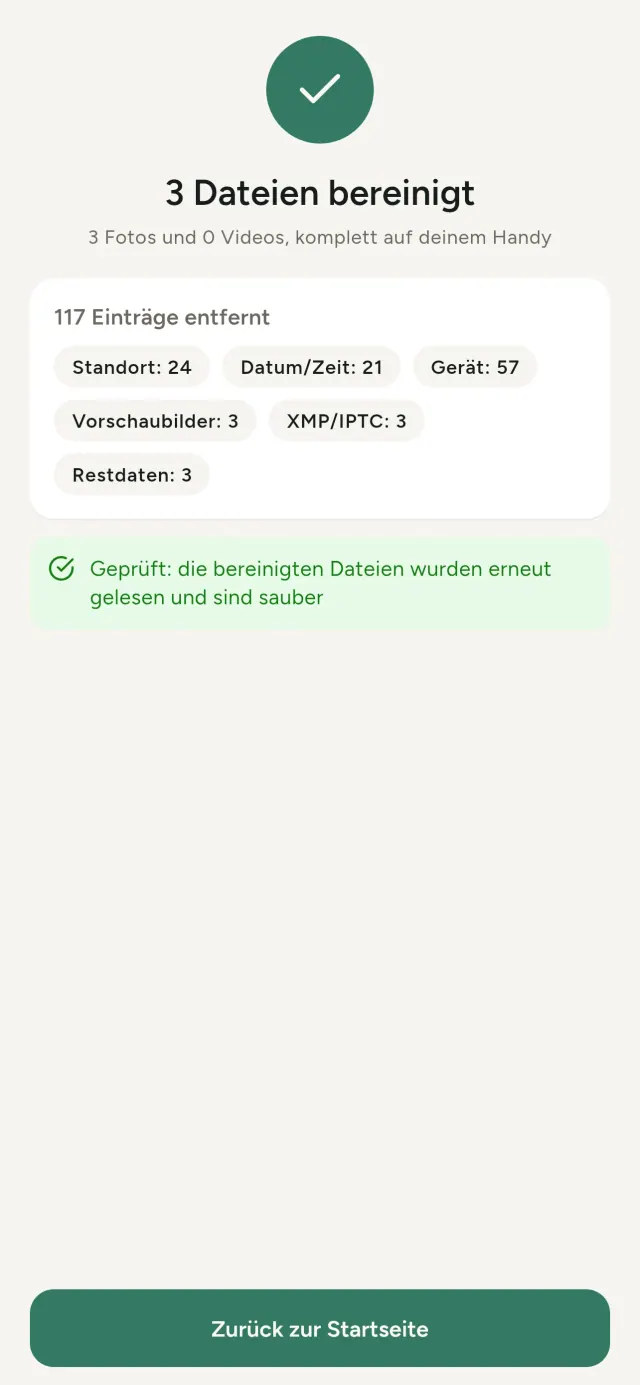
Metadata Cleaner zeigt, was deine Fotos und Videos enthalten, korrigiert es und entfernt es direkt auf deinem Handy.
Was Metadata Cleaner kann
Lesen
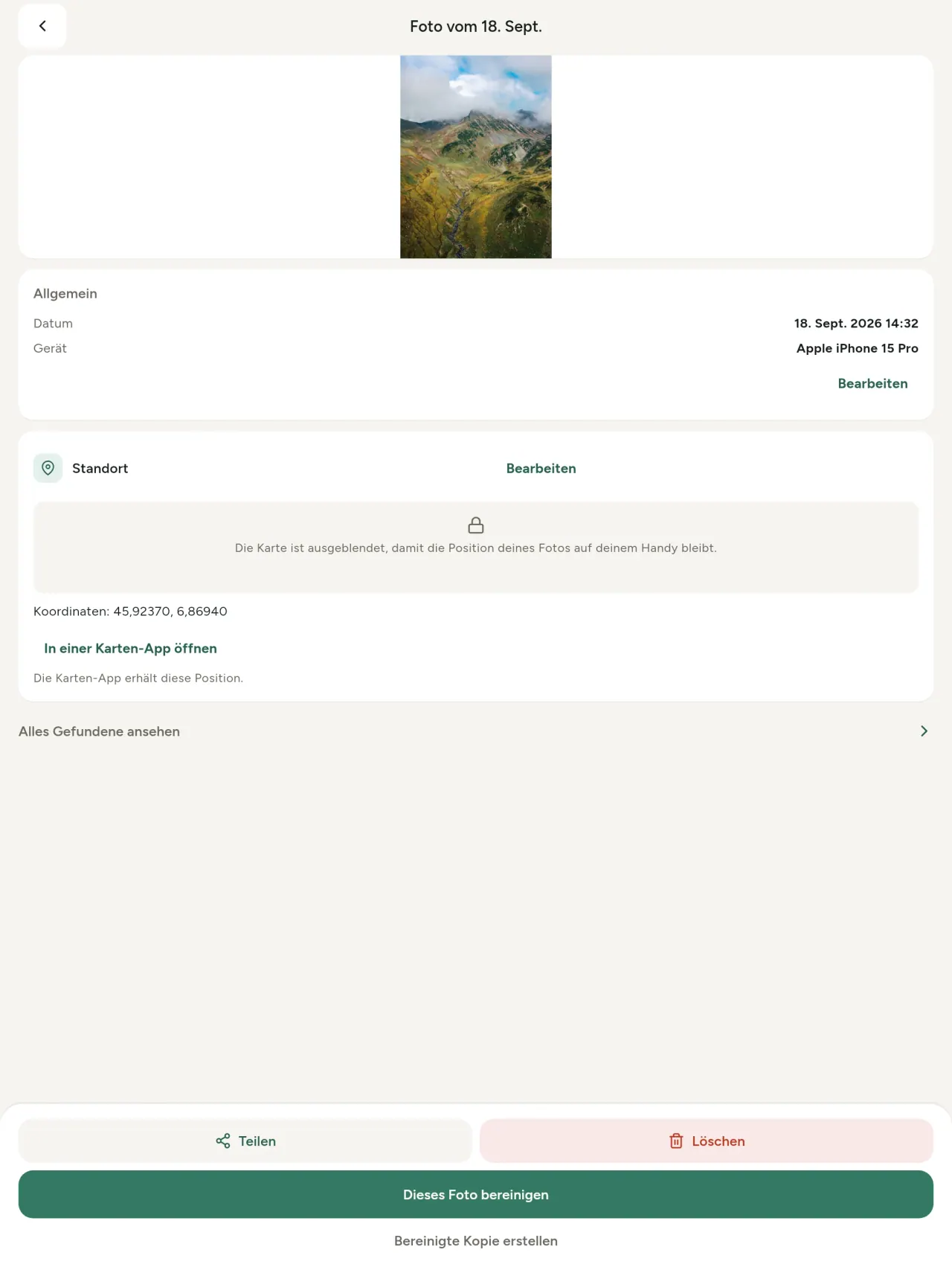
Ein echter Viewer für Foto-Metadaten: Jeder gefundene Wert (EXIF, IPTC, XMP, Video-Codecs, Dauer und Auflösung) ist gruppiert, durchsuchbar und kopierbar. Der Standort ist leicht zu erkennen, Entferntes wird markiert. KI-Herkunft (C2PA, Generierungsparameter) wird ebenfalls erkannt.
Bearbeiten
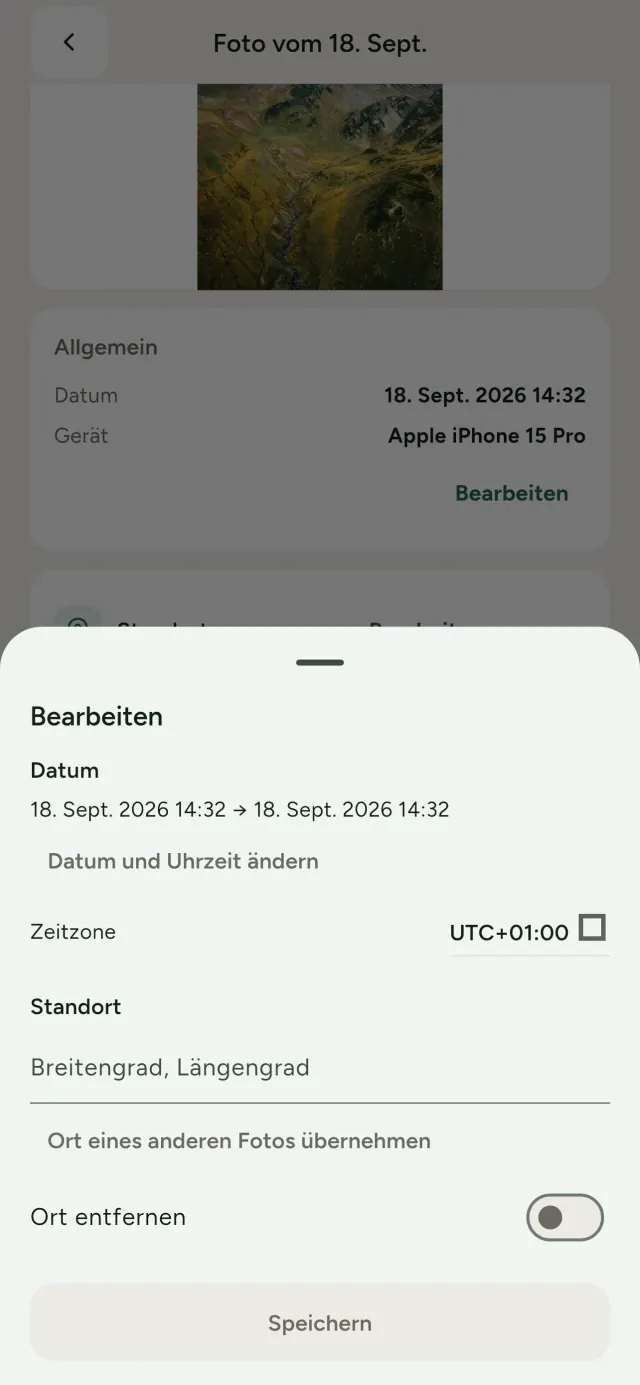
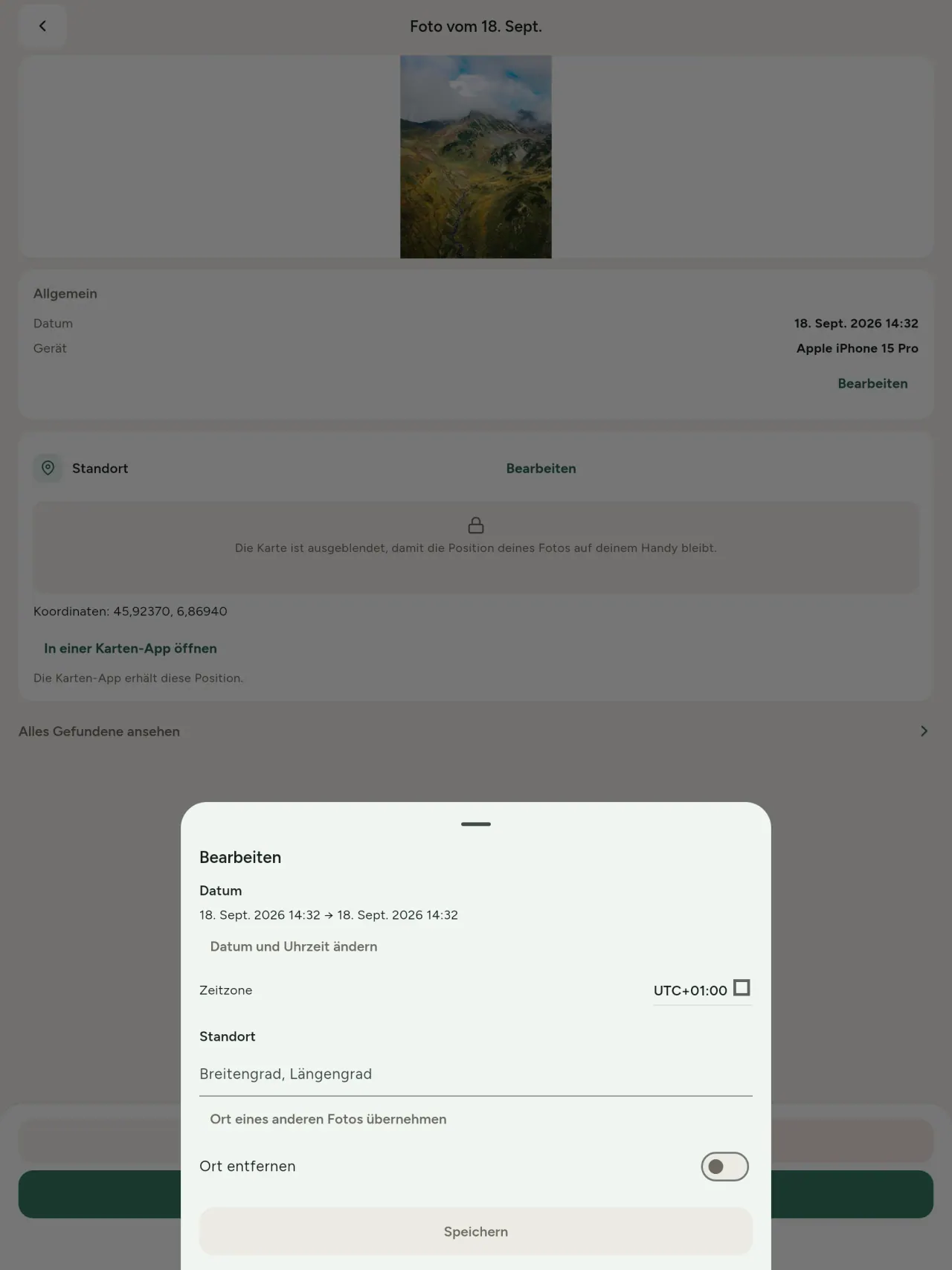
Ändere Datum und Ort, auch bei Fotos ohne Metadaten. Übernimm den Standort eines anderen Fotos oder wähle ihn auf der Karte, nachdem wir jedes Mal vorher fragen. Vergleiche vorher und nachher.
Entfernen
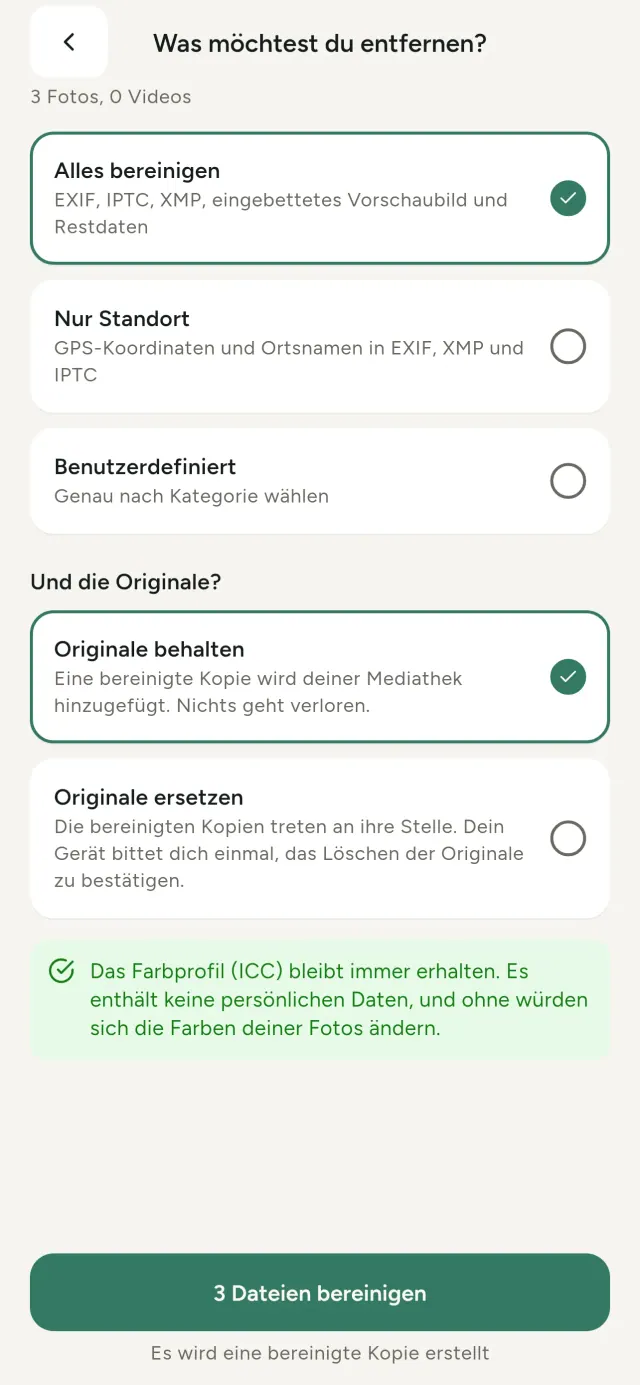
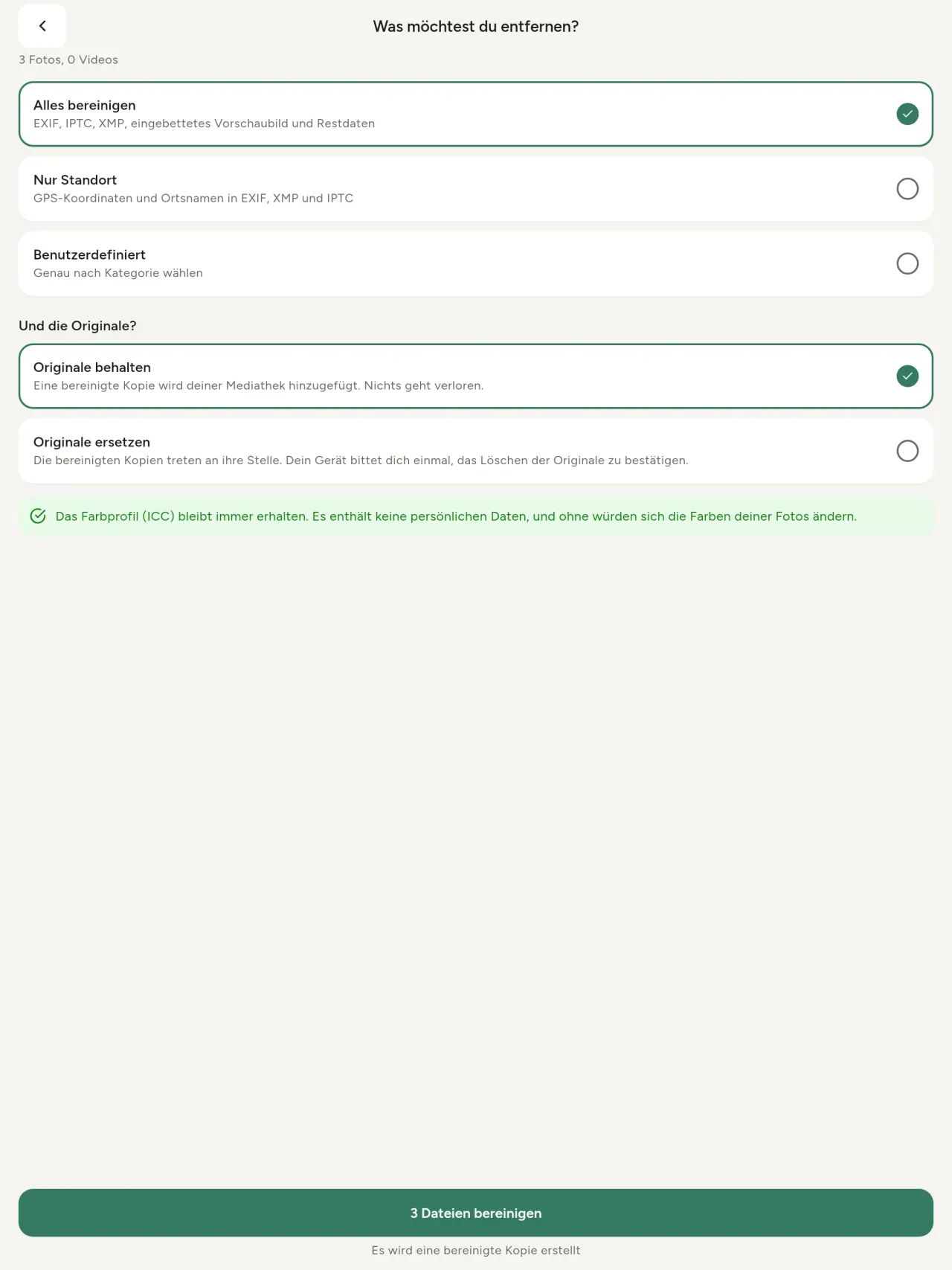
Alles, nur den Standort oder gewählte Kategorien: EXIF-, IPTC- und XMP-Daten, Vorschaubilder, Herstellernotizen, KI-Herkunft und Restbytes hinter zugeschnittenen Bildern. Bereinige eine ganze Auswahl und behalte oder ersetze die Originale.
Sicher auf einen Blick
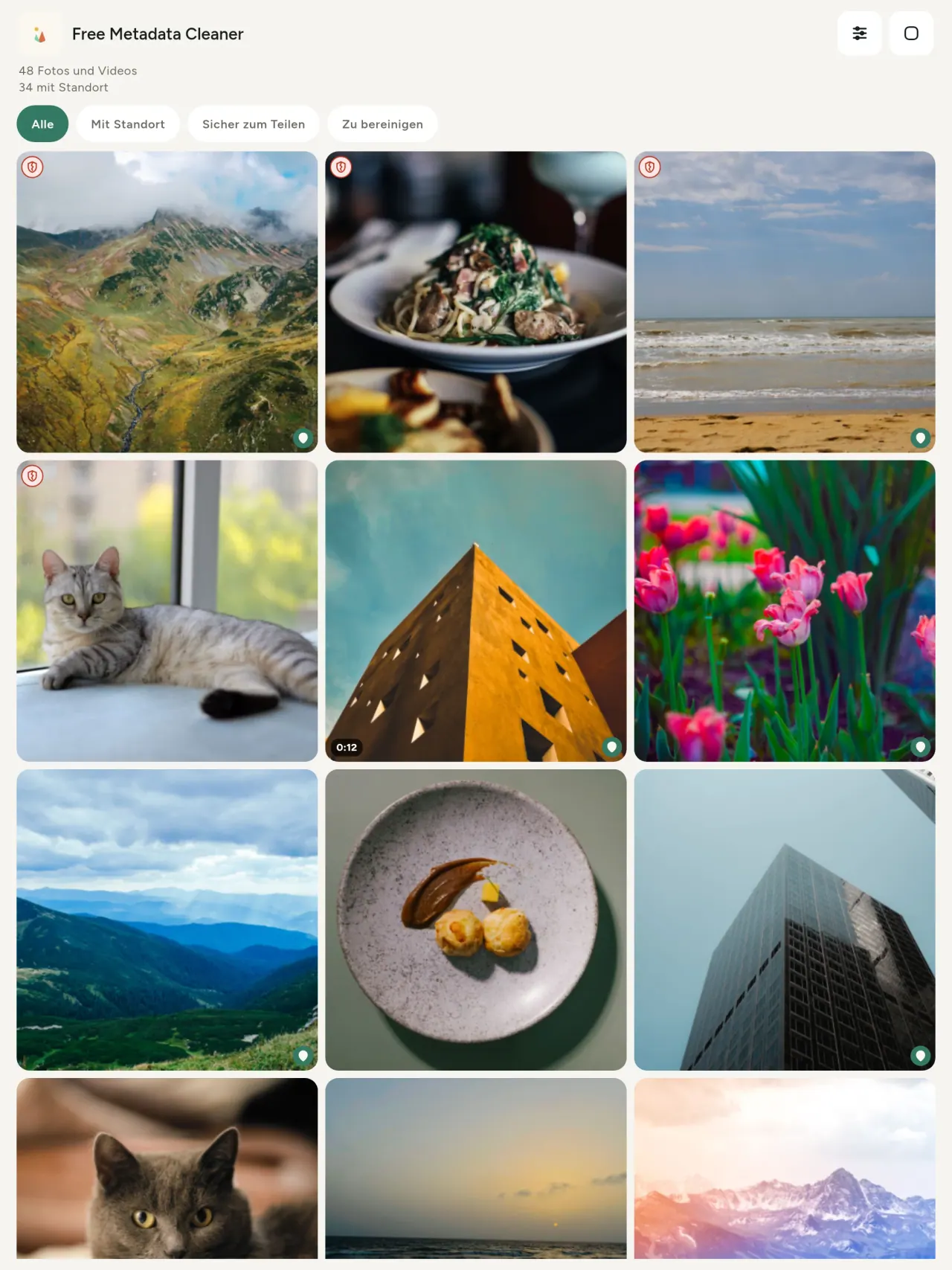
Ein grünes Schild markiert Dateien ohne Metadaten, ein rotes, gesprungenes Schild Dateien mit verbleibenden Daten.
Kein Qualitätsverlust
Bilder werden nie neu kodiert.
Privat von Grund auf
Alles geschieht auf deinem Gerät: kein Konto, keine Werbung, keine Analyse. Nur die optionale Karte lädt nach deiner Zustimmung Daten von OpenStreetMap; das Foto wird nie gesendet.
Kostenlos, ohne Werbung
Wenn dir die App hilft, kannst du freiwillig Trinkgeld geben.
Für wen
- Alle, die wissen wollen, was ein Foto verrät (GPS-Standort, Datum, Kamera), bevor sie es posten, verkaufen oder senden.
- Menschen, die auf Kleinanzeigenplattformen verkaufen und nicht zeigen wollen, wo sie wohnen.
- Eltern und alle, die sensible Orte (Zuhause, Schule, Arbeitsplatz) aus geteilten Fotos heraushalten wollen.
- Journalisten, Aktivisten und gefährdete Personen, die ein Bild ohne Spuren teilen müssen.
- Menschen, die Datenlecks satt haben und die Kontrolle über die in ihren Fotos steckenden persönlichen Informationen zurückhaben wollen.
Warum Metadata Cleaner wählen
- Drei Funktionen in einer App: Erfahren Sie, was ein Foto oder Video verrät, bearbeiten Sie es (Aufnahmedatum, Standort) und entfernen Sie die Metadaten mit nur wenigen Fingertipps.
- Alles läuft auf dem Telefon. Deine Fotos werden nirgendwohin gesendet.
- Fotos (JPEG, HEIC, PNG, WebP, GIF) und Videos (MP4, MOV, 3GP).
Was es noch nicht kann
- Nur die oben genannten Formate werden unterstützt. Weitere Formate sind geplant.
Pixeon-Prinzip. Pixeon-Apps sind Local-First: kein Konto, kein Tracking, und deine Daten bleiben auf deinem Telefon. Wenn eine App sich mit dem Netz verbindet, dann nur, wenn du eine Funktion bewusst einschaltest, die du brauchst, und die Datenschutzerklärung wird aktualisiert, bevor sie ausgeliefert wird.
Metadata Cleaner in Aktion.
Metadata Cleaner laden.
Kostenlos für iPhone und Android.
SHA-256: A4:38:C9:B4:A9:3F:97:7B:E8:98:AD:B7:3B:30:5F:63:01:22:E0:D9:F8:CF:5D:2B:D7:4E:38:CB:9A:CF:5A:A2
Version 1.1
- App Store Demnächst
- Google Play Demnächst
Neuigkeiten
Dieser Text ist auf Englisch.
- Read: see exactly what a photo or video reveals (location, date, camera, AI provenance labels such as C2PA and generation parameters, video duration, codecs, resolution and frame rate).
- Edit: change the date a photo was taken and its location (JPEG, HEIC, AVIF), even on a photo with no metadata, reuse the location of another photo, or pick it on an OpenStreetMap map after your confirmation.
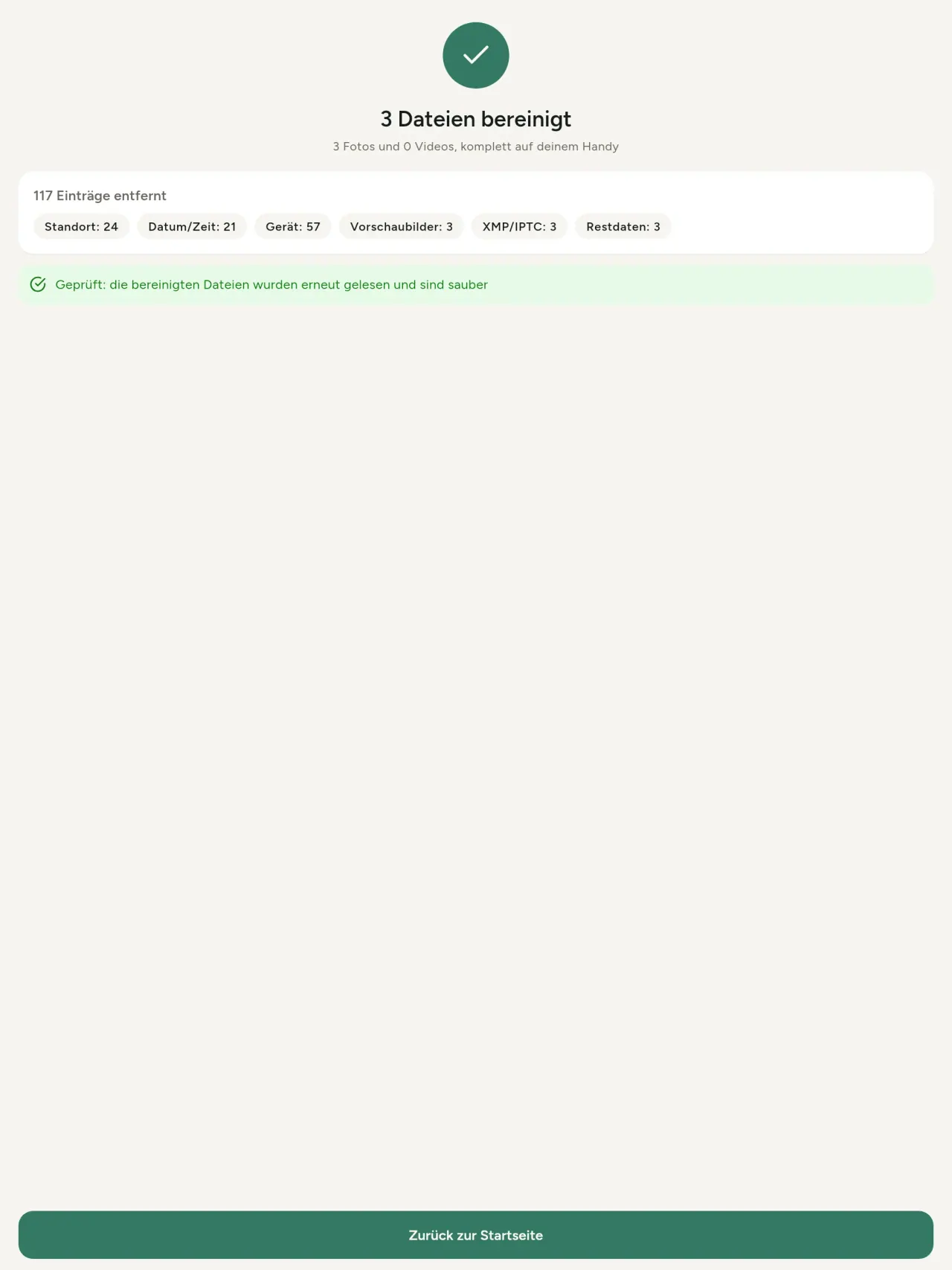
- Remove: clean metadata in a few taps, with a before and after view on the result screen.
- DNG photos are supported.
- Translations aligned across 91 languages.
Privacy policy
Die Datenschutzerklärung und die Support-Texte unten sind auf Englisch. Die englische Fassung ist maßgeblich.
Last updated: 2026-11-18 · applies to version 1.1 and later
Policy versions: 1.1 and later (this text) · version 1.0 (still the policy of the app version 1.0). The version number of your app is shown at the bottom of its Settings screen.
Free Metadata Cleaner shows and removes the metadata hidden in your photos and videos (location, date and time, camera and lens details, thumbnails…). The short version: everything happens on your device, and we collect nothing.
What the app accesses
Your photo and video library, only after you grant permission (and, where your system requires it, the permission to read the location stored in your photos, so that it can be shown to you). The files you choose are read and cleaned on your device; the cleaned copy is saved to your library. If you choose to replace the originals, the system asks you to confirm before deleting them.
To show which photos are already clean, the app reads the metadata of the photos displayed on screen, on your device. This result is kept in memory only and is never stored.
What we collect
Nothing. No account, no analytics or usage tracking, no advertising or advertising identifiers, no crash or diagnostics reporting beyond what the app stores provide, and no third-party SDK that sends data anywhere. There is no Free Metadata Cleaner server. Cleaning a photo or video never uses the network, at all: turn on airplane mode and clean one to check for yourself. The only network request the app itself can ever make is described under “Location” below, and it only ever happens if you ask for it. The one other connection is the optional tip purchase, handled by the store (see “Optional support”).
Temporary files and history
The app keeps no history and no database. Temporary files created while cleaning are deleted after each item and purged when the app starts.
Deleted originals
Originals that are deleted remain in your system's trash (such as “Recently Deleted” or the trash) for about 30 days, with their metadata. The app cannot empty it: do it yourself if you need the originals gone at once.
iCloud and cloud photos
If a photo is stored in iCloud and not on your device, the operating system may download it before the app can process it. That transfer is made by the system, under the provider's own terms, not by the app.
Location
When a photo contains a location, the app shows the coordinates as text, which stays on your device. Three actions can send location information off your device, only when you choose them, each time: “Open in…” hands the coordinates to the maps application you select, under its own privacy policy; “Show the map” asks you to confirm first (“Showing the map sends this photo's position to a map service. Nothing else is sent.”), then loads a small map from OpenStreetMap for that one position; and, when you edit a photo's place, “Choose on the map” asks you to confirm first, then opens a full-screen map from OpenStreetMap. This map does not use your phone's location. As you move and zoom it, the app requests the map tiles of the area you are browsing, so OpenStreetMap receives the position of the area shown on screen, which starts on the photo's current place if it has one, and otherwise on a world view. The photo itself is never sent, and nothing is sent before you confirm. The place you choose on the map (or copy from another photo) is written into the photo's file only when you save, on your device. In every case OpenStreetMap receives, as with any web request, technical details like your IP address; it does not receive your name, an account, or anything else about you or your other photos. See OpenStreetMap's own privacy policy. Outside of these explicit actions, the app never sends a photo's location, or anything else, anywhere.
Optional support
The app is free. If you wish, you can leave a tip. On iPhone and in the Google Play version for Android, tips are in-app purchases processed by Apple or Google under their own terms and privacy policy; the app adds the Google Play billing permission for this, makes no network call itself, and receives no payment or personal details. Versions installed outside Google Play may instead open an external donation page in your browser, operated by a third party under its own privacy policy; nothing from the app is sent to it. A tip unlocks nothing.
Contact form on this website
If you write to us through this site, we use your message and the email address you optionally give only to reply. Bot protection is provided by Cloudflare and email delivery by Resend.
Language choice on this website
When you choose a language, or when this site opens a page in your browser's language, it stores
one small functional cookie (pxl, a language code, one year) so that your choice is
remembered. If this site suggests a page in your browser's language and you close that suggestion,
your browser also keeps a local note (pxl-banner-off, in local storage, 30 days) so the
suggestion does not come back. Neither identifies anyone, neither is used for tracking or advertising,
and neither is shared. You can delete them in your browser at any time.
Website statistics
This website uses Cloudflare Web Analytics to count visits (pages viewed, country, browser type, loading speed). It sets no cookie, does not use local storage, does not fingerprint your device, does not follow you across sites and does not build a profile of you. Search engines (for example Google Search Console) give us aggregated search statistics, without any data about individual visitors. Our own web server also counts the pages and APK downloads it serves: for each request it keeps the address, the site or social network that sent you (only its name, or the campaign tag written in the link), the country, the type of device and whether the request came from a robot. It keeps no IP address, no identifier and no cookie, and these counts are anonymous. We use no advertising or other analytics service. None of this concerns the app itself, which collects nothing.
Children
The app is a general-purpose tool and is not directed at children.
Changes
An updated policy will be published at this URL with a new date above.
Contact
Questions about privacy: metadata-cleaner-contact@pixeon.net
Version 1.0
- App Store Veröffentlicht
- Google Play Veröffentlicht
Neuigkeiten
Dieser Text ist auf Englisch.
- Cleans JPEG, HEIC, PNG, WebP, GIF, MP4, MOV and 3GP files, with no video re-encoding.
- "Safe to share" and "To clean" filters.
- New green design.
- Help screen with a FAQ.
- Settings: share, rate, feedback, unsupported formats.
- Optional tips.
Privacy policy, version 1.0
Die Datenschutzerklärung und die Support-Texte unten sind auf Englisch. Die englische Fassung ist maßgeblich.
Applies to version 1.0 of the app (the first release). Later versions: current policy.
Free Metadata Cleaner shows and removes the metadata hidden in your photos and videos (location, date and time, camera and lens details, thumbnails…). The short version: everything happens on your device, and we collect nothing.
What the app accesses
Your photo and video library, only after you grant permission (and, where your system requires it, the permission to read the location stored in your photos, so that it can be shown to you). The files you choose are read and cleaned on your device; the cleaned copy is saved to your library. If you choose to replace the originals, the system asks you to confirm before deleting them.
To show which photos are already clean, the app reads the metadata of the photos displayed on screen, on your device. This result is kept in memory only and is never stored.
What we collect
Nothing. No account, no analytics or usage tracking, no advertising or advertising identifiers, no crash or diagnostics reporting beyond what the app stores provide, and no third-party SDK that sends data anywhere. There is no Free Metadata Cleaner server. Cleaning a photo or video never uses the network, at all: turn on airplane mode and clean one to check for yourself. The only network request the app itself can ever make is described under “Location” below, and it only ever happens if you ask for it. The one other connection is the optional tip purchase, handled by the store (see “Optional support”).
Temporary files and history
The app keeps no history and no database. Temporary files created while cleaning are deleted after each item and purged when the app starts.
Deleted originals
Originals that are deleted remain in your system's trash (such as “Recently Deleted” or the trash) for about 30 days, with their metadata. The app cannot empty it: do it yourself if you need the originals gone at once.
iCloud and cloud photos
If a photo is stored in iCloud and not on your device, the operating system may download it before the app can process it. That transfer is made by the system, under the provider's own terms, not by the app.
Location
When a photo contains a location, the app shows the coordinates as text, which stays on your device. Two actions send that one photo's position off your device, only when you choose them, each time: “Open in…” hands the coordinates to the maps application you select, under its own privacy policy; “Show the map” asks you to confirm first (“Showing the map sends this photo's position to a map service. Nothing else is sent.”), then loads a small map from OpenStreetMap for that one position. OpenStreetMap receives the coordinates and, as with any web request, technical details like your IP address; it does not receive your name, an account, or anything else about you or your other photos. See OpenStreetMap's own privacy policy. Outside of these two explicit actions, the app never sends a photo's location, or anything else, anywhere.
Optional support
The app is free. If you wish, you can leave a tip. On iPhone and in the Google Play version for Android, tips are in-app purchases processed by Apple or Google under their own terms and privacy policy; the app adds the Google Play billing permission for this, makes no network call itself, and receives no payment or personal details. Versions installed outside Google Play may instead open an external donation page in your browser, operated by a third party under its own privacy policy; nothing from the app is sent to it. A tip unlocks nothing.
Contact form on this website
If you write to us through this site, we use your message and the email address you optionally give only to reply. Bot protection is provided by Cloudflare and email delivery by Resend.
Language choice on this website
When you choose a language, or when this site opens a page in your browser's language, it stores
one small functional cookie (pxl, a language code, one year) so that your choice is
remembered. If this site suggests a page in your browser's language and you close that suggestion,
your browser also keeps a local note (pxl-banner-off, in local storage, 30 days) so the
suggestion does not come back. Neither identifies anyone, neither is used for tracking or advertising,
and neither is shared. You can delete them in your browser at any time.
Website statistics
This website uses Cloudflare Web Analytics to count visits (pages viewed, country, browser type, loading speed). It sets no cookie, does not use local storage, does not fingerprint your device, does not follow you across sites and does not build a profile of you. Search engines (for example Google Search Console) give us aggregated search statistics, without any data about individual visitors. Our own web server also counts the pages and APK downloads it serves: for each request it keeps the address, the site or social network that sent you (only its name, or the campaign tag written in the link), the country, the type of device and whether the request came from a robot. It keeps no IP address, no identifier and no cookie, and these counts are anonymous. We use no advertising or other analytics service. None of this concerns the app itself, which collects nothing.
Children
The app is a general-purpose tool and is not directed at children.
Changes
An updated policy will be published at this URL with a new date above.
Contact
Questions about privacy: metadata-cleaner-contact@pixeon.net
Credits
Android is a trademark of Google LLC. The Android robot is reproduced or modified from work created and shared by Google and used according to terms described in the Creative Commons 3.0 Attribution License. This site is not affiliated with or endorsed by Google.
Support
Zuletzt aktualisiert: 2026-10-08
Free Metadata Cleaner ist eine kleine unabhängige App. Antworten auf die häufigsten Fragen finden Sie unten.
Wir bemühen uns, innerhalb weniger Tage zu antworten. Damit wir helfen können, nennen Sie bitte Ihr Gerätemodell, die Systemversion und was Sie gerade gemacht haben. Bitte senden Sie keine privaten Fotos.
Welche Daten speichert oder versendet die App?
Keine. Es wird keine Historie gespeichert, es gibt kein Konto und keinen Server. Mehr dazu in der Datenschutzrichtlinie.
Wie reinige ich ein Foto?
- Öffnen Sie die App und erlauben Sie den Zugriff auf Ihre Mediathek, wenn Sie dazu aufgefordert werden.
- Wählen Sie die Fotos oder Videos aus, die gereinigt werden sollen.
- Wählen Sie, was entfernt werden soll und ob die Originale ersetzt oder eine bereinigte Kopie erstellt wird.
- Bestätigen Sie. Eine Übersicht zeigt, was entfernt wurde und welche Dateien nicht verarbeitet werden konnten.
Wo werden die bereinigten Kopien gespeichert?
In Ihrer Fotomediathek. Das Datum des Originals bleibt erhalten, sodass ein gereinigtes Foto nicht an den Anfang Ihrer Galerie springt.
Ich habe "Originale ersetzen" gewählt, aber die Originale sind noch vorhanden.
Gelöschte Originale bleiben etwa 30 Tage im Systempapierkorb (wie "Zuletzt gelöscht" oder Papierkorb) mit ihren Metadaten gespeichert. Leeren Sie den Papierkorb, um sie sofort zu entfernen. Wenn Sie die Systemlöschfrage ablehnen, bleiben die Originale erhalten und die bereinigten Kopien werden trotzdem hinzugefügt.
Welche Dateien werden unterstützt?
Fotos in JPEG, HEIC, AVIF, PNG, WebP und GIF sowie Videos in MP4, MOV und 3GP (weitere Formate werden ergänzt). Eine Datei, die die App nicht reinigen kann, bleibt unangetastet und wird in der Übersicht mit Grund genannt, ohne den Rest des Stapels zu stoppen.
Warum benötigt die App Zugriff auf meine Fotos?
Damit Sie Ihre Fotos auswählen und bereinigte Kopien speichern können. Wo das System dies verlangt, fragt die App zusätzlich die Erlaubnis, Standortdaten aus Fotos auszulesen: Ohne diese Erlaubnis versteckt das System den Standort, sodass die App Ihnen nicht zeigen könnte, was ein Foto an Informationen enthält. Nichts wird hochgeladen.
Wie kann ich überprüfen, dass nichts mein Handy verlässt?
Schalten Sie den Flugmodus an und reinigen Sie ein Foto: Es funktioniert genauso. Die einzige Ausnahme ist die Karte: Wenn Sie "Karte anzeigen" bei einem Foto-Standort tippen und bestätigen, wird nur diese eine Position an OpenStreetMap gesendet, um die Karte anzuzeigen, sonst nichts. Siehe "Standort" oben.
Welche Sprachen sind verfügbar?
Die App ist verfügbar in Englisch, Französisch, Deutsch, Spanisch, Italienisch, Portugiesisch und Arabisch. Diese Webseite ist in weiteren Sprachen verfügbar und neue App-Sprachen folgen.
Das Projekt unterstützen
Metadata Cleaner bleibt kostenlos und werbefrei. Wenn die App Ihnen nützt, können Sie die Entwicklung unterstützen (freiwillig):
Buy Me a CoffeeBudget Planer und Ausgaben Tracker, ohne Konto und ohne Kontoanbindung. Offline.
Auch von PixeonVaultMarkDokumente Tresor, verschlüsselt. Wasserzeichen Dokument, Metadaten entfernen.
Auch von PixeonLittle RelayBabytagebuch mit Beikost, Stillen und Schlaf, ohne Konto
Auch von PixeonMenuloopEssensplaner mit Einkaufsliste, Rezepte mit Fotos, auch offline.
Auch von PixeonIndie OfficeRechnung schreiben, Angebot erstellen. Offline, ohne Konto, ohne Werbung.