
Metadata Cleaner: Photo/Video
Funda, lungisa noma ususe i-metadata yesithombe (GPS, usuku).


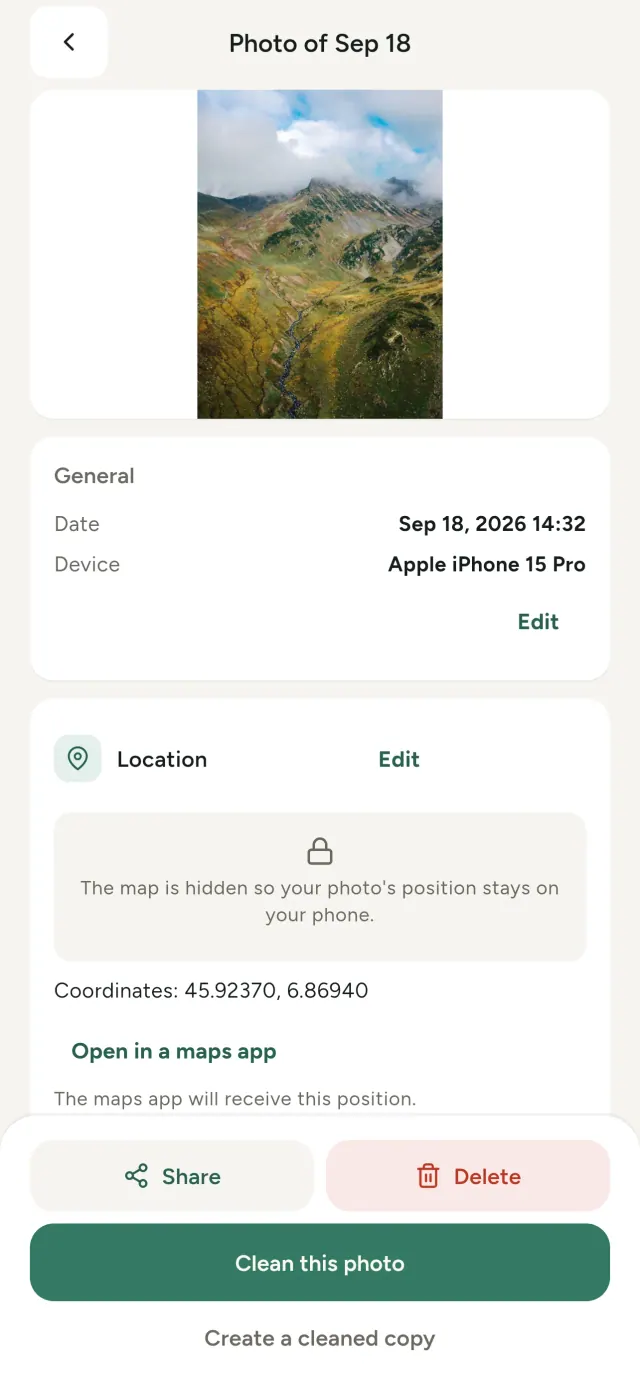
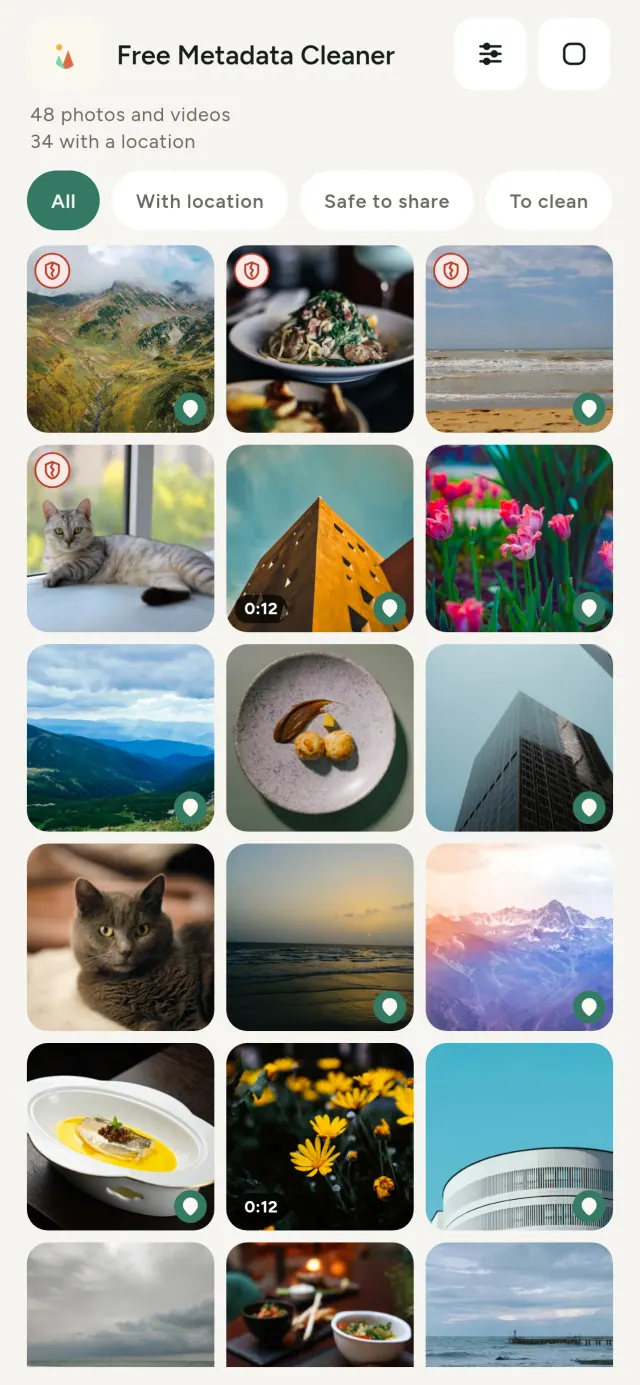
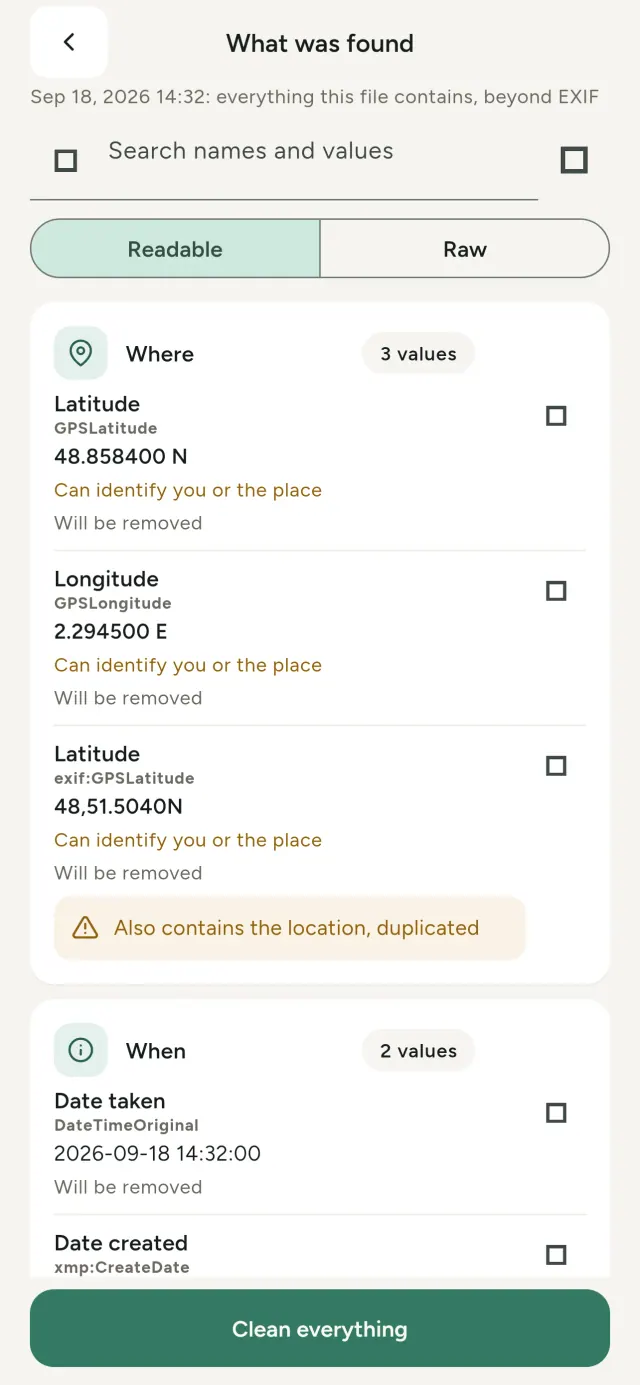
Isithombe ngasinye osithathayo siphethe ulwazi olufihlekile: lapho sithathwe khona, nini, ngomakhalekhukhwini muni, ngezinye izikhathi nomfanekiso omncane wesithombe sokuqala. Uma usabelana ngaso, lonke lolo lwazi luyahamba nalo.
Metadata Cleaner yenza izinto ezintathu kufoni yakho: ibonisa ukuthi izithombe namavidiyo aqukini, ikuvumela ukuba uzilungise, bese isusa i-metadata.
Okwenziwa yi-Metadata Cleaner
Funda
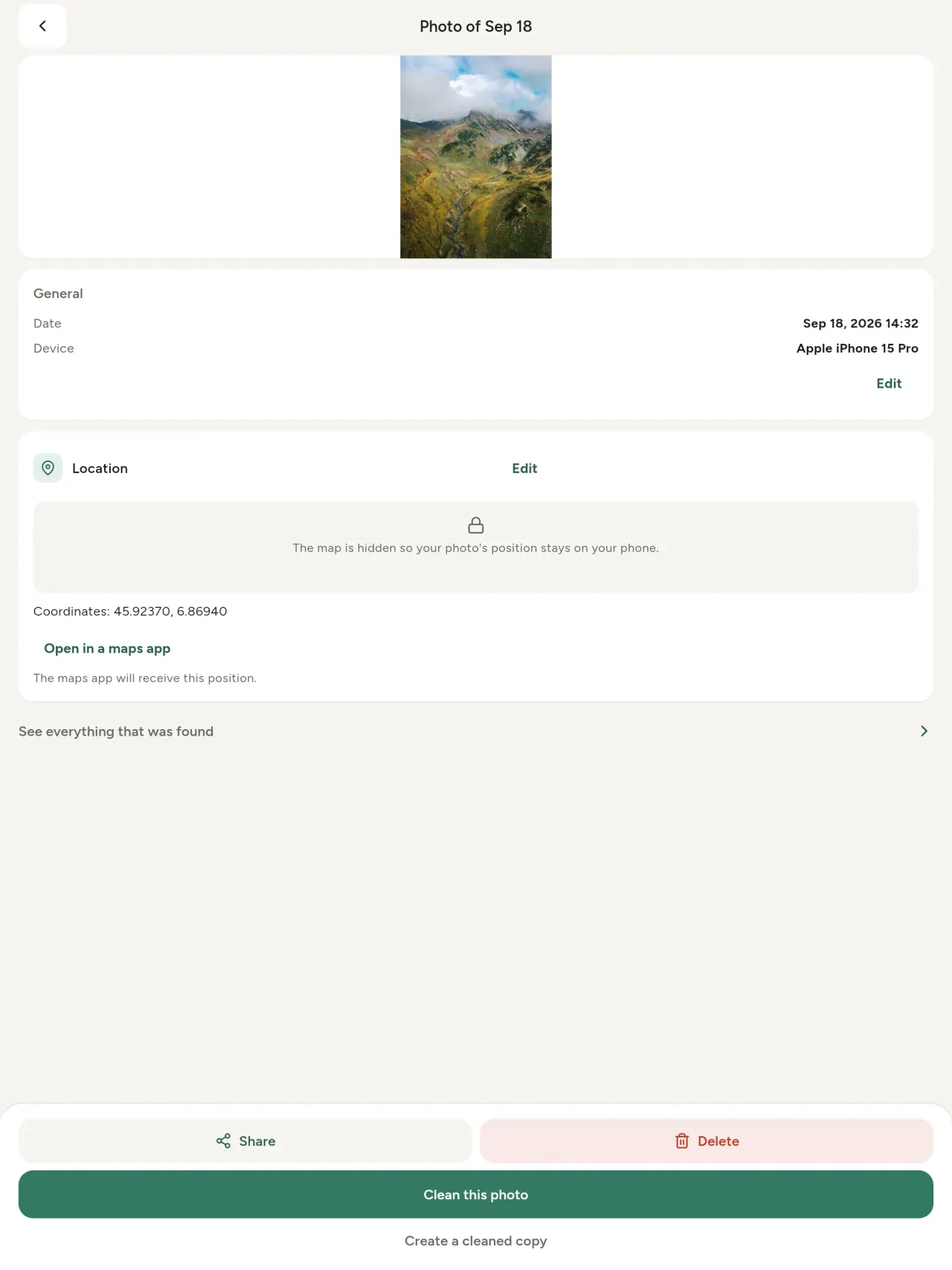
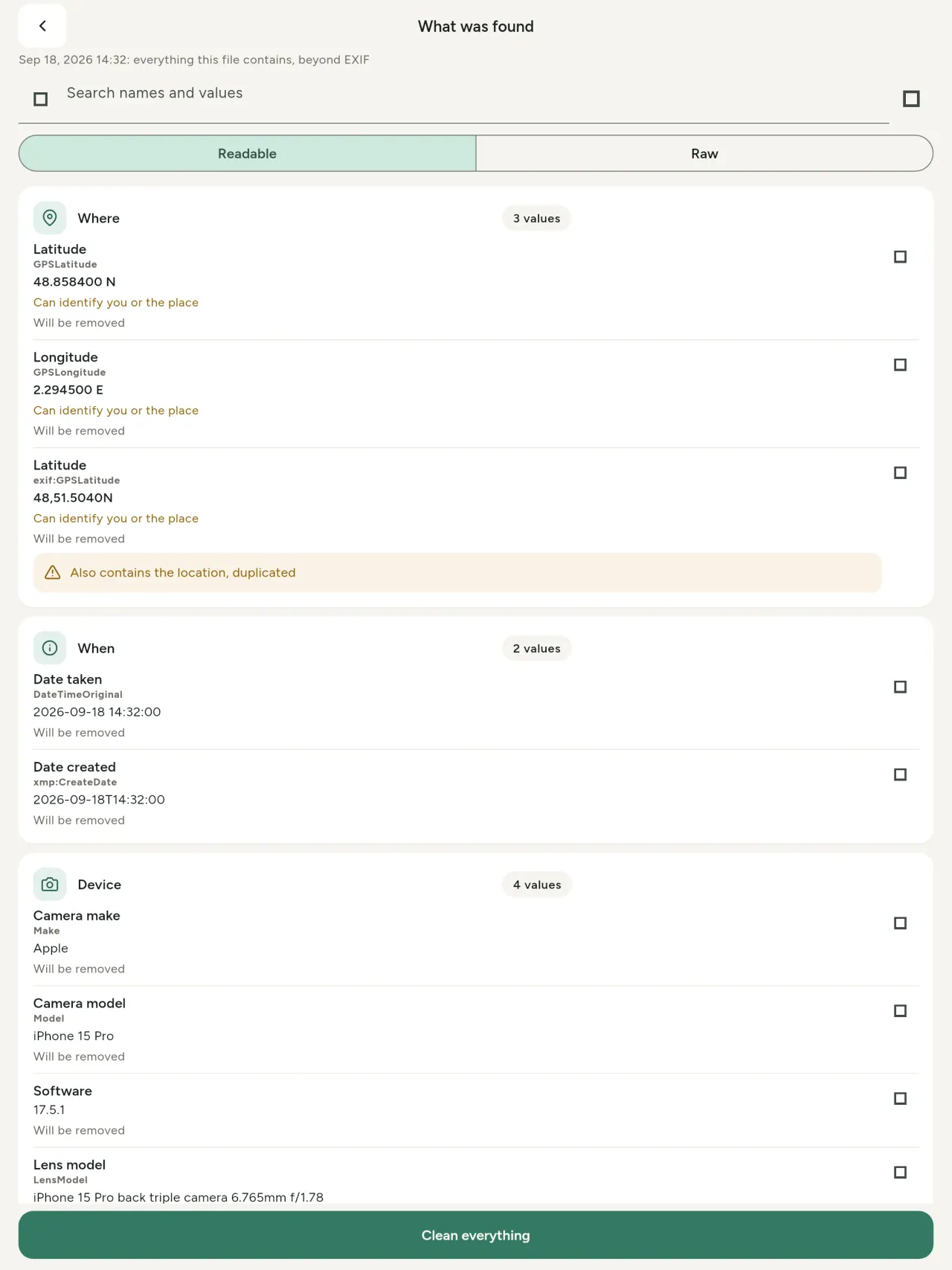
Isibonisi sangempela se-metadata: inani ngalinye elitholakala esithombeni noma kuvidiyo (EXIF, IPTC, XMP, amakhodi wevidiyo, ubude nobukhulu), lihlelwe, lingafunwa bese likopishwa, okuzosuswa kukhonjisiwe. Ukuzalwa kwe-AI (C2PA, amapharamitha wokukhiqiza) nakho kuyahlonzwa.
Hlela
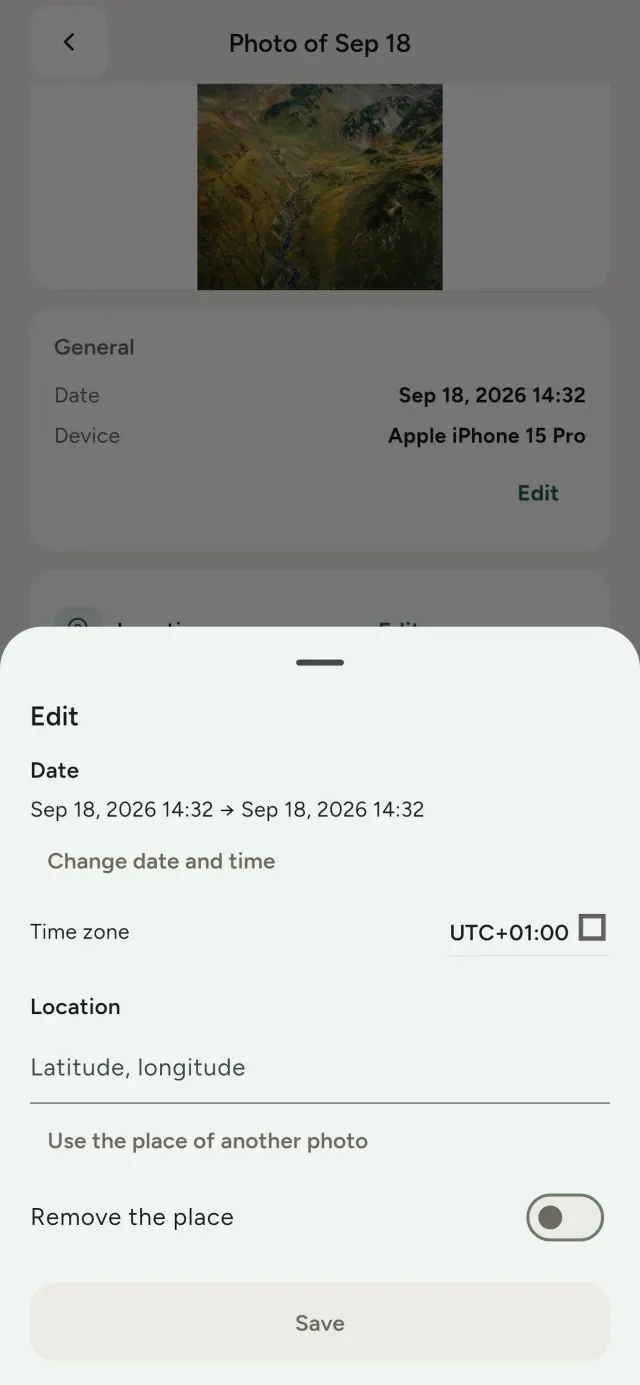
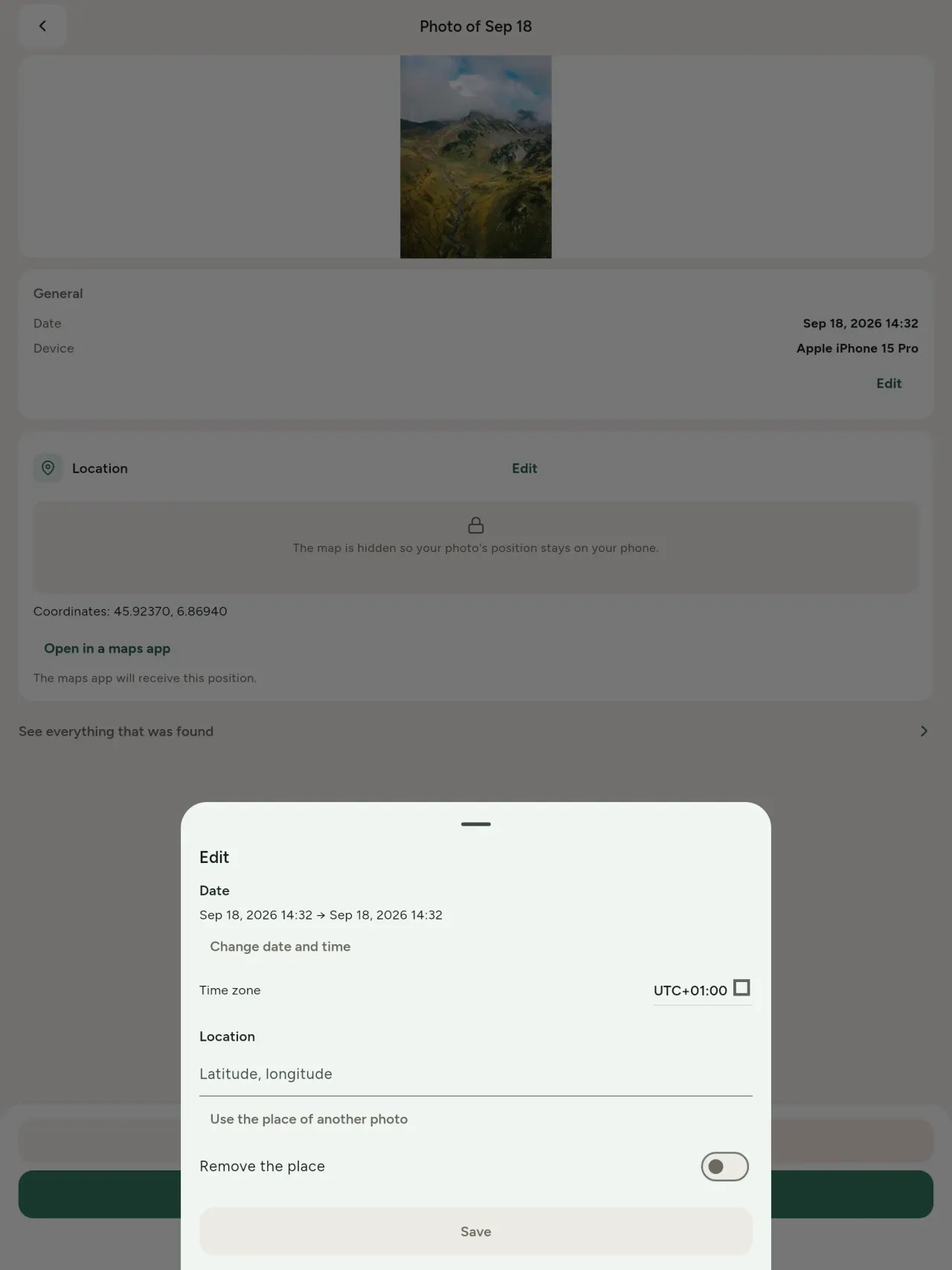
Shintsha usuku nendawo yesithombe, ngisho nesithombe esingenayo nhlobo i-metadata. Kopisha indawo kwesinye isithombe, noma uyikhethe kwimephu (kubuzwa kuqala, njalo). Qhathanisa ngaphambi nangemva.
Susa
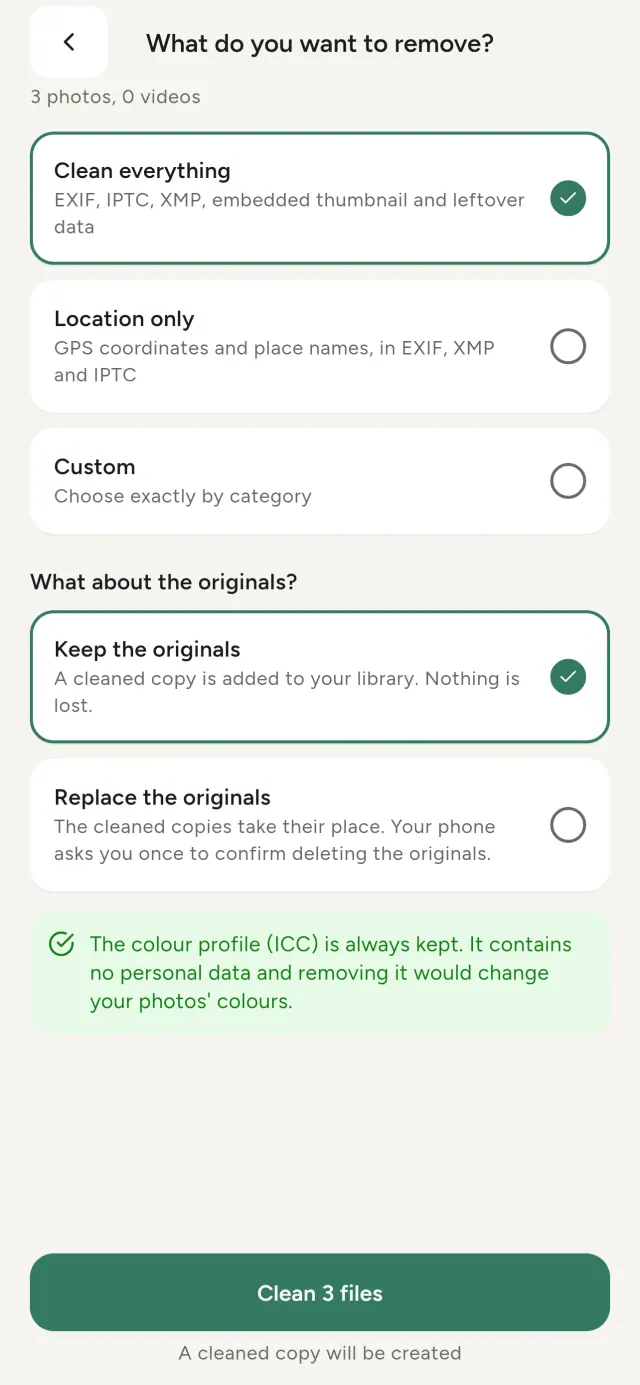
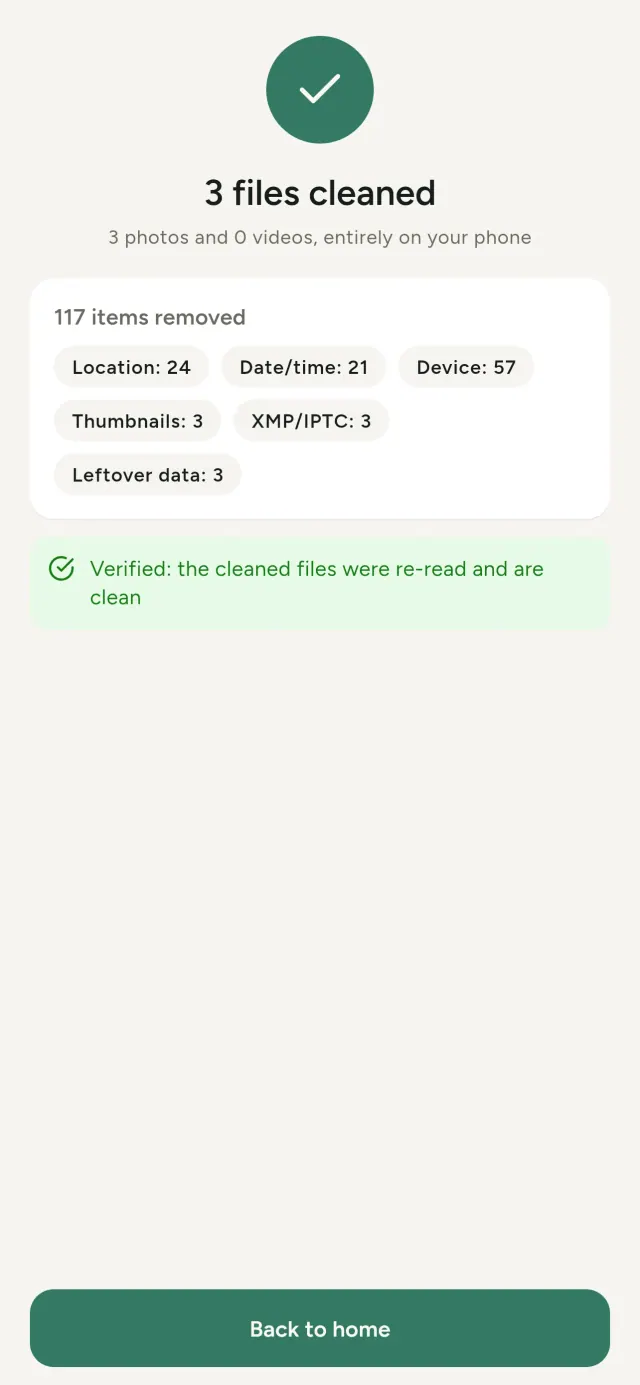
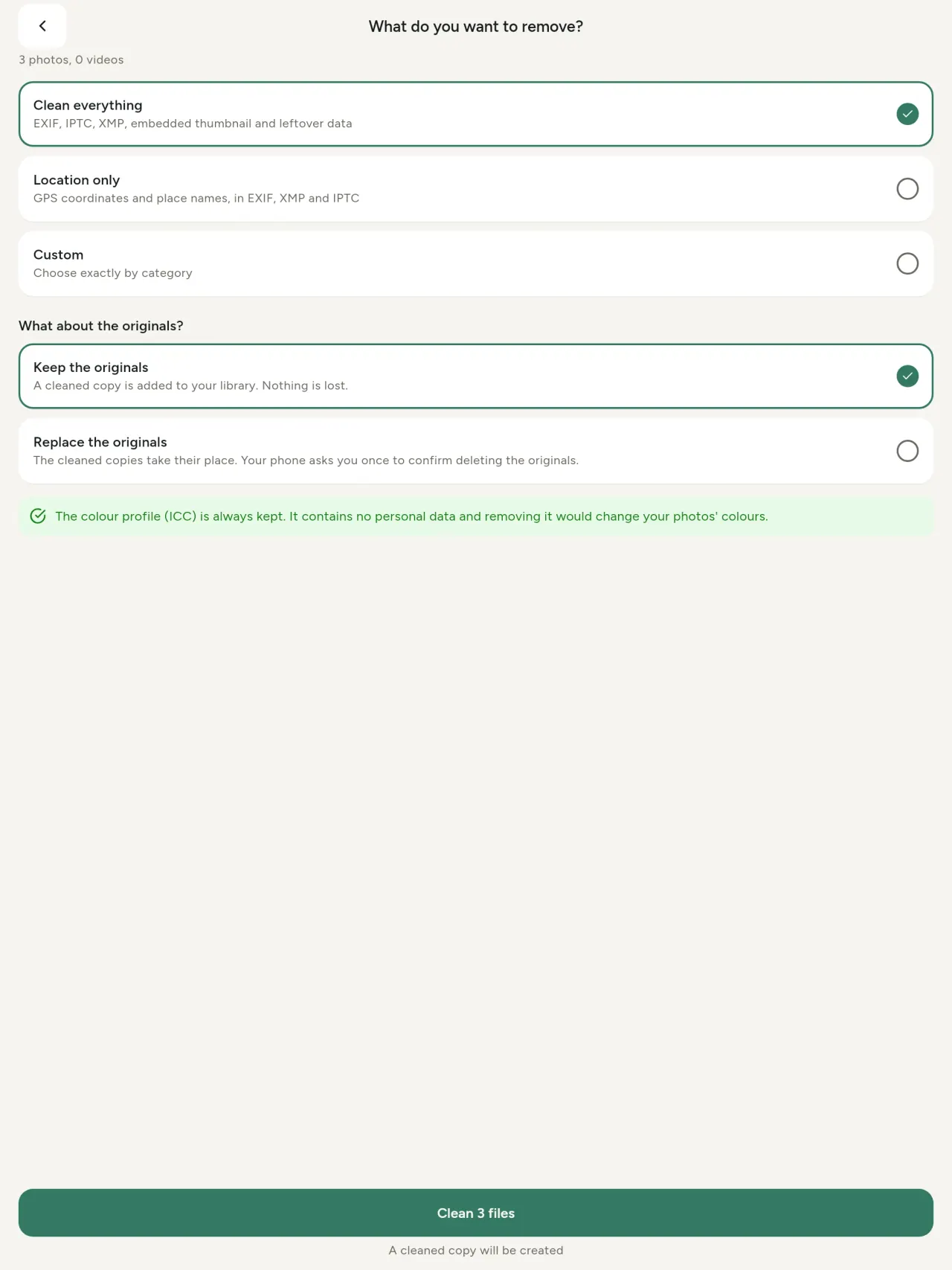
Konke, indawo kuphela, noma izigaba ozikhethayo: i-EXIF, IPTC ne-XMP, izithonjana ezifakiwe, amanothi omakhi wekhamera, ukuqhamuka kwe-AI namabhayithi asala ngemva kokugunda isithombe athwalwa ezinye izinhlelo zokuhlela. Hlanza iqoqo lezithombe ngasikhathi sinye, bese ugcina zokuqala noma uzishintsha.
Kuphephile ngokubheka nje
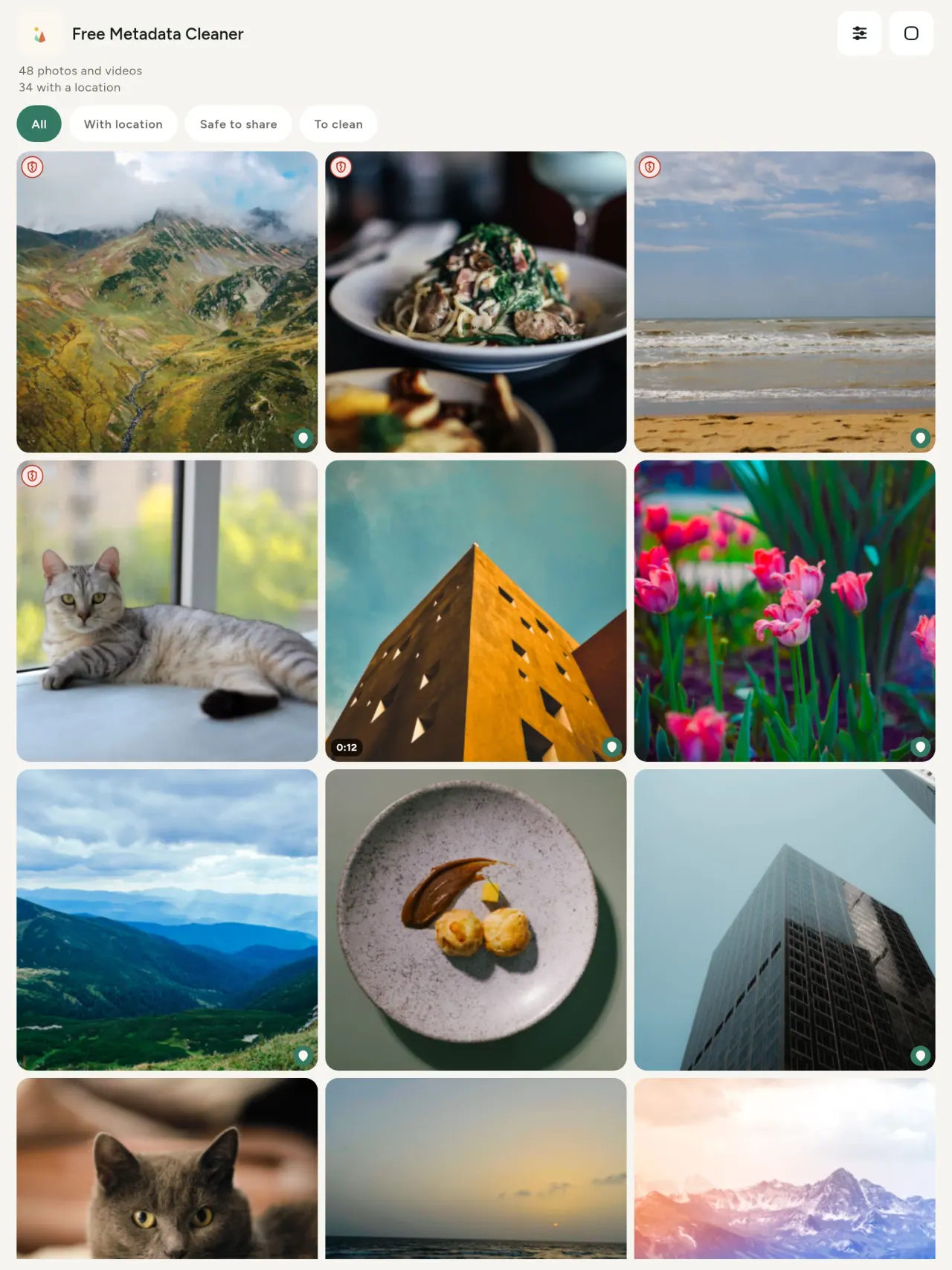
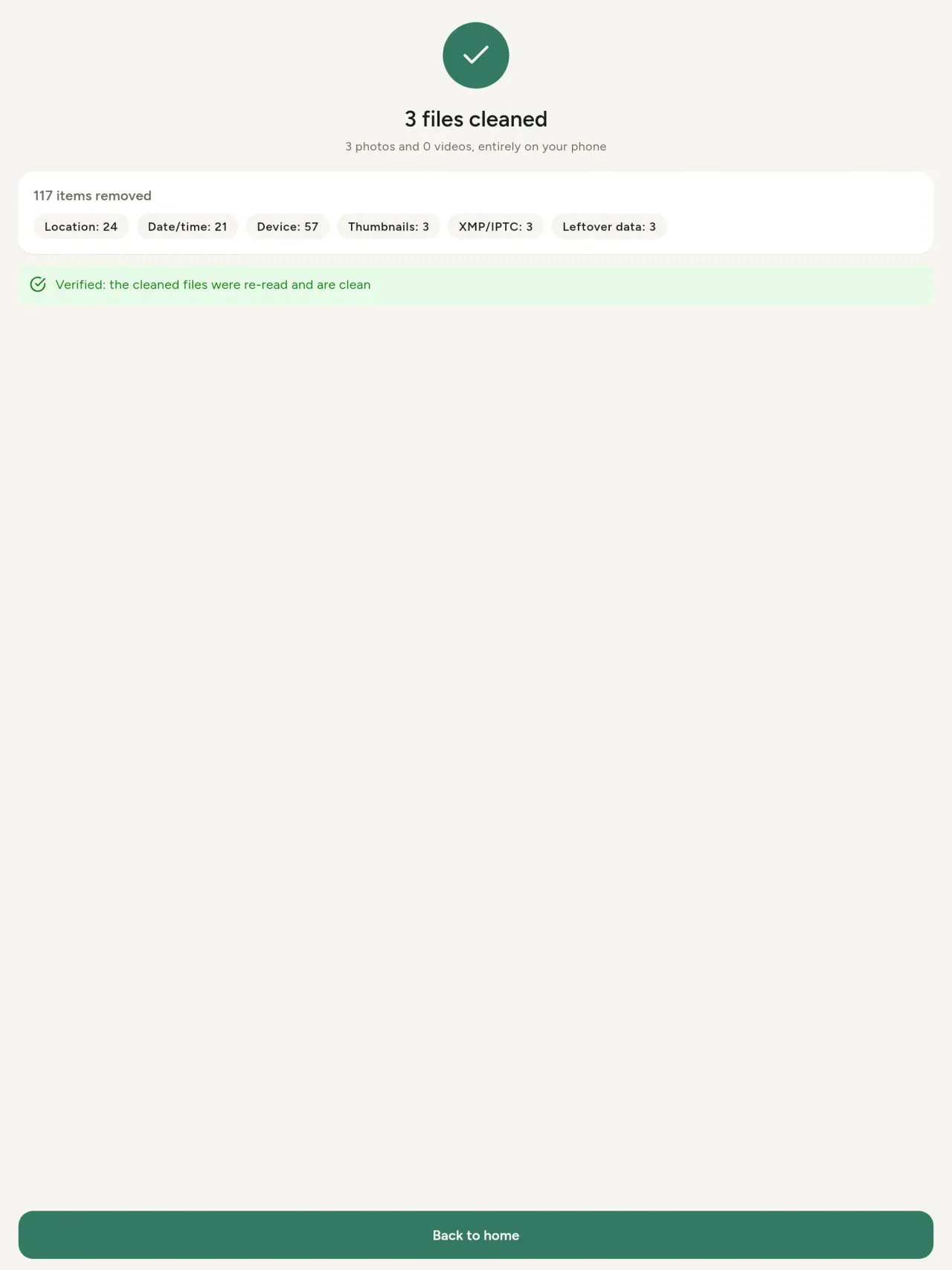
Ishield eliluhlaza libonisa amafayela angenalo i-metadata esele; ishield elibomvu eliqhekekile libonisa lawo asenayo.
Alikho ilahleko yekhwalithi
Izithombe azikhodwanga kabusha: isithombe uqobo asithintwa.
Ukwenzelwe ubumfihlo
Izithombe zakho zifundwa, zihlolwe futhi zihlanzwe kudivayisi yakho. Akukho akhawunti, akukho izikhangiso, akukho ukuhlaziywa. Okukhethekile okukodwa imephu: uma ucelile ukubona indawo yesithombe, noma ukukhetha indawo, uhlelo lubuza kuqala, njalo, bese lilayisha imephu evela ku-OpenStreetMap (isithombe uqobo asithunyelwa).
Mahhala, akukho zikhangiso
Uma uhlelo lukusiza, ungashiya umnikelo wokuzithandela.
Ukuba ngubani okufanele kube khona
- Noma ubani ofuna ukwazi ukuthi isithombe sidalani (indawo ye-GPS, usuku, ikhamera) ngaphambi kokusithumela, ukusidayisa noma ukusithumela komunye umuntu.
- Abantu abadayisa kumawebhusayithi ezikhangiso abafuni ukubonisa lapho behlala khona.
- Abazali noma omunye umuntu ofuna ukuvikela indawo ebucayi (ikhaya, isikole, indawo yomsebenzi) ezithombeni abazabelana ngazo.
- Izintatheli, abashisekeli kanye nabantu abasengcupheni, abadinga ukwabelana ngesithombe ngaphandle kokushiya umkhondo.
- Abakhathazekile ngokuvuza kwedatha abafuna ukuphatha imininingwane yezithombe zabo mathupha.
Kungani ukhethe Metadata Cleaner
- Izinto ezintathu kuhlelo olulodwa: funda ukuthi isithombe noma ividiyo kudalani, hlela (usuku oluthathiwe, indawo), bese ususa imininingwane emfishane ngezinyathelo ezimbalwa.
- Konke kusebenza ocingweni. Izithombe zakho azithunyelwa ndawo.
- Izithombe (JPEG, HEIC, PNG, WebP, GIF) namavidiyo (MP4, MOV, 3GP).
Izinto uhlelo olungakakwenzi okwamanje
- Kusekelwa okufomethi kuphela okukhulunywe ngakho ngenhla. Okuningi kuzongezwa.
Isimiso sePixeon. Izinhlelo zokusebenza zePixeon zisebenza endaweni: awekho ama-akhawunti, awekho amalogi, futhi idatha yakho ihlala ocingweni lwakho. Uma uhlelo lokusebenza luxhuma kunethiwekhi, kuba kuphela uma ukhetha ukuvula isici osidingayo, kanti inqubomgomo yobumfihlo ibuyekezwa ngaphambi kokuthi ithunyelwe.
Bona Metadata Cleaner isebenza.
Thola i-Metadata Cleaner.
Mahhala ku-iPhone naku-Android.
Inguqulo 1.1
- App Store Ezoza
- Google Play Ezoza
Yini entsha
Lo mbhalo ungowesiNgisi.
- Read: see exactly what a photo or video reveals (location, date, camera, AI provenance labels such as C2PA and generation parameters, video duration, codecs, resolution and frame rate).
- Edit: change the date a photo was taken and its location (JPEG, HEIC, AVIF), even on a photo with no metadata, reuse the location of another photo, or pick it on an OpenStreetMap map after your confirmation.
- Remove: clean metadata in a few taps, with a before and after view on the result screen.
- DNG photos are supported.
- Translations aligned across 91 languages.
Privacy policy
Umbhalo ongezansi ungowesiNgisi. Inguqulo yesiNgisi iyona esebenzayo.
Last updated: 2026-11-03 · applies to version 1.1 and later
Policy versions: 1.1 and later (this text) · version 1.0 (still the policy of the app version 1.0). The version number of your app is shown at the bottom of its Settings screen.
Free Metadata Cleaner shows and removes the metadata hidden in your photos and videos (location, date and time, camera and lens details, thumbnails…). The short version: everything happens on your device, and we collect nothing.
What the app accesses
Your photo and video library, only after you grant permission (and, where your system requires it, the permission to read the location stored in your photos, so that it can be shown to you). The files you choose are read and cleaned on your device; the cleaned copy is saved to your library. If you choose to replace the originals, the system asks you to confirm before deleting them.
To show which photos are already clean, the app reads the metadata of the photos displayed on screen, on your device. This result is kept in memory only and is never stored.
What we collect
Nothing. No account, no analytics or usage tracking, no advertising or advertising identifiers, no crash or diagnostics reporting beyond what the app stores provide, and no third-party SDK that sends data anywhere. There is no Free Metadata Cleaner server. Cleaning a photo or video never uses the network, at all: turn on airplane mode and clean one to check for yourself. The only network request the app itself can ever make is described under “Location” below, and it only ever happens if you ask for it. The one other connection is the optional tip purchase, handled by the store (see “Optional support”).
Temporary files and history
The app keeps no history and no database. Temporary files created while cleaning are deleted after each item and purged when the app starts.
Deleted originals
Originals that are deleted remain in your system's trash (such as “Recently Deleted” or the trash) for about 30 days, with their metadata. The app cannot empty it: do it yourself if you need the originals gone at once.
iCloud and cloud photos
If a photo is stored in iCloud and not on your device, the operating system may download it before the app can process it. That transfer is made by the system, under the provider's own terms, not by the app.
Location
When a photo contains a location, the app shows the coordinates as text, which stays on your device. Three actions can send location information off your device, only when you choose them, each time: “Open in…” hands the coordinates to the maps application you select, under its own privacy policy; “Show the map” asks you to confirm first (“Showing the map sends this photo's position to a map service. Nothing else is sent.”), then loads a small map from OpenStreetMap for that one position; and, when you edit a photo's place, “Choose on the map” asks you to confirm first, then opens a full-screen map from OpenStreetMap. This map does not use your phone's location. As you move and zoom it, the app requests the map tiles of the area you are browsing, so OpenStreetMap receives the position of the area shown on screen, which starts on the photo's current place if it has one, and otherwise on a world view. The photo itself is never sent, and nothing is sent before you confirm. The place you choose on the map (or copy from another photo) is written into the photo's file only when you save, on your device. In every case OpenStreetMap receives, as with any web request, technical details like your IP address; it does not receive your name, an account, or anything else about you or your other photos. See OpenStreetMap's own privacy policy. Outside of these explicit actions, the app never sends a photo's location, or anything else, anywhere.
Optional support
The app is free. If you wish, you can leave a tip. On iPhone and in the Google Play version for Android, tips are in-app purchases processed by Apple or Google under their own terms and privacy policy; the app adds the Google Play billing permission for this, makes no network call itself, and receives no payment or personal details. Versions installed outside Google Play may instead open an external donation page in your browser, operated by a third party under its own privacy policy; nothing from the app is sent to it. A tip unlocks nothing.
Contact form on this website
If you write to us through this site, we use your message and the email address you optionally give only to reply. Bot protection is provided by Cloudflare and email delivery by Resend.
Language choice on this website
When you choose a language, or when this site opens a page in your browser's language, it stores
one small functional cookie (pxl, a language code, one year) so that your choice is
remembered. If this site suggests a page in your browser's language and you close that suggestion,
your browser also keeps a local note (pxl-banner-off, in local storage, 30 days) so the
suggestion does not come back. Neither identifies anyone, neither is used for tracking or advertising,
and neither is shared. You can delete them in your browser at any time.
Website statistics
This website uses Cloudflare Web Analytics to count visits (pages viewed, country, browser type, loading speed). It sets no cookie, does not use local storage, does not fingerprint your device, does not follow you across sites and does not build a profile of you. Search engines (for example Google Search Console) give us aggregated search statistics, without any data about individual visitors. Our own web server also counts the pages it serves: for each page it keeps the page address, the site or social network that sent you (only its name, or the campaign tag written in the link), the country, the type of device and whether the request came from a robot. It keeps no IP address, no identifier and no cookie, and these counts are anonymous. We use no advertising or other analytics service. None of this concerns the app itself, which collects nothing.
Children
The app is a general-purpose tool and is not directed at children.
Changes
An updated policy will be published at this URL with a new date above.
Contact
Questions about privacy: metadata-cleaner-contact@pixeon.net
Inguqulo 1.0
- App Store Ishicilelwe
- Google Play Ishicilelwe
Yini entsha
Lo mbhalo ungowesiNgisi.
- Cleans JPEG, HEIC, PNG, WebP, GIF, MP4, MOV and 3GP files, with no video re-encoding.
- "Safe to share" and "To clean" filters.
- New green design.
- Help screen with a FAQ.
- Settings: share, rate, feedback, unsupported formats.
- Optional tips.
Privacy policy, version 1.0
Umbhalo ongezansi ungowesiNgisi. Inguqulo yesiNgisi iyona esebenzayo.
Applies to version 1.0 of the app (the first release). Later versions: current policy.
Free Metadata Cleaner shows and removes the metadata hidden in your photos and videos (location, date and time, camera and lens details, thumbnails…). The short version: everything happens on your device, and we collect nothing.
What the app accesses
Your photo and video library, only after you grant permission (and, where your system requires it, the permission to read the location stored in your photos, so that it can be shown to you). The files you choose are read and cleaned on your device; the cleaned copy is saved to your library. If you choose to replace the originals, the system asks you to confirm before deleting them.
To show which photos are already clean, the app reads the metadata of the photos displayed on screen, on your device. This result is kept in memory only and is never stored.
What we collect
Nothing. No account, no analytics or usage tracking, no advertising or advertising identifiers, no crash or diagnostics reporting beyond what the app stores provide, and no third-party SDK that sends data anywhere. There is no Free Metadata Cleaner server. Cleaning a photo or video never uses the network, at all: turn on airplane mode and clean one to check for yourself. The only network request the app itself can ever make is described under “Location” below, and it only ever happens if you ask for it. The one other connection is the optional tip purchase, handled by the store (see “Optional support”).
Temporary files and history
The app keeps no history and no database. Temporary files created while cleaning are deleted after each item and purged when the app starts.
Deleted originals
Originals that are deleted remain in your system's trash (such as “Recently Deleted” or the trash) for about 30 days, with their metadata. The app cannot empty it: do it yourself if you need the originals gone at once.
iCloud and cloud photos
If a photo is stored in iCloud and not on your device, the operating system may download it before the app can process it. That transfer is made by the system, under the provider's own terms, not by the app.
Location
When a photo contains a location, the app shows the coordinates as text, which stays on your device. Two actions send that one photo's position off your device, only when you choose them, each time: “Open in…” hands the coordinates to the maps application you select, under its own privacy policy; “Show the map” asks you to confirm first (“Showing the map sends this photo's position to a map service. Nothing else is sent.”), then loads a small map from OpenStreetMap for that one position. OpenStreetMap receives the coordinates and, as with any web request, technical details like your IP address; it does not receive your name, an account, or anything else about you or your other photos. See OpenStreetMap's own privacy policy. Outside of these two explicit actions, the app never sends a photo's location, or anything else, anywhere.
Optional support
The app is free. If you wish, you can leave a tip. On iPhone and in the Google Play version for Android, tips are in-app purchases processed by Apple or Google under their own terms and privacy policy; the app adds the Google Play billing permission for this, makes no network call itself, and receives no payment or personal details. Versions installed outside Google Play may instead open an external donation page in your browser, operated by a third party under its own privacy policy; nothing from the app is sent to it. A tip unlocks nothing.
Contact form on this website
If you write to us through this site, we use your message and the email address you optionally give only to reply. Bot protection is provided by Cloudflare and email delivery by Resend.
Language choice on this website
When you choose a language, or when this site opens a page in your browser's language, it stores
one small functional cookie (pxl, a language code, one year) so that your choice is
remembered. If this site suggests a page in your browser's language and you close that suggestion,
your browser also keeps a local note (pxl-banner-off, in local storage, 30 days) so the
suggestion does not come back. Neither identifies anyone, neither is used for tracking or advertising,
and neither is shared. You can delete them in your browser at any time.
Website statistics
This website uses Cloudflare Web Analytics to count visits (pages viewed, country, browser type, loading speed). It sets no cookie, does not use local storage, does not fingerprint your device, does not follow you across sites and does not build a profile of you. Search engines (for example Google Search Console) give us aggregated search statistics, without any data about individual visitors. Our own web server also counts the pages it serves: for each page it keeps the page address, the site or social network that sent you (only its name, or the campaign tag written in the link), the country, the type of device and whether the request came from a robot. It keeps no IP address, no identifier and no cookie, and these counts are anonymous. We use no advertising or other analytics service. None of this concerns the app itself, which collects nothing.
Children
The app is a general-purpose tool and is not directed at children.
Changes
An updated policy will be published at this URL with a new date above.
Contact
Questions about privacy: metadata-cleaner-contact@pixeon.net
Usekelo
Kugcine ukubuyekezwa: 2026-10-08
IFree Metadata Cleaner wuhlelo oluncane oluzimele. Izimpendulo zemibuzo evame ukubuzwa zibhaliwe ngezansi.
Senza konke okusemandleni ethu ukuphendula ezinsukwini ezimbalwa. Ukuze usisize, sitshele imodeli yedivayisi yakho, inguqulo yesistimu yayo nokuthi ubuwenzani. Sicela ungathumeli izithombe eziyimfihlo.
Yiyiphi idatha egcinwa noma ethunyelwa uhlelo?
Ayikho. Aligcini umlando, alinayo i-akhawunti futhi alinayo iseva. Imininingwane iku-inqubomgomo yobumfihlo.
Ngisihlanza kanjani isithombe?
- Vula uhlelo bese uvumela ukufinyelela kulabhulali yakho lapho ubuzwa.
- Khetha izithombe noma amavidiyo ofuna ukuwahlanza.
- Khetha ozokususa nokuthi okwangempela kuzothathelwa indawo noma kuzokwakhiwa ikhophi ehlanziwe.
- Qinisekisa. Isifinyezo sibonisa okususiwe nanoma yiliphi ifayela elingakwazi ukucutshungulwa.
Amakhophi ahlanzekile aya kuphi?
Elabhulali yezithombe zakho. Usuku lwangempela lwelabhulali luyagcinwa, ngakho isithombe esihlanzekile asikhuphukeli phezulu kugalari yakho.
Ngikhethe “shintsha okwangempela” kodwa okwangempela kusekhona.
Okususwe kwangempela kuhlala kudoti wesistimu (njenge-“Okusanda kususwa” noma kudoti) cishe izinsuku ezingu-30, kanye nemethadatha yakho. Thulula udoti ukuze ukukususe ngokushesha. Uma wenqaba isicelo sokususa sesistimu, okwangempela kuyagcinwa futhi amakhophi ahlanzekile asangezwa.
Imaphi amafayela asekelwayo?
Izithombe ze-JPEG, HEIC, AVIF, PNG, WebP ne-GIF, namavidiyo e-MP4, MOV ne-3GP (amanye amafomethi ayengezwa). Ifayela uhlelo olungakwazi ukulihlanza liyekwa linjalo futhi lifakwe ohlwini esifingqweni nesizathu, ngaphandle kokumisa yonke inqwaba.
Kungani uhlelo ludinga ukufinyelela ezithombeni zami?
Ukuze lubonise izithombe ongakhetha kuzo futhi lugcine amakhophi ahlanzekile. Lapho isistimu yakho ikudinga khona, uhlelo luphinde lucele imvume yokufunda indawo egcinwe ezithombeni: ngaphandle kwayo isistimu ifihla indawo, ngakho uhlelo belungeke lukubonise lokho isithombe esikuvezayo. Akukho okulayishwayo.
Ngingahlola kanjani ukuthi akukho lutho oluphuma ocingweni lwami?
Vula imodi yendiza bese uhlanza isithombe: kusebenza ngendlela efanayo. Okuwukuphela kokuhlukile yimephu: uma ucindezela u-“Bonisa imephu” endaweni yesithombe bese uqinisekisa, leyo ndawo eyodwa ithunyelwa ku-OpenStreetMap ukuze kuboniswe imephu, akukho okunye. Bona i-“Ndawo” ngenhla.
Yiziphi izilimi ezitholakalayo?
Uhlelo lutholakala ngesiNgisi, isiFulentshi, isiJalimane, iSpanishi, isiNtaliyane, isiPutukezi nesi-Arabhu. Le webhusayithi itholakala ngezinye izilimi, futhi kuzongezwa ezinye izilimi zohlelo.
Sekela iphrojekthi
Metadata Cleaner izohlala imahhala futhi ingenazo izikhangiso. Uma ilusizo kuwe, ungasekela ukuthuthukiswa kwayo (uma uthanda):
Buy Me a CoffeeIsabelomali: ukulandela izindleko, ngaphandle kwe-akhawunti, ku-offline.
Okunye okuvela kwa-PixeonVaultMarkEncrypted document vault. Watermark documents, remove metadata before sharing.
Okunye okuvela kwa-PixeonLittle RelayBreastfeeding, sleep and starting solids tracker. No account, works offline.
Okunye okuvela kwa-PixeonMenuloopPlan the week's meals, build your grocery list and keep recipes with photos.