
Metadata Cleaner
Kà, ṣe àtúnṣe tàbí yọ metadata fọto (GPS, ọjọ) lórí fónú rẹ ní ààbò.


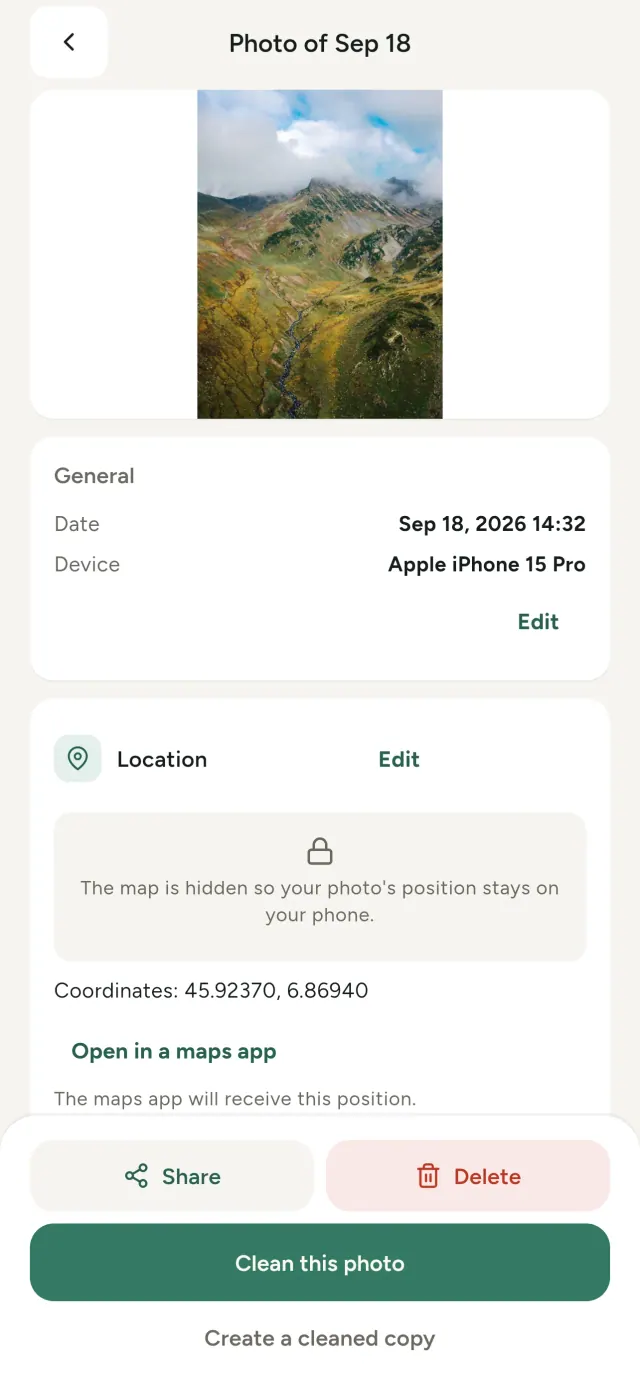
Gbogbo fọ́tò tí o ya ní ìtànkálẹ̀ tí a fi pamọ́: ibi tí a ti ya a, ìgbà tí a ya a, irú fónú tí a lò, nígbà míì àwòrán kéékèèké ti àwòrán àkọ́kọ́ náà. Tí o bá pín in, gbogbo ìtànkálẹ̀ yìí máa bá a lọ.
Metadata Cleaner ṣe nǹkan mẹ́ta lórí fónú rẹ: ó fi hàn ohun tí metadata àwọn fọ́tò àti fídíò rẹ ní, ó jẹ́ kí o lè ṣe àtúnṣe wọn, ó sì ń yọ wọn.
Kí ni Metadata Cleaner ṣe
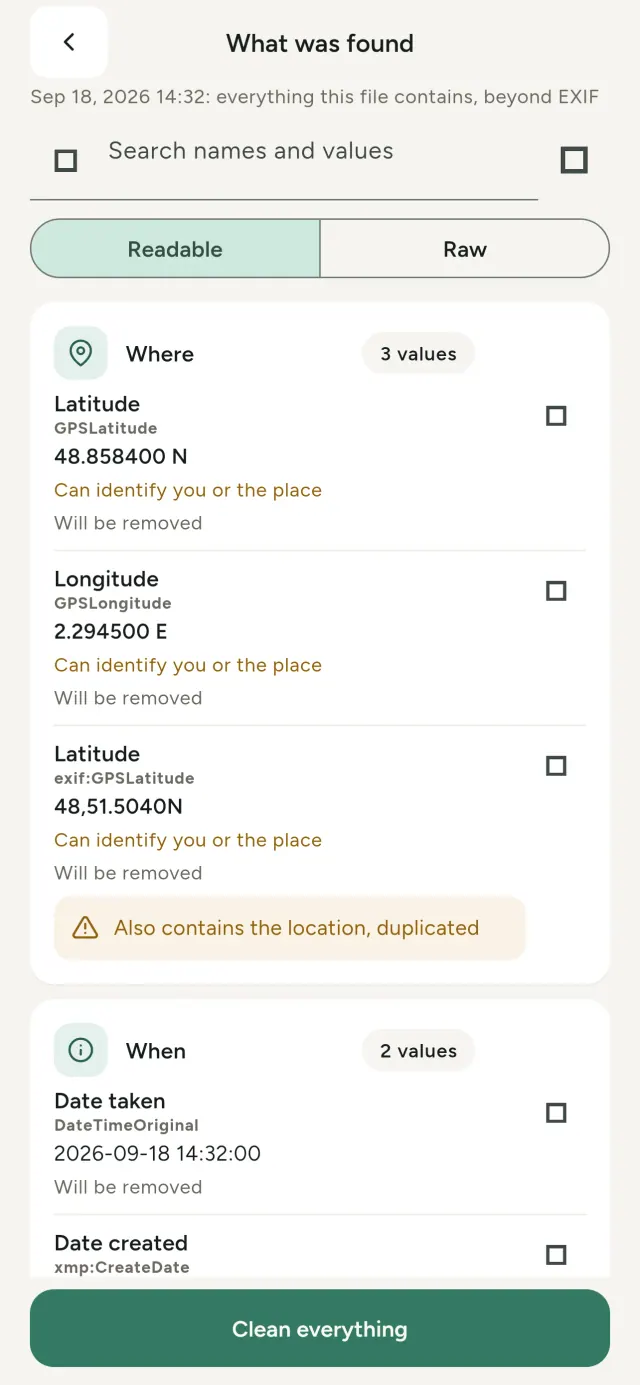
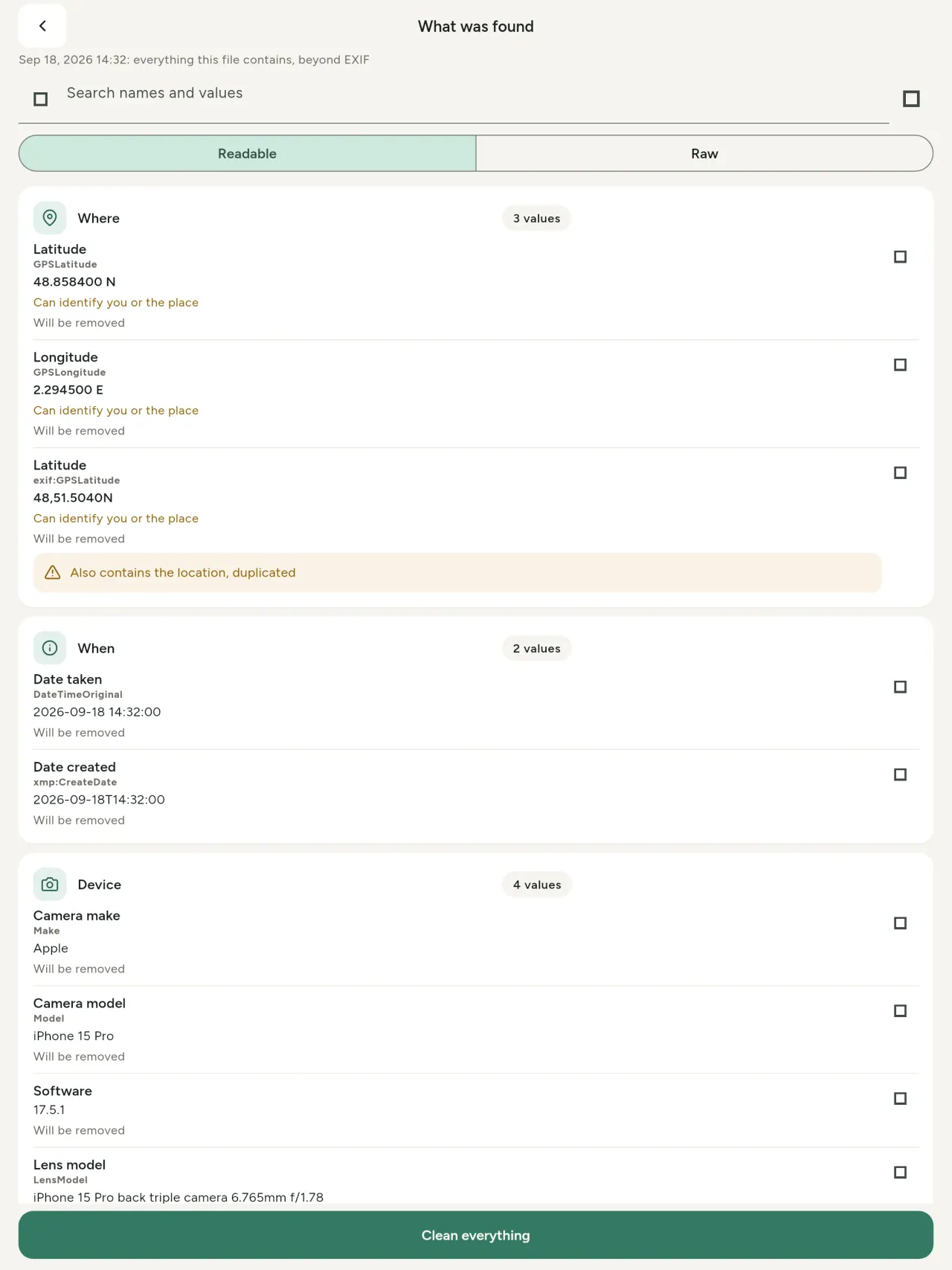
Kà. Olùfihàn metadata gidi
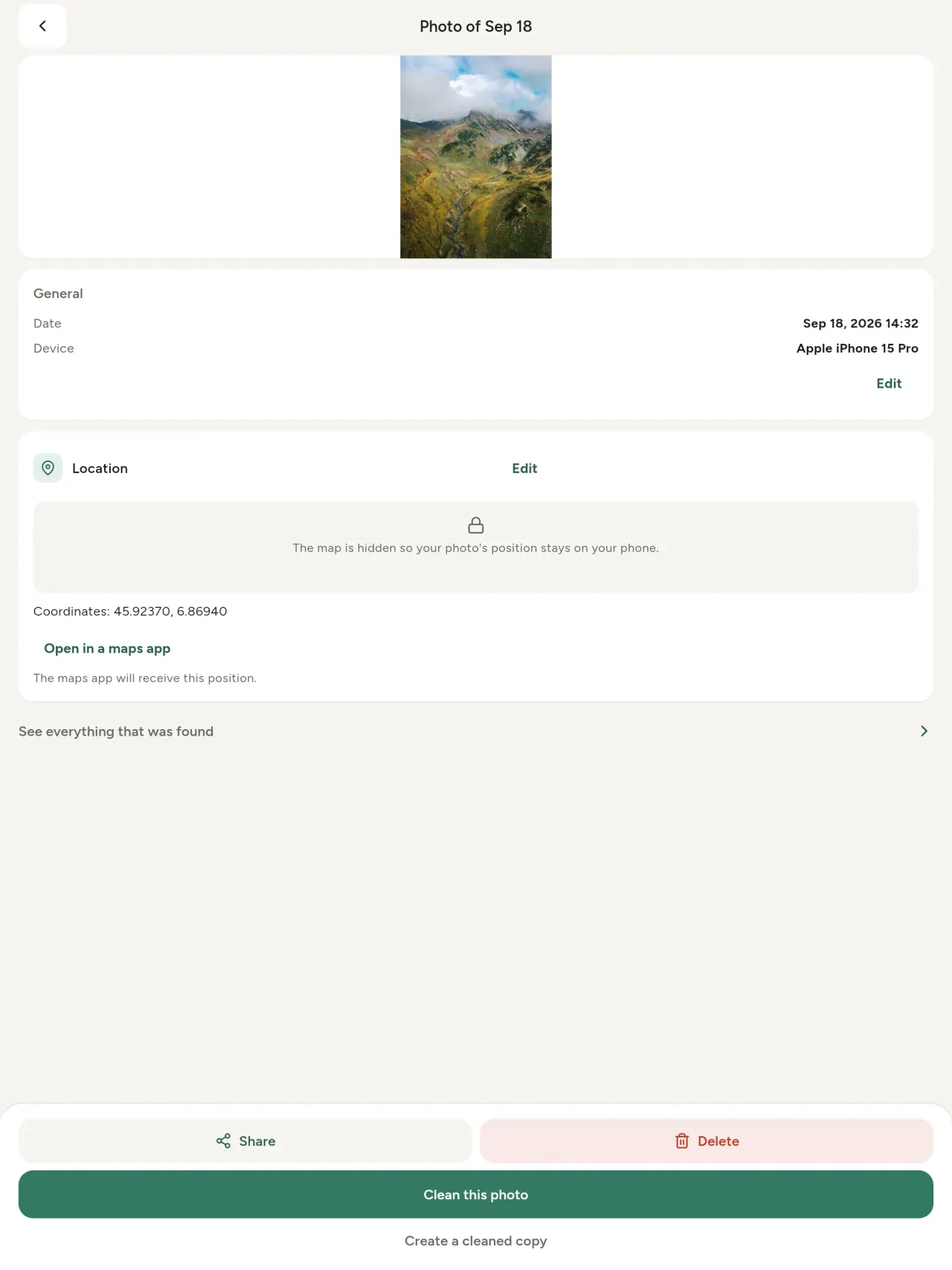
gbogbo iye tí a bá rí nínú fọ́tò tàbí fídíò (EXIF, IPTC, XMP, kóòdù fídíò, àkókò àti ìpinnu), a fi pẹ̀lú, a lè wá a, a sì lè kọ́pì rẹ, a sì fi àmì sí ohun tí a ó yọ. A tún mọ ìbílẹ̀ AI (C2PA, àwọn paramíta ìdá) náà.
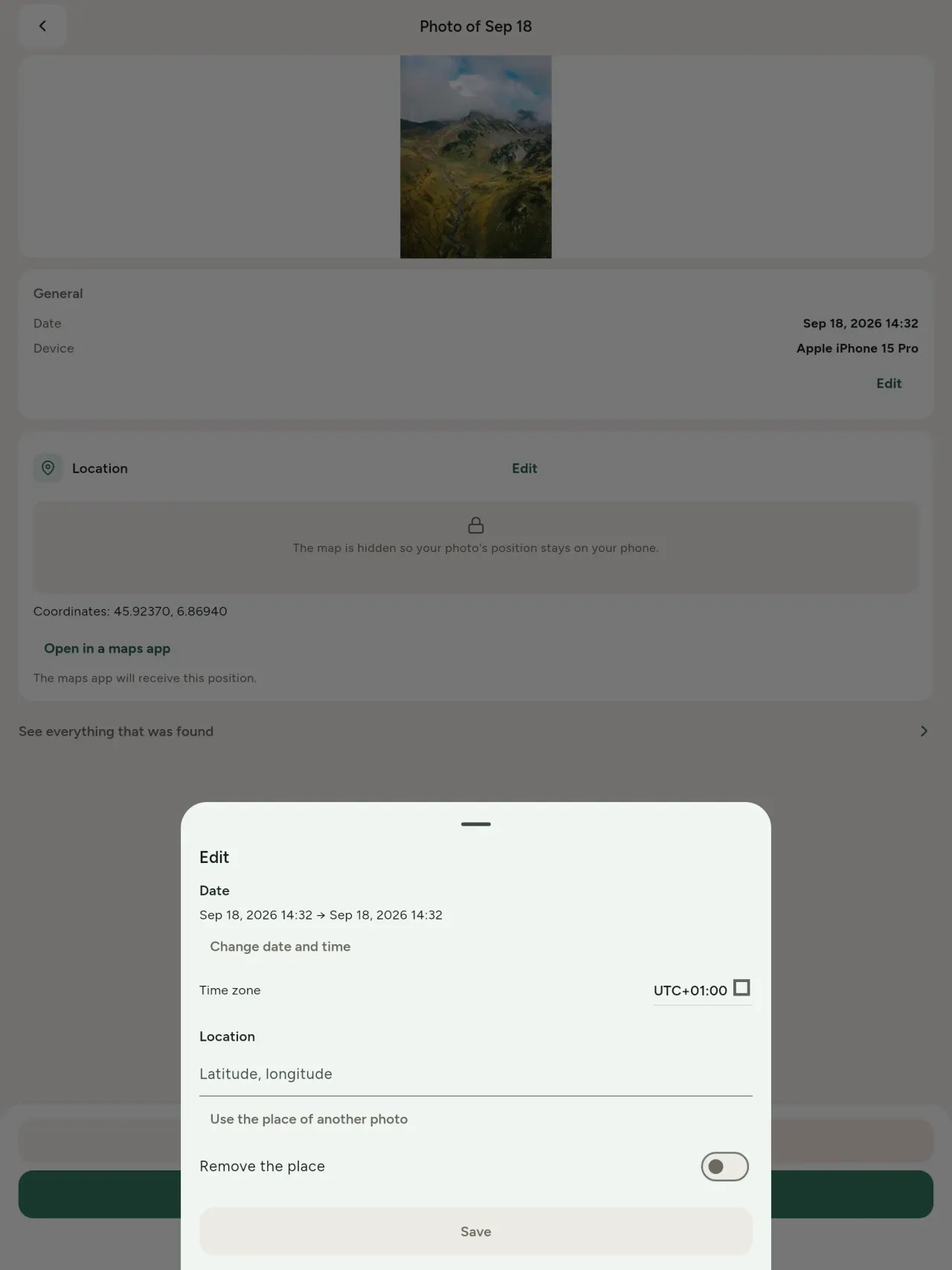
Ṣe àtúnṣe
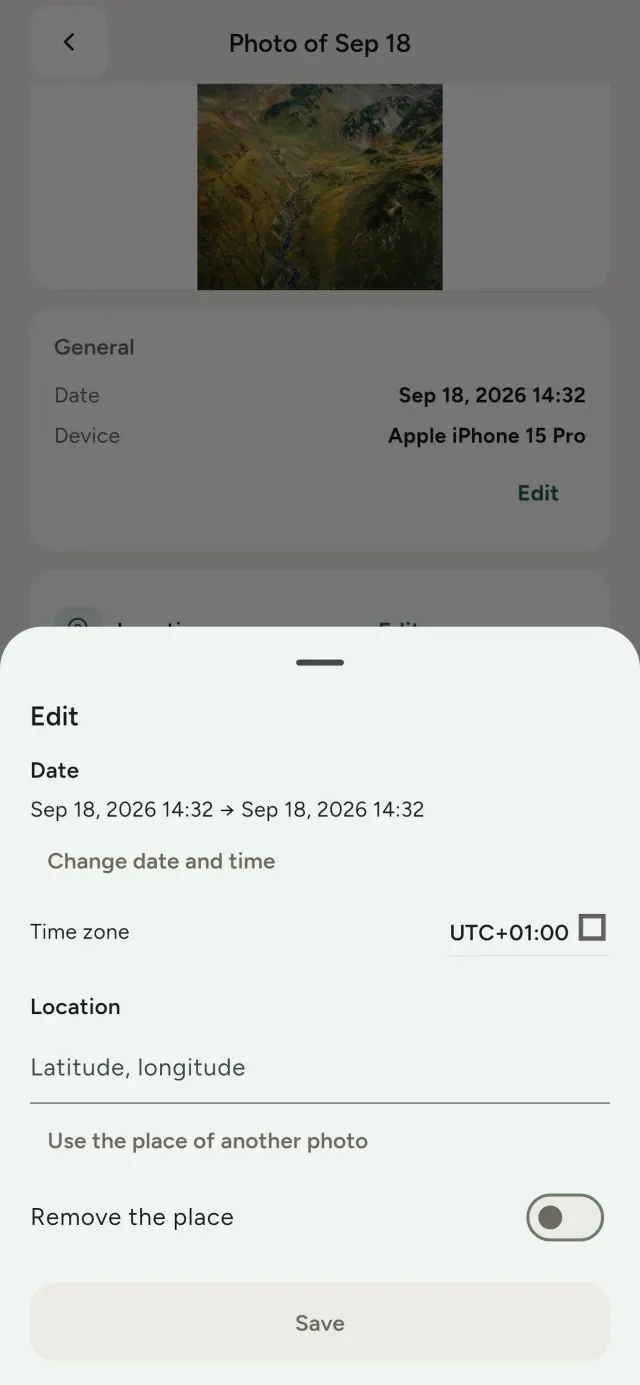
Ṣe àyípadà ọjọ àti ibi fọ́tò, àní fọ́tò tí kò ní metadata rárá. Kọ́pì ibi láti inú fọ́tò mìíràn, tàbí yàn ibi lórí maapu (a máa béèrè kọ́ọ̀kan ìgbà). Fi kí o tó yí padà wé ìgbà tí o bá ti yí i padà.
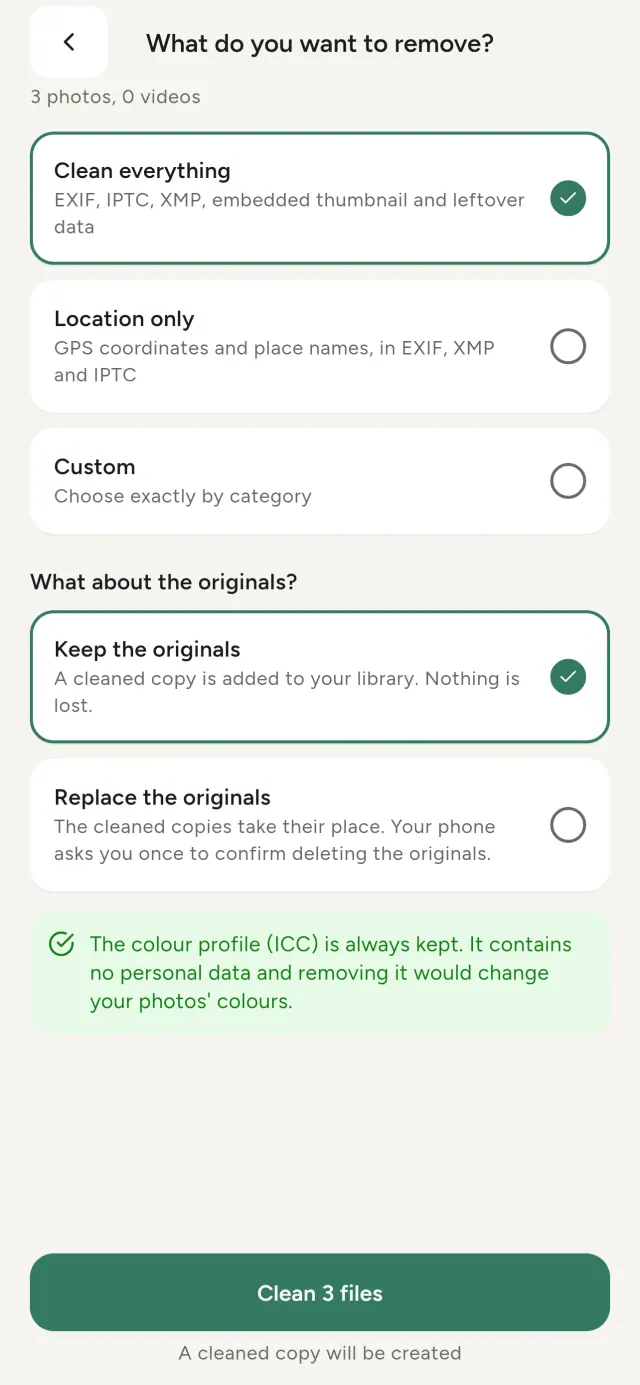
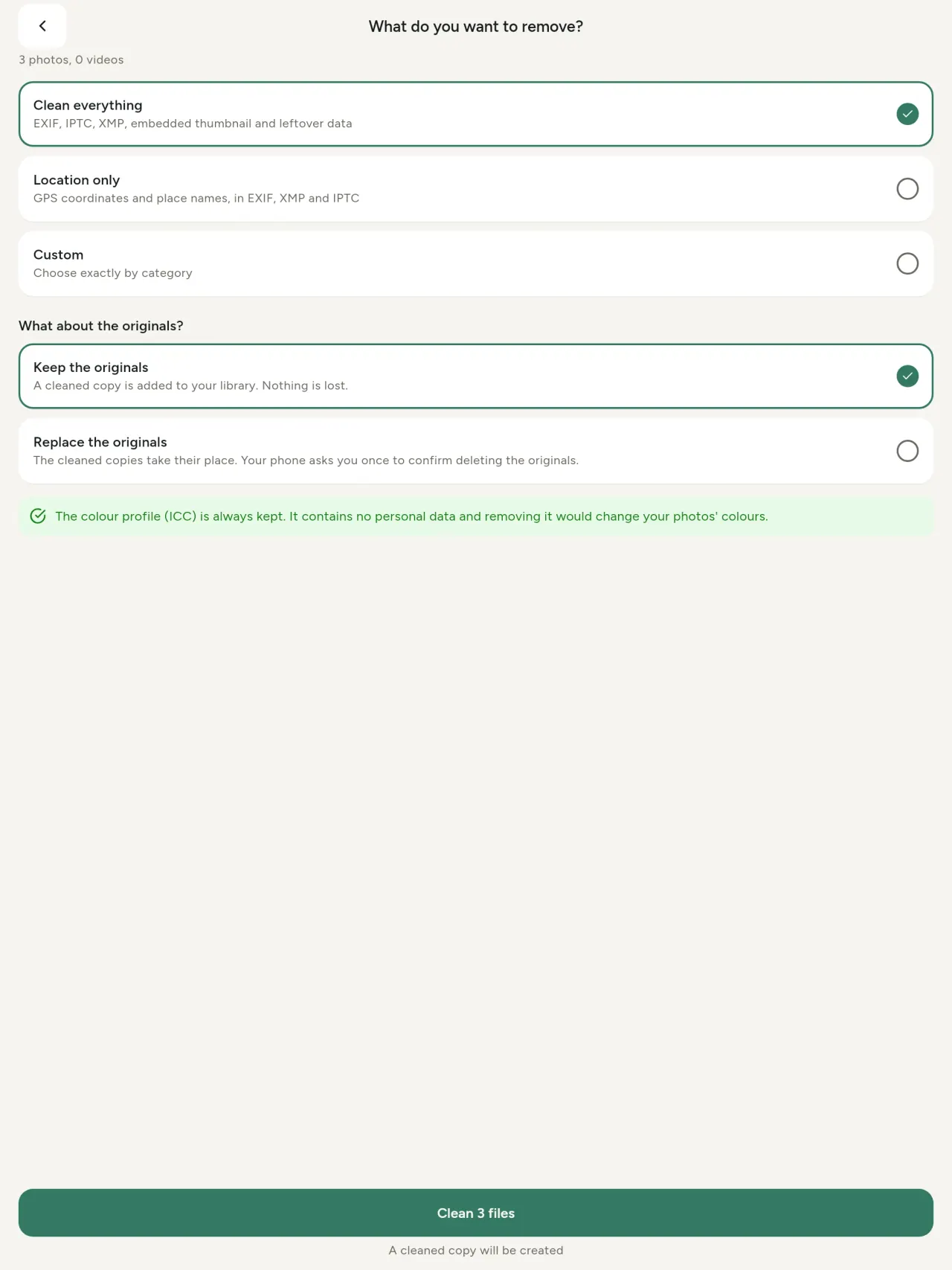
Yọ. Gbogbo metadata, ibi nìkan, tàbí ẹ̀ka tí o bá yàn
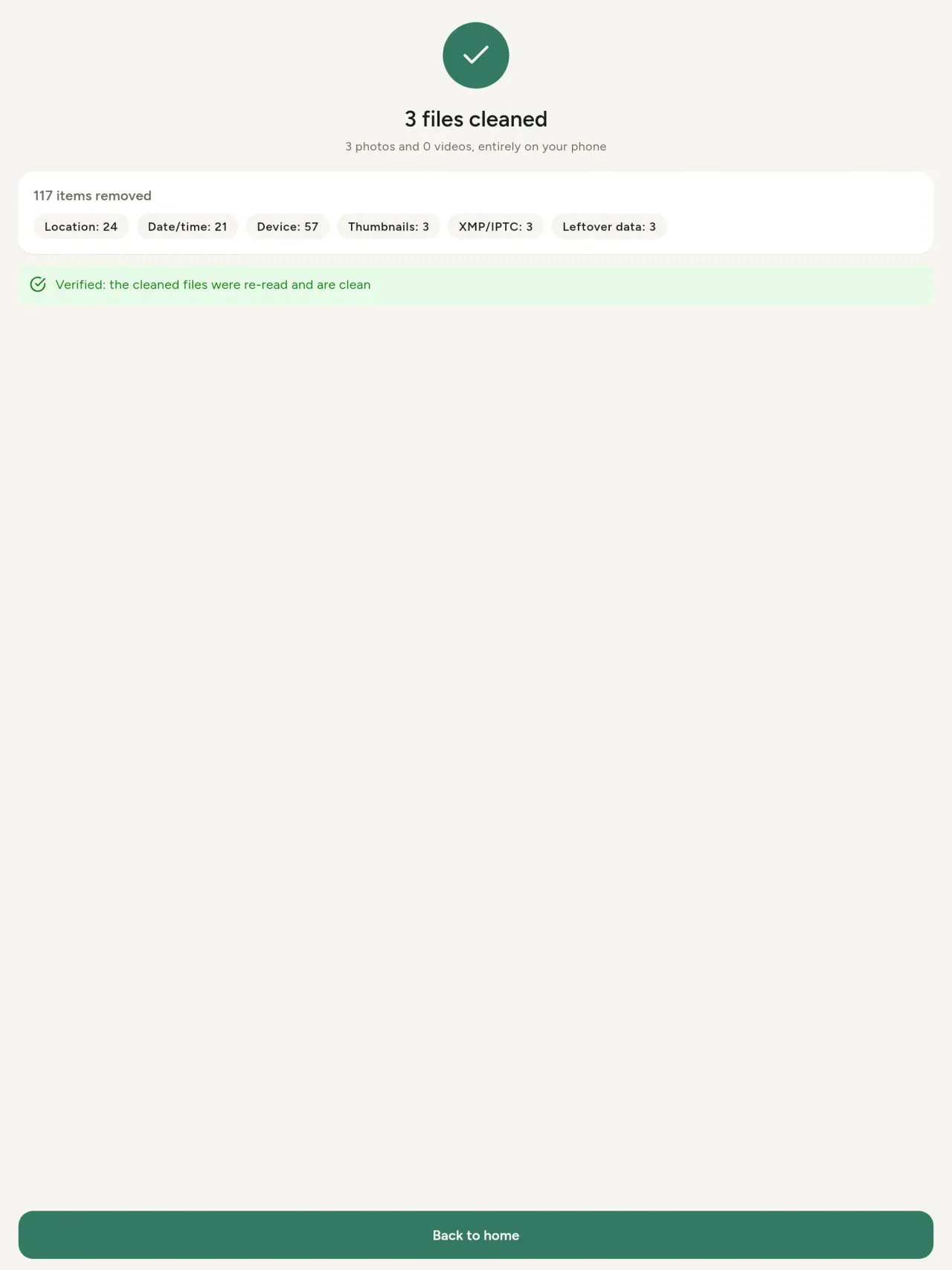
EXIF, IPTC àti XMP, àwòrán kéékèèké tí a fi sínú, àwọn àkíyèsí aṣèṣẹ́ kámẹ́rà, ìbílẹ̀ AI àti àwọn báítì tí díẹ̀ lára àwọn irinṣẹ́ àtúnṣe fi sílẹ̀ lẹ́yìn tí wọn bá gé fọ́tò. Wẹ́ àkójọpọ̀ àwọn fọ́tò nígbà kan náà, lẹ́yìn náà o lè pa àwòrán àbẹ́yẹ nípò tàbí rọ́pò wọn.
Ààbò ní kíákíá
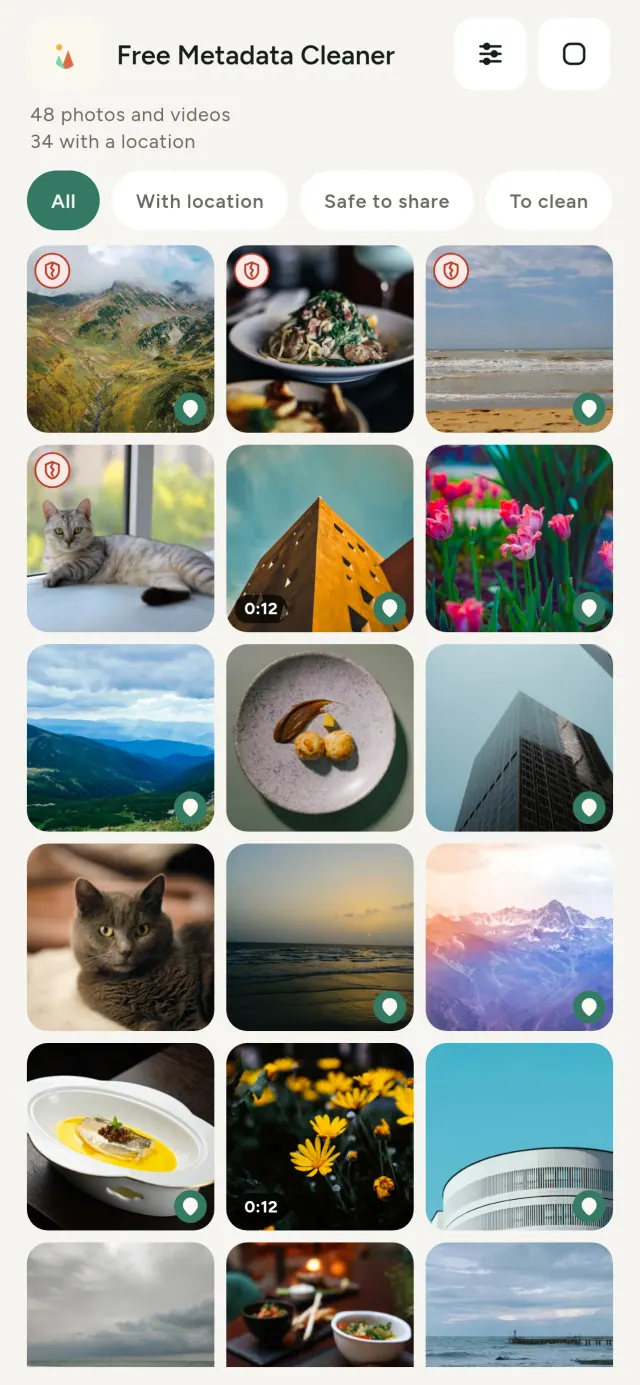
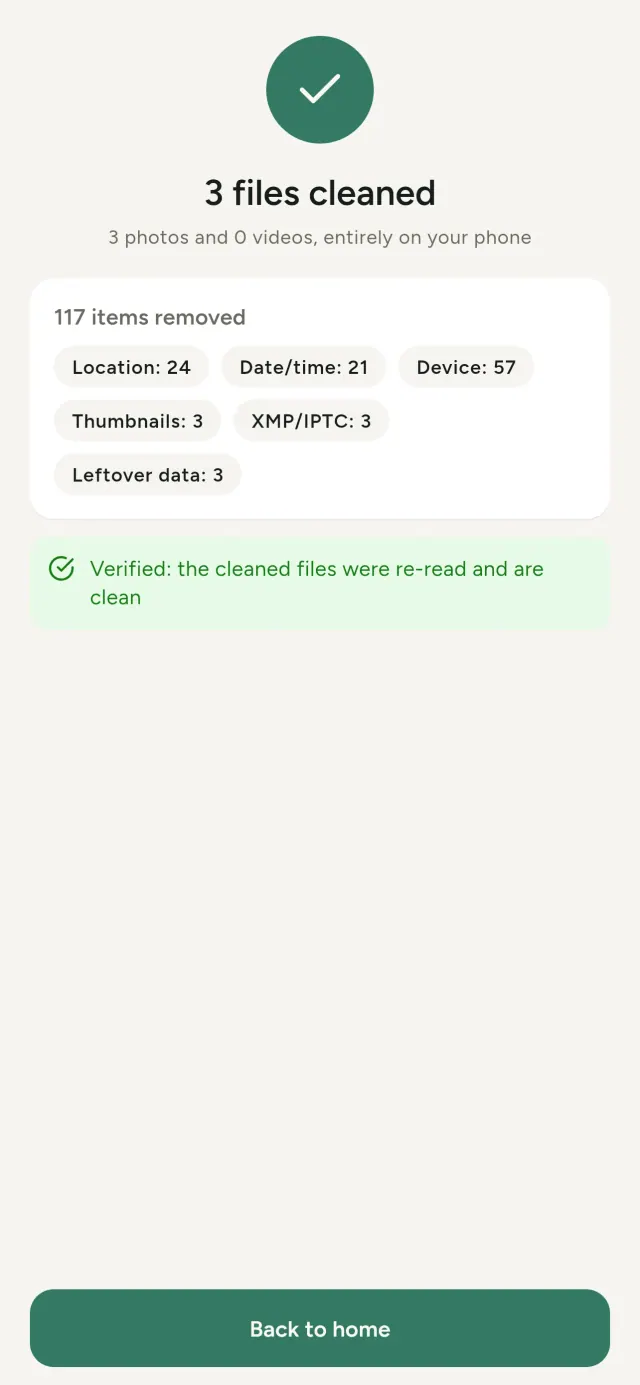
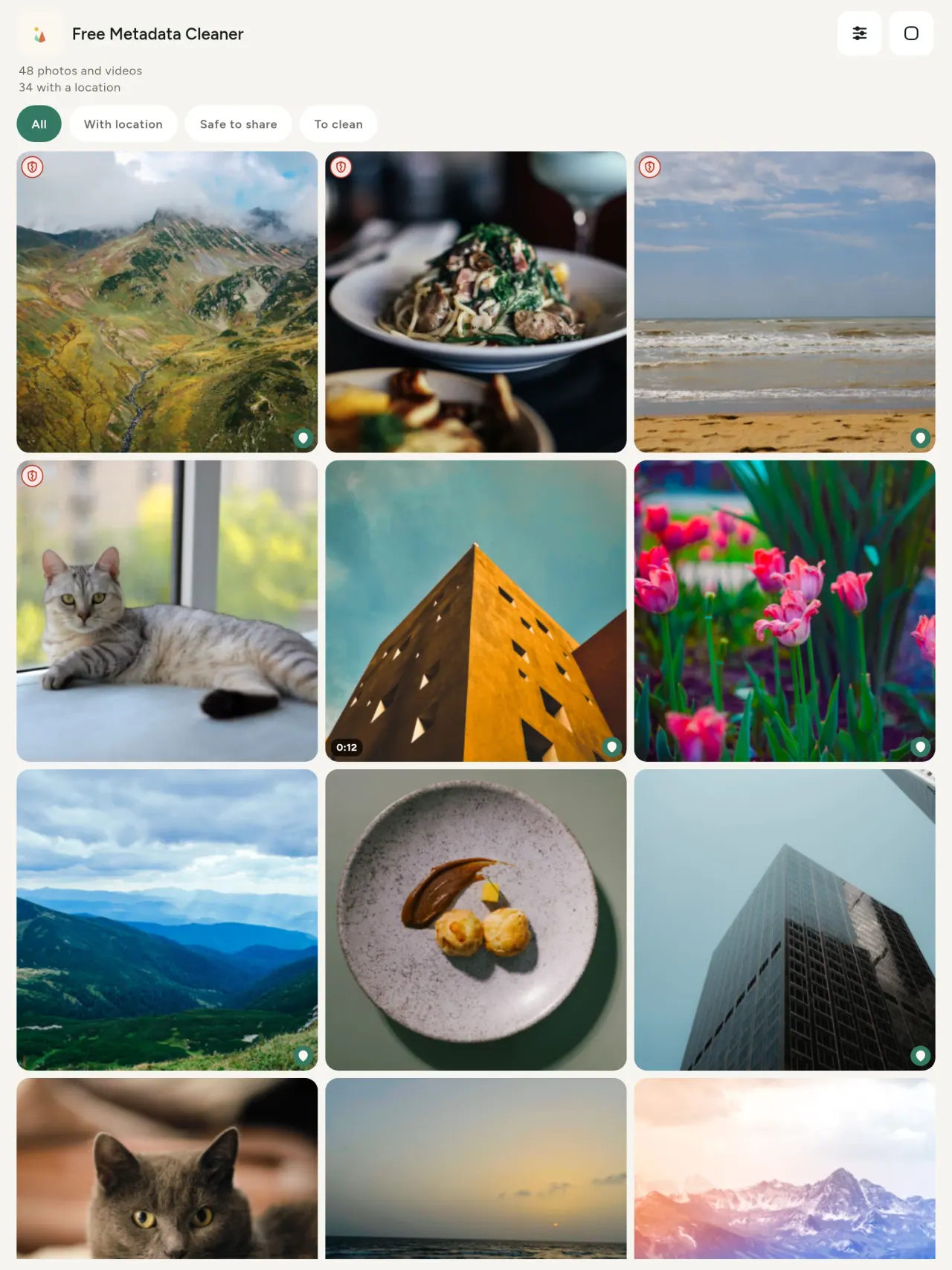
Àṣàáṣí aláwọ̀ ewé ń fi hàn pé metadata kò kù, àṣàáṣí pupa tí ó fà já ń fi hàn pé metadata ṣì wà.
Didùn àwòrán kò bàjẹ́
A kò tún kóòdù àwòrán mọ́: àwòrán gangan kì í bàjẹ́.
A ṣe é fún àsiri
A kà, a ṣe àtúnṣe, a sì ń wẹ́ fọ́tò lórí ètò rẹ lati ara rẹ. Kò sí àkàúnì, kò sí ìpolówó, kò sí ìtẹ̀jáde ìwádìí. Ohun kan ṣoṣo tí ó yàtọ̀ ni maapu aṣàyàn: tí o bá fẹ́ wo ibi fọ́tò, tàbí yàn ibi, àpamọ́ máa béèrè lọ́wọ́ rẹ kọ́ọ̀kan ìgbà, lẹ́yìn náà e o sì rán maapu láti OpenStreetMap (a kò rán fọ́tò náà rárá).
Fífẹ́, láìsí ìpolówó
Tí app bá ràn ọ́ lọ́wọ́, o lè fi ànfààní oríṣìíríṣìí gẹ́gẹ́ bí ìránwọ́ ààyè.
Tà ni ó yẹ
- Ẹnikẹ́ni tí ó fẹ́ mọ ohun tó wà nínú fọ́tò (ipo GPS, ọjọ́, kámerà) kí ó tó ránṣẹ́, tà, tàbí pín án.
- Àwọn tó fẹ́ ta nínú eto tita lórí ayelujara tí kò fẹ́ kó ibi tí wọ́n ń gbé hàn.
- Ìdílé àti ẹnikẹ́ni tó fẹ́ fi ibi ìpamọ́ rẹ jù sẹ́yìn pẹ̀lú fọ́tò tí a pín.
- Agbẹnusọ, agbára àwàdà àti ẹni tó wà nínú ewu, tí ó nílò láti pín àwòrán láì fi ipa sílẹ̀.
- Àwọn tí o rẹ̀ ẹ̀sùn data tó ń jáde fẹ́ gba àkóso itọ́ka tí àwòrán tirẹ ń ràjò.
Ìdí tí o fi yan Metadata Cleaner
- Mẹta ní app kan: kà ohun tí àwòrán tàbí fídiò fi hàn, ṣatúnṣe rẹ (ọjọ́ yà, ipo), yọ metadata pẹ̀lú títẹ́ díẹ̀.
- Gbogbo ohun ṣiṣẹ́ lórí fóònù. Àwọn fọ́tò rẹ kò ní jáde sí ibòmíràn.
- Àwòrán (JPEG, HEIC, PNG, WebP, GIF) àti fidio (MP4, MOV, 3GP).
Ohun tí app ṣi kò le ṣe
- Àwọn amúludàn tí a mẹ́nu kàn lókè nikan ni a gba. Ẹ̀dá míì máa bọ.
Ìlànà Pixeon. App Pixeon jẹ́ amúlúdáni àkọ́kọ́: kò sí àkọọlẹ, kò sí amúnisẹ̀yọ, data rẹ sì wa lórí fóònù. Bí app bá yá lórí nẹ́tíwọ́ọ̀kì, o jẹ́ nígbà tí o bà yàn pátá, àti àsà aṣiri ni a ṣe àtúnṣe ṣáájú.
Wo Metadata Cleaner nínú ìṣẹ́.
Gba Metadata Cleaner.
Ọfẹ́ lórí iPhone àti Android.
Ẹ̀dà 1.1
- App Store Tí yóò dé
- Google Play Tí yóò dé
Kí ló tún ṣẹlẹ̀
Ọ̀rọ̀ yìí wà ní Gẹ̀ẹ́sì kì í bá kó tí yàtọ́.
- Read: see exactly what a photo or video reveals (location, date, camera, AI provenance labels such as C2PA and generation parameters, video duration, codecs, resolution and frame rate).
- Edit: change the date a photo was taken and its location (JPEG, HEIC, AVIF), even on a photo with no metadata, reuse the location of another photo, or pick it on an OpenStreetMap map after your confirmation.
- Remove: clean metadata in a few taps, with a before and after view on the result screen.
- DNG photos are supported.
- Translations aligned across 91 languages.
Privacy policy
Ọ̀rọ̀ tó wà ni isalẹ yìí wà ní Gẹ̀ẹ́sì. Ẹ̀dà Gẹ̀ẹ́sì ni wà fún àkipẹ̀.
Last updated: 2026-11-03 · applies to version 1.1 and later
Policy versions: 1.1 and later (this text) · version 1.0 (still the policy of the app version 1.0). The version number of your app is shown at the bottom of its Settings screen.
Free Metadata Cleaner shows and removes the metadata hidden in your photos and videos (location, date and time, camera and lens details, thumbnails…). The short version: everything happens on your device, and we collect nothing.
What the app accesses
Your photo and video library, only after you grant permission (and, where your system requires it, the permission to read the location stored in your photos, so that it can be shown to you). The files you choose are read and cleaned on your device; the cleaned copy is saved to your library. If you choose to replace the originals, the system asks you to confirm before deleting them.
To show which photos are already clean, the app reads the metadata of the photos displayed on screen, on your device. This result is kept in memory only and is never stored.
What we collect
Nothing. No account, no analytics or usage tracking, no advertising or advertising identifiers, no crash or diagnostics reporting beyond what the app stores provide, and no third-party SDK that sends data anywhere. There is no Free Metadata Cleaner server. Cleaning a photo or video never uses the network, at all: turn on airplane mode and clean one to check for yourself. The only network request the app itself can ever make is described under “Location” below, and it only ever happens if you ask for it. The one other connection is the optional tip purchase, handled by the store (see “Optional support”).
Temporary files and history
The app keeps no history and no database. Temporary files created while cleaning are deleted after each item and purged when the app starts.
Deleted originals
Originals that are deleted remain in your system's trash (such as “Recently Deleted” or the trash) for about 30 days, with their metadata. The app cannot empty it: do it yourself if you need the originals gone at once.
iCloud and cloud photos
If a photo is stored in iCloud and not on your device, the operating system may download it before the app can process it. That transfer is made by the system, under the provider's own terms, not by the app.
Location
When a photo contains a location, the app shows the coordinates as text, which stays on your device. Three actions can send location information off your device, only when you choose them, each time: “Open in…” hands the coordinates to the maps application you select, under its own privacy policy; “Show the map” asks you to confirm first (“Showing the map sends this photo's position to a map service. Nothing else is sent.”), then loads a small map from OpenStreetMap for that one position; and, when you edit a photo's place, “Choose on the map” asks you to confirm first, then opens a full-screen map from OpenStreetMap. This map does not use your phone's location. As you move and zoom it, the app requests the map tiles of the area you are browsing, so OpenStreetMap receives the position of the area shown on screen, which starts on the photo's current place if it has one, and otherwise on a world view. The photo itself is never sent, and nothing is sent before you confirm. The place you choose on the map (or copy from another photo) is written into the photo's file only when you save, on your device. In every case OpenStreetMap receives, as with any web request, technical details like your IP address; it does not receive your name, an account, or anything else about you or your other photos. See OpenStreetMap's own privacy policy. Outside of these explicit actions, the app never sends a photo's location, or anything else, anywhere.
Optional support
The app is free. If you wish, you can leave a tip. On iPhone and in the Google Play version for Android, tips are in-app purchases processed by Apple or Google under their own terms and privacy policy; the app adds the Google Play billing permission for this, makes no network call itself, and receives no payment or personal details. Versions installed outside Google Play may instead open an external donation page in your browser, operated by a third party under its own privacy policy; nothing from the app is sent to it. A tip unlocks nothing.
Contact form on this website
If you write to us through this site, we use your message and the email address you optionally give only to reply. Bot protection is provided by Cloudflare and email delivery by Resend.
Language choice on this website
When you choose a language, or when this site opens a page in your browser's language, it stores
one small functional cookie (pxl, a language code, one year) so that your choice is
remembered. If this site suggests a page in your browser's language and you close that suggestion,
your browser also keeps a local note (pxl-banner-off, in local storage, 30 days) so the
suggestion does not come back. Neither identifies anyone, neither is used for tracking or advertising,
and neither is shared. You can delete them in your browser at any time.
Website statistics
This website uses Cloudflare Web Analytics to count visits (pages viewed, country, browser type, loading speed). It sets no cookie, does not use local storage, does not fingerprint your device, does not follow you across sites and does not build a profile of you. Search engines (for example Google Search Console) give us aggregated search statistics, without any data about individual visitors. Our own web server also counts the pages it serves: for each page it keeps the page address, the site or social network that sent you (only its name, or the campaign tag written in the link), the country, the type of device and whether the request came from a robot. It keeps no IP address, no identifier and no cookie, and these counts are anonymous. We use no advertising or other analytics service. None of this concerns the app itself, which collects nothing.
Children
The app is a general-purpose tool and is not directed at children.
Changes
An updated policy will be published at this URL with a new date above.
Contact
Questions about privacy: metadata-cleaner-contact@pixeon.net
Ẹ̀dà 1.0
- App Store Tẹ̀jade
- Google Play Tẹ̀jade
Kí ló tún ṣẹlẹ̀
Ọ̀rọ̀ yìí wà ní Gẹ̀ẹ́sì kì í bá kó tí yàtọ́.
- Cleans JPEG, HEIC, PNG, WebP, GIF, MP4, MOV and 3GP files, with no video re-encoding.
- "Safe to share" and "To clean" filters.
- New green design.
- Help screen with a FAQ.
- Settings: share, rate, feedback, unsupported formats.
- Optional tips.
Privacy policy, version 1.0
Ọ̀rọ̀ tó wà ni isalẹ yìí wà ní Gẹ̀ẹ́sì. Ẹ̀dà Gẹ̀ẹ́sì ni wà fún àkipẹ̀.
Applies to version 1.0 of the app (the first release). Later versions: current policy.
Free Metadata Cleaner shows and removes the metadata hidden in your photos and videos (location, date and time, camera and lens details, thumbnails…). The short version: everything happens on your device, and we collect nothing.
What the app accesses
Your photo and video library, only after you grant permission (and, where your system requires it, the permission to read the location stored in your photos, so that it can be shown to you). The files you choose are read and cleaned on your device; the cleaned copy is saved to your library. If you choose to replace the originals, the system asks you to confirm before deleting them.
To show which photos are already clean, the app reads the metadata of the photos displayed on screen, on your device. This result is kept in memory only and is never stored.
What we collect
Nothing. No account, no analytics or usage tracking, no advertising or advertising identifiers, no crash or diagnostics reporting beyond what the app stores provide, and no third-party SDK that sends data anywhere. There is no Free Metadata Cleaner server. Cleaning a photo or video never uses the network, at all: turn on airplane mode and clean one to check for yourself. The only network request the app itself can ever make is described under “Location” below, and it only ever happens if you ask for it. The one other connection is the optional tip purchase, handled by the store (see “Optional support”).
Temporary files and history
The app keeps no history and no database. Temporary files created while cleaning are deleted after each item and purged when the app starts.
Deleted originals
Originals that are deleted remain in your system's trash (such as “Recently Deleted” or the trash) for about 30 days, with their metadata. The app cannot empty it: do it yourself if you need the originals gone at once.
iCloud and cloud photos
If a photo is stored in iCloud and not on your device, the operating system may download it before the app can process it. That transfer is made by the system, under the provider's own terms, not by the app.
Location
When a photo contains a location, the app shows the coordinates as text, which stays on your device. Two actions send that one photo's position off your device, only when you choose them, each time: “Open in…” hands the coordinates to the maps application you select, under its own privacy policy; “Show the map” asks you to confirm first (“Showing the map sends this photo's position to a map service. Nothing else is sent.”), then loads a small map from OpenStreetMap for that one position. OpenStreetMap receives the coordinates and, as with any web request, technical details like your IP address; it does not receive your name, an account, or anything else about you or your other photos. See OpenStreetMap's own privacy policy. Outside of these two explicit actions, the app never sends a photo's location, or anything else, anywhere.
Optional support
The app is free. If you wish, you can leave a tip. On iPhone and in the Google Play version for Android, tips are in-app purchases processed by Apple or Google under their own terms and privacy policy; the app adds the Google Play billing permission for this, makes no network call itself, and receives no payment or personal details. Versions installed outside Google Play may instead open an external donation page in your browser, operated by a third party under its own privacy policy; nothing from the app is sent to it. A tip unlocks nothing.
Contact form on this website
If you write to us through this site, we use your message and the email address you optionally give only to reply. Bot protection is provided by Cloudflare and email delivery by Resend.
Language choice on this website
When you choose a language, or when this site opens a page in your browser's language, it stores
one small functional cookie (pxl, a language code, one year) so that your choice is
remembered. If this site suggests a page in your browser's language and you close that suggestion,
your browser also keeps a local note (pxl-banner-off, in local storage, 30 days) so the
suggestion does not come back. Neither identifies anyone, neither is used for tracking or advertising,
and neither is shared. You can delete them in your browser at any time.
Website statistics
This website uses Cloudflare Web Analytics to count visits (pages viewed, country, browser type, loading speed). It sets no cookie, does not use local storage, does not fingerprint your device, does not follow you across sites and does not build a profile of you. Search engines (for example Google Search Console) give us aggregated search statistics, without any data about individual visitors. Our own web server also counts the pages it serves: for each page it keeps the page address, the site or social network that sent you (only its name, or the campaign tag written in the link), the country, the type of device and whether the request came from a robot. It keeps no IP address, no identifier and no cookie, and these counts are anonymous. We use no advertising or other analytics service. None of this concerns the app itself, which collects nothing.
Children
The app is a general-purpose tool and is not directed at children.
Changes
An updated policy will be published at this URL with a new date above.
Contact
Questions about privacy: metadata-cleaner-contact@pixeon.net
Ìtìlẹ́yìn
Àtúnṣe tó kẹ́yìn: 2026-10-08
Free Metadata Cleaner jẹ́ app olómìnira kékeré. Àwọn ìbéèrè tí wọ́pọ̀ àti ìdáhùn wọn wà nísàlẹ̀.
A máa gbiyanju láti dáhùn ní ọ̀sẹ̀ díẹ̀. Jọ̀wọ́, sọ awoṣe ẹrọ rẹ, èyí tí ẹ̀rọ náà jẹ́ àti iṣẹ́ tí o ń ṣe. Jọ̀wọ́, má ṣe fi àwọn fọ́tò ikọkọ ránṣẹ́.
Kí ni app náà ń fipamọ́ tàbí ránṣẹ́ síbẹ?
Kò fipamọ́ nkan kankan. Kò ní ìtàn, àkọọlẹ́ tàbí olùsèví. Àlàyé wa ní ètò aṣiri.
Báwo ni mo ṣe le sọ fọ́tò di mímọ́?
- Ìbẹ̀rẹ̀ app, gba àyè sí ilé-ìkàwé rẹ nígbà tí a bá béèrè.
- Yan àwọn fọ́tò tàbí fíìmù tí o fẹ́ sọ di mímọ́.
- Yan ohun tí o fẹ́ yọ, àti bóyá o fẹ́ rọ́pò àyọkà tàbí ṣẹda ẹ̀dà mímọ́.
- Fẹ́sẹ̀mulẹ̀. Ìsúmúlò yóò sọ ohun tí a yọ sílẹ̀ àti àwọn fáìlì tí a kò le sọ di mímọ́.
Nibo ni ẹ̀dà mímọ́ ti ń lọ?
Sí ilé-ìkàwé fọ́tò rẹ. Ọjọ́ ilé-ìkàwé ti fọ́tò ìbẹ̀rẹ̀ wà, nítorí náà fọ́tò mímọ́ kì í bọ́ sí ipò àkójọ rẹ.
Mo yan “replace originals” ṣùgbọ́n oríjìnàlì ṣì wà.
Àwọn oríjìnàlì tí a pa wà nínú àpò idọti eto (gẹ́gẹ́ bí “Recently Deleted” tàbí àpò idọti) fún ọjọ́ mọ́kànlá, pẹ̀lú data wọn. Sọ àpò idọti di ofo láti yọ wọn kúrò lẹ́sẹ̀kẹsẹ̀. Bí o bá kọ ifọ̀rọ̀wánilẹ́nuwo piparẹ́ eto, àwọn oríjìnàlì náà wà, ṣùgbọ́n ẹ̀dà tí a sọ di mímọ́ tún ṣe é fi kún un.
Àwọn fáìlì wo ni app náà gbà?
Fọ́tò ní JPEG, HEIC, AVIF, PNG, WebP àti GIF, àti fíìmù ní MP4, MOV àti 3GP (àwọn fọ́ọ̀màtì míì ń bọ̀). Fáìlì tí app ko le sọ di mímọ́ yóò wà bí ó ti wà, a sí máa fi sí ìsúmúlò pẹ̀lú ìdí tí ko ṣe é se, láì dá ẹ̀ka yòókù dúró.
Kí ló dé tí app fi nílò ààyè sí àwọn fọ́tò mi?
Láti le fi àkójọ fọ́tò hàn fún ọ kí o le yan, àti láti fi ẹ̀dà mímọ́ pamọ́. Níbi tí eto rẹ ṣe béèrè e, app náà tún béèrè àṣẹ láti ka ipo tí fọ́tò fi pamọ́: láì ṣe béèh, eto máa fi ipò pamọ́, app náà kì yóò sì fi hàn ohun tí fọ́tò lè so nípa rẹ. Kò sí ohun tí a fi ranṣẹ́ s'ode.
Báwo ni mo ṣe le dájú pé kò sí nkan tó lọ kúrò ní fôònù mi?
Dán airplane mode wò kí o sọ fọ́tò di mímọ́: yóò ṣiṣẹ́ yíyàtọ̀ kankan. Àyípadà nikan ni maapu: bí o bá tẹ “Show the map” lórí ipo fọ́tò kan, kí o sì jẹ́wọ́, ipo yìí àdájọ́kan ni a rán sí OpenStreetMap láti fi maapu hàn, kò sí nkan míì. Wo “Location” lókè.
Àwọn èdè wo ló wà?
App náà wà ní Gẹ̀ẹ́sì, Faranṣé, Jámánì, Sípáníìṣì, Итàlì, Pọtugi àti Árábìkì. Ojúewé yìí wà nípò èdè míì, a ó sì fi àwọn èdè tuntun kún un laipẹ́.
Tíìlẹ́ṣẹ́ agbára
Metadata Cleaner wà lórí owó ọfẹ́, kò sí ipolówó. Bí ó bá wúlò fún ọ, o lè ṣèrànwọ́ sí ìdàgbàsókè rẹ (aṣàyàn):
Buy Me a CoffeeExpense tracker and family budget planner. Free phone sync, no account.
Tun wá láti ọdọ PixeonVaultMarkEncrypted document vault. Watermark documents, remove metadata before sharing.
Tun wá láti ọdọ PixeonLittle RelayBreastfeeding, sleep and starting solids tracker. No account, works offline.
Tun wá láti ọdọ PixeonMenuloopPlan the week's meals, build your grocery list and keep recipes with photos.