
Metadata Cleaner: Picha/Video
Kitazamaji, kihariri na kiondoa EXIF: metadata, mahali na tarehe.


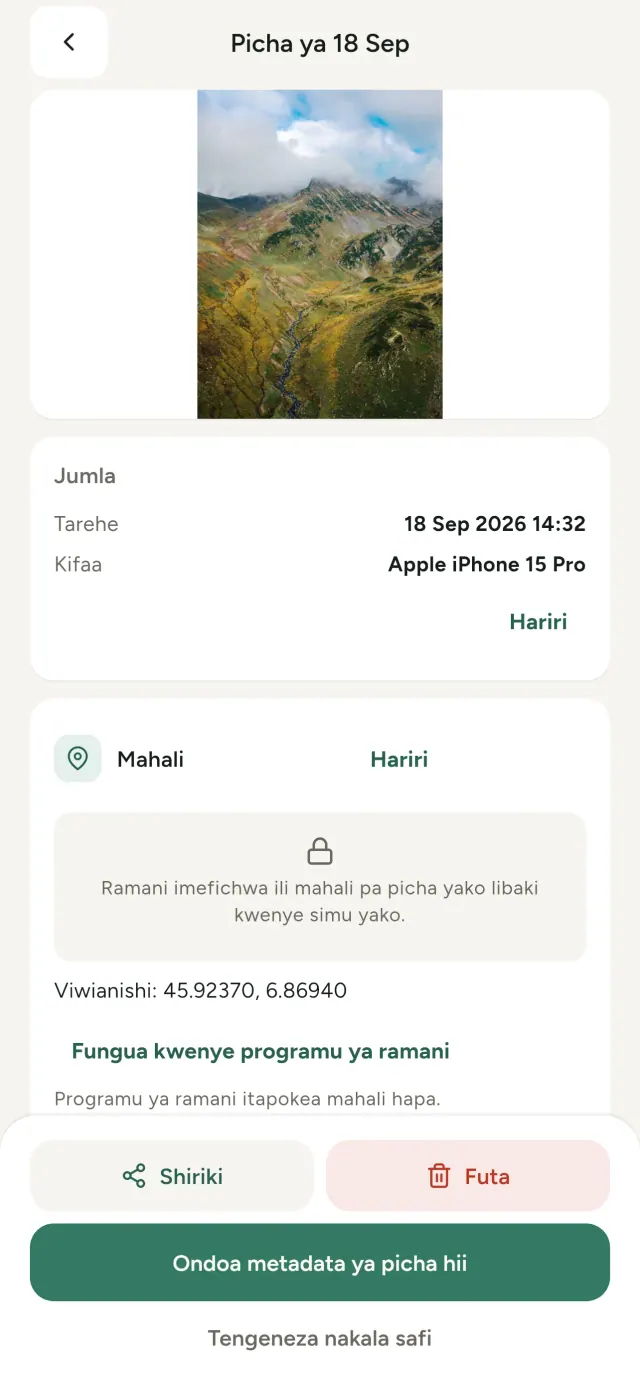
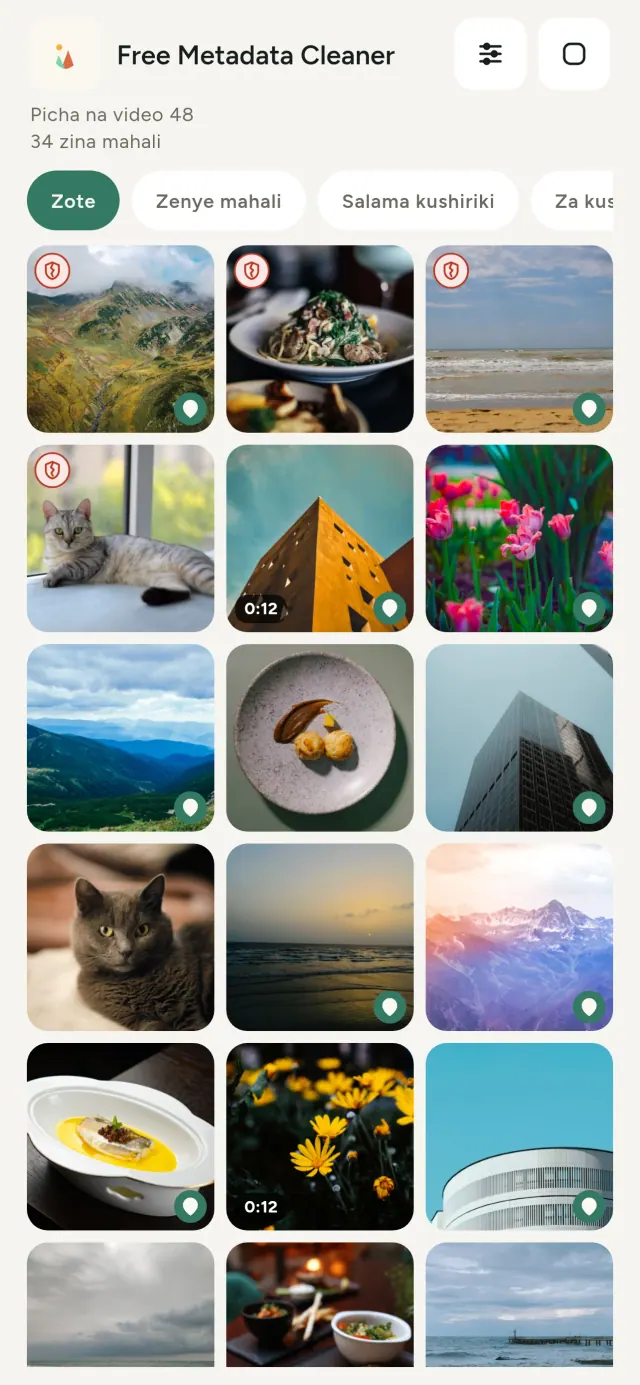
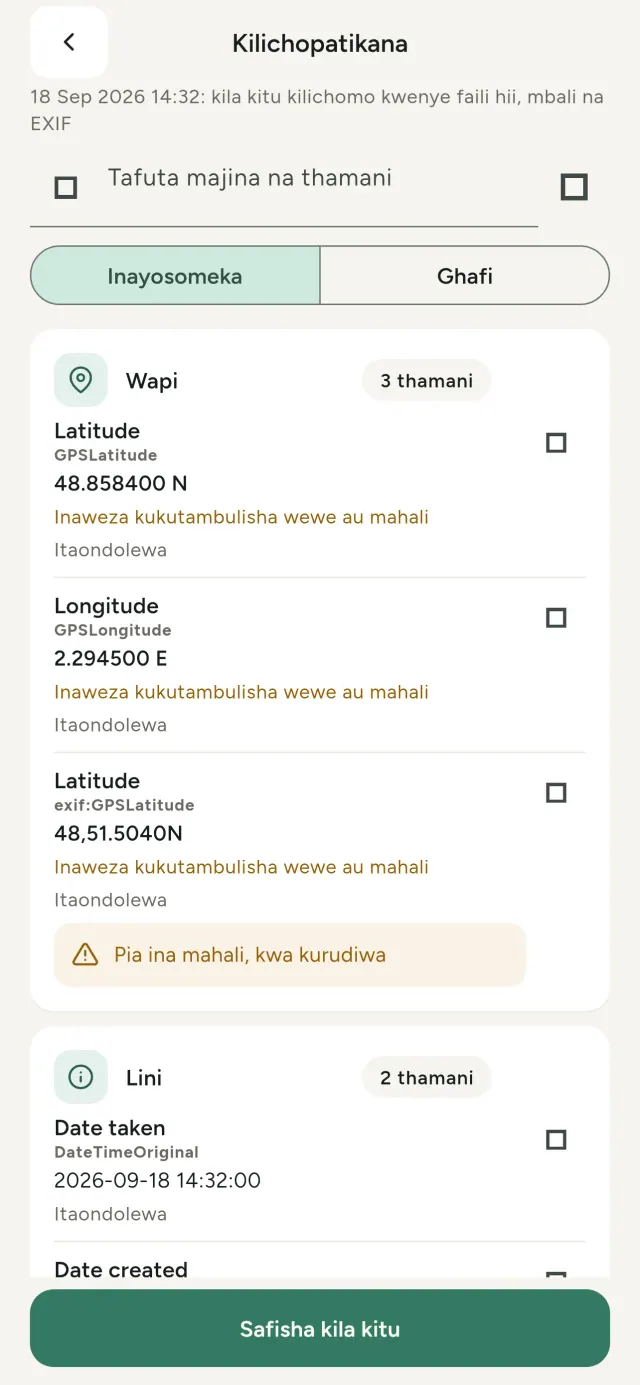
Kila picha unayopiga hubeba taarifa zilizofichwa: ilipopigwa, lini, kwa simu gani, na wakati mwingine onyesho dogo la picha asili. Ukiishiriki, yote hayo huenda nayo.
Metadata Cleaner hufanya mambo matatu kwenye simu yako: hukuonyesha vilivyomo kwenye picha na video zako, hukuwezesha kuvirekebisha na huviondoa.
Kile Metadata Cleaner inachofanya
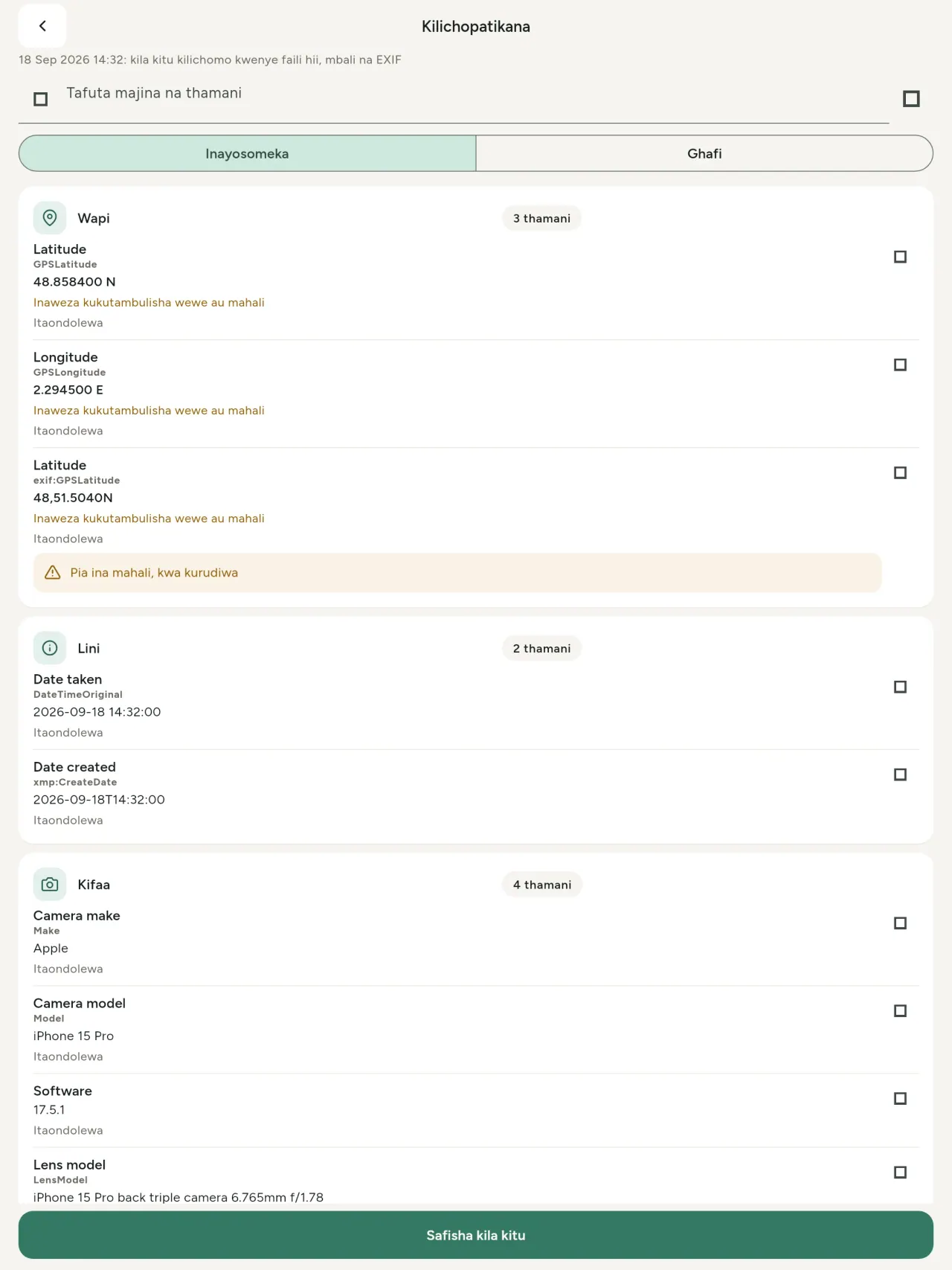
Soma
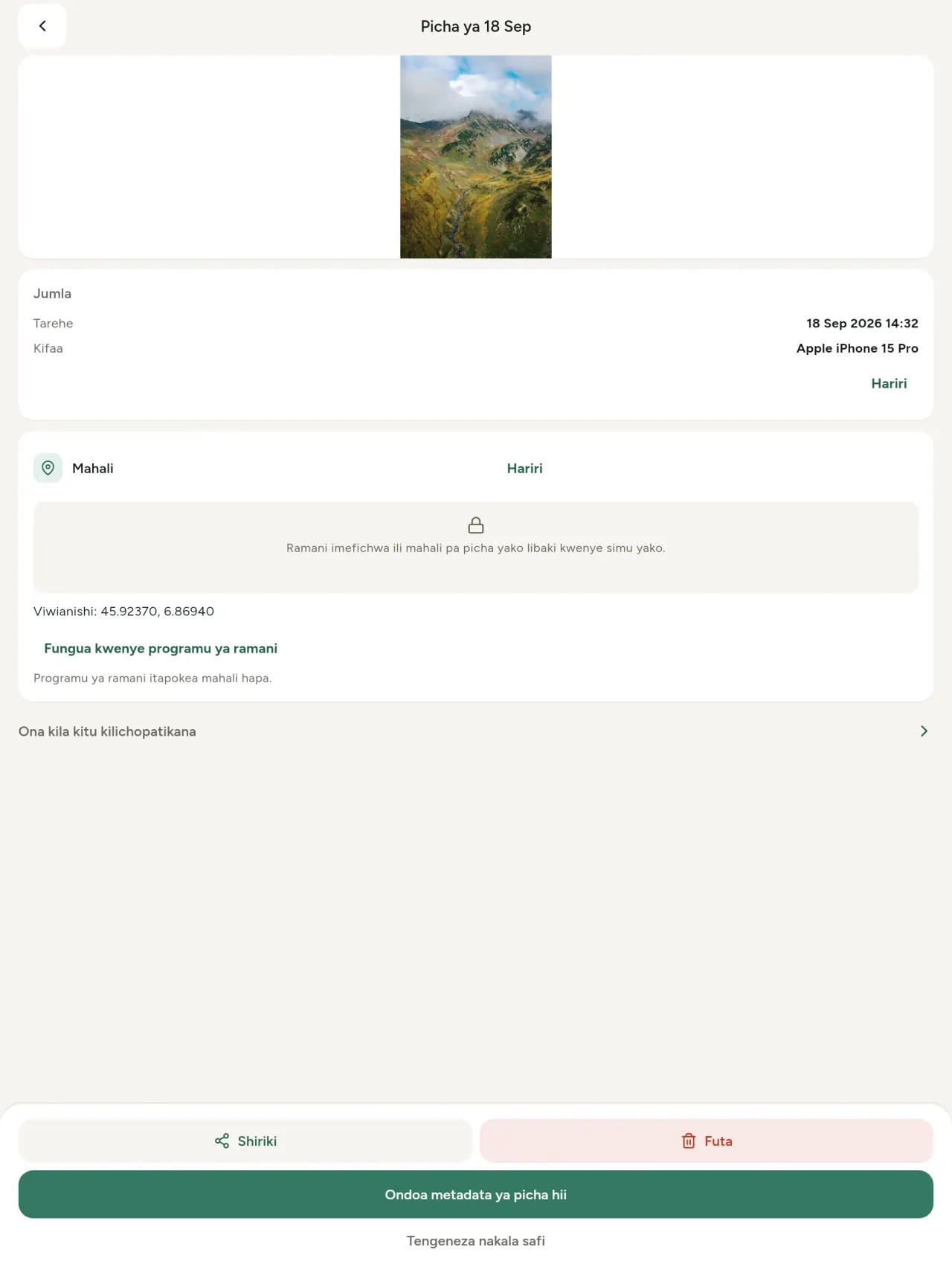
Kitazamaji halisi cha metadata: kila thamani kwenye picha au video (EXIF, IPTC, XMP, kodeki za video, muda na ubora), zimepangwa, zinaweza kutafutwa na kunakiliwa, huku kitakachoondolewa kikiwekewa alama. Hugundua pia asili ya AI (C2PA, vigezo vya uzalishaji).
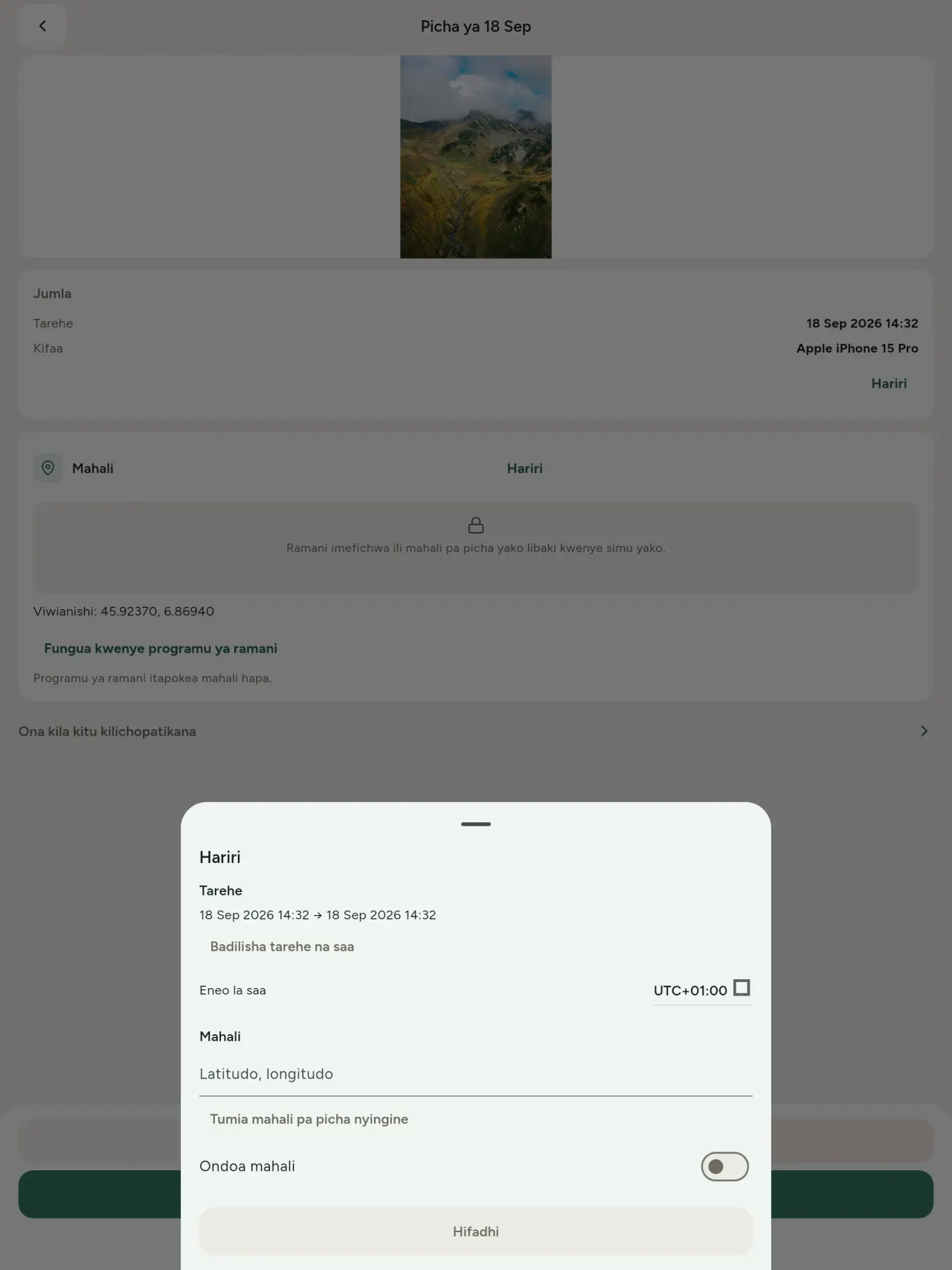
Hariri
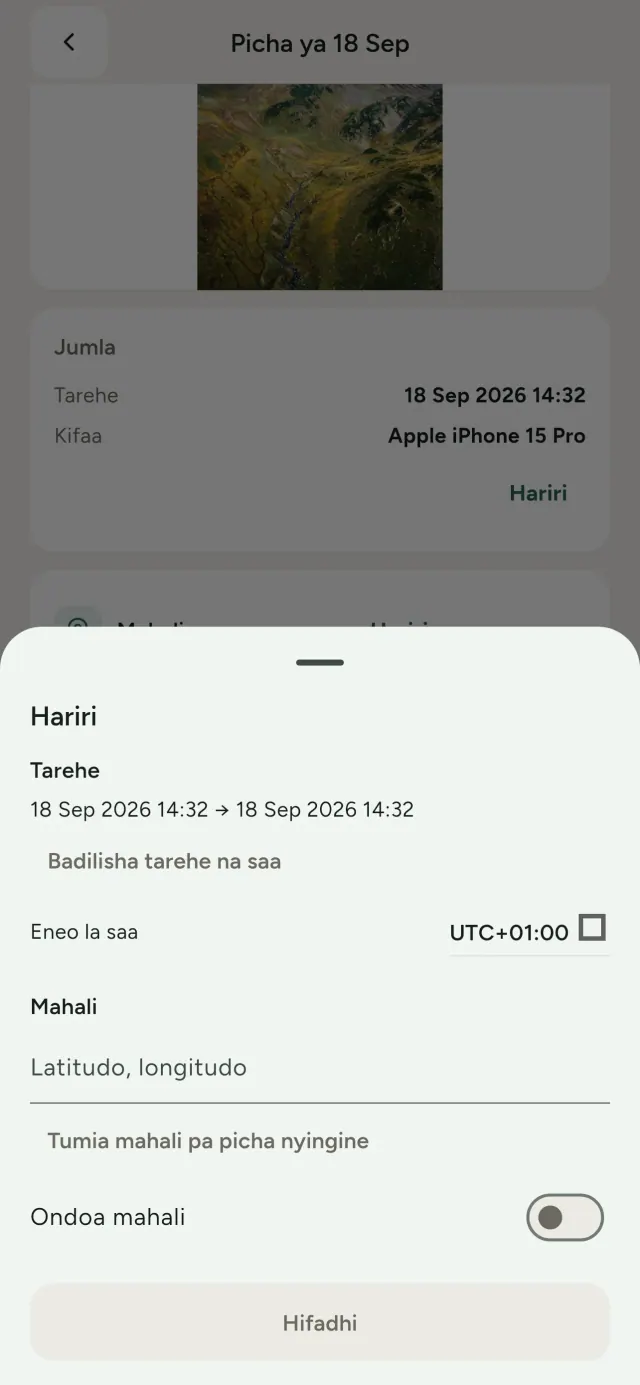
Badilisha tarehe na mahali pa picha, hata ikiwa haina metadata. Nakili mahali kutoka picha nyingine au chagua kwenye ramani (programu huuliza kwanza, kila mara). Linganisha kabla na baada.
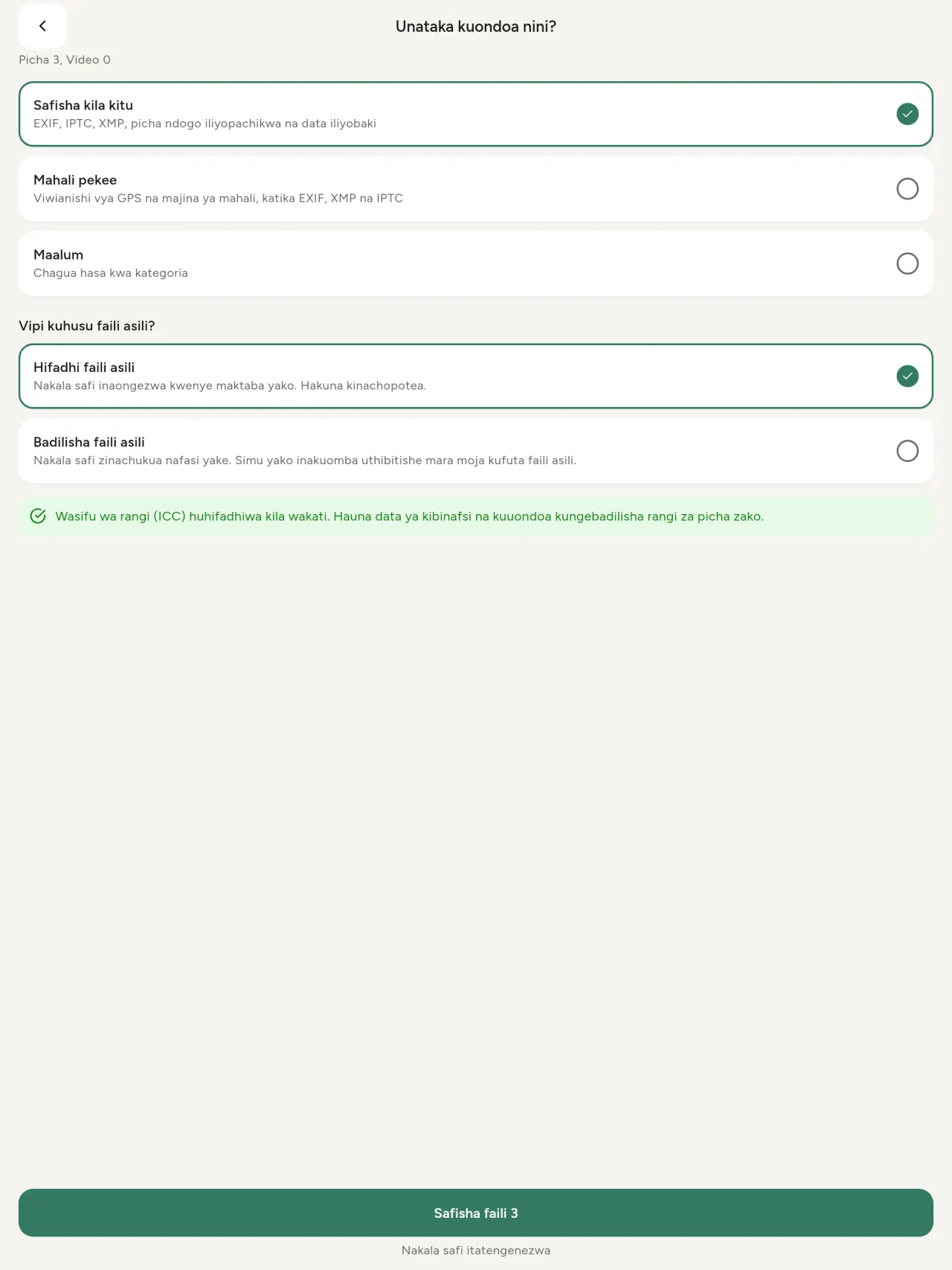
Ondoa
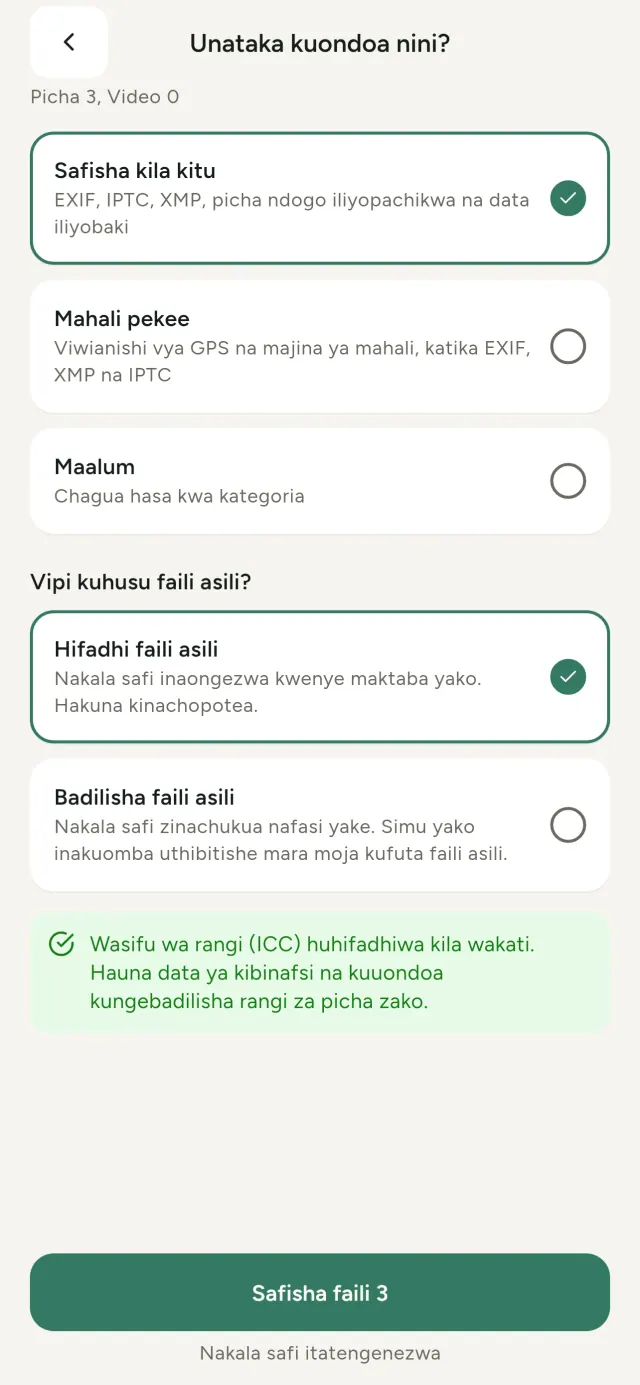
Kila kitu, mahali pekee au makundi unayochagua: data ya EXIF, IPTC na XMP, picha ndogo zilizopachikwa, maelezo ya mtengenezaji wa kamera, asili ya AI na baiti za ziada ambazo baadhi ya zana huacha baada ya kukata picha. Safisha uteuzi mzima mara moja, kisha hifadhi au badilisha picha asili.
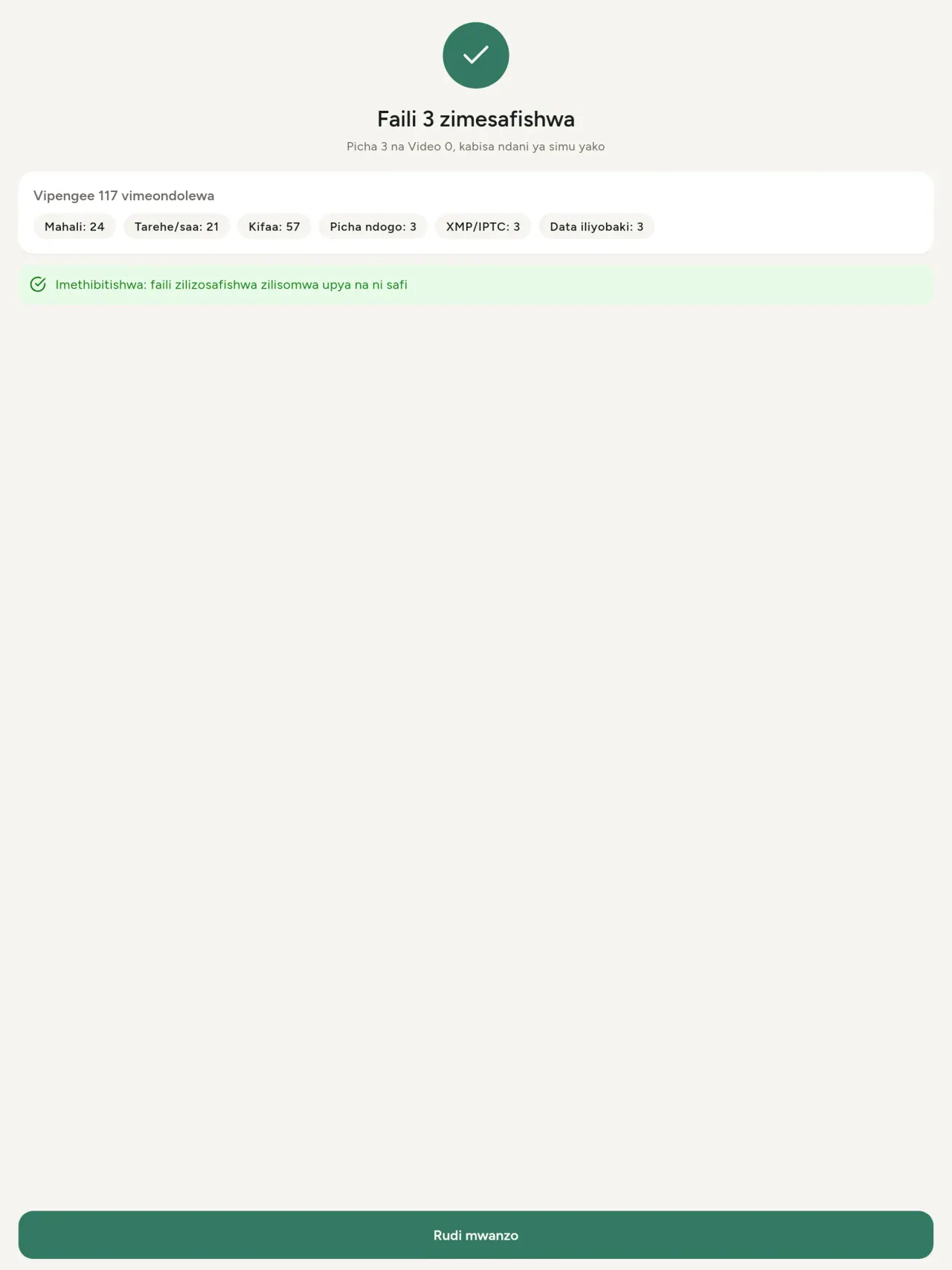
Salama kushiriki kwa mtazamo mmoja
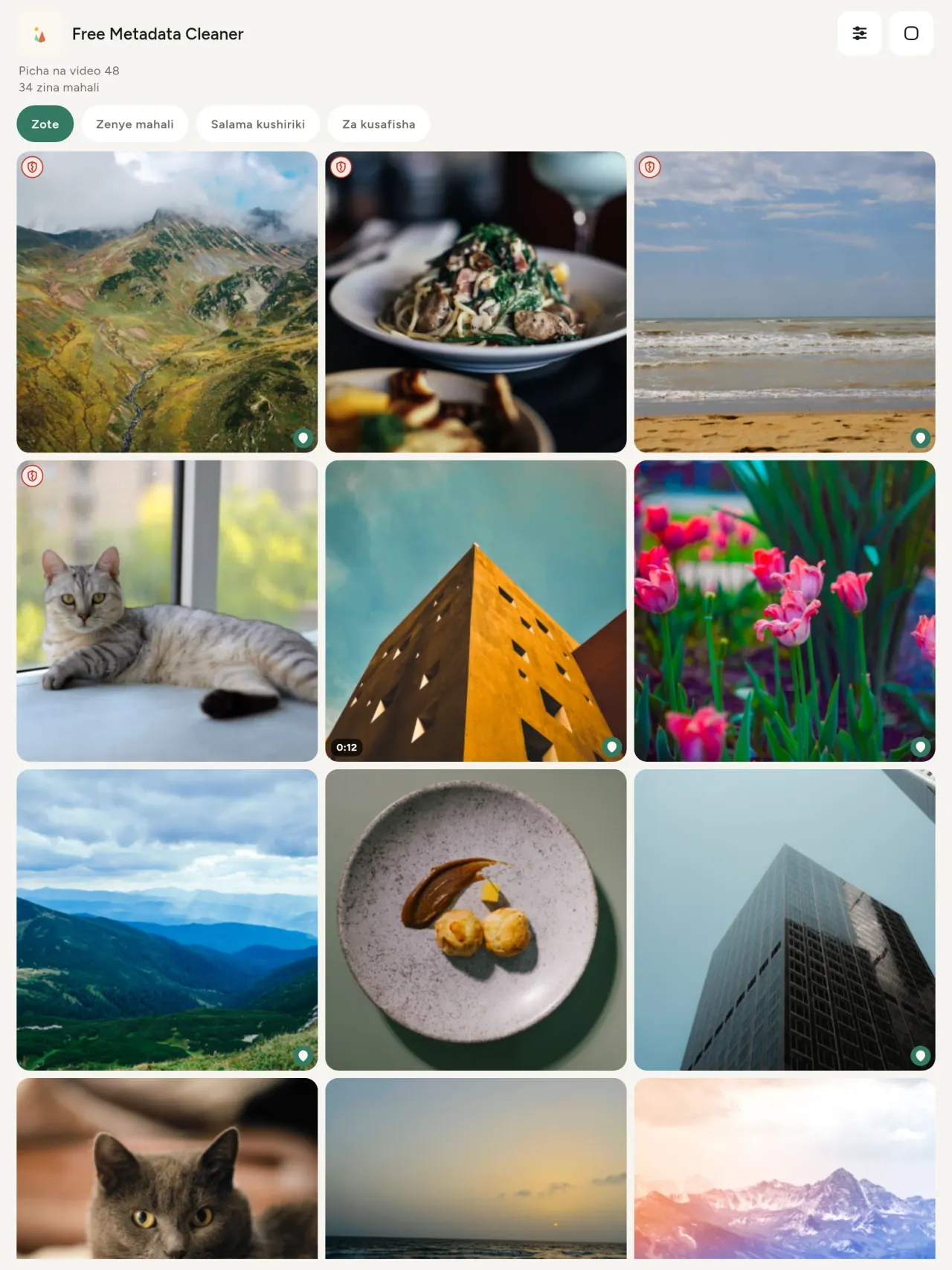
Ngao ya kijani huashiria faili isiyo na metadata; ngao nyekundu iliyopasuka huashiria iliyo nayo bado.
Hakuna upotevu wa ubora
Picha hazisimbwi upya: picha yenyewe haiguswi.
Faragha tangu mwanzo
Picha zako husomwa, kuhaririwa na kusafishwa kwenye kifaa chako. Hakuna akaunti, matangazo wala uchanganuzi. Isipokuwa moja la hiari ni ramani: ukiomba kuona mahali picha ilipo au kuchagua mahali, programu huuliza kwanza kila mara kisha hupakia ramani kutoka OpenStreetMap (picha yenyewe haitumwi).
Bila malipo na bila matangazo
Programu ikikusaidia, unaweza kuacha bakshishi ya hiari.
Ni ya nani
- Yeyote anayetaka kujua picha inafichua nini (eneo la GPS, tarehe, kamera) kabla ya kuichapisha, kuiuza au kuituma.
- Watu wanaouza kwenye tovuti za matangazo na hawataki kuonyesha wanapoishi.
- Wazazi na yeyote anayetaka kuweka mahali nyeti (nyumbani, shuleni, kazini) nje ya picha anazoshiriki.
- Waandishi wa habari, wanaharakati na watu walio hatarini, wanaohitaji kushiriki picha bila kuacha alama.
- Watu waliochoshwa na uvujaji wa data wanaotaka kurejesha udhibiti wa taarifa binafsi zinazobebwa na picha zao wenyewe.
Kwa nini uchague Metadata Cleaner
- Mambo matatu katika programu moja: soma kile picha au video inafichua, hariri (tarehe ilipopigwa, mahali), na ondoa metadata kwa mibofyo michache tu.
- Kila kitu hufanya kazi kwenye simu. Picha zako hazitumwi popote.
- Picha (JPEG, HEIC, PNG, WebP, GIF) na video (MP4, MOV, 3GP).
Ambacho programu haifanyi bado
- Ni miundo iliyoorodheshwa hapo juu pekee inayotumika. Miundo zaidi imepangwa.
Kanuni ya Pixeon. Programu za Pixeon huanza na kifaa chako: hakuna akaunti, hakuna ufuatiliaji, na data yako hubaki kwenye simu yako. Ikiwa programu itaunganishwa na mtandao wakati wowote, ni pale tu unapochagua kuwasha kipengele unachohitaji, na sera ya faragha husasishwa kabla ya kutolewa.
Ona Metadata Cleaner ikifanya kazi.
Pata Metadata Cleaner.
Bila malipo kwenye iPhone na Android.
SHA-256: A4:38:C9:B4:A9:3F:97:7B:E8:98:AD:B7:3B:30:5F:63:01:22:E0:D9:F8:CF:5D:2B:D7:4E:38:CB:9A:CF:5A:A2
Toleo 1.1
- App Store Inakuja
- Google Play Inakuja
Nini kipya
Maandishi haya yako kwa Kiingereza.
- Read: see exactly what a photo or video reveals (location, date, camera, AI provenance labels such as C2PA and generation parameters, video duration, codecs, resolution and frame rate).
- Edit: change the date a photo was taken and its location (JPEG, HEIC, AVIF), even on a photo with no metadata, reuse the location of another photo, or pick it on an OpenStreetMap map after your confirmation.
- Remove: clean metadata in a few taps, with a before and after view on the result screen.
- DNG photos are supported.
- Translations aligned across 91 languages.
Privacy policy
Maandishi yaliyo hapa chini yako kwa Kiingereza. Toleo la Kiingereza ndilo linalotumika.
Last updated: 2026-11-18 · applies to version 1.1 and later
Policy versions: 1.1 and later (this text) · version 1.0 (still the policy of the app version 1.0). The version number of your app is shown at the bottom of its Settings screen.
Free Metadata Cleaner shows and removes the metadata hidden in your photos and videos (location, date and time, camera and lens details, thumbnails…). The short version: everything happens on your device, and we collect nothing.
What the app accesses
Your photo and video library, only after you grant permission (and, where your system requires it, the permission to read the location stored in your photos, so that it can be shown to you). The files you choose are read and cleaned on your device; the cleaned copy is saved to your library. If you choose to replace the originals, the system asks you to confirm before deleting them.
To show which photos are already clean, the app reads the metadata of the photos displayed on screen, on your device. This result is kept in memory only and is never stored.
What we collect
Nothing. No account, no analytics or usage tracking, no advertising or advertising identifiers, no crash or diagnostics reporting beyond what the app stores provide, and no third-party SDK that sends data anywhere. There is no Free Metadata Cleaner server. Cleaning a photo or video never uses the network, at all: turn on airplane mode and clean one to check for yourself. The only network request the app itself can ever make is described under “Location” below, and it only ever happens if you ask for it. The one other connection is the optional tip purchase, handled by the store (see “Optional support”).
Temporary files and history
The app keeps no history and no database. Temporary files created while cleaning are deleted after each item and purged when the app starts.
Deleted originals
Originals that are deleted remain in your system's trash (such as “Recently Deleted” or the trash) for about 30 days, with their metadata. The app cannot empty it: do it yourself if you need the originals gone at once.
iCloud and cloud photos
If a photo is stored in iCloud and not on your device, the operating system may download it before the app can process it. That transfer is made by the system, under the provider's own terms, not by the app.
Location
When a photo contains a location, the app shows the coordinates as text, which stays on your device. Three actions can send location information off your device, only when you choose them, each time: “Open in…” hands the coordinates to the maps application you select, under its own privacy policy; “Show the map” asks you to confirm first (“Showing the map sends this photo's position to a map service. Nothing else is sent.”), then loads a small map from OpenStreetMap for that one position; and, when you edit a photo's place, “Choose on the map” asks you to confirm first, then opens a full-screen map from OpenStreetMap. This map does not use your phone's location. As you move and zoom it, the app requests the map tiles of the area you are browsing, so OpenStreetMap receives the position of the area shown on screen, which starts on the photo's current place if it has one, and otherwise on a world view. The photo itself is never sent, and nothing is sent before you confirm. The place you choose on the map (or copy from another photo) is written into the photo's file only when you save, on your device. In every case OpenStreetMap receives, as with any web request, technical details like your IP address; it does not receive your name, an account, or anything else about you or your other photos. See OpenStreetMap's own privacy policy. Outside of these explicit actions, the app never sends a photo's location, or anything else, anywhere.
Optional support
The app is free. If you wish, you can leave a tip. On iPhone and in the Google Play version for Android, tips are in-app purchases processed by Apple or Google under their own terms and privacy policy; the app adds the Google Play billing permission for this, makes no network call itself, and receives no payment or personal details. Versions installed outside Google Play may instead open an external donation page in your browser, operated by a third party under its own privacy policy; nothing from the app is sent to it. A tip unlocks nothing.
Contact form on this website
If you write to us through this site, we use your message and the email address you optionally give only to reply. Bot protection is provided by Cloudflare and email delivery by Resend.
Language choice on this website
When you choose a language, or when this site opens a page in your browser's language, it stores
one small functional cookie (pxl, a language code, one year) so that your choice is
remembered. If this site suggests a page in your browser's language and you close that suggestion,
your browser also keeps a local note (pxl-banner-off, in local storage, 30 days) so the
suggestion does not come back. Neither identifies anyone, neither is used for tracking or advertising,
and neither is shared. You can delete them in your browser at any time.
Website statistics
This website uses Cloudflare Web Analytics to count visits (pages viewed, country, browser type, loading speed). It sets no cookie, does not use local storage, does not fingerprint your device, does not follow you across sites and does not build a profile of you. Search engines (for example Google Search Console) give us aggregated search statistics, without any data about individual visitors. Our own web server also counts the pages and APK downloads it serves: for each request it keeps the address, the site or social network that sent you (only its name, or the campaign tag written in the link), the country, the type of device and whether the request came from a robot. It keeps no IP address, no identifier and no cookie, and these counts are anonymous. We use no advertising or other analytics service. None of this concerns the app itself, which collects nothing.
Children
The app is a general-purpose tool and is not directed at children.
Changes
An updated policy will be published at this URL with a new date above.
Contact
Questions about privacy: metadata-cleaner-contact@pixeon.net
Toleo 1.0
- App Store Imechapishwa
- Google Play Imechapishwa
Nini kipya
Maandishi haya yako kwa Kiingereza.
- Cleans JPEG, HEIC, PNG, WebP, GIF, MP4, MOV and 3GP files, with no video re-encoding.
- "Safe to share" and "To clean" filters.
- New green design.
- Help screen with a FAQ.
- Settings: share, rate, feedback, unsupported formats.
- Optional tips.
Privacy policy, version 1.0
Maandishi yaliyo hapa chini yako kwa Kiingereza. Toleo la Kiingereza ndilo linalotumika.
Applies to version 1.0 of the app (the first release). Later versions: current policy.
Free Metadata Cleaner shows and removes the metadata hidden in your photos and videos (location, date and time, camera and lens details, thumbnails…). The short version: everything happens on your device, and we collect nothing.
What the app accesses
Your photo and video library, only after you grant permission (and, where your system requires it, the permission to read the location stored in your photos, so that it can be shown to you). The files you choose are read and cleaned on your device; the cleaned copy is saved to your library. If you choose to replace the originals, the system asks you to confirm before deleting them.
To show which photos are already clean, the app reads the metadata of the photos displayed on screen, on your device. This result is kept in memory only and is never stored.
What we collect
Nothing. No account, no analytics or usage tracking, no advertising or advertising identifiers, no crash or diagnostics reporting beyond what the app stores provide, and no third-party SDK that sends data anywhere. There is no Free Metadata Cleaner server. Cleaning a photo or video never uses the network, at all: turn on airplane mode and clean one to check for yourself. The only network request the app itself can ever make is described under “Location” below, and it only ever happens if you ask for it. The one other connection is the optional tip purchase, handled by the store (see “Optional support”).
Temporary files and history
The app keeps no history and no database. Temporary files created while cleaning are deleted after each item and purged when the app starts.
Deleted originals
Originals that are deleted remain in your system's trash (such as “Recently Deleted” or the trash) for about 30 days, with their metadata. The app cannot empty it: do it yourself if you need the originals gone at once.
iCloud and cloud photos
If a photo is stored in iCloud and not on your device, the operating system may download it before the app can process it. That transfer is made by the system, under the provider's own terms, not by the app.
Location
When a photo contains a location, the app shows the coordinates as text, which stays on your device. Two actions send that one photo's position off your device, only when you choose them, each time: “Open in…” hands the coordinates to the maps application you select, under its own privacy policy; “Show the map” asks you to confirm first (“Showing the map sends this photo's position to a map service. Nothing else is sent.”), then loads a small map from OpenStreetMap for that one position. OpenStreetMap receives the coordinates and, as with any web request, technical details like your IP address; it does not receive your name, an account, or anything else about you or your other photos. See OpenStreetMap's own privacy policy. Outside of these two explicit actions, the app never sends a photo's location, or anything else, anywhere.
Optional support
The app is free. If you wish, you can leave a tip. On iPhone and in the Google Play version for Android, tips are in-app purchases processed by Apple or Google under their own terms and privacy policy; the app adds the Google Play billing permission for this, makes no network call itself, and receives no payment or personal details. Versions installed outside Google Play may instead open an external donation page in your browser, operated by a third party under its own privacy policy; nothing from the app is sent to it. A tip unlocks nothing.
Contact form on this website
If you write to us through this site, we use your message and the email address you optionally give only to reply. Bot protection is provided by Cloudflare and email delivery by Resend.
Language choice on this website
When you choose a language, or when this site opens a page in your browser's language, it stores
one small functional cookie (pxl, a language code, one year) so that your choice is
remembered. If this site suggests a page in your browser's language and you close that suggestion,
your browser also keeps a local note (pxl-banner-off, in local storage, 30 days) so the
suggestion does not come back. Neither identifies anyone, neither is used for tracking or advertising,
and neither is shared. You can delete them in your browser at any time.
Website statistics
This website uses Cloudflare Web Analytics to count visits (pages viewed, country, browser type, loading speed). It sets no cookie, does not use local storage, does not fingerprint your device, does not follow you across sites and does not build a profile of you. Search engines (for example Google Search Console) give us aggregated search statistics, without any data about individual visitors. Our own web server also counts the pages and APK downloads it serves: for each request it keeps the address, the site or social network that sent you (only its name, or the campaign tag written in the link), the country, the type of device and whether the request came from a robot. It keeps no IP address, no identifier and no cookie, and these counts are anonymous. We use no advertising or other analytics service. None of this concerns the app itself, which collects nothing.
Children
The app is a general-purpose tool and is not directed at children.
Changes
An updated policy will be published at this URL with a new date above.
Contact
Questions about privacy: metadata-cleaner-contact@pixeon.net
Credits
Android is a trademark of Google LLC. The Android robot is reproduced or modified from work created and shared by Google and used according to terms described in the Creative Commons 3.0 Attribution License. This site is not affiliated with or endorsed by Google.
Msaada
Ilisasishwa mwisho: 2026-10-08
Free Metadata Cleaner ni programu ndogo huru. Majibu ya maswali yanayoulizwa mara nyingi yako hapa chini.
Tunajitahidi kujibu ndani ya siku chache. Ili kutusaidia, tuambie modeli ya kifaa chako, toleo la mfumo wake na ulichokuwa ukifanya. Tafadhali usitumie picha za faragha.
Programu huhifadhi au kutuma data gani?
Hakuna. Haihifadhi historia, haina akaunti wala seva. Maelezo yako katika sera ya faragha.
Ninasafishaje picha?
- Fungua programu na uruhusu kufikia maktaba yako unapoombwa.
- Chagua picha au video za kusafisha.
- Chagua cha kuondoa na kama picha za awali zibadilishwe au nakala iliyosafishwa iundwe.
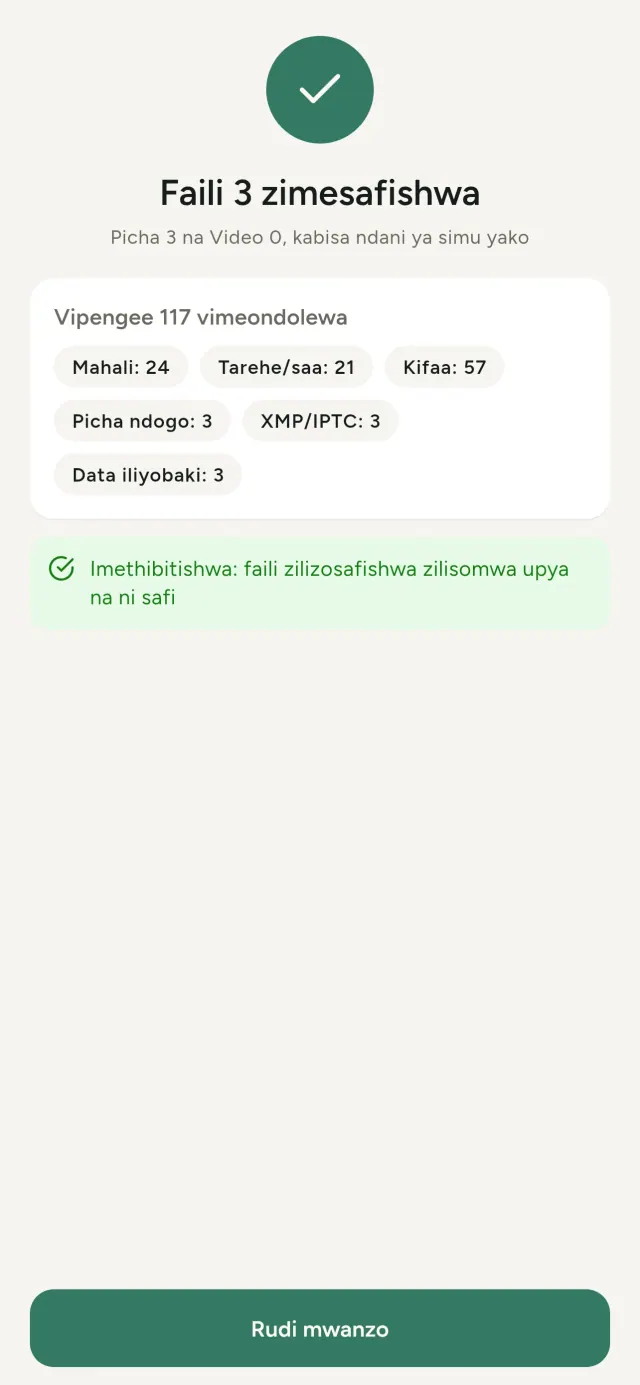
- Thibitisha. Muhtasari utaonyesha kilichoondolewa na faili lolote ambalo halikuweza kuchakatwa.
Nakala zilizosafishwa huenda wapi?
Kwenye maktaba yako ya picha. Tarehe ya maktaba ya picha ya awali huhifadhiwa, kwa hiyo picha iliyosafishwa haiendi juu ya ghala lako.
Nilichagua “badilisha picha za awali” lakini picha za awali bado zipo.
Picha za awali zilizofutwa hubaki kwenye taka ya mfumo (kama vile “Zilizofutwa hivi karibuni” au taka) kwa takriban siku 30, zikiwa na metadata zake. Ondoa taka ili kuzifuta mara moja. Ukikataa ombi la mfumo la kufuta, picha za awali zitahifadhiwa na nakala zilizosafishwa bado zitaongezwa.
Ni faili zipi zinazotumika?
Picha za JPEG, HEIC, AVIF, PNG, WebP na GIF, pamoja na video za MP4, MOV na 3GP (miundo zaidi inaongezwa). Faili ambayo programu haiwezi kusafisha huachwa bila kubadilishwa na kuorodheshwa kwenye muhtasari pamoja na sababu, bila kusimamisha kundi lililosalia.
Kwa nini programu inahitaji kufikia picha zangu?
Ili kuorodhesha picha unazoweza kuchagua na kuhifadhi nakala zilizosafishwa. Mfumo wako unapohitaji, programu pia huomba ruhusa ya kusoma eneo lililohifadhiwa kwenye picha: bila ruhusa hiyo mfumo huficha eneo, kwa hiyo programu haiwezi kukuonyesha kile ambacho picha inafichua. Hakuna kinachopakiwa.
Ninawezaje kukagua kwamba hakuna kinachoondoka kwenye simu yangu?
Washa hali ya ndege na usafishe picha: itafanya kazi vivyo hivyo. Isipokuwa pekee ni ramani: ukigusa “Onyesha ramani” kwenye eneo la picha na kuthibitisha, eneo hilo moja hutumwa kwa OpenStreetMap ili kuonyesha ramani, na hakuna kingine. Tazama “Eneo” hapo juu.
Ni lugha zipi zinapatikana?
Programu inapatikana kwa Kiingereza, Kifaransa, Kijerumani, Kihispania, Kiitaliano, Kireno na Kiarabu. Tovuti hii inapatikana kwa lugha zaidi, na lugha zaidi za programu zinaongezwa.
Unga mkono mradi
Metadata Cleaner inabaki bila malipo na bila matangazo. Ikiwa inakusaidia, unaweza kuunga mkono uundaji wake (hiari):
Buy Me a CoffeeBajeti ya familia na kufuatilia matumizi kwenye simu yako, bila akaunti.
Pia kutoka PixeonVaultMarkKasiki ya hati ndani ya simu: kichanganuzi, alama ya maji na metadata PDF.
Pia kutoka PixeonLittle RelayBreastfeeding, sleep and starting solids tracker. No account, works offline.
Pia kutoka PixeonMenuloopWeekly meal plans and organized shopping.
Pia kutoka PixeonIndie OfficeQuote maker and self-employed invoices. Offline, no account, no ads.