
Metadata Cleaner: Larawan
EXIF viewer at editor ng metadata: ayusin o burahin ang GPS at petsa sa larawan.


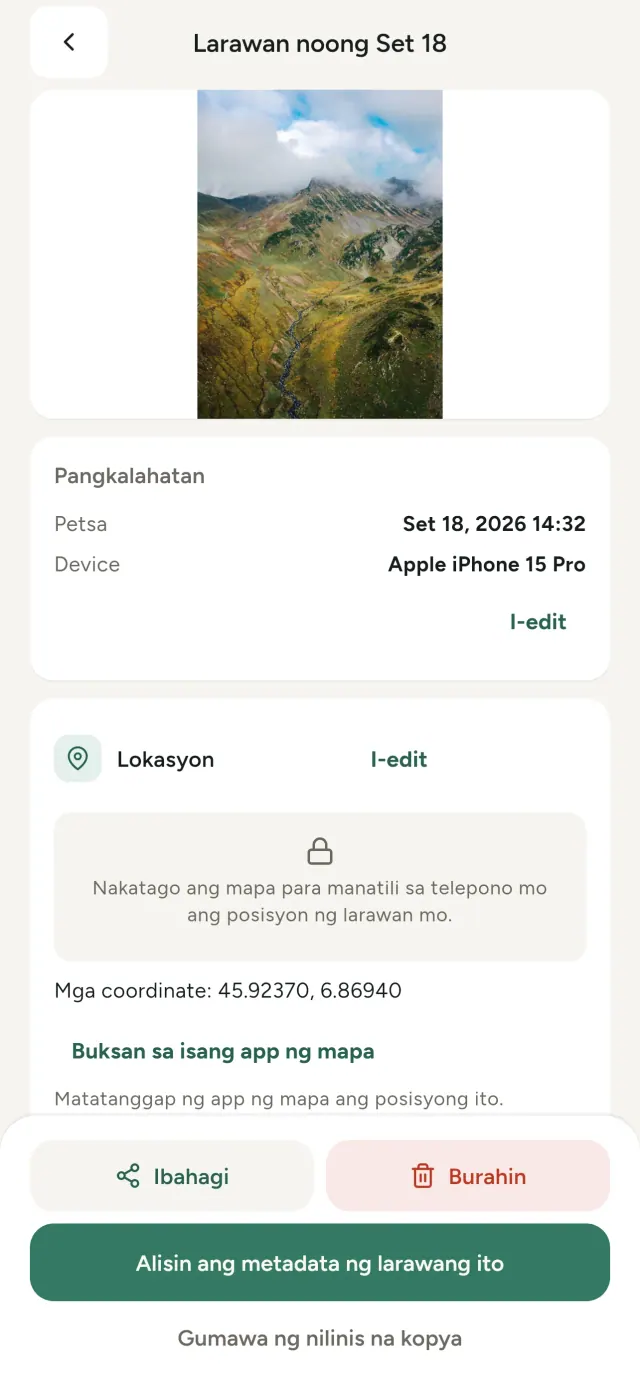
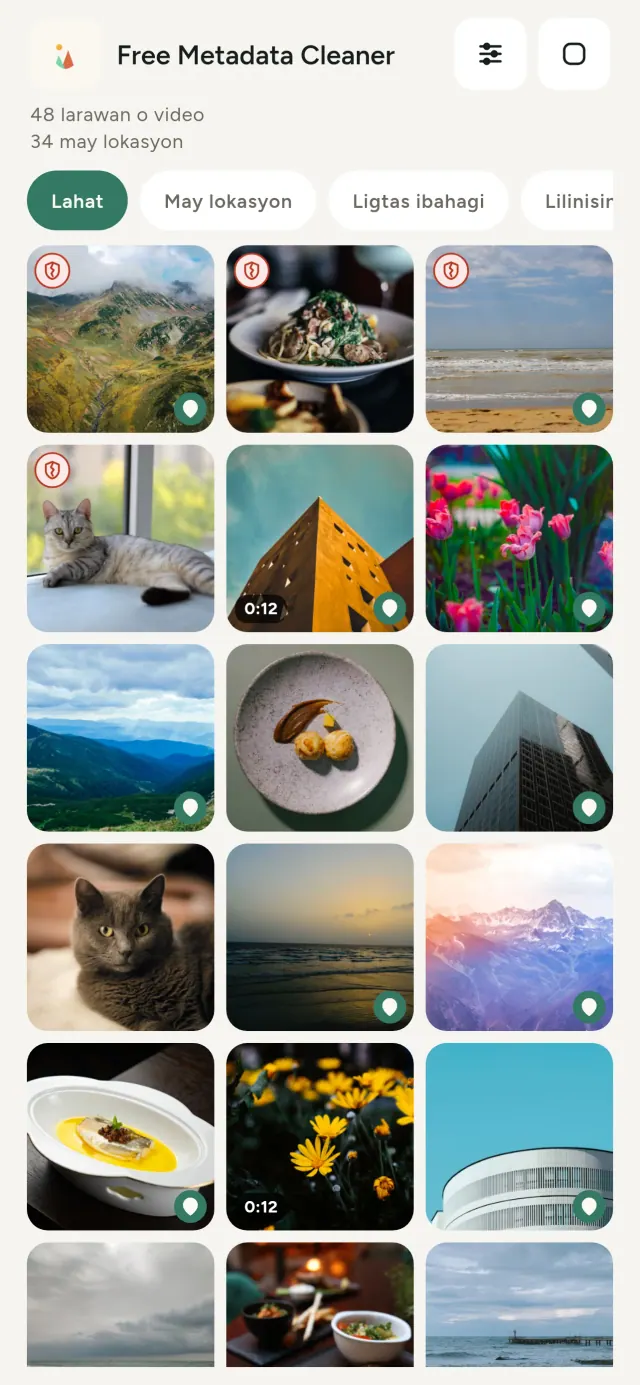
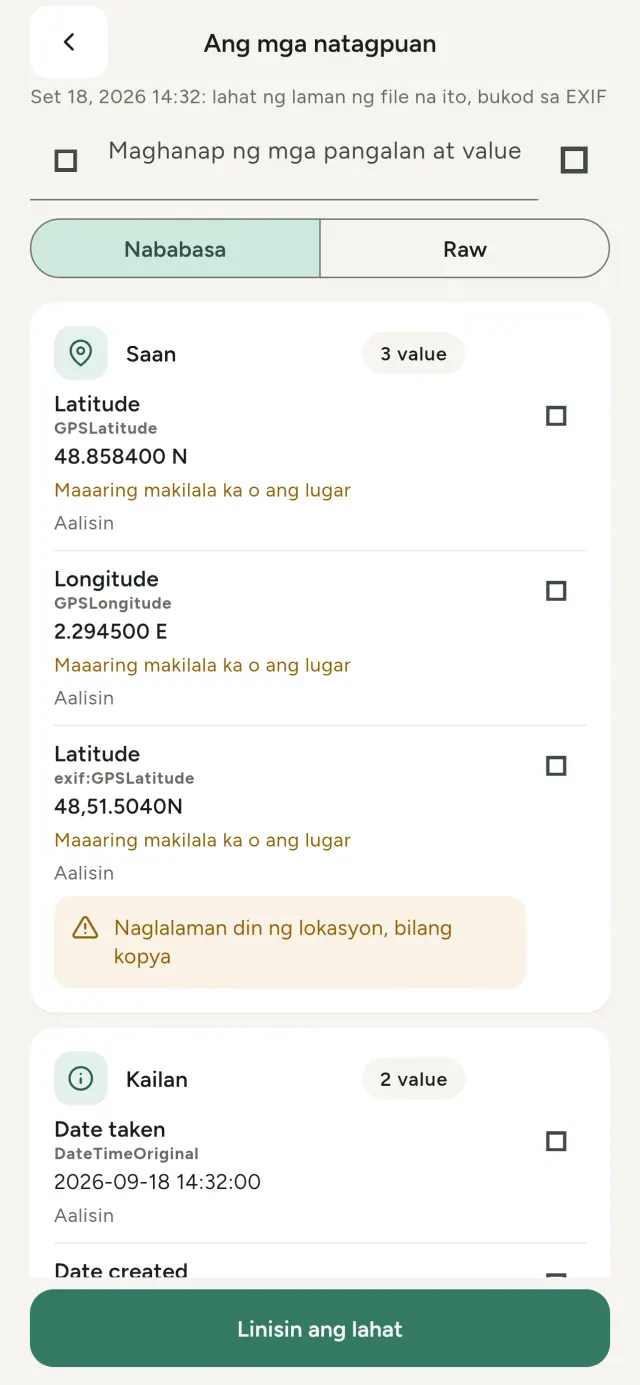
Bawat larawang kinukunan mo ay may nakatagong impormasyon: saan at kailan kinunan, anong telepono ang ginamit, at minsan pati maliit na preview ng orihinal. Kapag ibinahagi mo ito, kasama ang lahat ng iyon.
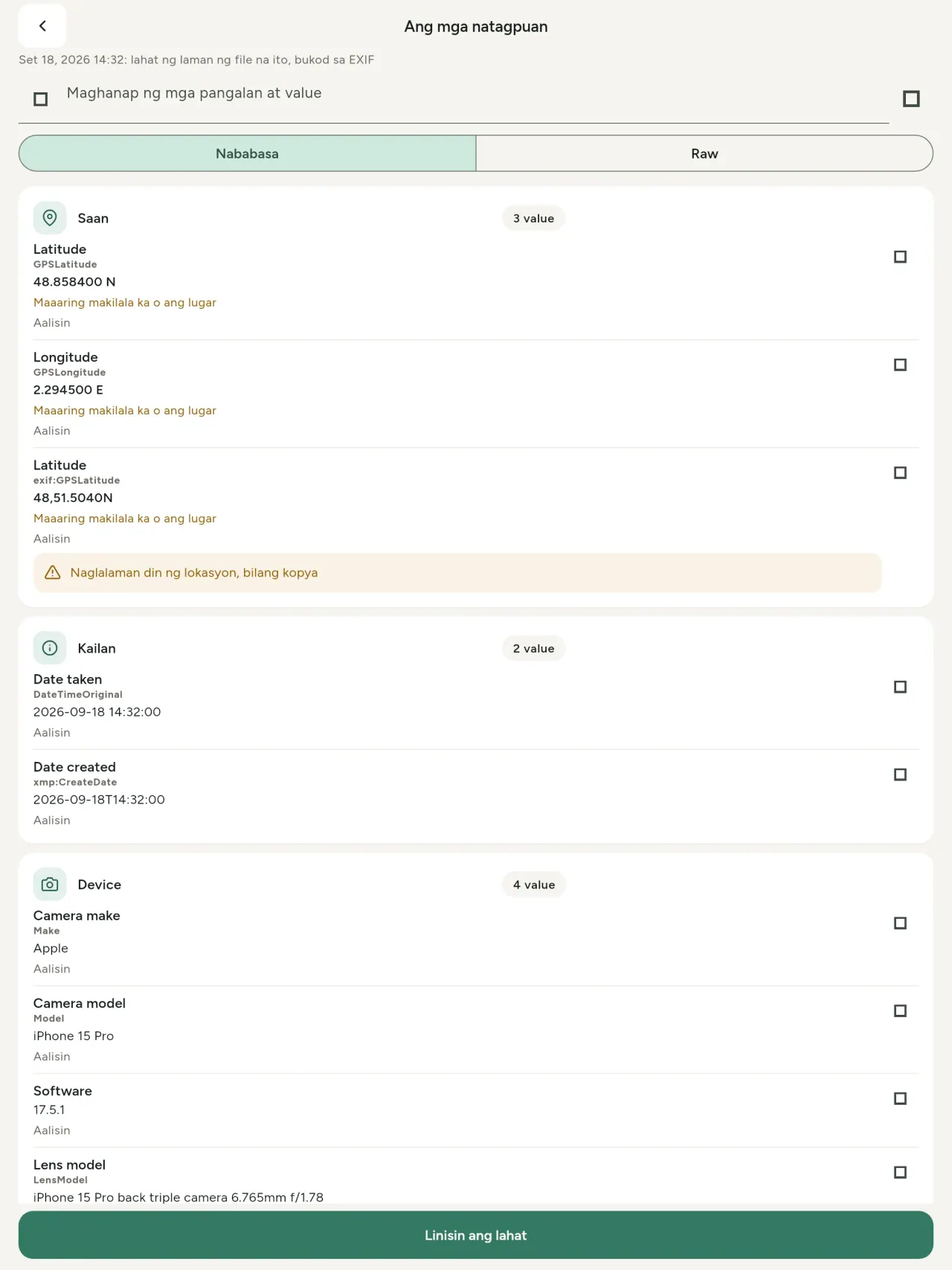
Tatlong bagay ang ginagawa ng Metadata Cleaner sa telepono mo: ipinapakita nito ang laman ng mga larawan at video, hinahayaan kang ayusin ito, at inaalis ito.
Ano ang ginagawa ng Metadata Cleaner
Basahin
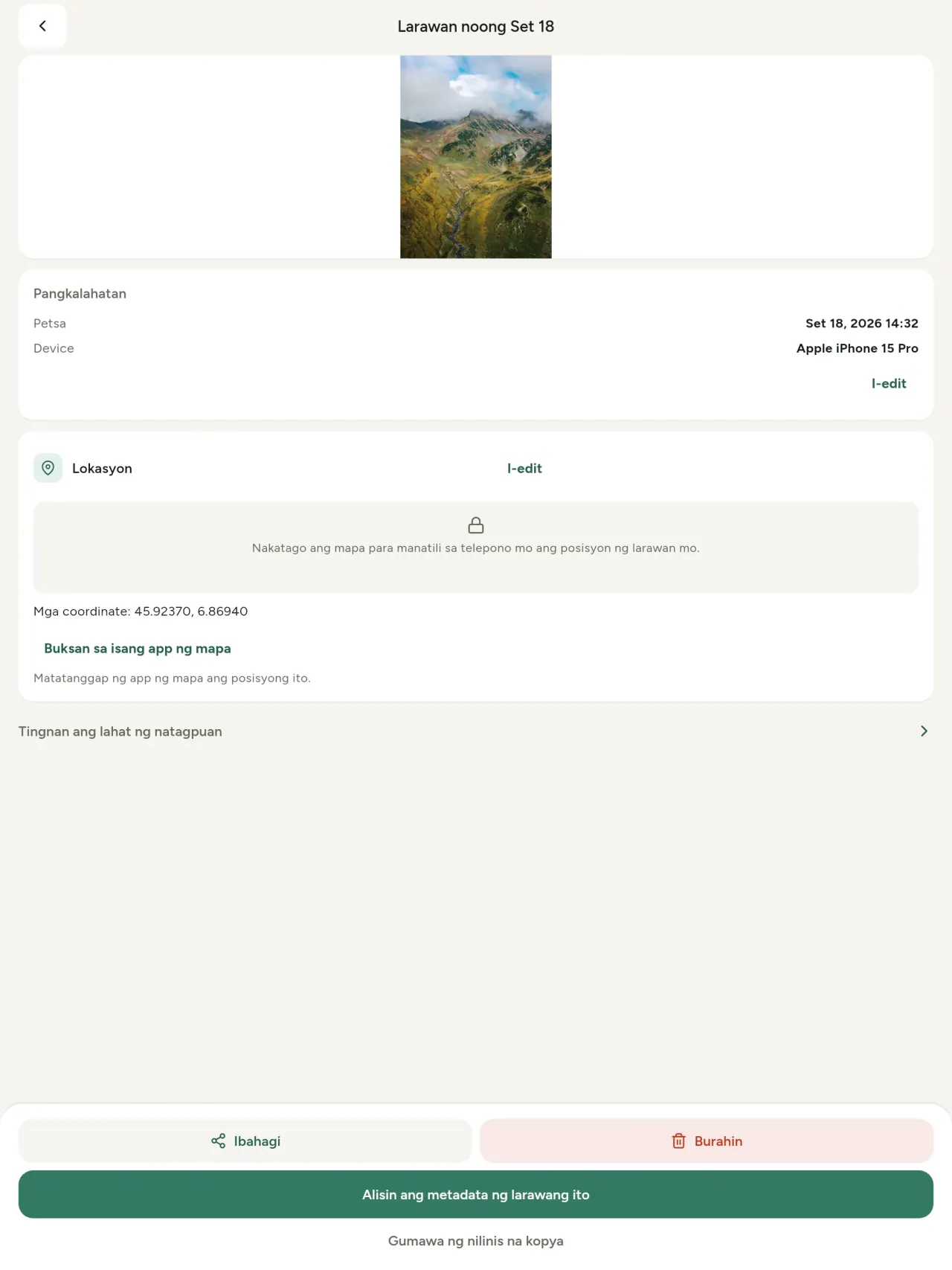
Tunay na metadata viewer: bawat halagang makita sa larawan o video (EXIF, IPTC, XMP, video codec, tagal at resolution), naka-grupo, nahahanap at nakokopya, at may marka sa aalisin. Natutukoy din ang pinagmulan ng AI (C2PA, mga parameter ng pagbuo).
I-edit
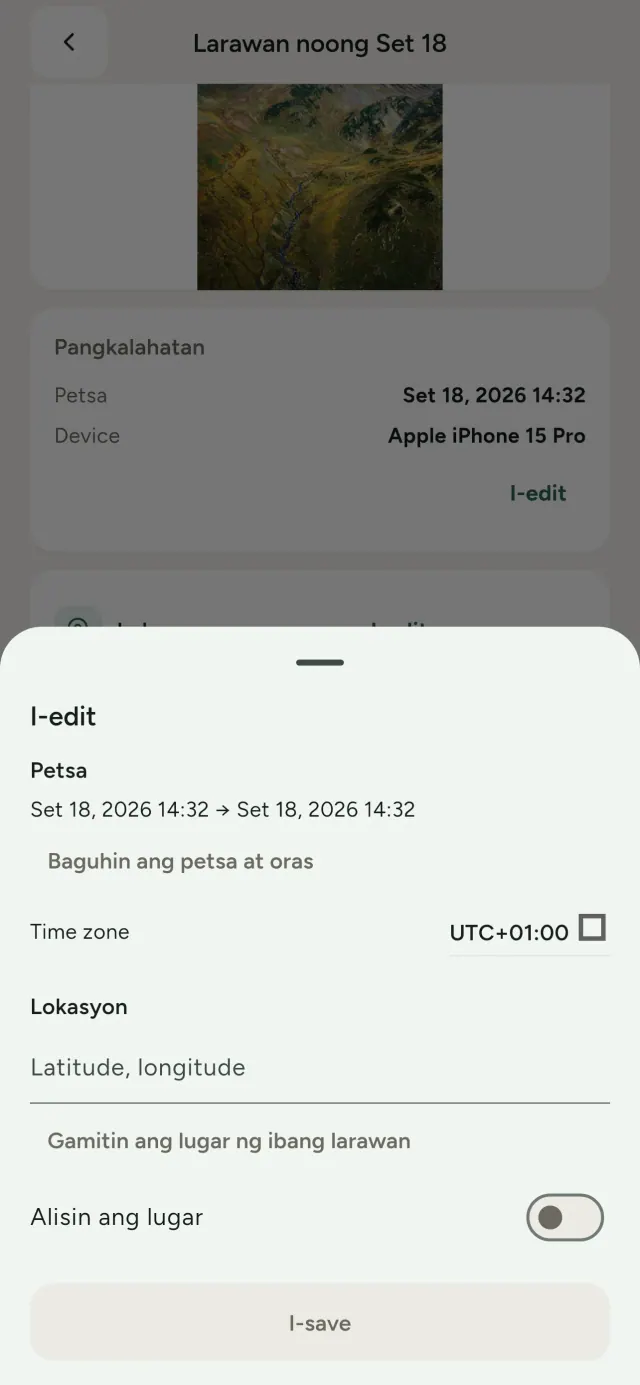
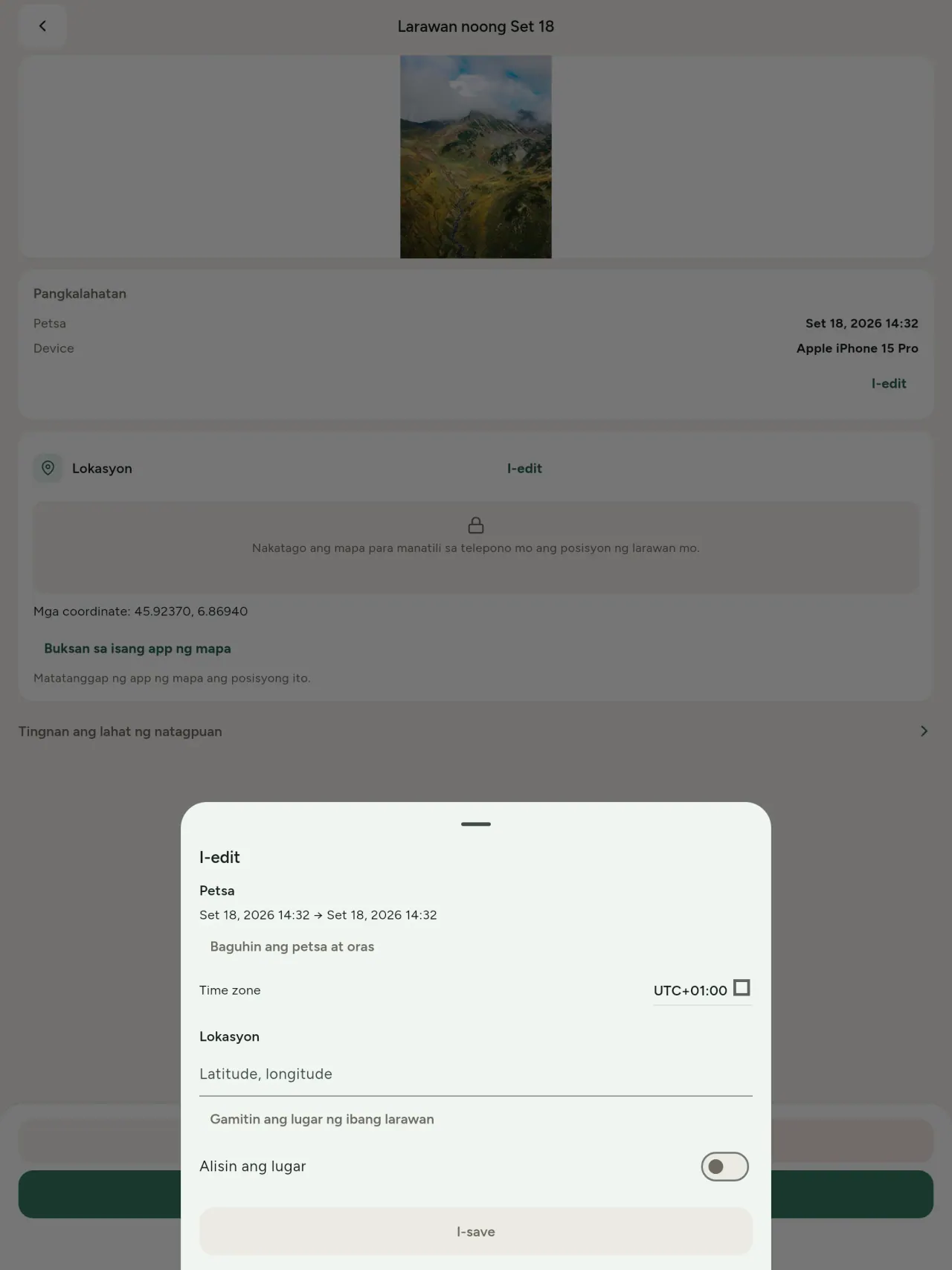
Baguhin o palitan ang petsa at lugar ng larawan, kahit walang metadata ang larawan. Kopyahin ang lugar mula sa ibang larawan, o piliin ito sa mapa (magtatanong muna, bawat pagkakataon). Ihambing ang bago at pagkatapos.
Alisin
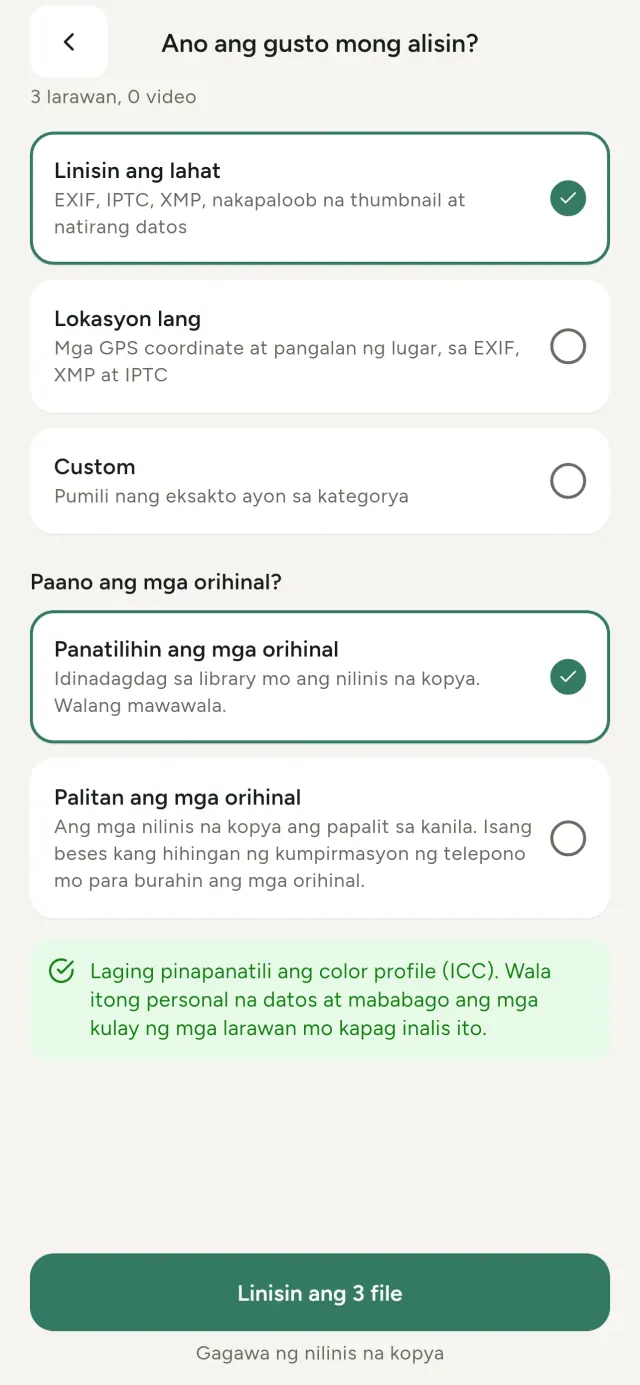
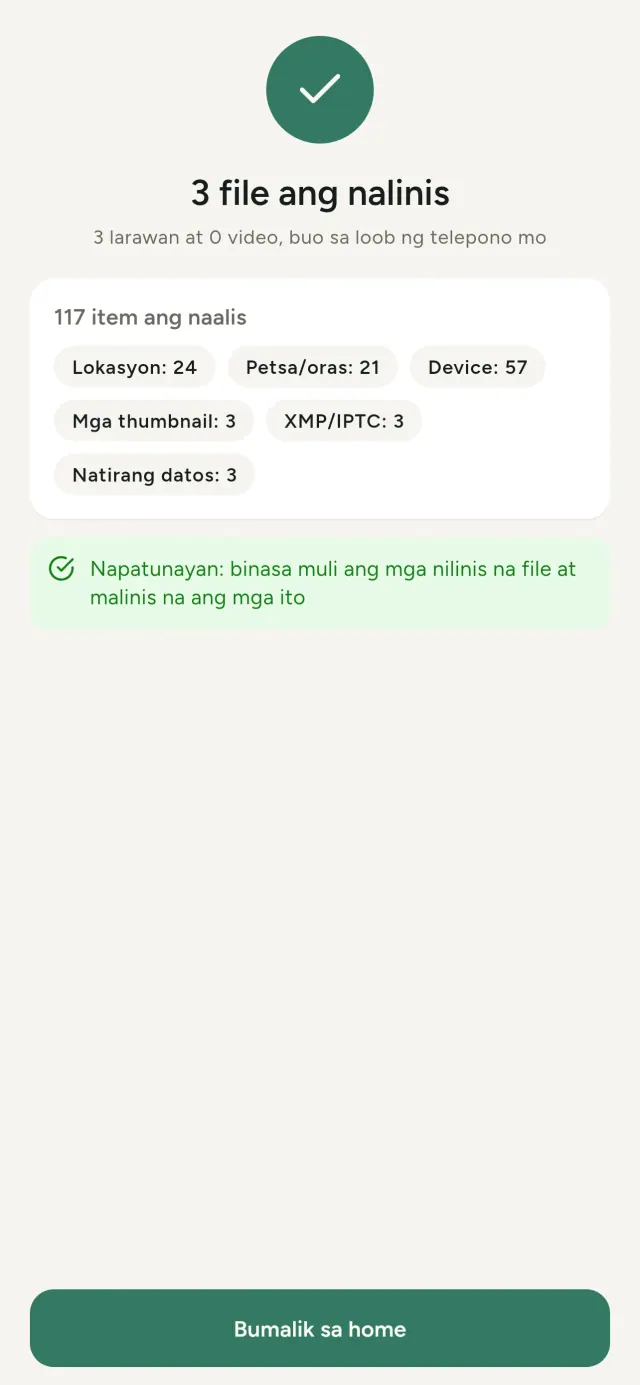
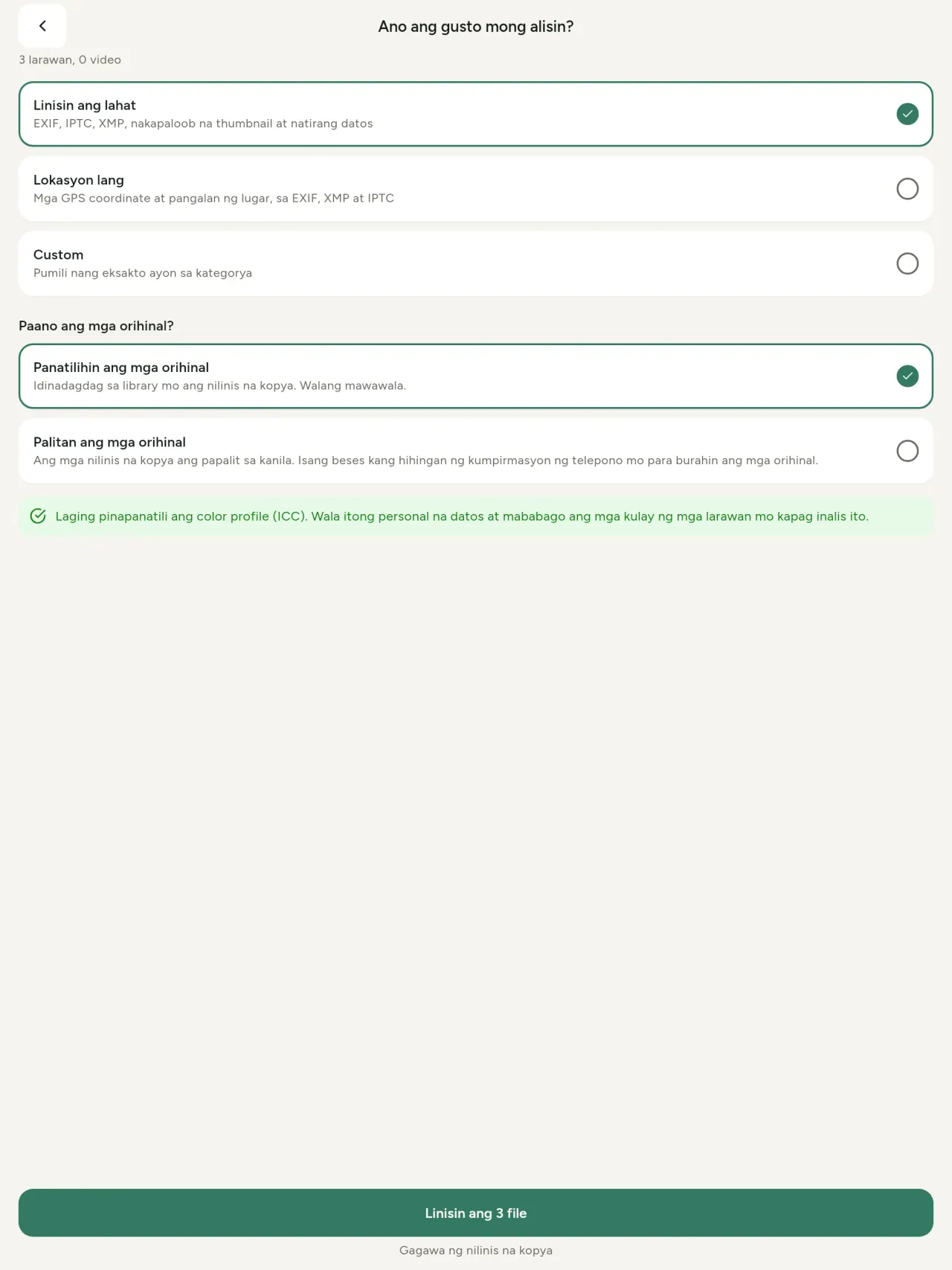
Lahat, lokasyon lang, o mga kategoryang pipiliin mo: datos na EXIF, IPTC at XMP, naka-embed na thumbnail, tala ng gumawa ng camera, pinagmulan ng AI, at mga sobrang byte na iniiwan ng ilang tool sa pag-edit sa likod ng na-crop na larawan. Linisin ang buong pinili nang sabay-sabay, saka panatilihin o palitan ang mga orihinal.
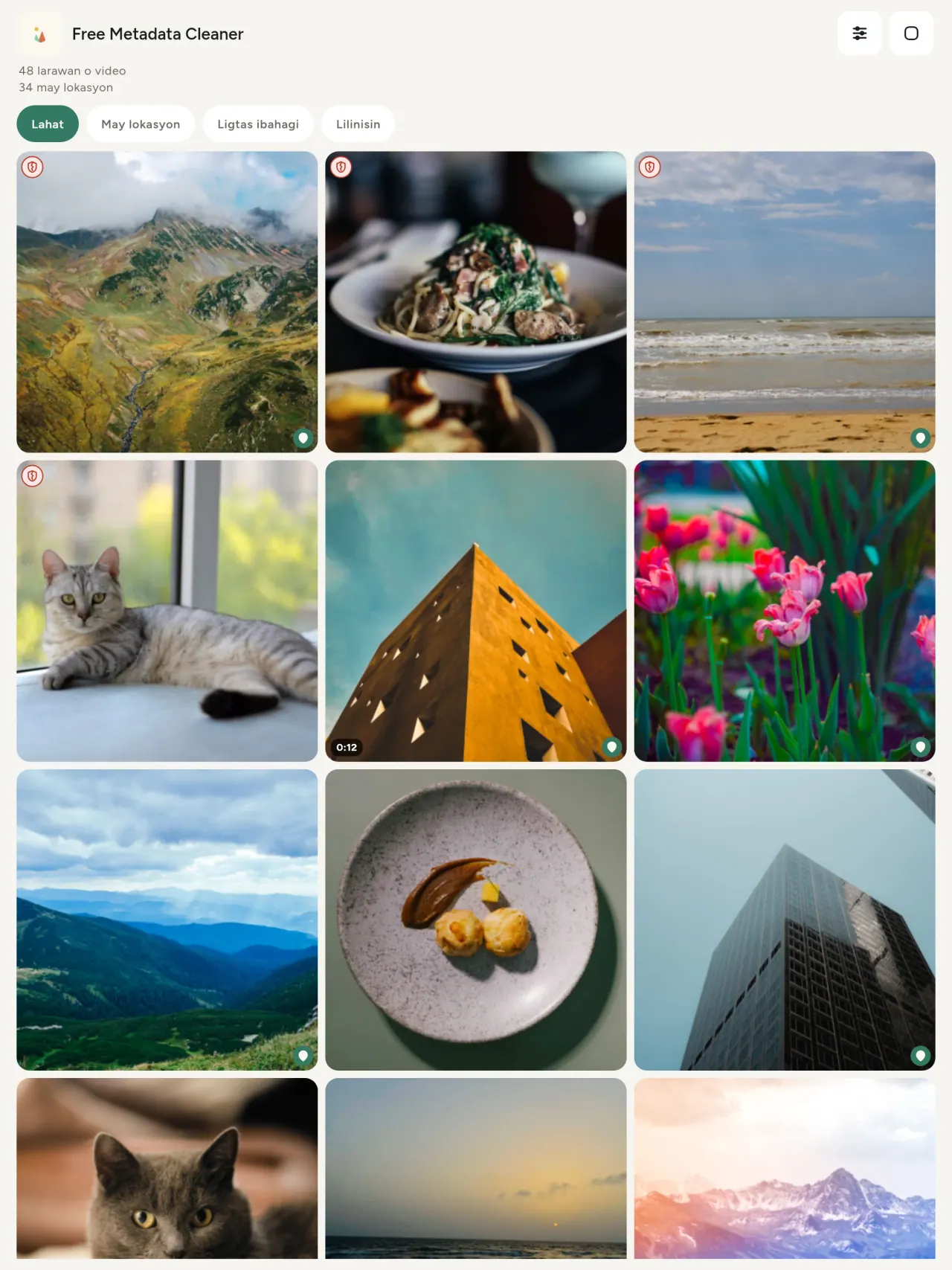
Ligtas i-share sa isang tingin
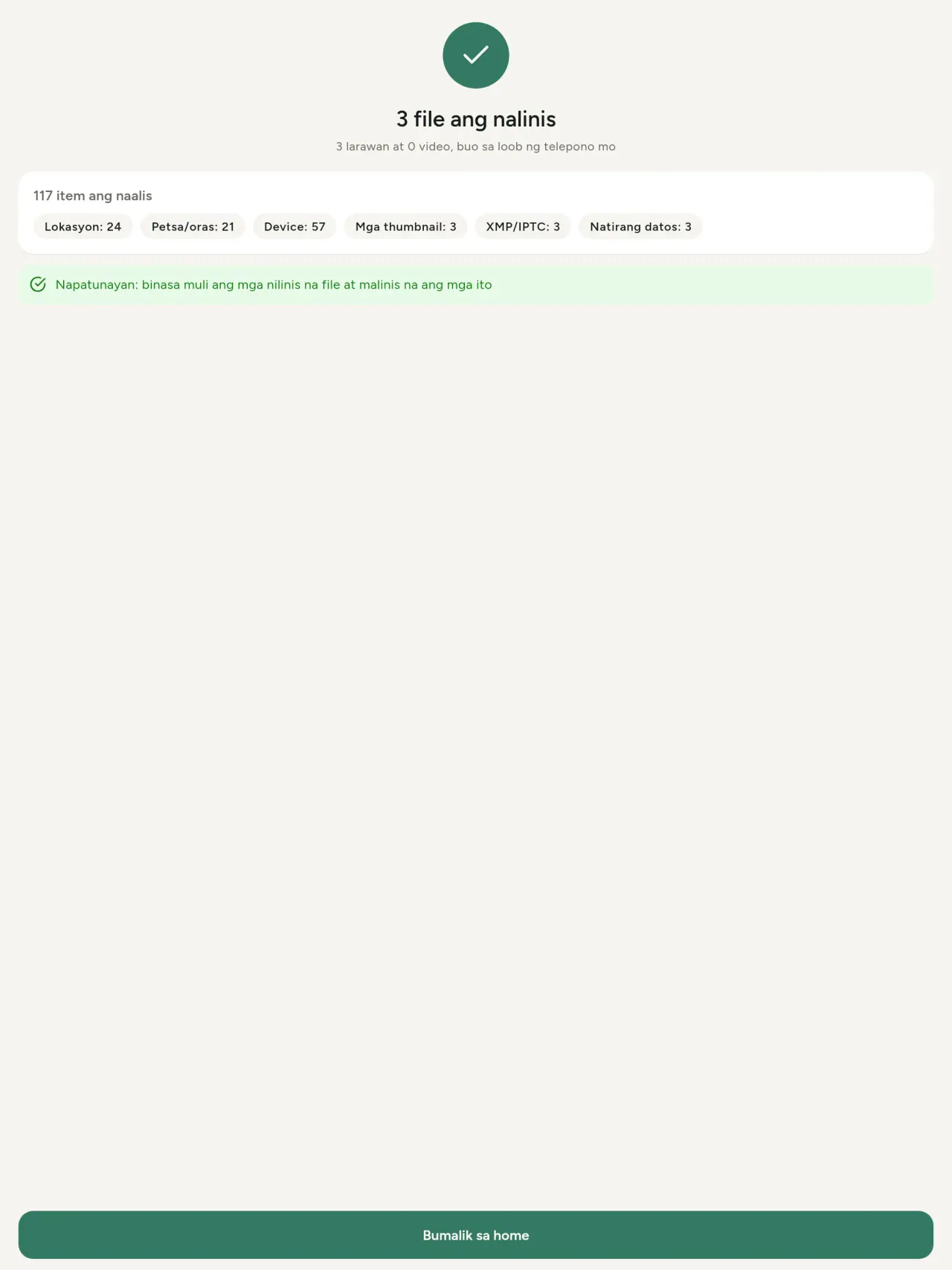
Berdeng kalasag ang marka ng mga file na wala nang metadata; pulang basag na kalasag ang mga may natitira pa.
Walang bawas sa kalidad
Hindi muling ine-encode ang mga larawan: hindi ginagalaw ang mismong larawan.
Pribado ayon sa disenyo
Binabasa, ine-edit at nililinis ang mga larawan sa device mo. Walang account, ads o analytics. Ang tanging opsyonal na eksepsiyon ay ang mapa: kapag hiniling mong makita ang lokasyon ng larawan o pumili ng lugar, magtatanong muna ang app, bawat pagkakataon, saka ilo-load ang mapa mula sa OpenStreetMap (hindi kailanman ipinapadala ang larawan).
Libre, walang ads
Kung nakatulong ang app, maaari kang mag-iwan ng opsyonal na tip.
Para kanino ito
- Sinumang gustong malaman kung ano ang ibinubunyag ng isang larawan (lokasyon ng GPS, petsa, camera) bago ito i-post, ibenta o ipadala.
- Mga taong nagbebenta sa mga site ng classified ad at ayaw ipakita kung saan sila nakatira.
- Mga magulang at sinumang gustong ilayo ang sensitibong lugar (bahay, paaralan, pinagtatrabahuhan) sa mga larawang ibinabahagi nila.
- Mga mamamahayag, aktibista at mga taong nasa panganib, na kailangang magbahagi ng larawan nang walang iniiwang bakas.
- Mga taong pagod na sa mga pagtagas ng data at gustong bawiin ang kontrol sa personal na impormasyong dala ng kanilang sariling mga larawan.
Bakit piliin ang Metadata Cleaner
- Tatlong bagay sa isang app: basahin ang nilalaman ng litrato o video, i-edit ito (petsang kinuhaan, lokasyon), at alisin ang metadata sa ilang pindot lang.
- Lahat ay tumatakbo sa telepono. Hindi ipinapadala saanman ang iyong mga larawan.
- Mga larawan (JPEG, HEIC, PNG, WebP, GIF) at mga video (MP4, MOV, 3GP).
Ang hindi pa nagagawa ng app
- Ang mga format lang na nakalista sa itaas ang sinusuportahan. May plano para sa mas maraming format.
Ang prinsipyo ng Pixeon. Lokal muna ang mga app ng Pixeon: walang account, walang pagsubaybay, at nananatili ang iyong data sa iyong telepono. Kung kumonekta man ang isang app sa network, mangyayari lang ito kapag pinili mong i-on ang tampok na kailangan mo, at ina-update ang patakaran sa privacy bago ito ilabas.
Tingnan ang Metadata Cleaner sa aksyon.
Kunin ang Metadata Cleaner.
Libre sa iPhone at Android.
SHA-256: A4:38:C9:B4:A9:3F:97:7B:E8:98:AD:B7:3B:30:5F:63:01:22:E0:D9:F8:CF:5D:2B:D7:4E:38:CB:9A:CF:5A:A2
Bersyon 1.1
- App Store Paparating
- Google Play Paparating
Ano ang bago
Ang text na ito ay nasa English.
- Read: see exactly what a photo or video reveals (location, date, camera, AI provenance labels such as C2PA and generation parameters, video duration, codecs, resolution and frame rate).
- Edit: change the date a photo was taken and its location (JPEG, HEIC, AVIF), even on a photo with no metadata, reuse the location of another photo, or pick it on an OpenStreetMap map after your confirmation.
- Remove: clean metadata in a few taps, with a before and after view on the result screen.
- DNG photos are supported.
- Translations aligned across 91 languages.
Privacy policy
Nasa Ingles ang teksto sa ibaba. Mananaig ang bersyong Ingles.
Last updated: 2026-11-18 · applies to version 1.1 and later
Policy versions: 1.1 and later (this text) · version 1.0 (still the policy of the app version 1.0). The version number of your app is shown at the bottom of its Settings screen.
Free Metadata Cleaner shows and removes the metadata hidden in your photos and videos (location, date and time, camera and lens details, thumbnails…). The short version: everything happens on your device, and we collect nothing.
What the app accesses
Your photo and video library, only after you grant permission (and, where your system requires it, the permission to read the location stored in your photos, so that it can be shown to you). The files you choose are read and cleaned on your device; the cleaned copy is saved to your library. If you choose to replace the originals, the system asks you to confirm before deleting them.
To show which photos are already clean, the app reads the metadata of the photos displayed on screen, on your device. This result is kept in memory only and is never stored.
What we collect
Nothing. No account, no analytics or usage tracking, no advertising or advertising identifiers, no crash or diagnostics reporting beyond what the app stores provide, and no third-party SDK that sends data anywhere. There is no Free Metadata Cleaner server. Cleaning a photo or video never uses the network, at all: turn on airplane mode and clean one to check for yourself. The only network request the app itself can ever make is described under “Location” below, and it only ever happens if you ask for it. The one other connection is the optional tip purchase, handled by the store (see “Optional support”).
Temporary files and history
The app keeps no history and no database. Temporary files created while cleaning are deleted after each item and purged when the app starts.
Deleted originals
Originals that are deleted remain in your system's trash (such as “Recently Deleted” or the trash) for about 30 days, with their metadata. The app cannot empty it: do it yourself if you need the originals gone at once.
iCloud and cloud photos
If a photo is stored in iCloud and not on your device, the operating system may download it before the app can process it. That transfer is made by the system, under the provider's own terms, not by the app.
Location
When a photo contains a location, the app shows the coordinates as text, which stays on your device. Three actions can send location information off your device, only when you choose them, each time: “Open in…” hands the coordinates to the maps application you select, under its own privacy policy; “Show the map” asks you to confirm first (“Showing the map sends this photo's position to a map service. Nothing else is sent.”), then loads a small map from OpenStreetMap for that one position; and, when you edit a photo's place, “Choose on the map” asks you to confirm first, then opens a full-screen map from OpenStreetMap. This map does not use your phone's location. As you move and zoom it, the app requests the map tiles of the area you are browsing, so OpenStreetMap receives the position of the area shown on screen, which starts on the photo's current place if it has one, and otherwise on a world view. The photo itself is never sent, and nothing is sent before you confirm. The place you choose on the map (or copy from another photo) is written into the photo's file only when you save, on your device. In every case OpenStreetMap receives, as with any web request, technical details like your IP address; it does not receive your name, an account, or anything else about you or your other photos. See OpenStreetMap's own privacy policy. Outside of these explicit actions, the app never sends a photo's location, or anything else, anywhere.
Optional support
The app is free. If you wish, you can leave a tip. On iPhone and in the Google Play version for Android, tips are in-app purchases processed by Apple or Google under their own terms and privacy policy; the app adds the Google Play billing permission for this, makes no network call itself, and receives no payment or personal details. Versions installed outside Google Play may instead open an external donation page in your browser, operated by a third party under its own privacy policy; nothing from the app is sent to it. A tip unlocks nothing.
Contact form on this website
If you write to us through this site, we use your message and the email address you optionally give only to reply. Bot protection is provided by Cloudflare and email delivery by Resend.
Language choice on this website
When you choose a language, or when this site opens a page in your browser's language, it stores
one small functional cookie (pxl, a language code, one year) so that your choice is
remembered. If this site suggests a page in your browser's language and you close that suggestion,
your browser also keeps a local note (pxl-banner-off, in local storage, 30 days) so the
suggestion does not come back. Neither identifies anyone, neither is used for tracking or advertising,
and neither is shared. You can delete them in your browser at any time.
Website statistics
This website uses Cloudflare Web Analytics to count visits (pages viewed, country, browser type, loading speed). It sets no cookie, does not use local storage, does not fingerprint your device, does not follow you across sites and does not build a profile of you. Search engines (for example Google Search Console) give us aggregated search statistics, without any data about individual visitors. Our own web server also counts the pages and APK downloads it serves: for each request it keeps the address, the site or social network that sent you (only its name, or the campaign tag written in the link), the country, the type of device and whether the request came from a robot. It keeps no IP address, no identifier and no cookie, and these counts are anonymous. We use no advertising or other analytics service. None of this concerns the app itself, which collects nothing.
Children
The app is a general-purpose tool and is not directed at children.
Changes
An updated policy will be published at this URL with a new date above.
Contact
Questions about privacy: metadata-cleaner-contact@pixeon.net
Bersyon 1.0
- App Store Na-publish
- Google Play Na-publish
Ano ang bago
Ang text na ito ay nasa English.
- Cleans JPEG, HEIC, PNG, WebP, GIF, MP4, MOV and 3GP files, with no video re-encoding.
- "Safe to share" and "To clean" filters.
- New green design.
- Help screen with a FAQ.
- Settings: share, rate, feedback, unsupported formats.
- Optional tips.
Privacy policy, version 1.0
Nasa Ingles ang teksto sa ibaba. Mananaig ang bersyong Ingles.
Applies to version 1.0 of the app (the first release). Later versions: current policy.
Free Metadata Cleaner shows and removes the metadata hidden in your photos and videos (location, date and time, camera and lens details, thumbnails…). The short version: everything happens on your device, and we collect nothing.
What the app accesses
Your photo and video library, only after you grant permission (and, where your system requires it, the permission to read the location stored in your photos, so that it can be shown to you). The files you choose are read and cleaned on your device; the cleaned copy is saved to your library. If you choose to replace the originals, the system asks you to confirm before deleting them.
To show which photos are already clean, the app reads the metadata of the photos displayed on screen, on your device. This result is kept in memory only and is never stored.
What we collect
Nothing. No account, no analytics or usage tracking, no advertising or advertising identifiers, no crash or diagnostics reporting beyond what the app stores provide, and no third-party SDK that sends data anywhere. There is no Free Metadata Cleaner server. Cleaning a photo or video never uses the network, at all: turn on airplane mode and clean one to check for yourself. The only network request the app itself can ever make is described under “Location” below, and it only ever happens if you ask for it. The one other connection is the optional tip purchase, handled by the store (see “Optional support”).
Temporary files and history
The app keeps no history and no database. Temporary files created while cleaning are deleted after each item and purged when the app starts.
Deleted originals
Originals that are deleted remain in your system's trash (such as “Recently Deleted” or the trash) for about 30 days, with their metadata. The app cannot empty it: do it yourself if you need the originals gone at once.
iCloud and cloud photos
If a photo is stored in iCloud and not on your device, the operating system may download it before the app can process it. That transfer is made by the system, under the provider's own terms, not by the app.
Location
When a photo contains a location, the app shows the coordinates as text, which stays on your device. Two actions send that one photo's position off your device, only when you choose them, each time: “Open in…” hands the coordinates to the maps application you select, under its own privacy policy; “Show the map” asks you to confirm first (“Showing the map sends this photo's position to a map service. Nothing else is sent.”), then loads a small map from OpenStreetMap for that one position. OpenStreetMap receives the coordinates and, as with any web request, technical details like your IP address; it does not receive your name, an account, or anything else about you or your other photos. See OpenStreetMap's own privacy policy. Outside of these two explicit actions, the app never sends a photo's location, or anything else, anywhere.
Optional support
The app is free. If you wish, you can leave a tip. On iPhone and in the Google Play version for Android, tips are in-app purchases processed by Apple or Google under their own terms and privacy policy; the app adds the Google Play billing permission for this, makes no network call itself, and receives no payment or personal details. Versions installed outside Google Play may instead open an external donation page in your browser, operated by a third party under its own privacy policy; nothing from the app is sent to it. A tip unlocks nothing.
Contact form on this website
If you write to us through this site, we use your message and the email address you optionally give only to reply. Bot protection is provided by Cloudflare and email delivery by Resend.
Language choice on this website
When you choose a language, or when this site opens a page in your browser's language, it stores
one small functional cookie (pxl, a language code, one year) so that your choice is
remembered. If this site suggests a page in your browser's language and you close that suggestion,
your browser also keeps a local note (pxl-banner-off, in local storage, 30 days) so the
suggestion does not come back. Neither identifies anyone, neither is used for tracking or advertising,
and neither is shared. You can delete them in your browser at any time.
Website statistics
This website uses Cloudflare Web Analytics to count visits (pages viewed, country, browser type, loading speed). It sets no cookie, does not use local storage, does not fingerprint your device, does not follow you across sites and does not build a profile of you. Search engines (for example Google Search Console) give us aggregated search statistics, without any data about individual visitors. Our own web server also counts the pages and APK downloads it serves: for each request it keeps the address, the site or social network that sent you (only its name, or the campaign tag written in the link), the country, the type of device and whether the request came from a robot. It keeps no IP address, no identifier and no cookie, and these counts are anonymous. We use no advertising or other analytics service. None of this concerns the app itself, which collects nothing.
Children
The app is a general-purpose tool and is not directed at children.
Changes
An updated policy will be published at this URL with a new date above.
Contact
Questions about privacy: metadata-cleaner-contact@pixeon.net
Credits
Android is a trademark of Google LLC. The Android robot is reproduced or modified from work created and shared by Google and used according to terms described in the Creative Commons 3.0 Attribution License. This site is not affiliated with or endorsed by Google.
Suporta
Huling na-update: 2026-10-08
Ang Free Metadata Cleaner ay isang maliit at independiyenteng app. Nasa ibaba ang mga sagot sa mga pinakakaraniwang tanong.
Sinisikap naming sumagot sa loob ng ilang araw. Para matulungan kami, sabihin ang modelo ng iyong device, bersyon ng system nito, at kung ano ang ginagawa mo. Huwag magpadala ng mga pribadong larawan.
Anong datos ang iniimbak o ipinapadala ng app?
Wala. Hindi ito nag-iingat ng history, walang account, at walang server. Mga detalye sa patakaran sa privacy.
Paano ako maglilinis ng larawan?
- Buksan ang app at payagan ang access sa iyong library kapag hiniling.
- Piliin ang mga larawan o video na lilinisin.
- Piliin kung ano ang aalisin, at kung papalitan ang mga orihinal o gagawa ng malinis na kopya.
- Kumpirmahin. Ipinapakita ng buod kung ano ang inalis at kung aling file ang hindi naproseso.
Saan napupunta ang mga malilinis na kopya?
Sa iyong photo library. Pinananatili ang petsa ng orihinal sa library, kaya hindi mapupunta sa itaas ng gallery ang malinis na larawan.
Pinili ko ang “palitan ang mga orihinal” pero naroon pa rin ang mga orihinal.
Nananatili ang mga dineletang orihinal sa system trash, tulad ng “Recently Deleted” o basurahan, nang humigit-kumulang 30 araw, kasama ang metadata ng mga ito. Alisan ng laman ang basurahan para maalis agad ang mga ito. Kung tatanggihan mo ang prompt ng system para sa pag-delete, pananatilihin ang mga orihinal at idaragdag pa rin ang mga malinis na kopya.
Anong mga file ang sinusuportahan?
Mga larawang JPEG, HEIC, AVIF, PNG, WebP, at GIF, at mga video na MP4, MOV, at 3GP, at may idinadagdag pang mga format. Ang file na hindi kayang linisin ng app ay hindi gagalawin at ililista sa buod kasama ang dahilan, nang hindi pinipigilan ang natitirang batch.
Bakit kailangan ng app ng access sa aking mga larawan?
Para ilista ang mga larawang maaari mong piliin at i-save ang mga malinis na kopya. Kung kinakailangan ng iyong system, hihingi rin ang app ng pahintulot na basahin ang lokasyong nakalagay sa mga larawan: kung wala ito, itinatago ng system ang lokasyon, kaya hindi maipapakita ng app kung ano ang inilalantad ng isang larawan. Walang ina-upload.
Paano ko masusuri na walang lumalabas sa aking phone?
I-on ang airplane mode at maglinis ng larawan: pareho itong gagana. Ang tanging eksepsyon ay ang mapa: kung ita-tap mo ang “Ipakita ang mapa” sa lokasyon ng larawan at magkukumpirma, ang posisyong iyon lamang ay ipinapadala sa OpenStreetMap para magpakita ng mapa, at wala nang iba. Tingnan ang “Lokasyon” sa itaas.
Anong mga wika ang available?
Available ang app sa English, French, German, Spanish, Italian, Portuguese, at Arabic. Available ang website na ito sa mas marami pang wika, at may paparating pang mga wika para sa app.
Suportahan ang proyekto
Mananatiling libre at walang ad ang Metadata Cleaner. Kung kapaki-pakinabang ito sa iyo, maaari mong suportahan ang pagpapaunlad nito (opsyonal):
Buy Me a CoffeeBadyet at tracker ng gastos para sa pamilya, offline at walang account.
Mula rin sa PixeonVaultMarkLokal na vault ng dokumento: scanner, watermark PDF at burang metadata.
Mula rin sa PixeonLittle RelayBreastfeeding, sleep and starting solids tracker. No account, works offline.
Mula rin sa PixeonMenuloopWeekly meal plans, recipes & shopping lists.
Mula rin sa PixeonIndie OfficeQuote maker and self-employed invoices. Offline, no account, no ads.